New image editors keep arriving with the same pitch: Nano Banana quality for less money and less waiting. We ran 200 edits through eight models on fal and had three AI judges from three different labs score all 1,592 images blind. Here is what we found.
- FLUX.3 Klein is 2× faster and 5× cheaper than Nano Banana 2.1 (6.3 s and $0.009 per image against 11.7 s and $0.045) and only slightly worse: the judges scored it 6.93 out of 10 against 7.20. It fails on storyboard frames, edits that combine several reference images, and pose changes.
- Krea 3 Edit costs the same and takes as long as Nano Banana 2.1 ($0.043, 13.0 s) and is slightly worse: 7.14, and it lost 157 to 208 when judges compared the two directly.
- GPT Image 2.5 Flare has the best quality: 7.46, and it won 71% of its blind comparisons, at $0.054 and 20.8 s.
- Nano Banana Pro costs 3× as much ($0.15) and scored no better (7.07).
So use Klein for cheap, fast everyday edits (text, labels, relighting, simple object and product edits), and keep Nano Banana 2.1 or GPT Image for anything that has to hold a style or combine references. All runs used fal's hosted endpoints on October 15, 2026, at about 1 megapixel per image. Prices are fal's list prices read the same day.
See the edits side by side
Nine of the 200 test cases, each with its input, the exact prompt and every model's output. The number under each output is the three judges' mean overall score out of 10. The first is open; click any other to expand it.
Storyboard frame in line art: Klein and Krea 3 speed paint the character in color
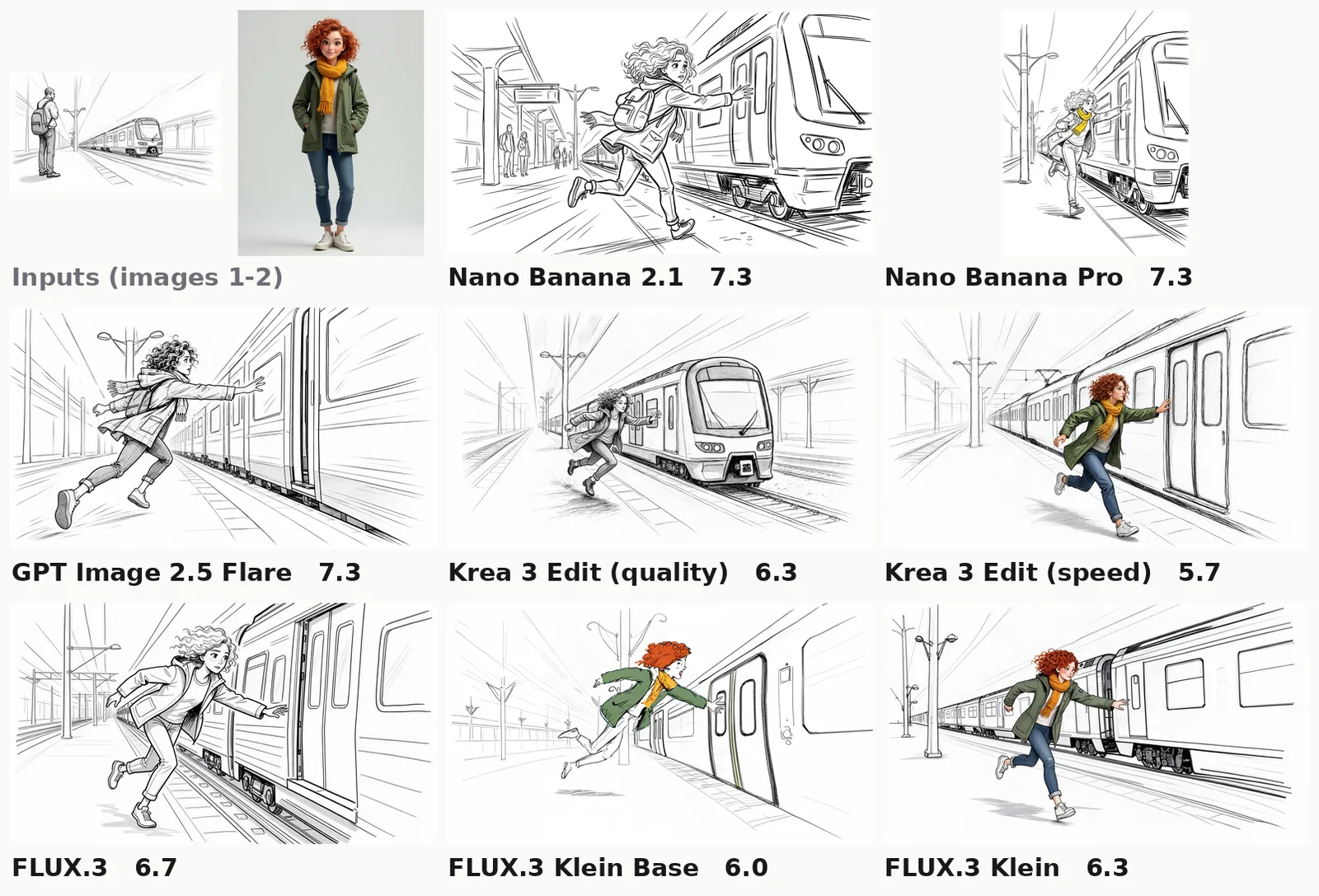
Frame: the woman from image 2 running to catch a departing train, reaching for the closing door.

Use image 2 only for the woman's face, hair and coat. Draw the whole frame as loose black line art on white, like image 1, not as a photograph. No text.
Last frame of a shot: five of eight models barely move the car
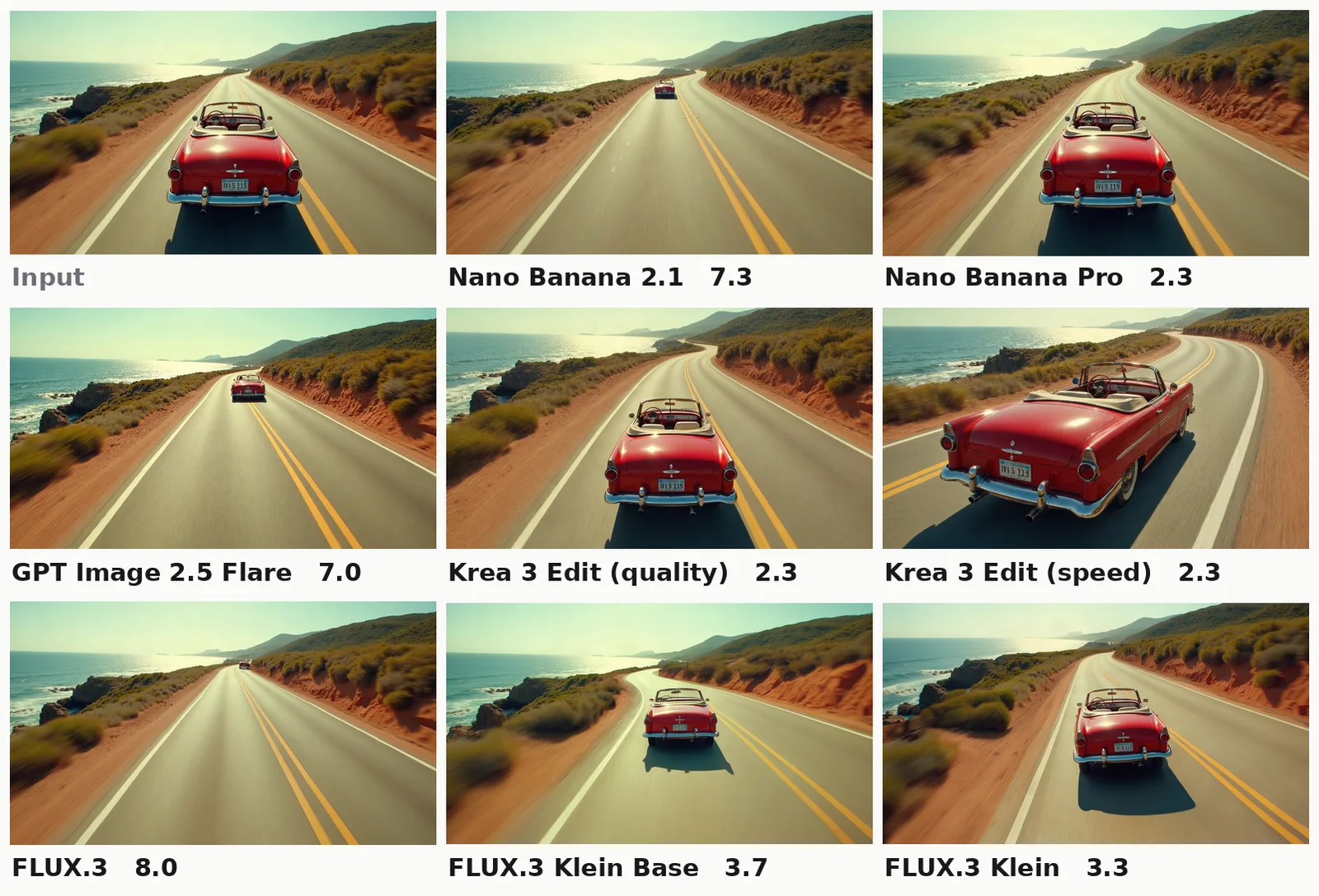
This is the first frame of a shot. Draw the last frame of the same shot 4 seconds later: the same red convertible has driven further along the coastal road and is now rounding the bend near the top of the frame, same camera position, same afternoon light. No text.
Outfit swap from a second reference: Klein swaps the whole outfit
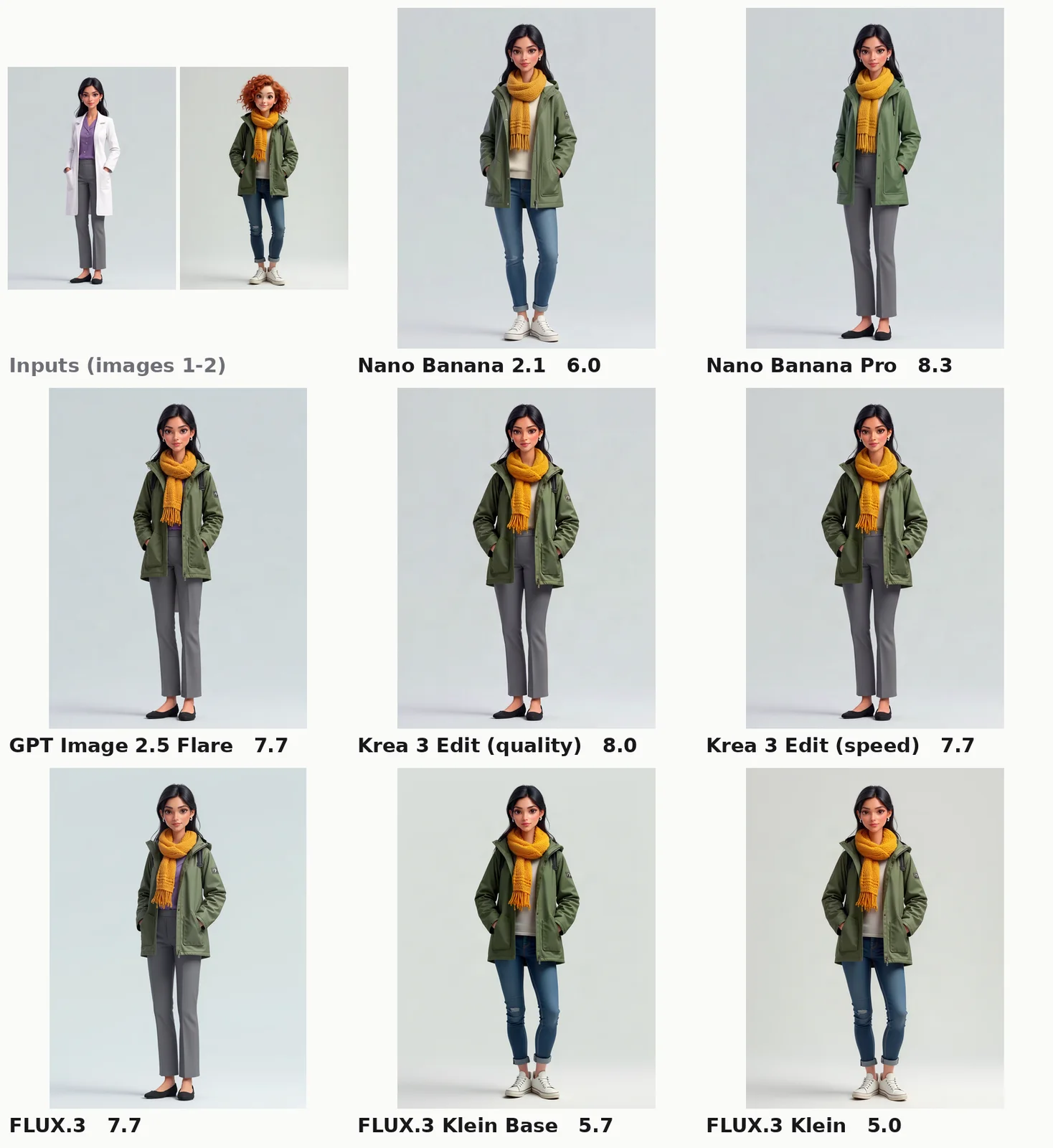
Dress the woman from image 1 in the rain jacket and scarf worn by the woman in image 2. Keep image 1's face, hair, pose, lab background and framing exactly.
Four references in one scene: every model composes it
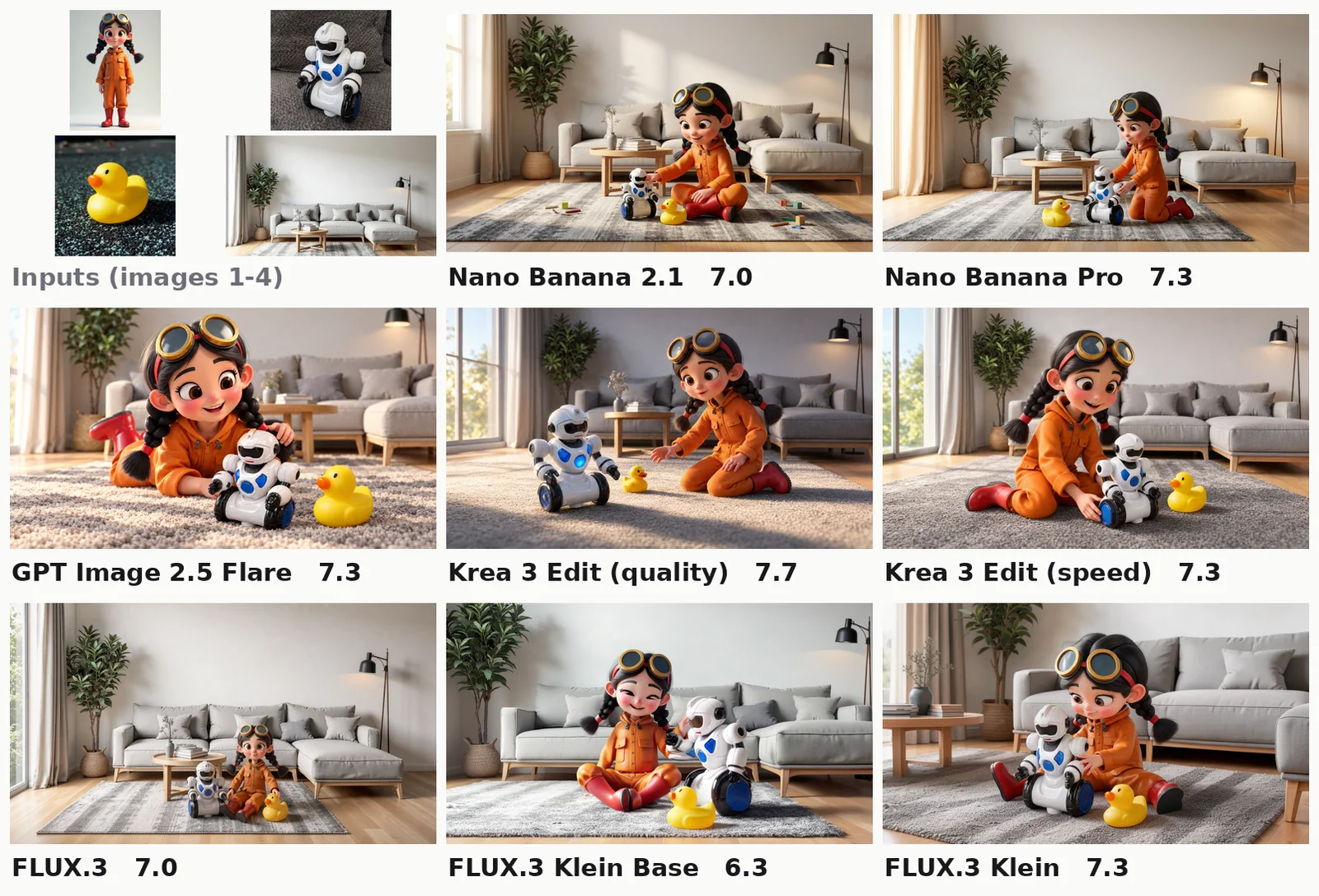
The girl from image 1 playing on a rug with the robot toy from image 2 and the rubber duck from image 3 in the living room from image 4. Keep each toy's exact design and colours. Stylised 3D animated film look like image 1.
Replace text on a label: every model gets it right
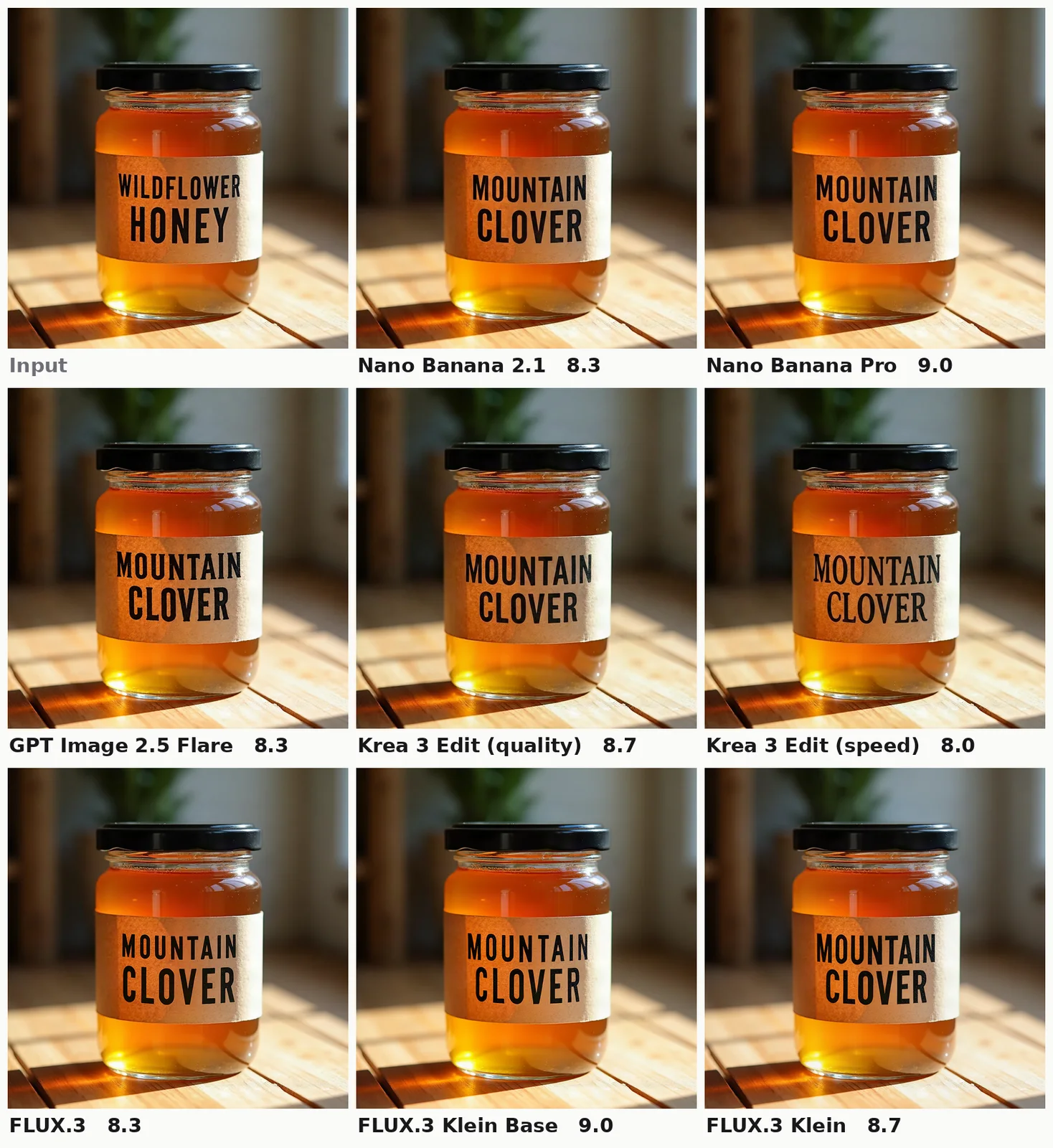
Change the label text to "MOUNTAIN CLOVER" in the same black serif lettering on the same kraft-paper label. Keep the jar, honey, table and light exactly as they are.
Relight a street for night: Klein matches the leaders
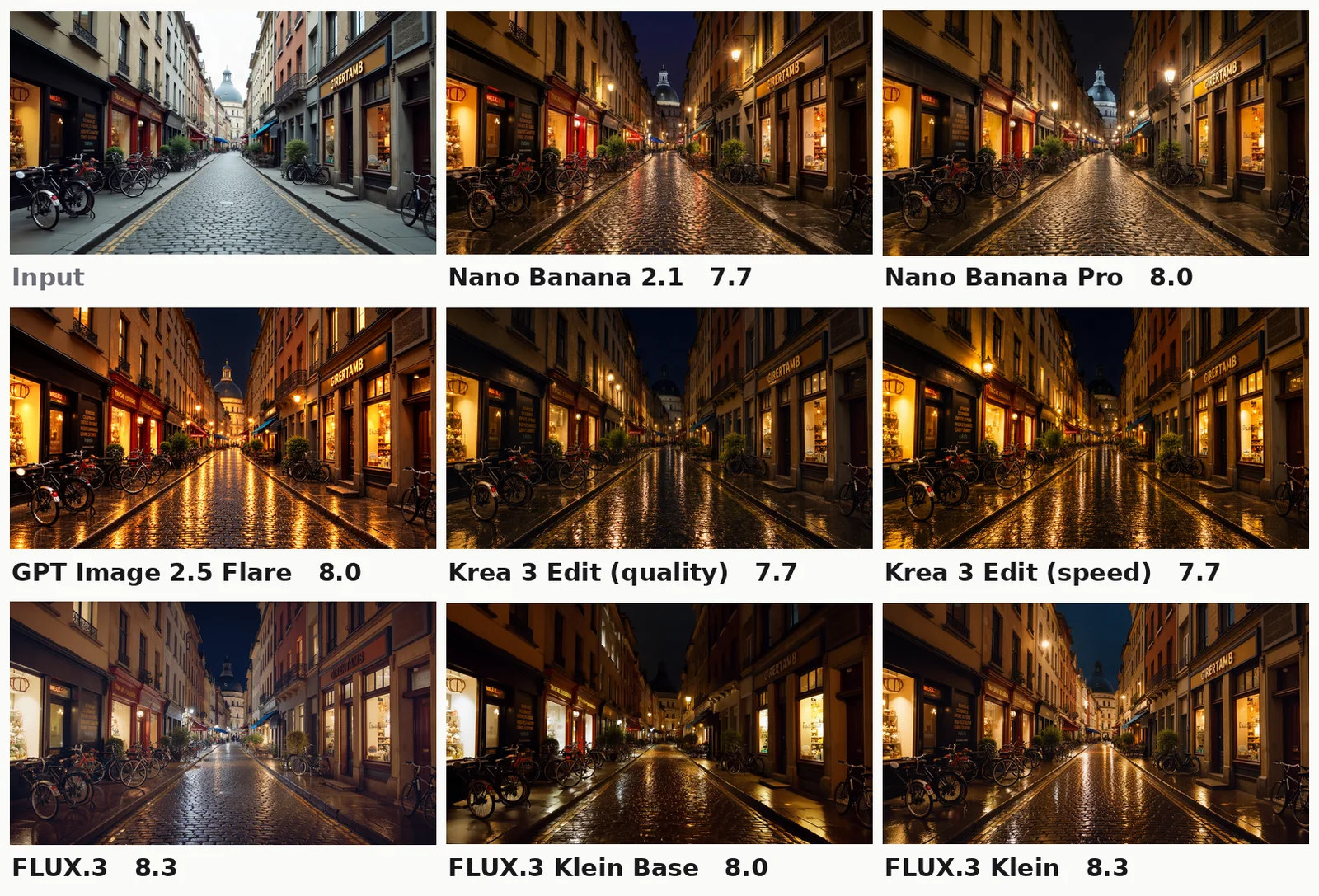
Make it night: warm street lamps and lit shop windows reflecting on wet cobblestones. Keep the street, shops and bicycles exactly as they are.
Place a product in a scene: Klein holds up, Klein Base tilts the can
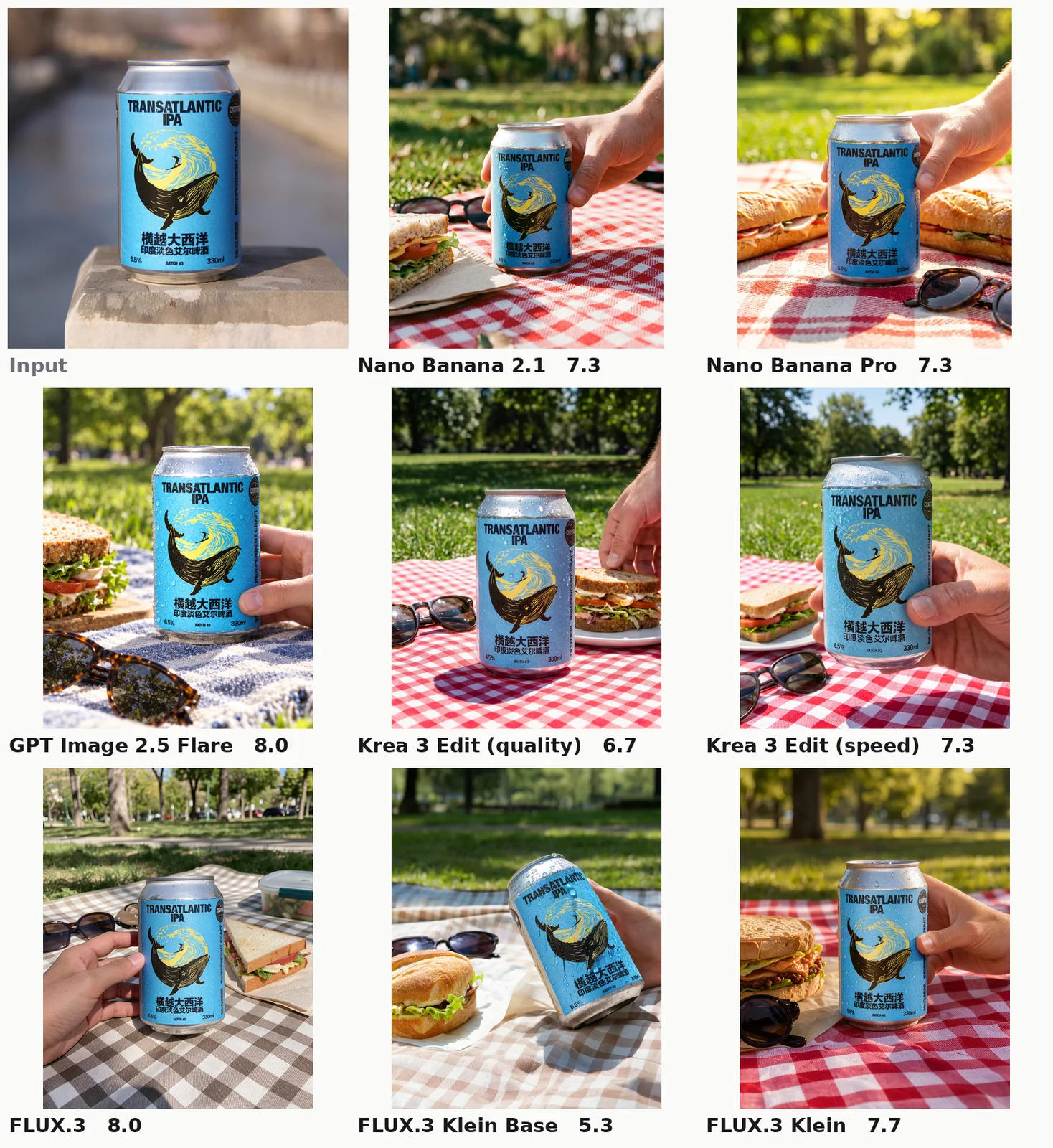
Place this exact product, unchanged in shape, color, label and logo, in this scene: On a picnic blanket in a sunny park next to a sandwich and sunglasses, condensation on the can, held lightly by a hand at the edge of frame. Photorealistic product photography.
Sprite back view: Nano Banana Pro draws the front again
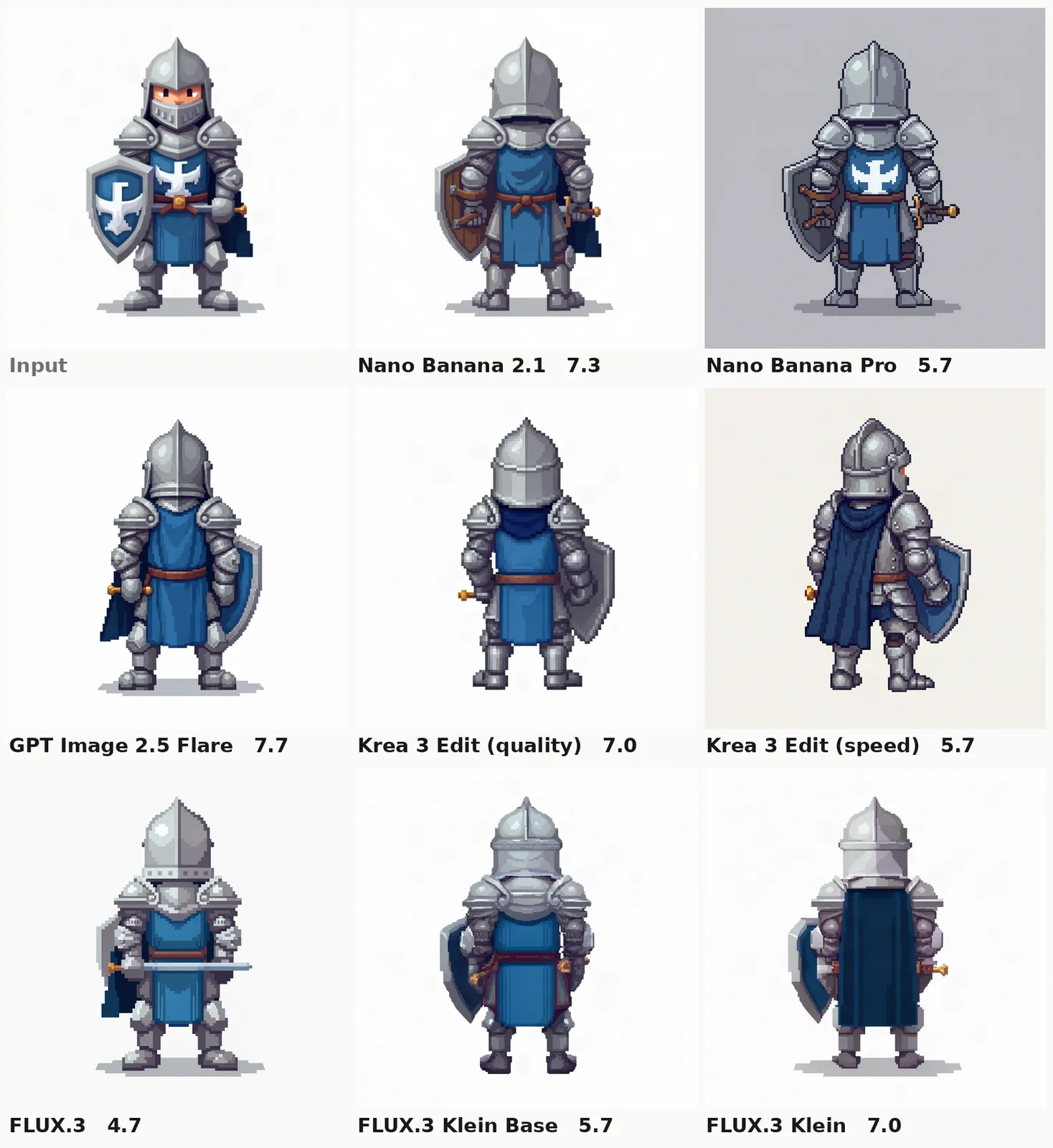
The character in the reference, turned to this facing: facing away from the viewer (back view). Same face, hair, clothes, proportions, pose and scale, full body and centered, on a plain flat background. Look: 16-bit pixel art.
Pet restyle: Klein barely changes the photo
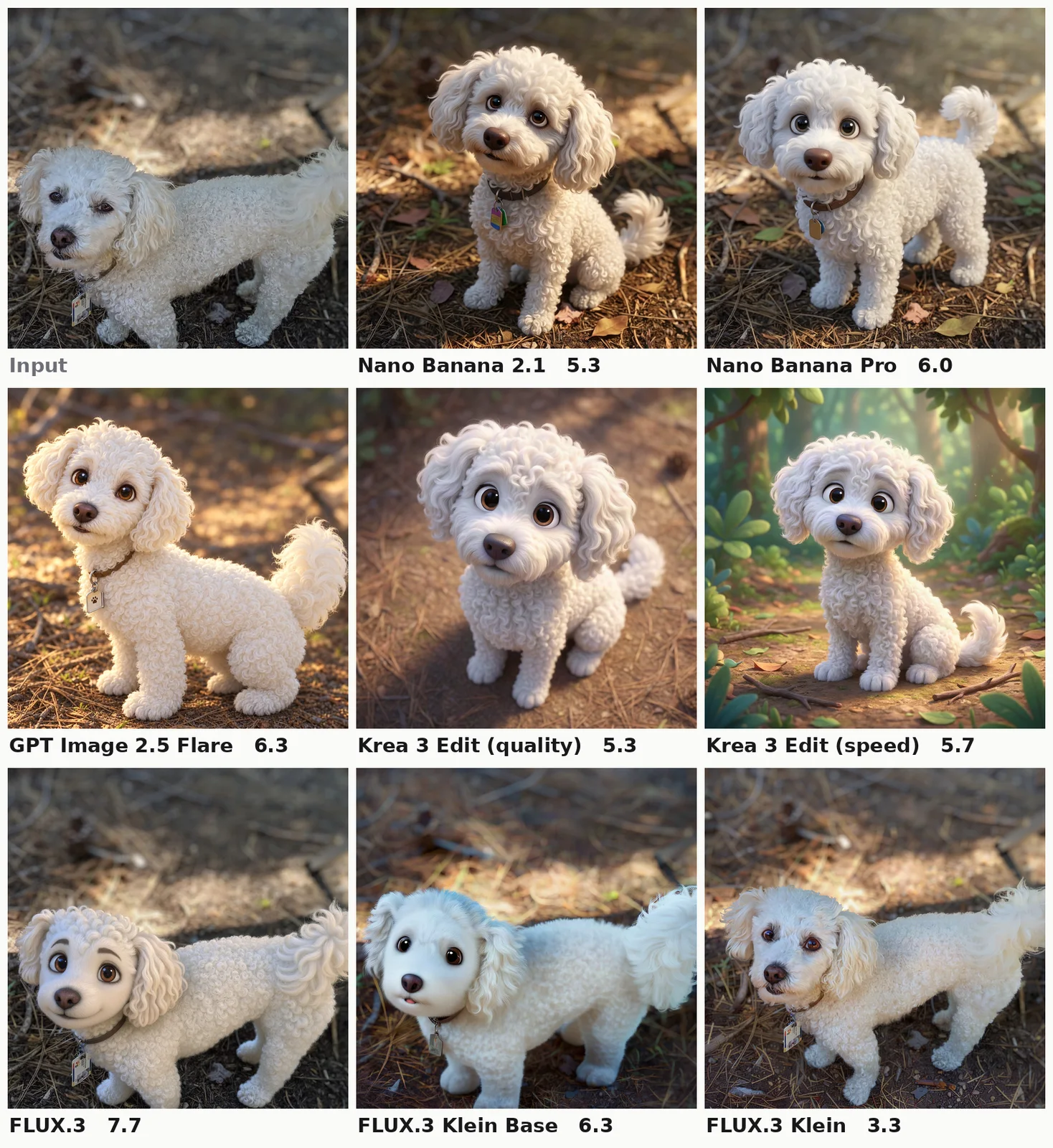
Turn this dog into a cute 3D animated movie character, same white curly fur and face, sitting in the same pose.
The eight models
- Nano Banana 2.1 is Google's current Gemini image model, and the default for reference-guided edits in Voyager. It takes up to 14 reference images. We ran it at 1K with minimal thinking.
- Nano Banana Pro is Google's premium tier (Gemini 3 Pro Image), billed at a flat $0.15 per image at 1K or 2K.
- GPT Image 2.5 Flare is OpenAI's general-purpose image model, run at its default high quality.
- Krea 3 Edit comes in two variants on one endpoint: a quality model and a speed model. It takes up to 8 references and bills $0.025 per megapixel for the output and for each reference.
- FLUX.3 Klein is Black Forest Labs' small, step-distilled editor at $0.009 per megapixel. Klein Base is the undistilled 50-step version at $0.027 per megapixel. Both take up to 10 references and rewrite your prompt with a language model by default.
- FLUX.3 is the full model, $0.048 per megapixel.
Results at a glance
| Model | Cost per image | Median time | Slowest 10% take | Judge score (of 10) | Blind preference vs incumbents |
|---|---|---|---|---|---|
| GPT Image 2.5 Flare | $0.054 | 20.8 s | 25.4 s | 7.46 | 71% |
| FLUX.3 | $0.050 | 37.6 s | 67.0 s | 7.23 | 46% |
| Nano Banana 2.1 | $0.045 | 11.7 s | 13.1 s | 7.20 | 57% |
| Krea 3 Edit (quality) | $0.043 | 13.0 s | 24.1 s | 7.14 | 42% |
| Krea 3 Edit (speed) | $0.043 | 12.9 s | 24.1 s | 7.10 | 42% |
| Nano Banana Pro | $0.150 | 16.0 s | 17.7 s | 7.07 | 53% |
| FLUX.3 Klein | $0.009 | 6.3 s | 13.4 s | 6.93 | 36% |
| FLUX.3 Klein Base | $0.028 | 7.8 s | 15.2 s | 6.81 | 31% |
Cost per image is the average over all 200 cases at list price, including extra charges for reference images. Nano Banana 2.1 and GPT Image are billed in tokens and fal's response does not report usage, so their costs are estimates from the token prices. Times run from submitting the job to fal reporting it complete, excluding download. The judge score is the mean of three judges over every case a model answered; its 95% confidence interval is about ±0.15 to ±0.2. The last column is the share of blind pairwise comparisons won (ties count half): the three incumbents are compared only against the five new models, and the new models only against the incumbents.
Read the score column as tiers rather than a ranking. GPT Image is ahead, Klein and Klein Base are behind, and the five in the middle overlap.
How the test worked
The cases. We wanted edits people actually ask for, so the 200 cases come from three places:
- 88 from GEdit-Bench, an editing benchmark built from real user requests. Its instructions are short and casual ("make him look more handsome", "apply a suitable filter"), across 11 categories: background, color, material, pose, portrait retouching, style, add, remove, replace, text and tone. We sampled 8 per category with a fixed seed and used the prompts word for word.
- 84 creator edits written from the templates Voyager's own image workflows use: the same character in a new storyboard frame, a product placed in a lifestyle scene, two to five references combined into one image, line-art and noir storyboard frames, style transfer, text on posters and labels, object edits, relighting, pet restyles, sprite turnarounds, thumbnails and reframes. Every case names what must stay unchanged.
- 28 text-to-image prompts that check counting, spatial relations, color binding, dense scenes and rendered text, in the style of GenEval and DPG-Bench.
The source images for our own cases are either from the DreamBooth dataset (CC BY 4.0) or generated with FLUX.1 [dev], which is not one of the models compared. The GEdit-Bench photos are used for scoring only and are not reproduced here.
The settings. Every model ran once per case on fal, at about 1 megapixel, with seed 1234 where the model takes one, safety checkers on, and otherwise the endpoint defaults. Edits keep the input's framing unless the case asks for a new aspect ratio. Krea 3's default output is about 4 megapixels, which costs four times as much, so we set the size explicitly. Of 1,600 requests, 8 were refused by a safety check and none failed outright.
The judges. Claude Opus 5.5, Gemini 3.1 Pro and GPT-6.1 Sol each saw the input images, the instruction, the list of things to preserve and the output, never a model name. They scored instruction following, preservation, quality, artifacts and an overall usability score from 0 to 10, a split of the VIEScore method that GEdit-Bench uses. Separately, Claude and GPT compared every new model against every incumbent on every case as a blind A/B choice, Gemini on a quarter of the cases. Each pair was shown in both orders; if a judge picked different winners when the order flipped, we counted a tie. In total the judges made more than 18,000 calls.
Our own eyes. Judges can be confidently wrong, so we also inspected outputs side by side, three cases from each category of the creator edits. The figures below are from that review, and where the judges and our reading disagree, we say so.
This is one run per model and case, on one provider, on one day. It tells you how these models behaved on these edits. Small categories (6 to 12 cases) show direction, not precise margins.
Text, labels and signs: any model works
On posters, jar labels, storefront signs and mugs, every model changed the words, kept the typeface style and left the rest of the image alone. The creator text cases scored between 7.8 and 8.6 for every model, the highest of any edit group (see the honey jar example above).
The one thing to watch is a model taking small liberties. On the storefront, both Klein models replaced the roses on the sign with crescent moons to suit "LUNA COFFEE". It is a nice touch if you wanted it and an unrequested change if you did not.
If your workload is mostly text and label edits, FLUX.3 Klein does them at a fifth of Nano Banana 2.1's cost.
Everyday photo edits: the gap is small
For removing an object, adding one, relighting a room or placing a product in a scene, the judges' scores sit close together and the cheap models stay within about a point of the leaders. In our side-by-side review, all seven of the models we inspected kept the products recognisable and the can's label artwork intact in the placement cases; Klein Base softened small print and tilted one can.
Head to head, Nano Banana 2.1 still had the edge. Across every judge verdict that compared them directly over all 200 cases, Nano Banana 2.1 beat Krea 3's quality model 208 to 157, with 81 ties, and the speed variant 198 to 166. Klein lost to it 224 to 132. On the night relight and the picnic product shot above, though, Klein scored with the leaders. Against Nano Banana Pro, Krea 3's quality model was dead even: 181 to 180.
The clearest gap in the benchmark's everyday categories was changing a subject's pose or motion ("make him jump"), where Klein and Klein Base averaged 5.4 against 7.0 for GPT Image.
Style is where the cheap editors break
Ask for a look and the differences become visible at a glance. The hardest case, open at the top of the examples, was a storyboard frame: take the woman from a color character sheet and draw her into the scene in the loose line-art style of a sketch. Krea 3 speed and both Klein models painted her in color.
For a storyboard that is a failure, not a matter of taste: every frame in a sequence has to share one look. The judges marked these outputs down, but not as hard as a director would. In the storyboard group overall, Klein and Klein Base averaged 5.6, the lowest of any model, and GPT Image 7.2. Drawing the last frame of a shot exposed a different gap: only Nano Banana 2.1, GPT Image and FLUX.3 actually moved the car down the road.
Strong restyles showed the opposite failure. Turning a photo of a poodle into an animated movie character, Krea 3 Edit committed fully to the look, while Klein Base and Klein returned something close to the original photo.
Characters, sprites and multiple references
Character consistency was a pleasant surprise. Across three storyboard frames of the same woman, all seven models we inspected kept her hair, scarf and coat; the differences were framing and light, not identity. Krea 3's quality model had the best average score in this group (7.4), and GPT Image won the most blind comparisons (69%).
Sprite turnarounds are a stricter test of whether a model understands a request. Asked for the back view of a pixel-art knight, most models turned him around. Nano Banana Pro drew the front again, with the crest on his chest.
Combining references separates Klein from the rest. With two to five input images (a person and a scene, a man and a dog on a street, a girl with two toys in a living room, a five-product flat-lay), every model composed something sensible. Six of the eight averaged 6.8 to 7.0; Klein and Klein Base averaged 6.2, and in blind comparisons against the incumbents they won only 30% and 19% of the time. In the outfit-swap example, both gave the woman the second reference's jeans and sneakers as well as the jacket, a mistake Nano Banana 2.1 also made.
Speed and cost
FLUX.3 Klein is the fastest and cheapest by a wide margin: a median of 6.3 seconds and $0.009 per image. At those numbers a thousand drafts cost about $9, against about $45 on Nano Banana 2.1.
Nano Banana 2.1 is the most predictable. Its slowest 10% took 13.1 seconds against a median of 11.7. Krea 3 and Klein were close to twice their median at the slow end. Both rewrite the prompt with a language model before generating; for Krea's quality model that step took about 1 second at the median and 7 seconds for the slowest 10%.
Krea 3 Edit is not cheaper than Nano Banana 2.1 once you include references. Its list price is per megapixel of output plus each reference, so a typical single-reference edit at 1 megapixel costs about $0.032, and our average across all cases was $0.043. Its speed variant was not faster than the quality model in our runs: both had a median of about 13 seconds, and fal's timing breakdown showed the same 4 seconds of inference for each.
Full FLUX.3 is slow. Its median, 37.6 seconds, is about three times Nano Banana 2.1's, and its slowest 10% took 67 seconds. Its scores were second only to GPT Image, and it beat Nano Banana Pro head to head 183 to 156, but it is not the fast option.
Nano Banana Pro costs $0.15 per image and scored no higher than Nano Banana 2.1 in our test. We would keep it for cases where you have already seen it do better on your own material.
How much to trust AI judges
The judges agreed on the big picture and disagreed on the details. Ranked by average score, the three judges put the eight models in a similar order (rank correlations 0.74 to 0.92), and all three put GPT Image first and Klein Base last. Scoring individual images, they agreed far less: the correlation between judges on the overall score averaged 0.44, and on pairwise choices all three picked the same winner only 38% of the time.
Claude and GPT agreed with each other most. Gemini gave half of all images a 7, which compresses its differences, and favored whichever image it saw first 61% of the time, which is why every comparison was shown in both orders. Claude and GPT each changed their answer when the order flipped in 17% of comparisons, Gemini in 31%.
That matches what we saw. All three judges scored Klein's barely changed poodle between 2 and 4. But they can split even on an obvious miss: Nano Banana Pro's front-facing knight got a 3 from Claude and a 7 from both Gemini and GPT. And they are noisy about which of two good edits is better. Use a panel of judges for a first pass across many outputs, then look at the images yourself before you switch a production workflow. If you want to run the same kind of check on your own edits, this is the scoring rubric we gave each judge, shortened:
An AI image editor received the input image(s) and the instruction below. Evaluate its OUTPUT image.

Instruction: <the edit you asked for>
Must be preserved (unchanged unless the instruction says otherwise): <identity, product details, layout, text, style>

Score each dimension as an integer 0-10:
- instruction: did the output do exactly what was asked, every part of it?
- preserve: is everything that should stay the same unchanged? For multi-reference tasks, are the referenced subjects faithfully reproduced?
- quality: natural, coherent lighting, perspective, sharpness and materials.
- artifacts: 10 = none. Deduct for distortions, malformed hands or faces, garbled text, seams, halos and duplicated objects.
- overall: how usable this result is for a professional creator who wanted this edit. A failed instruction or a lost identity caps it low.
- reason: one short sentence naming the main strength or flaw.

Return JSON with those six keys.
Do not show the judge the model name, and if you compare two outputs, ask twice with the order swapped.
Which model for which edit
| If the edit is mostly | Use | Because |
|---|---|---|
| Text, labels, signs | FLUX.3 Klein | Every model got these right; Klein is the cheapest and fastest |
| High-volume drafts and simple photo edits | FLUX.3 Klein | $0.009 and about 6 seconds, a little below the leaders on simple edits |
| Strong restyles of a photo | GPT Image 2.5 Flare, FLUX.3 or Krea 3 Edit | Top style-transfer scores (7.9 to 8.0); Klein often barely changed the photo |
| Style-locked storyboard frames | GPT Image 2.5 Flare or Nano Banana 2.1 | Klein and Krea 3 speed carried the photo's colors into a line-art frame |
| Multiple references in one scene | Nano Banana 2.1 or GPT Image 2.5 Flare | Klein and Klein Base fell about 0.7 points behind; Nano Banana 2.1 has the steadiest latency |
| Pose changes and edits to people | GPT Image 2.5 Flare | Klein averaged 5.4 on pose changes against 7.0 for GPT Image |
| Bulk sprite variants | FLUX.3 Klein | Second only to GPT Image on sprites (7.3 against 7.6) at a sixth of the price |
| The best result regardless of cost | GPT Image 2.5 Flare | Highest score and won 71% of its blind comparisons, at about 21 seconds |
Where Voyager fits
No single model wins every row of that table, which is why we do not hard-code one. In Voyager, the agent chooses the image model per request from a dated list of candidates by task (Nano Banana 2.1 by default for reference-guided edits, GPT Image 2.5 Flare for transparency and iterative edits), and you can name any model on fal instead. Generation is billed at provider cost. Results like these are what that list is built from.
Frequently asked questions
Is Krea 3 Edit better than Nano Banana? Not on our test. Its average score was close (7.14 against 7.20), but in blind comparisons the judges preferred Nano Banana 2.1 over Krea 3's quality model 208 to 157, with 81 ties, and over its speed model 198 to 166. Its quality model tied Nano Banana Pro, 181 to 180. In our review it gave the most convincing animated-character restyle but leaked color into a line-art frame in its speed variant. It cost about the same per image.
Is FLUX.3 Klein good enough to replace Nano Banana? For text edits, simple object edits, relighting and drafts, yes, at a fifth of the cost and about twice the speed. For style-locked frames, pose changes and multi-reference scenes it fell behind, and we would not swap it in for those.
Which image edit model is cheapest? FLUX.3 Klein at $0.009 per megapixel on fal, read October 15, 2026. Klein Base is three times that, and Krea 3 Edit bills each reference image on top of the output.
Which is fastest? FLUX.3 Klein, with a median of 6.3 seconds per edit on fal in our run. Nano Banana 2.1 had a higher median, 11.7 seconds, but the smallest spread.
Is Nano Banana Pro worth $0.15 an image? Not on this test. It scored in the middle of the pack, refused two of the 200 edits and redrew the front of a sprite when asked for the back. Run it on a sample of your own edits before paying three times the price.
Make your next project in Voyager
Create an account, download Voyager, and start making.