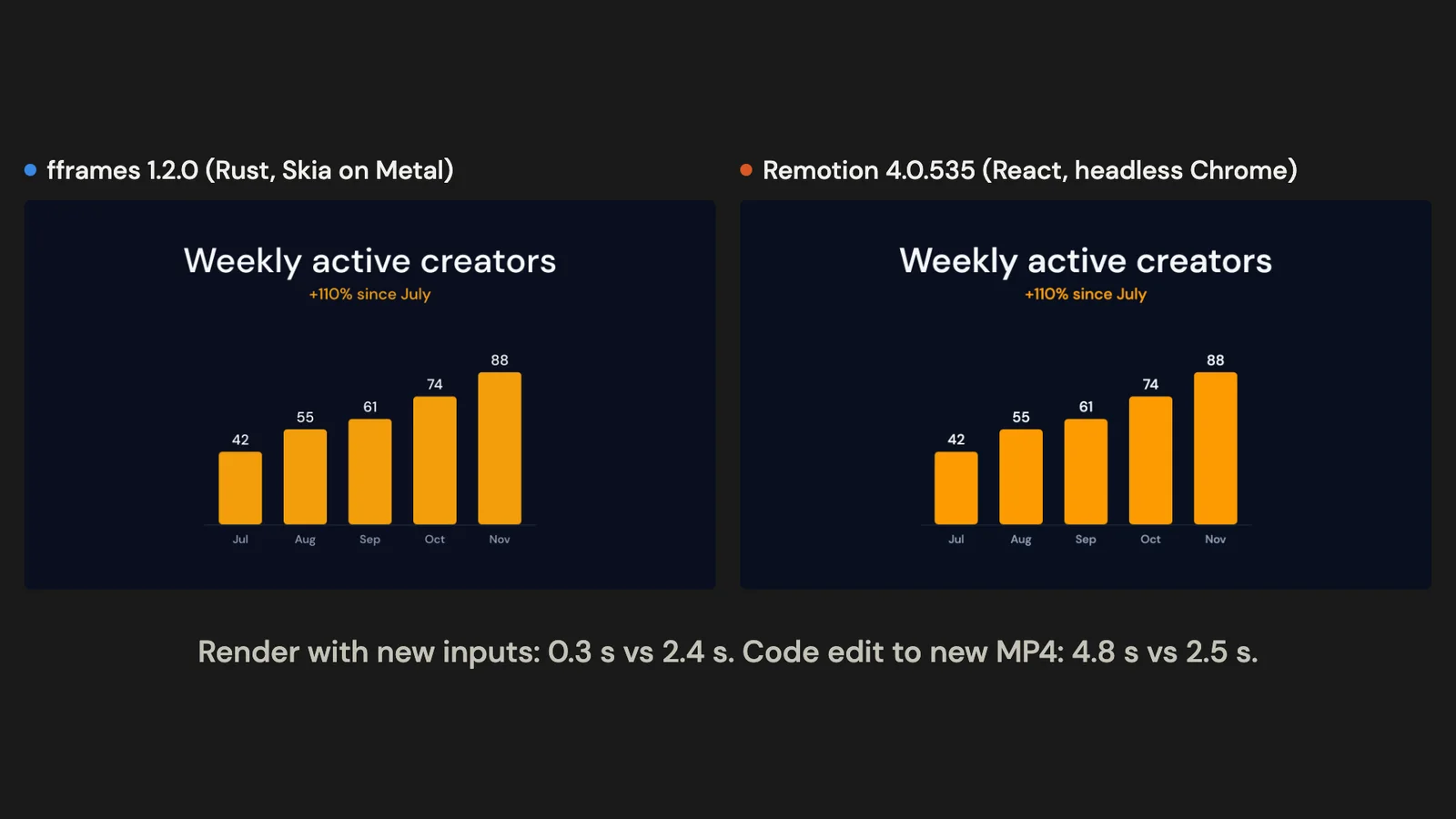
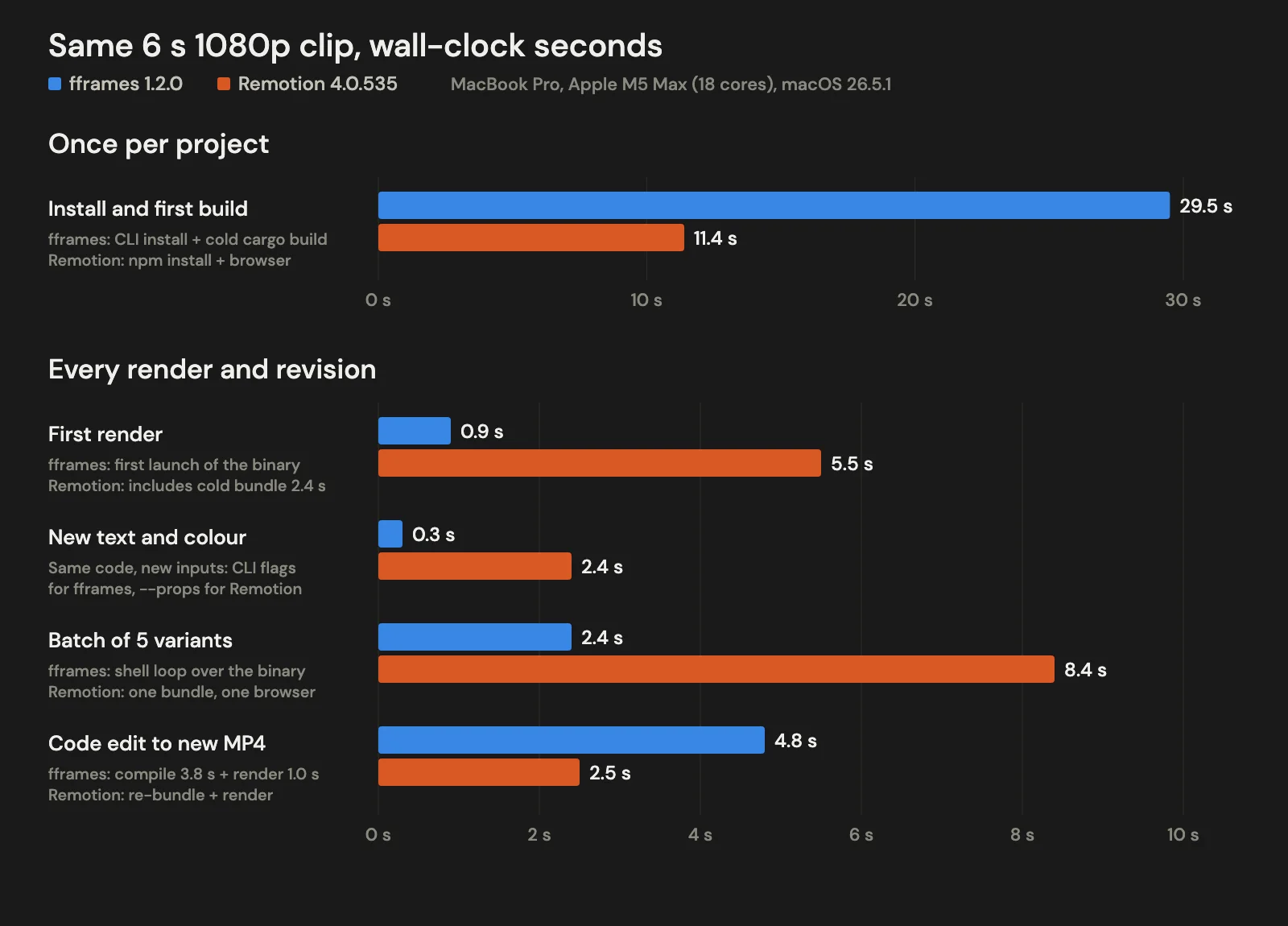
fframes is a Rust framework that draws each video frame as SVG on the GPU; Remotion draws each frame as a React web page in headless Chrome. We built the same six-second 1080p title card in both and timed every step on one MacBook Pro. fframes rendered a batch of five variants with different text and colours in 2.4 seconds against Remotion's 8.4, but Remotion turned an edit to the code itself into a new video in about half the time (2.5 seconds against 4.8), because Rust recompiles first.
The short version: fframes is the stronger candidate when one composition will be rendered many times, or with heavy vector scenes, on machines you control, and when an MIT licence with no company threshold matters. Choose Remotion when the composition itself changes constantly, when it should reuse React components or web layout, or when you need its Player, AWS Lambda rendering or a mature ecosystem. Organisations above Remotion's free threshold (more than three employees, unless they are a non-profit) should budget for its company licence.
Versions, licences and prices were read from each project's repository, documentation and pricing page on 20 October 2026. The timings come from one machine and one composition on the same date; both projects, the exact commands and the original timing logs are in the source download. Voyager, the desktop app our team builds, sets up Remotion projects for its users, so we have used Remotion longer than fframes.
What each is
fframes is a Rust library by Dmitriy Kovalenko for rendering video from code. Each frame is a Rust function that returns an SVG tree, written with an svgr! macro; Skia draws it on the GPU through Metal (macOS) or Vulkan (Linux and Windows), and FFmpeg's libav libraries, linked into your program, encode it (fframes README). The repository dates from November 2021, but the public 1.x line is new: 1.0.2 shipped on 28 September 2026, 1.1.0 on 30 September and 1.2.0 on 3 October (releases). It became MIT licensed on 28 September, replacing an older custom licence (PR #144).
Remotion is a React framework for making videos programmatically. A composition is a React component that draws itself for the current frame; for a server render, Remotion bundles the project, opens it in a pinned Chrome Headless Shell, captures each frame and encodes with an FFmpeg build it installs for you (Chrome Headless Shell, binaries). Around that sit Remotion Studio for previewing, a Player for embedding videos in React apps, and Lambda for distributed rendering. The latest release was 4.0.537 on 19 October 2026 (release). It is source-available under the Remotion License, free for individuals and small organisations and paid above that (license).
fframes vs Remotion at a glance
| fframes 1.2.0 | Remotion 4.0.535 | |
|---|---|---|
| You write | Rust; each frame returns SVG via svgr! | React and TypeScript: JSX, CSS, SVG, canvas, browser-compatible npm packages |
| Renderer | Skia on the GPU (Metal, Vulkan), or a CPU backend | Chrome Headless Shell, frames captured in parallel |
| Encoder | FFmpeg's libav linked into your binary | FFmpeg build installed with Remotion |
| Preview | Native GPU window; browser editor via WebAssembly | Remotion Studio in the browser, hot reload |
| Five variants, same code (this run) | 2.4 s | 8.4 s (one bundle, one browser) |
| Code edit to new MP4 (this run) | 4.8 s | 2.5 s |
| Distributed rendering | Not documented | AWS Lambda; Cloud Run in alpha and not actively developed |
| Embed in a web app | Not documented | Player for React |
| Agent support | Official skill; CLI that turns video into text and images | Official skills, Markdown docs for LLMs, Studio WebMCP |
| Licence | MIT | Remotion License: free for individuals, up to 3 employees, non-profits; company licence above |
Sources: fframes README v1.2.0, Remotion docs, Remotion Cloud Run, Remotion license and pricing, read 20 October 2026. "Not documented" means absent from the project's documentation on that date, not impossible.
The same title card, built twice
The test piece is a 1920x1080, 30 fps, six-second title card: a headline that springs up, a subtitle that fades in, five bars that grow in sequence with their values counting up, then a fade out to the dark background. Both versions use the same font file, the same spring constants (mass 1, stiffness 180, damping 20), the same cubic-bezier curves and the same layout numbers. Title, subtitle and accent colour are run-time inputs in both: command-line flags in fframes, input props in Remotion. A coding agent (Claude) wrote both from each project's own documentation; the fframes composition is 137 lines of Rust and the Remotion one 103 lines of TSX. Here is the same bar in each:
// fframes: one bar, inside render_frame() (simplified)
let grow = frame.animate(&fframes::timeline!(
    at start => start + BAR_GROW, animate 0.0_f32 => 1.0, EASE_OUT
));
// SVG skips zero-height rects, so grow from a hairline
let h = (VALUES[i] / 100.0 * MAX_BAR * grow).max(0.5);
fframes::svgr!(
    <rect x={x} y={BASELINE - h} width={BAR_W} height={h}
          rx="10" fill={self.accent.as_str()} />
)
// Remotion: the same bar, inside the component (simplified)
const grow = interpolate(t, [start, start + BAR_GROW], [0, 1], {
  easing: EASE_OUT, extrapolateLeft: 'clamp', extrapolateRight: 'clamp',
});
const h = Math.max((value / 100) * MAX_BAR * grow, 0.5);
return (
  <rect x={x} y={BASELINE - h} width={BAR_W} height={h}
        rx={10} fill={accent} />
);
Both encoders used the same core H.264 options: x264, CRF 18, preset medium, 4:2:0. Those are Remotion's defaults (config, CLI render); the fframes template ships CRF 20 with an animation tune, which we changed to match. Everything else stayed at each tool's default, including keyframe spacing (which differs, see output files) and parallelism: Remotion chose 8 browser tabs, half the CPU threads capped at 8 (source), and fframes used its template's maximum-performance Skia setting.
The machine was a MacBook Pro with an Apple M5 Max (18 cores, 128 GB) on macOS 26.5.1, with Rust 1.96.1 and Node 26.11.1. For a cold start, the Rust build used an empty Cargo home and FFmpeg download cache, and the Remotion install an empty npm cache. Homebrew already had FFmpeg, x264, x265 and Opus; adding the two missing build tools fframes asks for, nasm and ninja, took 5.5 seconds.
Setup
fframes. Installing the generator (cargo install --locked --version 1.2.0 cargo-fframes) took 3.7 seconds and cargo fframes new created the project instantly. The first cargo build --release locked 444 crates, downloaded prebuilt Skia and FFmpeg libraries and finished in 25.8 seconds, well within the README's "under a minute on a fast machine" (README). The README warns that targets or feature combinations without a prebuilt download compile Skia and FFmpeg from source, which can take about 20 minutes. The build directory reached 1.7 GB, and the renderer is a 45 MB binary with the font compiled in.
Remotion. npm install of remotion, @remotion/cli and @remotion/fonts at 4.0.535 with React 19 took 6.4 seconds (258 packages, 263 MB), and npx remotion browser ensure downloaded the 171 MB Chrome Headless Shell in 5.0 seconds. With the browser and the bundler cache, node_modules grew to about 1 GB.
Both setups are mostly downloads, so a slower connection stretches each. What differs is the fallback: Remotion installs through npm plus a browser download, with some extra system packages on Linux (system requirements), while fframes can drop into a long native build on an unusual target, and on Windows needs a separately downloaded FFmpeg 9 build, LLVM and environment variables (README, Windows).
Rendering
Once its binary was warm, fframes rendered and wrote all 180 frames in 0.29 to 0.32 seconds. The first launch of each freshly compiled binary took about 1 second instead. Remotion's first render took 5.5 seconds: 2.4 seconds to bundle the project, 2.1 seconds to render and encode the frames, plus browser start-up and stitching. Later renders reused the bundler cache, cutting bundling to about 0.4 seconds and the whole command to 2.4 to 2.6 seconds, of which about 1.3 seconds was frames (3.4 seconds on the first render after a code change).
So command to command, fframes was about eight times faster here, and about four times faster than Remotion's frame stage alone. fframes draws vector shapes onto a GPU surface and hands them to an encoder in the same process, and it hashes the parts of each frame that never change at compile time so its renderers can cache and reuse them (README); Remotion lays out a web page per frame in Chrome. Remotion 4.0.534 and later pass raw bitmaps from Chrome to FFmpeg through shared memory on Apple Silicon and Linux instead of compressing screenshots (shared-memory capture), and this run used that path.
How the gap behaves on other content is not something one title card can show. The fframes repository's own benchmark against Remotion is a dense stress test: 99,000 animated circles at 4K for ten seconds. On an M4 Max, fframes on the GPU took 4.1 seconds and Remotion with FFmpeg 118.7 seconds (raw results). It is the author's test, one run per pipeline, with hardware VideoToolbox encoding, Remotion 4.0.529 (before shared-memory capture) and a patched SVG dependency, and it excludes building and bundling, all of which its README states.
New data versus new code
New data, same code. Changing the title, subtitle and accent colour through run-time inputs needed no rebuild in either tool. From the command line, fframes rendered a variant in 0.28 seconds and Remotion, with --props, in 2.4 seconds. A render service would not call Remotion's CLI each time, so the batch test used Remotion's Node API the way its docs describe for repeated renders: bundle once, open one browser, then call renderMedia() per variant (renderMedia, openBrowser). Rendering five variants one after another took 8.4 seconds, about 1.5 seconds each after a 0.7-second bundle. fframes, as a shell loop calling its binary five times in sequence, took 2.4 seconds including the first launch of a freshly built binary. Neither batch was tuned for concurrent jobs. The chart values stayed constants here; they could be run-time inputs in the same way.
./target/release/fframes-title --title "Daily active creators" --subtitle "Up 2.1x since July" --accent "#a78bfa" render -o variant.mp4
npx remotion render TitleCard out/variant.mp4 --props='{"title":"Daily active creators","subtitle":"Up 2.1x since July","accent":"#a78bfa"}'
New code. The revision test changed the composition itself: new default copy and colour, and bars that start 0.6 seconds later with a wider stagger. That was the same five lines in each project.
From saving the file to having a new MP4, fframes took 4.8 seconds: 3.8 seconds of cargo build --release and 1.0 second for the first run of the new binary. Remotion took 2.5 seconds. This measures a change to the code; the same timing values could have been made run-time inputs, at the cost of more plumbing. Preview latency was not timed, but the workflows differ: Remotion Studio hot-reloads in the browser as you save, while the fframes preview window plays the compiled binary, so each change means a rebuild before you can watch it. The fframes browser editor with live reload is set up from the repository's examples rather than generated with a project (skill guide).
fframes offsets some of that with review commands that report problems as text and images an agent can read. inspect checked 24 sampled frames for missing fonts, text running off the canvas and invalid SVG without rasterising anything, and strip wrote a labelled contact sheet of 12 frames to one PNG (README). Remotion has no structural checker of that kind; an agent reviews it by rendering stills with npx remotion still and looking at the pixels. Both projects publish agent skills: fframes one skill (npx skills add https://fframes.studio) meant to take an agent from an empty folder to a checked render, Remotion a set of skills, setup guides for Claude Code, Codex and other agents, Markdown docs for LLMs, and a WebMCP integration for Studio (AI docs, skills).
Output files
The two version-one files looked the same but differed fourfold in size: 329 KB from fframes and 80 KB from Remotion. Keyframes account for much of it. fframes encodes the video in parallel chunks with a default group of pictures of 24 frames, so its file carries 14 keyframes where Remotion's single x264 stream carries one (fframes encoder source). Raising gop_size to 250 brought the fframes file to 210 KB, but each chunk still began with a keyframe, one per second; the rest of the gap was not isolated, so equal CRF should not be read as equal compression efficiency. At these sizes it hardly matters; across thousands of stored renders it is worth setting a bitrate or keyframe interval deliberately.
The colours differed in metadata more than in pixels. Sampled amber pixels decoded to YUV values within one step of each other, but fframes tags the colour matrix as BT.601 (SMPTE 170M), while Remotion 4 by default tags BT.709 primaries and the sRGB transfer curve with no matrix. Players that assume a BT.709 matrix for HD video then show Remotion's orange slightly more saturated, as in the clips above. Rendering with --color-space=bt709 converted and tagged matrix, primaries and transfer as BT.709, and the amber then decoded to within a few values of the source colour; Remotion's 5.0 migration notes make BT.709 the default (color space option, 5.0 migration).
Decide by job
Rendering a lot
When one composition is rendered many times, fframes' render speed compounds and its compile cost does not, as the batch showed: about 0.5 seconds a variant on average against 1.7 for Remotion's API path, including each tool's start-up. Longer clips, footage, audio and complex typography were not part of this run, so test representative content at your resolution, encoder settings and deployment hardware before deciding.
Remotion's answer to volume is parallelism across machines: Lambda renders chunks of one video in many functions in your own AWS account and stitches them (Lambda). Lambda has no GPU (GPU guide), and its compute is billed by AWS on top of any Remotion licence.
Choose fframes if render time on machines you run is the constraint. Choose Remotion if you want rendering spread across cloud functions without running render servers.
What you can put in a frame
Remotion frames are web pages, so what Chrome can draw is available: CSS layout and text wrapping, web fonts, canvas, WebGL, video and audio, and browser-compatible npm libraries for charts, maps and animation. A React team can reuse its own components and design tokens. Animation libraries driven by the wall clock need adapting to frame-based timing; the HyperFrames vs Remotion comparison covers that problem and the HTML-first alternative.
fframes frames are SVG trees built in Rust: shapes, gradients, clip paths, masks and filters, embedded images and video frames, measured and fitted text, springs and timelines, an audio mix with loudness analysis, and GPU shaders (SkSL or pasted Shadertoy GLSL) as layers (API cheat sheet). There is no CSS layout engine and no ecosystem of ready-made components; positions are numbers you compute. Text is measured rather than flowed: the API offers text_width, text_fit and text_break_lines to size and wrap it yourself. If customers supply the copy, check long titles, wrapping, fallback fonts and non-Latin scripts in both tools; the short English titles here did not exercise them. The README calls the API "explicit and verbose" and pitches that as work for an agent with its skill (README).
Choose Remotion if the video reuses web UI, needs flowing layout or depends on JavaScript libraries. Choose fframes for motion graphics, data and audio visualisation you are happy to describe in coordinates.
Deploying renders and embedding video
Remotion has the broader production story: a Node API for server rendering, Lambda, a Cloud Run package in alpha that is not actively developed, client-side rendering in the browser, and the Player for showing a parameterised video inside a React app (Lambda, Cloud Run, web renderer, Player).
fframes gives you a native program per video. It links FFmpeg statically but still loads the system's encoder libraries: the binary built here needed Homebrew's libx264 at run time, and the README notes that the encoders must be installed on the machine (README). The generated project is also tied to one GPU backend, Metal in this case, so a Linux render server needs a Vulkan build, or a project generated with --backend cpu, which the README says is about ten times slower. fframes documents no managed or distributed rendering service and no embeddable player; its editor runs videos compiled to WebAssembly.
Choose Remotion if you need distributed, in-browser or in-app rendering today. Choose fframes if you control the render machines and can build for them.
Licence and cost
fframes is MIT licensed, with no headcount threshold or usage fees (LICENSE). One caveat for redistribution: the generated project enables x264 through a libav-agree-gpl feature, which, as the name says, brings FFmpeg's GPL terms into the compiled renderer (README, codecs). That matters if you ship the binary to others, not for the videos it makes.
Remotion 4's licence file makes it free for individuals, for-profit organisations with up to three employees, non-profits, and evaluation before commercial use (license); the pricing page phrases the threshold as "companies of up to 3 people". Everyone else needs a company licence. As of October 2026 that is $25 a month per seat under "Remotion for Creators" for manual video work, or $0.01 per render with a $100 monthly minimum under "Remotion for Automators", for batch rendering, video products and embedding the Player. Enterprise plans start at $500 a month (pricing).
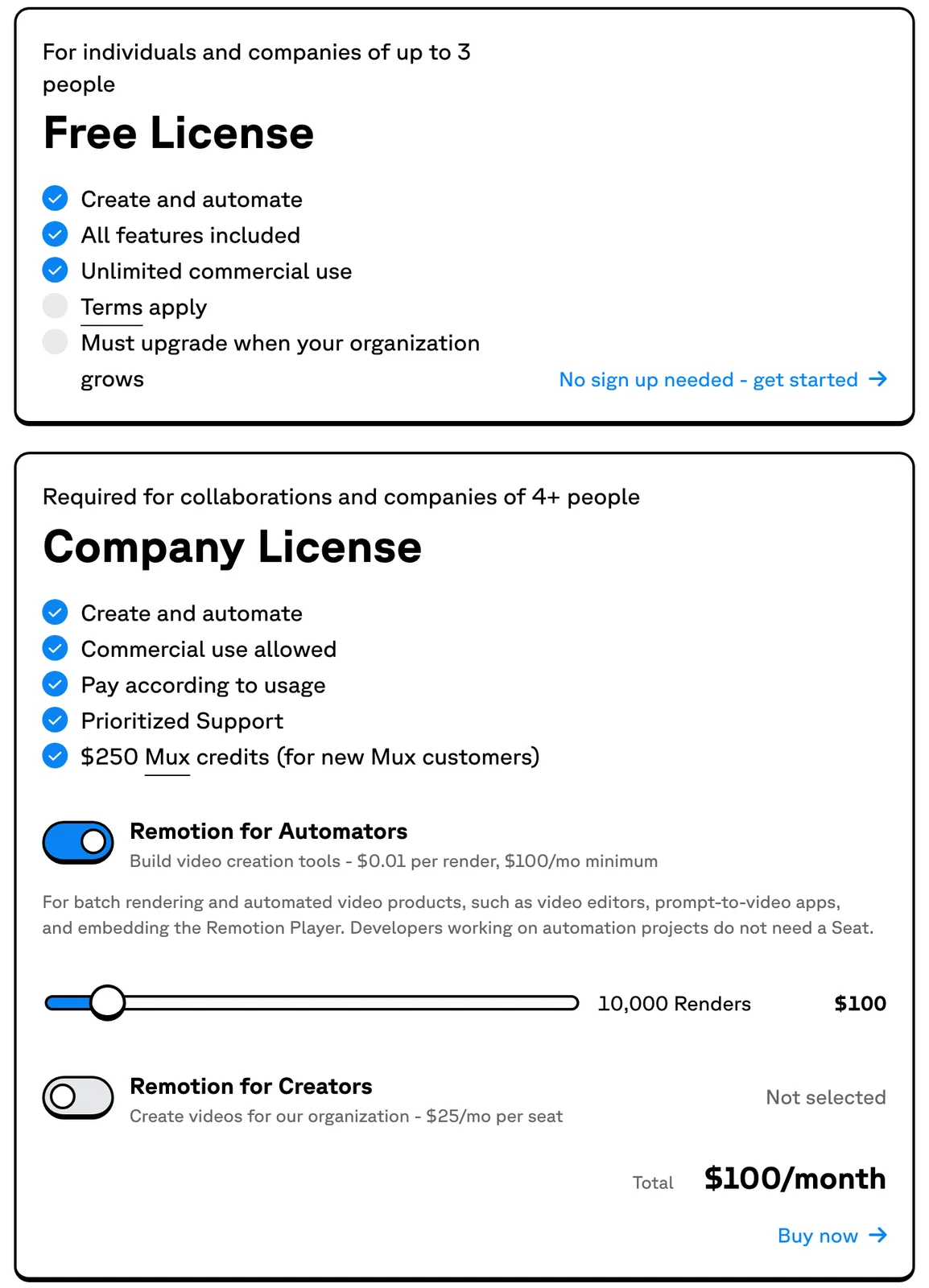
Two details catch teams out. Headcount is the whole organisation, not the people using Remotion: the licence FAQ says a 20-person company with one Remotion user needs a company licence, which can be a single $25 seat. And the FAQ defines an automation as owning code that calls the render functions, a list that includes npx remotion render, so a company's own render script falls under Automators (FAQ). The upcoming Remotion 5.0 terms count contractors toward headcount and require Automators to enable usage telemetry or agree an alternative report (5.0 terms, telemetry).
Choose fframes if Remotion's licence model or per-render fees are a problem for your product. Choose Remotion if you are under the threshold, or if $25 a seat or $100 a month is small next to what its ecosystem saves you.
Maturity and risk
Remotion has years of production use, a company behind it and extensive documentation. fframes 1.x is weeks old and mostly one developer's work (contributors), and it moves fast, with 1.2.1 release candidates on crates.io as recently as 18 October (crates.io). Open reports include a link failure between the prebuilt FFmpeg and a newer system x264 on Arch Linux (#192) and a Vulkan crash on an AMD integrated GPU whose cause the reporter had not confirmed (#179).
Choose Remotion if you want the lower-risk dependency for a pipeline you will maintain for years. Choose fframes if you have Rust skills on the team, can pin a version and test on your own render machines, and its speed is worth owning that risk.
Which should you choose?
| If your work is mostly | Choose | Because |
|---|---|---|
| Changing the composition many times a day | Remotion | Hot reload and a 2.5 s code-edit-to-file loop beat a Rust recompile |
| One template rendered for many customers | fframes | New inputs need no rebuild; five variants took 2.4 s against 8.4 s |
| Dense SVG scenes with many animated shapes | fframes, after a test | The author's stress test of that workload shows a far larger gap than this title card |
| Video that reuses React components or web UI | Remotion | Frames are web pages, so components and CSS come along |
| Video embedded in a web app | Remotion | The Player is built for it; fframes documents no equivalent |
| Rendering spread across the cloud | Remotion | Lambda splits a render across functions in your AWS account |
| A product where licence fees or headcount rules are a problem | fframes | MIT, no threshold, no per-render fee |
Whichever you lean towards, rebuild one representative composition in it, then time one code change, one data change and one long render. Those three numbers decide this better than any benchmark, including ours.
Frequently asked questions
Is Remotion free? For individuals, for-profit organisations with up to three employees, non-profits and evaluation, yes (license). Other organisations pay $25 per seat per month for manual creation, or $0.01 per render with a $100 monthly minimum for automation, as of October 2026 (pricing). Remotion calls itself source-available, not open source (FAQ).
Do I need to know Rust to use fframes? You need to be able to read it. A composition is a Rust struct with a frame function returning SVG, and the setup needs the Rust toolchain and native libraries. fframes is designed for agents to write that code, but you own a Rust project afterwards (README).
Can I convert a Remotion project to fframes? Not automatically. Neither project documents a migration tool, and React components, CSS layout and npm packages have no fframes equivalent, so the composition has to be rewritten as SVG and Rust. The title card here translated almost line for line, as the code excerpts show, because it was already SVG driven by frame maths; anything built on web layout or JavaScript libraries is a rebuild.
Does fframes need a GPU? No. Projects generated with --backend cpu use a built-in CPU rasteriser, with no preview window and, according to the README, about a tenth of the speed (README).
Voyager is a desktop AI agent for creative work
Describe what you want to make; Voyager plans it, uses your apps and tools, and keeps everything editable.