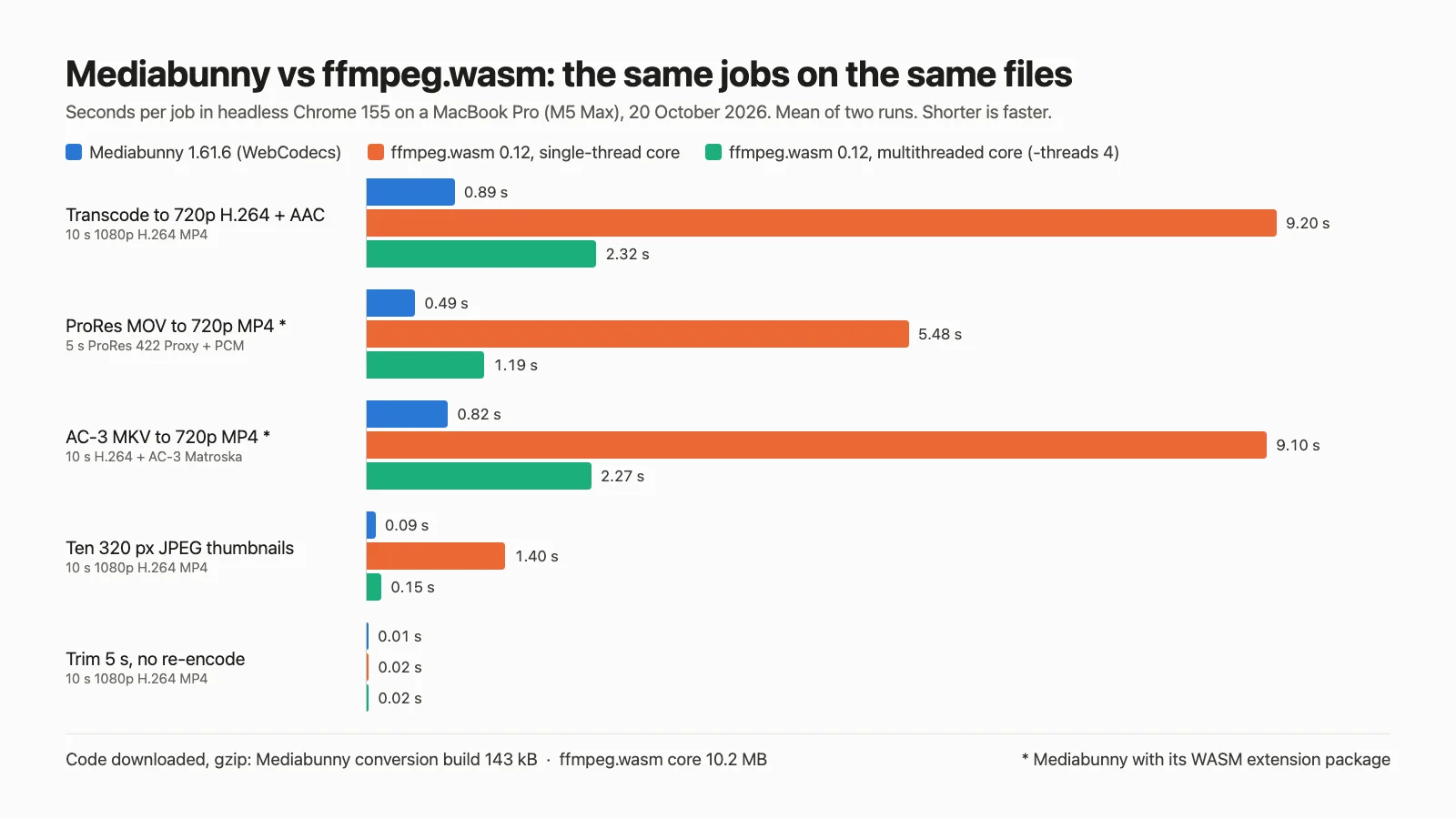
Mediabunny and FFmpeg.wasm both let a web page trim, convert and extract frames from video without a server, but they get their codecs from different places. Mediabunny is a TypeScript library that parses and writes containers itself and hands decoding and encoding to the browser's WebCodecs API, which can use the operating system's hardware codecs. FFmpeg.wasm is FFmpeg compiled to WebAssembly and brings its own software codecs. On the same files in headless Chrome, the tested Mediabunny 1.61.6 transcoded about 10 times faster than ffmpeg.wasm's default single-thread core and needed about a seventieth of the compressed code. But what it can do depends on the browser, and when it cannot handle a track it can still report a valid conversion: in two of four browser builds it turned a synthetic HEVC clip, shaped like phone video, into an MP4 with no video.
The short version: choose Mediabunny for in-browser exports, upload compression and thumbnails, check every file's tracks before converting, and add its WebAssembly extension packages for ProRes, AC-3 and missing audio encoders. Choose ffmpeg.wasm when inputs span codecs and containers the browser cannot handle, when output should be the same in every browser, or when you need FFmpeg filters, and accept a 7 to 10 MB download and slower encodes. When most files are ordinary but some are not, use both: Mediabunny first, ffmpeg.wasm loaded only for the files it rejects (how to route a file).
Update, 20 October 2026: Mediabunny 1.62.0 fixes malformed-input hangs and excessive memory/CPU use across parsers; its @mediabunny/prores update fixes TurboRes decoder out-of-bounds reads. It also changes parsing performance and timestamp handling for some valid files (release notes). For user uploads, use 1.62.0 or later, including the patched ProRes extension when needed. These changes could affect ProRes handling, malformed-input behaviour, timings, memory use and output details. All measurements and recovery-example results below remain from 1.61.6; we have not rerun them on 1.62.0 or tested malformed inputs. The release notes do not establish that missing browser codecs or discarded-track behaviour have changed, so keep the track checks and fallback.
Versions, licences and documentation were read from each project's repository, npm and documentation on 20 October 2026. The measurements are ours, from the same day; the method and limits are under the test, and the page, scripts, raw results and logs are in the source download.
What each is
Mediabunny is a TypeScript library by Vanilagy for reading, writing and converting media files in the browser. It demuxes and muxes MP4, MOV, Matroska, WebM, Ogg, MPEG-TS, HLS, MP3, WAV, FLAC and ADTS itself and decodes and encodes through WebCodecs, so codec availability "depends on the browser and thus cannot be guaranteed by this library", in its own words (supported formats and codecs). Codecs WebCodecs lacks come from optional extension packages, each a WebAssembly build: encoders for AAC, MP3 and FLAC, AC-3/E-AC-3 and DTS coders, and a ProRes decoder (same page). It is MPL-2.0. The tested version, 1.61.6, shipped on 16 October 2026 (v1.61.6); the current release is 1.62.0, published on 20 October 2026 (v1.62.0).
FFmpeg.wasm is FFmpeg compiled to WebAssembly with Emscripten. You write files into an in-memory file system, run FFmpeg command-line arguments with exec() in a Web Worker, and read the results back (overview, usage). Decoding, filtering and encoding (libx264, x265, libvpx, LAME, Opus and FFmpeg's own codecs) all run as software inside the module. The current cores, 0.12.10, are built from FFmpeg 5.1.4 (Dockerfile); the last release was in January 2025 and the last commit to main in September 2025 (releases, commits).
Mediabunny vs FFmpeg.wasm at a glance
| Mediabunny 1.61.6 | FFmpeg.wasm 0.12.15, core 0.12.10 | |
|---|---|---|
| Where codecs come from | The browser's WebCodecs, plus optional WebAssembly extensions | FFmpeg 5.1.4 and bundled libraries, compiled to WebAssembly |
| Compressed code (gzip, this test) | 143 kB for a conversion build; 40 to 85 kB to only read files | 10.2 MB core (7.3 MB with Brotli) |
| 720p transcode of a 10 s 1080p clip | 0.89 s in Chrome; 3.96 s in the WebKit build | 9.20 s single-thread; 2.32 s multithreaded, similar in all four builds |
| Output across browsers | Trimmed packets matched but file bytes differed; transcodes differed in every build | Every shared job matched across four builds for a given core and command (hashes) |
| Inputs it converted here | H.264, VP9, AAC, Opus, PCM; HEVC only where the browser decodes it; ProRes and AC-3 with extensions | All five fixtures, no extra packages |
| Cross-origin isolation | Not needed | Needed for the multithreaded core |
| API | Typed objects: Input, Output, Conversion, sinks | FFmpeg arguments as strings |
| Licence | MPL-2.0 | Wrapper MIT; cores GPL-2.0-or-later |
Sources: Mediabunny docs, ffmpeg.wasm docs, npm metadata for Mediabunny and ffmpeg.wasm, read 20 October 2026. Timings and sizes are from the test below, using Mediabunny 1.61.6.
The test
The recorded runs used Mediabunny 1.61.6, ffmpeg.wasm 0.12.15 and core 0.12.10. Timings, compressed sizes, memory, output hashes, fidelity and observed conversion behaviour describe those versions and the packages pinned in the source download, not a measurement of Mediabunny 1.62.0.
Five synthetic inputs made with FFmpeg 9.0.2 from its test pattern and a 440 Hz tone, all tagged BT.709:
| Fixture | Probe | Trim | 720p transcode | Thumbnails | Convert to H.264 + AAC MP4 |
|---|---|---|---|---|---|
| 10 s 1080p30 H.264 + AAC, MP4, keyframe every 2 s | Yes | Yes | Yes | Yes | |
| 10 s 1080p VP9 + Opus, WebM | Yes | Yes | Yes | ||
| 5 s 1080p ProRes 422 Proxy + PCM, MOV | Yes | Mediabunny with extension | Yes | ||
| 10 s 1080p H.264 + AC-3, Matroska | Yes | Yes | |||
| 10 s HEVC Main 10 + AAC, MOV, rotation tag (plays portrait), shaped like phone video but synthetic | Yes | Yes, to 720x1280 with audio copied |
Transcodes target 2.5 Mbit/s H.264 and 128 kbit/s AAC. ffmpeg.wasm used libx264 -preset veryfast (and ultrafast once). The thumbnail jobs differ by design: Mediabunny's CanvasSink seeks to ten timestamps and encodes JPEGs with the canvas, while ffmpeg.wasm decodes the whole clip through an fps=1 filter.
Playwright 1.64.1 drove headless browsers on a MacBook Pro with an Apple M5 Max (18 cores, 128 GB) on macOS 26.5.1: Google Chrome 155, Playwright's Chromium 156, and Playwright's builds of Firefox 157 and WebKit 27.2. Chrome and Chromium share an engine but not a codec set; the Firefox and WebKit builds are patched test builds, not the Firefox or Safari people install; and macOS codecs are not Windows, Linux or Android codecs. Chrome ran every job twice (the two runs of each transcode and thumbnail job agreed within 11 percent) and the others once. Files came from localhost with cross-origin isolation headers, so times exclude network download. Every MP4 was checked with native ffprobe (streams, decoded frame counts, rotation) and a full decode, and the 720p outputs were compared with the source.
Speed
In Chrome (chart at the top, mean of two runs), Mediabunny 1.61.6 took 0.89 seconds for the 720p transcode and ffmpeg.wasm's single-thread core took 9.2 seconds; with x264's ultrafast preset it took 4.8 seconds. VP9 input gave nearly the same numbers (0.88 against 9.2), and the phone-style HEVC clip 0.82 against 10.8. The multithreaded core, with -threads 4, took 2.3 to 2.4 seconds for each 10-second transcode, about four times faster than the single-thread core, more than the "around 2x" the project's FAQ suggests (FAQ). In Chrome, Mediabunny stayed 2.4 to 2.8 times faster than that on every transcode, and its ten thumbnails took 0.09 to 0.16 seconds against 0.15 to 0.52.
The browser matters more for Mediabunny than for ffmpeg.wasm, and it can reverse the result:
| 720p transcode, H.264 input | Chrome 155 | Chromium 156 | Firefox 157 build | WebKit 27.2 build |
|---|---|---|---|---|
| Mediabunny 1.61.6 | 0.89 s | 0.82 s | 0.89 s without audio; 1.04 s with the AAC extension | 3.96 s |
| ffmpeg.wasm, single-thread | 9.20 s | 9.18 s | 10.12 s | 8.99 s |
| ffmpeg.wasm, multithreaded | 2.32 s | 2.37 s | 2.42 s | 2.33 s |
In the WebKit build, multithreaded ffmpeg.wasm was faster than Mediabunny at every transcode: 2.33 against 3.96 seconds here, 1.18 against 2.00 for ProRes and 2.37 against 4.43 for the phone-style clip. WebCodecs gives no reliable way to ask whether an encoder runs in hardware (hardwareAcceleration is a hint, WebCodecs spec), so measure on the browsers your users have before promising them a time.
Mediabunny's homepage shows a far larger gap, 804 frames per second against ffmpeg.wasm's 12 for a conversion to 320x180 WebM, measured on 22 June 2025 on a Ryzen 7600X with an RTX 4070, without naming the ffmpeg.wasm core or settings (homepage). The ratio depends on the job, the output size, the core and the browser.
Download size
Bundling only what a conversion needs (Input, Output, Conversion, Mp4OutputFormat, BufferTarget, ALL_FORMATS) from Mediabunny 1.61.6 with esbuild gave 560 kB minified and 143 kB gzipped. Reading files only took 85 kB gzipped with every format and 40 kB with MP4 alone; importing everything took 181 kB. The homepage's 30 kB for reading all formats and 69.6 kB for all features date from June 2025 (homepage). The extensions are loaded only when needed: the AAC encoder measured 254 kB gzipped, AC-3 297 kB and ProRes 50 kB.
ffmpeg.wasm's single-thread ffmpeg-core.wasm is 32,232,419 bytes: 10.2 MB gzipped or 7.3 MB with Brotli (unpkg). In Chrome, loading and initialising a core from localhost took 42 to 128 milliseconds, so on a real connection the download dominates: 7.3 MB takes about 1.2 seconds at 50 Mbit/s. Load it lazily, for the files that need it, and serve it with Brotli. The project documents building a smaller core with only the libraries you need (custom core): building without x264, x265 and FFmpeg's --enable-gpl flag avoids the GPL parts (FFmpeg legal), but a core built for probing or audio does only those jobs, so it is a different tool, not a smaller copy of the one measured here.
Trimming without re-encoding
Both libraries copied the encoded packets in 9 to 26 milliseconds. Both started from the keyframe at 2.0 seconds, kept the half second before 2.5 in the file and hid it with an MP4 edit list, so both outputs begin on frame 75, the frame at 2.500 seconds, in players that honour edit lists. They ended differently. Mediabunny's file ran without gaps to the frame at 7.500 seconds (151 frames, 5.03 s). ffmpeg.wasm's, with -ss 2.5 -t 5 -c copy, ended on the frame at 7.567 seconds but had no frame at 7.533, so the clip skips one frame just before its end, in every build (timestamps). That is consistent with a stream copy cutting packets in decode order, where a B-frame can fall after the cut although it displays before the last frame kept. Neither file is a hard cut: the hidden preroll is still there for tools that ignore edit lists.
Mediabunny's guide still warns that a trim start other than the default "will currently force a transcode" (converting media files); with 1.61.6's default copy options it copied.
When a track cannot be decoded or encoded
Mediabunny 1.61.6 knew what it could not do: its probe returned canDecode() false for the ProRes video and the AC-3 audio, and its capability checks reported no HEVC decoder in the Chromium and Firefox builds. But conversions still went ahead. In Chrome the ProRes file became a 26 KB MP4 with only audio and the AC-3 file a 720p MP4 with no sound; in Chromium and Firefox the phone-style HEVC clip became an audio-only MP4. Each time conversion.isValid was true, and conversion.discardedTracks listed the dropped track with the reason undecodable_source_codec. Only when nothing usable was left did it refuse: in the Firefox build, which could neither decode the ProRes video nor encode its PCM audio to AAC, the ProRes conversion was invalid. Mediabunny prints a console warning about discarded tracks by default (the test page turned it off with showWarnings: false), and its guide says to inspect isValid and the discarded tracks before executing (converting media files). A conversion that keeps usable video after dropping unsupported audio is valid by design; code that checks only isValid will ship silent or video-less files.
Missing encoders behave the same way. The Firefox build has no AAC encoder in WebCodecs (MDN codec selection), so the transcode, which forced audio re-encoding, produced a video-only MP4 with the reason no_encodable_target_codec. Re-encoding is often unnecessary: when the source audio is already AAC and the target is MP4, leaving audio settings alone lets Mediabunny copy the packets, and the Firefox build then produced an MP4 with both tracks without any AAC encoder.
With @mediabunny/prores, @mediabunny/ac3 and, in Firefox, @mediabunny/aac-encoder registered, the ProRes and AC-3 jobs succeeded in every build: 0.49 and 0.82 seconds in Chrome. Loading and registering the needed packages took 8 to 21 milliseconds from localhost. There is no official HEVC extension, so an HEVC file in a browser without an HEVC decoder needs another route.
One gap can hide another. In the Firefox build, the AC-3 file's first check reported only the undecodable AC-3; once the decoder was registered, the second check found that the decoded audio could not be encoded to AAC either. A version of the pattern below that loaded the AAC encoder only for tracks reported as unencodable failed on that file (log in the download). This one loads extensions according to what was dropped, checks again, and throws when anything would still be lost, so the caller can fall back. On Mediabunny 1.61.6, it produced an MP4 with video and audio from the H.264, VP9, ProRes and AC-3 fixtures in Chrome and in the Firefox and WebKit builds, and threw for the HEVC clip in the Firefox build. The example has not been verified on 1.62.0. It is a recovery example, not the benchmark's export settings: it uses Mediabunny's default bitrates and a landscape 1280x720 frame.
import { Input, Output, Conversion, ALL_FORMATS, BlobSource, BufferTarget, Mp4OutputFormat, canEncodeAudio } from 'mediabunny';

async function toMp4(file: File, signal?: AbortSignal): Promise<ArrayBuffer> {
  const inputs: Input[] = [];
  let target = new BufferTarget();
  const make = () => {
    const input = new Input({ source: new BlobSource(file), formats: ALL_FORMATS });
    inputs.push(input);
    target = new BufferTarget();
    return Conversion.init({
      input,
      output: new Output({ format: new Mp4OutputFormat(), target }),
      video: { codec: 'avc', width: 1280, height: 720, fit: 'contain' },
      audio: { codec: 'aac' }, // copies AAC sources, encodes anything else
    });
  };
  try {
    let conversion = await make();
    const dropped = await Promise.all(conversion.discardedTracks.map(async (d) => ({
      codec: await d.track.getCodec(), type: d.track.type, reason: d.reason,
    })));
    if (dropped.length) {
      if (dropped.some((d) => d.codec === 'prores'))
        (await import('@mediabunny/prores')).registerProresDecoder();
      if (dropped.some((d) => d.codec === 'ac3' || d.codec === 'eac3'))
        (await import('@mediabunny/ac3')).registerAc3Decoder();
      // any dropped audio will need encoding; Firefox has no native AAC encoder
      if (dropped.some((d) => d.type === 'audio') && !(await canEncodeAudio('aac')))
        (await import('@mediabunny/aac-encoder')).registerAacEncoder();
      conversion = await make();
    }
    if (!conversion.isValid || conversion.discardedTracks.length)
      throw new Error('Cannot convert in this browser: ' + JSON.stringify(conversion.discardedTracks.map((d) => d.reason)));
    signal?.throwIfAborted();
    const cancel = () => void conversion.cancel(); // execute() then throws ConversionCanceledError
    signal?.addEventListener('abort', cancel, { once: true });
    try {
      await conversion.execute();
    } finally {
      signal?.removeEventListener('abort', cancel);
    }
    return target.buffer!;
  } finally {
    for (const input of inputs) input.dispose();
  }
}
Fall back on any error except a cancellation the user asked for (ConversionCanceledError or an AbortError); a file can pass every check and still fail mid-decode, on a corrupt frame for instance. For ffmpeg.wasm, terminate() kills the worker, and you load the core again before the next job.
Rejecting every discarded track is a strict policy. Relax it to the tracks your product must keep: drop the others on purpose with discard: true in the track options, and filter the resulting discarded_by_user entries out before the checks above, so the decision is yours rather than the browser's. discardedTracks also covers only what Mediabunny reads: version 1.61.6 writes WebVTT subtitles but does not read subtitle tracks (supported formats), so a subtitle stream in the input never appears there and is not carried over.
ffmpeg.wasm converted every fixture, including the HEVC clip in every build, with no extra packages: FFmpeg includes ProRes, AC-3 and HEVC decoders. It was slower (5.5 seconds for the 5-second ProRes clip single-threaded, 1.2 multithreaded). A codec it lacks makes exec() return a non-zero exit code with a log line, but without -map options FFmpeg picks at most one stream of each type and silently leaves the rest out, so a second audio track disappears without an error (stream selection). Map the streams you need and check the output there too.
Both libraries handled the rotation tag. Mediabunny in Chrome and the WebKit build, and ffmpeg.wasm everywhere, wrote a 720x1280 portrait H.264 file with 300 frames and the AAC audio copied.
How to route a file
- Read the container with Mediabunny 1.62.0 or later. Use the patched
@mediabunny/prores1.62.0 or later when decoding ProRes from user uploads (release notes). The 1.61.6 measurements above do not establish the updated version's performance or malformed-input behaviour. - If it cannot read the container, consider remuxing before you transcode. An AVI or FLV often holds H.264 and AAC or MP3 the browser can decode. ffmpeg.wasm can copy those streams into a container Mediabunny reads (
-map 0:v:0 -map 0:a:0 -c copyinto MP4, or Matroska when MP4 cannot carry a stream you keep), then Mediabunny transcodes. The copy does no codec work, but it still costs the full core download and holds the whole input and output in memory, so it pays off for files that fit comfortably in memory and need a real transcode afterwards. If the remux exits non-zero or drops a stream you need, transcode in ffmpeg.wasm instead. This route follows from the measurements above; it was not timed. - Copy when nothing needs to change. Trims, remuxes and container changes with compatible codecs are packet copies in either library; Mediabunny's is the smaller download, and its trim had no missing frame.
- Check every track before encoding. Call
Conversion.init(), readdiscardedTracks, register extensions for what they cover (ProRes decoding; AC-3, E-AC-3 and DTS; AAC, MP3 or FLAC encoding), and check again. - Fall back for what remains. HEVC without a browser decoder, legacy codecs, filters Mediabunny does not offer, an
execute()that failed for any reason but cancellation: load ffmpeg.wasm for those files only, or send them to a server when they are larger than you want to hold in memory. Use the single-thread core unless you control the page's isolation headers. - Validate the result. Check track count, duration and frame count of the output in both cases, since both can succeed without every input track.
Output files and quality
All 128 MP4s, from the benchmark and the fallback pattern, decoded without errors, and every full-length conversion that kept its video had the expected 300 or 150 frames (the audio-only results are described above). The evidence download contains the decode and fidelity results in results/check.json, SHA-256 hashes of all 608 saved outputs in results/output-sha256.txt, and a comparison script, scripts/hash-outputs.mjs. Two differences matter.
ffmpeg.wasm's hashes matched across builds; Mediabunny gave the browser's file. Every ffmpeg.wasm job shared by all four builds produced matching SHA-256 hashes for a given core and command: 73 groups covering 365 saved files, counting each thumbnail separately. For example, the H.264-to-720p outputs had these hash prefixes, including both Chrome runs:
| Core | SHA-256 prefix (first 16 hex characters) | Browser builds with the same hash |
|---|---|---|
| Single-thread | 6dad80b48cdb30bb | 4 of 4 |
| Multithreaded | 6d92a4c41b1e6504 | 4 of 4 |
Run node scripts/hash-outputs.mjs from the extracted download to compare the full recorded hashes; generated media is omitted from the archive, so comparing the recorded hashes needs no conversion, but rehashing the files themselves requires regenerating the outputs as its README explains. The single-thread and multithreaded transcodes differ from each other. Recheck byte identity when changing the core, command or browser environment. Mediabunny's transcode came out as four different files: Chrome and Firefox wrote limited-range BT.709, Chromium and WebKit full-range, and Chrome tagged the transfer curve as sRGB where Firefox wrote BT.709. If you hash outputs, compare them in tests or hand them to tools that ignore colour tags, expect per-browser differences.
Measured fidelity was higher for ffmpeg.wasm at the same bitrate. Against the source scaled with FFmpeg's default bicubic filter, both sides converted to limited range, ffmpeg.wasm's conversions (x264 veryfast) scored an SSIM of 0.994 to 0.997 and 41.0 to 44.7 dB PSNR; Mediabunny's scored 0.988 to 0.994 and 34.0 to 38.7 dB across browsers and inputs, at file sizes within 4 percent for outputs with both tracks. The low end was the portrait phone-style clip in the WebKit build, 34.0 dB against ffmpeg.wasm's 43.5. This measures the whole pipeline against a reference built with FFmpeg's scaler, not the encoders alone. Asked for 20 Mbit/s, Mediabunny's Chrome output averaged 11.8 Mbit/s and its SSIM caught up with ffmpeg.wasm's (0.9965 against 0.9968), but PSNR stayed at 38.8 dB against 43.7. Bitrate alone does not explain the gap; a systematic difference such as scaling or colour conversion may, though the test did not isolate it. A synthetic test pattern is also easy for x264, so compare your own footage before deciding on quality.
Browser codec gaps and bugs
Mediabunny's capability checks found these differences between the builds on this Mac:
| Can encode | Chrome 155 | Chromium 156 | Firefox 157 build | WebKit 27.2 build |
|---|---|---|---|---|
| H.264, VP8, VP9, AV1 | Yes | Yes | Yes | Yes |
| HEVC (also decode) | Yes | No | No | Yes |
| AAC | Yes | Yes | No | Yes |
| Opus | Yes | Yes | Yes | Yes |
| MP3, FLAC | No | No | No | No |
Playwright's Chromium encoded H.264 and AAC through macOS here, although Playwright warns that its Chromium builds lack some codecs branded Chrome includes (Playwright browsers); on Linux CI, test what the runner actually has, and note that MDN lists no native AAC encoding on desktop Linux (MDN codec selection). Safari gained AudioEncoder and AudioDecoder only in Safari 26, so Safari 16.4 to 18 can encode video but not audio through WebCodecs (WebKit, Safari 26.0, MDN compatibility data). Firefox for Android does not ship WebCodecs encoders or decoders (same data).
Bugs are the less visible cost. Mediabunny 1.61.6, released 16 October 2026, added workarounds for Firefox writing an incorrect H.264 decoder configuration (the AVCC record) on Windows and Linux and for Firefox shifting encoded video timestamps forward, and improved one for WebKit's AudioEncoder emitting an incorrect AAC description (v1.61.6). The Firefox AVCC bug had produced files that played black in Chrome after a successful conversion (issue #559). Fixes like these arrive in Mediabunny releases, which is a reason to pin and track them; ffmpeg.wasm avoids the class by not using the browser's codecs.
The multithreaded core and its thread count
ffmpeg.wasm's multithreaded core needs SharedArrayBuffer, so the page must be cross-origin isolated with Cross-Origin-Opener-Policy: same-origin and Cross-Origin-Embedder-Policy: require-corp (or credentialless where supported) (usage, MDN). With require-corp, isolation blocks cross-origin resources that do not opt in (credentialless loads them without credentials instead), which can break third-party embeds and scripts on the page.
With isolation in place, the first runs hung. The transcode and the thumbnail job printed FFmpeg's stream mapping and stopped, with the browser's processes near 1 percent CPU; the 180-second timeout passed to exec() never fired, and only the test's 240-second watchdog, which closed the browser, recovered. Trimming with -c copy worked. Adding -threads 4 after the input, which sets the encoders' thread count and leaves the decoder on its automatic setting, fixed every job in all four builds (2.3 to 2.5 seconds for the transcode); -threads 8 and -threads 16 hung like the default. The core preallocates 32 worker threads (pthreadPoolSize=32 in ffmpeg-core.js), and FFmpeg's automatic thread counts on an 18-core machine may ask for more; the hang is consistent with that pool running out, but the cause was not confirmed. Similar hangs are open in the project's tracker (#772, #883), and the FAQ calls the multithreaded build "more unstable" (FAQ).
So pass an explicit, small -threads value, run your own watchdog that calls terminate() and reloads the core, and fall back to the single-thread core if a job stalls. The working command was:
-i in.mp4 -threads 4 -vf scale=1280:720 -c:v libx264 -preset veryfast -b:v 2500k -pix_fmt yuv420p -c:a aac -b:a 128k -movflags +faststart out.mp4
Memory and large files
ffmpeg.wasm works on files in memory: the usual pattern copies the whole input into its in-memory file system and reads the whole output back, and the FAQ gives 2 GB as the maximum input (FAQ). A WORKERFS mount can read a File without copying it in first (API). Mediabunny reads files in ranges (BlobSource, 8 MiB cache by default) (reading). The test wrote to BufferTarget, which holds the whole output.
Mediabunny can also write as it goes with StreamTarget, but only some configurations keep memory flat. Each chunk carries a byte position, and with MP4's default settings later chunks overwrite earlier bytes, so appending chunks to an upload in arrival order corrupts the file; write them to a destination that honours positions, such as a file opened with the File System Access API. The MP4 fast-start setting matters too: 'in-memory' keeps every encoded chunk until the end, while 'fragmented' writes in order with little held back, at the cost of fragmented MP4, which some players and tools handle less well (writing, MP4 options).
During the 10-second transcode in Chrome, the measured process tree (the browser and the Playwright driver) grew by a peak of about 77 to 89 MiB for Mediabunny 1.61.6, 115 to 142 MiB for the single-thread core and 326 to 330 MiB for the multithreaded one (resident memory sampled every 100 ms, including loading the input and saving the output, excluding loading the core). With clips this short, those figures say little about hour-long files; the design difference (range reads and positioned writes against whole files in memory) is what should matter there, but this test did not measure it.
Licences
Mediabunny's MPL-2.0 is file-level copyleft: you can ship it in closed-source apps, and if you distribute modified Mediabunny files you must make their source available under the MPL (README). The AAC, AC-3 and DTS extensions are built from FFmpeg code and the MP3 encoder from LAME, and those projects' licences apply too (mp3-encoder README); the ProRes extension uses the TurboRes decoder (ProRes extension).
The ffmpeg.wasm wrapper is MIT, but the cores follow FFmpeg's licences and are published as GPL-2.0-or-later because they enable x264 and x265 (FAQ, npm). FFmpeg's legal page explains what enabling GPL parts means (FFmpeg legal). Serving the core to visitors is distribution; if that matters to your company, get advice or build a core without the GPL libraries.
Decide by job
For Mediabunny recommendations, use 1.62.0 or later and the patched ProRes extension when needed (release notes). The figures in this table are the recorded 1.61.6 results, not updated benchmarks.
| If your work is mostly | Choose | Because |
|---|---|---|
| Compressing user uploads before sending them | Mediabunny, with a fallback | Fast where the browser's encoder is, 143 kB; check discardedTracks and route failures to ffmpeg.wasm or a server |
| Thumbnails, posters, scrubbing previews | Mediabunny | 0.09 to 0.28 s for ten frames from the 10-second clips across builds; reads only the ranges it needs |
| Trimming or remuxing without re-encoding | Either | Both copied packets in milliseconds; Mediabunny downloads far less |
| Exporting canvas or WebGL frames to MP4 | Mediabunny | Encodes frames with the browser's encoder; no WebAssembly codec to download |
| Arbitrary user files, legacy formats, HEVC where the browser has no decoder | ffmpeg.wasm, or Mediabunny with extensions and a fallback | ffmpeg.wasm converted every fixture in every build |
| Output that should be identical in every browser | ffmpeg.wasm, with the core and command pinned | All 73 shared output groups matched across four builds; verify your pinned setup (hashes) |
| FFmpeg filters and subtitle rendering | ffmpeg.wasm | Filter graphs with the libraries compiled into the core (libass, FreeType, zimg); Mediabunny leaves frame processing to your canvas code |
| Decoding or encoding in Firefox for Android or other browsers without WebCodecs | ffmpeg.wasm | WebCodecs encoders and decoders are absent there |
Frequently asked questions
Is Mediabunny faster than FFmpeg.wasm? Mediabunny 1.61.6 was faster than the single-thread core at every completed decode or encode job in every build tested. Against the multithreaded core with -threads 4, it depended on the browser: Mediabunny's transcodes were 2.4 to 2.8 times faster in Chrome and 1.7 to 1.9 times slower in Playwright's WebKit build. Trimming without re-encoding took milliseconds in both. The per-browser numbers are under speed.
Does Mediabunny use FFmpeg? The core library does not; it is TypeScript plus the browser's WebCodecs. Some optional extensions, such as the AAC encoder and the AC-3 coder, are small WebAssembly builds of FFmpeg's codecs (supported formats), and @mediabunny/server uses FFmpeg's native libraries through NodeAV for Node, Bun and Deno (server extension).
Does Mediabunny work in Firefox and Safari? Firefox desktop has WebCodecs from version 130, Safari from 16.4 for video and 26 for audio (MDN compatibility data, audio). Firefox cannot encode AAC, so MP4 exports that re-encode audio need @mediabunny/aac-encoder or Opus, and the Firefox build here did not decode HEVC. Firefox for Android does not ship the encoders and decoders.
Is FFmpeg.wasm still maintained? Its last release was in January 2025 and its last commit to main in September 2025. A maintainer opened pull requests in September 2026, including one for new threading builds, that were unmerged on 20 October 2026 (PR #987). The multithreaded hangs reported in its tracker are still open, so plan to work around them with the steps above.
What is the file size limit? ffmpeg.wasm's FAQ gives 2 GB for input (FAQ), and by default inputs and outputs both live in memory. Mediabunny has no stated limit: it reads in ranges, and with StreamTarget writing to a positioned destination, or fragmented MP4, it does not have to hold the output either. With BufferTarget or fastStart: 'in-memory', the output stays in memory until the end.
Can I use Mediabunny without cross-origin isolation? Yes. WebCodecs needs a secure context (HTTPS or localhost) but not isolation. Only ffmpeg.wasm's multithreaded core requires SharedArrayBuffer; Mediabunny's ProRes extension uses shared-memory threads when the page is isolated and a slower threading method when it is not (ProRes setup).
Voyager is a desktop AI agent for creative work
Describe what you want to make; Voyager plans it, uses your apps and tools, and keeps everything editable.