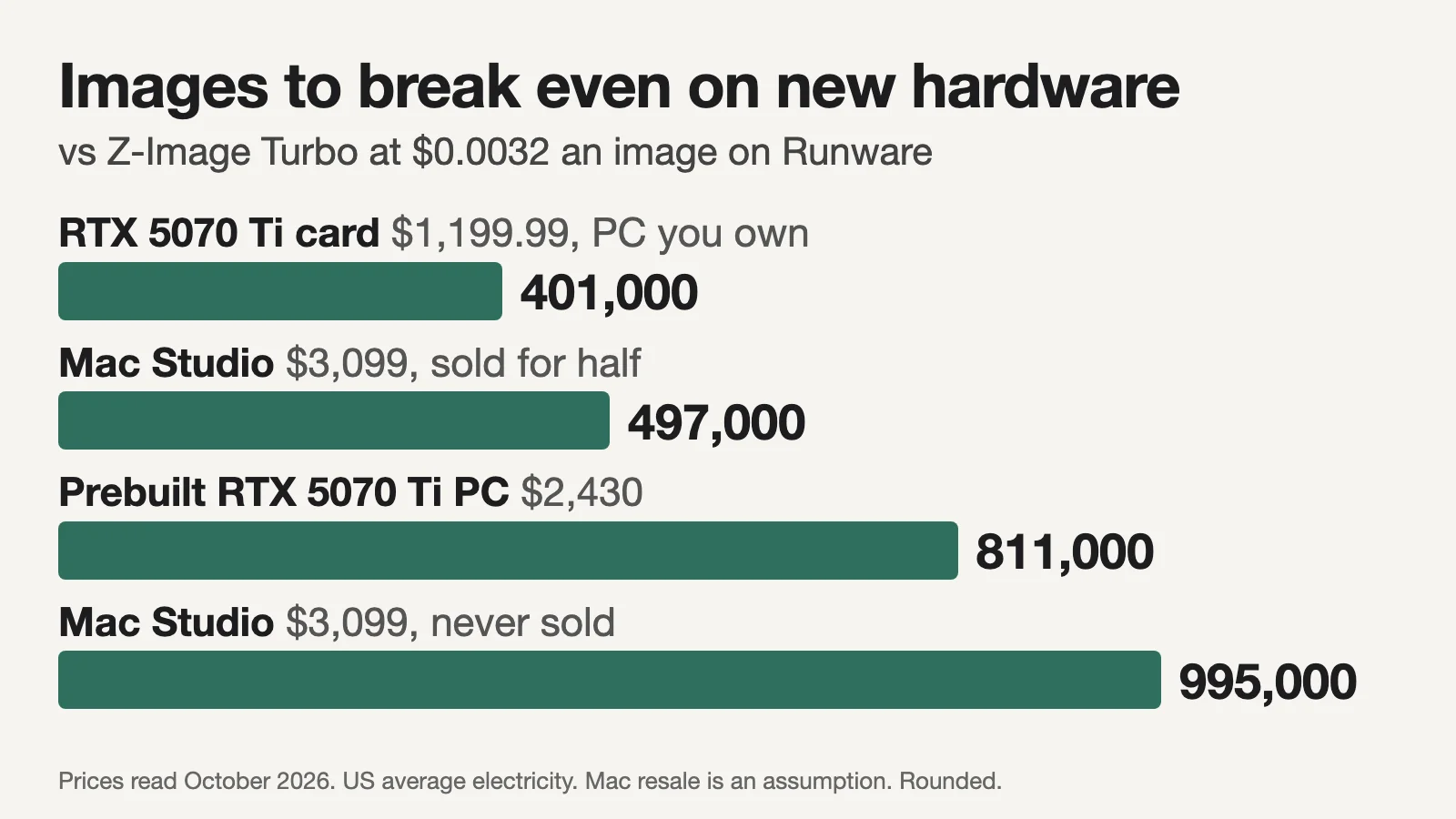
On a computer you already own, generating with an open model costs almost nothing per image. On our MacBook Pro with an M5 Max, a 1024×1024 Z-Image Turbo image takes 13.1 seconds, about $0.000085 of electricity at the average US home rate, or 9 cents per thousand. The same model costs $0.0032 an image on Runware, $3.20 per thousand, or $5 per thousand on fal. Buying hardware to generate locally is another matter: against Runware, the cheapest Z-Image Turbo host we found at this size, a $3,099 Mac Studio has to replace about 995,000 hosted images before it pays for itself, and even the cheapest 16 GB graphics card we found, $829.99 to add to a PC you already own, needs at least 259,000 before electricity.
The short version: if the model you want is open and your machine already runs it at a speed you can live with, local is the cheaper way to make big batches, as long as keeping it running does not eat your time. If you would buy hardware mainly for image generation, cheap hosted APIs for open models usually win on cash unless you will make well over 10,000 images a month for years. Even adding a $1,199.99 RTX 5070 Ti to a PC you own takes about 40 months to repay at 10,000 images a month against Runware. The answer moves when the hosted price is higher, when you are buying a computer anyway, and when you need privacy, your own LoRAs or a proprietary model.
Prices come from each vendor's own pricing page and hardware prices from apple.com and NVIDIA, all read on 20 October 2026, plus two dated retail checks: Tom's Hardware's Amazon US prices of 14 October and a PC Gamer deal listing of 19 October. Electricity rates are from the US Energy Information Administration, Ofgem and Eurostat. Z-Image Turbo times on the M5 Max come from our existing ComfyUI runs on 20 October 2026, with workflows and package versions and timing and memory logs; other hardware times come from the published benchmarks linked beside them. The arithmetic is in a downloadable worksheet.
Same model, two bills
A fair comparison needs the same model on both sides, which means an open-weight model: one whose weights you can download and run, and which hosts also sell by the image. As of 20 October 2026:
| Model | Running it yourself | Hosted price, 1024×1024 image |
|---|---|---|
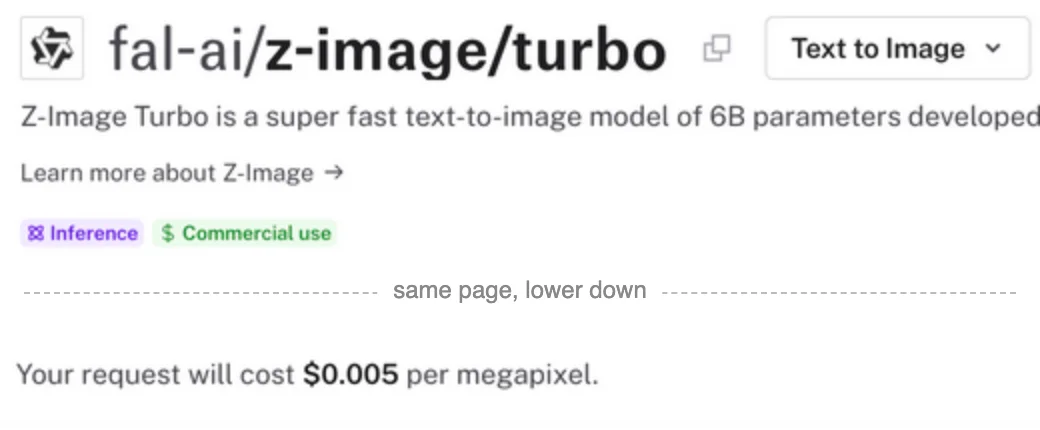
| Z-Image Turbo (6B, 8 steps) | Apache-2.0 | $0.0032 on Runware at 1024×1024; $0.005 on fal ($0.005 per megapixel) and WaveSpeed (per image); $0.015 per image on Alibaba Cloud Model Studio, international, prompt rewriting off |
| FLUX.2 klein 4B (4 steps) | Apache-2.0 | $0.0005 on Prodia for text-to-image, effective 1 October 2026; about $0.001 on Replicate ($1 per thousand output megapixels); $0.005 on fal; $0.014 for the first megapixel on Black Forest Labs' API |
| SDXL | CreativeML Open RAIL++-M, commercial use with use restrictions | About $0.002 on Together; about $0.004 per run on Replicate, which bills GPU time |
| FLUX.2 dev | Non-commercial; commercial use of the model needs a paid licence | $0.012 on fal ($0.012 per megapixel), which lists commercial use |
| Qwen-Image (20B) | Apache-2.0 | About $0.006 on Together ($0.0058 per megapixel); $0.02 on fal |
| HiDream-I1 Full | MIT for the image model; its Llama 3.1 text encoder has its own licence | $0.05 on fal ($0.05 per megapixel) |
Licences are from each model card (Z-Image Turbo, FLUX.2 klein 4B, SDXL, FLUX.2 dev, Qwen-Image, HiDream-I1). Hosts count megapixels differently: fal bills a 1024×1024 image as one megapixel, while Together's billing formula divides width times height by a million, so the same image is 1.05 megapixels there. The Together prices above apply that formula to its published per-megapixel rates, though the same catalog labels Qwen-Image and SDXL as billed per image, so confirm on your first invoice. Prodia explicitly includes 1024×1024 in its up-to-1-MP bucket; its $0.0005 rate is for text-to-image without input images. Runware publishes the $0.0032 rate for this exact size and bills its open-weight tier by compute time. Check each host's formula and your billed request cost before pricing other sizes. Our model reference has fuller pricing for Qwen-Image and HiDream-I1 Full.
Proprietary models are a separate question. Google and OpenAI list no downloadable weights for Nano Banana 2 or GPT Image 2, so choosing between them and a local open model is a choice of model, not of bill. For scale, their image-output charges for a 1024×1024 image are $0.067 for Nano Banana 2 (Gemini API pricing) and $0.006 at low quality to $0.211 at high for GPT Image 2 (OpenAI's image guide), with prompt and input tokens billed on top.
The bigger surprise is how much hosts differ for the same open model. Z-Image Turbo costs about 4.7 times as much on Alibaba's own cloud as on Runware, and FLUX.2 klein 4B twenty-eight times as much on its maker's API as on Prodia. Before comparing local with hosted, find the cheapest host for your model.
On a computer you already own
If the machine is paid for, the model's licence is free for your use and you have room for the files, the only extra cash cost of a local image is electricity: watts at the wall, times seconds per image, times your price per kilowatt-hour.
Our measured case is the stock Z-Image Turbo template in ComfyUI v0.42.1 at 1024×1024 and 8 steps, with the full bf16 files, on a 16-inch MacBook Pro with an M5 Max (40-core GPU) and 128 GB of memory. The workflow and package download and run logs document the setup. Each configuration ran twice on 20 October 2026, timed from submitting the job to its completion: 16.1 seconds for the first run, which loads the models, and 13.1 seconds once they were loaded. The ComfyUI process peaked at about 27 GiB of memory. With the smaller int8 model file and an fp8 text encoder it peaked at about 15 GiB and took 19 to 20 seconds.
We did not measure power during those runs. Notebookcheck's review of the same laptop measured 128.9 W at the wall in a GPU-heavy game, 133.9 W under a combined stress test and 5.7 W idle, screen on. At 130 W, an image uses about 0.47 watt-hours and a thousand images 0.47 kWh:
| Electricity price | Source | 1,000 images on the M5 Max |
|---|---|---|
| 17.99¢ per kWh, US residential average | EIA, 12 months to July 2026 | $0.085 |
| 48.00¢, Hawaii, the highest US state | EIA, July 2026 | $0.227 |
| €0.3618, German households using 2,500 to 4,999 kWh a year | Eurostat, first half of 2026 | €0.171 |
For Z-Image Turbo, that is about 2.7 percent of Runware's price at the US average and 7.1 percent in Hawaii, versus 1.7 and 4.5 percent on fal. Double the power estimate and Hawaii is still about 14 percent of Runware's price. In Great Britain the October to December default-tariff average is 26.32p per kWh by Direct Debit (Ofgem), about 12.5p per thousand images.
The more useful number is the saving: a thousand local images instead of Runware saves $3.11, versus $4.91 against fal. If you value your time at $50 an hour, that pays for about four minutes of setup, troubleshooting or waiting against Runware, or six against fal. So the deciding variable on an owned machine is not volume but hands-on time. If the workflow already runs and needs no attention, local is cheaper at any volume. If keeping it working costs you an hour a month, you need about 16,100 images a month before local comes out ahead of Runware at that rate, versus 10,200 against fal.
An NVIDIA desktop lands in a similar place. A published RTX 5090 benchmark made the same image in 3.18 seconds of compute in bf16. The card is rated at 575 W; if the whole PC drew 700 W, our assumption rather than a measurement, a thousand images would cost about 11 cents at the US average.
Can your machine run it, and how fast
Speed matters more than electricity: it decides how long a batch takes and how much one machine can make in a month. These are published Z-Image Turbo figures at 1024×1024 that state their method. They use different software, step counts and timing boundaries, so read them as orders of magnitude, not a ranking:
| Hardware | Software and settings | Seconds per image | Source |
|---|---|---|---|
| RTX 5090, 32 GB | Diffusers, bf16, 8 steps, compute time only | 3.18 | Benchmark report |
| RTX 3090 Ti, 24 GB | ComfyUI, bf16, 7 steps at 0.82 denoise, second run | 6.74 | miroleon benchmark |
| RTX 4070 Ti, 12 GB | Same settings | 9.14 | Same |
| Mac Studio, M5 Ultra, 80-core GPU | mflux 0.19.2, 9 steps, model loaded, median of five | 9.25 | NetworkChuck's harness, 20 September 2026 |
| MacBook Pro, M5 Max, 40-core GPU | ComfyUI v0.42.1, bf16, 8 steps, models loaded | 13.1 | Our run logs, 20 October 2026 |
| M5 Pro, 16-core GPU, 48 GB | A custom int8 Metal engine, 8 steps | 13.7 | zimgturbo, its developer's figures |
| Same M5 Pro | The reference PyTorch pipeline, bf16, 9 steps | about 76 | Same |
| RTX 3080 laptop, 8 GB | ComfyUI, fp8 files, 7 steps at 0.82 denoise, second run | 17.6 | miroleon benchmark |
| Mac mini, M4 Pro, 24 GB | ComfyUI, 4-bit model and 2-bit text encoder files, same settings | 104.1 | miroleon benchmark |
| Same Mac mini | bf16 files, same settings | 187.8 | Same |
Memory and software interact. The full-size Z-Image files are a 20.7 GB download (Comfy-Org's file list) and peaked at 27 GiB in our run; the int8 and fp8 files peaked at 15 GiB. When a workflow does not fit, it either fails or spills into slower memory: the 8 GB laptop above took 17.6 seconds with fp8 files and about twice as long with bf16 files, which are larger than its 8 GB, so part of the model had to be offloaded. On a Mac, apps and macOS share the same memory, so plan for the full-size files on 48 GB or more and the smaller files on 24 or 32 GB. Software matters as much: the M5 Pro rows show one machine at about 76 seconds with the standard PyTorch pipeline and 13.7 with a specialised engine. The Mac mini's slow result held even with heavily compressed files, and the benchmark does not say why.
Where to start with hardware you already have, for Z-Image Turbo at 1024×1024:
| You have | Try | What to expect |
|---|---|---|
| A 16 GB Mac | Draw Things, a Mac-native app, with 6-bit Z-Image Turbo files | One user reported 2 minutes 48 seconds an image at 896×1152 on a 16 GB M4 Mac mini, April 2026 |
| A 24 or 32 GB Mac | ComfyUI with the int8 model and fp8 text encoder files | About 15 GiB peak in our run; we found no timing for these machines |
| A Mac with 48 GB or more | ComfyUI with the full bf16 files | 13.1 seconds on our M5 Max; 27 GiB peak |
| An NVIDIA laptop with 8 GB | ComfyUI with fp8 files | 17.6 seconds on an RTX 3080 laptop |
| An NVIDIA card with 12 GB or more | ComfyUI with bf16 files | 9.14 seconds on an RTX 4070 Ti |
At almost three minutes an image, the 16 GB Mac above makes about 170 images in an eight-hour night, roughly 5,100 a month; 10,000 would need about 470 hours, nearly 16 hours a day. Quick back-and-forth while you work is not realistic in that setup, and that, more than electricity, is what limits small machines.
Buying hardware to generate locally
Once you are paying for hardware, the question is how many hosted images it has to replace to cover its net cost over the time you own it:
break-even images over ownership = (hardware cost - resale value) / (hosted price per image - electricity per image)
Which hardware cost to count depends on why you are buying:
- You already own it. The purchase is sunk; count electricity and your time only.
- You are buying a computer anyway. Count only the extra you pay for generation, and only if the cheaper configuration could not run your workflow. A 16 GB Mac mini with M6 is $899 and the 32 GB version $1,299 (Apple); if 16 GB cannot run your model at a speed you accept and 32 GB can, the $400 is the cost of going local. Using the MacBook's electricity figure, which we did not measure on a Mac mini, it pays back after about 128,000 Z-Image images at Runware's price, or 81,000 at fal's. If the cheaper machine already runs a smaller file well enough, a bigger upgrade buys speed and headroom rather than access, and the API comparison does not apply.
- You are buying it only for generation. Count the whole price, and treat resale as cash you get back only when you sell.
For case 3, compare the cheapest Z-Image Turbo host we found, Runware at $0.0032, with the fal baseline at $0.005. Each pair below is Runware / fal:
| Hardware | Cost counted | Images to break even | Per month over 3 years | Generation hours needed |
|---|---|---|---|---|
| RTX 5070 Ti card, 16 GB, added to a PC you own: $1,199.99, the cheapest Amazon US listing Tom's Hardware found on 14 October | $1,199.99 | 401,000 / 250,000 | 11,100 / 7,000 | 1,020 / 640 at 9.14 s |
| Prebuilt PC with an RTX 5070 Ti, $2,430 at Walmart (PC Gamer, 19 October) | $2,430 | 811,000 / 507,000 | 22,500 / 14,100 | 2,060 / 1,290 at 9.14 s |
| Mac Studio, M5 Max 40-core GPU, 48 GB, $3,099 (Apple), resold for half after three years | $1,549.50 net | 497,000 / 315,000 | 13,800 / 8,800 | 1,810 / 1,150 at 13.1 s |
| Same Mac Studio, no resale | $3,099 | 995,000 / 631,000 | 27,600 / 17,500 | 3,620 / 2,300 |
| RTX 5090 at October's $4,299 median listing, in a PC you own | $4,299 | 1,392,000 / 879,000 | 38,700 / 24,400 | 1,230 / 780 at 3.18 s |
Counts and hours are rounded. The chart at the top of this page shows the Runware case for the card, the two Mac Studio cases and the prebuilt PC. We found no published Z-Image Turbo time for the RTX 5070 Ti, so its rows use the older RTX 4070 Ti's 9.14 seconds and assume the PC draws 450 W; electricity is so small a share that even half that speed would move the break-even by under 8 percent against Runware, or 5 percent against fal. The cheapest 16 GB card in the same Tom's Hardware check, an RTX 5060 Ti at $829.99, would need at least 259,000 images against Runware before electricity, or 166,000 against fal. Those are lower bounds of 26 and 17 months at 10,000 a month; we found no published Z-Image time for it either, and it is a slower card than the 5070 Ti. The card needs a PC with a 750 W supply, by NVIDIA's recommendation, and the 5090 one of 1,000 W. The Mac Studio rows assume it matches our MacBook Pro's 13.1 seconds, since it has the same chip; we did not measure one. Resale for half is an assumption, and the Mac Studio's half-resale row only breaks even once the sale happens.
In cash terms, at 10,000 images a month ($32 on Runware, $50 on fal):
- RTX 5070 Ti card in a PC you own: about 40 months to repay against Runware, versus 25 against fal. After three years you are about $122 behind Runware, or $526 ahead of fal, before resale.
- Prebuilt RTX 5070 Ti PC: about 81 months against Runware, versus 51 against fal.
- Mac Studio: about 99 months against Runware, versus 63 against fal. Three years of savings against Runware total about $1,121; even selling for half ($1,549.50) leaves you about $428 behind. Against fal, $1,769 of savings plus the sale leave you about $220 ahead, only on the day you sell it.
- RTX 5090 at the median listing: about 139 months against Runware, versus 88 against fal.
At 1,000 images a month ($3.20 on Runware, $5 on fal), none of these pays back within any sensible life of the machine.
These counts assume today's hosted price holds for years. If Runware's $0.0032 price halved to $0.0016, the RTX 5070 Ti card would take about 86 months to repay at 10,000 images a month and the Mac Studio about 205. If fal's $0.005 halved to $0.0025, those figures would be about 52 and 128 months. The price you compare against matters as much: against Qwen-Image at fal's $0.02, the $3,099 Mac Studio breaks even after about 155,000 images; at Together's price, after about 517,000. Against HiDream-I1 Full at $0.05, about 62,000. Those use the Z-Image electricity figure, and both models are larger and slower, so check your machine runs them acceptably before counting the saving. Against FLUX.2 klein 4B at Prodia's $0.0005, the same machine needs about 7.47 million images using that electricity proxy, versus 3.39 million at Replicate's $0.001. The Klein result needs its own local timing and power measurement before you buy hardware.
Rented GPUs sit in between
You can also rent a GPU and run the open model yourself. RunPod lists an RTX 5090 at $0.69 an hour on its community cloud and $1.19 on its secure cloud as of 20 October 2026, billed by the second. At the 3.18-second benchmark time, the community price is about $0.0006 an image, about 19 percent of Runware's price, or 12 percent of fal's, but only for seconds when the GPU is busy. Starting the machine, downloading 20 GB of model files and leaving it idle between prompts are billed too (RunPod billing). Rental beats Runware's $0.0032 only while the GPU is busy more than about 19 percent of the billed time, versus 12 percent against fal, and storage keeps billing on stopped pods. A 1,000-image batch with ten extra billed minutes for startup and idle costs about $0.72 before storage, against $3.20 on Runware or $5 on fal. Rental suits a large batch prepared in advance, and for someone whose volume comes in batches it is the route to price before buying hardware; for a few images at a time, a per-image API is cheaper and simpler.
When cost is not the deciding factor
Some reasons to choose local or hosted outweigh a fraction of a cent per image:
- Privacy. In a fully local workflow, prompts and reference images never leave the machine. ComfyUI can also call paid outside services through its partner nodes, so check that your workflow uses none. Client material under an NDA may settle the question before price does.
- Your own LoRAs and nodes. Local ComfyUI runs the LoRAs, ControlNets and custom nodes you install, provided they were built for that model's architecture and work with your hardware and setup (ComfyUI's LoRA guide). Hosts cover the common cases at a premium: fal's Z-Image Turbo LoRA endpoint is $0.0085 per megapixel (fal).
- A proprietary model is better for the job. If only Nano Banana or GPT Image produces acceptable results, the comparison is between their price and your time, not your hardware.
- Both. A common split is local drafts and iteration on an owned machine, then hosted runs for a model or size the machine cannot handle. Voyager, the desktop app our team builds, can run an existing workflow on your local ComfyUI server or generate with hosted models through your own fal or Google key, so specify which route you want to pay for.
The costs people forget
Time, yours and the machine's. A thousand images at 13.1 seconds each keeps the M5 Max busy for 3.6 hours, during which its GPU and memory are mostly unavailable for other heavy work; a hosted API can run requests in parallel. Overnight batches hide this, interactive work does not.
Setup and upkeep. On our test Mac a fresh ComfyUI install took under a minute and the model downloads about five minutes on a fast connection; budget more on a slower line and more still the first time. Updates can break add-ons: a January 2026 ComfyUI change stopped the TeaCache and MagCache nodes from loading, and users documented a workaround in issue 11660.
Storage. Model files accumulate: Z-Image Turbo alone is 20.7 GB at full size. On a Mac, where internal storage is expensive to upgrade, a growing models folder usually ends up on an external drive.
Licences. Downloading weights does not always allow commercial use. FLUX.2 dev's licence allows commercial use of outputs but limits running the model to non-commercial purposes, and says use "for revenue-generating activity" is not one (licence); Black Forest Labs sells self-hosted commercial licences and its public licensing page lists no prices (BFL licensing), while fal lists commercial use on its hosted FLUX.2 dev endpoint. Terms also differ within a family: FLUX.2 klein 9B is non-commercial, unlike the 4B (model card), and Qwen-Image 2.1 is research-only, unlike the original Qwen-Image (licence). Read the licence that ships with the exact files you download.
Hosted extras. fal's Z-Image Turbo endpoint adds $0.0025 per request with prompt expansion on, and returns a black image when its safety checker flags an output; switching the checker off needs account approval (API reference). Purchased credits expire after a year at fal and Replicate. Apps that resell these models may add a margin.
Images you throw away. Both routes charge per attempt, not per keeper. Divide each route's cost by the share of images you keep: at $0.0032 an image and one keeper in four, a usable hosted image costs $0.0128 ($0.02 at fal's $0.005), while local electricity per keeper stays a fraction of a cent. The same logic decides between two hosted models of different quality, as our guide to comparing AI video costs by usable shots shows for video.
Same model is not always the same output
Running "the same model" locally and hosted does not guarantee the same pictures. fal's Z-Image Turbo endpoint defaults to 8 steps, an acceleration setting of regular (with none and high available), PNG output and its safety checker, and its API reference does not state the precision it serves (API reference). Locally you choose: our int8 files used much less memory and took about 50 percent longer, and the side-by-side output comparison looked similar for this one prompt. That is not a quality-equivalence test. Distilled models such as Z-Image Turbo also have slower base versions, which are different checkpoints at different prices; Z-Image's base model is $0.01 per megapixel on fal. If quality matters, run the same prompts both ways before trusting a price comparison.
The worksheet
Download the worksheet (CSV) and open it in Excel, Google Sheets or Numbers. Change the values in column B: images per month, your machine's seconds per image, its power draw, your electricity price, the hosted price, the hardware cost you are adding, resale value, the hours a month the machine is free, and any licence, storage and upkeep costs. Put one-time setup time, valued at your rate, into the hardware cost, and recurring upkeep into hands-on hours. Defaults use Runware's $0.0032 Z-Image Turbo price. Set the hosted-price input to $0.005 for the fal baseline, or $0.0005 for Prodia's Klein 4B text-to-image; use your own local timing and power for a different model.
It works out electricity per image and monthly cost both ways, sends any volume beyond one machine's free hours to the API, and reports two different answers that are easy to confuse: how many months of savings repay the purchase, and whether you come out ahead over the whole period once you sell. It also gives the monthly volume you need to break even and whether one machine can make it. If your app shows formulas instead of results, the fourth column describes each.
Two inputs are worth measuring yourself: seconds per image, timed on your own workflow after a warm-up run, and power, read from a plug-in watt meter while a batch runs.
Which to choose
| If your situation is | Choose | Because |
|---|---|---|
| You own a capable machine and the workflow runs without attention | Local, at any volume | Electricity was about 2.7 percent of Runware's Z-Image Turbo price at the US average |
| Local would need setup or regular fixing, and you make a few thousand images a month or fewer | A hosted API | A thousand local images save about $3.11 against Runware; an hour of your time costs more |
| You own a gaming PC and will make 10,000 images a month | Compare a 16 GB card with the cheapest host before buying | A 5070 Ti takes 40 months against Runware, versus 25 against fal; a 5060 Ti needs at least 26 months before electricity against Runware |
| Buying a computer anyway, and the cheaper configuration cannot run your model | The upgrade, if you will make over 128,000 images at the assumed running cost | $400 for 32 GB pays back in about 128,000 Z-Image images against Runware, or 81,000 against fal |
| A dedicated Mac or high-end PC for an open model priced at $0.0032 an image | A hosted API, unless you will make well over 10,000 images a month for years | About 995,000 images for a $3,099 Mac Studio with no resale |
| A large one-off batch and no suitable hardware | A rented GPU | About $0.0006 an image on a busy RTX 5090 |
| Paid client work with FLUX.2 dev | A hosted endpoint that includes commercial use, or a paid licence | The free licence does not cover commercial use of the model |
| Only a proprietary model meets your quality bar | That model's API | Neither Google nor OpenAI lists downloadable weights |
Frequently asked questions
Is it cheaper to generate AI images locally? On hardware you already own and have set up, yes: Z-Image Turbo on an M5 Max costs about 9 cents of electricity per thousand images at the US average rate, against $3.20 per thousand on Runware or $5 on fal as of October 2026. Against Runware, buying hardware pays back only at high volume, from at least 259,000 images before electricity for an $830 graphics card to about 995,000 for a $3,099 Mac Studio.
Does the same apply to Stable Diffusion? The arithmetic is the same, and SDXL has a lower hosted price than Z-Image Turbo: about $0.002 an image on Together as of October 2026. At the same hardware and running costs, that leaves less saving per image to repay a purchase, though SDXL is a smaller model that may run on cheaper hardware; either way, on an owned machine local electricity is still a small fraction of the hosted price.
Voyager is a desktop AI agent for creative work
Describe what you want to make; Voyager plans it, uses your apps and tools, and keeps everything editable.