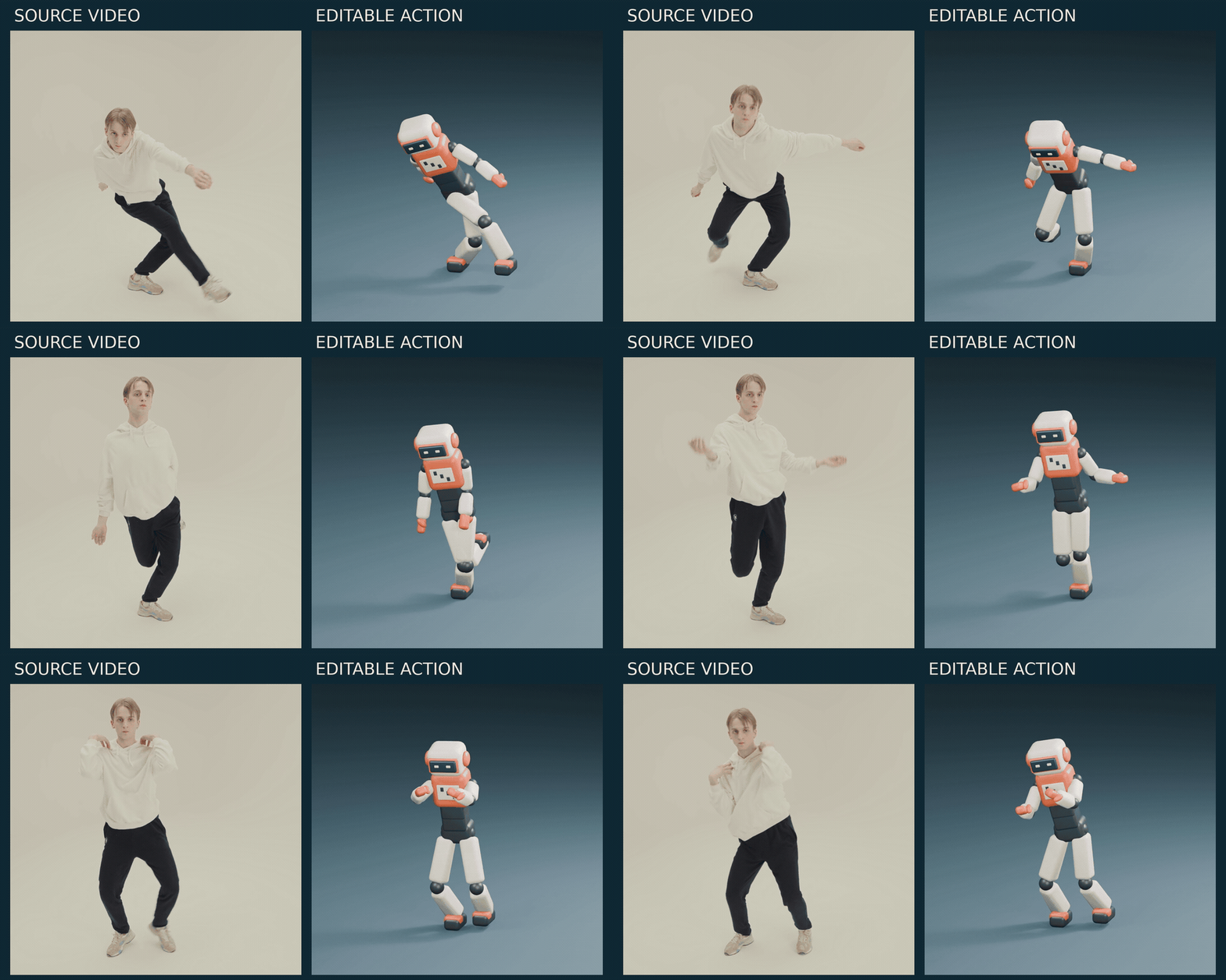
A four-second performance can give you a useful starting point for a game emote, character test or animated short. The valuable deliverable is a Blender action you can edit: keep the arm sweep, change a foot plant, then use the movement in another shot.
We turned a short dance reference into this toy robot’s body animation. The download keeps the captured and cleaned actions separate, so you can inspect what changed.
Start with a clip you can actually track
Recent creator experiments show agents working from movement references. For an editable result, the practical challenge is getting from visible body positions to a rig, then fixing the contacts that make it feel grounded.
Choose a short shot with one performer, a steady camera and visible hands and feet. A clean few seconds is more useful than a long clip with hidden limbs. Review the motion before choosing its endpoint: our first selection included a later arm turn that did not transfer reliably, so we selected a shorter phrase and extracted it again.
Here is a reusable starting prompt:
Turn this four-second full-body performance into editable Blender animation using the supplied Rigify fixture.

Keep the original pose observations and source timestamps. Save separate captured and cleaned actions. Start with light smoothing, then compare the arm gesture and leg lift against the source. Flag missing or unreliable motion instead of inventing it.

Show a synchronized source-and-character preview. Keep floor placement and contact corrections separate from the captured motion. Deliver the .blend and the pose data.
Our reference is Antoni Shkraba’s studio dance, used under the Pexels license. The sample covers seconds 18–22 of that recording.
Capture the gesture; author the contact
MediaPipe Pose Landmarker estimates 33 body landmarks. Those observations can drive a rig, but they do not establish where the studio floor is or when a shoe should stay planted. Smoothing also cannot recover a gesture the tracker missed.
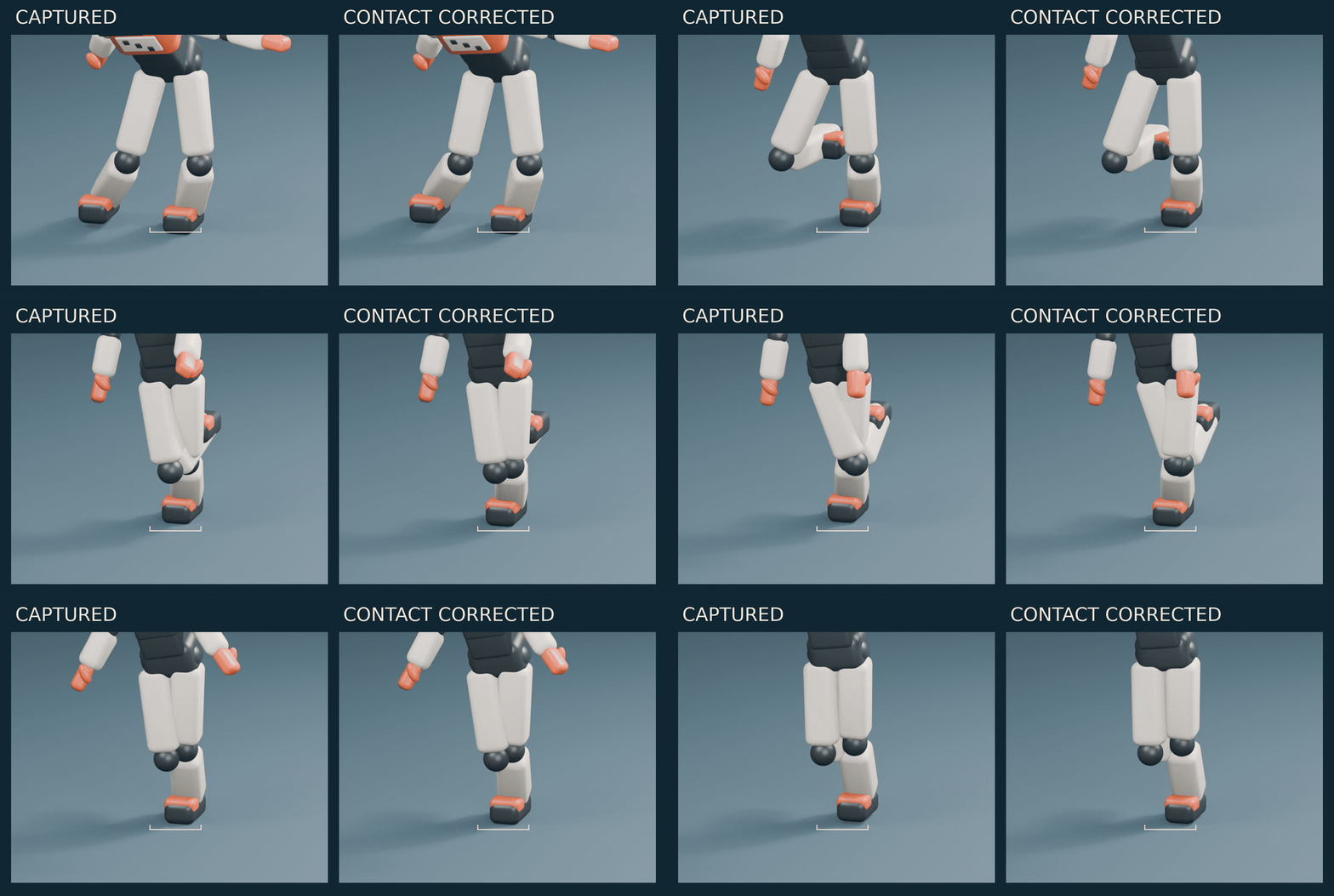
For this shot, the left foot stays planted from 0.9 to 2.1 seconds of the excerpt. We kept that interval as an explicit constraint, with short transitions into and out of the hold.
Keep the left foot planted from 0.9 to 2.1 seconds, blending the contact over 0.15 seconds at each end. Preserve the arm gesture and the lifted leg.

Keep the captured action unchanged. Put the correction in a separate cleaned action, and keep floor/root placement as an authored curve. Check the boots against the floor throughout the shot, including between keyed frames.
Check the entire body after a repair. A planted foot is not a success if the knee pops, the other leg intersects it, or filtering removes the gesture you wanted. Keep the source visible while judging the result.
Take it into Voyager without losing the editable parts
Voyager’s animate-from-video skill connects local extraction to a supported Rigify fixture, preserves decoded timestamps, and saves the observed motion, cleaned controls and authored root movement. The agent can rebuild a shortened selection, inspect the saved actions, then revise the contact plan in the same project.
The current local extraction route requires Apple Silicon, macOS 14 or later, and Blender; this kit uses Blender 5.2.2. The adapter supports the supplied basic-human Rigify fixture. An arbitrary character rig needs its own inspected mapping. This is body animation; fingers and reliable limb twist need separate work.
Download the editable scene
Get the Blender project and offline preview. It includes the unanimated robot, pose data, contact plan, rebuilding scripts and both actions. The original performance remains linked to its source and license.
Open the scene and select the rig object. Captured_Controls preserves the retargeted body motion; Cleaned_Controls_Contacts contains the cleanup. The README explains how to switch actions and disable contact constraints for a fair raw comparison.
Try changing the contact interval before changing the whole performance. That is the benefit of keeping the animation editable: one local correction can improve the shot while the useful gesture survives.
Make your next project in Voyager
Create an account, download Voyager, and start making.