
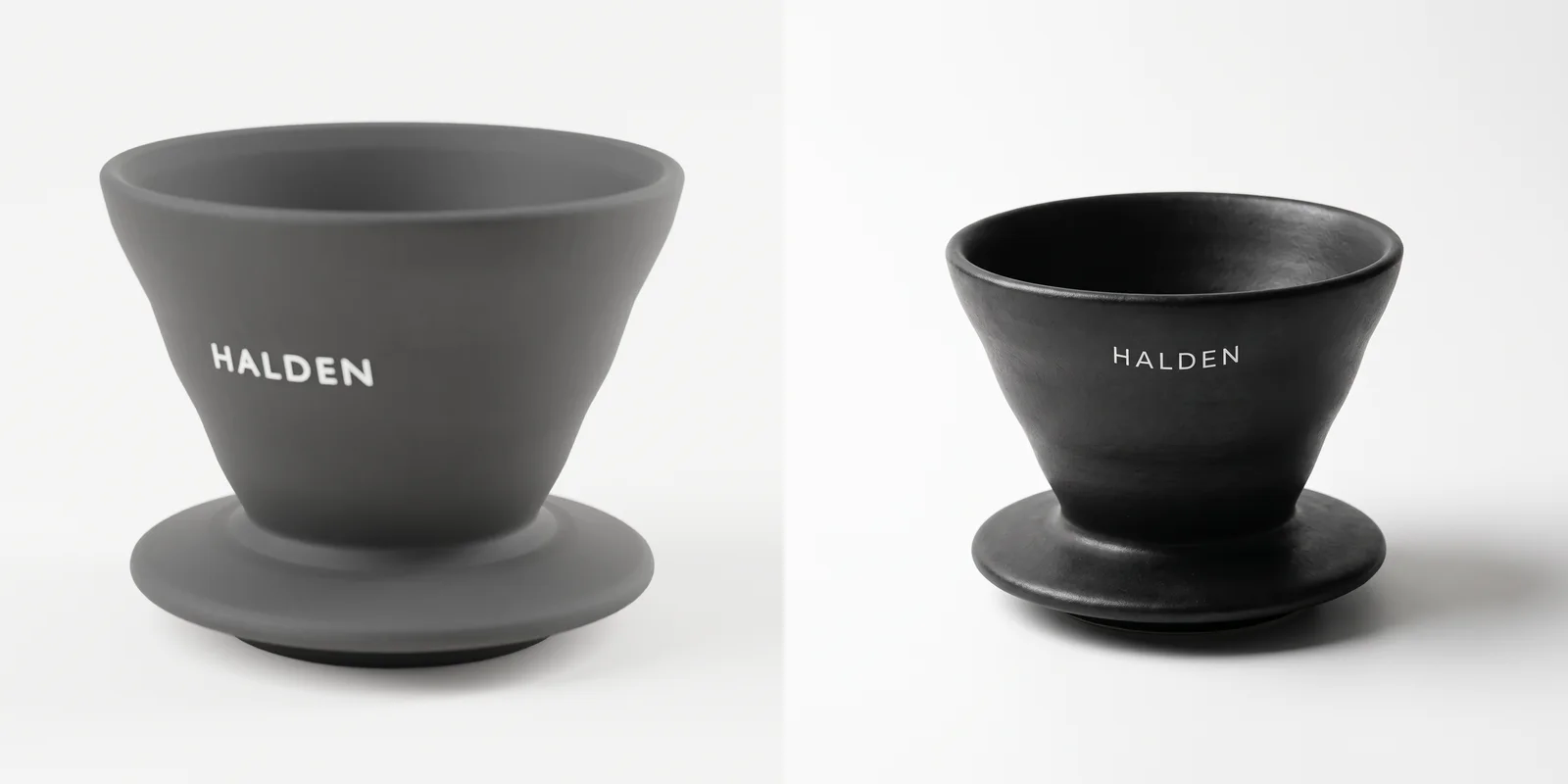
A 3D product render is an image of a product made from a 3D model instead of a camera. There are four routes: hire a studio, render a CAD or 3D model you already have in Blender or KeyShot, generate a model from a product image and render that, or skip 3D and have an image model redraw the product shot. Which one fits depends mostly on whether you have CAD, how many products have to match, and whether the shot must show parts a single photo hides.
The short version: if you have CAD, render it yourself or give it to a studio, because the dimensions and hidden parts then come from the design. Without CAD, image-to-3D gave us usable catalogue stills of one generated product after a material fix, though the inside of the cone was not a working dripper. Image-only AI produced a styled lifestyle shot without building a set, but each image redraws the product rather than showing a fixed model.
Key takeaways
- Rapid Renders' calculator estimates a simple product render at $99 to $199 per image, and 7cgi starts at $150 per simple SKU for a model, two white-background images and colour variations (calculator, 7cgi, read 20 November 2026). Both studios prefer CAD or STEP files as input.
- An image-to-3D dripper (Trellis 2, $0.30 per model at list in our credit catalog, read 20 November 2026) rendered convincingly in Blender after two material values were changed, but neither it nor the Tripo P2 mesh has the outlet in the cone's floor that the source image hides.
- From the same image, Nano Banana 2 and GPT Image 2 each spelled a requested wordmark correctly, but their views from above invented two different floors for the cone, and both lifestyle scenes added props we did not ask for.
Studio, KeyShot and Blender facts were read from their own pages on 20 November 2026. Voyager, the desktop app our team builds, runs the AI models in this post, and their prices are estimates from its published credit prices (price points dated 4 November 2026, read 20 November 2026) at 1 credit = $0.01, the Creator monthly rate.
The four routes at a glance
| Route | What you need | Price, with its unit | Time | Same product from every angle? | Where it breaks |
|---|---|---|---|---|---|
| Hire a studio | CAD or STEP files, or photos with dimensions, plus finish details | Rapid Renders' calculator: $99 to $199 per image (simple), $200 to $600 per image (lifestyle). 7cgi: from $150 per simple SKU | 7cgi: drafts in 1 to 3 business days, finals in 3 (simple) to 7 (advanced). Rapid Renders: test renders in 2 to 3 days, stills in about a week | Yes, from the studio's model | Price per SKU or image, revision rounds, waiting |
| Render your own CAD in Blender or KeyShot | A CAD or 3D model, and a lit set you build once | Blender free. KeyShot Professional $1,299 per seat per year | Set-up once, then 21 to 45 seconds per still in our Blender scene | Yes | You need the model and the lighting skill |
| Image-to-3D, then render | One clean product image | $0.30 to $1.10 per model at list for the two we used, plus your time | About 1 to 2 minutes to generate, then set-up, material fixes and renders | Yes, one mesh holds its shape | Hidden geometry, materials, fine detail |
| Image-only AI shot | One product image and a prompt | $0.10 to $0.22 per image at list | 19 to 92 seconds per image in our runs | No, each image is redrawn | Angles, interiors, reflections, label placement |
Sources: Rapid Renders' cost calculator and product rendering page, 7cgi product renderings, KeyShot pricing, all read 20 November 2026. The AI prices are list estimates from the credit catalog, at the settings given in Routes 3 and 4: the image-to-3D row covers Trellis 2 at 1024p (30 credits) and Tripo P2 (110 credits), which took about two minutes and 70 seconds to generate on their dripper runs. The AI rows leave out your time in Blender and any subscription.
Route 1: hire a studio
A product rendering studio models your product, sets up materials and lights, and sends finished images. Two studios that publish their prices show the range, both read 20 November 2026:
- 7cgi prices per SKU, and its figures are starting prices for simple products. Launch, from $150, covers a model, materials, two white-background images, three colour variations and an AR-ready model. Engage, from $250, adds a 3D lifestyle scene, one lifestyle image and a detail close-up; extra angles or scenes are quoted separately, so confirm what your quote includes. Expand, from $350, adds a 360 spin among other items. Very large or highly detailed products are quoted before work starts. First drafts take one to three business days; final files for one product take three business days if simple, five if moderate and seven if advanced. Three revision rounds are included on the approved brief.
- Rapid Renders' cost calculator estimates per image: $99 to $199 for a simple white-background render (one to two days), $200 to $1,500 for a complex product, $200 to $600 for a lifestyle render (three to seven days) and typically $250 to $700 for a CAD-based render. These are estimates; a fixed quote follows a brief review. The same page lists surcharges of 40 percent for 48-hour rush, 25 percent for priority and 25 percent for 4K, so check which apply to your quote. Its product rendering page gives first test renders in two to three days and final studio stills in about a week.
Both studios call CAD or STEP files the ideal input and accept clear photos with dimensions when there is no CAD; 7cgi adds that each open question adds about a day.
Settle file ownership before you order if you want future edits. 7cgi's FAQ says you own the 3D models and the final files, and it delivers AR and 3D files as GLB and USDZ. Rapid Renders' terms of service give you the final deliverables and any models listed in the scope after full payment, but keep working and source files unless that is agreed in writing, possibly for a fee. If you want to reuse the model for colourways, 360 spins or AR later, name the editable model, its materials and textures as deliverables.
A studio is the right call when you need many SKUs to look consistent, you have no one to light a scene, or the render has to survive close inspection by a buyer or a retailer.
Route 2: render your own CAD or 3D model
If your product exists as CAD, you already have the hard part: exact dimensions, the hidden geometry and real part boundaries. What remains is a set, materials, lights and a camera.
Blender is free and released under the GNU GPL, which lets you use it for any purpose (Blender manual). Its Cycles renderer is a path tracer that renders on a GPU or, more slowly, on the CPU. Blender 5.2.1 imports glTF, OBJ, FBX, STL, USD and PLY out of the box but has no built-in STEP importer. You can export a mesh format from your CAD tool, or add a STEP importer such as the STEPper Reborn extension (GPL, Blender 5.1 and newer, version 2.3.1 on 20 November 2026); our CAD to product animation technique covers a CAD import end to end.
KeyShot lists STEP, IGES, Parasolid, SOLIDWORKS, Creo, CATIA, Inventor, NX and Rhino files among its supported import formats, and you assign materials by dragging them onto parts. Its pricing page, read 20 November 2026, lists KeyShot Studio Professional at $1,299 per user per year (shown as $108.25 a month, billed annually), Business at $1,599 per user per year and a 14-day trial without a card. Every plan includes KeyShot Studio AI; cloud rendering and the AI Agent are paid with prepaid credits. We did not run KeyShot, so we have no speed comparison with Blender.
The set we used is the standard product setup, and it transfers to either tool:
- A seamless sweep: a floor that curves up into the back wall, so there is no horizon line.
- A large soft key light above and to the left, a narrow rim light behind on the right, and a weak fill.
- Two black flags just out of frame. A dark product, and a glossy one even more, reflects whatever surrounds it; without flags, a black dripper reflects a white room and reads as grey or chrome.
- A low-strength studio HDRI for the reflections in between. We used studio_small_09 from Poly Haven, which is CC0: Poly Haven's licence page says its assets can be used for any purpose without credit.
- A long lens (85 to 100 mm equivalent) so the product is not distorted, real-world scale (we set the dripper to 10 cm tall) and a filmic view transform (AgX in Blender).
After the set existed, each 1600 x 1600 still took 21 to 45 seconds in Cycles at 256 samples on an Apple M5 Max, and the 72-frame turntable below took about six minutes at 64 samples.
Route 3: no model? Generate one from an image, then render it
Image-to-3D models turn one product image into a textured mesh. Our input was the coffee dripper image the model reference feeds to every image-to-3D model. It is a generated image, not a photo: a smooth matte black ceramic pour-over cone on a flared round foot, seen from slightly above, with nothing printed on it. The smooth upper inside wall is visible; the floor of the cone and its outlet are not.
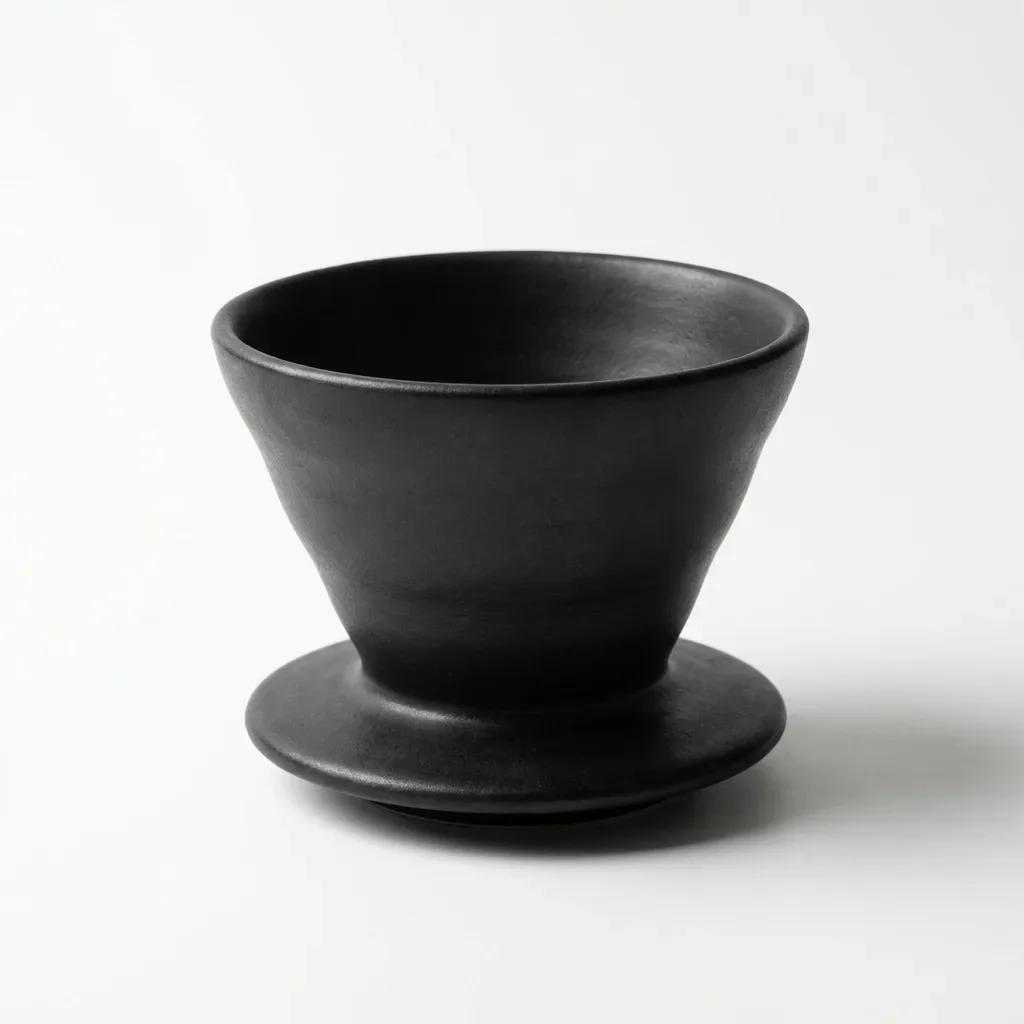
The two meshes are ones the reference made from that image on 17 November 2026. The catalog lists an estimated $0.30 at 1024p for Trellis 2 and $1.10 for Tripo P2 (read 20 November 2026). Trellis 2 took about two minutes and has 460,795 triangles with colour, roughness and metal maps; we picked it because it scored at or near the top on the dripper in the roundup on both its first and second attempts and is among the cheapest. Tripo P2 has 4,838 triangles with PBR maps. Trellis 2 supplied every Blender shot below, and Tripo P2 joined it for the gloss and clay comparison, all rendered in Blender 5.2.1 on 20 November 2026 in the set described above.
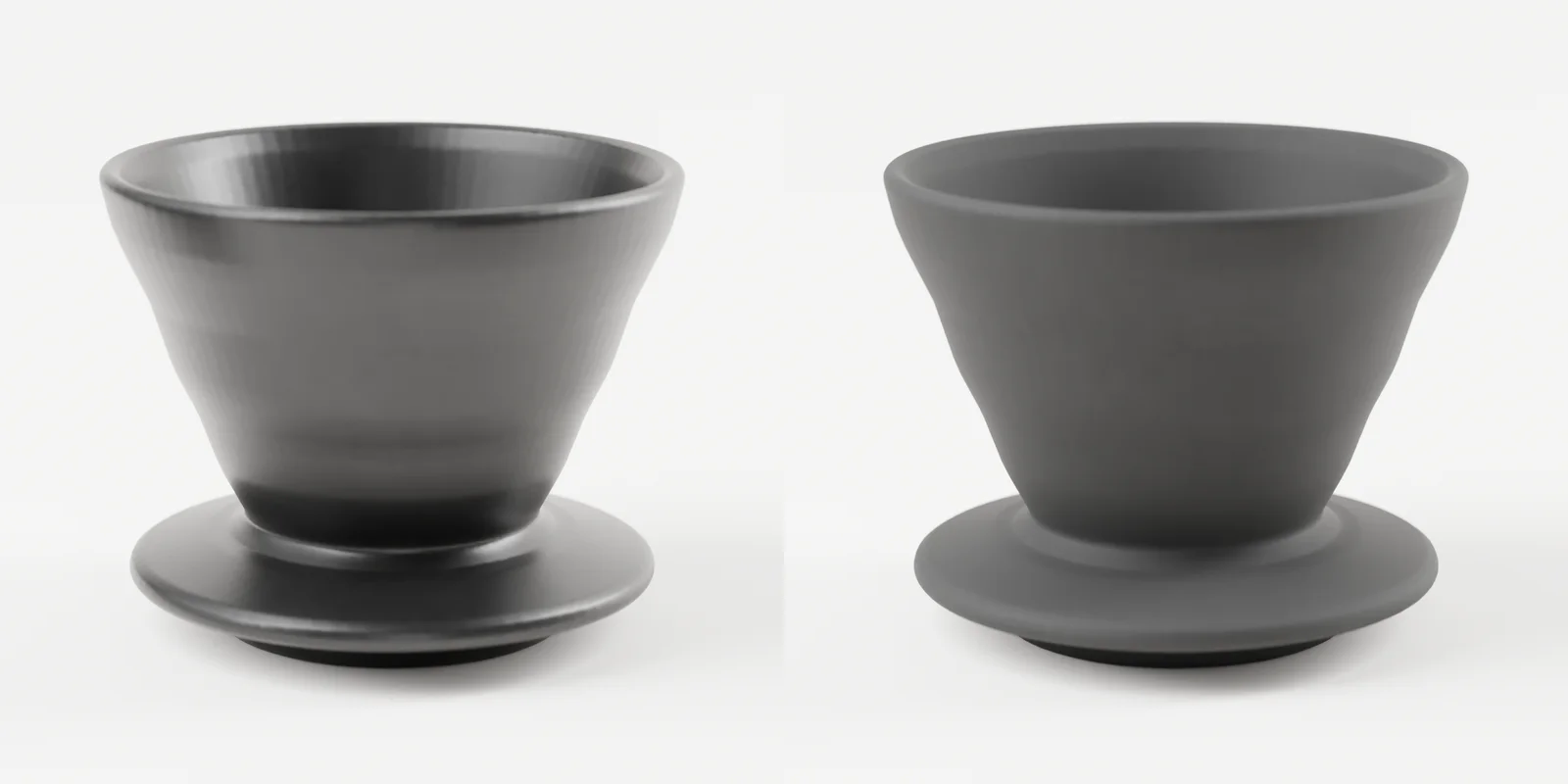
Three things needed attention once the model was in a lit studio:
The material was wrong for the product. The generated maps describe a surface with an average roughness of about 0.37 and a metal value of about 0.2, which is a satin, slightly metallic finish, not matte ceramic. Under studio lights the dripper read as grey metal with a lighter band baked into the colour map. Replacing the two maps with plain values (roughness 0.8, metal 0) fixed it. Check the roughness and metal maps on any generated model before trusting them; here the colour map was the part worth keeping.
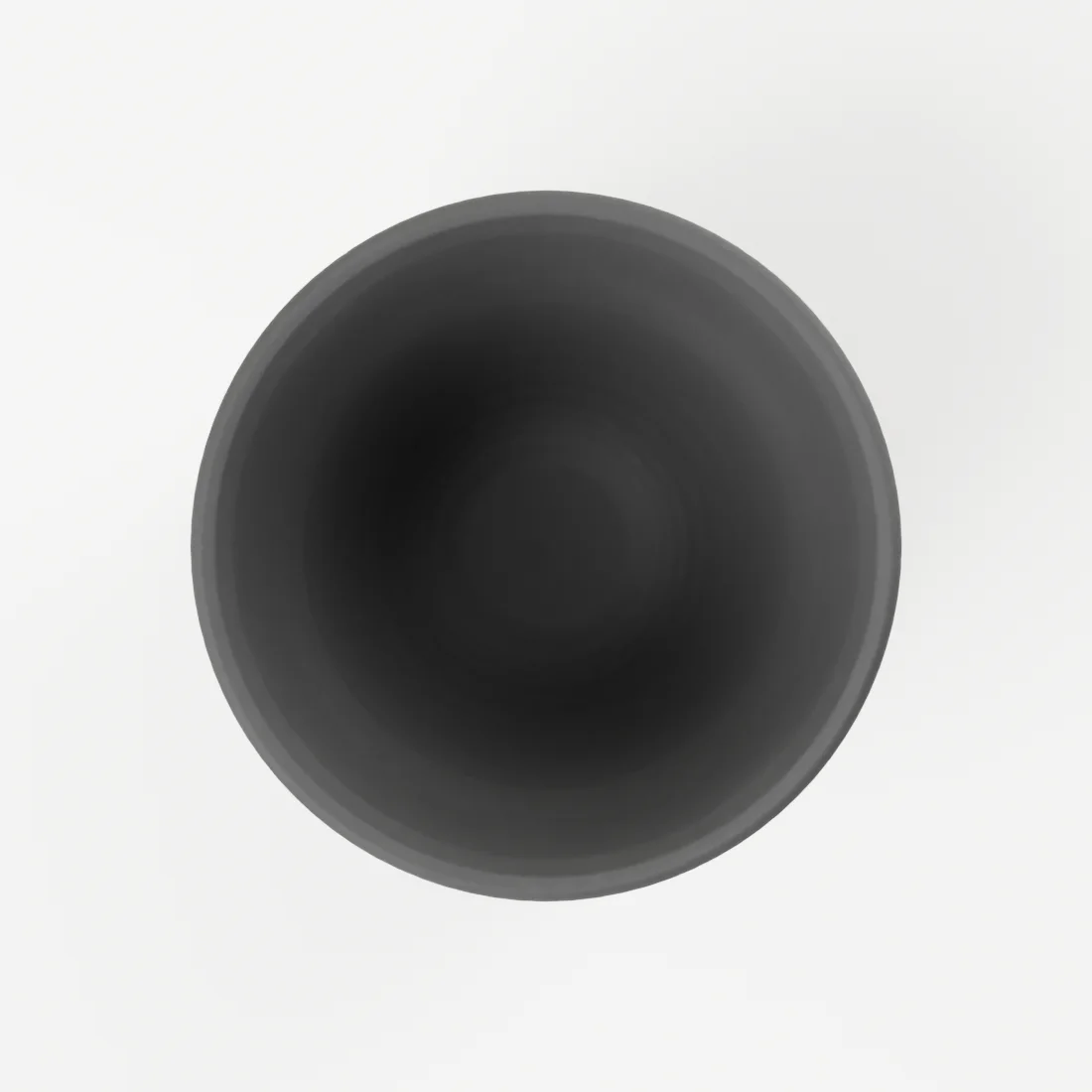
The hidden geometry was invented. A pour-over dripper drains through an outlet in the floor of its cone. The source image hides that floor, and neither mesh has a central outlet: a ray cast straight down the axis in Blender hits a solid floor about a quarter of the way up the Trellis 2 mesh and about 4 percent of the way up the Tripo P2 mesh. Viewed from above, the Trellis 2 render is a closed bowl. A side-on shot can hide the missing outlet if the interior stays out of view; for a top-down shot, a cutaway or anything compared with a real product, it is geometry you have to model by hand.
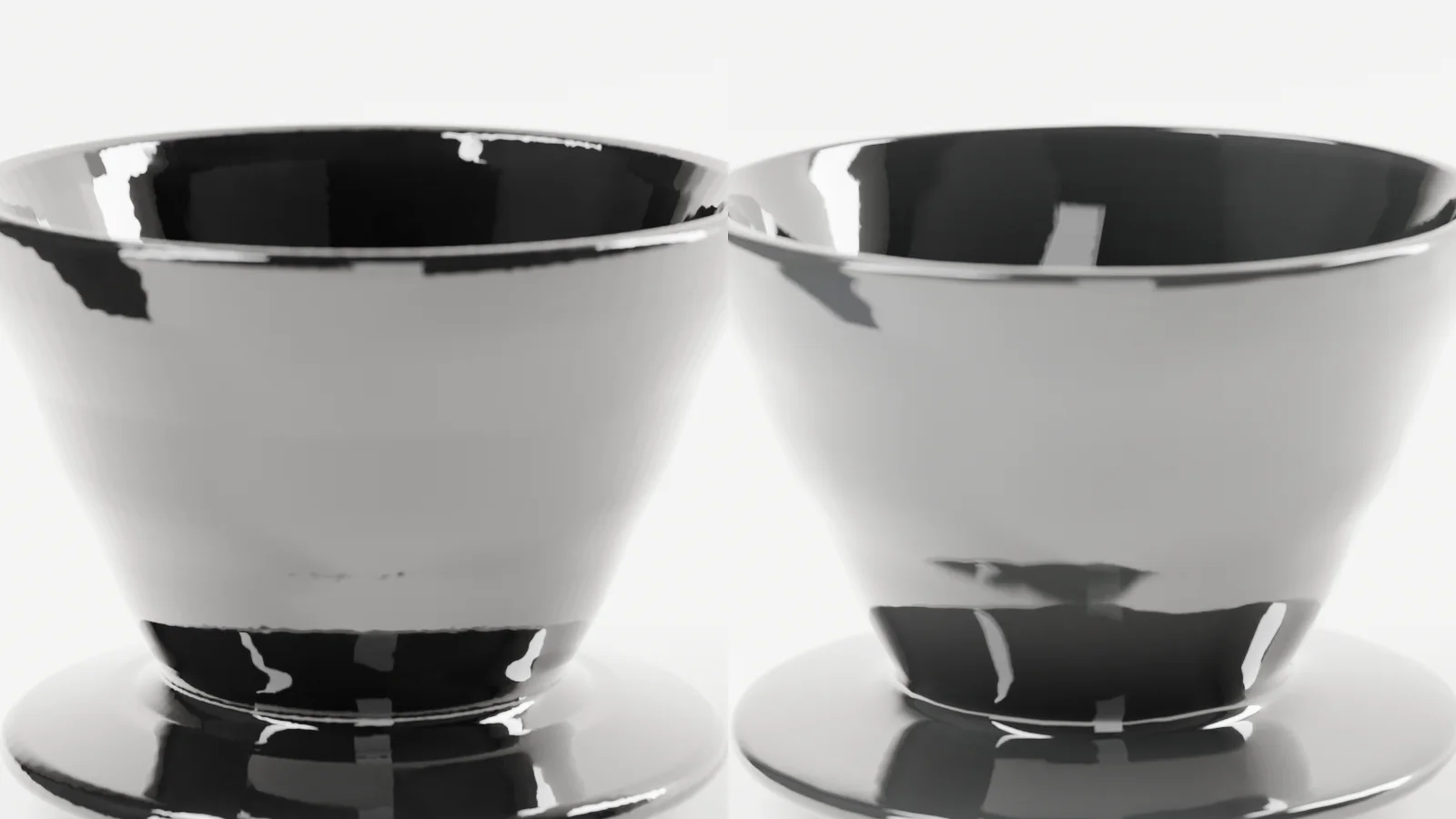
Gloss shows every ripple. A matte finish forgives a lumpy surface; a glossy one turns it into wobbly reflections. Rendered as glossy black, the Trellis 2 cone showed broken reflection bands and a few dark specks. The Tripo P2 mesh, at 4,838 triangles, was smoother overall but has a visible kink low on the cone where the reflection jumps. If the real product is glossy, check the generated mesh as clay or gloss before you commit to it, or smooth it first; our AI retopology guide covers decimating and remeshing these files.
The HALDEN wordmark below is a text object projected onto the Trellis 2 mesh, at the size and position we chose, following the curve of the cone. Because it is geometry on the model, it stays in place and spelled the same in every frame. For the turntable the camera stays fixed while the product and the two black flags rotate together, so the product is the same from every angle.
Description / transcript
No audio. The dripper rotates once under a fixed camera.
How faithful the shape is depends on the input. Our source was one generated image with no dimensions, so the mesh is a plausible dripper, not a measured one. For a real product, the side silhouette is only as accurate as the image, and anything the image hides is a guess.
In Voyager, the web Generate page makes 3D from an image only (a text idea becomes an image first, as its own job), and both mesh models here need the Starter plan or above. A mesh downloads as GLB, with an option to set a real-world height; FBX or .blend conversions are offered for some jobs and keep the original scale. Voyager's agent, or your own Claude Code or Codex, can also drive Blender on your computer to build the set and render.
Route 4: image-only AI product shots
Image models can take your product image and return a finished product shot without any 3D. On 20 November 2026 we sent the dripper image with four edit prompts (a lifestyle scene, a printed wordmark, a view from directly above and a gloss finish), once each, to Nano Banana 2 (2K, $0.10 per image at list, 19 to 24 seconds per call) and GPT Image 2 (high quality at 1024 x 1024, $0.22 per image at list, 85 to 92 seconds).
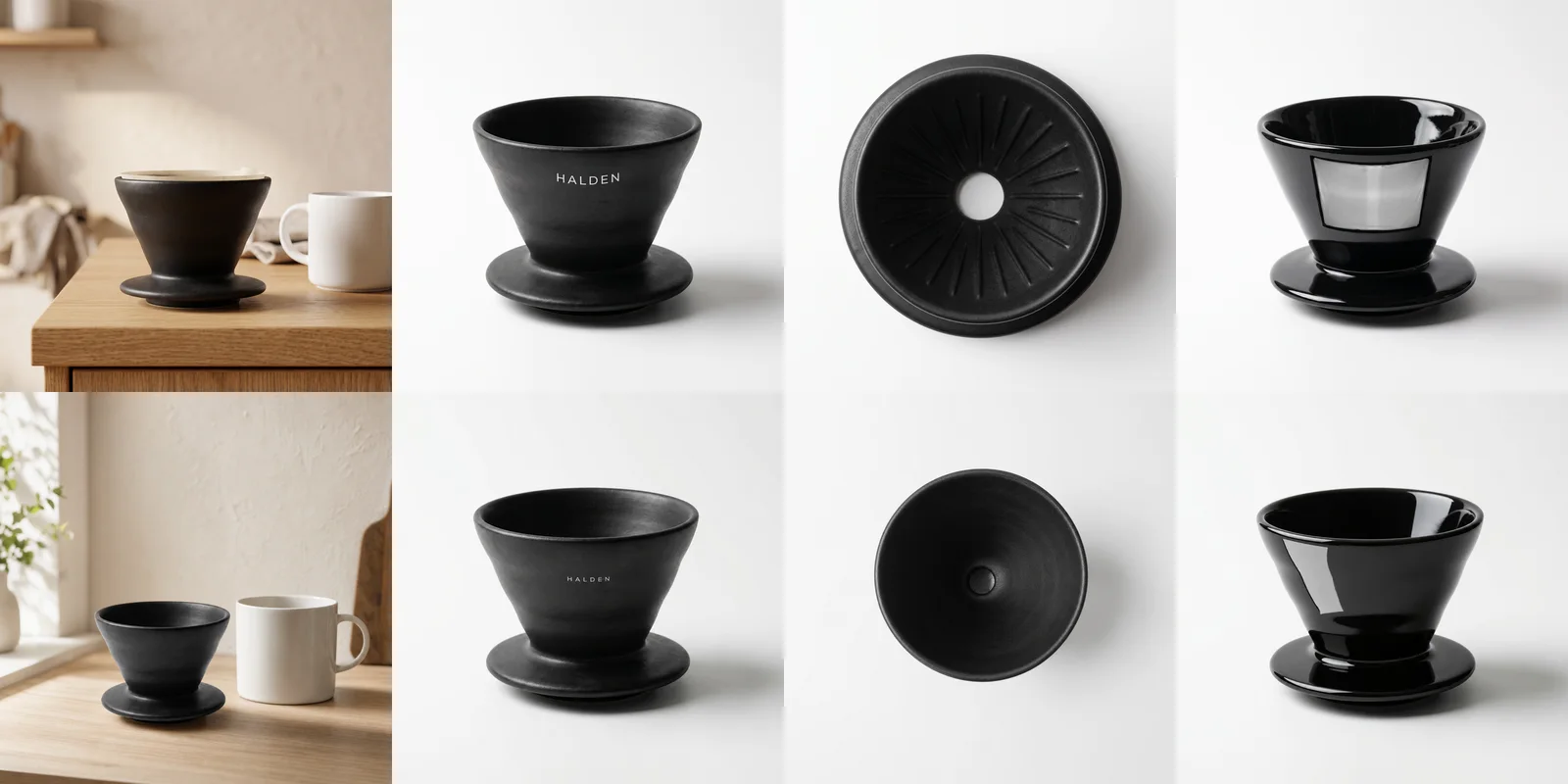
- Lifestyle scenes were the strength. Both put the dripper on an oak counter with a mug and believable window light. Nano Banana 2 put a paper filter in the dripper; GPT Image 2 left the dripper empty but added a vase of leaves and a leaning board to the scene.
- Labels were spelled right, but placed by the model. Both printed HALDEN correctly. Nano Banana 2 set it flat across the cone rather than following the curve; GPT Image 2 made it tiny. Size and position follow the prompt only loosely, and the label is part of the generated image rather than artwork you placed. We did not test the labelled product from other angles.
- The floor was invented, differently by each model. Asked for a view from directly above, Nano Banana 2 added radial ribs that the visible inner wall does not have and a large central hole; GPT Image 2 kept the wall smooth and drew a raised centre with no clearly visible opening. The source image does not show the floor or outlet, so each model made its own.
- Reflections were mixed. GPT Image 2's gloss version reads as a glazed surface. Nano Banana 2's put a flat grey rectangle on the front that does not wrap around the cone.
Our eight images come to an estimated 128 credits ($1.28) at the catalog's list rates: 10 credits per 2K Nano Banana 2 edit and 22 per high-quality 1024 x 1024 GPT Image 2 edit. The brass-handle recolours on the model-reference pages are a different test: each used that model's own generated dripper rather than this source image, so they are not part of this comparison.
Which route for which job
These verdicts rest on one generated product and the studios' and vendors' own pages. With a real product, CAD, artwork or several reference photos change what the AI routes can get right.
| If you need | Choose | Because |
|---|---|---|
| A launch set for a product you have CAD for | Render it yourself, or send the CAD to a studio | Dimensions and hidden parts come from the design; a studio adds lighting and consistency across SKUs |
| Dozens of SKUs that must match | A studio, or one Blender or KeyShot set you reuse | The same lights and camera on every product |
| A quick catalogue still or 360 of a simple product with no CAD | Image-to-3D, then render | One mesh held its shape and a placed wordmark across every view of our turntable; fix the material and check what the image hides |
| A label or logo at an exact size and position | Any 3D route | You place the artwork on the model; the image models chose the label's size and placement themselves |
| A lifestyle or social image this afternoon | Image-only AI | No set to build, $0.10 to $0.22 per image at list and 19 to 92 seconds each, and scenes were the image models' strongest results |
| Views of the inside or the floor of the product | CAD, a studio, or a mesh you fix by hand | The floor the image hides was closed in both meshes and drawn differently by each image model |
| A glossy or metallic product | CAD or a studio; image-to-3D only after a gloss check | Gloss exposed surface flaws in both generated meshes |
For a product film rather than stills, our 3D model to product commercial technique starts where this post ends.
Frequently asked questions
How much does 3D product rendering cost?
A simple studio render is estimated at $99 to $199 per image on Rapid Renders' calculator, and 7cgi starts at $150 per simple SKU for a model, two images and colour variations, both read 20 November 2026. Doing it yourself costs nothing in software with Blender, or $1,299 per seat per year for KeyShot Professional (read 20 November 2026). Generating the model from an image is estimated at $0.30 (Trellis 2) to $1.10 (Tripo P2) per model in our credit catalog, read 20 November 2026.
What software is used for 3D product rendering?
Blender (free, GPL, Cycles renderer), KeyShot (built around CAD import, $1,299 per seat per year for Professional on its pricing page, read 20 November 2026) and V-Ray in 3ds Max, Rhino or SketchUp are common choices. For one product on a seamless background, Blender and KeyShot both do the job; KeyShot opens STEP and native CAD files directly, while Blender needs a mesh export or a STEP extension.
Can AI make a 3D product render from a photo?
Yes, in two ways. An image-to-3D model builds a 3D model from one product image, which you then light and render like any other model; in our run from a generated image, it needed a material fix and had no outlet in the floor the image hid. An image model can also redraw the product in a new scene directly, which is faster but redraws the product each time.
Will AI replace 3D product rendering?
In our single-dripper test, image-only edits worked for lifestyle scenes, but the edits and generated meshes both invented the hidden interior. For shots that need exact dimensions or hidden geometry, use CAD or a model built from the product design.
How long does a 3D product render take?
A studio takes days: 7cgi quotes first drafts in one to three business days, and Rapid Renders final stills in about a week (7cgi, Rapid Renders, read 20 November 2026). With a model and a set already built, a 1600 x 1600 Cycles still took us 21 to 45 seconds, and an image-only shot took 19 to 92 seconds.
Voyager is a desktop AI agent for creative work
Describe what you want to make; Voyager plans it, uses your apps and tools, and keeps everything editable.

Co-founder, Voyager
Ravi is a co-founder of Voyager. Before that, Ravi co-founded heap.io and was an EDM producer.