Give two agents the same model, the same prompt and the same copy of Blender. Does the setup around the model still change what comes out? We ran eight Blender briefs through Voyager and through plain Claude Code, both on Claude Opus 5.5, to find out.
Both agents built every scene in Blender, the free 3D suite, by writing Python and rendering headless. Unlike in our Remotion test, both sides got exactly the same words: "Use Blender." is part of every brief. So whatever differs below comes from the agent setup, not the model or the prompt.
Each brief shows the prompt both agents received and two results, A and B: five videos and three still images. Which side is which is shuffled for every visitor. Pick the one that answers the brief better, and once you have picked all eight, reveal the answers to see how often you chose Voyager.
Take the blind quiz
Blind quiz: Voyager vs Claude Code with Blender
Brief 1 of 8
Mug turntable
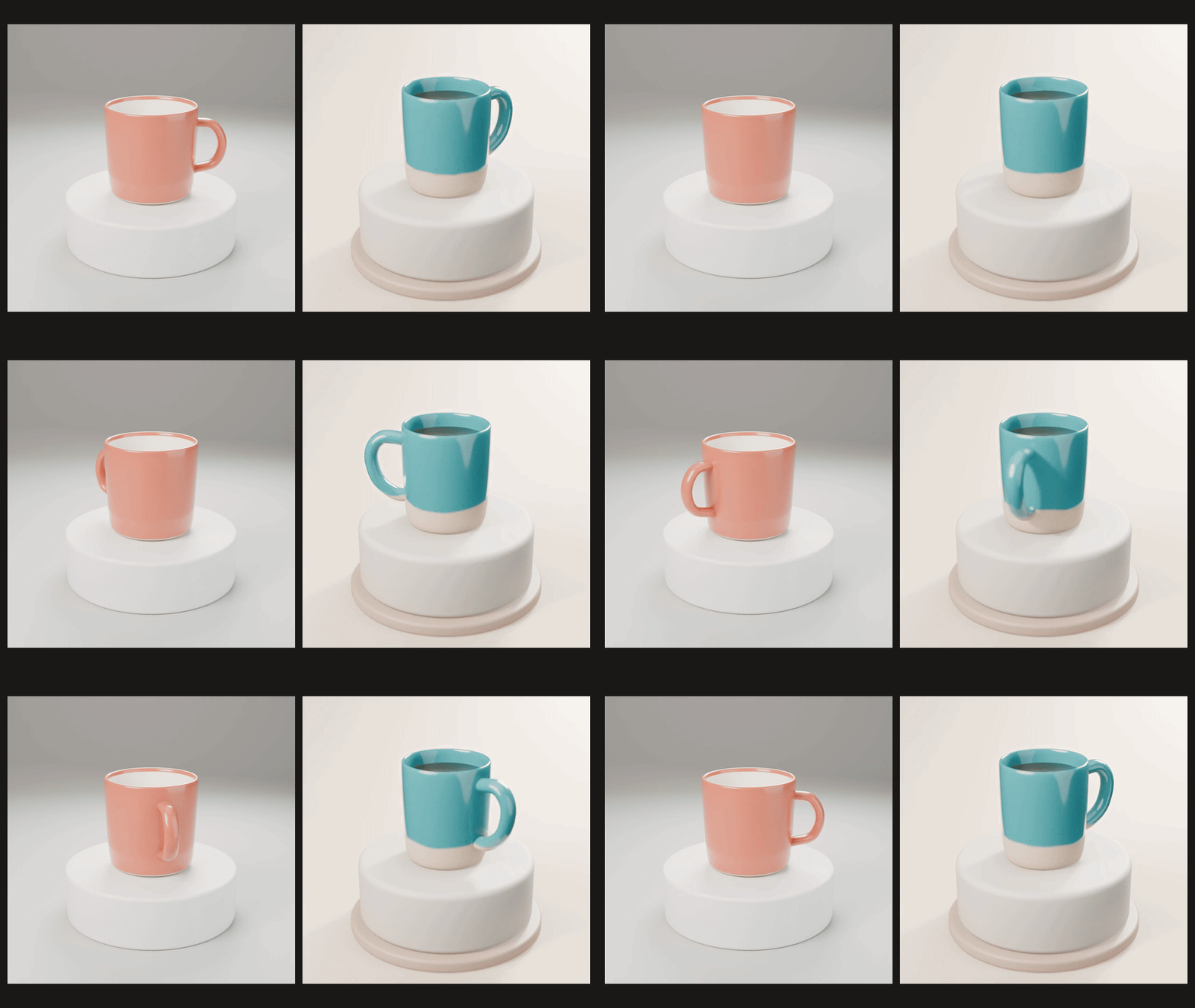
Make a 6-second seamless turntable video of a stylized ceramic coffee mug on a simple pedestal, with soft studio lighting, 1080x1080. Use Blender. Render the final video to a file in this folder and tell me its path.
Video A Loading video AVideo B Loading video BBrief 2 of 8
Logo sting
Make a 5-second logo sting video that animates the logo in logo.svg in this folder as an extruded 3D logo, 1920x1080. Use Blender. Render the final video to a file in this folder and tell me its path.
Attached file: logo.svg
<?xml version="1.0" encoding="UTF-8"?>
<svg xmlns="http://www.w3.org/2000/svg" width="600" height="480" viewBox="0 0 600 480">
  <title>Quillmere (fictional brand)</title>
  <g id="emblem">
    <path id="ring" fill="#1F4E5F" fill-rule="evenodd" d="M300 40 A130 130 0 0 1 300 300 A130 130 0 0 1 300 40 Z M300 62 A108 108 0 0 0 300 278 A108 108 0 0 0 300 62 Z"/>
    <path id="peak-back" fill="#3E8E7E" d="M228 250 L300 140 L372 250 Z"/>
    <path id="peak-front" fill="#1F4E5F" d="M262 250 L318 178 L370 250 Z"/>
    <circle id="sun" cx="248" cy="150" r="20" fill="#F2A541"/>
    <path id="water" fill="#3E8E7E" d="M246 256 H354 V266 H246 Z"/>
  </g>
  <g id="wordmark" fill="#1F4E5F">
    <path d="M129.09375 414.1875Q132.5 416.625 136.5 418.0625L133.09375 424.59375Q131.0 423.96875 129.0 422.875Q128.5625 422.65625 122.84375 418.8125Q118.34375 420.78125 112.875 420.78125Q102.3125 420.78125 96.328125 414.5625Q90.34375 408.34375 90.34375 397.09375Q90.34375 385.875 96.34375 379.640625Q102.34375 373.40625 112.625 373.40625Q122.8125 373.40625 128.78125 379.640625Q134.75 385.875 134.75 397.09375Q134.75 403.03125 133.09375 407.53125Q131.84375 410.96875 129.09375 414.1875ZM121.65625 408.96875Q123.4375 406.875 124.328125 403.90625Q125.21875 400.9375 125.21875 397.09375Q125.21875 389.15625 121.71875 385.234375Q118.21875 381.3125 112.5625 381.3125Q106.90625 381.3125 103.390625 385.25Q99.875 389.1875 99.875 397.09375Q99.875 405.125 103.390625 409.109375Q106.90625 413.09375 112.28125 413.09375Q114.28125 413.09375 116.0625 412.4375Q113.25 410.59375 110.34375 409.5625L112.9375 404.28125Q117.5 405.84375 121.65625 408.96875Z"/>
    <path d="M147.9375 374.1875H157.1875V399.0Q157.1875 404.90625 157.53125 406.65625Q158.125 409.46875 160.359375 411.171875Q162.59375 412.875 166.46875 412.875Q170.40625 412.875 172.40625 411.265625Q174.40625 409.65625 174.8125 407.3125Q175.21875 404.96875 175.21875 399.53125V374.1875H184.46875V398.25Q184.46875 406.5 183.71875 409.90625Q182.96875 413.3125 180.953125 415.65625Q178.9375 418.0 175.5625 419.390625Q172.1875 420.78125 166.75 420.78125Q160.1875 420.78125 156.796875 419.265625Q153.40625 417.75 151.4375 415.328125Q149.46875 412.90625 148.84375 410.25Q147.9375 406.3125 147.9375 398.625Z"/>
    <path d="M199.9375 420.0V374.1875H209.1875V420.0Z"/>
    <path d="M224.25 420.0V374.5625H233.5V412.28125H256.5V420.0Z"/>
    <path d="M269.34375 420.0V374.5625H278.59375V412.28125H301.59375V420.0Z"/>
    <path d="M314.0625 420.0V374.1875H327.90625L336.21875 405.4375L344.4375 374.1875H358.3125V420.0H349.71875V383.9375L340.625 420.0H331.71875L322.65625 383.9375V420.0Z"/>
    <path d="M373.5 420.0V374.1875H407.46875V381.9375H382.75V392.09375H405.75V399.8125H382.75V412.28125H408.34375V420.0Z"/>
    <path d="M422.21875 420.0V374.1875H441.6875Q449.03125 374.1875 452.359375 375.421875Q455.6875 376.65625 457.6875 379.8125Q459.6875 382.96875 459.6875 387.03125Q459.6875 392.1875 456.65625 395.546875Q453.625 398.90625 447.59375 399.78125Q450.59375 401.53125 452.546875 403.625Q454.5 405.71875 457.8125 411.0625L463.40625 420.0H452.34375L445.65625 410.03125Q442.09375 404.6875 440.78125 403.296875Q439.46875 401.90625 438.0 401.390625Q436.53125 400.875 433.34375 400.875H431.46875V420.0ZM431.46875 393.5625H438.3125Q444.96875 393.5625 446.625 393.0Q448.28125 392.4375 449.21875 391.0625Q450.15625 389.6875 450.15625 387.625Q450.15625 385.3125 448.921875 383.890625Q447.6875 382.46875 445.4375 382.09375Q444.3125 381.9375 438.6875 381.9375H431.46875Z"/>
    <path d="M474.40625 420.0V374.1875H508.375V381.9375H483.65625V392.09375H506.65625V399.8125H483.65625V412.28125H509.25V420.0Z"/>
  </g>
</svg>
Video A Loading video AVideo B Loading video BBrief 3 of 8
Animated bar chart
Make a 6-second animated 3D bar chart video from the data in sales.csv in this folder, bars growing in one at a time, with labels, 1920x1080. Use Blender. Render the final video to a file in this folder and tell me its path.
Attached file: sales.csv
month,revenue
Jan,42000
Feb,48500
Mar,45200
Apr,57800
May,63400
Jun,71900
Video A Loading video AVideo B Loading video BBrief 4 of 8
Earbuds hero shot
Make a premium product hero image of a pair of wireless earbuds in an open charging case on a reflective surface, 2048x2048. Use Blender. Render the final image to a file in this folder and tell me its path.
Image A Loading image AImage B Loading image BBrief 5 of 8
Reading nook
Make an image of a cozy reading nook interior at golden hour, with an armchair, a lamp, a bookshelf and a window, 1920x1080. Use Blender. Render the final image to a file in this folder and tell me its path.
Image A Loading image AImage B Loading image BBrief 6 of 8
Low-poly island
Make a 6-second video of a stylized low-poly tropical island with a slow camera orbit, 1920x1080. Use Blender. Render the final video to a file in this folder and tell me its path.
Video A Loading video AVideo B Loading video BBrief 7 of 8
Isometric coffee shop
Make an isometric diorama image of a tiny coffee shop with furniture and a counter, 1600x1600. Use Blender. Render the final image to a file in this folder and tell me its path.
Image A Loading image AImage B Loading image BBrief 8 of 8
Glossy loop
Make a 5-second seamless looping abstract motion video of glossy colorful shapes, 1080x1350. Use Blender. Render the final video to a file in this folder and tell me its path.
Video A Loading video AVideo B Loading video B
0 of 8 picked. Pick A or B for every brief, then reveal which agent made each one.
What we found
Our reviewer judged the same eight pairs blind, and the split was clean. Voyager's result was preferred on all five briefs about real things: the mug, the logo sting, the bar chart, the earbuds and the reading nook. Plain Claude Code's was preferred on all three stylized briefs: the low-poly island, the isometric coffee shop and the glossy loop. That was one judge on one run per brief, so read it as a pattern to check, not a score.
The likeliest explanation is the skill. Every Voyager run loaded Voyager's Blender skill, a set of instructions for building, lighting, finishing and checking a Blender scene. Plain Claude Code had no Blender skill. That skill is written around real objects: materials, studio lighting, props that make a scene feel used, and a look at rendered frames before delivering. That shows in the details: the mug's speckled glaze and the coffee in the cup, the earbuds' mirror floor, the open book left on the nook's armchair. Its checking steps are written for real objects, though. On all three stylized briefs Voyager finished sooner than Claude Code, and on the coffee shop it delivered after a single preview while Claude Code kept fixing its scene. That is where Voyager's framing and colour choices slipped.
Time and cost went both ways. The mug shows the biggest gap: Voyager rendered it with Blender's fast Eevee engine and finished in 12 minutes, while Claude Code chose Cycles, Blender's path tracer, and took 48. Across all 48 runs (three per brief and side), Voyager averaged 7.8 minutes a run against 8.5, and cost more in model usage: $20.01 in total against $14.73.
What differs between the pairs
Both sides wrote their Blender scripts from scratch every time, and they often made the same technical choices: faceted geometry for the island, a true isometric camera for the coffee shop, clean loops on every video. Most of the differences are art direction. Voyager's results carry more set dressing and finishing detail; Claude Code's frame the subject larger and keep the scene simpler.
- Mug turntable. Voyager's mug has a speckled teal glaze over a bare clay foot, coffee inside and a two-step pedestal against a warm backdrop. Claude Code's has a single coral glaze, is empty and sits on a plain white pedestal against grey.
- Logo sting. The closest pair. Both start on an empty backdrop, extrude the Quillmere emblem, then bring in the wordmark and hold on the full logo. Voyager's backdrop is a cool light grey, and its colours come out paler than the logo file. Claude Code's is a warm cream with deeper shadows and keeps the logo's colours closer.
- Animated bar chart. Both read
sales.csvand grow the bars one month at a time. Voyager's stands the bars on a dark, spotlit stage with a title, short labels such as $42.0K and no axis, and picks out June, the highest month, in orange. Claude Code's is a flat, light chart with a title and subtitle, a dollar axis, gridlines and full values such as $42,000. - Earbuds hero shot. Both put a white case on a dark, reflective floor. Voyager's buds stand up in the case over a sharp mirror reflection, though that reflection shows the buds through the bottom of the case. Claude Code's case fills more of the frame, with the buds lying low in the tray and a soft reflection.
- Reading nook. Both rooms have the bookshelf, lamp, armchair and window under warm evening light. Voyager pulled back to show more of the room, with a green armchair, an open book left on its arm and a sky gradient in the window; both rooms put a mug on the side table. Claude Code framed closer, so its rust armchair is larger, with stronger sunlight falling across the rug.
- Low-poly island. Both islands are faceted, with palms and rocks, on a slow orbit. Claude Code's fills more of the frame and sits in a pale lagoon with haze. Voyager's is smaller, on a saturated blue sea, so much of the frame is open water.
- Isometric coffee shop. Both cut away the front walls of a small room. Both stock the counter with an espresso machine and a pastry case under a menu board. Voyager's is green and cream on a grass-edged base, with a cushioned bench, pendant lamps and a till. Claude Code's has a mint wall, two café tables beside a row of bar stools and a lit COFFEE sign that overlaps its menu board.
- Glossy loop. Claude Code's scatters many saturated shapes over a dark purple backdrop, some cut off at the frame edges. Voyager's builds around one large pink torus on a violet-to-coral gradient, so its main shape sits close to the colour of the background.
What to take from this if you use Claude Code with Blender
The model is the same on both sides, so most of what Voyager's skill adds is direction you can also write into a prompt yourself:
- Ask for the set dressing you want. In this test, plain Claude Code mostly built what the brief named and little more. If the mug should have coffee in it or the nook should look lived in, say so.
- Ask for framing in numbers. Voyager lost the island and the coffee shop partly on framing. "The subject fills about two thirds of the frame" is easy for an agent to check and hard to get by accident.
- Name the render engine and a time budget. The same mug took 12 minutes in Eevee and 48 in Cycles. For a stylized or preview render, "use Eevee" saves most of that.
- Give stylized work a contrast rule. A pink shape on a pink backdrop disappears. Ask for a backdrop clearly darker or lighter than the hero.
- Make it look before it delivers. Ask the agent to render three frames, describe what is wrong and fix it before the final render. All three briefs Voyager lost were ones where it spent less time than Claude Code.
Before the final render, render three frames (start, middle, end) and check them: the subject fills about two thirds of the frame, it stands out clearly from the background, and every element the brief asks for is visible. Fix anything that fails, then render.
To let Claude Code work inside a running Blender instead of from the command line, see Blender MCP: official vs community server and setup.
How the test was run
- The same model. Both sides ran Claude Opus 5.5 (
claude-opus-5-5) at medium effort through Claude Code 2.1.301. - What "Voyager" means here. Voyager's agent setup from Voyager build 2026.10.15+8: its system instructions, its skills, including its Blender skill, and the
voyagercommand-line tool. It made its own choices instead of asking questions. - What "plain Claude Code" means here. Claude Code with its default tools and nothing added: an empty home folder with no plugins, added skills, instruction files or connectors, and no
voyagertool. - The same prompt, word for word. Each brief is shown in the quiz exactly as both sides received it. Files a prompt names (the logo and the sales data) were copied into both project folders.
- Both used Blender. Every run on both sides built its scene in Blender 5.2.2 LTS with Python and rendered it headless.
- Same machine, one run at a time. Every run used one Apple M5 laptop with a 60-minute limit, and the side that went first alternated. Every run finished inside the limit and delivered a file.
- A fresh, empty project folder for every run.
- No paid media. Neither side could use image, video or 3D model generation services, so every frame was rendered on the laptop.
- Not cherry-picked. We ran each brief three times on each side, and the quiz shows run 1 of each, a rule fixed before the seven new briefs ran. The mug was our pilot and ran first, so its run 1 is the pilot pair.
- Shown at a common size. Videos are silent re-encodes at 720p; none had a sound track. Still images are scaled to 1280 pixels on the long side.
Frequently asked questions
Is Voyager better than Claude Code for 3D work in Blender? On these briefs it depended on the kind of brief: Voyager's results were preferred on the real-world subjects and Claude Code's on the stylized ones. A separate, larger internal test of ours (six harder Blender production tasks, repeated three times per setup, judged blind by two AI judges) also found no reliable overall difference. Take the quiz and see where you land.
Does Voyager use Claude? In this test, yes. Both sides ran the same Claude model through Claude Code. What Voyager added was its instructions, its skills and the voyager command-line tool, so the comparison holds the model fixed and varies the agent setup.
Were the two sides set up the same apart from Voyager? Almost. Voyager's side used Voyager's own bundled ffmpeg, while Claude Code used the copy installed on the laptop. Voyager also ran signed out and without the parts that only exist inside its app, such as its session tools, so nothing paid or networked was available to it.
Did anything change during the test? Two things. The mug pilot started with a 45-minute limit, raised to 60 while Claude Code was still rendering; it finished in 48 minutes, so under the original limit it would have failed, and the pilot did not alternate which side went first. And both bar chart runs were discarded and run again after the laptop went to sleep mid-run.
How do I use Claude Code with Blender myself? Claude Code can drive Blender from the command line with Python, as both sides did here; the tips above are a good start. To let it work inside a running Blender, see Blender MCP: official vs community server and setup.
Make your next project in Voyager
Create an account, download Voyager, and start making.