The best AI video editors solve different jobs. For professional editing, color and audio in one application, we would start with DaVinci Resolve. For cutting interviews by their words, start with Descript. For automating work inside an existing Premiere or Resolve project, compare FireCut and AutoCut before replacing the editor.
Choose an agent such as Voyager when the job spans generation, editing, motion and sound across several apps and you want an editable project back; choose a generation platform when you need new footage. The deciding question is what happens after the first output: can you change individual cuts, captions and tracks, or do you receive a rendered video that needs a separate finishing project?
Prices, plan limits and documented features were read on 23 October 2026 from the vendors' pages linked beside each claim. Prices are US dollars; annual equivalents require annual billing. This is a comparison of documented workflows, without performance or image-quality scores. Voyager, the desktop app our team builds, is included for work across supported creative apps.
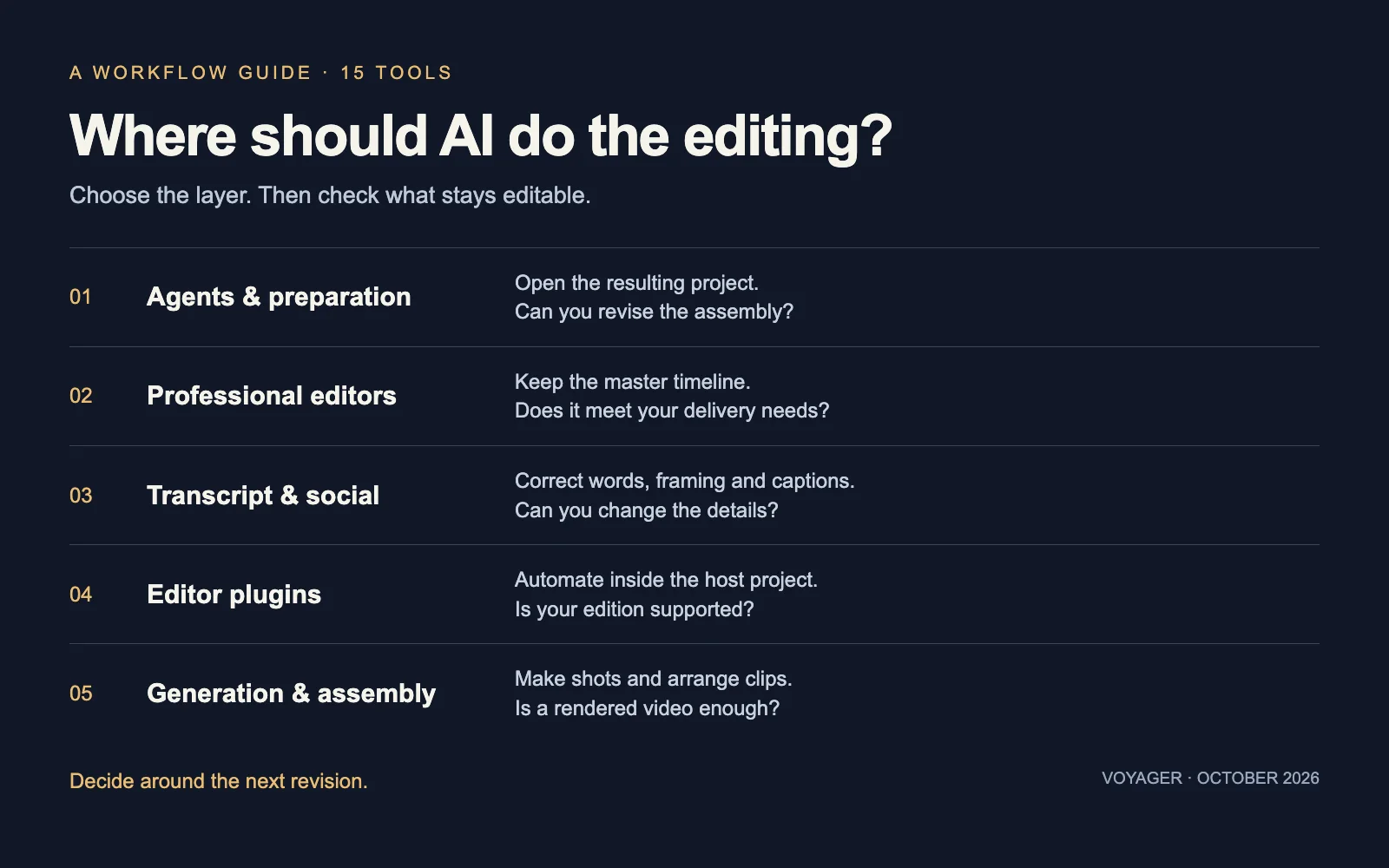
Choose the layer before the tool
A professional editor earns its place by keeping the decisions behind a finished film: source links, cuts, effects, color and audio. An automation tool should preserve the parts your next revision will touch. That matters more than how many AI features appear on its homepage.
| Layer | What you are changing | The revision check |
|---|---|---|
| Agents and preparation | Who organizes media and builds the first assembly | Can you open and adjust the resulting project? |
| Professional editors | The main editing and finishing environment | Does it cover your delivery and collaboration requirements? |
| Transcript and social | How dialogue becomes a cut or a short | Can you correct words, framing and caption timing? |
| Editor plugins | Repetitive operations inside your existing project | Does the exact host, edition and plan support the operation? |
| Generation and assembly | Where new shots are made and sequenced | Do you need a rendered clip or a transferable timeline? |
These roles overlap. An editor can generate footage, and a generator can include a timeline. We group each tool by the job that gives it a reason to be on your shortlist.
The 15 tools at a glance
The prices below were read on 23 October 2026. Links lead to vendor plan pages; each entry explains the purchase check.
| Tool | Start here for | Price and condition |
|---|---|---|
| Voyager | Agent work across creative apps | Free app; Starter $19/month, individual monthly |
| Wideframe | Preparing native Premiere projects | $100/month during beta, 7-day trial |
| Manus | Conversational edits in its own timeline | Free membership; Pro from $20/month, AI uses credits |
| DaVinci Resolve | Professional editing and finishing | Free; Studio $236 promotional, normally $295, one-time |
| Adobe Premiere Pro | An existing Creative Cloud workflow | $22.99/month, annual commitment, billed monthly |
| Final Cut Pro | Mac editing and Apple workflows | $299.99 one-time, or Creator Studio subscription |
| Descript | Transcript-led dialogue editing | Free; Hobbyist $24/person/month, $16 annually |
| CapCut | Short social edits and templates | Free and paid plans; check local checkout |
| Kapwing | Shared captioning and resizing | Free; Pro $24/member/month, $16 annually |
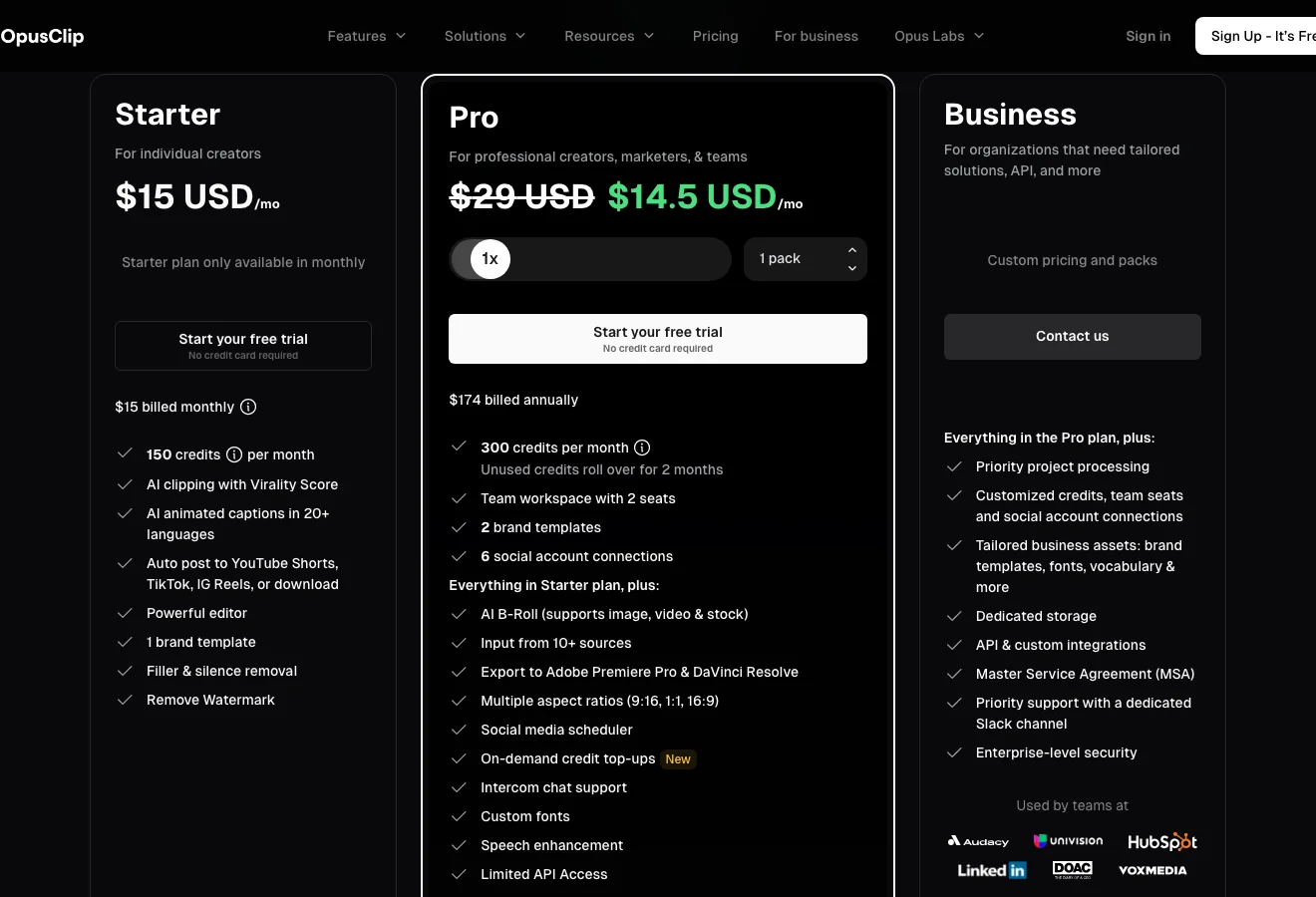
| OpusClip | Shorts from long recordings | Free; Starter $15/month; Pro $29/month |
| FireCut | In-project podcast and dialogue automation | Premiere Starter $19/month; Resolve has free tools, Captions $12.99/month |
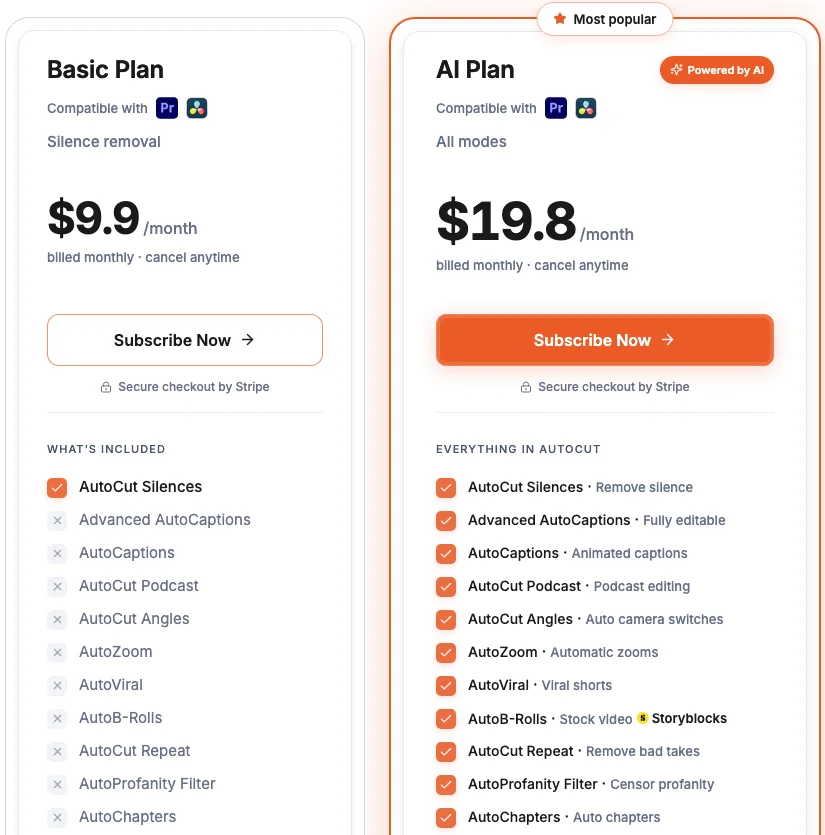
| AutoCut | Recurring host-editor cuts and captions | Basic $9.90/month; AI $19.80/month, less annually |
| Runway | Generating and modifying shots | Free; Standard $15/month, $12 annually |
| Krea | Generated clips and short assemblies | Free; Basic $9/month, selected video models |
| FLORA | Connected generation on a shared canvas | Free; Starter $18/seat/month |
Agents and editing assistants
1. Voyager: work across creative apps
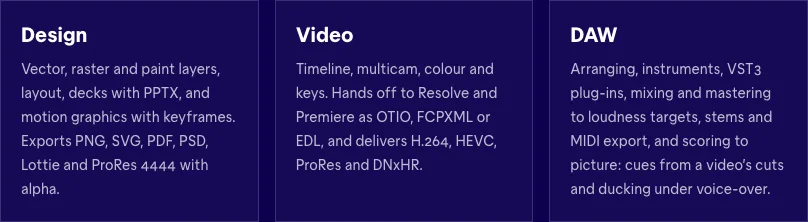
Voyager fits a job that moves between generation, editing, motion and sound. Its agent, or your own Claude Code or Codex connection, works in supported desktop apps and its built-in Video, Design and DAW editors. Projects in external apps remain ordinary editable files; Voyager Video also supports OTIO, FCPXML and EDL handoffs (capabilities and app control).
The purchase check starts with your computer and licences. The released desktop app requires Apple silicon and macOS 15 or later; Windows 11 and Linux builds are alpha. Live control of Adobe apps is macOS-only today, and you need licences for the external apps it drives. Free Resolve has a more limited route: build and import a cut, then finish there; Studio enables the full scripting route (platform and Resolve requirements).
The free plan includes the three editors and 1,000 monthly credits for agent chat and images. Managed video, voice and GPU machines require a paid plan. Individual monthly plans include Starter at $19 with 1,500 credits, Creator at $49 with 4,700 and Ultra at $149 with 14,400. Managed generation uses credits at provider cost, with no markup; you can also bring supported API keys. Choose it for the cross-app workflow, and check the supported route for your exact editor before committing a project.
2. Wideframe: prepare footage for Premiere
Wideframe focuses on assistant-editor work: searching footage, transcript selects, interview stringouts, multicam preparation and native Premiere .prproj output. That is a useful fit when the blank timeline is caused by an unorganized footage library and you want to finish the creative cut in Premiere.
Its public page lists $100/month during beta, with a seven-day trial that requires a saved card and converts to the first $100 charge unless cancelled. It requires an Apple-silicon Mac. The native project is the reason to shortlist it; the beta terms and separate Premiere licence are the purchase checks. The vendor says pricing may change after beta (workflow, requirements and trial terms).
3. Manus: revise a first cut by conversation or timeline
Manus Video Editor builds a first cut from footage or a brief, then lets you trim clips, adjust text and audio, and change timing in the same project. You can start in the browser, but manual timeline editing and video export use Manus Desktop on Mac or Windows. Choose it if you want conversational changes alongside direct timeline control in one environment.
Free membership and desktop download do not make AI editing unlimited: making and editing videos uses credits. The membership help page lists Pro from $20/month with 4,000 monthly credits, and a $40 tier with 8,000. These are general task credits, not a fixed number of finished videos. Before moving a client project, verify the export you need; the video-editor page describes rendered export without promising a native Premiere or Resolve project.
Professional editors with AI inside the project
4. DaVinci Resolve: editing, color and audio finishing
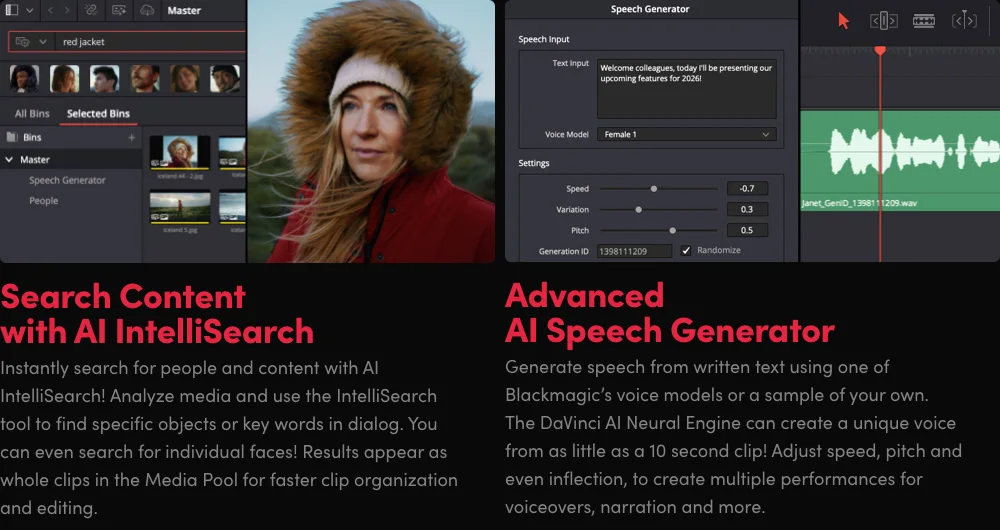
DaVinci Resolve combines Edit, Fusion, Color and Fairlight in a professional post-production environment. We recommend it here for keeping the final edit, grade and sound together. Its free edition supports finishing up to 60 fps at Ultra HD; Studio adds the Neural Engine and tools including Magic Mask, noise reduction and additional effects.
Resolve 21's IntelliSearch finds media by visual content, dialogue and faces. That helps when finding a shot is the bottleneck. Check edition requirements before treating the free editor as the entire AI suite: Blackmagic documents its advanced AI tools under Studio (Studio features).
On 23 October, Blackmagic's US store showed Studio at $236, reduced from $295, as a one-time purchase. Treat $236 as a dated promotion, not the permanent price. Blackmagic's 21.1 support listing places AI-assistant integration and 20 new scripting APIs in Studio. For agent work, Studio is the full scripting route; do not choose free Resolve on the assumption that a particular scripting integration will work (Studio scripting support).
5. Adobe Premiere Pro: keep the Adobe project
Premiere is the fit when the team already exchanges Premiere projects and uses Adobe's wider production tools. Adobe documents Text-Based Editing, Media Intelligence and Generative Extend within the editing environment. The September 2026 release notes identify two version 26.5 additions: Paper Edit assembles selected transcript lines into a sequence, and the Generative Media Tool creates video and sound effects from prompts on the timeline.
The key distinction is that generated media becomes clips you can arrange and trim. That does not expose every object inside the generated picture as a separately editable element.
Premiere costs $22.99/month on an annual plan billed monthly. Creative Cloud Pro's regular price is $69.99/month on the same billing basis; temporary introductory offers have different terms. Check the generative allowance for your intended tools rather than assuming the editing subscription includes unrestricted generation. Choose Premiere when preserving the existing project and team workflow outweighs switching costs.
6. Final Cut Pro: a Mac editing workflow
Final Cut Pro combines the Magnetic Timeline with AI-assisted search and captions. It fits Mac editors who want hands-on control of an ongoing project. Check the requirements for the particular intelligence feature you need, since platform and hardware support vary.
The Mac app remains available for $299.99 one-time. Alternatively, Apple Creator Studio is $12.99/month or $129/year and includes Final Cut Pro, Logic Pro, Pixelmator Pro, Motion, Compressor and MainStage, alongside premium features for Apple's productivity apps. That makes the subscription decision partly about the other production apps you need. Apple also distinguishes subscription-only premium content from the standalone purchase (purchase comparison).
Transcript and social video editors
7. Descript: edit dialogue as text
Descript is a strong starting point for podcasts, interviews and tutorials where the story lives in speech. Its transcript workflow, Underlord assistant, filler-word removal and Studio Sound address the dialogue edit before detailed finishing.
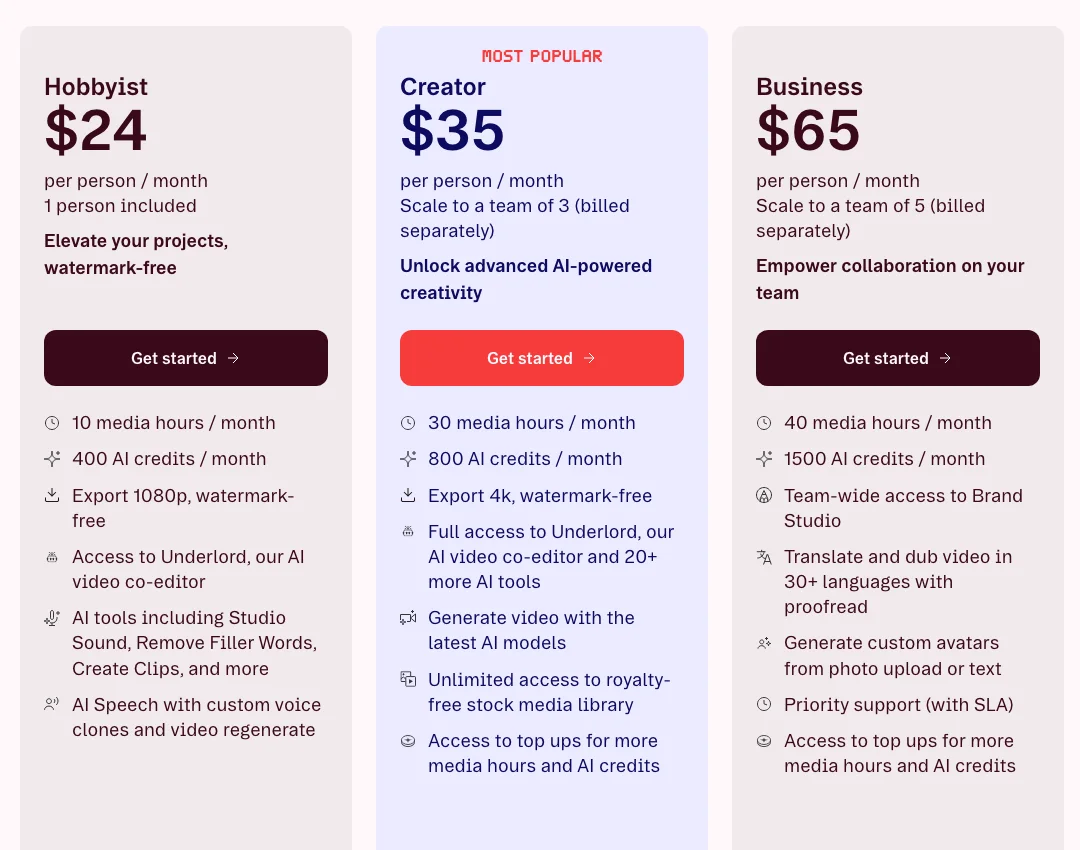
The paid-plan decision has two meters: imported media hours and AI credits. Hobbyist is $24/person/month, or $16 annually, with 10 media hours, 400 AI credits and watermark-free 1080p export. Creator is $35 monthly, or $24 annually, with 30 hours, 800 credits and 4K export. Business is $65 monthly, or $50 annually (plan limits).
Choose it when cutting words is the recurring job. Before buying for a multi-camera production, compare the plan's actual media allowance with all the recordings you will import, not just the final runtime.
8. CapCut: social edits on your actual device
CapCut combines manual editing with captions, effects and template-led social production across mobile, desktop and web. It is a practical shortlist entry when a recurring vertical format matters more than a complex finishing pipeline.
There are free and paid options, but we would use the price shown in your account and country rather than a universal Pro figure. Check the exact asset, AI feature and export on your intended device before subscribing. CapCut's template guidance explains that template availability differs by platform and region. A mobile template workflow is therefore a poor basis for assuming identical desktop behavior. Choose it for the recurring social format you can reproduce, then keep the source footage and a clean master for later revisions.
9. Kapwing: a shared publishing workspace
Kapwing's plans combine captions, translation, transcript trimming and collaborative editing. It fits a marketing team that wants to correct captions and resize shared projects in the same workspace.
Free exports are watermarked, limited to four minutes and 720p. Pro is $24/member/month, or $16 annually, and adds watermark-free 4K export, projects up to two hours, shared workspaces and 1,000 monthly credits. Business is $64 monthly, or $50 annually, with 4,000 credits. Credit allowances serve multiple tasks, including subtitling and dubbing, so compare your whole publishing workload with the plan rather than counting only finished videos (pricing and allowances).
Choose it when the shared project is where revisions will happen. If a client needs a desktop editor project, establish that handoff before moving their footage into the workspace.
10. OpusClip: propose shorts, then review them
OpusClip fits long recordings that need multiple captioned, reframed shorts. Its automated suggestions are a starting point for editorial review: check that each clip preserves the speaker's meaning and has a complete ending.
Starter is $15/month with 150 credits. Pro is $29/month, or $14.50/month billed as $174 annually, with 300 monthly credits. Pro adds export to Premiere Pro and DaVinci Resolve. The free plan has 60 monthly credits, watermarks, no editing, and clips stop being exportable after three days (plan comparison).
Pro's editor handoff is the material purchase gate if another editor will finish the shorts. Check the imported captions, framing and source links before relying on an interchange export for delivery.
Plugins for the editor you already own
11. FireCut: buy for the host and transcription allowance
FireCut automates dialogue work inside the host project. Its Premiere plans start at $19/month for Starter. Pro is $34 monthly, or $20/month annually, with captions, podcast automation and 25 transcription hours per month. Max is $44 monthly, with 100 hours and script-based cutting. Choose against the transcription volume you actually process.
Resolve pricing is separate: free tools include silence removal, multichannel-audio splitting and markers. Paid Captions is $12.99/month; Pro is $20.99/month, with annual options. The Resolve page explicitly supports the free edition and describes styled on-timeline Fusion captions, plus SRT/VTT export. That is a different compatibility promise from a Studio-only workflow integration. Confirm the exact tool, host version and allowance rather than transferring Premiere's plan assumptions to Resolve.
12. AutoCut: silence removal or the wider suite
AutoCut Basic is $9.90/month for silence removal. The AI plan is $19.80/month and includes the broader toolset, including captions, podcast cuts, zooms and repeat detection. Annual equivalents are $6.60 and $14.90/month, respectively. The public page offers a 14-day trial.
The useful distinction is the task you repeat: Basic is enough only if silence removal is the job. Choose the AI tier for caption and podcast work, and verify availability for your Premiere or Resolve version during the trial. Keeping the work inside the host project avoids a separate rough-cut workspace, but automated cut points and caption timing still need review.
Generation platforms with assembly tools
13. Runway: make a shot, then place it in the edit
Runway's plans combine generative video models with an agentic creative collaborator. Choose it when creating or changing footage is central to the brief. Free includes 125 one-time credits. Standard is $15/month, or $12 annually, with 625 monthly credits; Pro is $35 monthly, or $28 annually; Max is $95 monthly, or $76 annually. Different models consume those credits at different rates.
For an existing Resolve workflow, the Runway plugin requires Resolve Studio 19 or later on macOS or Windows, and Standard or higher for generation. The plugin is free to download, but generations spend the paid plan's credits. Results arrive in the bin and timeline as media. This makes the plugin a route for acquiring shots inside your finishing project, rather than a reason to abandon that project.
14. Krea: short assemblies beside the conversation
Krea Agent's video editor has two video and two audio tracks, clip cutting, trimming and model-based extension. Its documented output is a single rendered file. Choose it when assembling a short piece from generated media is enough; check a separate handoff if a downstream editor needs the individual timeline decisions.
Krea pricing lists Free with daily compute, Basic at $9/month with 5,000 units, Pro at $35 with 20,000, and Max at $105 with 60,000. Annual discounts are available. Basic includes selected video models; Pro unlocks all video models. Compute pays for generation and edits, so the headline unit balance is not a fixed clip allowance. Name the model you need before comparing plans.
15. FLORA: keep generation steps on the canvas
FLORA's Timeline Editor lets you trim, arrange and render clips without leaving the creative canvas. Its reason to be on this list is continuity between visual exploration, connected generation steps and a short assembled result.
FLORA pricing lists Free with three active projects; Starter is $18/seat/month, Pro $50 and Max $200, with quarterly and annual discounts. Starter includes text, image and video models plus real-time collaboration. Pro adds shared team assets and per-member usage caps. Usage is pooled and metered at published model rates.
Choose FLORA for a team that wants the generation process visible and reusable. If the deliverable includes a native Premiere or Resolve project, confirm that requirement separately: the cited editor announcement describes trimming, arranging and rendering, without promising either native project format.
Make the decision around the next revision
Imagine a client asks for three changes: remove one sentence, replace one shot and deliver a vertical version. Write down where each change would happen before buying another subscription.
| If your work is mostly | Choose | Because |
|---|---|---|
| Editing, grading and finishing a master project | Resolve; Premiere for an existing Adobe pipeline; Final Cut for a Mac workflow | The full editor remains the place you revise and deliver |
| Preparing footage or delegating across apps | Wideframe for Premiere preparation; Voyager for supported cross-app work; Manus for its own timeline | The agent's working environment determines the handoff |
| Cutting speech and publishing social versions | Descript, CapCut or Kapwing | Words, captions and recurring formats are the daily work |
| Turning long recordings into shorts | OpusClip | Suggested selections can be reviewed, with Pro for editor export |
| Repeating operations in an existing timeline | FireCut or AutoCut | The host project stays central |
| Generating footage and assembling short pieces | Runway, Krea or FLORA | Generation and iteration are the bottleneck |
Our recommendation is to keep the master project wherever you expect to make the last difficult revision. Add automation at the stage that consumes the most effort. A new generator or caption tool can be useful without becoming the main editor.
Frequently asked questions
What is the best free AI video editor? We would start with free DaVinci Resolve when you need a professional desktop editing environment. Its free edition supports Ultra HD finishing up to 60 fps, but many Neural Engine features require Studio. Free editing and free access to the complete AI suite are different offers (Blackmagic's edition comparison).
Can AI edit a video from a prompt? Yes, documented tools such as Manus Video Editor can build a first cut and accept follow-up instructions. Check the result for omitted context, incorrect captions and unintended shot choices. A documented prompt workflow does not establish that a particular client brief will succeed without review.
Should we buy a plugin or change editors? Start with a plugin if the recurring task is silence removal, captions or podcast cuts and the current editor already meets delivery needs. Compare AutoCut's tool-based plans with FireCut's host and transcription limits. Switch editors when the editor itself is the constraint.
Does an MP4 keep the project editable? An MP4 preserves the rendered picture and sound. It does not by itself preserve separate captions, source links or timeline decisions. For comparison, Krea describes a single rendered export, while Wideframe documents native Premiere project output. Ask for the project and linked media when further editing is part of the delivery.
What costs should we check beyond the subscription? Include the host editor licence, media-hour limits, generation usage, storage and the plan needed for your export. Descript meters hours and AI credits separately, and OpusClip puts editor export on Pro. Budget from the footage you process and the revisions you expect, rather than treating every platform's credits as interchangeable.
Voyager is a desktop AI agent for creative work
Describe what you want to make; Voyager plans it, uses your apps and tools, and keeps everything editable.