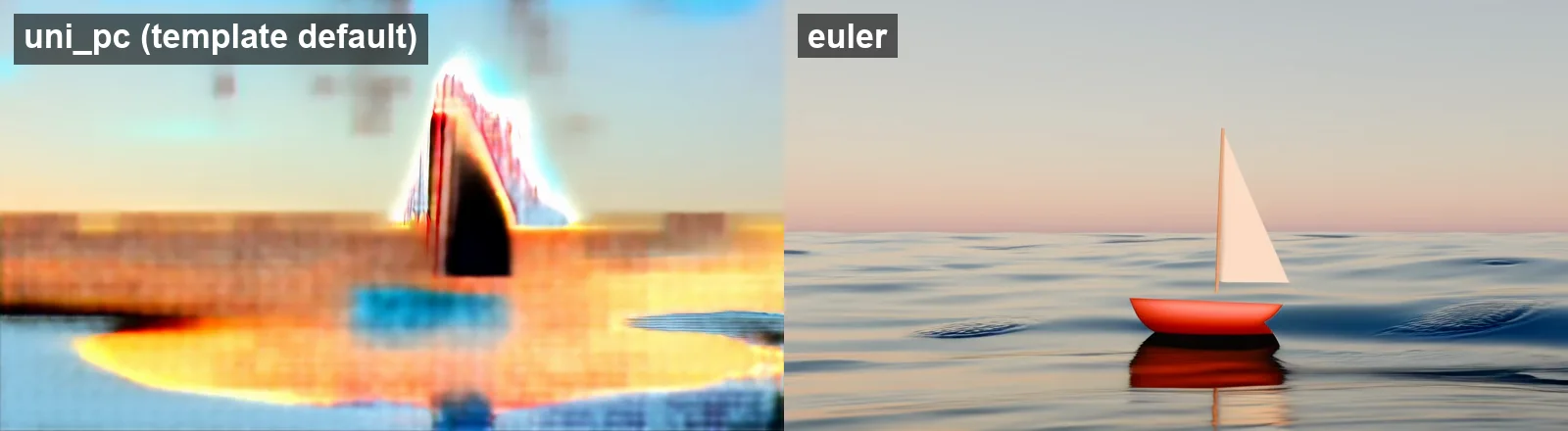
For local image-to-video in ComfyUI, load Wan 2.2 5B Video Generation, download its three model files and enable Load Image, which ships bypassed. On an Apple Silicon Mac, if the first frame looks right but later frames dissolve into colored bands, try changing the KSampler from uni_pc to euler. That single change repaired our PyTorch 2.14.1 runs with the same seed, prompt and model files; newer PyTorch releases need a separate check.
The short version: use a 640×352, 49-frame preview to check the motion, then try a short 1280×704 render. Our native-size two-second clip took about seven minutes; the five-second version took 35 minutes and used swap. Choose this route when you want to manage a local graph and downloadable weights. For hosted generation controls and plans, use the image-to-video tools comparison.
The clips and measurements were recorded 20 October 2026, on an M5 Max with 128 GB unified memory, ComfyUI v0.42.1 and PyTorch 2.14.1. We rechecked Comfy's documentation, templates, issue tracker and Hugging Face files on 29 October 2026. The workflow and source still reproduce the recorded settings; the still is a Blender render made for this example.
The local result
Description / transcript
No audio. The boat keeps its single sail and red hull while the water moves around it; the hull becomes rounder over the clip.
Wan 2.2 TI2V-5B handles both text and image inputs, with recommended 720p output at 24 fps and an Apache-2.0 license (Wan model card). This workflow uses one 10 GB diffusion file rather than the two experts required by Wan 2.2 14B. That makes 5B a smaller download to start with; it does not establish which model will best preserve your subject.
Download the three files
Start with an installed ComfyUI that can run local models on your hardware. The steps below begin at the workflow, rather than installing Python or GPU drivers.
| File | Folder under ComfyUI/models/ | Download size |
|---|---|---|
wan2.2_ti2v_5B_fp16.safetensors | diffusion_models/ | 10.0 GB |
wan2.2_vae.safetensors | vae/ | 1.41 GB |
umt5_xxl_fp8_e4m3fn_scaled.safetensors | text_encoders/ | 6.74 GB |
These total 18.1 GB, in decimal gigabytes, according to the Hugging Face file API, rechecked 29 October 2026. Download them from Comfy's repackaged Wan repository. Our ZIP's README contains the matching SHA-256 checksums. Download size is not working memory.
Use the 5B VAE above: the 14B workflow uses wan_2.1_vae.safetensors instead (Comfy's Wan tutorial). In Comfy Desktop → Desktop Settings → Storage, check which shared models directory has the DOWNLOADS badge, and which output directory is configured (Desktop storage settings).
The fp8 text encoder loaded on the CPU as float16 in our recorded run. MPS fp8 support has changed: PyTorch issue 148420 closed as implemented on 17 October, and PyTorch 2.15.0, released 28 October 2026, now lists MPS float8_e4m3fn support. We have not rerun this graph on that release. If an older install rejects the file, the same Wan repository provides an 11.4 GB fp16 encoder.
Build the workflow in five steps
-
Open Templates in the sidebar, or Workflow → Browse Workflow Templates, and search Wan2.2 5B. Choose Wan 2.2 5B Video Generation (template browser). Its generation and video-save nodes are built in, so this graph needs no custom node pack. If nodes are missing, update ComfyUI first. The current release is v0.43.0; our recorded run used v0.42.1.
-
Select Load Image, press Ctrl+B to enable it, and upload your still. Until enabled, the graph runs text-to-video. Crop important edges yourself: the latent node scales and center-crops an input whose aspect ratio differs from the output (recorded-version source).
-
In Wan22ImageToVideoLatent, begin with 640×352, length 49, batch size 1. For the final landscape render, try 1280×704; the model card also recommends 704×1280 for portrait. Use lengths of 4n+1, such as 33, 49 or 121 (Wan generator). At 24 fps, 49 frames is about two seconds.
-
Describe the motion in the positive prompt. For the clip above:
PromptA small toy sailboat with a white sail and a red hull floats on a gently rolling sea at dusk. Soft waves pass the hull and the boat rocks slightly, the sail catches a light breeze, and the reflection ripples on the water. Static camera. Pastel sunset sky, calm and quiet. -
Set 20 steps, CFG 5, scheduler simple, denoise 1, with ModelSamplingSD3 shift 8 and Create Video at 24 fps. These remain the stock template's values, checked 29 October 2026. Retain its negative prompt. Use
eulerto match our downloadable graph; the stock sampler remainsuni_pc. Click Run. With default output storage, the Save Video prefix writes toComfyUI/output/video/; Desktop's shared-output configuration can change the base folder.
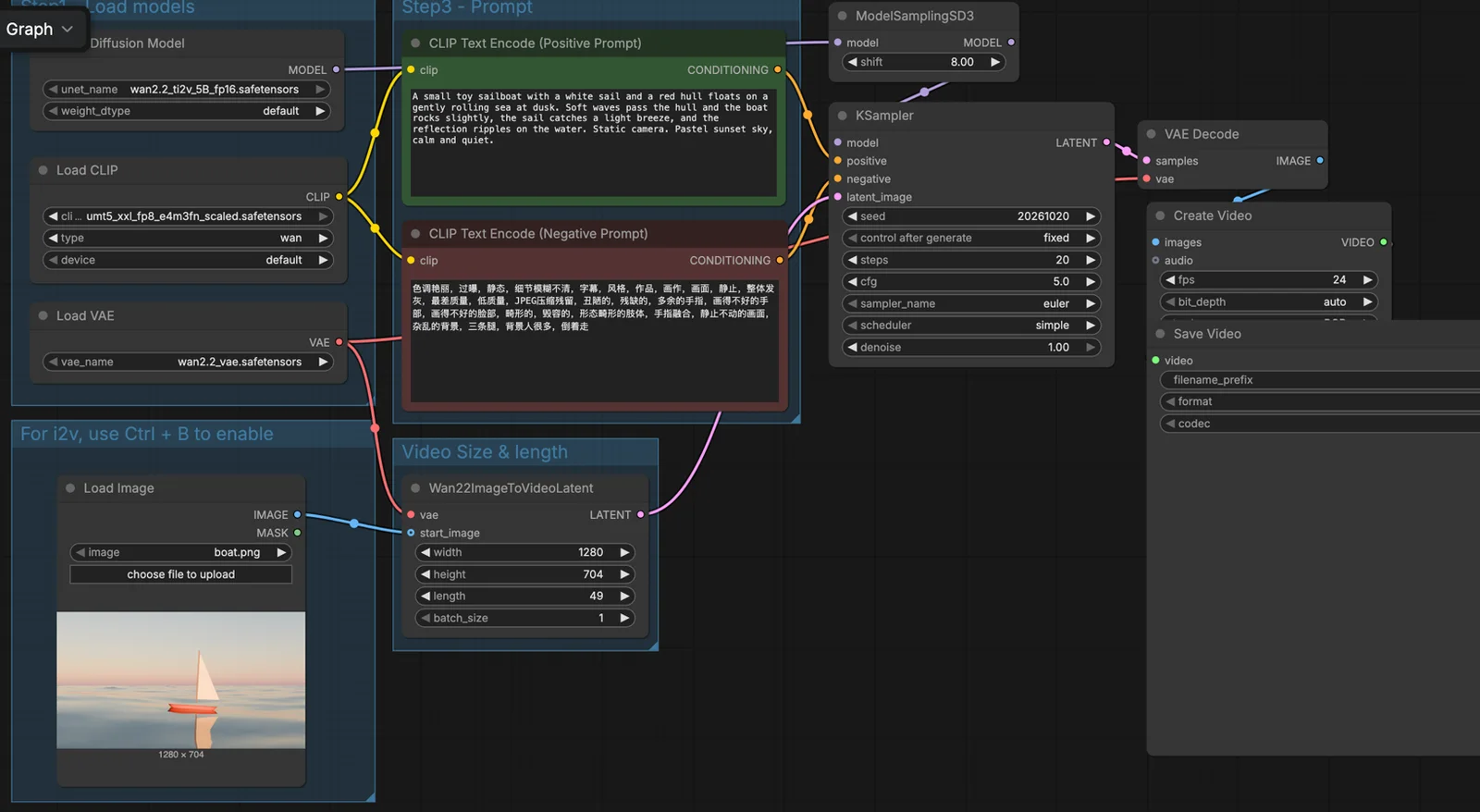
Open the graph image at full size to read the node values. Or download the workflow and still, drag the JSON onto the canvas, then upload boat.png in Load Image. The ZIP includes settings and the image, but no model weights. Its seed is fixed at 20261020. For agent-driven queueing once your graph works, see ComfyUI MCP.
A workaround for correct-first-frame corruption on a Mac
Our uni_pc runs completed without errors at both 640×352 and 1280×704, but every frame after the source still was corrupted. Changing only the sampler to euler produced the clean result.
Description / transcript
No audio. Only the first frame resembles the source image.
As of 29 October 2026, issue 15793, issue 15921 and issue 16573 remain open. The controlled report in 15921 also finds euler clean at lengths where uni_pc fails. Issue 16573 proposes a coefficient-precision explanation; its corresponding fix PR 16574 is still unmerged, and the sampler code is unchanged between our recorded version and v0.43.0. However, PyTorch 2.15.0's release notes also include the MPS expm1 precision repair implicated in those reports (PyTorch issue 198708). We have not rerun the graph on 2.15, so whether it still needs the workaround is unverified.
If you see this pattern, change the sampler first. An out-of-memory exception or an entirely black clip needs separate diagnosis. Our clips establish the workaround on the recorded stack, not a continuing failure on PyTorch 2.15.
Keep the clip short before increasing resolution
The five Wan runs below used the same source, seed, prompt and 20-step settings on 20 October 2026. Wall time includes loading when needed. Peak memory is approximate ComfyUI process physical footprint, sampled about once a second and rounded to GiB, not GPU VRAM or a minimum requirement.
| Resolution / frames | Sampler | Wall time | Peak process memory | Result |
|---|---|---|---|---|
| 640×352 / 49, cold | uni_pc | 1 min 26 s | ~21 GiB | Corrupt |
| 640×352 / 49, warm | euler | 54 s | ~21 GiB | Clean |
| 1280×704 / 49 | uni_pc | 6 min 50 s | ~75 GiB | Corrupt |
| 1280×704 / 49 | euler | 7 min 16 s | ~74 GiB | Clean |
| 1280×704 / 121 | euler | 35 min 21 s | ~132 GiB, including swap | Clean |
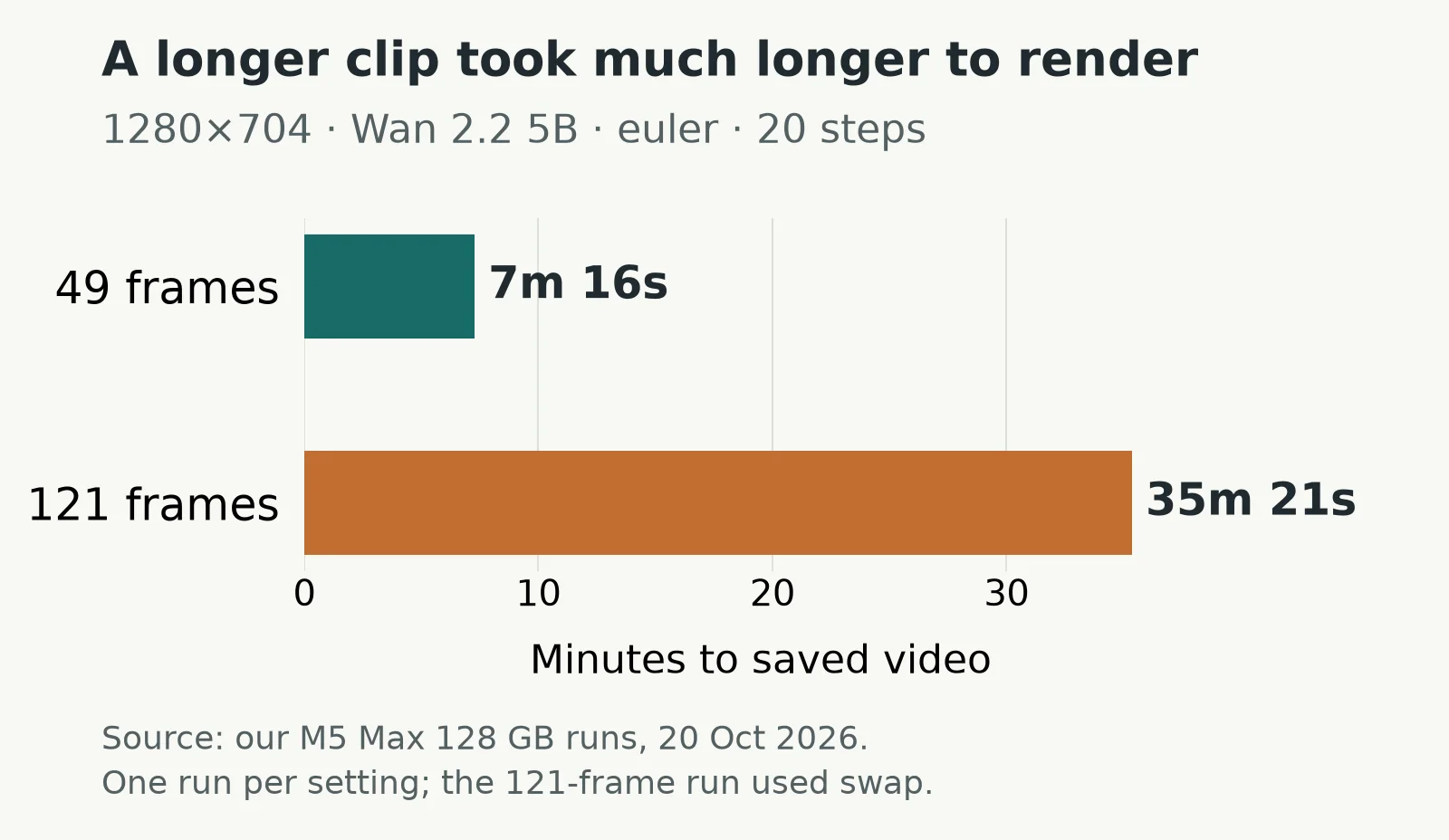
The 121-frame run reached about 40 GB of system swap. Other builds shared the Mac, so times may be inflated. ComfyUI's attention chunks also adapt to free memory (v0.42.1 source); the peaks on this 128 GB machine do not establish what a smaller Mac needs.
If a run does not fit:
- Shorten it first. Keep 49 frames while finding the motion, then increase length.
- Reduce resolution next. Our 640×352
eulerpreview stayed coherent, with softer detail than native output. - Change decoding only if sampling finishes. Try VAE Decode (Tiled) for a failure at the final decode. Its recorded-version defaults are 512-pixel tiles and a temporal size of 64 frames (node source); it does not reduce sampling memory.
Check that the still survives the motion
A successful render can still change your subject. Our Wan clip kept the single sail and red hull, but rounded the hull over time. We also recorded the older LTX-Video 2B 0.9.5 image-to-video template on the same Mac:
Description / transcript
No audio. The water moves smoothly, but the boat differs from the source image from the first frame.
Its image-conditioning strength was 0.15, the value still in the LTXV template. It added a sail and changed the hull. Raising strength might help; we did not run that experiment. Different resolutions, lengths and template settings make these two configurations unsuitable for a model speed ranking. For a broader choice of models, inspect the image-to-video model samples.
Keep paid remote nodes out of the local graph
The template browser also contains hosted API workflows. On 29 October, its index includes Kling 4.0, FLUX 3 Max and Wan 3.0 image-to-video templates tagged API. Their presence in ComfyUI does not make those models local.
Partner Nodes send work to external services, require an account with a positive credit balance and charge credits. To disable them, launch with --disable-partner-nodes. The same documentation describes --offline for also preventing the frontend's internet communication. This Wan graph uses local model nodes and has no per-generation provider charge; hardware, storage and electricity remain yours to supply.
Frequently asked questions
Why does the template ignore my image? Load Image ships bypassed. Enable it with Ctrl+B and select your still; otherwise the hybrid model runs text-to-video (Comfy's tutorial).
Will this run on a 16 GB or 32 GB Mac? We have not measured either. Comfy's tutorial says the 5B model should fit 8 GB VRAM with native offloading, but that is not a Mac unified-memory minimum. Our 640×352 preview peaked at about 21 GiB on a 128 GB Mac; do not use that result as a guarantee for a smaller machine.
Can I use the output commercially? Wan 2.2's Apache-2.0 model license is different from the older LTX 2B checkpoint's Open RAIL-M terms, which include use restrictions. Check the exact checkpoint's terms and clear the rights to your input image.
Voyager is a desktop AI agent for creative work
Describe what you want to make; Voyager plans it, uses your apps and tools, and keeps everything editable.