The best image-to-video AI tool is the one that exposes the controls your shot needs and gives back something you can keep working on. For most people that means starting in the app of the model maker whose model suits the shot: the Kling app for long, keyframed motion, Google Flow for Veo 3.1 with a free daily allowance, Luma for keyframes and HDR. Choose a multi-model platform such as Runway, Higgsfield or Pika when you want several models on one bill. Choose an agent such as Voyager when the clip is one shot in a larger piece that has to be edited, scored and revised.
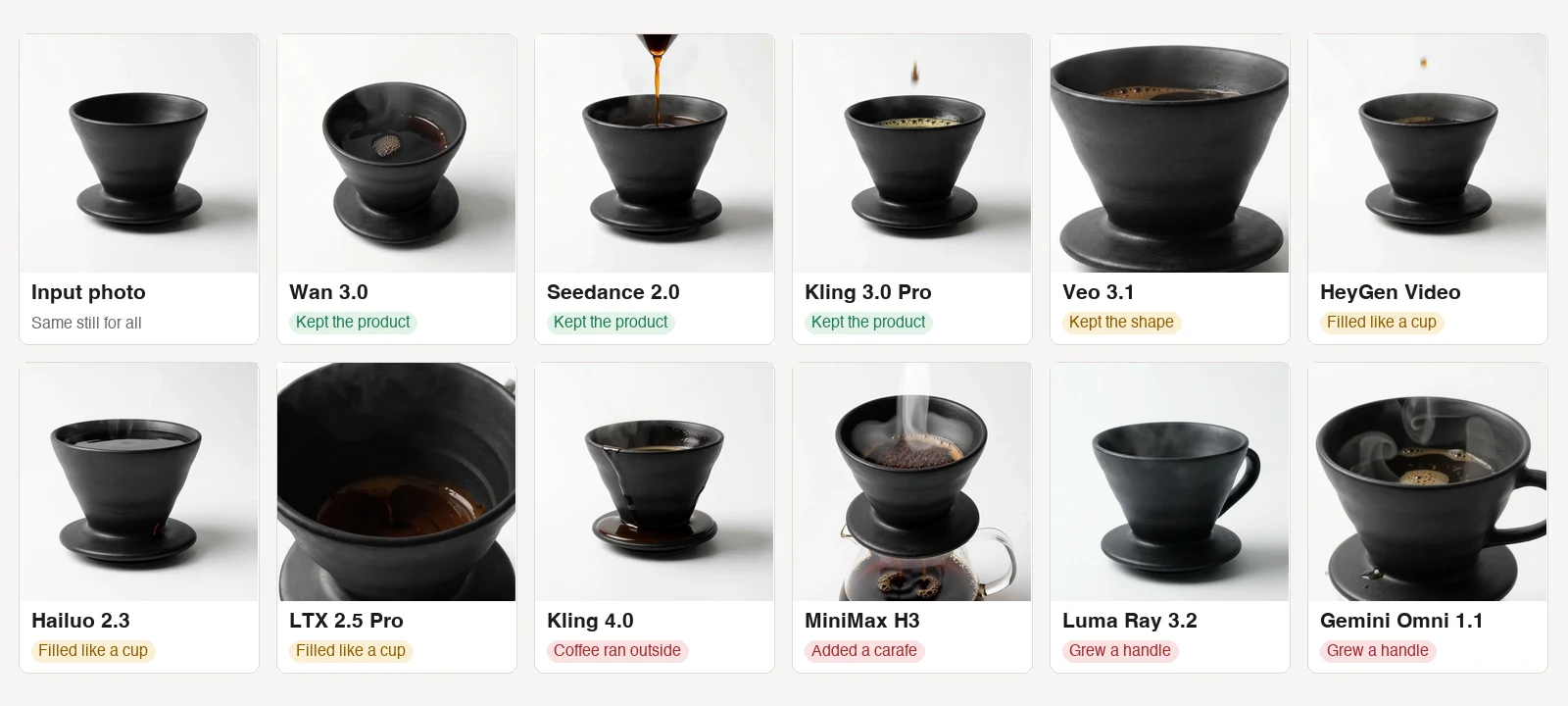
The short version: the tool matters less than the model behind it and the controls in front of it. We sent one product photo through 11 of the models these tools run. Three kept the product exactly as photographed; others added a handle, put a carafe under it or spilled the coffee down its side. Start from the model that keeps your subject, then pick the tool that exposes that model with the start frame, end frame, keyframes and rights you need.
Key takeaways
- Choose an image-to-video tool by its model, start and end frames, keyframes and commercial-use terms.
- Three of the 11 models in our shared product-photo test kept the product exactly as photographed.
- Our five- to six-second test clips cost $0.10 to $2.40 at fal’s posted rates, before retries and editing.
Plans, limits and controls were read from each vendor's own pages on 29 October 2026, signed out. Prices are US dollars with monthly billing unless stated. The test clips are our own runs; how they were made and what they cannot show is under the test. Voyager, the desktop app our team builds, is included for work that continues past the first clip.
Jump to: choose by shot · the test · at a glance · the tools · free tiers and rights · verdict by job · questions
Choose by what the shot needs
Image-to-video starts from a still, so the first question is how much of the clip the still should decide. A first frame anchors where the shot starts. An end frame anchors where it should land. Keyframes in between set intermediate states, and the model generates the motion between them. Reference images carry a product or character into shots that do not start from the same picture. None of these guarantees the subject survives the move; whether to start from an image or from text is a per-shot choice.
| If the shot needs | Start with | Why |
|---|---|---|
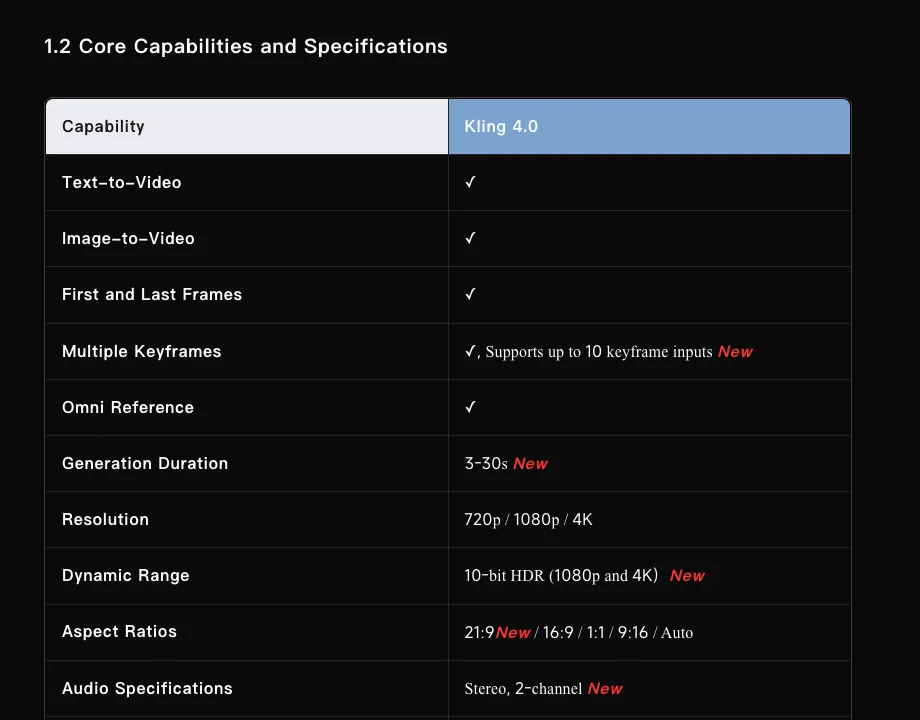
| A path through several poses, or 30 seconds in one take | Kling app (Kling 4.0) | Up to 10 keyframes and 3 to 30 seconds in one generation |
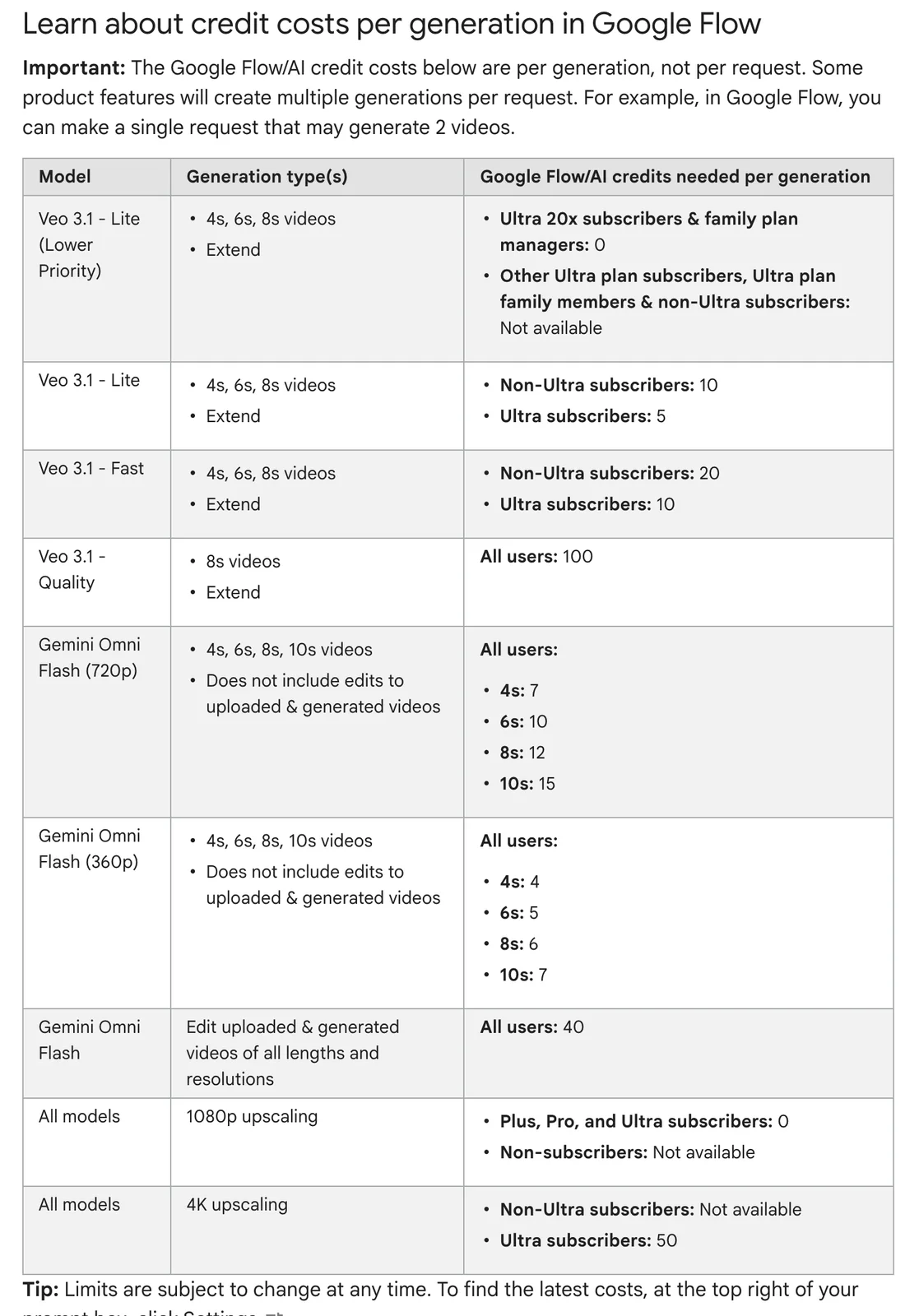
| Veo 3.1 with sound, without paying first | Google Flow | 50 free credits a day; Veo 3.1 Lite and Fast take a start and end frame |
| Keyframes, loops or HDR for grading | Luma (Ray 3.2) | Up to 16 ordered keyframes; HDR and EXR output |
| Several models and a plugin in your editor | Runway or Higgsfield | Partner models plus Premiere Pro, After Effects and DaVinci Resolve integrations |
| Keyframe transitions and quick effects | Pika | Pikaframes takes 2 to 5 stills; Starter at $10 includes a commercial licence |
| A storyboard you assemble before export | LTX Studio | Storyboard and timeline in the app, with XML export |
| A presenter speaking from a photo | HeyGen | Photo avatars with lip sync and translation |
| Footage that goes on into an edit with music and titles | Voyager | An agent generates, then builds the edit in Voyager Video or a supported editor |
Same photo, eleven models
Every tool above is a front end for one or more video models, and the model decides whether your subject survives the move. To see how much that varies, we sent the same product photo to each model's image-to-video endpoint with the same prompt: coffee drips through the dripper, steam rises, the camera drifts, "the dripper itself unchanged". The grid at the top of this page shows a frame from four and a half seconds into each clip.
Three of the eleven kept the dripper exactly as photographed and dripped coffee into it: Wan 3.0, Seedance 2.0 and Kling 3.0 Pro (Kling 3.0 Standard, in the chart below, did too). Veo 3.1 kept the shape and poured well. HeyGen Video, Hailuo 2.3 and LTX 2.5 Pro kept the shape but filled it like a cup rather than letting coffee drip through. Kling 4.0 kept the shape but failed the action: coffee ran down the outside from the first second. MiniMax H3 added a glass carafe underneath, a reasonable reading of a pour-over. Luma Ray 3.2 and Gemini Omni Flash 1.1 changed the product itself by giving it a handle, which is harmless in a concept piece and disqualifying in a product ad.
The newest model was not the most faithful. Kling 3.0 Pro did what was asked where Kling 4.0 did not, and Seedance 2.5 returned no clip at all: its generated output was rejected for a potential copyright violation, although the photo was our own. One run per model cannot rank them, and the endpoints' own prompt enhancement means the prompt each model acted on may differ from the one we sent. It is enough to show why you should test your actual image on two or three models before committing a plan to one. All 30 model attempts, 29 playable clips and the one refusal, are on our image-to-video model test.
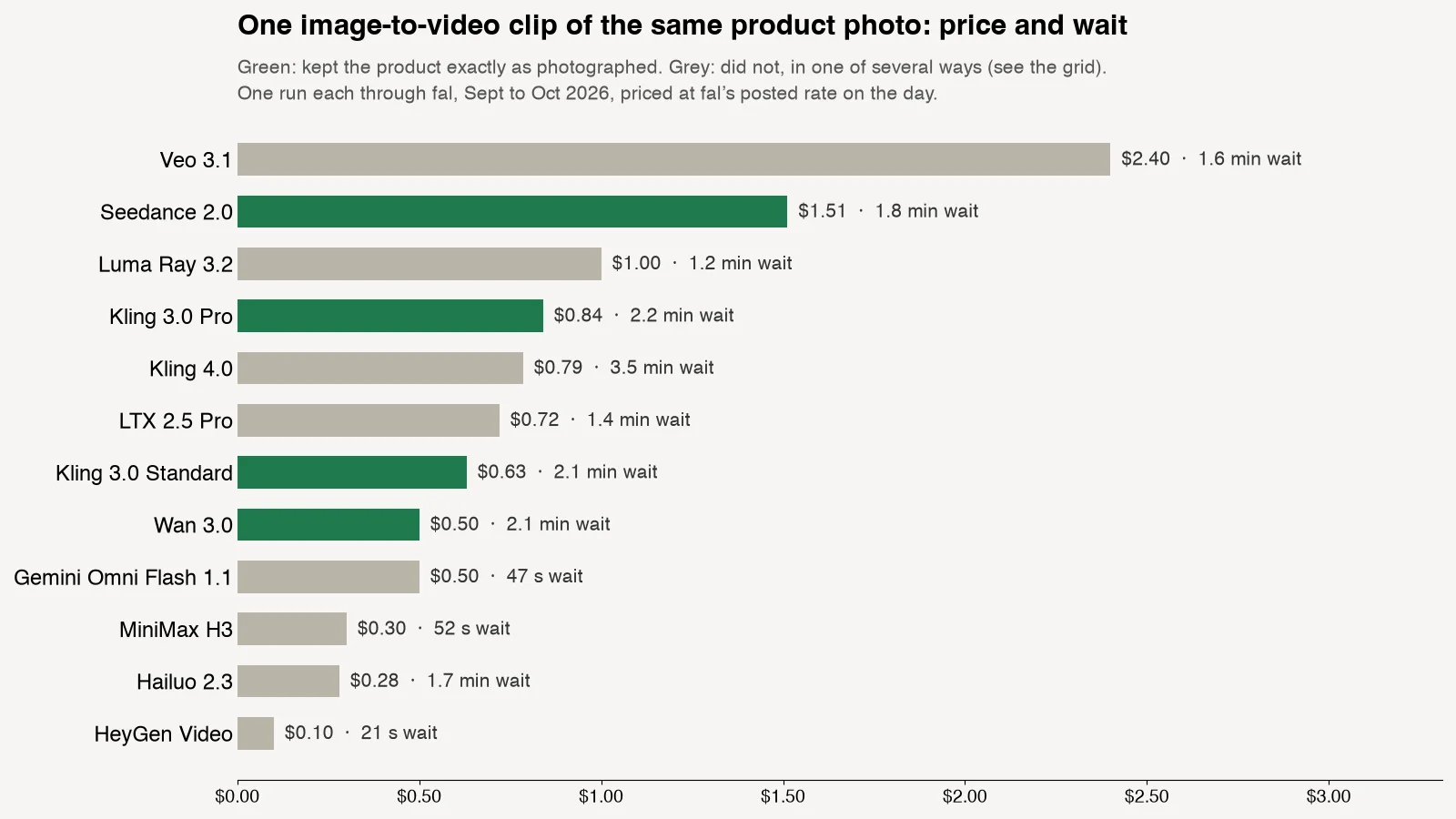
Price did not track fidelity either. Wan 3.0 kept the product exactly for $0.50; Veo 3.1's six-second clip cost $2.40. HeyGen Video's $0.10 clip came back in 21 seconds and kept the shape. For drafts, a cheap model that is roughly right is useful; for the final, pay for the one that keeps the subject.
The 11 tools at a glance
| Tool | Image controls | Longest documented clip, by model | Free tier | Cheapest paid plan | What you get back |
|---|---|---|---|---|---|
| Voyager | Start, end, keyframes and references, per model | 30 s (Seedance 2.5, Wan 3.0, Kling 4.0) | Free app; video with your own key | Starter $19, 1,800 credits | Clips plus an edit in Voyager Video, or a timeline for Premiere, Resolve or Final Cut |
| Kling | Start, end, up to 10 keyframes, 10 references | 30 s (Kling 4.0) | Basic, branded, no commercial use (20 Oct) | Standard $8.80, 660 credits (20 Oct) | Clips; Canvas workspace |
| Google Flow | Start and end frame; Ingredients references | 8 s (Veo 3.1), 10 s (Omni 1.1) | 50 credits a day | Google AI Plus $4.99 | Clips in a Flow project |
| Luma | Up to 16 keyframes on Ray 3.2 | 10 s (Ray 3.2 only documented) | None listed | Plus $30, 10,000 credits | MP4, HDR, EXR |
| Runway | Start frame; end and up to 10 keyframes via Kling 4.0 | 30 s (Kling 4.0, Seedance 2.5) | 125 one-time credits, watermarked | Standard $15, 625 credits | Clips; rendered cuts from its timeline; plugins for Premiere, After Effects, Resolve |
| Higgsfield | Start, end, up to 10 keyframes via Kling 4.0 | 30 s (Kling 4.0) | Watermarked, few models | Starter $19 (17 Sept; plans) | Clips; plugins for Premiere, After Effects, Resolve |
| Pika | 2 to 5 keyframes (Pikaframes); up to 30 references via Seedance 2.5 | 30 s (Seedance 2.5) | No monthly credits; no commercial licence | Starter $10, 900 credits | Clips |
| Adobe Firefly | Start and end frame | 5 s (Firefly Video), 15 s (Kling 3.0) | Limited daily generations | Standard $9.99, 2,000 credits | MP4; timeline sent to Premiere |
| Hailuo | Start and end frame; up to 12 references (H3) | 15 s (H3) | One-time welcome credits, watermarked | Standard $14.99, 1,000 credits | MP4 |
| LTX Studio | Start and end frame; elements and style references | 20 s, by model | 800 one-time credits, personal use | Lite $15 (personal use) | Storyboard, timeline, MP4, XML |
| HeyGen | Photo avatar; start and end frame on Wan 3 and Seedance | 30 s B-roll (Seedance 2.5, Pro plan) | 1 to 3 videos a month by region, watermarked | Creator $29, 600 credits | Video, audio and SRT downloads |
Read on 29 October 2026 from the pages linked in the first column and in each section below; Kling's plan figures are from its membership page on 20 October 2026, Higgsfield's from its pricing page on 17 September; neither page loaded signed out today, so confirm at checkout. "Longest clip" is one generation without extensions, for the model or mode named. Blank capabilities mean the vendor's pages do not document them, not that they are impossible.
The tools
1. Voyager
Voyager is a desktop app with an AI agent that generates with cloud video models and then works in the editing apps on your computer; you can also drive it with your own Claude Code or Codex setup. For image-to-video it runs Veo 3.1, Kling 3.0 and 4.0, Seedance 2.0 and 2.5, Wan 3.0, MiniMax H3, Luma Ray 3.2, Gemini Omni Flash 1.1, LTX 2.5 and FLUX 3 Max with each model's own controls: a start and end frame on most, up to eight middle frames on Kling 4.0, up to ten keyframes on FLUX 3 Max, and reference images for a product or character that recurs across shots (model catalog).
What it adds is the part after the clip. The agent can cut takes into an edit in Voyager's own video editor and export OTIO, FCPXML or EDL, build a new Premiere Pro sequence from an XML timeline, work in DaVinci Resolve and After Effects, or hand a checked FCPXML timeline to Final Cut Pro, with titles, music and sound kept as separate tracks you can change without regenerating the footage (what stays editable). Those editors need their own licences, and Resolve's options depend on its edition. A generated shot is still rendered footage: a handle the model added stays until you regenerate the shot.
Purchase check. The app and its Design, Video and DAW editors are free. Video on Voyager credits needs a paid plan: Starter $19 a month with 1,800 credits, Creator $49 with 4,900, Ultra $149 with 16,000, with the first three monthly grants 50% larger during launch (pricing). Generations are charged at the provider's cost, one credit per cent, so the $0.50 Wan 3.0 clip above is 50 credits; on the Free plan you can make video with your own fal key. Seedance with real people's faces needs Ultra or above, Voyager's separate written approval and the person's express permission (FAQ). The released app needs macOS 15 on Apple silicon; Windows 11 and Linux builds are in alpha.
Choose it if the clip is one shot in a piece you will edit and revise. Choose a single-model app if you only need one clip and want that vendor's full set of controls.
2. Kling
Kuaishou's own app exposes the first-party controls. The full Kling 4.0 model takes a start frame, an end frame or both, up to 10 keyframes, and up to 10 reference images with 5 reference videos, and generates 3 to 30 seconds with stereo sound in one pass. Its guide lists 4K output (Kling 4.0 guide). Kling 4.0 Flash is the cheaper variant: 20 seconds at 720p, without start-and-end frames or keyframes. Kling 3.0 remains available for clips up to 15 seconds.
Purchase check. On 20 October 2026 Kling's membership page listed Standard renewing at $8.80 a month for 660 credits after a discounted first month, and the free Basic plan without commercial use; its paid-service terms require Kling branding on non-member output. The page did not load signed out today, so confirm both at checkout (plan details). In our test Kling 3.0 Pro did what was asked and Kling 4.0 did not, so try both versions on your image.
Choose it if your shot is a long move with a defined path, or a character that must hold across several angles.
3. Google Flow and the Gemini app
Flow is Google's filmmaking app and the documented consumer route to Veo 3.1. Veo 3.1 Lite, Fast and Quality take a start frame and an end frame, up to 8 seconds, with sound; Gemini Omni Flash 1.1 adds clips up to 10 seconds with first and last frames on the web. Lite and Fast also take Ingredients, reference images for subjects; Quality does not (Flow help).
Purchase check. Every Flow user gets 50 credits a day, and Veo 3.1 Lite costs 10 credits a generation and Fast 20 outside the Ultra plan, so a free account can make a few short clips daily, with peak-hour limits. Google AI Plus is $4.99 a month with 200 more Flow credits, Pro $19.99 with 1,000 (credits, plans). The Gemini app itself now makes video with Gemini Omni on paid plans, guided by up to five images, but its help does not document start or end frames (Gemini help). Developers should note that Google shut down the Veo 3.1 preview endpoints in the Gemini API on 22 October 2026 (deprecations).
Choose it if you want Veo 3.1 with sound and bookend frames, and short clips are enough.
4. Luma
Luma's app is now multi-model, but its own Ray 3.2 is the reason to choose it. Ray 3.2 takes up to 16 ordered keyframe images for one image-to-video clip of 5 or 10 seconds, can loop, and exports native 16-bit HDR and EXR as well as MP4, which suits footage headed for a grade or a composite (Ray 3.2). It makes no sound in text- or image-to-video. The app also lists Seedance, Kling, Veo, MiniMax H3, FLUX 3 and Gemini Omni Flash.
Purchase check. Plus is $30 a month with 10,000 credits and includes commercial use; Pro is $90, Ultra $300. The pricing page lists no free plan (pricing). In our test Ray 3.2 added a handle, so check product shots carefully.
Choose it if you need many keyframes, a seamless loop or HDR plates, and you will add sound elsewhere.
5. Runway
Runway's own Gen-4.5 animates a start frame for 2 to 10 seconds at 720p, at 12 credits a second on paid plans (Gen-4.5). The broader draw is its partner models: Kling 4.0 in Runway takes a start frame, up to 8 middle frames and an end frame and runs to 30 seconds at 1080p (Kling 4.0 on Runway), and Seedance 2.5, Veo 3.1 and Wan 3.0 are also offered. Runway's plugins generate inside Premiere Pro and After Effects, and inside DaVinci Resolve Studio 19 or later, using your plan's credits (Adobe plugin, Resolve plugin).
Purchase check. Free is 125 credits once, never refreshed, with a watermark and a limited model list (Free plan). Standard is $15 a month with 625 credits, about 52 seconds of Gen-4.5; Pro $35 with 2,250; Max $95 with 9,500, which adds ProRes and PNG-sequence downloads (pricing). Clips can be trimmed and arranged with separate audio in Runway's own timeline and exported as a rendered cut (assembling clips).
Choose it if you want several strong models and to place results straight into an Adobe or Resolve timeline. For other ways to cover what Runway does beyond image-to-video, the tradeoffs differ.
6. Higgsfield
Higgsfield bundles many models (Kling, Seedance, Veo, Wan, Hailuo, Gemini Omni Flash, FLUX 3 video and its own) in one app aimed at ads and social video. Through Kling 4.0 it offers a start frame, an end frame, up to 10 keyframes and clips up to 30 seconds (Kling 4.0 on Higgsfield). Like Runway, it has integrations that generate inside Premiere Pro, After Effects and DaVinci Resolve (integrations).
Purchase check. Free generations carry a visible watermark, and Higgsfield allows commercial use of output for all users (watermark, ownership). Its plans change often and the live pricing page did not load signed out today; on 17 September Starter was $19 a month, and its "unlimited" offers have conditions.
Choose it if you make ads and social video and want many models under one plan. Between it and Runway, the deciding differences are presets versus Runway's own models and editing tools.
7. Pika
Pika is no longer just an effects app: it runs Seedance 2.5 and 2.0, MiniMax H3, Wan 3.0, Gemini Omni Flash 1.1, Veo 3.1 and Grok Imagine alongside its own Pika 2.5 (video tools). Its Pikaframes tool animates between 2 and 5 stills you supply, at up to 1080p with four keyframes or 720p with five (Pikaframes). Pikaffects (melt, inflate and the rest) and Pikaformance, which animates a photo to audio you supply, cover the social end.
Purchase check. Free has no monthly credits; you can buy credit packs, and downloads carry no watermark, but Free output has no commercial licence even after a pack purchase. Starter at $10 a month with 900 credits includes the commercial licence; Creator is $35 with 3,150 (FAQ, pricing).
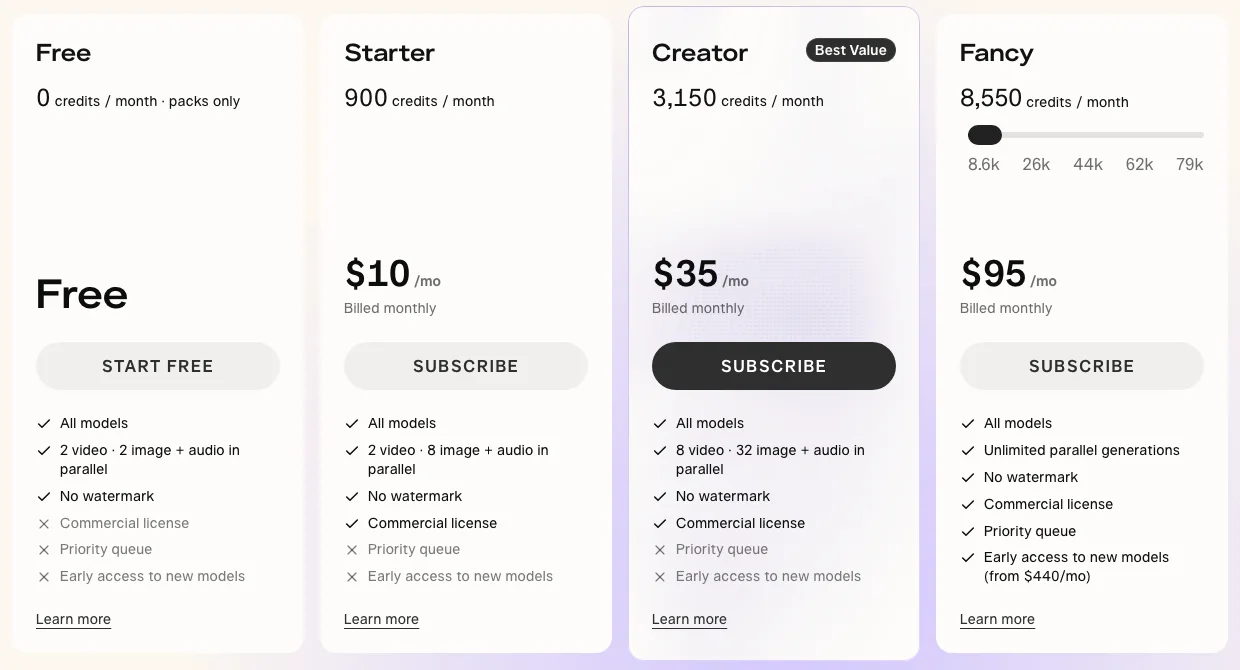
Choose it if you want Pikaframes transitions between your own stills or stylized effects; Starter includes commercial rights at $10 a month.
8. Adobe Firefly
Firefly's own video model takes a start frame and an end frame for a five-second 1080p clip (image to video), and partner models (Kling 3.0, Veo 3.1, Luma Ray, Runway Gen-4.5, Gemini Omni Flash) run longer, up to 15 seconds on Kling 3.0 (partner models). The Firefly video editor's timeline, in beta, can be sent to Premiere Pro on the desktop (send to Premiere).
Purchase check. A limited number of free generations refresh daily. Firefly Standard is $9.99 a month with 2,000 credits, enough for about 20 five-second Firefly videos; partner models cost more per clip. Adobe permits commercial use of Firefly output; partner models carry their own terms (features and plans, FAQ).
Choose it if you already pay for Creative Cloud and want generation that lands in Premiere.
9. Hailuo
MiniMax's Hailuo app is built around its H3 model now: a start frame, an end frame or both, up to 12 reference files (9 images, 3 videos, 3 audio), clips up to 15 seconds and native stereo sound (MiniMax H3). The app also offers Seedance 2.0. Hailuo 2.3, the older model in our test, remains available through APIs.
Purchase check. New accounts get one-time welcome credits that expire after three days, and free downloads are watermarked. The published terms list Standard at $14.99 a month for 1,000 credits; those terms date from July 2025, so check the price at checkout (payment policy). In our test H3 added a carafe under the product.
Choose it if you want H3's start and end frames, up to 12 references and 15 seconds with stereo sound in one app.
10. LTX Studio
LTX Studio is a production app rather than a generator: you plan a project as a storyboard, generate each shot from images (with start and end frames and recurring elements), and arrange shots on a timeline before exporting MP4, a pitch deck or XML for an editor (AI movie maker, FAQ). Shots run up to 20 seconds depending on the model. It runs Lightricks' LTX-2.5 and 2.3; Standard adds Kling 3.0 Pro and Seedance 2.0, Pro adds Veo 3.1.
Purchase check. Free is 800 credits once, for personal use only. Lite at $15 a month is still personal use; the commercial licence starts on Standard at $35 a month with 28,000 credits (pricing).
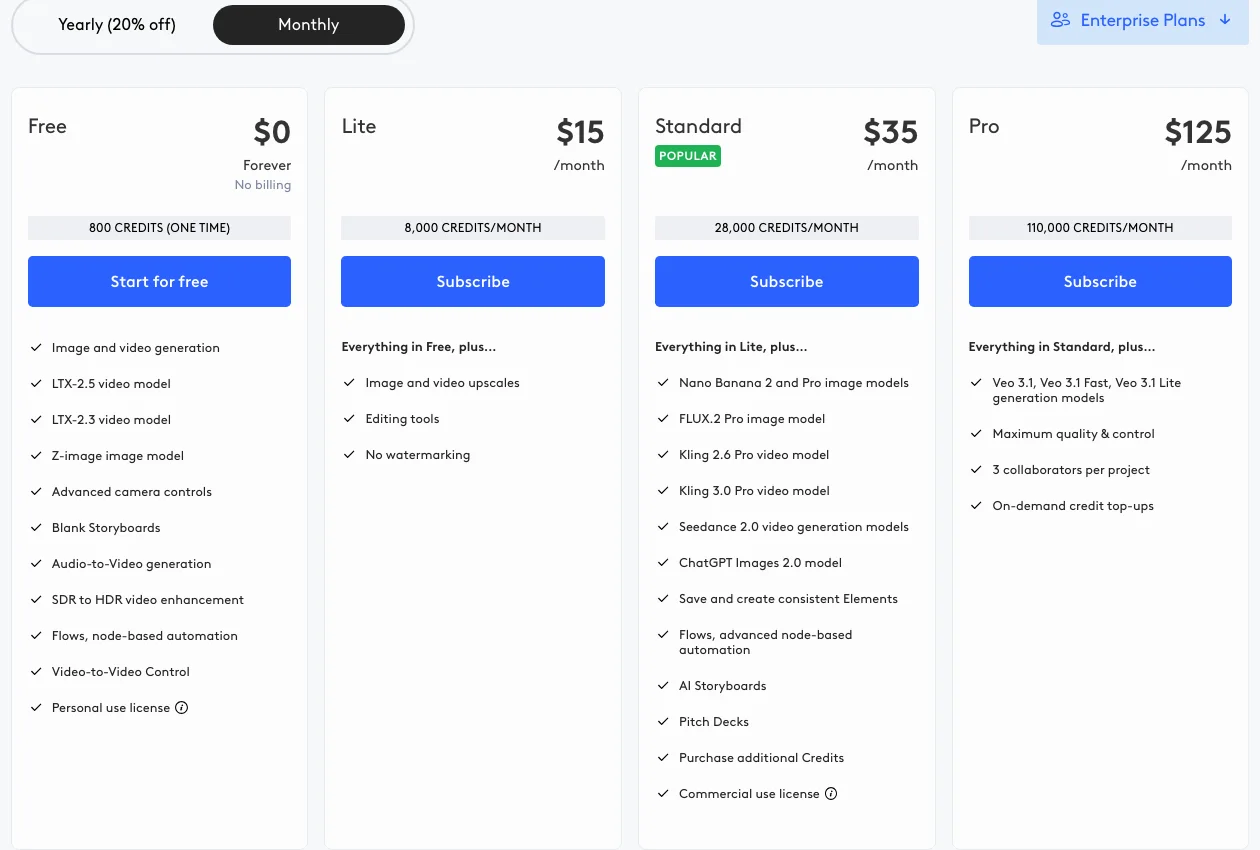
Choose it if you are building a sequence of shots from a script and want to see it assembled before anything goes to an editor.
11. HeyGen
HeyGen started as an avatar app, and photo avatars are still its main image-to-video use: one photo becomes a presenter who speaks your script, with lip sync and translation. Its Creative Studio now also animates scenes and products from a start frame with HeyGen Video, Seedance, Wan 3, Hailuo 2.3 and LTX, with start and end frames on Wan 3 and Seedance and up to 30 seconds on Seedance 2.5 (Creative Studio).
Purchase check. The pricing card advertises three free watermarked videos a month, each up to one minute; HeyGen's help says one to three depending on region (plans explained). Creator is $29 a month with 600 credits, Pro from $49 with 1,000; the Seedance models need Pro (pricing, credits). Credits are spent per feature, and avatar minutes cost differently from generated clips.
Choose it if the image is a person who needs to talk, especially in several languages.
Free tiers and commercial rights
Free tiers differ more in what you may do with the output than in how much you get. A watermark is visible; a missing commercial licence is not, and it is the one that matters for client work.
| Tool | Free allowance | Watermark on free output | Commercial use on free output |
|---|---|---|---|
| Google Flow | 50 credits a day | Not documented | Not documented |
| Adobe Firefly | Limited daily generations | Not documented (Content Credentials attached) | Allowed for Firefly models; partner models have their own terms |
| Runway | 125 credits, once | Yes | Allowed |
| LTX Studio | 800 credits, once | Not stated; watermark-free from Lite | No, personal use only |
| Pika | None monthly; packs for sale | No | No |
| Kling | Basic plan | Kling branding required | No, as of 20 October |
| Higgsfield | Limited models | Yes | Allowed |
| Hailuo | Welcome credits, expire in 3 days | Yes | Not clearly granted |
| HeyGen | 1 to 3 videos a month, by region | Yes | Not stated separately for Free |
| Luma | No free plan listed | n/a | Plus and above |
Where a cell says "not documented", the vendor's pages did not say either way on 29 October 2026. Rights to your input image are yours to clear whichever tool you use; read the plan's terms before publishing client work.
Verdict by job
| If your work is mostly | Choose | Because |
|---|---|---|
| Product shots that must not change | Test Wan 3.0, Seedance 2.0 and Kling 3.0 on your image, in whichever tool runs them | They kept our product exactly in a one-photo test |
| Long moves through set poses | Kling app | Kling 4.0's 10 keyframes and 30 seconds |
| Short clips with sound, on a budget | Google Flow | Free daily credits and Veo 3.1 with start and end frames |
| Plates for grading or compositing | Luma | Ray 3.2's HDR and EXR, up to 16 keyframes |
| Generating inside Premiere, After Effects or Resolve | Runway or Higgsfield | Plugins in all three |
| Social clips with commercial rights for $10 | Pika | Starter includes the licence |
| A sequence planned from a script | LTX Studio | Storyboard, timeline and XML export |
| A talking presenter from a photo | HeyGen | Photo avatars with lip sync and translation |
| A finished piece with an edit you can revise | Voyager | Generation and the edit, music and titles in one agent |
Frequently asked questions
What is the best image-to-video AI?
For keeping a product exactly as photographed, Wan 3.0, Seedance 2.0, Kling 3.0 and Kandinsky 6.0 Pro did best in our one-photo test across 30 models; Gemini Omni Flash and Luma Ray 3.2 added a handle. Which tool to use depends on which of those models it runs and the controls you need. Every clip is on our model test.
Is there a free image-to-video AI with no watermark?
Pika's free downloads carry no watermark, but free output has no commercial licence (Pika FAQ). Google Flow gives 50 credits a day and Firefly a limited number of daily generations; neither documents a visible watermark on its plan pages. Runway, Higgsfield, Hailuo and HeyGen watermark free output, and Kling requires its branding on non-member output.
Which image-to-video tool makes the longest clips?
Kling 4.0 runs to 30 seconds in the Kling app, Runway, Higgsfield and Voyager; Seedance 2.5 runs to 30 in Runway, Pika, HeyGen (Pro) and Voyager; Wan 3.0 to 30 on its API, which Voyager uses (Kling 4.0, Seedance 2.5 on Pika). Veo 3.1 stops at 8 seconds and Luma's Ray 3.2 at 10; longer pieces are usually several clips cut together.
What is a start and end frame in image-to-video?
The start frame is the image the clip begins on; the end frame is the image it must land on, and the model generates the motion between them. They work best when the two images are close, a turn or a lighting change, since very different frames can produce a cut instead of a move (Kling's guide).
Can I use image-to-video output commercially?
It depends on the platform, the plan, the model's terms and your rights to the input image. Pika allows it from Starter and LTX Studio from Standard, and Kling listed it for paid plans only on 20 October; Runway and Higgsfield allow it on free output, and Adobe on output from Firefly's own models (Runway, Higgsfield, Firefly). Check the exact plan's terms before you publish client work.
How much does one image-to-video clip cost?
Our five- to six-second test clips cost $0.10 to $2.40 at fal's posted rates, depending on the model. In apps, a plan's credits set the price: Runway's Standard plan covers about 52 seconds of Gen-4.5 (Gen-4.5), and Firefly Standard about 20 five-second Firefly clips (Firefly plans). Budget for several attempts per clip you keep.
Voyager is a desktop AI agent for creative work
Describe what you want to make; Voyager plans it, uses your apps and tools, and keeps everything editable.