The right Runway alternative depends on what you need to replace. Choose a different generation workspace for new shot controls, a model's own app for its specific reference tools, or a desktop agent when the work continues into an editable production project. Those are three different purchases.
We would start with Voyager for generation flowing into Premiere Pro, After Effects, Resolve or its own editors; Higgsfield for recurring characters and ad concepts; Adobe Firefly for Adobe-centered generation; Kling for its own motion and reference workflow; Pika for short effects; Luma for shot development; Krea for reusable visual workflows; and OpenArt for multi-model stories.
Prices, plan conditions and product documentation were read on 23 October 2026. All dollar prices below are US dollars, before tax, with monthly billing unless stated otherwise. This is a comparison of documented capabilities and public pricing, without generation-quality measurements. Voyager, the desktop app our team builds, is included for the production workflow it supports. The cost comparison separates published rates, calculated estimates and settings that could not be matched.
What Runway does well, and why people stay
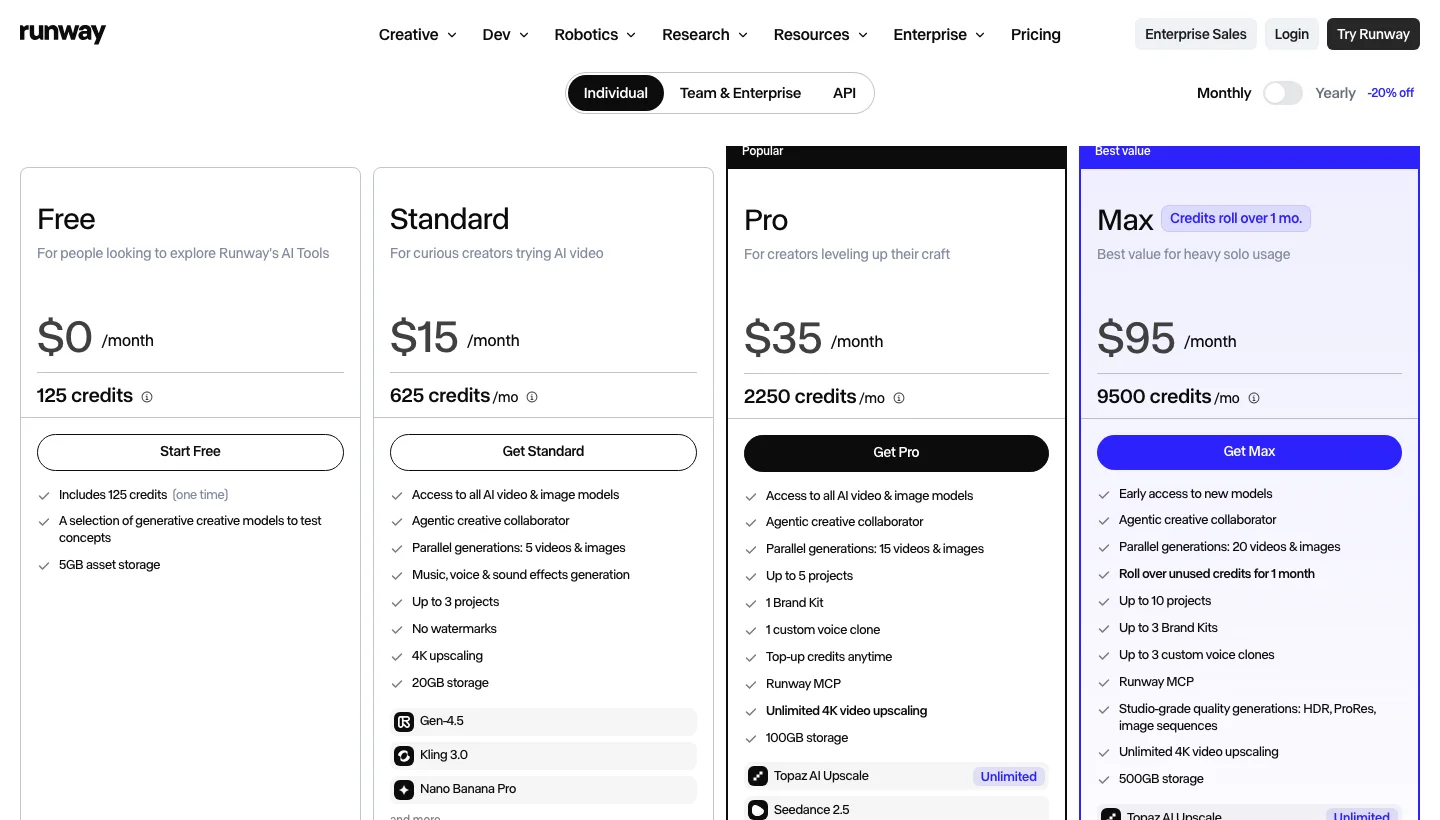
Runway is a multi-model creative platform with first-party tools that another Kling subscription will not replace. Its model table lists Gen-4.5 for generating footage, Aleph 2.0 for editing existing footage and Act-Two for transferring a driving performance to a character. If one of those operations is central to your work, switching the place you buy Kling leaves that need unresolved.
Runway also has an Agent timeline: arrange footage on tracks, split and trim clips, separate audio and export a cut. It is a real assembly workflow. Before buying an alternative, identify the specific edit or handoff your existing setup cannot handle.
Its desktop integration is another reason to stay. Runway launched Premiere Pro and After Effects plugins on 8 September 2026, followed by a DaVinci Resolve plugin on 23 September. The Adobe panel can generate media, restyle selected footage with Aleph and place results in a sequence or composition using an existing paid plan's credits. Merely generating inside an editor is no longer a unique reason to switch.
Which Runway alternative should you choose?
| If your main job is… | Shortlist | The deciding check |
|---|---|---|
| Turn generated assets into a revisable desktop production | Voyager | Can the agent change the actual timeline, composition and audio project you deliver? |
| Reuse a character in advertising concepts | Higgsfield | Does the selected model preserve your references across the revisions you need? |
| Generate within an Adobe-centered workflow | Adobe Firefly | Which models and desktop app licences does your subscription include? |
| Direct movement or animate an approved still | Kling AI | Does the first-party reference or motion control solve your specific shot? |
| Make short, effect-driven clips | Pika | Is the desired effect available in the current product and plan? |
| Develop and modify shots | Luma | What does each generation or modification cost at your settings? |
| Reuse a sequence of models and processing steps | Krea | Can you preserve the workflow, rather than only its last rendered result? |
| Build multi-scene stories across models | OpenArt | Does your plan allow commercial use, and can you export what the next editor needs? |
These are starting points, not output-quality scores. A platform can solve more than one job. For the underlying input choice, see text-to-video versus image-to-video.
Runway alternatives at a glance
| Alternative | What it is | Monthly entry plan and purchase check |
|---|---|---|
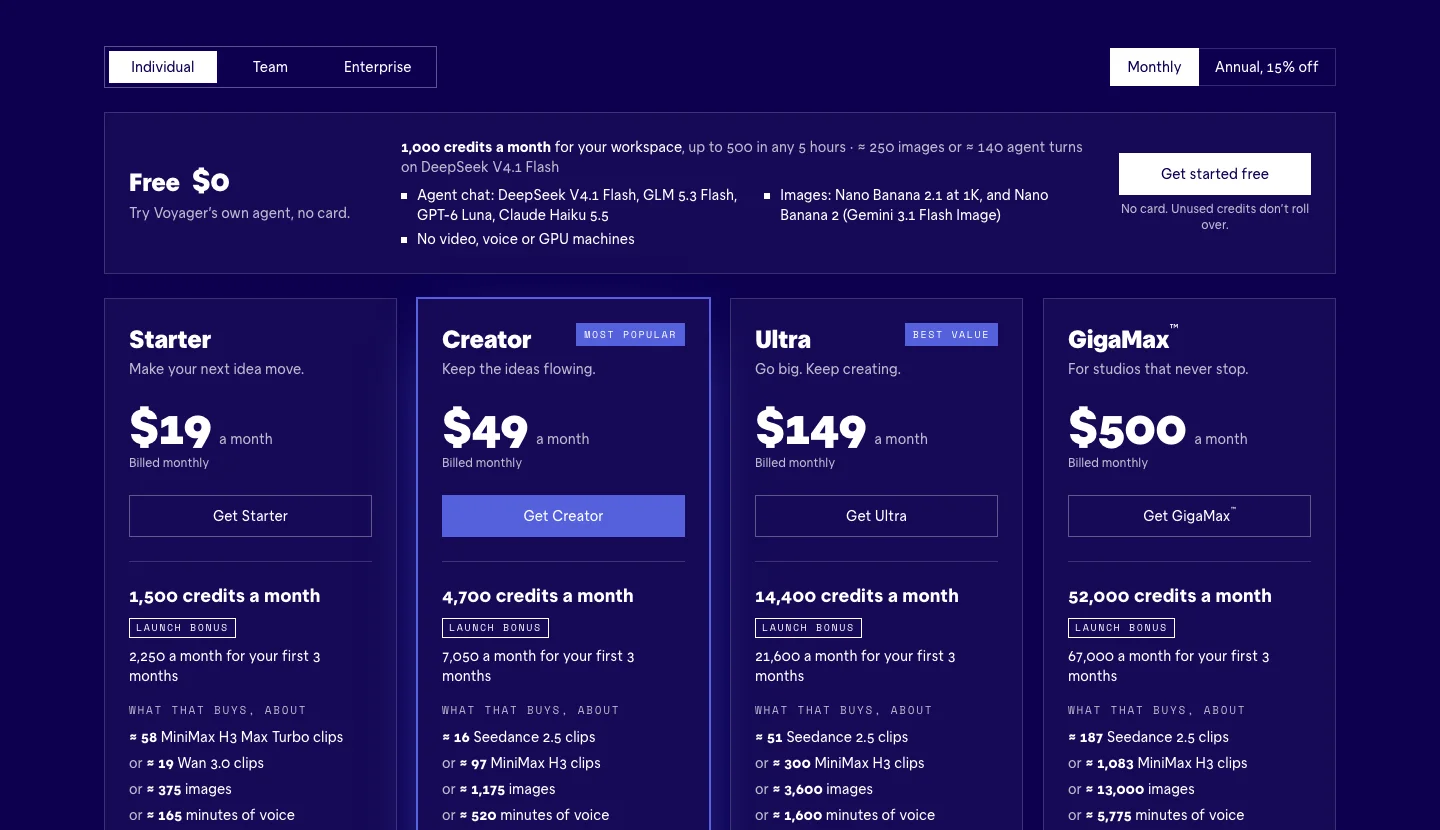
| Voyager | Desktop creative agent plus Design, Video and DAW editors | Free app; Starter $19, 1,500 credits. Managed video needs a paid plan. |
| Higgsfield | Multi-model workspace with character and advertising tools | Starter $19, 270 credits; selected models only. Plus $59, 1,200 credits, adds all-model access. |
| Adobe Firefly | Adobe and partner generation models, web tools and Adobe integrations | Standard $9.99, 2,000 generative credits. Check desktop app entitlements separately. |
| Kling AI | First-party Kling model workspace | Standard $10 list, 660 credits; the page shows $6.99 for the first month, then $8.80/month. |
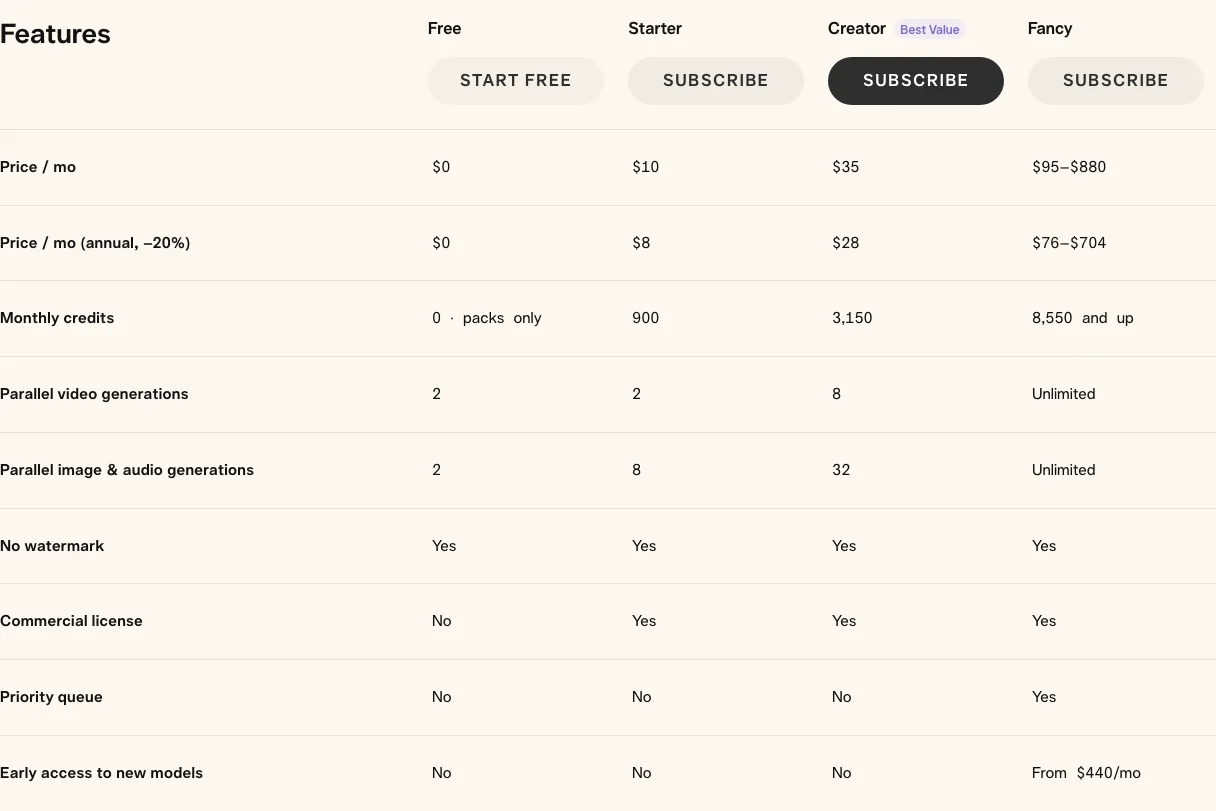
| Pika | Video, image and audio generation with creative effects | Starter $10, 900 credits; the current table includes commercial use. |
| Luma | Ray and partner models with shot modification and Agents | Plus $30, 10,000 credits; Pro $90, 40,000 credits. |
| Krea | Generation, real-time exploration, Agent and Nodes | Basic $9, 5,000 compute units; Pro $35, 20,000 units. Check model access. |
| OpenArt | Multi-model creative workspace with Director story tools | Starter $14, 4,000 credits; commercial rights begin at Plus, $34 for 12,000. |
Sources are linked in each row, read on 23 October 2026. Kling's list, introductory and renewal prices are different offers. The clip table uses list prices consistently; it does not describe the lowest checkout offer available to every reader.
What the same Kling 3.0 clip costs
Credit counts alone do not compare value. We use one generation attempt: five seconds of Kling 3.0 Standard, 720p, native audio on, without voice control. That excludes Pro, Omni, Turbo, reference-video editing and upscaling.
For each subscription, whole clips = monthly credits divided by credits per clip, rounded down. Effective cost = monthly price divided by that whole-clip count. This allocates the entire subscription to that one task, including the small unused balance. It is neither an overage price nor the cost of an approved shot.
| Platform and rate source | Credits per five-second clip | Entry plan: allowance → whole clips → cost each | Next plan: allowance → whole clips → cost each |
|---|---|---|---|
| Runway: 13 credits/second with audio, plans | 65 | Standard $15: 625 → 9 → $1.67 | Pro $35: 2,250 → 34 → $1.03 |
| Voyager, standard allowance: provider-cost policy and plans, fal rate | 63, fal's rate at cost | Starter $19: 1,500 → 23 → $0.83 | Creator $49: 4,700 → 74 → $0.66 |
| Voyager, temporary launch allowance | Same 63 credits | Starter $19: 2,250 → 35 → $0.54 | Creator $49: 7,050 → 111 → $0.44 |
| Adobe Firefly: 25 credits/second with audio, plans | 125 | Standard $9.99: 2,000 → 16 → $0.62 | Pro $19.99: 4,000 → 32 → $0.62 |
| Luma: 40 credits/second with audio and plans | 200 | Plus $30: 10,000 → 50 → $0.60 | Pro $90: 40,000 → 200 → $0.45 |
| OpenArt: published pricing configuration, plans | 175 | Starter $14: 4,000 → 22 → $0.64, non-commercial | Plus $34: 12,000 → 68 → $0.50 |
| Higgsfield: current rate table | Audio setting not specified in its approximately 7-credit estimate | Not priced for this matched task | Not priced for this matched task |
| Kling AI: credit guide | Exact 720p audio charge not confirmed in the current public guide | Not priced for this matched task | Not priced for this matched task |
| Krea: current plan estimates | Public example uses three seconds with audio off | Not priced for this matched task | Not priced for this matched task |
All sources read on 23 October 2026. OpenArt's live pricing code sets Standard Kling 3.0 to 35 credits per second with sound, versus 25 silent; its calculator also lists 175 credits for a generation. OpenArt's terms permit commercial use on Plus and higher, so Starter's lower entry price is not a client-work recommendation.
Voyager's audio row comes from the provider rate. Its public table lists Standard 720p silent at 8.4 credits/second but not the with-audio tier. At fal's $0.126/second audio rate and one credit per cent of provider cost, five seconds is 63 credits, which matches the quote the app gave for the same request on 23 October 2026. With your own fal key, the provider bill for this clip is $0.63, separate from Voyager subscription credits.
The launch allowance adds 50% for the first three months, with the extra credits capped at 15,000 per month; Starter and Creator do not reach that cap. At 63 credits a clip, Voyager has the lowest entry-plan figure and next-plan figure among the numeric subscription rows above during that period. Afterward its figures return to $0.83 and $0.66. Luma Pro remains $0.45 at its published rate. The unpriced rows prevent a claim about the cheapest platform overall.
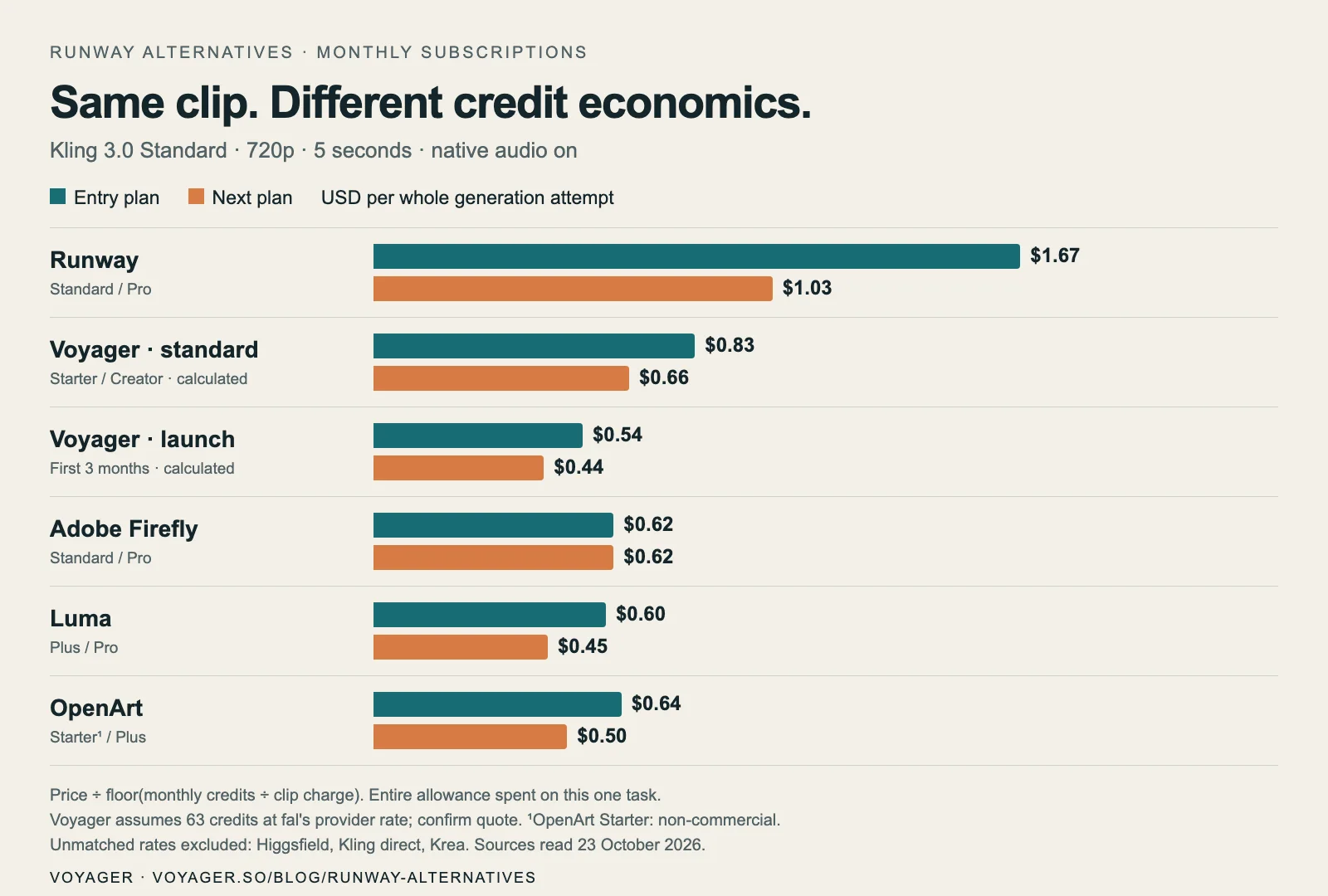

Retries change the budget more than a small difference between these figures. Five attempts for one accepted shot cost five times the attempt allowance. Reference creation, agent chat, sound, modifications and upscale also compete for the same balance. Annual discounts and short promotions can change the arithmetic; do not combine a monthly price from one offer with credits from another.
1. Voyager for editable desktop production
Voyager fits first here for readers whose problem starts after generation: choosing takes, building a timeline, adding titles, scoring the cut and revising the deliverables. Its creative-app and editor documentation describes an agent working in Premiere Pro, After Effects and DaVinci Resolve, plus Voyager Design, Video and DAW. It can use your Claude Code or Codex setup and your own model keys.
The distinction is the file you revise. A generated shot is rendered footage; putting it in a native timeline does not turn its pixels into layers. The surrounding edit, titles, composition and audio arrangement can remain revisable. Voyager Video's handoffs include OTIO, FCPXML and EDL, which you should check against the effects and media your destination editor must preserve.
The tradeoffs are concrete: Apple silicon Macs require macOS 15 or later; Windows 11 and Linux builds are alpha, live Adobe control is macOS-only, and you still need licences for the apps it drives. Resolve Studio offers the full scripting route; free Resolve uses a more limited handoff. The free app includes the editors and 1,000 monthly credits for chat and images, while managed video and voice require a paid plan.
Choose it when the agent needs to work across production stages and leave editable projects. Choose a focused generation workspace when you mainly want to direct and compare shots.
2. Higgsfield for character-led ads
Higgsfield's Cinema Studio provides camera-led shot development, while its Soul ID workflow focuses on recurring identity. That makes it a useful shortlist for ad variations where the same character must appear in several concepts.
Its current plan table lists Kling, Seedance, Veo and Wan models, but Starter has selected-model access; Plus adds all-model access. The same page says unlimited and free-generation offers apply on higgsfield.ai, excluding MCP/CLI, Canvas and Supercomputer. Do not budget an automated workflow as though a website promotion covers it.
Choose Higgsfield for its directing and character workflow. Before subscribing, verify the exact model, reference mode and audio quote: the current approximately seven-credit Kling 720p estimate does not identify its audio setting, so we have not treated it as a matched ten-credit clip.
3. Adobe Firefly for an Adobe-centered workflow
Firefly combines Adobe models with partner models and credits usable across compatible Adobe features. Adobe's partner-model table specifically lists Kling 3.0 in text-to-video, image-to-video, the Firefly video editor and Boards. Kling access is limited to individual or Creative Cloud for individuals users.
Choose Firefly when those Adobe surfaces already fit your job. A Firefly subscription is not a blanket licence to every desktop Creative Cloud app, and Adobe's own-model commercial assurances should not be assumed to cover partner models identically. Adobe distinguishes non-Adobe models in its generative AI terms.
4. Kling AI for first-party motion and references
Kling's own workspace includes Motion Control and reference-oriented Kling models. Its 3.0 guide distinguishes native audio, multi-shot work and Omni reference workflows. Consider it when one of those controls, rather than a broader model catalog, solves the shot you need.
The purchase check is the live quote and renewal condition. Standard's $10 list price differs from its introductory and recurring offers. We have left the five-second audio cell unpriced because the current public guide no longer supplies the exact 720p rate needed for that calculation. A different platform's Kling charge does not establish Kling's own charge.
5. Pika for short effects and social concepts
Pika's current product includes video creation and effect-oriented tools alongside image and audio generation. It is a useful starting point when the brief is a short transformation or playful visual idea, with a separate finishing workflow for the campaign.
Its current pricing table includes commercial use on Starter, as well as Creator and Fancy. Free has no monthly credit allocation and does not include a commercial licence. That makes the paid entry plan worth evaluating for commercial shorts, while the free plan's availability should not be mistaken for a recurring free video budget.
6. Luma for developing and modifying shots
Luma's pricing and model table puts Ray generation and video modification alongside partner models. That is a useful distinction when the task is to change a shot you already have, rather than generate unrelated alternatives.
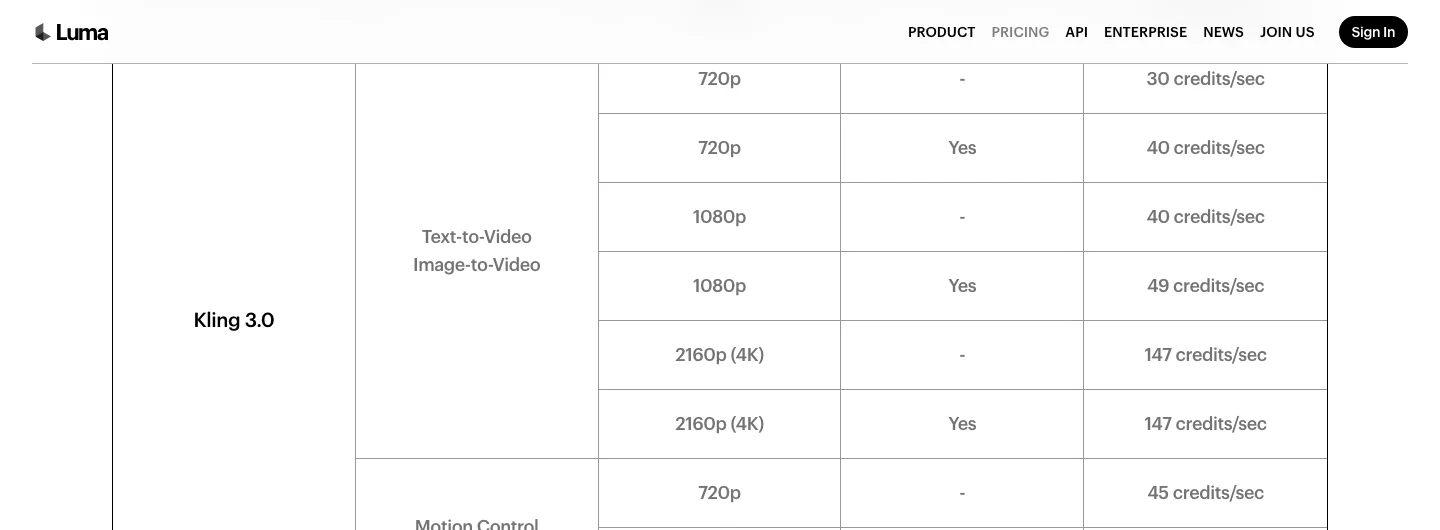
Its 10,000-credit Plus allowance and 40,000-credit Pro allowance are large enough to make the exact operation important: text-to-video, modification, resolution and audio can have different charges. For the matched Kling task, the published 720p audio rate is 40 credits per second. Choose Luma for the shot-development workflow, then confirm the downstream project and export requirements before treating it as your finishing environment.
7. Krea for real-time exploration and reusable workflows
Krea's Nodes connect models, prompts and processing steps in a visual workflow. Its real-time generation and Agent offer other ways to develop an idea before committing to a final shot. Choose it when preserving the sequence of creative operations matters as much as saving the last output.
Basic includes selected video models; Pro unlocks all video models, subject to the plan's usage limits. The public pricing comparison's Kling 3.0 example is three seconds, Standard, audio off. It cannot be substituted directly for our five-second audio task. Krea's API guide also bills a separate dollar balance, so an API dollar rate is not a subscription compute-unit rate.
8. OpenArt for multi-model stories
OpenArt's Director is available on Starter and higher, alongside multiple image, video and audio models. Consider it for planning a story across several scenes and model choices, rather than evaluating every shot in isolation.
The decisive restriction is commercial use: Starter removes watermarks but does not permit commercial output; Plus and higher do. There is a second purchase check for custom-model users: OpenArt's transition FAQ says the previous workspace retires on 16 November 2026 and its trained models and stories do not transfer into the new workspace. Confirm the current workflow before subscribing for a legacy training feature.
The verdict: replace the part that costs you work
If the bottleneck is turning generated assets into a production you can revise, evaluate Voyager's agent and editable project handoff. If it is shot direction, compare Higgsfield, Kling and Luma using the exact references and revision you need. If you already work in Adobe, compare Firefly with Runway's own plugins before adding another workspace. Krea and OpenArt are stronger shortlist candidates when reusable workflows or scene planning drive the decision; Pika fits shorter effects-led work.
Stay with Runway when Aleph 2.0, Act-Two, Gen-4.5 or its existing assembly and plugin workflow is doing the job. The matched Kling calculation can expose a spending difference, but it cannot price the loss of a tool you depend on, measure quality or predict how many takes your brief will need.
Frequently asked questions
Is Runway still worth paying for in 2026? Yes, when its first-party tools are central to your workflow. Gen-4.5, Aleph 2.0 and Act-Two solve different generation, transformation and performance jobs; a cheaper subscription to a shared model does not replace them.
Which Runway alternative is cheapest per clip? For the numeric monthly subscription rows above, Luma Pro's published allowance works out to $0.45 per matched attempt. Voyager Creator's temporary launch allowance works out to $0.44, then returns to $0.66 after three months. These figures allocate the whole plan to one task; the unpriced rows and changing offers prevent an overall cheapest-platform claim. Sources and conditions appear in the comparison table.
Can I use a free plan for commercial video? Check both the credit allowance and usage terms. Pika Free has no monthly credits or commercial licence; Kling Basic excludes commercial use. A trial or free account is not enough to establish that a client deliverable is licensed.
Does using the same model mean the platforms produce identical clips? No. Compare the submitted prompt, reference inputs, mode, resolution, duration and audio setting. Matching the rate task controls the billing comparison; it does not establish identical defaults or output quality.
Can I finish generated clips in Premiere Pro or Resolve? Yes. Runway itself offers editor plugins, and downloaded rendered footage can also enter a normal editing workflow. Check separately whether the surrounding cut, captions, audio and effects survive as editable project elements, as described in what editable means for AI video.
Voyager is a desktop AI agent for creative work
Describe what you want to make; Voyager plans it, uses your apps and tools, and keeps everything editable.