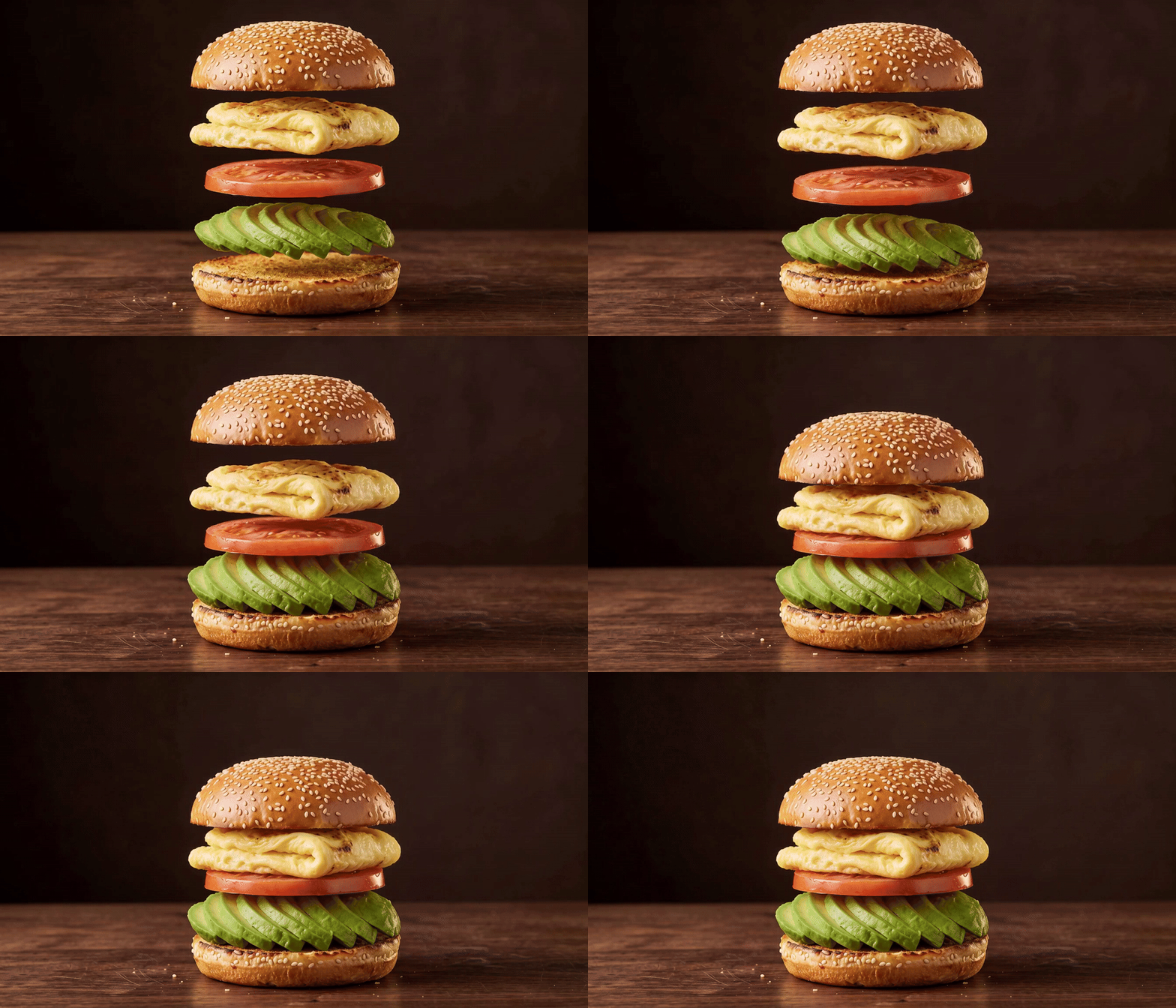
A sandwich is more interesting before it lands. Suspend the bun, egg, tomato and avocado in the air, then let them settle into a finished breakfast: eight seconds that could open a recipe, tease a menu item or sell a food-film concept.
The trick is to design both ends of the movement. A beautiful floating stack gives the video model a starting point. An assembled reference shows where every layer should land.
Start with a stack you can count
A recent food-anatomy prompt on X pairs floating ingredients with an assembled cross-section. We took that still-image idea into motion with an original breakfast sandwich.
Our stack has five layers: sesame bun crown, folded egg, one tomato slice, an avocado fan and the bun base. The two bun halves count separately. Here is a reusable version of our still-image brief:
Make a photoreal editorial food image of a breakfast sandwich in an exploded view. Show exactly five separated horizontal layers, from top to bottom: sesame bun crown, folded egg, one tomato slice, an avocado fan grouped as one layer, and toasted bun base.

Rest the base on the surface. Float the other layers directly above it, with clear air gaps and room to see the entire stack. Use a three-quarter close-up, moist food textures, a deep espresso-brown background, walnut surface and warm rim light. No lettering.
We generated three directions with Nano Banana 2: bakery, dark studio and mint café. The bakery image added a second tomato slice. The café introduced background people. We chose the dark studio: one tomato slice, clear separation and a quiet background.
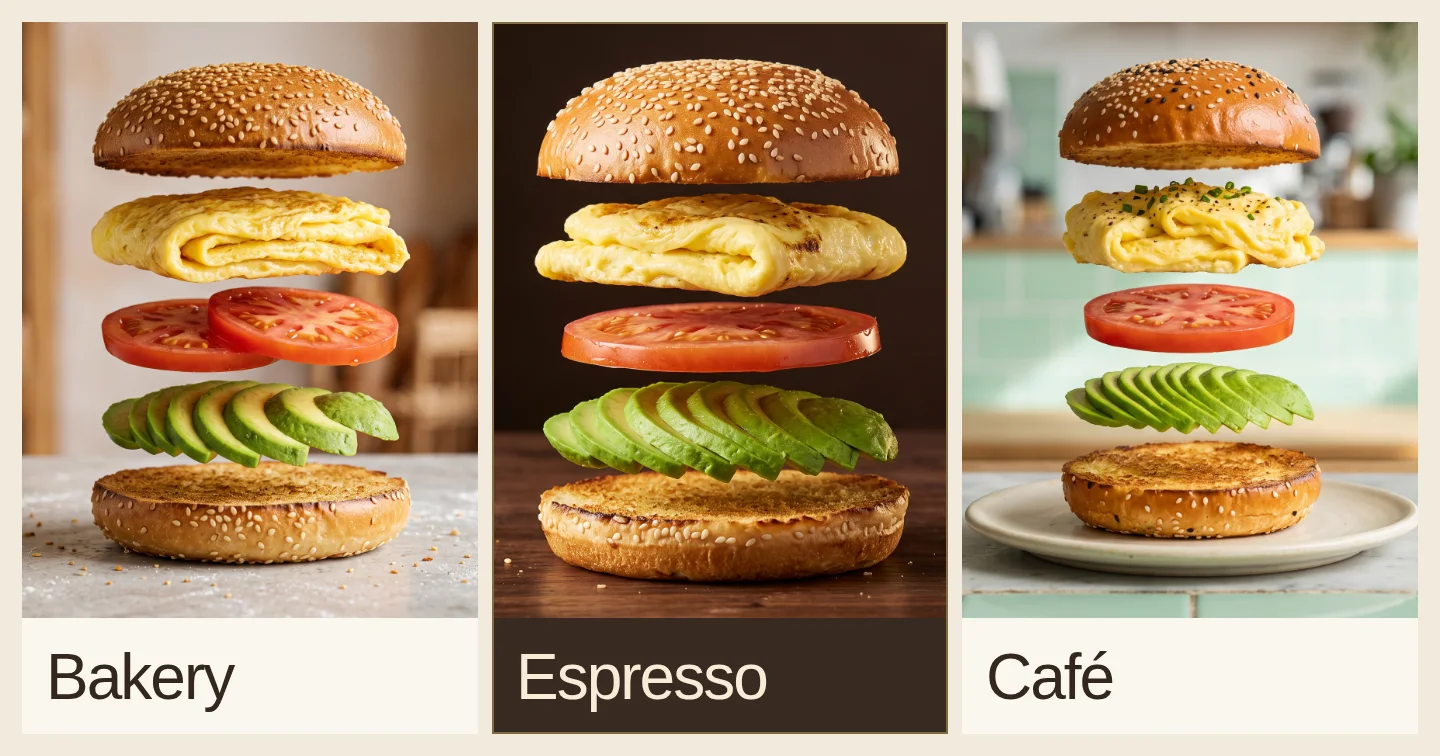
Approve the still before animating it. Count the parts, check their order and leave room around the tallest layer. A longer motion prompt is a poor substitute for fixing the starting image.
Show the video model where to land
Our first image-to-video attempt lifted the top bun out of frame and left a gap between the fillings. A stricter prompt still failed. We edited the chosen still into an assembled end frame instead:
Using the exploded sandwich image, make the fully assembled sandwich. Keep the bottom bun in place. Rest the avocado directly on it, the single tomato slice on the avocado, the folded egg on the tomato, and the bun crown on the egg. Close every air gap.

Keep the same ingredients, camera, framing, table, dark background and lighting. The assembled sandwich is shorter and sits in the lower center of the unchanged scene. Leave the surrounding space empty.
Check that edited image too: neighboring layers should touch, and nothing should have been added to help assemble them.
The accepted take uses H3 Max reference-to-video: eight seconds, 768P, the exploded image as both subject reference and first frame, and the assembled image as the last frame. Prompt expansion was off. The endpoint schema describes these separate inputs.
The earlier Veo takes still introduced unwanted details, including a visible support above the bun. Changing models with the same approved images gave us the cleaner take shown above.
Here is the reusable motion brief. The download includes the exact structured prompt and generation request:
A single fixed shot of a self-assembling sandwich. Start with the separated layers in the first image. Let them float briefly, then move slowly downward: avocado onto the base, tomato onto avocado, egg onto tomato, crown onto egg. Keep the base planted on the table and the crown inside the picture.

Preserve the food order, textures, framing and lighting. Close every gap to match the assembled last image. Hold the finished sandwich still for the final two seconds. The scene contains only the food, wooden table and empty brown background; nothing is handling or supporting the floating layers.
The accepted animation settles the fillings first and the crown last, then holds the assembled sandwich. We kept its original eight-second pace.
Before keeping a take, inspect the movement as well as the endpoints. Do the same parts remain recognizable? Do they meet without passing through one another? Does the final sandwich hold long enough to register? Reference frames guide the model; they do not make the motion between them exact.
Keep the chosen image when the motion changes
Once you like the still, revising the video should not mean regenerating it. Voyager’s Mini flows keep the image options, your choice and the later generation steps together.
Enable Mini flows in Creative preferences, then start with:
Create a flow for this breakfast film. Make three photographic directions: warm bakery, dark espresso studio and mint café. Keep the same five-layer sandwich brief in each. Wait for my choice before generating a video, then stop for review.
We kept all three original stills and the selected espresso image through the video revisions. Editing the motion marked that step out of date; Run from here generated a new take using the saved choice. The earlier image versions remained available.
For the final take, we added the assembled end image and attached that specific file as the last-frame reference. If you choose a different sandwich image, make a matching end frame too. Voyager keeps the work and decisions together; you still review whether the generated motion respects them.
Download the source images, finished film and exact prompts. Unzip the folder together, then open index.html to view both reference images and play the final film locally. The kit also includes the first failed take and portable generation settings.
Direct the landing
The floating ingredients get attention; the landing makes the shot useful. Design a clear start, make an end image you would actually use, then judge how the model connects them. For a menu teaser, give the finished food a readable hold. For a recipe opener, cut from that hold into the first preparation step.
Make your next project in Voyager
Create an account, download Voyager, and start making.