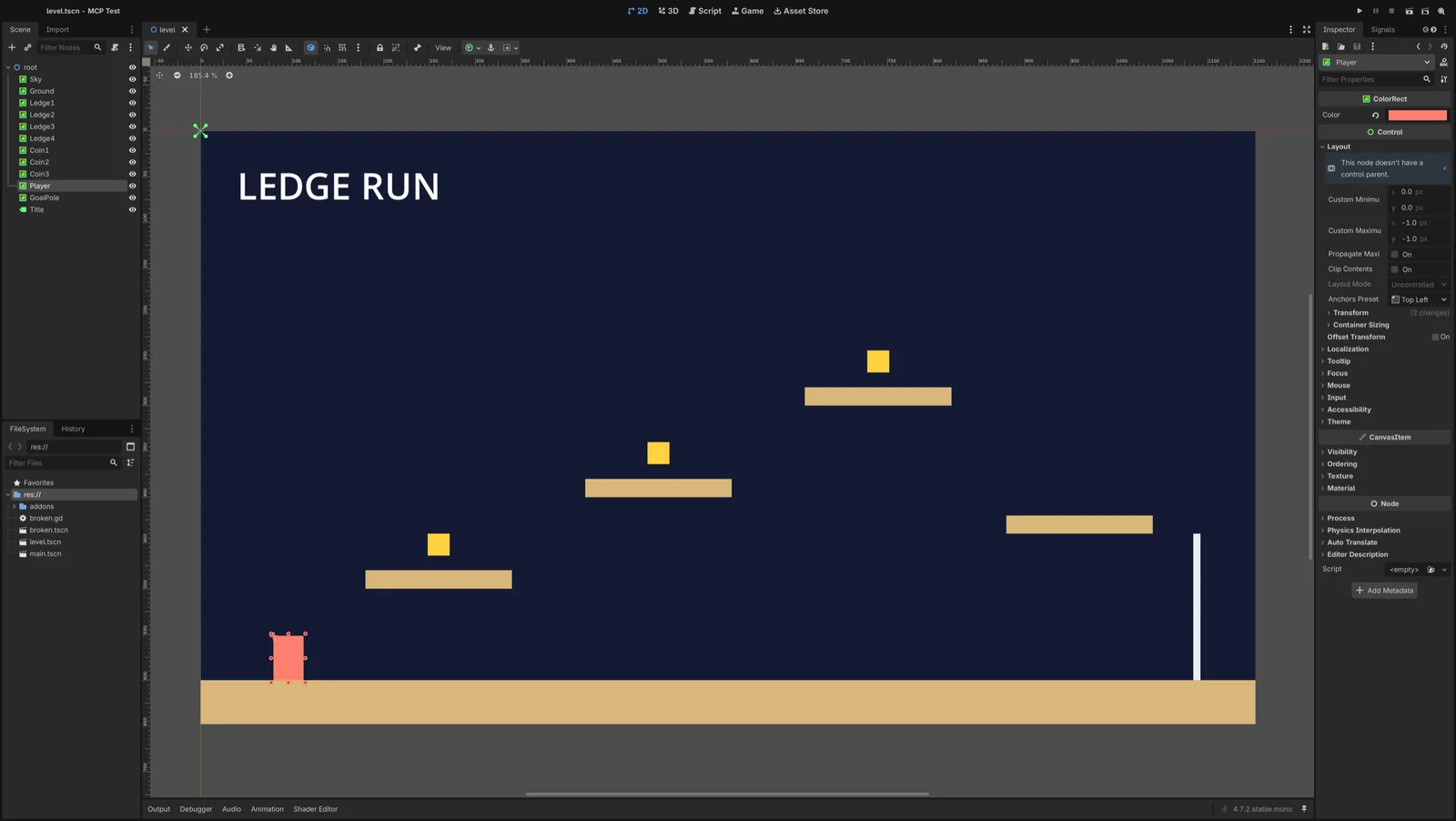
A Godot MCP server lets an AI agent such as Claude Code, Codex or Cursor work inside your Godot project: run it, read its errors, edit scenes and, with some servers, play the game. Godot has no official server, so you choose between community ones. Use Godot AI, a free editor plugin, if you want the agent to play and test the game. Use Coding-Solo's godot-mcp, the most popular server, if you only need it to run the project and fix errors.
Both of those were installed and run with Claude Code on Godot 4.7.2 on 8 October 2026. Everything else below, including star counts, versions and prices, comes from the projects' own pages, last checked on 20 October 2026.
Jump to: which server · Claude Code setup · Codex and Cursor · what it can do · troubleshooting · FAQ
Which Godot MCP server should you use?
The biggest difference between servers is how far they reach into Godot. There are three levels:
- Files only. The server starts Godot in the background for each request, edits
.tscnscene files and runs the project to collect its output. The agent can tell whether the game runs, not whether it plays correctly. - The open editor. A plugin inside the Godot editor takes requests from the agent. It works on the scene you have open, so changes land the way the editor would make them.
- The running game. The plugin also reaches into the game while it plays. The agent can press keys, read positions and take screenshots, so it can check that gameplay works.
Pick by what you want the agent to do:
| If you want the agent to | Use | Why |
|---|---|---|
| Run the project, read errors, fix scripts | Coding-Solo/godot-mcp | Small, works on any Godot 4, nothing to install in the project |
| Build scenes in the open editor and playtest | Godot AI | Free, edits the open scene, plays the game and presses inputs; needs Godot 4.7 |
| Playtest on Godot 4.5 or 4.6 | satelliteoflove/godot-mcp | Reaches the game through Godot's debugger, so the game needs no extra setup |
| The most tools, and you are happy to pay | Godot MCP Pro ($15 or more) or GDAI MCP ($19) | Both reach the editor and the game; neither does something the free ones cannot |
| Export builds or run checks in CI | No server: the godot command line | See do you need an MCP server at all |
"Godot AI" here is the name of one open-source plugin from hi-godot. Godot itself ships no AI assistant: a proposal to build one in was closed as not planned in August 2025 (godot-proposals #12409).
Godot MCP servers compared
Stars and dates are from GitHub on 20 October 2026. Tool counts are each project's own claim. A GitHub search for "godot mcp" finds 668 repositories, mostly forks and experiments; these are the maintained ones and the few with a different approach.
| Server | Stars | Last update | Reaches | Godot version | Price | Worth knowing |
|---|---|---|---|---|---|---|
| Coding-Solo/godot-mcp | 6,194 | 16 Apr 2026 | Files | 4.x | Free (MIT) | 14 tools. The npm package is behind the code on GitHub |
| hi-godot/godot-ai | 3,093 | 19 Oct 2026 | Editor and game | 4.7+ | Free (MIT) | 46 tools. Local connections need a token. Usage telemetry is on until you turn it off |
| yurineko73/Godot-MCP-Native | 859 | 3 Aug 2026 | Editor and game | 4.6 | Free (MIT) | Written in GDScript, no Node. Authentication is optional |
| Godot MCP Pro | 627 | 24 Sep 2026 | Editor and game | Some tools need 4.6+ | $15+ one-time | 187 tools, input recording, screenshot comparison, Android deploy |
| ee0pdt/Godot-MCP | 621 | 19 Mar 2025 | Editor | 4.x | Free (MIT) | No longer updated. Avoid: see security below |
| tugcantopaloglu/godot-mcp | 493 | 9 Oct 2026 | Files and game | 4.x | Free (MIT) | Coding-Solo fork with 157 tools |
| tomyud1/godot-mcp | 440 | 17 Oct 2026 | Editor | 4.x | Free (MIT) | Ctrl+Z does not undo its changes; it has its own undo tool |
| IvanMurzak/Godot-MCP | 297 | 20 Oct 2026 | Editor | 4.3+, .NET build only | Free (Apache-2.0) | Connects through a hosted service, ai-game.dev, unless you run your own server |
| satelliteoflove/godot-mcp | 178 | 2 Oct 2026 | Editor and game | 4.5+ | Free (MIT) | Can freeze time and step the game frame by frame |
| Erodenn/godot-mcp-runtime | 93 | 8 Oct 2026 | Files and game | 4.x | Free (MIT) | Adds its game hook only while the game runs |
| NPGameDev/godot-mcp-toolkit | 73 | 19 Oct 2026 | Editor and game | 4.2 to 4.7 | Free (MIT) | Token, read-only mode, removes itself from exports |
| GDAI MCP | Closed source | 7 Sep 2026 | Editor and game | 4.2+ | $19 one-time | Editor and game screenshots |
Popularity follows age here. The most-starred server is the only well-known one that cannot see the running game, and it has not published a new npm release since February. The newer servers all reach the game, and the better ones lock their local connection with a token.
How to set up Godot MCP with Claude Code
Coding-Solo's godot-mcp
You need Godot 4 and Node.js 18 or newer.
-
Get the server. The npm package (0.1.1, from February 2026) is missing a security fix that is on GitHub, so build it from source:
git clone https://github.com/Coding-Solo/godot-mcp.git cd godot-mcp && npm install && npm run build -
Add it to Claude Code. Point
GODOT_PATHat the Godot program itself. On a Mac that is inside the app:/Applications/Godot.app/Contents/MacOS/Godot.claude mcp add godot -e GODOT_PATH=/Applications/Godot.app/Contents/MacOS/Godot -- node /full/path/to/godot-mcp/build/index.jsAdd
--scope projectto save it in the project's.mcp.jsoninstead of your user settings. The README's one-line version,claude mcp add godot -- npx @coding-solo/godot-mcp, also works but uses the older npm build (README). -
Start Claude Code in your project and type
/mcp. You should seegodotwith 14 tools. -
Try it: "Run main.tscn with the godot tools and fix any errors in the debug output."
Godot AI (editor plugin)
You need Godot 4.7 or newer and uv, a Python tool runner.
- Download
godot-ai-v4-plugin.zipfrom the releases page (v4.3.0, 3 October 2026). Unzip it so the file sits atyour-project/addons/godot_ai/plugin.cfg. - In Godot, open Project > Project Settings > Plugins and enable Godot AI. A Godot AI panel appears.
- In that panel, press Configure next to Claude Code. It writes the server entry for you, matched to your plugin version.
- Start
claudeinside the project folder and approve the new server when asked. - Try it: "Show me the current scene tree, then run the game and press the right arrow for a second."
The panel's entry runs a small bridge, godot-ai attach, through uvx. Use it rather than typing a URL: the plugin's README says a plain http://127.0.0.1:8000/mcp entry "cannot authenticate". For reference, this is the entry that worked here:
{
  "mcpServers": {
    "godot-ai": {
      "type": "stdio",
      "command": "uvx",
      "args": ["--isolated", "--no-config", "--from", "godot-ai==4.3.0",
               "godot-ai", "attach", "--port", "8000", "--ws-port", "9500",
               "--disable-telemetry"]
    }
  }
}
Two things to know. The plugin's log said "Telemetry enabled" on first start; set GODOT_AI_DISABLE_TELEMETRY=true before launching Godot to turn it off (telemetry docs). And enabling the plugin adds an autoload, _mcp_game_helper, to project.godot, which is how it reaches the running game. You will see that change in version control.
How to set up Godot MCP with Codex or Cursor
Codex. One command adds the server to ~/.codex/config.toml, which the Codex CLI, IDE extension and ChatGPT desktop app share (Codex MCP docs):
codex mcp add godot --env GODOT_PATH=/Applications/Godot.app/Contents/MacOS/Godot -- node /full/path/to/godot-mcp/build/index.js
codex mcp list should show it as enabled. Coding-Solo's README has no Codex section; this is the standard Codex form, and it worked on 8 October 2026. For Godot AI, press Configure next to Codex in the plugin's panel.
Cursor. Add the same command to .cursor/mcp.json in your project:
{
  "mcpServers": {
    "godot": {
      "command": "node",
      "args": ["/full/path/to/godot-mcp/build/index.js"],
      "env": { "GODOT_PATH": "/Applications/Godot.app/Contents/MacOS/Godot" }
    }
  }
}
Claude Desktop uses the same block in claude_desktop_config.json. Godot AI's panel configures Cursor and Claude Desktop too.
What Claude Code can and cannot do in Godot
These results come from running both free servers with Claude Code on Godot 4.7.2.
Fix crashing scripts: yes. A scene's script read item 3 of an empty list. Through Coding-Solo's server, Claude Code ran the scene and got the error with its file and line:
SCRIPT ERROR: Out of bounds get index '3' (on base: 'Array')
          at: _ready (res://broken.gd:6)
It added a check, ran the scene again and confirmed the error was gone. This run, read, fix loop is what that server does best. One catch: after an error, Godot pauses the game at its debugger prompt, so the game stays open until the agent calls stop_project.
Build scenes: yes, with care. Claude Code built the level in the image above using only Coding-Solo's scene tools. Along the way it found that positions and sizes sent as {x, y} were silently ignored. The server passes values to Godot as they arrive, so anything that needs a Vector2 fails without an error, while plain numbers and colour strings like "#d9b77a" work. The agent switched to the numeric offset_* properties and finished. It also had to add nodes one at a time, because each call rewrites the whole scene file.
Play the game and check it works: only with an editor-and-game server. With Godot AI, Claude Code wrote a movement script, attached it to the player, ran the game, pressed the right arrow and read the player's position: 80 before, 868.78 after. It then took a screenshot of the game. Coding-Solo's server cannot do this; a game with a broken control and a working one produce the same clean log.
It was not smooth. The first game launch hung: the editor said the game was playing, but the plugin had lost track of it, and every game request timed out until the agent stopped and relaunched. Some log reads also timed out. Key presses are coarse too: the "one second" press lasted about three, because each request is a round trip. Tell the agent to check results by state, such as a position or score, not by timing.
Other jobs:
- C# scripts. Most servers only write the
.csfile. You need Godot's .NET build and adotnet buildto compile it. IvanMurzak's server is the C#-first option. - Exports. Some servers can trigger an export, but long exports can outlast a tool timeout (60 seconds by default in Codex). Run exports from the command line instead.
- Art and sound. Servers place assets; they do not make them. Check sprites in a real scene before trusting them: our Godot sprite sheet test shows how. For 3D models, see Blender MCP.
- Feel and fun. Nothing measures these. That is still your job.
Do you need a Godot MCP server at all?
Not always. If your agent can run terminal commands, the godot program does a lot of what the files-only servers do. The useful options, from the command-line docs:
| Option | What it does |
|---|---|
--headless | Runs with no window or sound, for servers and scripts |
--path <folder> | Picks the project |
--quit-after <n> | Stops after n frames |
--check-only | Checks a script for errors without running it (use with --script) |
--export-release <preset> <path> | Exports a build using a preset from export_presets.cfg |
--write-movie <file> | Saves frames to .png or .avi |
godot --headless --path . --quit-after 30 res://main.tscn 2>&1 | tee run.log
grep -q "SCRIPT ERROR" run.log && echo "failed"
godot --path . --write-movie /tmp/frame.png --fixed-fps 30 --quit-after 3 res://level.tscn
godot --headless --path . --export-release "macOS" build/game.zip
The one thing to tell your agent: don't trust Godot's exit code. On Godot 4.7.2, a run that hit a script error and a --check-only on a script with a typo both exited with code 0, which normally means success. Search the output for SCRIPT ERROR and Parse Error instead. --write-movie gives the agent pictures without any server, but it needs a screen; it saves nothing useful with --headless. Exports need Godot's export templates installed first.
You can also skip MCP and teach the agent instead. htdt/godogen (7,167 stars) has Claude Code or Codex build Godot games through the command line and judge them from screenshots and video. Skill packs such as haxqer/godot-skill, written for Godot 4.7, give the agent up-to-date API knowledge.
Voyager, the desktop app our team builds, uses this command-line approach for whole games. Its agent, or Claude Code or Codex through the Voyager plugin, builds a small playable Godot game with scenes, GDScript, controls, saves and a desktop export. It can also create game-ready models, images, audio and cutscenes with cloud models, billed at the provider's price. It playtests with real keyboard and mouse input and only counts a test as passed when checks on the game's state succeed, which avoids the exit-code trap above. It suits new, focused games better than editing a large existing project, it runs its own pinned Godot build rather than the one on your PATH, and it is a separate app rather than an MCP server for your current client. Sign up to download Voyager.
Is Godot MCP safe?
These servers run code on your computer with your permissions, so treat them like any developer tool you install.
- Use the GitHub version of Coding-Solo's server. An older release had a serious command-injection flaw, fixed in 0.1.1 (CVE-2026-25546). A later fix, which stops
add_nodefrom running a script you pass as a node type, is only on GitHub (PR #99). - Know which servers run any code. Godot MCP Pro, GDAI, tugcantopaloglu, Erodenn, satelliteoflove and IvanMurzak all have a tool that runs arbitrary GDScript or C#. That is powerful, and it means text in your project, such as a comment in a downloaded asset, could steer the agent into running something.
- Check the network setting. Godot AI, Godot MCP Pro, NPGameDev's toolkit and satelliteoflove only accept connections from your own machine, and Godot AI and the toolkit also require a token. ee0pdt's plugin listens on all network interfaces with no password, so anyone on the same network could send it commands.
- Commit before every session, and keep MCP plugins out of exported builds. The toolkit removes itself; most others do not say.
Godot's own AI rules cover contributions to the engine, not games made with it. Since 30 June 2026 the engine project bans AI-written pull requests and large AI-generated code (Godot Foundation). The Godot Asset Store accepts AI-generated assets if you disclose it (FAQ).
Godot MCP troubleshooting
"spawn npx ENOENT" or "command not found". Desktop apps like Claude Desktop and Cursor do not see your terminal's PATH. Use the full path from which node, which npx or which uvx.
The server cannot find Godot. Set GODOT_PATH to the program, not the .app folder. On a Mac: /Applications/Godot.app/Contents/MacOS/Godot. The .NET build lives in Godot_mono.app.
The game starts and never ends. A script error paused it at the debugger. Read the debug output, then stop the project.
Node properties are ignored. With Coding-Solo's server, send only numbers and strings. Use offset_left, offset_top and similar for UI nodes, and colours like "#ff7f6e". Open the .tscn file to confirm.
Nodes go missing. Coding-Solo's server rewrites the whole scene on each change. Add nodes one at a time.
Godot AI: game requests time out. Stop the game and run it again. Check the plugin panel shows your client as connected.
Godot AI: "cannot authenticate". Press Configure in the panel again after updating the plugin or changing ports.
Codex times out on long tasks. Raise tool_timeout_sec for that server in ~/.codex/config.toml, or run the task from the terminal.
C# changes do nothing. You need Godot's .NET build, and the code must be compiled with dotnet build.
Frequently asked questions
What is Godot MCP? It is a server that connects an AI agent like Claude Code, Codex or Cursor to Godot, so the agent can run your project, read errors, edit scenes and sometimes play the game. Several community projects offer one; Godot does not make its own.
Does Godot have an official MCP server or built-in AI? No. Godot has no built-in AI assistant and no official MCP server. The most popular servers, Coding-Solo/godot-mcp and Godot AI, are independent open-source projects.
What is the best Godot MCP server? For an agent that should play and test the game, Godot AI on Godot 4.7 or newer. For the simplest setup that runs your project and fixes errors on any Godot 4 version, Coding-Solo's godot-mcp built from GitHub.
Is Godot MCP free? Most servers are free and open source, and so is Godot. Godot MCP Pro costs $15 or more and GDAI MCP costs $19, both one-time, as of 20 October 2026. You still pay for the AI model behind your agent.
Can Claude Code make a Godot game? Yes, within limits. It writes GDScript and builds scenes well, and with a server that reaches the running game it can press keys and check the results. Judging whether the game feels good is still up to you.
Does Godot MCP work with Codex and Cursor? Yes. Use codex mcp add for Codex or add the server to .cursor/mcp.json for Cursor. Godot AI's panel can set up both for you.
Voyager is a desktop AI agent for creative work
Describe what you want to make; Voyager plans it, uses your apps and tools, and keeps everything editable.