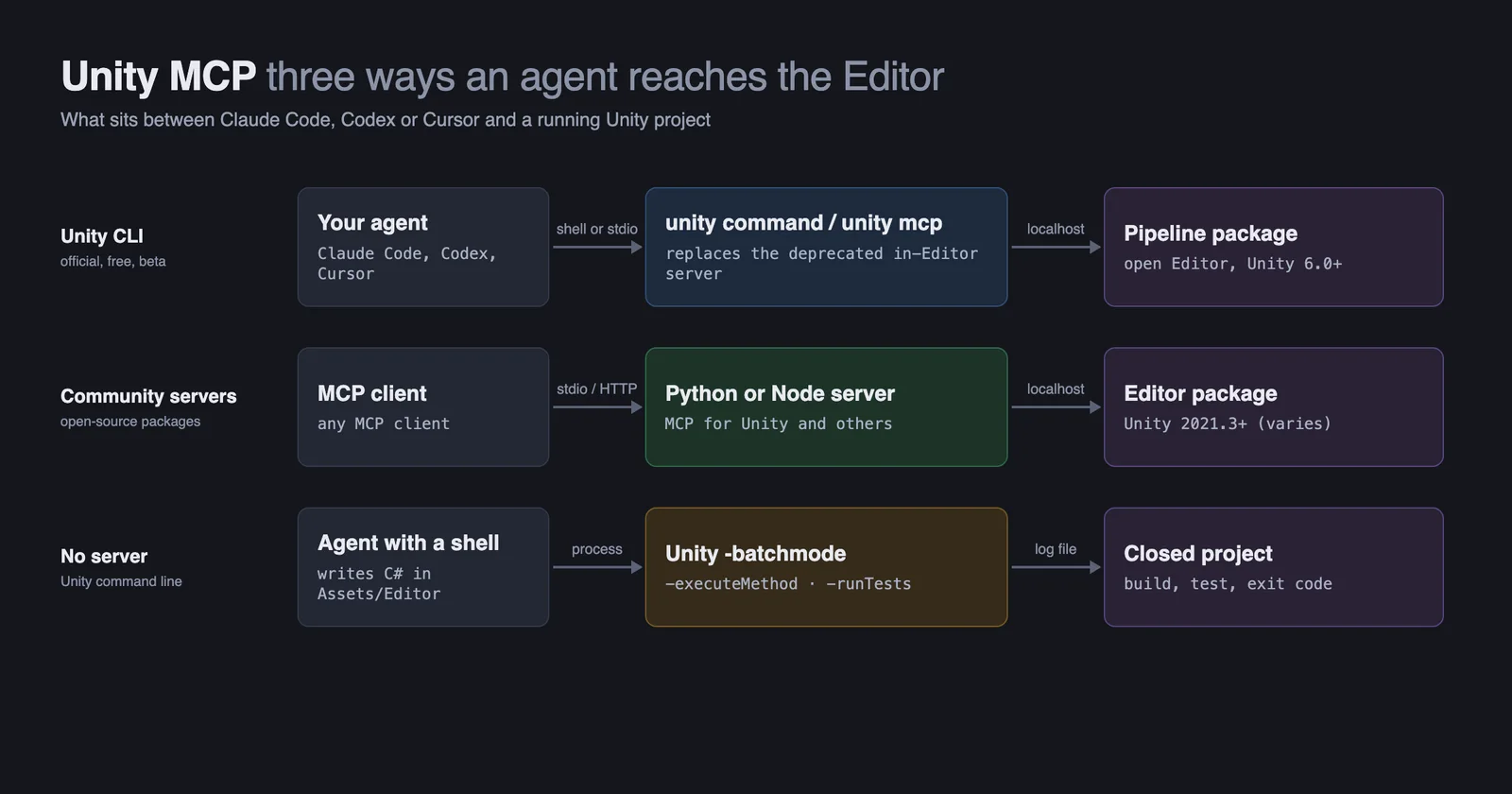
Unity MCP lets an AI agent such as Claude Code, Codex or Cursor control the Unity Editor: create objects, edit scenes and scripts, enter Play mode and run tests. In 2026, Unity deprecated the MCP server that came with its AI Assistant package. Its replacement is the free Unity CLI, which still offers an MCP server and needs Unity 6 or newer. On older Unity versions, or if you want more tools, use a community server such as MCP for Unity, which is free and works from Unity 2021.3.
The Unity CLI was installed and set up for Claude Code and Codex on 8 October 2026. Unity's documentation, prices and the community projects were last checked on 20 October 2026. No Unity Editor was run, so what happens inside the Editor is as documented, not observed.
Jump to: what changed · which server · Claude Code setup · Codex and Cursor · is it free · troubleshooting · FAQ
What happened to Unity's MCP server?
Unity's first MCP server shipped inside the AI Assistant package (com.unity.ai.assistant). It is now deprecated. From version 2.18 of that package's manual, every MCP page opens with: "Unity MCP server is deprecated. Use the Unity command-line interface (CLI) instead" (Unity docs). Older versions of the manual, such as 2.0, do not carry the note, so many setup guides still describe the old server.
The Unity CLI is a terminal program, unity, that installs Editors, opens projects, runs builds and tests, and drives an open Editor. Unity's migration page says three things that matter (Unity CLI docs):
- The CLI has its own MCP server.
unity mcp"is not part of the deprecation" and "remains fully supported", for agents that cannot run terminal commands. - Plain commands are preferred.
unity commanddrives the Editor directly, which Unity says is "faster and use[s] fewer tokens than MCP". - Community servers are unaffected. Third-party MCP packages keep working.
To drive an open Editor, the CLI needs Unity 6.0 or newer and a small package in your project, the Pipeline package. It only accepts connections from your own machine. The CLI is labelled experimental; it was still at version 1.0.0-beta.13 on 20 October 2026.
Which Unity MCP server should you use?
| If you | Use | Why |
|---|---|---|
| Use Unity 6 with Claude Code or Codex | The Unity CLI with Unity's agent plugin | Official, free, documented by Unity, and the agent uses plain commands |
| Use Unity 6 with Cursor or another app that cannot run commands | unity mcp from the Unity CLI | Unity's supported MCP server |
| Use Unity 2021.3 to 2023 | MCP for Unity | The CLI needs Unity 6 to drive the Editor |
| Want the widest set of tools | MCP for Unity | About 50 tools, from scenes and prefabs to builds, tests and profiling |
| Want the agent unable to run arbitrary code | CoderGamester's mcp-unity | No free-form code tool, and its connection needs a password |
| Run builds and tests in CI | Batch mode or unity build and unity test | See do you need an MCP server at all |
Unity MCP servers compared
Stars and releases are from GitHub on 20 October 2026. Tool counts are each project's own. A GitHub search for "unity mcp" finds 968 repositories; most are forks or stopped in 2025.
| Server | Stars | Latest | Unity | Price | Runs any C# | Worth knowing |
|---|---|---|---|---|---|---|
Unity CLI (unity command, unity mcp) | n/a | 1.0.0-beta.13 | 6.0+ to drive the Editor | Free | Yes, with eval | Official. Local connections only |
| Unity's agent plugin | 519 | 0.1.8-beta | 6.0+ | Free | Through the CLI | Unity's skills for Claude Code, Codex, Grok and Antigravity; installs the CLI when needed |
| MCP for Unity (CoplayDev/unity-mcp) | 15,201 | v10.3.0, 4 Oct 2026 | 2021.3 to 6.x | Free (MIT) | Yes, off by default | About 50 tools in groups. Backed by Aura, which sells a paid assistant |
| IvanMurzak/Unity-MCP | 4,504 | 1.2.0, 18 Oct 2026 | Not stated on its front page | Free (Apache-2.0); paid hosted plans | Yes | Its setup signs you in to a cloud service, ai-game.dev, and points your agent at it by default |
| CoderGamester/mcp-unity | 1,956 | 1.5.0, 3 Sep 2026 | 6+ | Free (MIT) | No | Node server; password-protected connection on port 8090 |
| Besty0728/Unity-Skills | 1,871 | v2.9.1, 16 Oct 2026 | 2022.3+ | Free (MIT) | Gated by approval | 839 skills over a local API instead of MCP, with undo snapshots |
| isuzu-shiranui/UnityMCP | 335 | v4.4.2, 17 Sep 2026 | 2022.3+ | Free (MIT) | Not checked | Runs inside the Editor; local only, token required |
| FunplayAI/funplay-unity-mcp | 265 | v0.7.0, 8 Oct 2026 | 2022.3+ | Free (MIT) | Yes, in its full set | 40 tools by default, 180 in full |
The trade-off is simple. MCP for Unity gives the agent many specific tools. Unity's route gives it fewer tools and lets it write and run C# for the rest, which relies more on the model getting the code right. mcp-unity gives up the run-anything tool in exchange for safety.
How to set up Unity MCP with Claude Code
With the Unity CLI (Unity 6 or newer)
-
Install the CLI. On macOS or Linux run
curl -fsSL https://unity.com/install.sh | bash, orbrew install --cask unity-cli. On Windows runwinget install Unity.CLI. It needs macOS 14, Windows 10 21H1, or Ubuntu 22.04 or RHEL 9, or newer (Unity docs). If you use Unity Hub you probably have it already, because the Hub now installs it automatically (plugin README). -
Check it works:
unity --version. -
Open your project in Unity. In a terminal in the project folder, run
unity auth login, thenunity pipeline install. Wait for Unity to recompile, then rununity pipeline listto confirm (Pipeline package docs). -
In Claude Code, install Unity's plugin. Type these inside a Claude Code session (plugin README):
Prompt/plugin marketplace add Unity-Technologies/unity-agent-plugin /plugin install unity@unity-agent-plugin -
Try it: "Check the Unity Editor is connected, list the commands it offers, then add an empty GameObject named Probe."
Claude Code will then run commands like these, taken from the guide the CLI ships for agents (unity skill show):
unity status                       # is an Editor connected and ready?
unity command                      # list what the Editor offers
unity command editor_play          # enter Play mode
unity command eval 'new UnityEngine.GameObject("Probe");'   # run C# in the Editor
unity recompile                    # recompile and report errors
If you would rather use MCP than plain commands, run unity mcp configure claude-code. On 8 October 2026 that ran claude mcp add --scope user --transport stdio unity-editor-mcp unity mcp, which adds the server to your user settings rather than the project.
With MCP for Unity (Unity 2021.3 or newer)
- Install uv and Python 3.10 or newer.
- In Unity, open Window > Package Manager, choose Add package from git URL, and paste
https://github.com/CoplayDev/unity-mcp.git?path=/MCPForUnity#main. For a fixed version, end it with#v10.3.0instead (README). - Open Window > MCP for Unity and click Configure All Detected Clients.
- Or add it by hand:
claude mcp add --transport http unityMCP http://localhost:8080/mcp.
Only the core tools are switched on at first. Ask the agent to turn on a group when you need it, for example "activate the testing tools".
How to set up Unity MCP with Codex or Cursor
Codex with the Unity CLI. Install the plugin with codex plugin marketplace add Unity-Technologies/unity-agent-plugin and codex plugin add unity@unity-agent-plugin. For the MCP server instead, run unity mcp configure codex. Read what it changes first with --dry-run: on 8 October 2026 it added the server to ~/.codex/config.toml and also turned on network access for Codex's sandbox, limited to your own machine, so the agent can reach the Editor.
Codex with MCP for Unity. codex mcp add unityMCP -- uvx --from mcpforunityserver mcp-for-unity --transport stdio.
Cursor. unity mcp configure cursor sets up the Unity CLI server. For MCP for Unity, its window configures Cursor, or add this to .cursor/mcp.json:
{ "mcpServers": { "unityMCP": { "url": "http://localhost:8080/mcp" } } }
unity mcp configure --list showed 17 supported apps, including Claude Desktop, VS Code, Windsurf and Zed.
mcp-unity. Add https://github.com/CoderGamester/mcp-unity.git in Package Manager, install Node 18 or newer, then open Tools > MCP Unity > Server Window. It installs the server and writes the settings for your apps (README).
Is Unity MCP free?
Yes. Unity says its "CLI, MCP server and Unity's official plugin are all free to use with no concurrency limits" (unity.com/products/ai). You do not need a Unity AI subscription or credits. The community servers are free and open source. You still pay for the AI model your agent uses.
The paid part is Unity's own assistant, the chat agent inside the Editor. It is included with Unity Pro, Enterprise and Industry. On Unity Personal it starts as a free trial and then costs $10 a month. Unity is also retiring the "Unity AI" name: the tools are now just called the assistant, the AI gateway, the MCP server, the plugin and the CLI. Muse, the older generative tool, has been retired, and its generators now live in the assistant (unity.com/products/ai).
Unity itself is free on Personal for individuals and companies under $200,000 in revenue or funding. Pro costs from $2,310 a year per seat (compare plans). Prices were checked on 20 October 2026.
What Claude Code can and cannot do in Unity
Scenes and objects: yes. Every route can create, find, change and delete GameObjects and components. Unity's plugin warns that "not every change is logged or can be undone from the Editor", so use version control.
Scripts: yes, but watch for compile errors. Agents write C# well. But if the Editor starts with a compile error, it opens in Safe Mode, and the Pipeline package does not load. Then unity command cannot connect at all. Fix the error in the files and restart Unity.
Play mode: yes, but check it is really running. Entering Play mode is one command. Unity's agent guide warns that "an unfocused Editor can freeze at frame 1" while still reporting that it is playing, and that a screenshot "can render a frozen frame that looks alive". Ask the agent to confirm that time or game state moved.
Builds and tests: better from the terminal. MCP for Unity and the CLI can both start builds and tests. Long builds can outlast an MCP tool timeout (60 seconds by default in Codex), so run them from the terminal.
Art and sound: not by itself. Agents can set import options, materials and prefabs. They do not make art unless a tool calls a generation service, such as MCP for Unity's optional asset tools with your own API key.
Do you need a Unity MCP server at all?
For builds and tests, no. Unity's batch mode runs the Editor with no window and is still the right tool for CI (command-line docs):
Unity -batchmode -nographics -quit -projectPath . \
  -executeMethod BuildScript.BuildMac -logFile build.log
-executeMethodruns a static C# method. To report a failure, throw an exception or callEditorApplication.Exitwith a non-zero code.- You cannot use batch mode on a project that is already open in the Editor.
- Keep the method synchronous:
-quitwith async code "can cause the application to hang".
The Unity CLI wraps the same thing as unity build and unity test, with readable output and clear exit codes. Have the agent write the build method under Assets/Editor and run it from the terminal. Unlike an MCP call, you get a script you can keep and rerun.
Voyager, the desktop app our team builds, works in Unity this way rather than through an MCP server. Its agent, or Claude Code or Codex through the Voyager plugin, finds the installed Editor that matches your project's Unity version, runs an Editor method in batch mode and reports the exit code, the full log and any compile errors. It can also build small games in Unity when you ask for that engine. Because it uses batch mode, it will not work on a project that is open in the Editor, it has no live connection to a running Editor (visual checks use screen control), and it is a separate app rather than a server for the client you already use. Sign up to download Voyager.
Is Unity MCP safe?
Any tool that drives the Editor runs code with your permissions. The differences are how much free-form code it allows and who can connect.
- Unity CLI.
unity command evalruns any C# in the open Editor. Connections are local only. - MCP for Unity. Its
execute_codetool runs any C#. Its docs say the built-in checks are "not a full sandbox". The tool is off by default; leave it off unless you need it. Its server only listens on your own machine unless you switch on Allow LAN Bind (SECURITY.md). Its telemetry document describes anonymous usage data, which you can turn off withDISABLE_TELEMETRY=trueor in its settings. - IvanMurzak's Unity-MCP. By default its setup signs you in to its cloud service, ai-game.dev, and points your agent at it, so your tool requests go through it. Pass
--no-pinfor its shared endpoint, or host the server yourself (README). - mcp-unity. No run-anything tool, a password on its connection, and it rejects requests from web pages. Installing packages is off by default, because "Unity packages can execute Editor code when they compile" (README).
Anything the agent reads in your project, such as object names, comments or a third-party package, could contain instructions. Commit before each session.
Unity MCP troubleshooting
unity mcp shows no tools. No Editor is connected. Open the project, check unity status says ready, and confirm the Pipeline package with unity pipeline list. With no Editor open, the server starts but lists zero tools.
unity command cannot connect after an edit. The Editor is probably in Safe Mode because of a compile error. Fix it and restart Unity.
The wrong Editor responds. You have more than one open. Add --project-path, or set UNITY_PROJECT_PATH for the session.
The old assistant server and the CLI clash. Update the AI Assistant package to 2.13 or newer, or remove it.
MCP for Unity will not connect. Check Window > MCP for Unity says Connected and that your app points at http://localhost:8080/mcp. Claude Desktop needs the stdio setup.
A tool from the docs is missing in MCP for Unity. It is in a group that is switched off. Ask the agent to turn the group on.
"spawn uvx ENOENT". Desktop apps do not see your terminal's PATH. Use the full path from which uvx.
Batch mode refuses the project. It is open in the Editor. Close it, or use the CLI against the open Editor.
IvanMurzak's server fails to connect. Its README says project paths cannot contain spaces.
Frequently asked questions
What is Unity MCP? It is a way to connect an AI agent like Claude Code, Codex or Cursor to the Unity Editor so the agent can edit scenes, scripts and assets. The name covers Unity's own server, now replaced by the Unity CLI, and community servers such as MCP for Unity, whose repository is called unity-mcp.
Is Unity MCP deprecated? Unity's original server, inside the AI Assistant package, is deprecated. The Unity CLI's unity mcp server replaces it and is fully supported, and community servers are unaffected.
Is Unity MCP free? Yes. The Unity CLI, its MCP server and Unity's plugin are free with no subscription, and the community servers are open source. Only Unity's in-Editor assistant is paid on Unity Personal, at $10 a month after a trial.
What is the best Unity MCP server? On Unity 6, the Unity CLI with Unity's plugin. On older versions, or for the most tools, MCP for Unity. For an agent that cannot run arbitrary code, CoderGamester's mcp-unity.
How do I connect Claude Code to Unity? On Unity 6, install the Unity CLI, run unity pipeline install in your project, then install Unity's plugin in Claude Code. On older versions, install MCP for Unity and click Configure All Detected Clients.
Does Unity MCP work with Cursor and Codex? Yes. unity mcp configure cursor and unity mcp configure codex set them up, and MCP for Unity configures both from its window.
Voyager is a desktop AI agent for creative work
Describe what you want to make; Voyager plans it, uses your apps and tools, and keeps everything editable.