To render 3D with Claude Code, point it at a renderer it can run from the command line, ask it to render a small preview, and let it read the image and revise. Claude Code can read PNG files, so the loop needs nothing special. Blender works today through blender -b and a Python script, and vork, the engine our team at Voyager makes, is built around that same loop.
The short version: use Blender unless you have a reason not to, since it has more features and did better in our test. Use vork if you want scenes as short JSON files, custom shader programs and quick final renders, and you can live with a research preview. If the 3D belongs on a website, have Claude write Three.js instead.
We gave Claude Code the same brief twice on 6 November 2026, on one Mac: once with Blender 5.2.1, once with vork 0.1.0. Both took about seven and a half minutes and worked. Blender's picture was better. That is one run of one brief, not a benchmark, and we make one of the two tools. The commands below are the ones we ran. vork's API is changing quickly, so check vork help for your version.
Pick a route
| Route | Setup | Best for | Watch out for |
|---|---|---|---|
| Blender with a script | Blender installed | Most jobs; shots that need volumes, simulation or Cycles; repeatable renders | Agent-written Python runs with your permissions |
| Blender with MCP | Add-on plus MCP server | Exploring or editing a live .blend while you watch | Runs generated code "without any guards"; needs Blender 5.1+ |
| vork | One installer, recent NVIDIA GPU or Apple Silicon | Short text scenes, custom programs, fast previews | No fog or volumes in 0.1.0; can fail on heavy scenes |
| Three.js in a browser | npm i three playwright | Output that also ships to the web | Real-time looks; GL flags are fiddly on servers |
We used the script route for Blender because a script is repeatable and needs no add-on. If you want Claude driving the Blender window you already have open, follow our Blender MCP guide instead.
Route 1: Blender with a Python script
You need Blender and Claude Code. On a Mac, the binary lives inside the app. Allow only that binary plus file tools, so Claude asks before doing anything else:
mkdir rocket-blender && cd rocket-blender
claude --allowedTools "Bash(/Applications/Blender.app/Contents/MacOS/Blender:*),Read,Write,Edit"
Then give it a brief:
Use Blender in background mode at /Applications/Blender.app/Contents/MacOS/Blender. Make a small scene of a red toy rocket standing on a wooden table at dusk, written as a Python script, render a preview and inspect the image. Refine the camera and lighting before rendering at final quality. Keep every render at 960x540 or smaller. Deliver rocket.png and a 3-second rocket.mp4 with a slowly moving camera in this folder. Keep the scene script in rocket.py.
In our run, Claude wrote a 25 KB script that accepts --preview, --frame and --anim flags, chose Cycles on the Mac's GPU, and documented how to run it:
blender -b -P rocket.py -- --preview --frame 37 --out preview.png
blender -b -P rocket.py -- --anim --frames-dir frames --out rocket.mp4
Everything after -- belongs to the script. On Linux or Windows, use your own path to blender, and expect a different Cycles device (OPTIX or CUDA on NVIDIA).
Route 2: vork
vork needs a recent NVIDIA GPU with a hardware ray tracing driver, or Apple Silicon. Install it per its README:
curl -fL https://github.com/voyager-so/vork/releases/latest/download/install.sh -o /tmp/vork-install.sh
sh /tmp/vork-install.sh
export PATH="$HOME/.local/bin:$PATH"
vork help
The installer also runs vork setup, which compiles shaders. It took 86 seconds on our M5 Max and about 2.5 to 4.5 minutes in the project's NVIDIA runs, with no output until it finishes. It isn't hung. Then:
mkdir rocket-vork && cd rocket-vork
claude --allowedTools "Bash(vork:*),Read,Write,Edit"
Read `vork help`. Make a small scene of a red toy rocket standing on a wooden table at dusk, render a preview and inspect the image. Refine the camera and lighting before rendering at final quality. Read the relevant help topic when you need a feature the first page doesn't explain. Keep every render at 960x540 or smaller. Deliver rocket.png and a 3-second rocket.mp4 with a slowly moving camera in this folder. Keep the scene in rocket.json.
The first line matters. Claude has no reliable memory of vork, which is new, and vork help is what teaches it: about 2,500 tokens to start, with a complete scene, and more topics on request. Render commands look like these, which we ran on 0.1.0:
vork render rocket.json --profile std/previs --out preview.png
vork render rocket.json --profile std/final --out final.png
vork render rocket.json --profile std/final --frame-start 0 --frame-end 71 --out rocket.mp4
Frame ranges include both ends, so 0 to 71 is 72 frames. If the agent's shell has a timeout, raise it: a first render with new custom programs can compile silently for minutes on NVIDIA, and later ones take seconds.
What the same brief produced
We ran the brief non-interactively with claude -p on Claude Opus 5.5, once for each engine, and read the transcripts.
| Blender 5.2.1 | vork 0.1.0 | |
|---|---|---|
| Time, start to delivered files | About 7.5 min | About 7.4 min |
| Model usage reported by Claude Code | $1.91 | $1.98 |
| Attempts to run the renderer | 13 | 15, including 3 tripped by our allowlist |
| Scene errors the agent had to fix | 0 | 1 (a wrong field name) |
| Scene source | 25 KB of Python | 6.6 KB of JSON |
| 72-frame MP4 | About 2 min at 96 samples, then ffmpeg | 50 s at 64 samples, written directly |
| What it built | Plank table, tall red rocket with a glowing window, a lake it added with a sunset reflection, out-of-focus house lights | Plain wooden table, shorter rocket with a brass-trimmed window, dark hills, a clean orange-to-grey dusk gradient |
| Our read | The better picture: considered composition, warm rim light, convincing depth of field | Correct and tidy, but simpler and flatter, with a lot of near-black behind the rocket |
The render times are indicative only, because the runs overlapped and the agents chose their own sample counts.
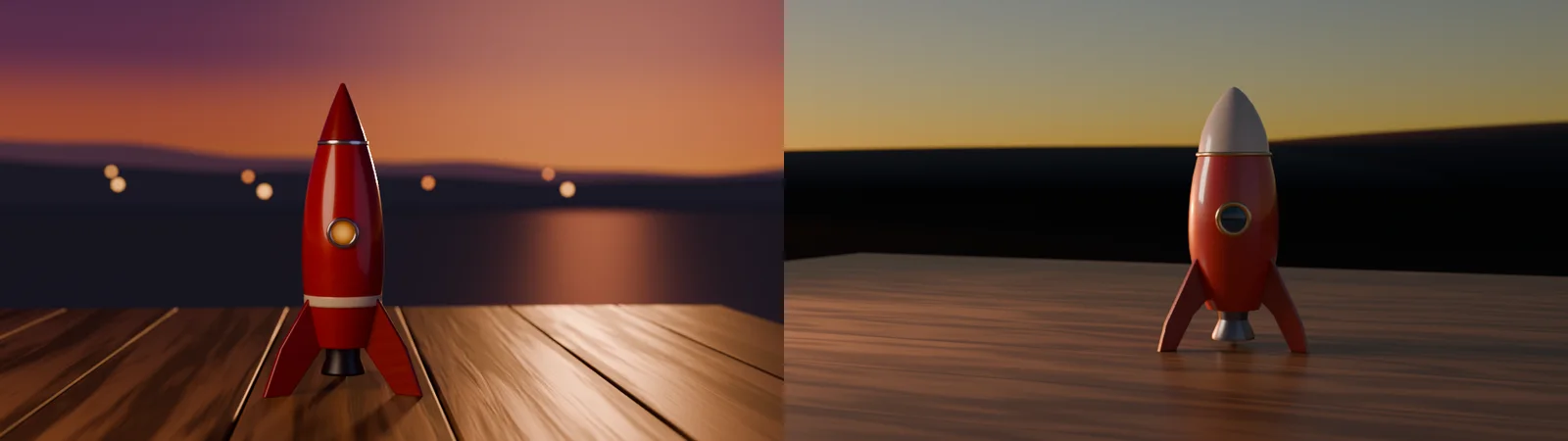
Both agents did what the brief asked: they inspected previews and changed things. The Blender agent found the rocket filled the frame and that its window had blown out to a white disc, then fixed both. The vork agent saw that its first preview looked like daylight, so it lowered the sun and dropped the exposure by three stops. Neither result is something you'd ship without direction, and the vork one is what we mean when we say agents' results from scratch can look basic. The shots on the vork page use prepared assets and art direction, and took far more than one prompt.
What we would do differently
Our allowlist was too tight, and the transcripts show the cost:
- Allow your frame-checking tool. With no
ffmpegorffprobe, neither agent could read frames back from the finished MP4. The vork agent re-rendered first and last frames instead, and the Blender agent checked source frames. Both said plainly they had not watched the video. AddBash(ffmpeg:*)andBash(ffprobe:*), and ask for a contact sheet of the video. - Allow Python if you want the SDK. vork's agent tried to generate its scene from a script, was blocked, and wrote JSON by hand, which worked but is limiting for anything procedural. vork's Python SDK installs from your vork folder, not PyPI:
python3 -m pip install "$HOME/.local/lib/vork/python"
- Bring assets when you care how it looks. Both agents built their rockets from code. For real shots, hand it models and textures: a glTF for vork, or anything Blender can import. Poly Haven's CC0 assets are a good start.
- Be specific about the shot. "At dusk" got two different ideas of dusk. Name the lens, the framing, the light direction and a reference.
- Give it a place to fail cheaply. Keep previews small, and only ask for final quality after the framing is right. Both agents did this because the brief said to.
- Sandbox it. Agent-written Blender scripts are ordinary Python running with your permissions, so keep a copy of anything you care about and use a dedicated folder or a VM. Our Blender MCP guide has more on this.
When this approach fits
It fits when a shot can be described in words and revised in code: a product turntable, a camera move through a known scene, a simple simulation, previs, a technical visual. It works best when you judge frames and give precise notes.
It doesn't fit organic modelling, sculpting, rigging a character by feel, or anything where a person has to shape the result by eye. In Blender, a person can open the file and fix it. vork has no interface, so changes happen through scene text and renders. And vork's limits rule out fog, volumes and some heavy scenes for now, including on Mac.
Frequently asked questions
Can Claude Code make 3D models?
Yes, procedurally. It writes code that builds geometry, which works for simple, hard-surface objects. It is much weaker on organic forms. For anything complex, give it an existing model, or use a generated mesh as a proxy.
Does Claude Code need an MCP server for Blender?
No. blender -b -P script.py is enough, and any agent with a shell can run it. An MCP server adds live control of an open Blender session. Blender Lab's official one is also available as a Claude connector.
Can Claude Code see the images it renders?
Yes. It can read PNG and JPEG files with its Read tool, which is what makes the loop work. It can't watch a video directly, so have it extract frames with ffmpeg or render stills at key times.
How much does it cost?
Blender and vork are free to use; vork is free during its research preview. In our runs, Claude Code reported about $2 of model usage per run at API prices, on Claude Opus 5.5, and subscription users would see this against their plan limits instead. A larger shot costs more.
Does this work with Codex or other agents?
Both routes only need a shell and a way to read images, so any comparable coding agent should work. We tested Claude Code only here. vork's help is the same for any agent, and Codex can connect to Blender's MCP server too.
What GPU do I need?
Blender runs on many GPUs and also renders on CPU with Cycles. vork needs a recent NVIDIA GPU with hardware ray tracing or Apple Silicon, and doesn't support AMD, Intel or software rendering. Our runs were on an M5 Max.
Should I use vork or Blender with Claude Code?
Start with Blender. Try vork if you want shorter text scenes, custom programs or very fast previews, and your shot avoids its gaps. vork vs Blender goes through the decision.
Voyager is a desktop AI agent for creative work
Describe what you want to make; Voyager plans it, uses your apps and tools, and keeps everything editable.