Headless 3D rendering means producing finished frames from a command, with no window and nobody at a screen. Blender does it with blender -b, Three.js does it inside headless Chromium, Unreal does it through Movie Render Queue on the command line, and vork, a newer engine our team at Voyager makes, has no window to begin with. Most of these still want a GPU. The word "headless" hides that, and two well-known headless modes produce no pixels at all.
The short version: use Blender if you have .blend files or need Cycles-quality light, fog and simulation. Use Three.js if the same scene also ships to a browser. Use Unreal if the project already lives there. Try vork if an agent is writing the scene from scratch and you have a recent NVIDIA GPU or Apple Silicon, and accept that it is a research preview with real gaps.
We ran the Blender, Three.js and vork commands below on one Mac on 6 November 2026, and read the Unreal, Godot, Babylon.js and Bevy details from their own documentation the same day. Versions are named beside each command, because these move. vork is made by Voyager, so read its section with that in mind. Its limits are listed from its own README.
Key takeaways
- On a trivial 640x480 scene, every renderer finished in about four seconds or less once warm, so speed did not separate them; scene features, hardware and how the scene gets authored do.
- Godot's
--headlessand Babylon.js's NullEngine are for servers and tests, not images. For pixels you need a real GPU context or software rendering. - vork takes one JSON file and one command with no editor or browser behind it, but it does not support AMD, Intel or CPU rendering and ignores fog and volumes in 0.1.0.
Three things "headless" can mean
The confusion in this topic comes from one word covering three requirements. Sort out which one you have before picking a tool.
| What you are missing | What it means | What still works |
|---|---|---|
| A window | Nobody needs to see the render happen | All of the tools here |
| A display server | A Linux box with no X11 or Wayland session | Tools that render without one. Blender added a headless Linux path for EEVEE in 3.4 |
| A GPU | A cheap CPU-only server or CI runner | Cycles on CPU, or browser software rendering. vork stops here |
Then there are the modes named headless that do not draw anything:
- Godot
--headless. The dedicated server guide describes it for a machine with no GPU or display server. It is meant for running game logic. When we ran Godot 4.7.2 for our Godot post,--write-movieneeded a screen and saved nothing useful with--headless. - Babylon.js NullEngine. Babylon's server guide says plainly that it "does not produce any rendering". It is for tests, server logic and loaders.
The same scene through each renderer
We built the same blocking in each tool: a sphere on a plane, one key light, one camera, 640x480, using each renderer's defaults, except that the Three.js version adds a fill light and AgX tone mapping. The looks were not matched and this is not a benchmark. It answers a narrower question: what does the shortest honest path to a PNG look like, and what does it cost in time on one machine?
| Route | Version | Setup before first render | First render | Warm renders | What came out |
|---|---|---|---|---|---|
vork std/final (8 samples, denoised) | 0.1.0 | Installer, including 86 s of shader setup | 5.2 s | 0.42 to 0.44 s | Soft shadow, smooth, with a grey default background |
| Blender EEVEE (64 samples) | 5.2.1 | Already installed | 2.0 s | 0.81 to 0.85 s | Correct form, visible grain at the shadow edge, black where no world was set |
| Blender Cycles on Metal (adaptive, denoised) | 5.2.1 | Already installed | 3.9 s | 2.2 to 4.0 s | The cleanest soft shadow of the four |
| Three.js in headless Chromium | r187 | npm i three playwright, plus the browser download | 1.9 s | 0.34 to 0.6 s | Hard-edged shadow map from a directional light, because RectAreaLight has no shadow support |
Times are the whole command, including startup and writing the file. Apple M5 Max, 6 November 2026.
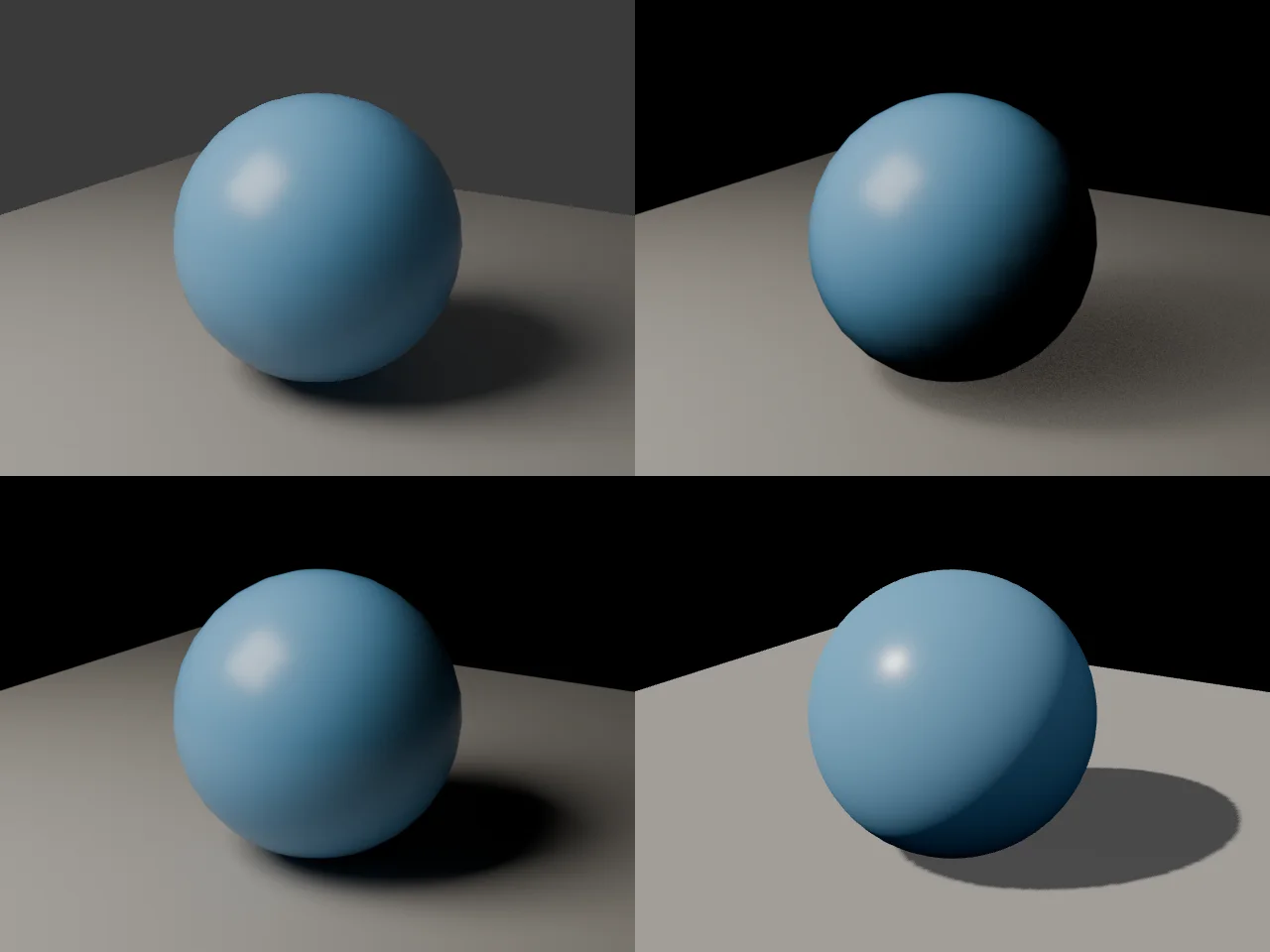
Two things to take from this. At this size, nobody should choose on speed: all four are fast enough for an agent loop. And Cycles took several times as long as the other three and gave the best image, the usual trade for a path tracer. vork's own README records its path tracer running 2 to 5.8 times slower than Cycles in its two named cases, so a pathtraced comparison would not flatter it.
Blender: blender -b
Blender is the default answer, and a good one. -b runs without the interface and -f or -a renders. From the Blender 5.2 manual:
blender -b file.blend -f 10
blender -b file.blend -E CYCLES -s 10 -e 500 -a
Arguments run in the order given, so the file comes before the render flag, and case matters: -F and -f are different flags. Most automated jobs pass a Python script instead of a prepared file. This is the script we ran, Blender 5.2.1, with no saved .blend:
# scene.py
import bpy, sys
from mathutils import Vector

engine, out = sys.argv[sys.argv.index("--") + 1:]
bpy.ops.wm.read_factory_settings(use_empty=True)
s = bpy.context.scene

def mat(rgb, rough):
    m = bpy.data.materials.new("m")
    m.use_nodes = True
    b = m.node_tree.nodes["Principled BSDF"]
    b.inputs["Base Color"].default_value = (*rgb, 1)
    b.inputs["Roughness"].default_value = rough
    return m

def add(data, loc):
    o = bpy.data.objects.new(data.name, data)
    s.collection.objects.link(o)
    o.location = loc
    o.rotation_euler = (Vector((0, 0, 0)) - o.location).to_track_quat("-Z", "Y").to_euler()
    return o

bpy.ops.mesh.primitive_uv_sphere_add(radius=1, segments=32, ring_count=16)
bpy.ops.object.shade_smooth()
bpy.context.object.data.materials.append(mat((0.12, 0.35, 0.65), 0.3))
bpy.ops.mesh.primitive_plane_add(size=10, location=(0, 0, -1))
bpy.context.object.data.materials.append(mat((0.35, 0.35, 0.35), 0.5))

light = bpy.data.lights.new("key", "AREA")
light.size, light.energy, light.color = 4, 700, (1, 0.92, 0.8)
add(light, (-3, -4, 5))
s.camera = add(bpy.data.cameras.new("cam"), (3, -5, 2))

s.render.engine = engine
s.render.resolution_x, s.render.resolution_y = 640, 480
s.render.filepath = out
if engine == "CYCLES":
    s.cycles.device = "GPU"
    prefs = bpy.context.preferences.addons["cycles"].preferences
    prefs.compute_device_type = "METAL"  # OPTIX or CUDA on NVIDIA
    prefs.get_devices()
    for d in prefs.devices:
        d.use = d.type != "CPU"
bpy.ops.render.render(write_still=True)
blender --background --factory-startup --python scene.py -- BLENDER_EEVEE $PWD/eevee.png
blender --background --factory-startup --python scene.py -- CYCLES $PWD/cycles.png
Two habits save trouble on a server. Use the data API where you can: many bpy.ops operators want a UI context and fail in background mode. And check how your Linux setup handles EEVEE, which still needs a working GPU context with the headless path added in 3.4; this report on Blender's tracker is worth reading before you commit to a Docker image. Cycles can also render on the CPU.
Choose Blender if the scene already exists as a .blend, or if you need fog, volumes, simulation, modelling tools or Cycles. Its licence is the GPL with Cycles itself under Apache 2.0, and it runs on far more hardware than vork.
Three.js: Chromium with a real GL context
Three.js has no native command-line renderer. The practical route is a headless browser. This is the whole program we ran, with three r187 and Playwright 1.65:
// render.mjs: npm i three playwright && npx playwright install chromium
import { chromium } from 'playwright';
import { readFileSync, writeFileSync } from 'node:fs';

const browser = await chromium.launch({ args: ['--use-angle=metal', '--enable-gpu', '--ignore-gpu-blocklist'] });
const page = await browser.newPage();
await page.route('**/*', (r) => {
  const name = new URL(r.request().url()).pathname.slice(1);
  if (name.endsWith('.js')) return r.fulfill({ contentType: 'text/javascript', body: readFileSync(`node_modules/three/build/${name}`, 'utf8') });
  return r.fulfill({ contentType: 'text/html', body: '<!doctype html>' });
});
await page.goto('http://local.test/');
const png = await page.evaluate(async () => {
  const THREE = await import('/three.module.js');
  const renderer = new THREE.WebGLRenderer({ antialias: true, preserveDrawingBuffer: true });
  renderer.setSize(640, 480);
  renderer.shadowMap.enabled = true;
  renderer.toneMapping = THREE.AgXToneMapping;
  const scene = new THREE.Scene();
  const ball = new THREE.Mesh(new THREE.SphereGeometry(1, 64, 32),
    new THREE.MeshStandardMaterial({ color: new THREE.Color(0.12, 0.35, 0.65), roughness: 0.3 }));
  ball.castShadow = true;
  const ground = new THREE.Mesh(new THREE.PlaneGeometry(10, 10),
    new THREE.MeshStandardMaterial({ color: new THREE.Color(0.35, 0.35, 0.35) }));
  ground.rotation.x = -Math.PI / 2; ground.position.y = -1; ground.receiveShadow = true;
  const key = new THREE.DirectionalLight(new THREE.Color(1, 0.92, 0.8), 4);
  key.position.set(-3, 5, 4); key.castShadow = true;
  scene.add(ball, ground, key, new THREE.HemisphereLight(0xffffff, 0x222222, 0.5));
  const camera = new THREE.PerspectiveCamera(30.3, 640 / 480, 0.1, 100);
  camera.position.set(3, 2, 5); camera.lookAt(0, 0, 0);
  renderer.render(scene, camera);
  return renderer.domElement.toDataURL('image/png');
});
writeFileSync('three.png', Buffer.from(png.split(',')[1], 'base64'));
await browser.close();
The GL flags are the part that goes wrong. Our flags are for a Mac; Linux needs a different backend. Remotion, which renders Three.js scenes in headless Chromium, publishes a clear guide to Chromium's GL options: angle on a desktop, angle-egl on a cloud instance with a GPU, swangle with no GPU, where it warns that rendering might be slow. It also warns of memory leaks with angle and suggests splitting long renders. For a video, your code has to own time: step the scene to each frame, capture it, and encode it yourself, since nothing here writes an MP4.
Choose Three.js if the scene also ships to the web, if your team already knows it, or if a CPU-only server with software rendering is good enough. Its MIT licence is the simplest here. Expect real-time looks, not offline light transport.
Unreal: Movie Render Queue
Unreal's route is documented for command line rendering with Movie Render Queue (the page we read is for 5.8):
UnrealEditor-Cmd.exe <path to .uproject> <map> -game -MoviePipelineConfig=<path to queue asset> -windowed -resx=<width> -resy=<height> -log -notexturestreaming
We have not run this, so we report it from the documentation only. The page uses -windowed and does not say whether the command can run with no display or no GPU. Unreal's assets are binary, so the queue and level have to be authored in the editor or through its Python API first. Unreal 5.8 also has an experimental first-party MCP server, described in Epic's docs.
Choose Unreal when the project is already Unreal, or when you need its real-time world building at high quality. It is the heaviest setup here, and non-game companies above $1 million in annual revenue need a paid seat (read 23 October 2026).
vork: nothing but a command
vork is a headless engine by design, written in Rust and Slang, rendering through Vulkan and Metal. There is no editor. A scene is a JSON file, which a Python or TypeScript SDK can also generate:
{"version":2,"nodes":[
  {"type":"mesh","name":"ball","geometry":{"std":"sphere","radius":1},
   "materials":[{"inputs":{"base_color":[0.12,0.35,0.65],"specular_roughness":0.3}}]},
  {"type":"mesh","translation":[0,-1,0],"geometry":{"std":"grid","size":[10,10]},
   "materials":[{"inputs":{"base_color":[0.35,0.35,0.35]}}]},
  {"type":"light","shape":"rectangle","translation":[-3,5,4],"target":[0,0,0],
   "energy":700,"size":4,"color":[1,0.92,0.8]},
  {"type":"camera","translation":[3,2,5],"target":[0,0,0]}
],
"animation":[{"tracks":[{"path":["nodes","ball","translation"],
  "keys":[[0,[0,0,0]],[2,[2,0,0]]],"interpolation":"LINEAR"}]}],
"render":{"resolution":[640,480]}}
# vork 0.1.0. The API is changing quickly, so check `vork help` for yours.
vork render shot.json --profile std/previs --out preview.png
vork render shot.json --profile std/final --out final.png
vork render shot.json --profile std/final --frame-start 0 --frame-end 47 --out clip.mp4
The MP4 is written directly through VideoToolbox: 48 frames took 7.2 seconds the first time on our Mac and 1.8 seconds warm. On Linux, MP4 output still needs ffmpeg to mux the stream.
The catches are substantial, and they come from vork's own README:
- Hardware. A recent NVIDIA GPU with hardware ray tracing on Linux or Windows, or Apple Silicon. AMD, Intel and CPU rendering are unsupported, so most cheap servers and CI runners are out.
- Compile time.
vork setuptakes a few minutes, and the first render of a scene with new programs can compile for minutes with no output, so don't kill it or give it a short timeout. We saw 86 seconds of setup on this Mac; the project's NVIDIA runs took about 2.5 to 4.5 minutes. - Missing features. Fog and participating volumes are ignored in 0.1.0.
- Failures. Large scenes and dense transparency can fail, including on Mac, and lowering the resolution does not necessarily help.
- Licence. It is source-available under the vork Preview License, free during the research preview including commercial work. It is not open source, and later versions may come under different terms.
- First results. An agent starting from scratch can get something basic. The showcase shots took much more direction.
Where it does well: the README's 1080p default final stills and the full results ran 1.15 to 1.90 times faster than retained EEVEE baselines on an NVIDIA L4, using eight denoised samples against EEVEE's 64, and it says plainly these are not equal-quality speedups. Scenes can carry Slang compute programs, which is how its million-bird shot was made. Choose vork when an agent writes the scene and reads the frames back, and your shot avoids its gaps.
Other engines worth knowing
- Bevy has an official headless renderer example that renders to an image with no window. Good if you are already writing Rust and willing to work from a code example; its README warns that important features are missing and releases break APIs about every three months.
- Cycles standalone builds without Blender and renders XML scenes. Fine for a pipeline that wants only the path tracer.
- Mitsuba 3 is a Python-first research renderer with CPU and NVIDIA backends, and it needs no window. Pick it for inverse rendering and light transport research, not for deliverables on a deadline.
Which one to use
| If your job is mostly | Choose | Because |
|---|---|---|
Rendering existing .blend files on a server | Blender with Cycles | Stable flags, CPU fallback, best quality here |
| The same scene in a website and a server render | Three.js | One codebase, MIT, software rendering fallback |
| Cinematics from an existing Unreal project | Unreal Movie Render Queue | It is already authored there |
| An agent writing shots from scratch, with custom shaders or simulation | vork, if your hardware and shot fit | No project to set up; scene is text; compute programs included |
| Shots with fog, smoke or volumes | Blender | vork 0.1.0 ignores them |
| Running on CPU only | Blender Cycles or Three.js with software GL | vork does not run there |
| Research on light transport | Mitsuba 3 | Built for it |
Frequently asked questions
What is headless 3D rendering?
Rendering 3D scenes to images or video from a command, with no window or person at a screen. It's used on servers, in batch pipelines and by AI agents. It does not necessarily mean no GPU: most real-time engines still need one.
Can Blender render without a GPU or display?
Yes, with limits. blender -b needs no window, and Cycles can render on the CPU, slowly. EEVEE needs a working GPU context; a headless Linux path arrived in Blender 3.4, so test it in your own container first.
Can Three.js run headless?
In a headless browser, yes, as above. There is no first-party command-line renderer, and Three.js's WebGL renderer needs a GL context, from a GPU or from software rendering such as SwiftShader. Remotion documents the options in detail.
Does Godot's --headless flag render images?
Not usefully. It is described for dedicated servers, and in our own Godot 4.7.2 run --write-movie needed a screen.
Is vork open source?
No. vork is source-available under the vork Preview License, and free during the research preview, including for commercial work. You may modify it for your own use, but may not redistribute changes or run it as a hosted rendering service without permission.
Can I render on a server with no GPU using vork?
No. vork 0.1.0 needs a recent NVIDIA GPU with hardware ray tracing or Apple Silicon. Software Vulkan adapters are unsupported, per the install notes.
Voyager is a desktop AI agent for creative work
Describe what you want to make; Voyager plans it, uses your apps and tools, and keeps everything editable.