A clean voice sounds wrong in a lot of places. A voicemail in a short film, a station announcement in a game, a radio bulletin under a period scene: each one is believable only when the voice sounds like it came through something first. A phone line, a crowded room, a valve radio, a tape, a record.
Description / transcript
A voicemail: Hey, it's me. I'm outside your building, but the buzzer's dead. Call me back when you get this. A cafe: I told him we'd be done by Friday. He just looked at me and laughed. A radio bulletin: Good evening. Here is the news. Heavy snow has closed every road north of the river tonight. A cassette diary: Day four. The generator's working again, but I still haven't found the others. A memory: That summer we drove to the coast with the windows down, and nobody said a word. A game host, pitched down: Attention players, the next game is about to begin. Do not move when the doll turns. A trooper over a radio: Halt! This hangar is sealed. Nobody leaves until we find the rebels.
The short version for a phone call: cut everything below about 300 Hz and above 3,400 Hz, compress it hard, and add a little distortion and line hiss. The other classic lo-fi voice effects work the same way, a band limit, some saturation and a noise bed, and each has a recipe you can rebuild with ordinary EQ, compression and noise in Premiere Pro, DaVinci Resolve, Audacity or any DAW. Below are five of them, with the settings we use in Voyager's voice presets, where each one works, and how to make each one from a clean take you already have.
Pick the effect by where the voice is
Start from where the listener should think the voice is, not from which effect sounds coolest.
| Effect | Where it works | Start at |
|---|---|---|
| Telephone | Voicemails, a caller in a scene, intercoms | 0.7 |
| Cafe | An overheard line, listening practice | 0.5 |
| Old radio | News bulletins, period scenes, announcements in a game | 0.6 |
| Cassette | Flashbacks, audio logs, a found tape in an escape room | 0.7 |
| Vinyl | Memories, retro ads, a spoken phrase under music | 0.6 |
The app starts every style at 70%; the "Start at" column is where we would start instead, on Voyager's 0.1 to 1 intensity scale. In another editor, read it as how far to push the settings below: 0.4 is a hint, 0.7 is clearly processed and 1 is as degraded as the recipe goes. Lower it for a line people must understand, and raise it when the voice is texture under something busier.
Phone call effect: a narrow band and a codec's grit
A landline call carries roughly 300 to 3,400 Hz, sampled at 8 kHz and compressed to 8 bits with μ-law or A-law companding. That is the ITU-T G.711 codec, and its grain is a large part of why a phone sounds like a phone.
To rebuild it:
- Cut below 300 Hz and above 3,400 Hz with steep filters (24 dB per octave or more).
- Compress hard with a fast attack, then add a little tube drive.
- If you have a bitcrusher, resample to 8 kHz and quantize to 8 bits on a logarithmic curve, which is what μ-law does.
- Lift the presence around 1.8 kHz and run the voice through a very small speaker.
- Add line hiss, band-limited to the same 300 to 3,400 Hz.
Voyager's preset uses this band, compression, codec grain, presence lift and hiss. Voyager calls this style Telephone. At full intensity it narrows the band to about 380 Hz to 3 kHz and drops to 6 bits.
Description / transcript
The same man, now sounding like he is on a phone line: Hey, it's me. I'm outside your building, but the buzzer's dead. Call me back when you get this.
Use it for a voicemail over B-roll, a caller in a sketch, or a phone call in a game cutscene. A walkie-talkie or intercom is the same recipe pushed narrower and grittier, usually with a click or burst of static where the speaker keys in and out.
Cafe background: a room and a crowd with no words
Keep the voice close and let the room do the work. Cut below 110 Hz, roll the highs off gently (from 12 kHz at a light setting to 6 kHz at full), compress lightly and add a small room with a short decay. Underneath go the room's low rumble (noise below 250 Hz), the odd glass clink and a chair scraping.
The crowd is the hard part. A recorded crowd has words in it that compete with your line, and you need the rights to use it. Voyager's preset builds the crowd from the speaker's own voice instead: six copies starting at different points in the take, pitched from 8 semitones down to 9 up, sped up or slowed by up to 20 percent, two of them reversed, then smeared and pushed into a large reverb with everything above 2.5 kHz removed. What remains has the rhythm of speech and no words you can follow. You can build the same thing in any editor from your own recording.
Description / transcript
A woman says: I told him we'd be done by Friday. He just looked at me and laughed. Murmur and room tone sit behind her.
Use it for an overheard line in a scene, or listening practice for language learners. Render the same sentence at 0.4, 0.7 and 1 and you have easy, medium and hard versions of one exercise. The room and crowd are synthesized, so present the result as practice audio, not as a recording of a real cafe.
If words get lost, lower the intensity before you switch to another effect. For a muffled voice from the next room, keep the room and drop the crowd, and pull the low-pass down to 1 or 2 kHz.
Old radio voice effect: the AM band through a valve set
An old radio is two sounds: the studio the voice was broadcast from, and the small set it plays through.
- Put a short, bright room on the voice (about a third of a second of decay). That is the studio.
- Add tube-style saturation.
- Band-limit it: low cut between about 150 and 300 Hz, high cut between about 6 and 3.5 kHz, both narrowing as you push it.
- Boost the midrange around 1.2 to 1.5 kHz for the honk.
- Underneath, add static: white noise filtered to between 1.2 and 5 kHz.
Description / transcript
A man says: Good evening. Here is the news. Heavy snow has closed every road north of the river tonight.
Use it for a news bulletin, a period scene or a station announcement in a game.
A long bulletin at full strength gets tiring to follow. For anything over a few sentences, try 0.5 or lower and let the static carry the period feel.
Cassette tape effect: wow, flutter and hiss
Tape never runs at quite the right speed. The slow drift is called wow and the fast one flutter (measurement background). You can make both with very short delays whose time is modulated: a slow one around 0.8 Hz for wow and a fast one around 5 Hz for flutter.
Then add a low bump somewhere between 90 and 180 Hz (tape's head bump), tape saturation, a low-pass that falls from about 9 to 11 kHz down to about 5 kHz as you push it, gentle bus-style compression and hiss from about 3.5 to 12 kHz. Push it further and the wobble gets deeper and the top gets duller.
Description / transcript
A man says: Day four. The generator's working again, but I still haven't found the others.
Use it for a flashback, an audio diary or log a player finds in a game, or a tape left for an escape room team. With a little more hiss and a duller top, the same recipe passes for the sound of an old VHS tape.
Render every line in a set with the same effect and intensity. Re-render a take with the same style and intensity and you get the same result, so lines styled weeks apart still match.
Vinyl record effect: warmth, crackle and a slow wobble
Start with the tone: a high-pass at 60 Hz, a gentle low-pass (15 kHz light, 11 kHz heavy), a small bump around 120 Hz and a little tube warmth or soft saturation. Then the surface: short, bright ticks, a few loud among many quiet, over almost no hiss.
For the wobble, remember that a record at 33⅓ rpm turns once every 1.8 seconds, so a slightly off-center pressing bends the pitch at that rate. A vibrato at about 0.555 Hz gets you there. Voyager's preset makes it a clearly audible slow sway, about three quarters of a percent of pitch (rms) at 0.6, a little under 1 percent at the 0.7 default and about 1.2 percent at full. In your own chain, start with a vibrato depth that gives about that much and pull it back until the voice sways without sounding seasick.
Description / transcript
A woman says: That summer we drove to the coast with the windows down, and nobody said a word.
Use it for a memory, a retro ad, or a short spoken phrase under music.
Cut first, apply the effect last
The order matters more than any setting. Cut the line to the words you want, then apply the effect to the finished line.
Every recipe above has something that runs continuously: hiss, static, a crowd, a room tail. Cut a processed file and that bed jumps at every edit, and the last word loses its tail. Applied last, the noise runs unbroken from the first word to the end. Voyager's styled takes are half a second longer than the clean take for the same reason, so the room or tape keeps ringing after the final word.
Make them in Voyager
Making a styled take needs a paid Voyager plan, Starter and up. It runs on your computer and uses no credits, and on every plan you can hear the previews.
In the Voice panel, on a finished take:
- Open the take menu under the script, choose All takes and repairs…, then point at the take and choose Style. The styles open as cards.
- Click a card to pick that style and hear the start of your take in it, and set the Intensity. The slider reads in percent, so 0.7 in this post is 70%.
- Choose Generate.
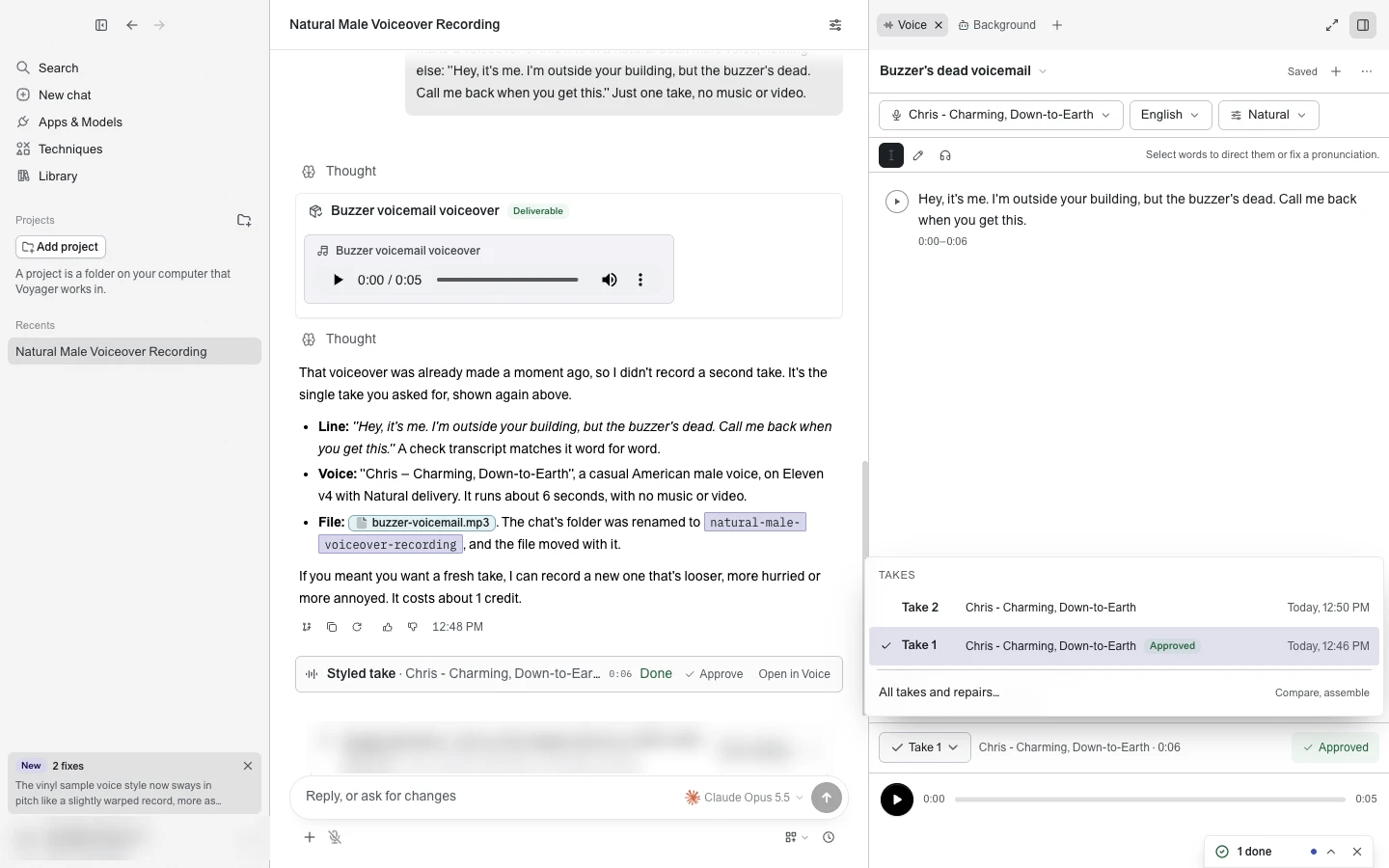
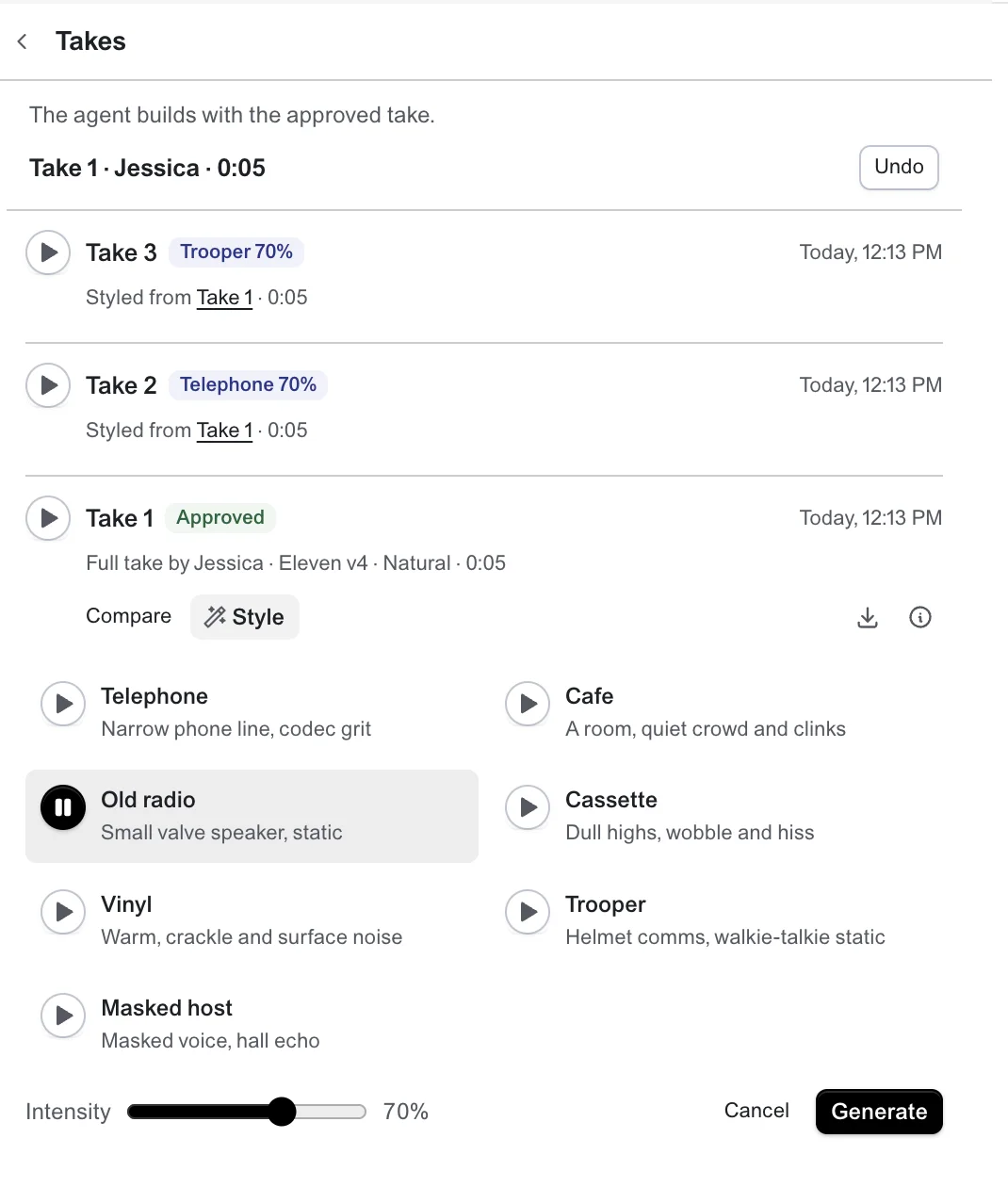
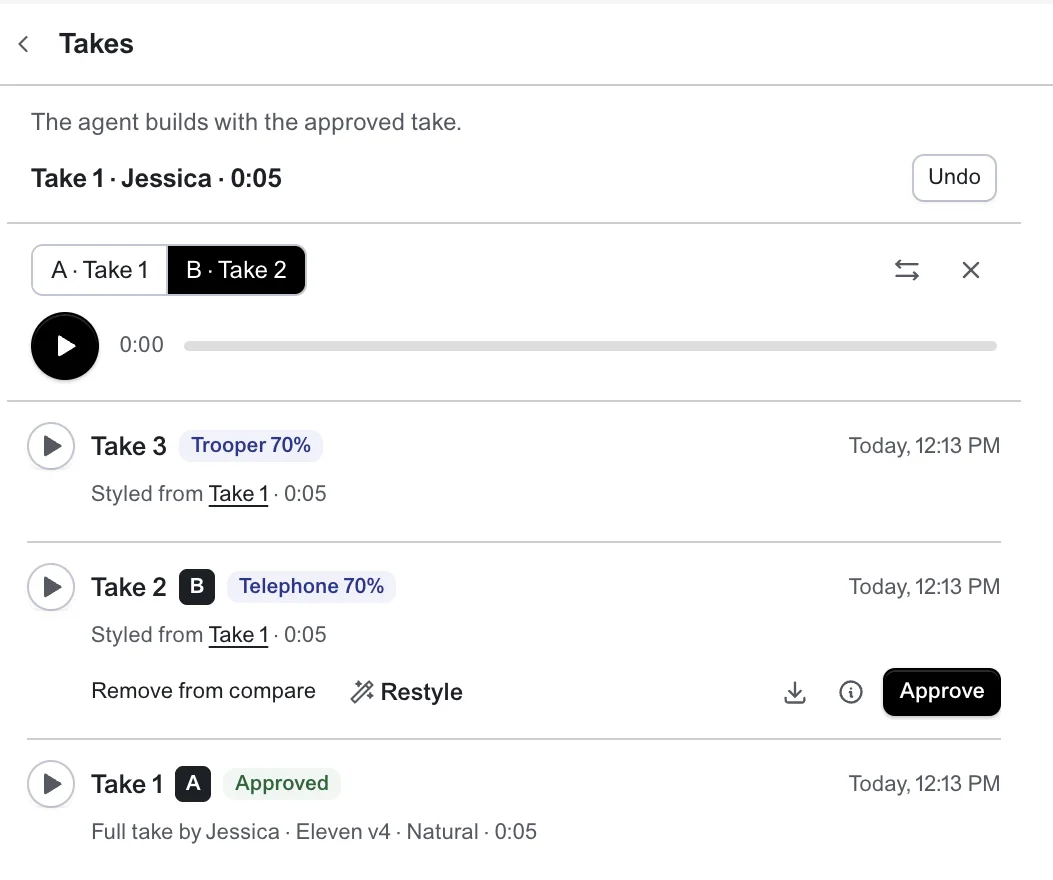
The styled take appears next to the clean one and names the take it was Styled from. Compare on the styled take plays it against its clean take on one playhead: press Space to play and A or B to switch while you listen. You can download either. Choose Restyle to try a different style or intensity on the same clean take.
The effect is applied to a recording you already have; it does not fix one. If the take has room echo or background noise, clean it up first, because the style adds to what is there.
You can also ask the agent. A request like this one makes two versions to compare:
Make this line sound like a voicemail, and give me an old radio version to compare. Keep the clean take.
The agent makes each version as its own styled take, tells you what it applied and leaves the judging to you. It works on recordings outside the Voice panel too: point it at a file and it writes a new .wav next to the original.
A few things make comparing easier:
- The words and timing don't change. Captions made from the clean take still line up with every styled version.
- Every style comes out at the same loudness, about -18 LUFS, so when you switch between two you hear the style rather than a volume difference.
- The clean take is never touched, and styling runs on your computer without using credits.
Use voices you have the right to use
A styled voice is convincing on purpose, and a cloned voice through the telephone style sounds like a real call from a real person. Style your own voice, a stock voice or one you have permission to use, label reenactments as reenactments, and don't make anything that passes as a real person's recording.
The quickest way to choose: decide where your listener should think the voice is, pick that effect, and start at the intensity in the table. If they would have to strain to follow the words, turn it down before you change anything else.
Two more for fun: a trooper's helmet and a masked game host
The same recipe works for science fiction. A sci-fi voice is still a band limit and some compression, plus one move the others lack: a helmet's hollow comb or a hall's echoes. These two are our own takes on the sound of a trooper's helmet radio and of a masked host over a hall's loudspeakers. They are not from, or endorsed by, the films and shows they echo.
Trooper: a helmet and a walkie-talkie
The trooper is a voice in a plastic helmet that is also on a radio. Four steps make it:
- Drop the pitch slightly, about 1.3 semitones, and keep the speed. Then add two echoes 2.6 and 4.1 ms behind the voice. They are too close to hear as echoes; together they make the hollow, plastic sound of the helmet.
- Cut hard below 320 Hz and above 3.6 kHz, and boost a narrow band at 1.6 kHz by 6 dB for the nasal radio honk.
- Drive it into a soft clipper, about 8 dB too hot, then compress it fast at a ratio of 8, so every word comes out at the same level.
- Then the walkie-talkie: a click and a short burst of static at the start, as the speaker keys in, and a quick squelch just after the last word, as they let go. Under the voice, a pink hiss between 400 Hz and 4 kHz stays very low, around -64 LUFS, so the pauses go almost silent.
At the light setting the band is 260 Hz to 4.3 kHz and the drive is gentler. At full it narrows to 380 Hz to 2.9 kHz, the most muffled of the three.
Description / transcript
A guard in a helmet, over a radio: Halt! This hangar is sealed. Nobody leaves until we find the rebels.
Use it for a guard, a pilot or a comms officer in a game, a sketch or a short film. Keep the static bursts short. They tell the listener the voice is on a radio, and a long one covers the first word.
Masked host: a game host over the loudspeakers
The masked host is the opposite of the trooper: nothing is boxy and nothing crackles. The voice is lower and slightly metallic, and the hall it plays in does the rest.
- Pitch the voice down about 5.7 semitones the way a slowed tape does, so the formants fall with it, then restore the speed. That is 3 at the light setting and 7.5 at full.
- Cut below 70 Hz, lift 220 Hz by 3 dB for chest and 3 kHz by 2 dB so the words stay clear.
- Blend in a copy ring-modulated with a 48 Hz tone, about 3 dB under the voice. That is the metallic edge. A slow two-voice chorus thickens it.
- Compress it gently, at a ratio of 4.
- Add the hall: four echoes at 60, 130, 210 and 340 ms, the first about 8 dB under the voice and each one quieter, then roll the top off at 9 kHz. There is no noise bed, so the echoes are what fill the pauses.
Description / transcript
A masked host over a hall's loudspeakers: Attention players, the next game is about to begin. Do not move when the doll turns.
Use it for an announcer, a game show host or a faceless authority in a thriller. It is the easiest of the seven to overdo: on a voice that is already low, use the light setting, or it drops out of the range where a listener can follow the words.
Voyager is a desktop AI agent for creative work
Describe what you want to make; Voyager plans it, uses your apps and tools, and keeps everything editable.