
An AI texture generator does one of two jobs. It makes a tileable material, a square image (ideally with normal and roughness maps) that repeats across a floor, wall or terrain and can go on any surface with UVs or box mapping, or it paints one specific 3D model, wrapping a texture around that mesh's own UV layout. For tileable materials, start with a free CC0 library, generate only the looks no library has, and check the seam yourself, because a model told to make a seamless texture often doesn't. To paint a model, use a retexturing tool such as Meshy, or StableGen inside Blender if you have a capable GPU.
The short version: when a scanned library has the material, use it, because it comes with measured maps and is made to tile. Generate when you need something specific (a stylised brick, a brand colour, an alien floor), make several and keep the ones that tile, and treat normal and roughness maps as a separate step. If the object already exists and only its surface is wrong, you need the other job: a texture atlas laid out on that mesh's UVs, which fits only that object and can't be reused as a material.
Key takeaways
- Asked explicitly for seamless textures, six image models made 4 clean tiles out of 18 on 20 November 2026; 10 had a seam you can see when the tile repeats.
- Repairing a seam is the weak step: neither paid AI edit fixed any of three seamed tiles, and the free offset blend removes the seam but ghosts the pattern. A fresh 1K attempt costs an estimated 3 to 14 credits.
- A colour image is not a PBR material: our simple luminance-based estimate turned flat wood grain into ridges in Blender, and Meshy's retexture returned full maps but gave "velvet" a satin roughness of 0.44.
We ran everything below on 20 November 2026: the tiles and seam edits through the models' hosted APIs, the chair retexture through Meshy's own API, and the renders in Blender, not through our app. Product facts come from the vendors' own pages, with the date read beside each. Voyager, the desktop app our team builds, runs the six image models in the seam test (five of them on its Starter plan or higher) and Meshy's 3D models, and its agent can script Blender; we have no commercial relationship with any other tool here.
How often a "seamless" prompt actually tiles
To see how far a plain image model gets, we asked six of them for three materials with the same prompt each: weathered red brick in running bond, horizontal oak floor planks, and a forest floor of oak leaves, twigs, needles and moss. Every prompt ended with the same instruction:
Seamless tileable texture: the left edge continues the right edge and the top edge continues the bottom edge, so it repeats with no visible seam. Orthographic top-down view, flat even diffuse lighting, no shadows from a light source, no perspective, no vignette, the material fills the whole frame edge to edge, no text, no border.
Each model made one 1024 by 1024 image per material. We then looked where seams are easiest to see: the point where four copies of the tile meet.
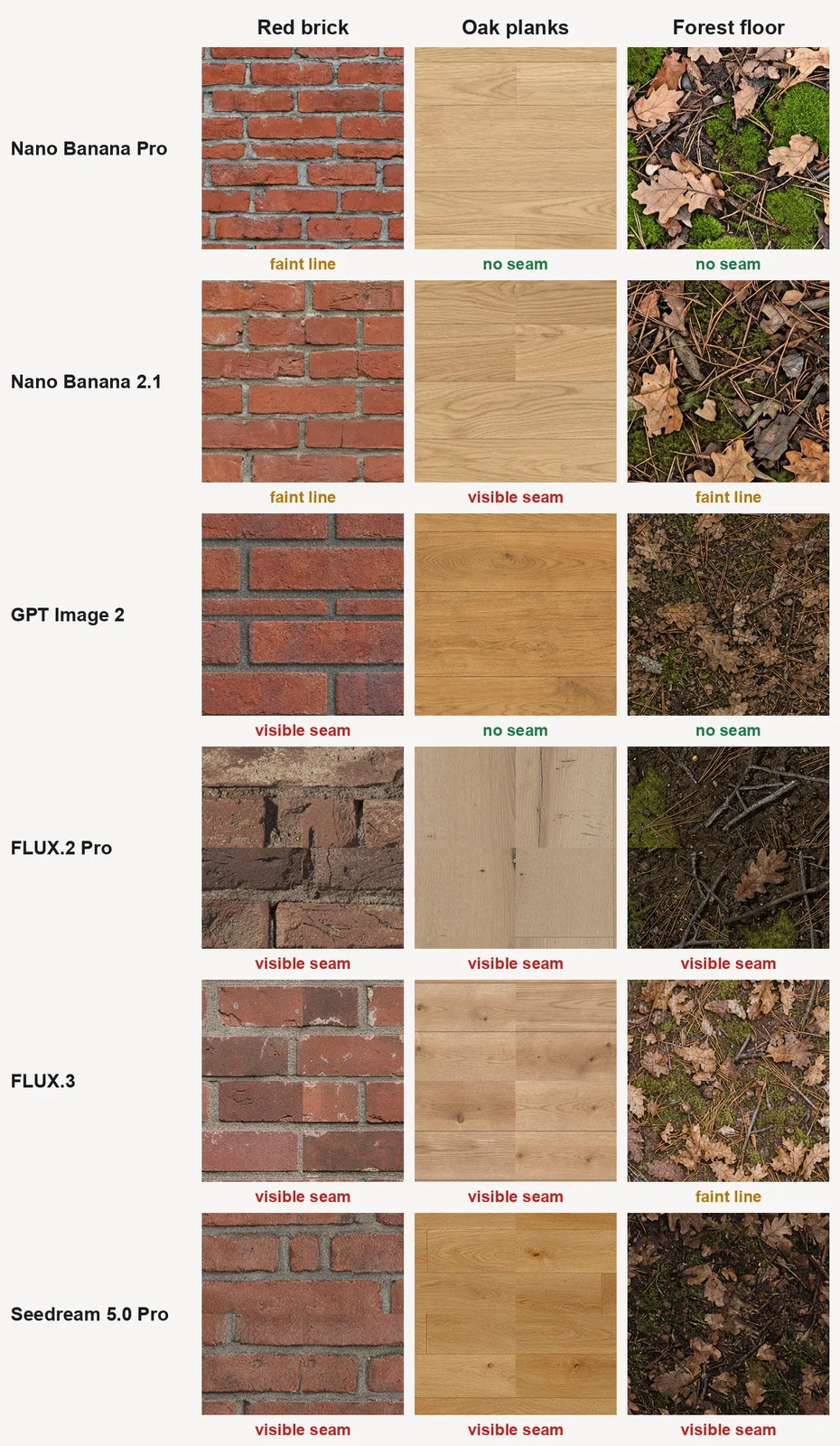
| Model | No seam | Faint line | Visible seam | Catalog estimate per 1K tile |
|---|---|---|---|---|
| Nano Banana Pro | planks, forest | brick | 14 credits | |
| GPT Image 2 (medium quality) | planks, forest | brick | 5 credits | |
| Nano Banana 2.1 | brick, forest | planks | 4 credits | |
| FLUX.3 | forest | brick, planks | 5 credits | |
| FLUX.2 Pro | brick, planks, forest | 3 credits | ||
| Seedream 5.0 Pro | brick, planks, forest | 4 credits |
We made one attempt per model and material, using the same prompt for all six models on each material, and graded the seams by eye at 1:1 and 2×. The counts show how often one prompt tiled, not which model is better. Credits are the example estimates in the model catalog published on voyager.so, read 20 November 2026; a credit is 1 cent on the Creator plan billed monthly and 1.1 cents in credit packs. The per-tile grades, settings and full prompts are in this CSV.
Visible seams were more common in our brick and plank tiles than in our forest-floor tiles. One brick tile had misaligned courses: GPT Image 2's has a sliver of half-height bricks where the top and bottom edges meet. Three plank tiles showed a colour step at the join, with boards lighter on one side, which becomes a stripe every tile width. A second attempt can land differently, so with any model, generate several, check them and keep the ones that tile; four attempts at the estimates above come to 12 to 56 credits.
Check a tile in half a minute
You don't need a script. Offset the image by half its width and height so the edges meet in the middle, then follow both lines of the cross from end to end, not only where they meet, since a mismatch can sit anywhere along a join:
- GIMP: Layer, Transform, Offset (Shift+Ctrl+O), then the "By width/2, height/2" button with wrap-around edges (GIMP 3.0 manual, read 20 November 2026).
- Krita: View, Wrap Around Mode shows the canvas tiled, and you can paint across the seam directly (Krita manual, read 20 November 2026).
- Blender: put the image on a plane and scale the texture coordinates (a Mapping node with Scale 4) to see it repeat.
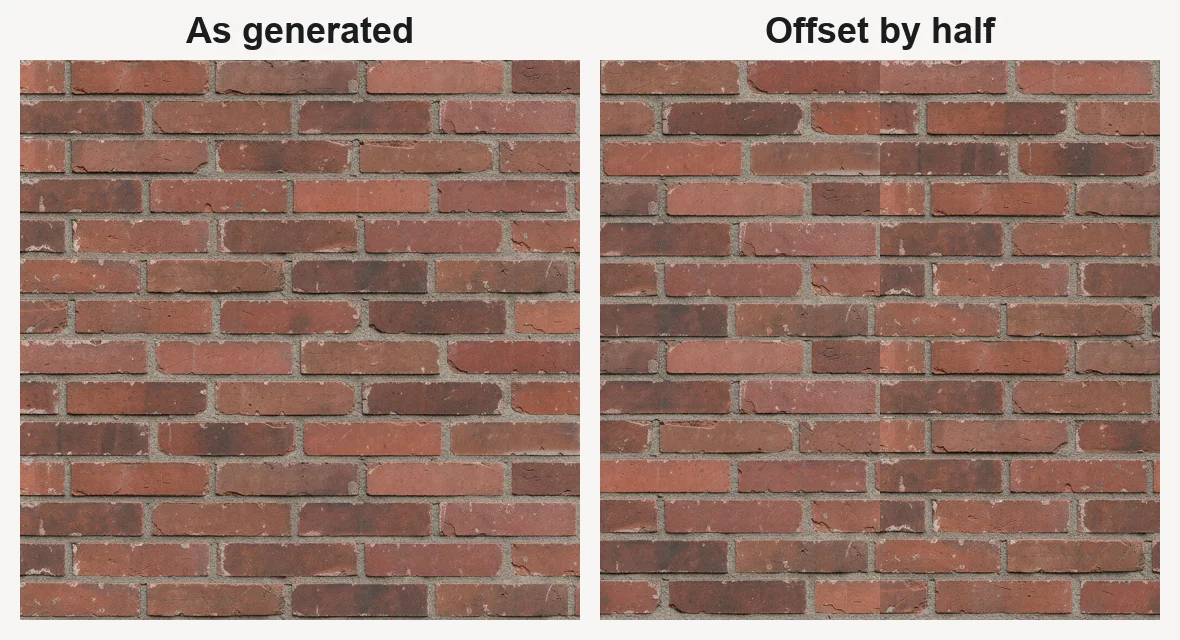
Look rather than measure. We also compared the colour jump across the wrapped edge with every other column of pixels, and that statistic flagged Poly Haven's CC0 wood floor, which tiles perfectly, because a board joint happens to sit on its edge. A number can't tell a designed edge from a mistake; your eye can.
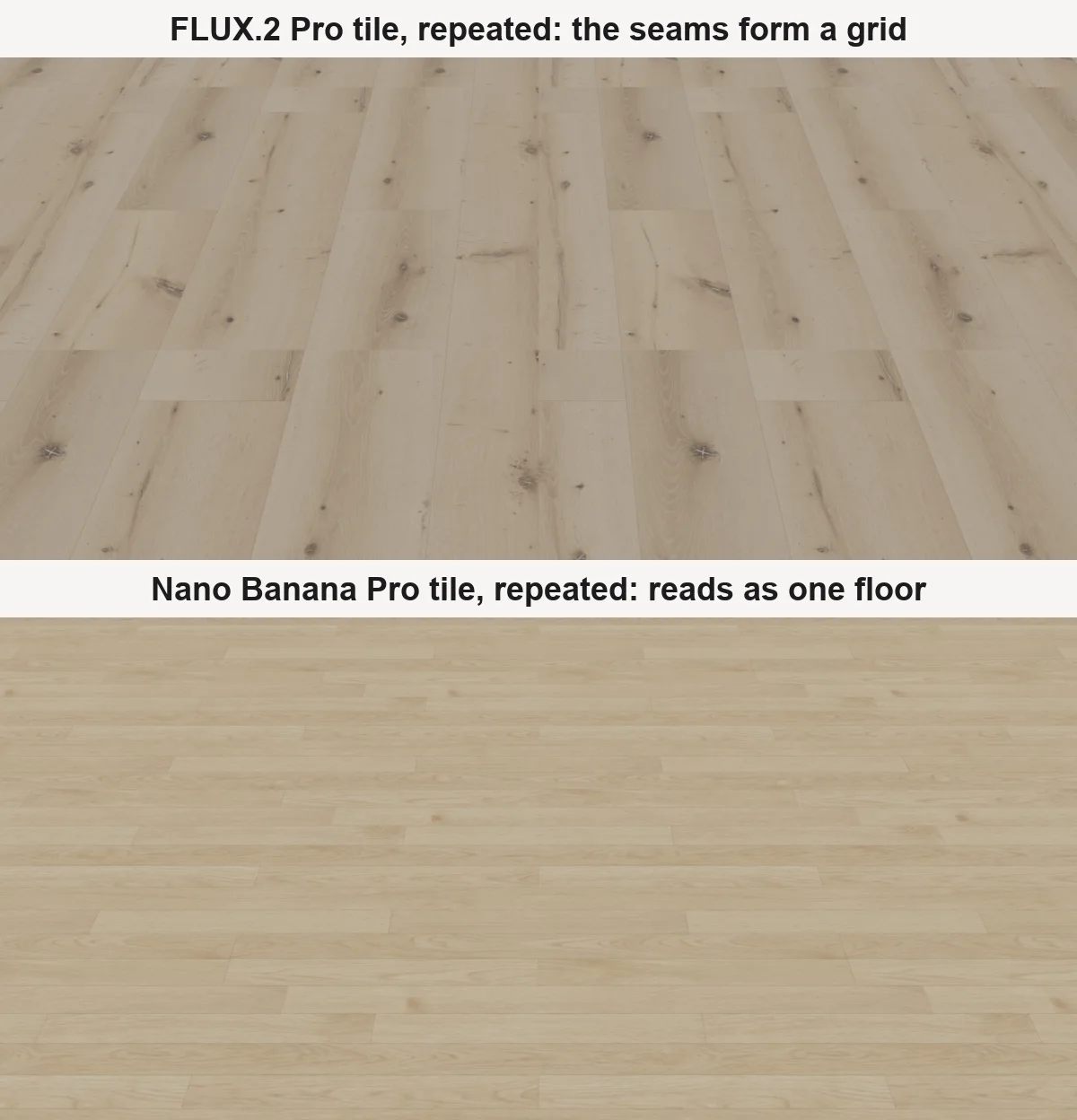
A clean join is not the end of it. View several repeats at the scale you will use: repeated across a floor, even a seamless tile shows its grid if it contains one memorable feature, such as a dark knot.
Fixing a seam: what worked
We took three tiles with visible seams (FLUX.3 brick, FLUX.2 Pro planks, Seedream forest) and tried three repairs on each.
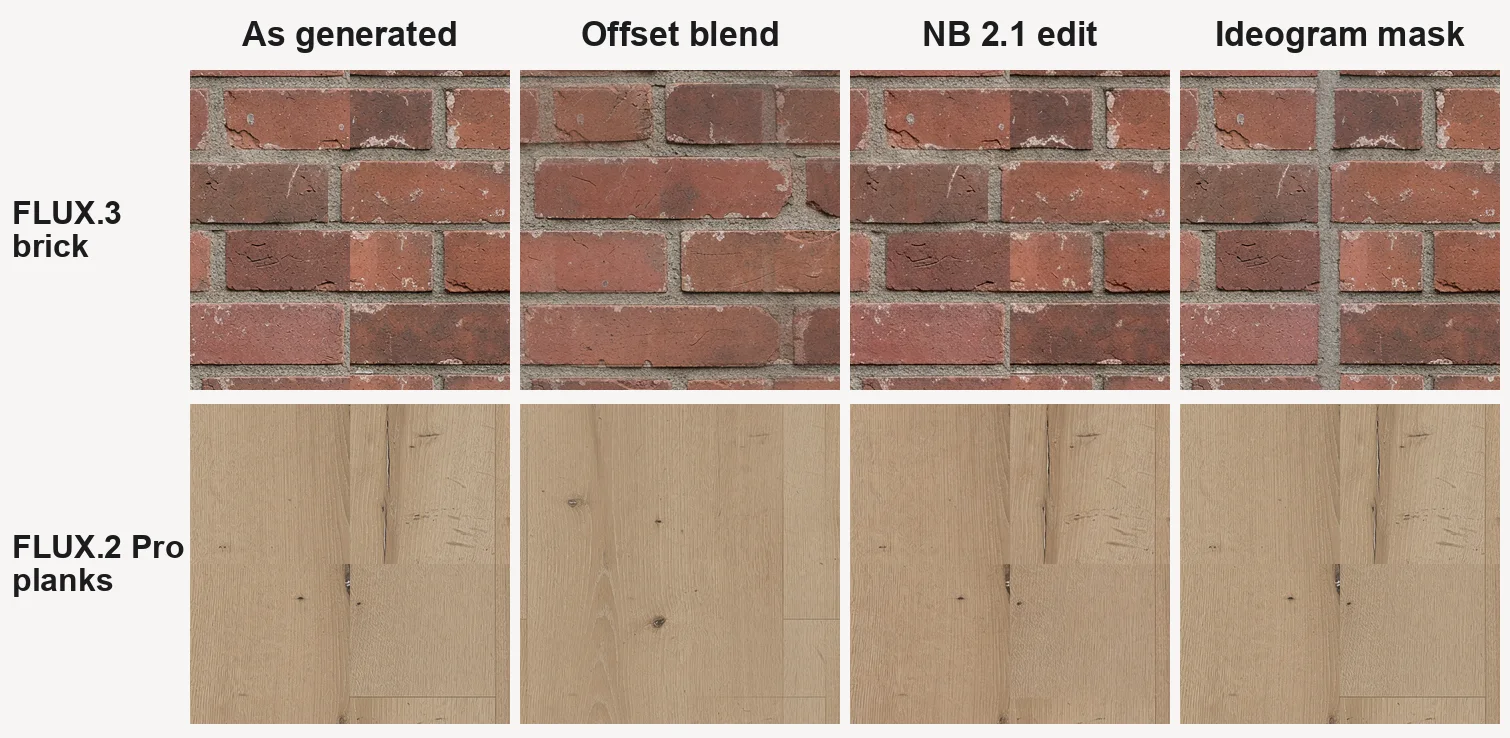
- Offset blend (free, always tiles). Mix the tile with a copy of itself offset by half, weighted so the edges come from the offset copy and the middle from the original. The result tiles by construction, because every edge is now made of pixels that were neighbours in the original. The cost is ghosting where the two copies mix; on the brick, the mortar joints doubled. It suits organic textures and fails on anything with a strict grid. GIMP has a one-click option, Filters, Map, Tile Seamless, whose manual warns the result may need correction (GIMP 3.0 manual, read 20 November 2026).
- An instruction edit (Nano Banana 2.1, catalog estimate 4 credits at 1K). We gave it the offset tile and asked it to repair only the seam lines and keep everything else, including the edges. All three seams were still there, and the whole image shifted slightly (by 5 to 16 levels out of 255 on average, edges included), which is enough to break the tiling of an image that already tiled.
- A masked edit (Ideogram 4.6, catalog estimate 6 credits at medium quality). With a cross-shaped mask over the seams at high precision, it returned all three images unchanged, pixel for pixel. A second run changed two things at once, regular precision and a reworded prompt: it left the planks the same, barely changed the forest, and turned the brick's colour step into a straight vertical mortar joint through every course, which breaks the bond pattern in a new way.
None of the AI repairs gave a usable tile. The edits are estimated at 4 credits (Nano Banana 2.1) and 6 (Ideogram), against 3 to 14 credits for a fresh 1K generation. Use the offset blend for leaves, soil, stone and fabric. For brick and planks, generate again or repaint the band by hand in Krita's wrap-around mode, where you can see the seam as you paint it.
PBR maps: a colour image is not a material
A shader can run on colour alone, with one roughness value and the mesh's own normals. Normal and roughness maps help when the surface needs fine relief or gloss that varies across it, which is why scanned materials ship with them, often alongside height and ambient occlusion. The image models we tested produced colour only. When you derive maps from that image, a luminance-based estimate treats darker pixels as lower.
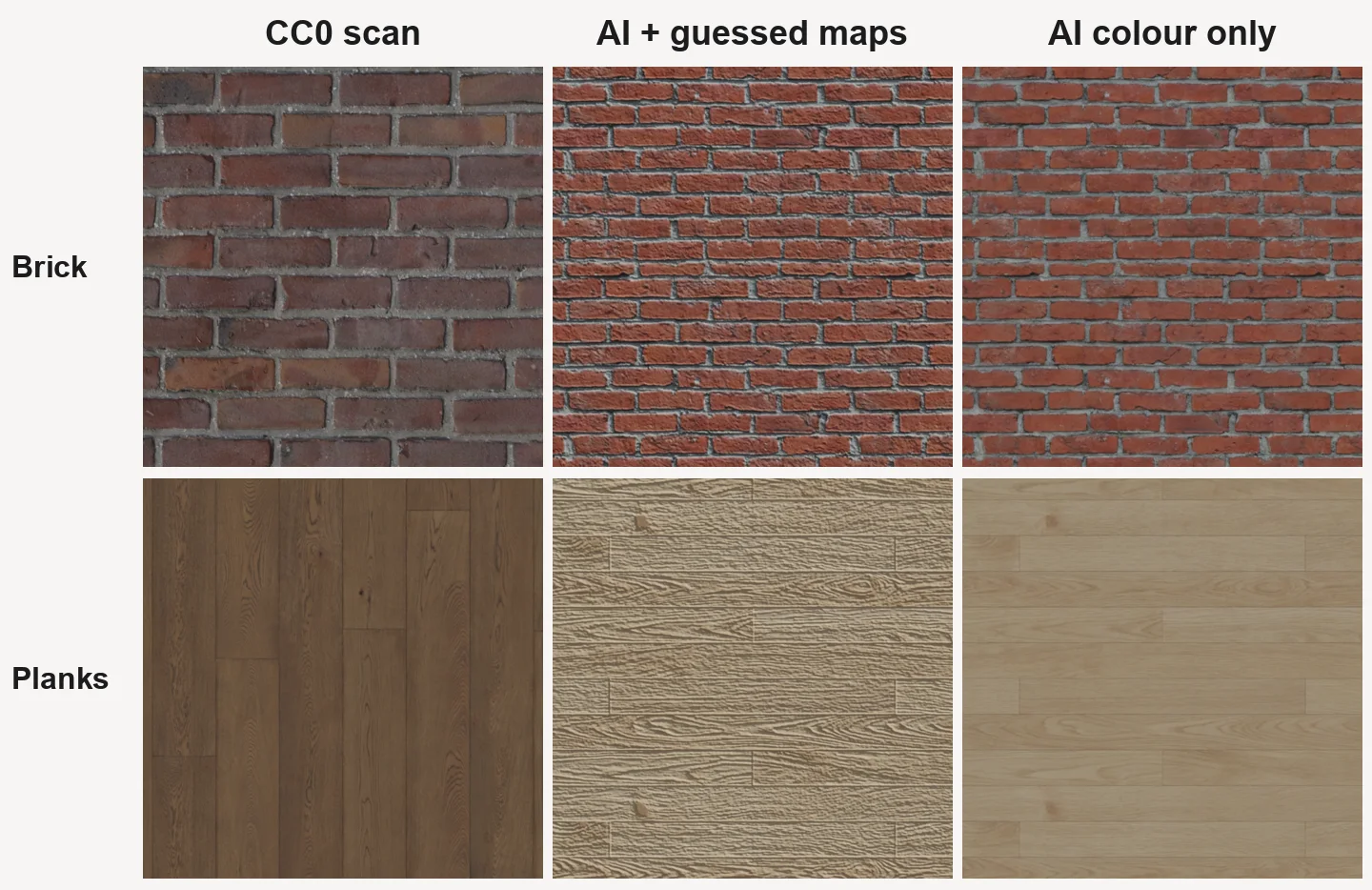
On the satin wood floor, whose dark grain is flat, the guessed normal map carved the grain into ridges. Baked-in shadows cause the same problem: an image model asked for flat lighting still draws some shading, and an estimator turns it into relief.
Dedicated estimators go further than a luminance trick. We did not run these; this is what their documentation says:
- Substance 3D Sampler, Image to Material. Its AI-powered mode builds normal, height and roughness maps from one image and removes shadows and highlights from the colour; a non-AI mode makes base colour, normal, metallic, roughness and AO procedurally (Adobe docs, read 20 November 2026). Sampler's own Text-to-Texture, Text-to-Pattern and Image-to-Texture generators are listed as beta and use no generative credits while in beta (Adobe docs, read 20 November 2026).
- Layer's PATINA. Reads maps from a texture you already have and leaves the original unchanged (Layer, read 20 November 2026). Layer's generator is covered with the tools below.
- Ubisoft's CHORD. An open-weights model for estimating PBR maps from generated textures, with ComfyUI nodes, released under the Ubisoft Machine Learning License, Research-Only, so it is not for commercial work (model card, read 20 November 2026).
Any single-image estimate is a guess about height and gloss that a photo scan measures. Check the result under a low light, as above, before you trust it.
Library, image model or dedicated generator
For common materials, a free CC0 library is the better source:
- Poly Haven listed 871 textures on 20 November 2026 (from its public API). Its standards ask for scans at 8K or more that are seamless on all axes, though it occasionally accepts surfaces that tile on one axis (texture standards, read 20 November 2026).
- ambientCG listed 2,043 materials through its API on the same day. Not all are scans: its creation methods include photogrammetry, procedural materials and maps approximated from a colour image alone, and each asset says which (creation methods, read 20 November 2026).
- Meshy links its own library of more than 600 seamless CC0 textures from its texture page (Meshy, read 20 November 2026).
Poly Haven and ambientCG are CC0: you can copy, modify and redistribute the files, including commercially, without asking or giving credit (Poly Haven licence, ambientCG licence, read 20 November 2026). Scanned materials win on the things generated tiles lose: they are made to tile, their maps were measured rather than guessed, and they come at higher resolution than a 1K or 2K generation. Generate instead when the look doesn't exist: a stylised or hand-painted surface, a specific palette, a fantasy material, a pattern matched to a reference image, or many variations of one surface to break up repetition.
To generate, any image model works if you check and fix the result yourself, as in our seam test. Dedicated generators add tiling-aware models, maps or a simpler workflow; we read their pages but did not run them:
- Polycam AI Texture Generator. Makes tileable textures from a prompt at 512 to 2,048 pixels (the generator offers 2 to 8 per prompt; its FAQ says up to four), with an optional reference image, strength slider and negative prompt. The tool page says unlimited use for Pro users. The help article lists generation on the web for Pro (now a legacy plan), Business and Enterprise, and its plan table marks it unavailable for Basic on web, iOS and Android, in a row labelled "Unlimited Downloads". The Basic plan page advertises downloading AI-generated textures, which is not the same as generating them. Basic was $150 a year on the pricing page (all read 20 November 2026). Its FAQ promises royalty-free commercial use. Neither page mentions normal or roughness maps.
- Layer. Two workflows: Create texture makes one seamless colour image, and Create PBR materials makes a set of base colour, normal (OpenGL and DirectX), roughness, metalness, height and AO, plus packed maps for Unity and ORM, downloaded as one zip. The maps only tile if you pick a tileable model such as PATINA Tileable 1.0 (Layer help), which Layer's rate card lists at 2.75 Creative Units per megapixel (pricing, both read 20 November 2026). It also trains on your own art style, offers a Retexture workflow for meshes, and is aimed at game studios.
- MyArchitectAI. Free with no login, 20 images a day per the top of its page, with a commercial licence claim, aimed at architecture and interiors. Its page says nothing about tiling or maps, so run the offset check on anything you download.
Texturing a 3D model
This is the other job: the mesh exists and you want a new surface on it. The tool renders the object from several views, paints them, and projects the result back onto the mesh's UVs.
We gave Meshy's retexture API the Tripo P2 armchair from our model reference, a 4,949-triangle mesh, with two prompts: oiled walnut with mustard wool, and black lacquer with green velvet and brass feet. We used ai_model: latest, which is Meshy 7 on this endpoint, with PBR on and 2K maps.
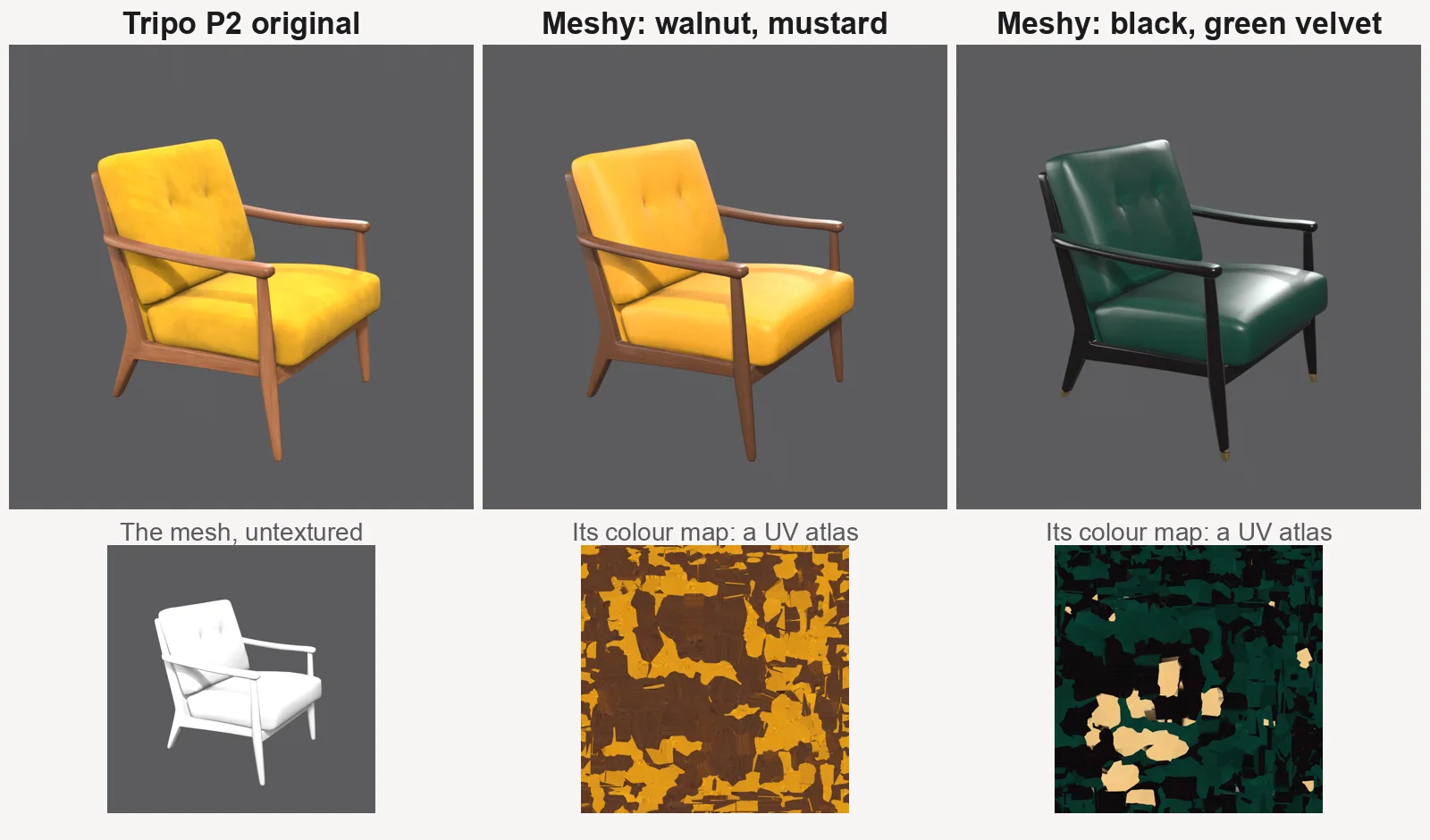
What came back, measured from the files:
- Geometry kept, UVs replaced. Both results still had 4,949 triangles, but Meshy laid out new UVs (the vertex count rose from 3,771 to about 5,000 as seams split vertices). Meshy's API has an option to keep your original UVs instead (
enable_original_uv, retexture API, read 20 November 2026); use it if the mesh already has a layout you care about. - Rescaled. The chair came back twice as large, 2 units on its longest side instead of about 1 m. Check scale before you drop a retextured model into a scene.
- Four maps at 2,048 pixels: base colour, metallic, roughness and normal. The brass caps were sensibly metallic (0.95, roughness 0.18). The "velvet" was not: its roughness map sat at about 0.44 across the cushions, so in Blender they render like satin leather. Real velvet is rough, so plan to adjust roughness by hand.
- Time and cost. Our two tasks showed 32 seconds of processing on Meshy's side (35 and 45 seconds end to end); Meshy's help says a 2K texture takes about two minutes in its web app (texture help, read 20 November 2026). Each charged 10 credits at 2K; Meshy's API rate card lists retexture at 10 credits for 2K or 4K and 15 at 8K (API pricing, read 20 November 2026). If you use the whole Pro allowance of 1,000 credits for $20 a month (US pricing, read 19 November 2026), 10 credits is about 20 cents; plans and credit rules are in our Meshy review. Meshy's Free plan can't download textured models or textures applied to a model you uploaded (free plan, read 20 November 2026).
Other options for this job:
- 3D AI Studio. Retextures GLB, FBX or OBJ uploads from a prompt or reference image, with optional PBR maps; its page recommends clean single meshes under about 100,000 faces. Its texture page lists a free plan of 100 credits a month and Basic at $19 a month for 1,000, and says texture charges vary by engine and quality, while its pricing page lists Texture AI as free with any plan; we couldn't confirm which applies to a given engine (both read 20 November 2026).
- StableGen (free, in Blender). A GPL-3.0 add-on that projects SDXL or Qwen Image views onto any mesh or whole scene through a ComfyUI backend, and estimates PBR maps. Version 0.5.0 shipped on 4 November 2026; it supports Blender 4.2 to 4.5 and 5.1 or later and suggests about 8 GB of VRAM for SDXL and 16 GB or more for Qwen Image. Some of the models it can run are non-commercial, including Qwen Image 2.1, so check the model you pick (README, read 20 November 2026).
- Hunyuan3D-Paint 2.1 (open weights). Paints an existing mesh from a reference image with PBR output and needs about 21 GB of VRAM for texturing. Its community licence does not apply in the European Union, the United Kingdom or South Korea (licence, read 20 November 2026).
For a whole AI-generated model, texture usually comes with generation; our free AI 3D model generator guide covers which free tiers let you download it.
Which tool for which job
| If you need | Use | Because |
|---|---|---|
| A common real material (brick, concrete, wood, ground) | Poly Haven or ambientCG | Free, CC0, made to tile (Poly Haven occasionally accepts one-axis tiling); Poly Haven's scans are 8K or more |
| A look no library has, as a tile | An image model, several attempts, then the offset check | 3 to 14 credits a try (catalog estimate); 4 of our 18 single attempts tiled cleanly |
| A seam fix on leaves, soil, stone or fabric | An offset blend | Free and always tiles; ghosting is hidden by organic detail |
| A seam fix on brick or planks | Regenerate, or repaint the band in Krita's wrap-around mode | No AI edit we tried gave a usable fix |
| Normal and roughness maps from a generated tile | Substance 3D Sampler's Image to Material, or Layer | Built for this job (we didn't run them); check under low light |
| A prompt-to-tile tool with no setup | Polycam or Layer | Built for tiling; confirm the plan and whether maps are included |
| A new surface on an existing mesh, fast | Meshy retexture (Meshy 7) | Four PBR maps for 10 credits at 2K; 32 s of processing in our two runs, about two minutes by Meshy's guidance; check scale and roughness |
| The same, free, in Blender | StableGen | GPL add-on with PBR estimation; needs a ComfyUI backend and a capable GPU |
Frequently asked questions
Is there a free AI texture generator?
Yes, with limits. MyArchitectAI's generator is free with no login for 20 images a day, though its page makes no tiling or map claims (MyArchitectAI, read 20 November 2026). For texturing meshes, StableGen is free on your own GPU, and so is Hunyuan3D-Paint where its licence applies, which excludes the European Union, the United Kingdom and South Korea (licence). Meshy's Free plan won't download retextured models. For ordinary materials, the free answer is a CC0 library: Poly Haven and ambientCG together listed 2,914 materials on 20 November 2026.
Can AI make seamless textures?
Sometimes: in our test, 4 of 18 tiles had no seam. Generate several, offset each by half (GIMP's Offset with "By width/2, height/2"), check both joins along their full length, then view a few repeats at the scale you will use.
Can AI generate PBR maps from a texture?
Tools can estimate them: Substance 3D Sampler's AI-powered Image to Material builds normal, height and roughness maps from one image (Adobe docs, read 20 November 2026), and Layer's PATINA reads maps from an existing texture; we didn't run either. Meshy's retexture returns maps too, but only for a mesh you give it. Check any estimate under a low light before you trust it.
What is the best AI texture generator for Blender?
For tileable materials, any generator whose output passes the offset check, plugged into a Principled BSDF with a Mapping node to set the repeat; Poly Haven's CC0 materials include Blender files. For texturing a model inside Blender, StableGen is the free add-on built for it (Blender 4.2 to 4.5 and 5.1 or later, per its README, read 20 November 2026).
Can I use AI-generated textures commercially?
It depends on the tool's terms. Polycam's FAQ describes its textures as royalty-free for commercial use (Polycam, read 20 November 2026). Meshy licenses Free-plan models under CC BY 4.0, which requires credit, but the Free plan can't download textured models in the first place (Meshy free plan, read 20 November 2026). Open-weight models carry their own licences, some non-commercial or limited by territory, so read the licence of the model you actually run. CC0 files from Poly Haven and ambientCG can be used, changed and redistributed commercially without permission or credit (Poly Haven licence, ambientCG licence).
Voyager is a desktop AI agent for creative work
Describe what you want to make; Voyager plans it, uses your apps and tools, and keeps everything editable.

Co-founder, Voyager
Ravi is a co-founder of Voyager. Before that, Ravi co-founded heap.io and was an EDM producer.