
Mixamo rigs and animates characters for free with an eligible Adobe ID, but only two-legged humanoids uploaded as FBX, OBJ or ZIP, so most replacements cover one half of it: the auto-rigger or the motion library. For a free desktop rigger with a motion store that includes some free clips, use AccuRIG with ActorCore (Windows only). For a free, open-source app that also rigs animals and runs in the browser or offline, use Mesh2Motion. If your character comes from an AI 3D generator, Meshy's or Tripo's built-in rigging is the shortest path, and both offer a Mixamo skeleton preset.
The short version: decide which half of Mixamo you are replacing. If it is the rigger, pick by where you work: a browser (Meshy, Tripo, Mesh2Motion), Windows (AccuRIG) or Blender (Auto-Rig Pro, Rigify). If it is the motion, pick by where the motion comes from: a library (ActorCore, Mesh2Motion, Meshy), your own video (DeepMotion), a text prompt (Meshy, Tripo) or your own keyframes (Cascadeur). Then plan the last step, getting the motion onto your engine's skeleton, which in Unreal means the IK Retargeter.
Key takeaways
- Mixamo is still free, but Adobe's FAQ limits its auto-rigger and library to "bipedal humanoids only" and its upload guide accepts FBX, OBJ and ZIP, not GLB (Mixamo FAQ and upload guide, read 20 November 2026).
- Meshy's API rigged our AI-generated fox for 5 API credits, with every vertex weighted to at most four bones and walk and run clips included; our run took about 26 seconds. Blender's automatic weights failed on the same file until we welded its vertices.
- Neither humanoid rig we made gave the fox a tail bone, so the tail moves with the legs. If your biped needs an articulated tail, wings or loose clothing, check the rigger's bone list first, or plan to add those bones by hand.
The rigging runs were made on 20 November 2026; every price, version and limit carries its source and the date it was read.
What Mixamo does, and why people leave it
Mixamo is Adobe's free web service for rigging and animating 3D characters. You upload a character, place markers on the wrists, elbows, knees and groin, and a few minutes later it has a skeleton and skin weights; then you apply clips from Mixamo's motion library and download the result (upload and rig guide, read 20 November 2026). It costs nothing and needs only an Adobe ID, not a Creative Cloud subscription, and Adobe says the characters and animations are royalty free for personal, commercial and non-profit projects, including games and films (Mixamo FAQ, read 20 November 2026).
Three things keep it the default: it is free, it is one page from upload to animated download, and you can upload a character rigged elsewhere as FBX and Mixamo maps its skeleton to its own system, so the library is not tied to Mixamo's rigger.
The limits people run into, from Adobe's own pages (read 20 November 2026):
- Humanoids only. The FAQ says "the auto-rigger and animation libraries are for bipedal humanoids only," and that on a humanoid, extra limbs, wings, tails, large hair or clothing, very stylised proportions or an asymmetric pose may stop the auto-rigger working.
- Narrow file support. Uploads must be FBX, OBJ or a ZIP of OBJ, MTL and textures, and a character that is already rigged must be FBX. A GLB, which is what every generator in our 3D roundup delivers, has to be converted first, for example by importing it into Blender and exporting FBX with textures embedded.
- Account limits. It is not available with Enterprise or Federated IDs, or to users with a China country code. Only the last character you uploaded is kept.
- Licence conditions. The Mixamo Additional Terms (effective 23 June 2021) forbid using Mixamo, or anything received or derived from it, directly or indirectly to create, train, test or improve AI systems, or letting others do so. Adobe's General Terms (effective 3 October 2025) let you use Adobe-supplied content files inside your own end product but not distribute them on a stand-alone basis (section 3.6). On our reading: ship Mixamo clips inside your game or film, but do not share the raw files.
Adobe last updated the FAQ and upload guide on 14 September 2021, which dates the pages, not the service. If your character isn't a standard humanoid, your pipeline is GLB-first, or the work can't depend on a personal Adobe sign-in, replace at least one half of Mixamo. Otherwise, converting to FBX keeps it usable for both.
Auto-riggers: put a skeleton in your character
| Rigger | Price | Runs on | Characters | Gets out |
|---|---|---|---|---|
| Mixamo | Free with an Adobe ID | Browser | Bipedal humanoids | FBX, OBJ or ZIP in (rigged: FBX); rigged character out |
| AccuRIG 2.1.1 | Free, personal and commercial | Windows 8, 10, 11 | Humanoids, A or T pose | Exports for major 3D apps and engines |
| Meshy (browser) | 0 credits on every plan | Browser | Humanoid, quadruped dog, Smart Rig (beta) for others | FBX or GLB; Smart Rig GLB only |
| Meshy (API) | 5 API credits; paid API access | API | Biped or quadruped | FBX and GLB |
| Tripo Studio | 20 credits per rig | Browser | Seven body types | FBX recommended |
| Mesh2Motion | Free, MIT code | Browser, or offline app for Windows, macOS, Linux | Humans, foxes, horses, birds, dragons, spiders, fish, snakes and more | GLB or FBX |
| Auto-Rig Pro | $50 full, $25 lite | Blender 2.93 to 5.3 | Humanoids automatic (full); others by hand | FBX or glTF for engines |
| Rigify | Free, bundled with Blender | Blender | Metarigs for humans, cat, wolf, horse, shark | A Blender control rig |
Prices and limits read 20 November 2026 from the pages linked below.
AccuRIG is Reallusion's free auto-rigger, at version 2.1.1 (29 September 2026, release notes). It is free for personal and commercial use, runs on Windows 11, 10 and 8 only (system requirements, FAQ), and asks you to log in with a Reallusion account on first use (installation guide). It is built for humanoids in A or T pose, including scans, sculpts and stylised characters, and lets you move joints, adjust shoulders and correct posture before you accept the rig (AccuRIG page). Upload the result to ActorCore to preview clips on it; since version 2.0 you can also search over 4,500 ActorCore motions inside AccuRIG. Its FAQ notes that rigging strips morph targets and that there are no facial bones. Choose it if you are on Windows and want to refine joints by hand, for free.
Meshy rigs inside the same browser tab that generates the model. In the web app, rigging, remeshing and the free animation set cost 0 credits on every plan; clips beyond the free set need a paid plan (web app credits). Humanoid and Quadruped Dog rigs use markers, but only humanoids get the preset library and Text to Motion; four-legged characters get a walking animation (animation guide). Smart Rig (beta) is documented for creatures, robots and props, downloads as GLB only and cannot use the animation library. Meshy wants a T or A pose with a gap between limbs and body, and asks you to remesh generated models over 300,000 faces first (rigging guide).
Meshy's API is a separate product with paid API credits. The API takes a GLB by URL, charges 5 credits per rig and rejects meshes over 380,000 triangles, counting each quad as two (Rigging API, API pricing, read 20 November 2026). Quadruped rigs get quadruped library actions (Animation API), and for bipeds you choose the skeleton: Meshy's own, Mixamo, UE5 Mannequin, Unity Humanoid, Rigify Basic Human, Maya HumanIK and others (Rigging API). Choose Meshy if your characters come from an AI generator and you want the rig and a first walk cycle without leaving the generator. Our Meshy AI review covers its plans.
Tripo Studio rigs seven body types: humanoid, plus quadrupeds, six- and eight-legged creatures, birds, snakes and fish. Skeleton presets include ActorCore, Mixamo, UE5 Mannequin, VRM 1.0 and Unity Humanoid, and Tripo documents exporting its rigged FBX and uploading it to Mixamo for more clips. A rig costs 20 credits, and you cannot edit the skeleton or weights in Studio; Tripo's advice is to fix shoulders and hips in Blender or Maya (rigging and animation guide). Choose it for creatures, and read our Tripo AI review for what a credit costs.
Mesh2Motion is an open-source app in the same mould as Mixamo: import a model, pick a skeleton type, fit it inside the mesh, test animations and export. It imports GLB, glTF, DAE and FBX, exports GLB or FBX with several animations in one file, and has over 170 animations (Mesh2Motion). Its release notes add an offline desktop app for Windows, macOS and Linux (2 August 2026), an FBX 7.4 exporter for Unity and Unreal (25 September 2026), and manual weight painting and import of Mixamo-compatible animations (19 November 2026) (news). The code is MIT and its own art assets, animations included, are CC0 (repository licences); that covers Mesh2Motion's clips, not the character you import. It is maintained by one developer in their spare time. Choose it for animals and for clips you can ship or share freely; expect a smaller library than Mixamo's.
Auto-Rig Pro is a paid Blender add-on, on sale for over ten years. The full package adds Smart, which places humanoid bones automatically, Remap, which retargets an action between armatures with different bone names and orientations, and FBX export set up for Unity, Unreal and Godot; the lite version has the core rig only. Full costs $50 and Lite $25 (Auto-Rig Pro, read 20 November 2026). Non-humanoids such as horses and dogs are rigged without Smart. Choose it if Blender is home and you will animate by hand after rigging.
Rigify is free and ships inside Blender (it is among Blender 5.2.1's core add-ons). It is not an auto-rigger: you add a metarig (Basic Human, Human, Cat, Wolf, Horse or Shark), fit its bones to your character by hand, and press Generate Rig to get an animator's control rig (Rigify basics). Skinning is a separate step, and Blender's manual warns that automatic weights can deform poorly and may need manual correction (Armature Deform Parent). Our Blender rigging guide walks through it. Choose it if you want a full control rig for free and are prepared to place the bones and paint weights yourself.
Creatures and tails. For a non-biped, pick a rigger with a skeleton for that body: Mesh2Motion (foxes, horses, birds, dragons, spiders, fish, snakes, with clips), Tripo's seven body types, Meshy's quadruped rig (a walking animation in the web app, quadruped library actions in the API) or Smart Rig (GLB, no library), or Auto-Rig Pro and Rigify for anything you will build bones for. A humanoid with a tail is a different problem. Meshy's humanoid template accepted our tailed fox but gave it no tail bone, and a quadruped or creature rig is no fix for a biped that needs an articulated tail; plan to add tail bones by hand in Blender.
Voyager, the desktop app our team builds, runs Meshy's rigging tools from its web Generate page. Rig (10 credits) appears on an eligible mesh, and Animate with preset motions (6 credits) on an eligible rig (catalog, read 20 November 2026). The Rig panel says it works best on a humanoid standing upright and facing forward; if it refuses a mesh for having too many faces, it offers Remesh when Remesh is available for that result. Generate on the web is image-to-3D, so a text idea becomes an image as its own step first, and managed 3D needs a paid plan, from Starter at $19 a month billed monthly (pricing, read 20 November 2026). The fox in our test below came from our model reference's AI 3D model generator roundup.
Motion: a library, capture or keyframes
Once a character is rigged, the choice is between clips someone already made, motion captured or generated for you, and motion you keyframe yourself. Licence and download limits often decide it.
A library is fastest when the move is common. To use Mixamo's on a character rigged elsewhere, upload it as a rigged FBX and let Mixamo map the skeleton; Meshy and Tripo both offer a Mixamo skeleton preset for this, though we did not upload our fox to Mixamo to confirm the mapping. Mixamo's clips ship inside your game but can't be shared raw. ActorCore sells motions from a store of over 4,500 and lists a free collection of 33 items, with up to 10 free downloads a day for signed-up users (free motions, read 20 November 2026). Meshy's library has 20 animations on the free plan and over 500 on paid plans, from Pro at $20 a month at the standard US monthly price (pricing, read 20 November 2026). Tripo has a motion library in its Animate module. If you need to redistribute the clips themselves, Mesh2Motion's own animations are CC0.
Capture or generate when no library has the move. DeepMotion Animate 3D turns MP4, MOV or AVI footage into animation on a stock or uploaded FBX or GLB character, and exports FBX, BVH and MP4, plus GLB for custom characters. One credit is one second of animation, and face or hand tracking each add half a credit per second. The page states the free allowance two ways: the plan table gives the Freemium plan 25 credits a month and 20 seconds per clip, and the FAQ says up to 60 seconds a month. Either way, free animations are for personal, non-commercial use, and paid plans start at Starter, $9 a month billed annually, for 180 credits (read 20 November 2026). Our guide to turning a dance video into Blender animation shows a local route through a Rigify rig. Meshy and Tripo also generate a clip from a description such as "victory dance." On Meshy's API, Text to Motion costs 10 credits in prime mode or 3 in swift mode and returns a standalone FBX or BVH clip of 2 to 10 seconds; putting it on your character is a separate Animation API request, which needs a biped rig and costs 3 credits per action (Animation API, Text to Motion API, API pricing, read 20 November 2026). Check foot contact and hand positions before you ship captured or generated motion.
Keyframe it yourself when a library clip is close but wrong. Cascadeur is keyframe animation software with AI-assisted posing and physics. Its free plan includes the rigging tools but is non-commercial, exports only its own .casc format and caps exports at 300 frames and 120 joints per scene. At standard US dollar prices, Indie costs $19 a month or $96 a year and is limited to $100,000 in revenue or funding over the 12 months before download and again at each renewal; clause 1.6 of the licence defines what counts for companies, non-profits and individuals. Pro costs $49 a month or $396 a year (read 20 November 2026, when a Black Friday discount was also on offer).
Getting clips onto your engine's skeleton
Retargeting decides whether a library is any use to you. If your game already uses the UE5 Mannequin, a clip made on a Mixamo skeleton has to be mapped onto it.
- In Unreal Engine, the IK Retargeter transfers animation between skeletons with different bone counts, names and orientations. It needs an IK Rig for the source and the target, retarget chains mapped between them, and a check that the two retarget poses match before you export the new animation sequences. Auto retargeting can do much of the setup: right-click animations to retarget them, generate chains by matching bone names against templates (UE4 and UE5 Mannequins, MetaHumans, Stack O Bot), and auto-align the poses (both read 20 November 2026). Check the result rather than trusting bone names alone.
- In Blender, Auto-Rig Pro's Remap (full package) retargets between armatures with different names and orientations.
- Shorten the step by rigging onto the skeleton you will animate: Meshy's API and Tripo both offer UE5 Mannequin and Unity Humanoid presets. Clips made for another skeleton still need retargeting unless their hierarchy and rest pose match.
One fox, rigged two ways
To see what an automatic rig gives you, we rigged one AI-generated character with Meshy's API and with Blender's own tools on 20 November 2026. The character is the cartoon fox our model reference made with Meshy 7.1 from a text prompt: 31,078 triangles, a scarf, a satchel and a large tail, the kind of clothing and appendages Mixamo's FAQ warns about. For Rigify, we placed the metarig's joints by script where Meshy's rig had put them, standing in for fitting it by hand.
| Meshy API, default | Meshy API, Mixamo preset | Blender: Rigify + automatic weights | |
|---|---|---|---|
| Time | 26 s API wall time | 25 s API wall time | Rig generation under 0.1 s; fitting the metarig is manual |
| Bones | 24, all deforming | 28: 27 named mixamorig:*, plus Meshy's headfront | 222, of which 35 deform |
| Skin weights | Every vertex weighted, at most 4 bones each | Every vertex weighted, at most 4 bones each | Failed on the raw file; after welding, every vertex weighted, 6,218 vertices with more than 4 bones (up to 12) |
| Files | FBX and GLB, plus walk and run clips in both | FBX and GLB, plus walk and run clips | A .blend; export is up to you |
| Cost | 5 API credits | 5 API credits | Free |
API wall time is from our request to the finished task, including polling, before downloading the files; each setting ran once.
- Blender's automatic weights failed until we welded the mesh. The fox arrived as 14,941 disconnected pieces. Parenting it to the Rigify rig with automatic weights gave the warning "Bone Heat Weighting: failed to find solution for one or more bones" and left all 59,401 vertices unweighted. Merge by Distance at 0.0001 m joined it into one piece of 15,525 vertices, and automatic weights then worked in under a second with no vertex left unweighted. If automatic weights fail on a generated model, check whether it is split into many pieces and weld it before trying again.
- Blender's weights spread across more bones. After welding, 6,218 vertices took influence from more than four bones, up to 12; Meshy's files stop at four. If your engine reads four, run Weights, Limit Total in Blender before export.
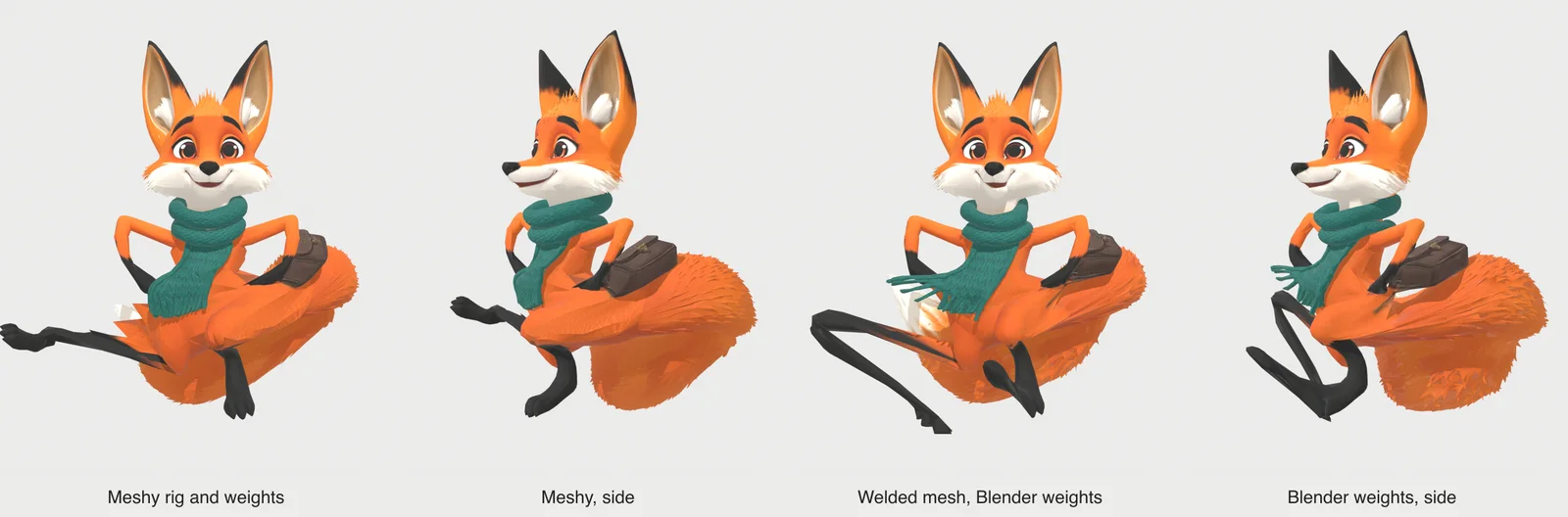
- Meshy's skin held up better in a stress pose. We also skinned Meshy's own 24-bone skeleton with Blender's automatic weights on the welded mesh (6,287 vertices over four bones, up to 11) and posed both versions the same way for the image at the top of this page. Because welding changed the mesh as well as the weights, this compares two workflows, not weights alone. Meshy's version kept the scarf on the chest and the raised leg in one piece; Blender's did neither.
- No tail bone in either. The tail follows the hips and thighs: it crumples under the raised thigh in the stress pose and swings across the legs in Meshy's own walk clip.
- Meshy's API picks its inputs. It refused the Tripo P2 fox with a pose-estimation error (we did not retry it in another orientation), the 500,000-triangle Rodin fox for exceeding its 380,000-triangle limit, and a request combining finger bones with the Mixamo preset on our fox; none was charged. The Mixamo preset without fingers worked.
- Download promptly. Result files expire about three days after the task.

The trade-off was clear on this character. Meshy delivered a usable animated biped in one request. The Rigify route gave an animator full controls for free, but only after we welded the mesh and took over the skinning.
Verdict by job
| If your work is mostly | Choose | Watch for |
|---|---|---|
| Rigging humanoids for free on Windows | AccuRIG, with ActorCore or Mixamo clips | Windows only; Reallusion login on first use; ActorCore clips mostly paid |
| AI-generated characters | Meshy or Tripo rigging | Meshy takes GLB; Tripo weights are not editable in Studio |
| Animals and creatures | Mesh2Motion or Tripo | Smaller libraries than Mixamo's |
| A biped with an articulated tail | Auto-Rig Pro or Rigify, adding tail bones by hand | Humanoid presets may not include tail bones; Meshy's gave our fox none |
| Clips you can redistribute | Mesh2Motion | CC0 covers its clips, not your character |
| Animating by hand in Blender | Auto-Rig Pro (with Remap), or Rigify if you will fit bones and paint weights | Rigify has no retargeting of its own |
| Motion from your own performance | DeepMotion | Free plan is small and non-commercial |
| A move no library has | Cascadeur, or text to motion in Meshy or Tripo | Cascadeur Free exports only .casc |
| Clips on your engine's skeleton | Rig onto a UE5 Mannequin or Unity Humanoid preset, or retarget with Unreal's IK Retargeter or Auto-Rig Pro Remap | Check retarget poses before export |
Frequently asked questions
Is Mixamo still free?
Yes. Adobe says Mixamo is free for anyone with an Adobe ID, needs no Creative Cloud subscription and no other purchase, and that its characters and animations are royalty free for personal, commercial and non-profit projects. It is not available with Enterprise or Federated IDs, or to users with a China country code (Mixamo FAQ, read 20 November 2026).
Is Mixamo being discontinued?
We found no end date on Adobe's Mixamo pages. Its FAQ and upload guide both show a last-updated date of 14 September 2021, and the Mixamo Additional Terms are effective from 23 June 2021; those dates describe the pages, not Adobe's plans (Mixamo FAQ, Mixamo Additional Terms, read 20 November 2026).
What is the best free alternative to Mixamo?
For humanoids on Windows, use AccuRIG: it is free for personal and commercial use after a Reallusion login on first use, and ActorCore has a small free collection of clips next to its paid store. On any desktop or in the browser, use Mesh2Motion, which is free and open source, has an offline app and over 170 CC0 animations, and rigs animals as well as people (AccuRIG FAQ, ActorCore free motions, Mesh2Motion news, read 20 November 2026).
Can Mixamo rig animals or characters with tails?
Not animals: Adobe's FAQ says the auto-rigger and animation libraries are for bipedal humanoids only. On a humanoid, it says tails, wings, large hair and clothing may stop the auto-rigger working. Mesh2Motion, Tripo Studio and Meshy's quadruped and Smart Rig modes document other body types (Mixamo FAQ, read 20 November 2026).
Can I upload a GLB to Mixamo?
No. Adobe lists three upload formats, FBX, OBJ and ZIP, and a character that is already rigged must be FBX (upload and rig guide, read 20 November 2026). Convert a GLB to FBX in Blender first, or use a rigger that takes GLB, such as Meshy (in the browser or through its API) or Mesh2Motion.
Can I use Mixamo animations on a character rigged somewhere else?
Adobe's route is to upload the rigged character as FBX and let Mixamo map its skeleton to its own system, then apply clips there (upload and rig guide, read 20 November 2026). Meshy's API and Tripo offer a Mixamo skeleton preset; our fox on Meshy's preset had 27 of its 28 bones named mixamorig:*, but we did not upload it to Mixamo. For a skeleton Mixamo cannot map, retarget with Unreal's IK Retargeter or Auto-Rig Pro's Remap.
Can I share Mixamo animations?
Adobe allows royalty-free use in your projects, and its General Terms let you use Adobe-supplied content files inside your own end product but not distribute them on a stand-alone basis (section 3.6, effective 3 October 2025). On our reading, a game that ships Mixamo clips is fine; posting the raw clip files for others to download is not (Mixamo FAQ, Adobe General Terms, read 20 November 2026). For clips you can share freely, use Mesh2Motion's CC0 library.
Why do Blender's automatic weights fail on my AI-generated model?
On our fox the cause was a mesh in pieces. It arrived as 14,941 disconnected pieces, and automatic weights failed with "Bone Heat Weighting: failed to find solution" and left every vertex unweighted. Selecting all in Edit Mode and running Mesh, Clean Up, Merge by Distance joined it into one piece, and parenting with automatic weights then worked. To check your own model, select one vertex in Edit Mode and press Ctrl+L: if only a small patch lights up, the mesh is in pieces.
Voyager is a desktop AI agent for creative work
Describe what you want to make; Voyager plans it, uses your apps and tools, and keeps everything editable.

Co-founder, Voyager
Ravi is a co-founder of Voyager. Before that, Ravi co-founded heap.io and was an EDM producer.