
Tripo AI is a 3D model generator made by VAST: you give it a picture or a text prompt and it returns a textured 3D model you can export to Blender, a game engine or a slicer. It is worth paying for if you want a mesh plus the cleanup steps around it (retopology, segmentation, rigging and animation) in one web app, or if you need many detailed models cheaply through its API. It is a weaker buy if you need exact colours and materials from a text prompt, or clean fine parts at a low polygon count.
The short version: choose Tripo H3.1 for detailed renders and print starting points, and expect files of about 1.4 million triangles that need reducing before a game can use them. Choose Tripo P2 for low-poly props: about 5,000 triangles with PBR maps, clean on simple shapes, weak on small parts. Use the free plan only to try it, because free accounts can export only the older H2.5 model and everything they make is public.
Key takeaways
- Tripo Studio Pro is $20 a month on monthly billing for 3,000 credits (pricing page, 19 November 2026). At Tripo's listed Studio costs that is about 120 textured H3.1 models, or about 26 P2 models textured with PBR maps.
- At default settings, first attempts and retries together, our H3.1 runs returned 1.41 to 1.49 million triangles per object and P2 returned 4,445 to 5,474. Asked for 50,000, H3.1 returned 45,734 to 48,786 and P2 49,517 to 54,707, and P2's dripper was the cleaner.
- Free outputs are public by default, and Tripo's terms put them under a public waiver that lets anyone reuse them, to the extent you hold rights in them; Tripo's pricing page instead lists free use as non-commercial. The terms let paid content be kept private where Studio offers the setting.
Plans, credit costs, features and terms below were read on Tripo's pricing page, its help centre, its API pricing and its terms on 19 November 2026. The model results come from our own runs of H3.1 and P2 on 17 November 2026, the same runs published on our Tripo H3.1 and Tripo P2 pages and in our 3D model roundup. Voyager, the desktop app our team builds, runs Tripo's models among others.
What Tripo is in November 2026
Tripo is three things that share one set of models:
- Tripo Studio (studio.tripo3d.ai), the web app most people mean by "Tripo AI". You generate from an image, several views, text or a batch of images, then edit in the same workspace. Tripo's help centre describes it as "an end-to-end production-ready AI 3D workspace built by VAST" (What is Tripo Studio, dated October 2026).
- The Tripo API (developers.tripo3d.ai), pay-as-you-go access to the same generation and processing steps, with ComfyUI nodes, a CLI and a Codex plugin listed in its documentation.
- Mobile apps, published by Holymolly Limited, the company named in Tripo's terms (App Store listing, read 19 November 2026).
The current models come in two lines, and the choice between them matters more than anything else in the product (models and versions):
| Line | Current version | API id | What it is for | Face budget |
|---|---|---|---|---|
| H series, called "Best Quality" or "HD Model" in Studio | H3.1 | v3.1-20260211 | Dense, detailed meshes for rendering, printing and hero assets | Adaptive; up to 1.5 million triangles, 2 million with detailed geometry |
| P series, called "Clean Topology" or "Smart Mesh" in Studio | P2 | P2-20260801 | Low-poly meshes for games, web and real time, with native quads | Requests of 48 to 50,000 triangles or 48 to 25,000 quads |
Older versions stay available for compatibility: H3.0, H2.5 and P1. H2.5 matters for one reason, covered below: it is the only model a free account can export. Tripo's API now also lists an image-to-Gaussian-splat task, which produces a splat rather than a mesh. For each model's full settings and per-model API price, see our pages for Tripo H3.1 and Tripo P2.
Tripo Studio plans and credits
| Plan | Price on 19 November 2026 | Credits a month | Concurrent tasks | Exports | Commercial use and private models |
|---|---|---|---|---|---|
| Free | $0 | 200 | 1 | 15, H2.5 only | Outputs are public. Pricing page: no commercial use; terms: public waiver (see below) |
| Pro | $20 a month | 3,000 | 10 | Unlimited | Yes |
| Max | $90 a month | 25,000 | 100 | Unlimited | Yes |
| Team | $110 per seat a month, or $55 per seat billed annually; 3 seats minimum | 90,000 (30,000 per seat) | 200 | Unlimited | Yes, plus shared workspace and central billing |
Sources: the plan cards and comparison table on tripo3d.ai/pricing, read 19 November 2026 in US dollars, and the help centre plans page for the Team seat minimum. On that date the Pro and Max cards showed the same $20 and $90 with either billing toggle selected ("billed annually as: $240.00 / year" for Pro), while the help centre page, dated October 2026, lists annual rates of $13 and $45. Tripo's terms say prices and promotions may vary by region (section 6.3), so the figure at checkout is the one that counts. The help centre also mentions a Starter plan with H3.0 and H3.1 exports, 45 a month according to the H series guide, but the pricing page did not show one on 19 November and we could not confirm its price or availability. New accounts were offered 50% off the first month. Extra credits cost $10 for 1,000, with bonus credits on larger packs up to $1,000 for 130,000.
Credits are what you actually spend, and the plan cards' model counts ("200 credits ≈ 13 models") assume the cheapest case: an untextured H-series generation at 15 credits. Tripo's own credit table on the pricing page lists:
| Studio operation | Credits | Add-ons |
|---|---|---|
| HD generate (H3.1, H3.0, H2.5) | 15 | Texture +10, HD texture +10, Ultra mesh +15, generate in parts +30, quad +5 |
| Smart Mesh (P series) | 35 | Smart Mesh P2.0 +65, so P2 is 100 |
| Texture generation | 10 | PBR +5, HD texture +10, style reference +5 |
| Retopology | 5 | Quad +5, smart low-poly +30 |
| Segmentation | 5 | Part completion +5 per part |
| Auto rig | 20 | None listed |
Add a texture and the arithmetic changes. A textured H3.1 model is 25 credits, or 50 with HD texture and Ultra mesh quality, so Pro's 3,000 credits buy about 120 textured H3.1 models, or 60 at the top settings. Studio's P2 generates geometry only and is textured as a separate step (P series guide), so a textured P2 model with PBR is about 115 credits, and Pro buys about 26 a month. The help centre's own credit table lists some different figures (segmentation at 30, retopology at 10); Studio shows the exact cost before you generate.
Monthly credits reset each billing cycle; purchased credits do not expire, and failed generations are not charged (help centre FAQ). Refunds and cancellation are covered in the FAQ below.
The free plan, and who owns what you make
The free plan gives 200 credits a month, one task at a time and a standard queue. The limits that decide whether it is useful:
- Exports are capped and limited to H2.5. The pricing table lists 15 exports, H2.5 only; the help centre says 25 a month (H series guide). You can generate with H3.1 on the free plan, but you cannot download it.
- P2 is two trial generations. After that, free accounts fall back to P1 (P series guide).
- Smart low-poly, multi-view input and the DCC bridges are paid only; segmentation is "limited access", three lifetime trials per the segmentation guide. Rigging and animation are ticked for every plan on the pricing table.
- Free outputs are public. Other users and the public can see them.
The licence needs a careful reading because Tripo's pages disagree. The pricing page comparison table marks commercial use as paid only. The help centre, dated October 2026, says free outputs may be used commercially with attribution and that their IP belongs to Tripo. The terms, updated 13 November 2026, say that for free outputs you have the right to dispose of, you waive copyright and "allow anyone, worldwide and permanently, to use, copy, modify, distribute or commercially exploit them free of charge, without further permission, payment or attribution". Where that waiver is not lawful, the terms grant the public a licence of the same scope, and trademarks and third parties' rights are unaffected (section 5.2.1). On our reading of the terms, you may use a free model commercially, but so may anyone else, and buying a plan later does not change that. For paid content, the terms say rights belong to you or whoever lawfully holds them, that you may use it commercially and keep it private where the service offers that setting, and that it keeps its status after you cancel (section 5.2.2).
If the model is for a client or a product, generate it on a paid plan with the model set to private, and read the current terms before you sell it.
How Tripo H3.1 and P2 did in our runs
We ran both current models on the five fixed objects of our 3D model reference: a coffee dripper from a generated product image, a mid-century armchair, a cartoon fox, a 35mm film camera and an articulated desk lamp. Each result was rendered twice from the same camera, textured and as plain clay, because texture hides bad geometry. These were API runs with standard PBR textures, not Studio generations.
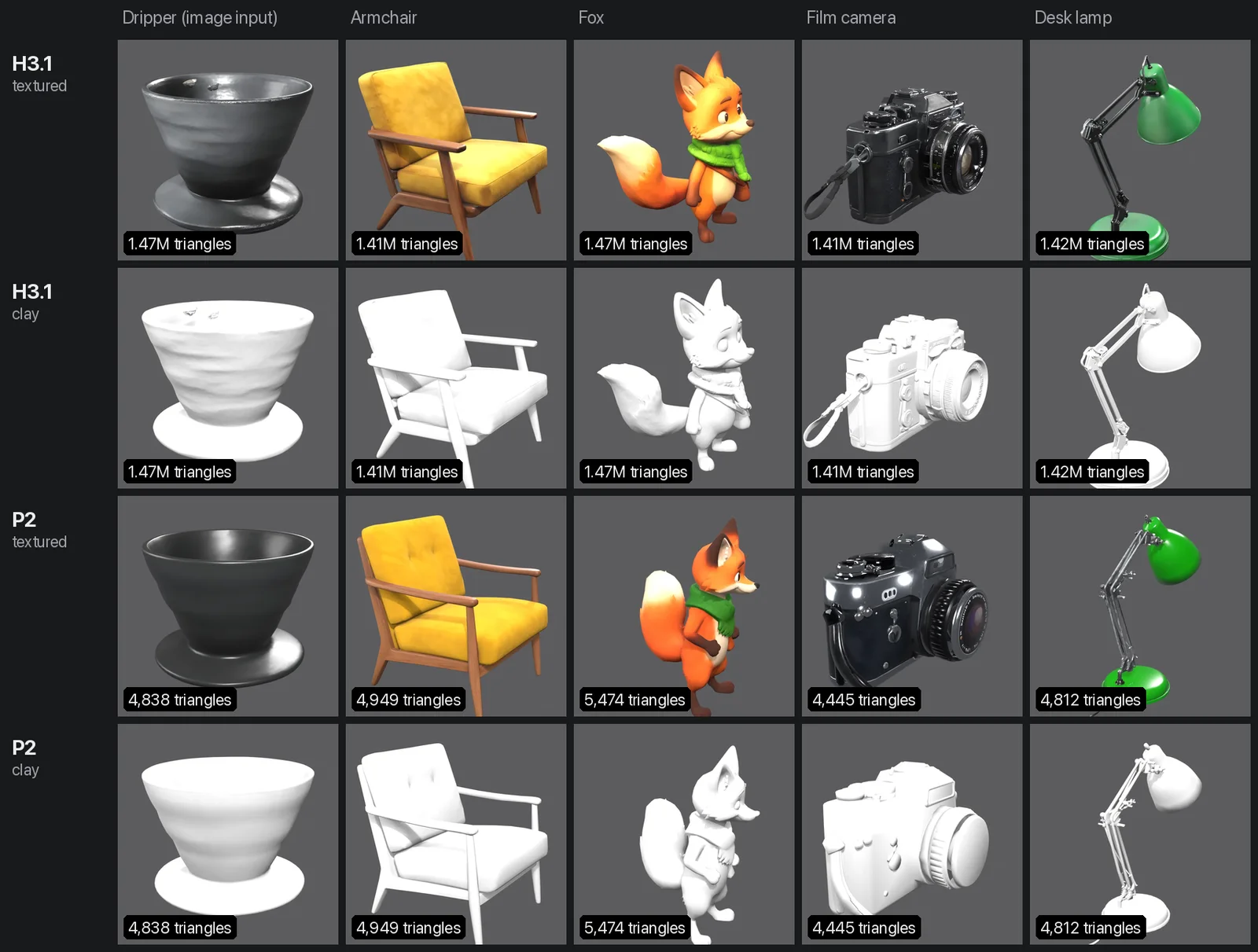
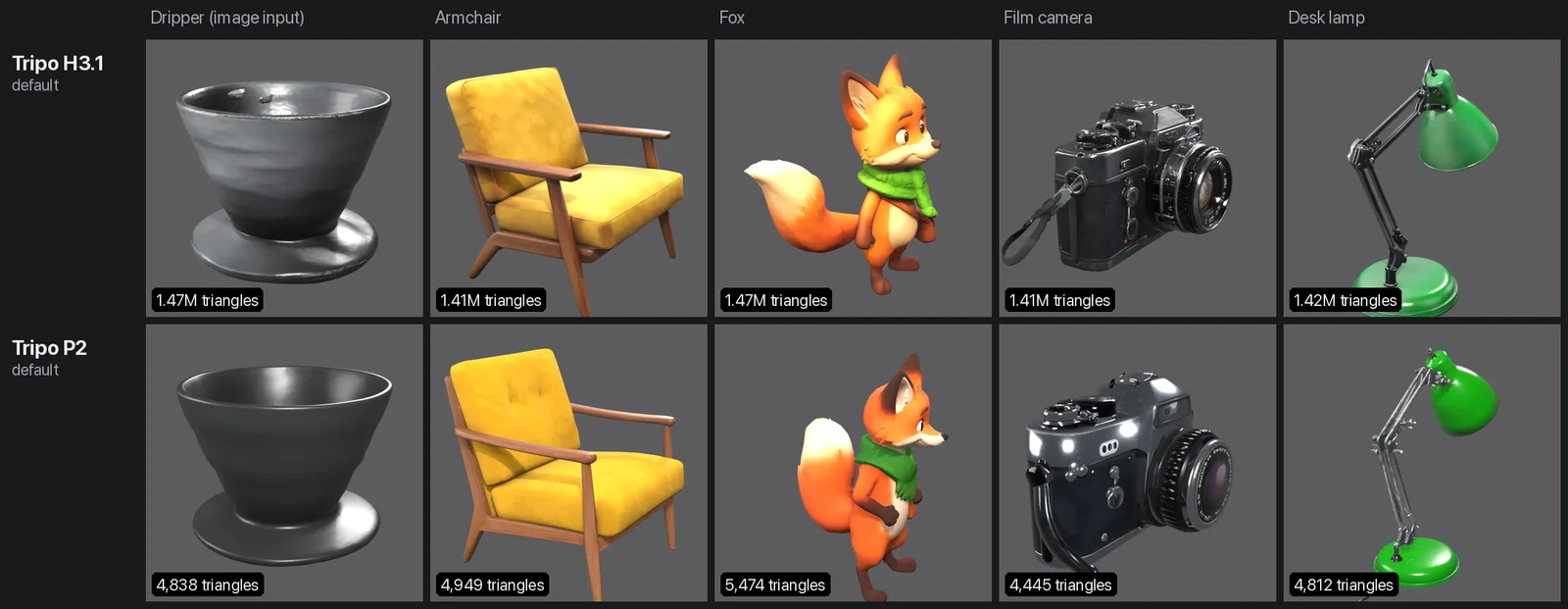
H3.1 is detailed and very heavy. The five default first attempts came back at 1.41 to 1.47 million triangles with three 2048-square texture maps and PBR materials. It built the hardest object, the desk lamp, with two thin articulated arms and spring detail, and a sharp camera with a separate wrist strap. It missed on materials: the camera came out black instead of brushed silver, the lamp's green glossy instead of matte, the dripper metallic instead of matte ceramic, and the clay view shows uneven horizontal bands, which the smooth input image does not have, and small bumps inside the dripper's rim. The fox has its scarf and a small brown bag, but at 1.47 million triangles it is far beyond a game budget. Waits for the four timed default first attempts ran from 99 to 259 seconds, including queueing.
P2 is the low-poly option, and good on simple shapes. Defaults landed at 4,445 to 5,474 triangles, again with PBR maps. The dripper was the cleanest Tripo result of all: symmetric and smooth with a dark finish, scoring 4 out of 5 on every criterion in our 3D roundup. The chair held up. Fine parts are where 5,000 triangles run out: the camera is blobby with its strap fused into a stub and bright spots baked into the texture, and the lamp has its double arms but jagged, spiky joints. The first fox's satchel was indistinct, a fur-coloured shape at the hip. Waits for the five default first attempts were 70 to 140 seconds.
Asked for 50,000 triangles
Default polygon counts make any comparison partly a comparison of file sizes, so we ran three objects again with face_limit set to 50,000.
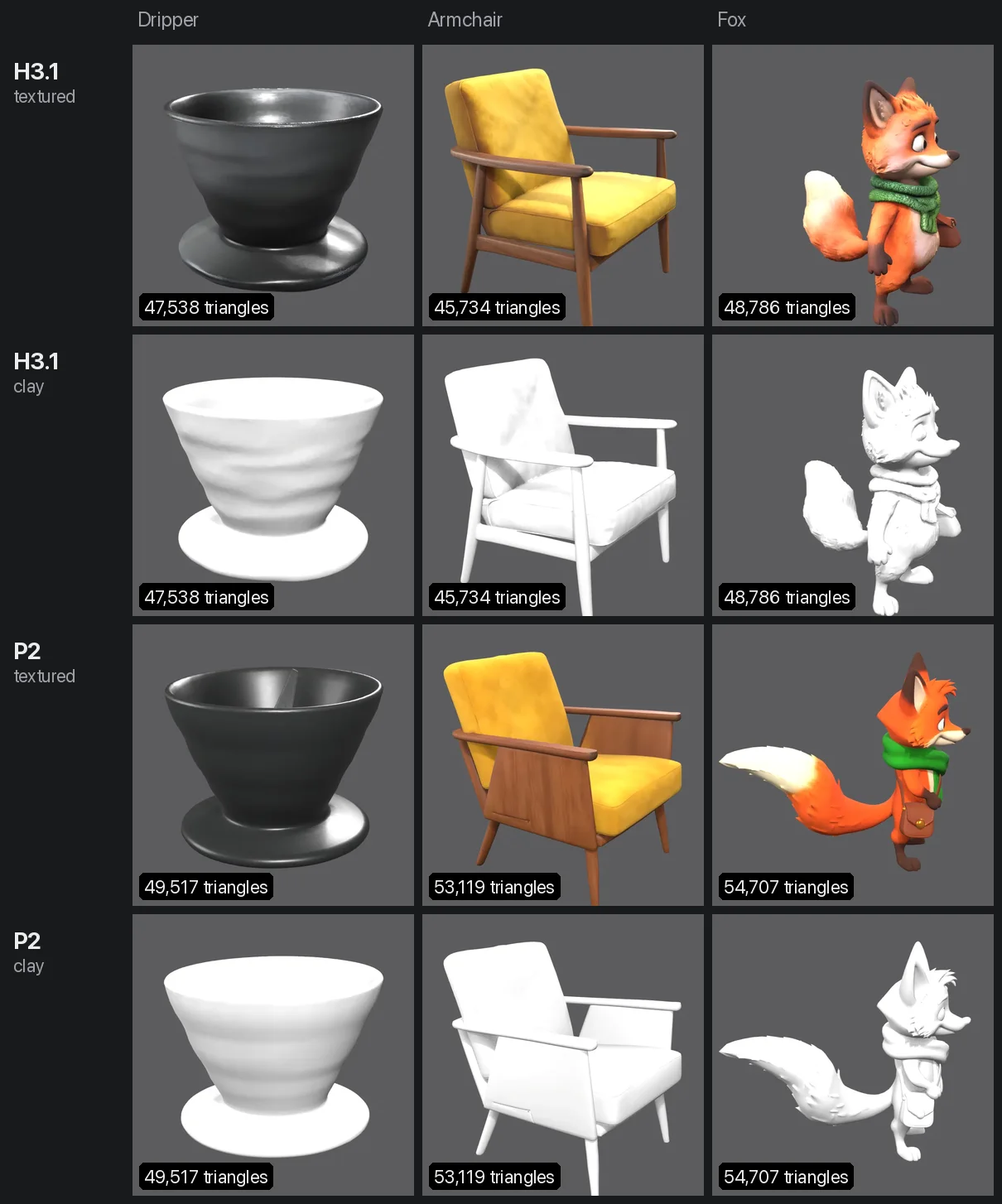
H3.1 came in under the limit, at 45,734 to 48,786 triangles, about a thirtieth of its default size. The chair and fox held their shape, so if you want H3.1's look at a game budget, asking for a face limit at generation is an option to try before reducing a 1.4-million-triangle file yourself; we did not compare the two. The dripper kept its wobbly bands and warped base: the flaw is in the shape, not the density. P2 returned 49,517 to 54,707, slightly over the requested limit on two objects. Its dripper was clean, its fox finally carried a readable satchel, and its chair swapped the open arms for solid wooden side panels. On the chair and fox the two models' rubric totals (out of 20) were within a point of each other; on the dripper P2 scored 15 to H3.1's 11 (3D roundup, where an AI reviewer scored each result and we checked the scores against the renders).
A second attempt
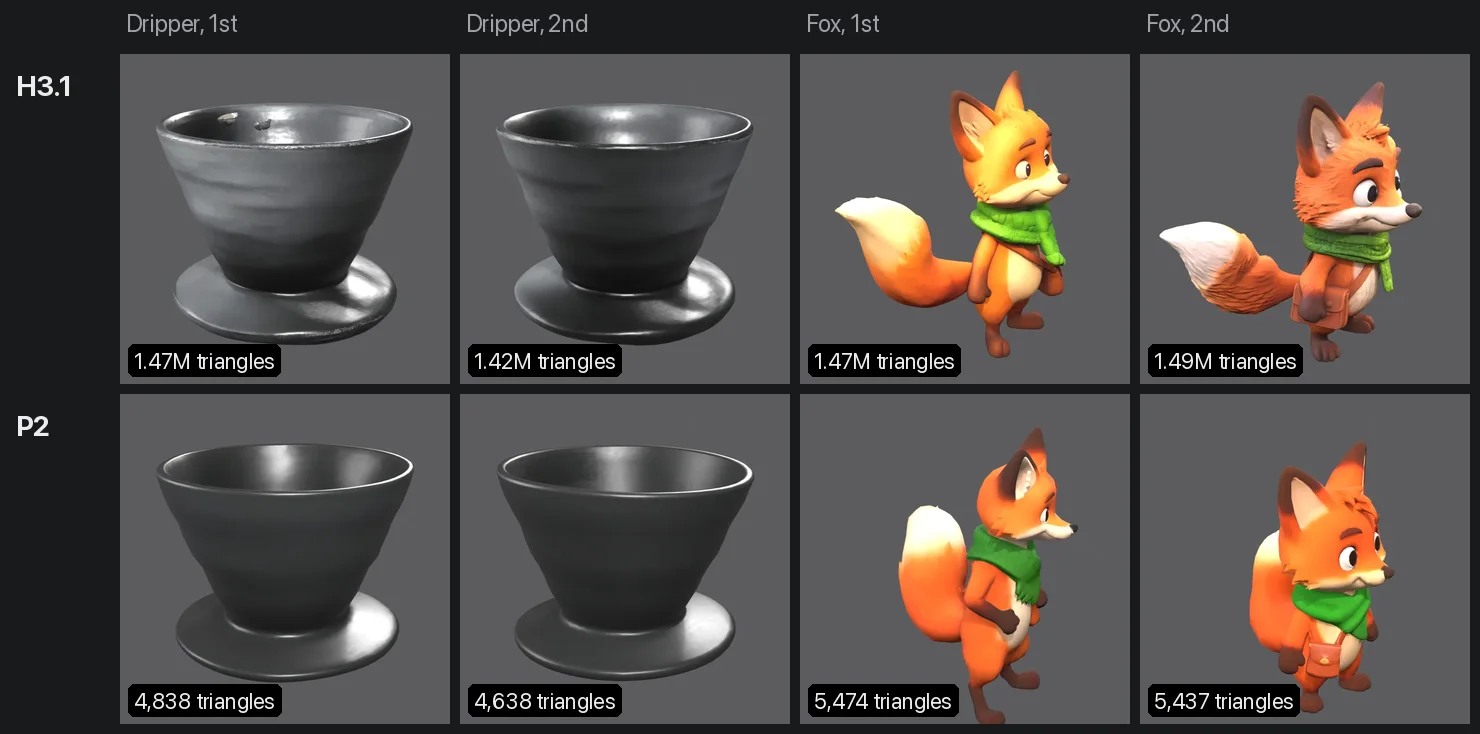
We sent the dripper, chair and fox again at default settings. P2 was consistent: an almost identical dripper and chair, and a fox whose satchel this time was clear. H3.1's second dripper lost the pits inside the cone but kept the warped base, its second chair was a different design with A-frame sides, and its second fox showed the satchel clearly at the hip. The changes that mattered to the asset were the satchel becoming clear on P2's fox and clearer on H3.1's, and H3.1's chair changing design; P2's dripper and chair changed only in detail (subtler bands, no tufting). Three retries per model are too few to say how often a second attempt is needed. At Tripo's API rates each extra textured attempt costs $0.20 to $0.30 for H3.1 and $1.10 for P2.
For every render at full size and the clay views, see Tripo H3.1 vs P2; the rubric and per-object scores are in the 3D roundup. For how Tripo compares with the other generators on the same objects, see Meshy vs Tripo and Tripo vs Rodin.
What Tripo Studio adds beyond generation
Generation is only the first step of most 3D jobs, and Studio's case rests on the steps after it. We did not use these tools; what follows is from Tripo's help centre and pricing page, read 19 November 2026.
- Retopology and smart low-poly. The Retopo module rebuilds a high-poly model, including one you upload, at a target of 500 to 50,000 faces, as quads or triangles. Smart low-poly is a paid-only option on top. Retopology invalidates the UVs, so the texture has to be generated again afterwards. This is the answer to H3.1's file sizes, but it costs credits and a second texturing pass, which is why asking for a face limit at generation time is often simpler.
- Segmentation. The Segment module splits a model into named parts at three precision levels, from 3 to 6 parts up to 15 or more, with a free flat "Quick Cap" or a paid AI completion to close the openings. Tripo's guide puts 3D printing first among its uses: multi-colour prints, assembly and fitting parts on the build plate. You can also generate in parts directly for 30 extra credits. Our API files each contained a single mesh object.
- Rigging and animation. The Rig module auto-rigs humanoids and six other body types, including quadrupeds, birds and snakes, to presets such as Mixamo, the UE5 Mannequin, Unity Humanoid and VRM, then applies clips from a motion library or from a text description. Skeletons and weights cannot be edited in Studio; Tripo's own advice is to fix shoulders and hips in Blender or Maya and to start from a T-pose or A-pose image. We did not rig our fox.
- Export and bridges. Exports come as FBX, OBJ, GLB, USDZ, STL and 3MF. FBX is the one that keeps quads, rigs and animation; GLB and OBJ may triangulate (Export & DCC). Paid plans add bridge plugins that send a model straight into Blender, 3ds Max, Unity, Unreal, Maya, Cocos, Godot and ZBrush.
- Image generation. Studio can make the reference image too: the pricing page lists one image model on the free plan and several on paid plans.
Choose Studio over the bare API if you want these steps done without leaving the browser. Choose the API, or another generator plus Blender, if you already have a retopology and rigging workflow you trust.
The Tripo API
The API charges per task at 1 credit = $0.01, with no subscription (API pricing, read 19 November 2026). API and Studio credits are separate balances.
| Task | No texture | Standard texture |
|---|---|---|
| H series, text to 3D | $0.10 | $0.20 |
| H series, image or multiview to 3D | $0.20 | $0.30 |
| P2, any input | $1.00 | $1.10 |
| Auto rig | $0.25 | |
| Animation retarget | $0.10 per animation | |
| Segmentation | $0.40 | |
| Retopology | $0.10 to $0.40 by version |
Add-ons stack on H-series tasks: HD texture +$0.10, 8K texture +$0.20, detailed geometry +$0.20, quads +$0.05, smart low-poly +$0.10, generate parts +$0.20. Failed and cancelled tasks are refunded to the balance (billing).
If you use all of a Pro plan's credits, Studio is the cheaper route. A textured H3.1 model is about $0.17 of Pro credits (25 credits) against $0.20 from text or $0.30 from an image by API. With HD texture and a higher mesh setting it is about $0.33 in Studio (50 credits, with Ultra mesh) against $0.50 from text or $0.60 from an image by API (HD texture plus detailed geometry, the closest equivalent). A P2 model textured with PBR is about $0.77 of Pro credits against $1.10 by API. The API suits uneven volume, because there is no subscription. The comparison is approximate, because Studio and API settings do not map one to one. At API rates with standard texture, a P2 model costs 5.5 times an H3.1 model from text ($1.10 against $0.20) and about 3.7 times from an image ($1.10 against $0.30), At default settings P2's meshes had roughly 270 to 315 times fewer triangles than H3.1's, but its GLB files were only 14 to 29 times smaller, because both carry three 2048-square texture maps; at the 50,000 request the file sizes were close.
Voyager runs both models too: from an image in web Generate on Voyager credits from the Starter plan up, or on any plan with your own fal key through the desktop app's provider connectors. Tripo's own Studio tools, such as its segmentation, smart low-poly and DCC bridge plugins, stay in Tripo's app.
Who should choose Tripo, and who should not
| If your work is mostly | Choose | Because |
|---|---|---|
| Low-poly props for a game or the web | Tripo P2 | About 5,000 triangles with PBR maps, and the cleanest simple shapes of any Tripo run |
| Game characters you will rig | Meshy, or Tripo P2 plus Studio's auto-rig | On first attempts, Meshy 7's fox scored 17 of 20 and Meshy 7.1's 15, both with scarf and satchel at about 31,000 triangles; Meshy says Meshy 7 retires from its API's 3D generation on 31 December 2026 (Meshy API changelog, read 19 November 2026). Tripo's rig and animation steps are in the same app |
| Detailed renders or a print starting point | Tripo H3.1 | The cheapest detailed model in our set; at default density it kept thin parts such as the lamp's arms (the lamp was not rerun with a face limit) |
| Multi-colour or multi-part prints | Tripo Studio on a paid plan | Segmentation, generate in parts and 3MF export in one place |
| Accurate colours and materials from a text prompt | Rodin 2.5 | The only silver camera in our set, and a cleaner dripper and chair than H3.1 |
| The cleanest geometry | Hunyuan3D 3 | Cleanest geometry on our objects, and the best dripper and chair at the requested 50,000 triangles |
| A model from a product image, free, on your own NVIDIA GPU with at least 24 GB (Linux) | Trellis 2 | Open weights and the crispest dripper from our product image |
| Trying AI 3D without paying | Tripo's free plan, knowing its limits | 200 credits a month, but only H2.5 exports and public outputs |
Tripo is a good buy when the job is a usable asset rather than a single impressive render: P2's budgets, H3.1's face limit and Studio's retopology, segmentation and rigging all point at that. Skip it if you need hard-surface objects with small parts at low polygon counts, or materials matched exactly to a prompt, and treat every result as a starting point to check, not a finished file.
Frequently asked questions
Is Tripo AI free?
Tripo Studio has a free plan with 200 credits a month and no card required, enough for about 13 untextured generations. Free accounts can export only H2.5 models, up to 15 exports according to the pricing page or 25 a month according to the help centre (both read 19 November 2026). They get two P2 trials, and everything they make is public. The API has no recurring free allowance listed on its pricing page.
How much does a Tripo AI subscription cost?
On 19 November 2026 Tripo's pricing page listed Pro at $20 a month for 3,000 credits, Max at $90 a month for 25,000 credits, and Team at $110 per seat a month or $55 per seat billed annually, with three seats minimum. Tripo's help centre lists lower annual rates for Pro and Max, $13 and $45, so check the price at checkout.
Who makes Tripo AI?
If you are asking who owns Tripo AI, its own pages answer who builds and operates it. Tripo's help centre describes Tripo Studio as "built by VAST" (What is Tripo Studio). The company you contract with is Holymolly Limited, a Hong Kong company (terms). Tripo's pricing FAQ says payments are collected by Holymolly Limited or by Holymolly Pte. Ltd. in Singapore as its payment collection agent (pricing FAQ, read 19 November 2026). Tripo's pages do not describe the corporate relationship between VAST and Holymolly.
Can Tripo AI charge my credit card?
Only if you buy a plan or credits; the free plan needs no card. Paid plans renew automatically until you cancel. For a web purchase, cancel from your credit balance, Membership, My Plan; if you subscribed through an app store, cancel there (section 6.2 of the terms). Refunds are for purchases made by mistake, requested within 24 hours, with none of the purchase's Studio credits used; if you claimed promotional API credits with it, those must be unused too, though claiming them does not by itself rule out a refund. The policy does not limit your rights under local law (pricing FAQ, read 19 November 2026).
Can I use Tripo models commercially?
On a paid plan, yes, subject to the terms, applicable law and third parties' rights: Tripo's terms say paid content belongs to you or whoever lawfully holds its rights, may be used commercially, can be kept private where the service offers that setting, and keeps its status after you cancel. For free outputs the sources disagree. The terms of 13 November 2026 place free outputs, to the extent you hold rights in them, under a public waiver that lets anyone use them commercially, you included, without attribution, with third parties' rights and legal obligations unaffected; the pricing page marks free use as non-commercial, and the help centre says attribution is required. Use a paid plan for client or product work.
Is Tripo good for 3D printing?
H3.1's dense meshes keep fine detail, and Studio adds segmentation for multi-part and multi-colour prints and exports STL and 3MF. Check every model for wall thickness and watertightness before slicing, which we did not test. On our dripper, H3.1 added uneven bands the smooth input lacks and warped the base on all three runs, including the 50,000 request, so inspect the clay view, not only the textured preview.
Is Tripo better than Meshy?
It depends on the job. On our objects, Tripo H3.1 built the desk lamp's two sprung arms, which no Meshy model did, and costs less per model than Meshy 7.1 at list price. Meshy 7 made the more game-ready character on first attempts, and at the requested 50,000 triangles Meshy 7 outscored H3.1 on all three objects (3D roundup). Our Meshy 7.1 vs Tripo H3.1 comparison shows every result side by side.
Is Tripo3D the same as Tripo AI?
Yes. Tripo's site is tripo3d.ai, the web app is Tripo Studio at studio.tripo3d.ai, and the developer platform is developers.tripo3d.ai. The official terms and pricing pages name Holymolly Limited as the company you deal with.
Voyager is a desktop AI agent for creative work
Describe what you want to make; Voyager plans it, uses your apps and tools, and keeps everything editable.

Co-founder, Voyager
Ravi is a co-founder of Voyager. Before that, Ravi co-founded heap.io and was an EDM producer.