
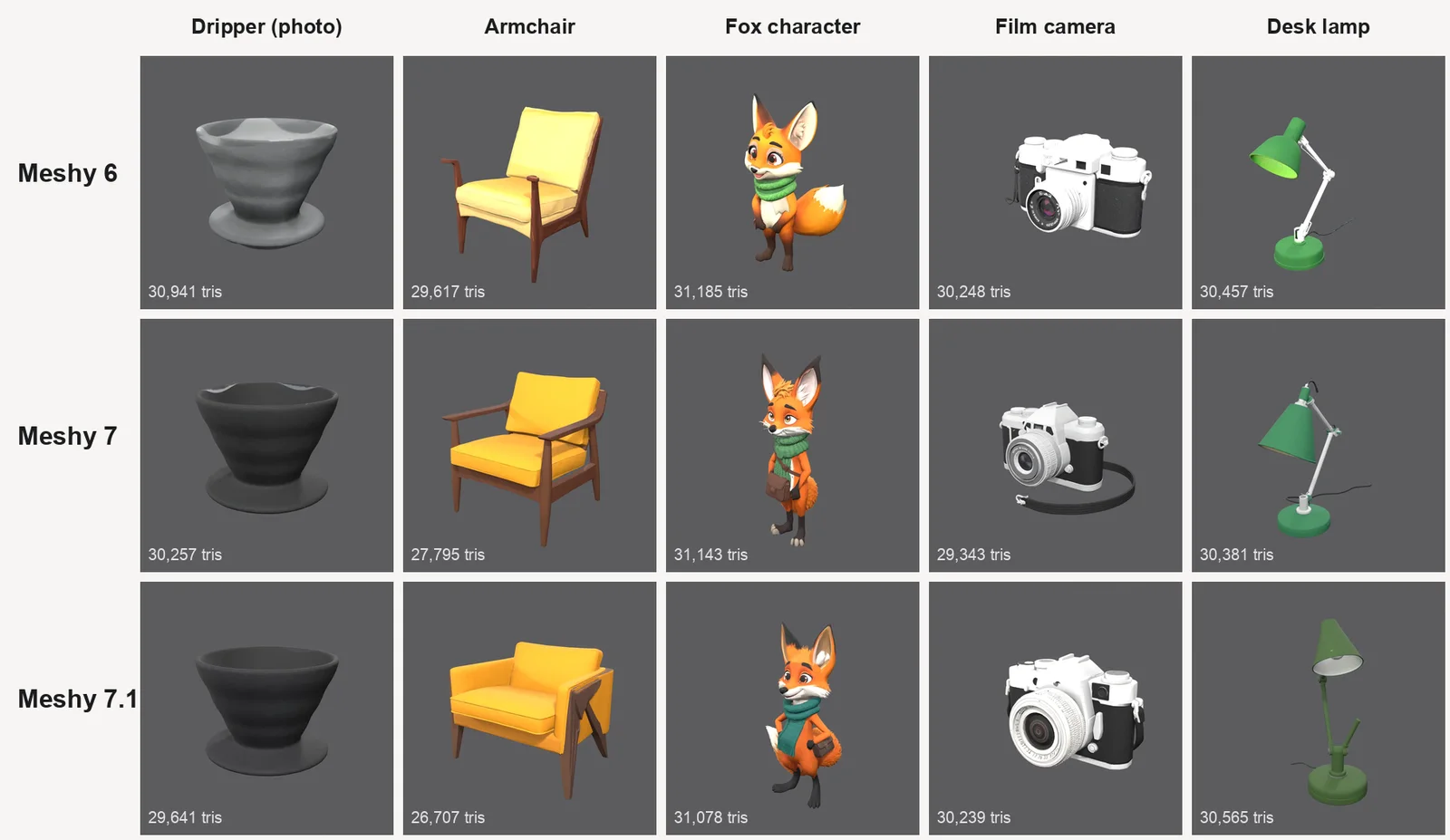
Meshy AI is a web app that turns an image or a text prompt into a textured 3D model, usually in a few minutes. Its free plan is for trying it: 100 credits a month, enough for about three textured generations, and downloads limited to untextured models from the older Meshy 6 Lite. Downloading textured models from the current Meshy 6, 7 and 7.1, and keeping them private, needs a paid plan: Pro at $20 a month for 1,000 credits in most countries (pricing, read 19 November 2026), or a $10 Starter plan offered in some countries. At Meshy's web app rates that is about 70 cents for a textured model from an image and 60 cents from text. In our runs at default API settings Meshy made moderate-density meshes of about 30,000 triangles (the paid web app starts Meshy 7.1 image jobs at Ultra geometry, which we did not run) and, on first attempts, Meshy 7 drew the fox character with the highest score of the seven models that built it. But none of its 33 files was watertight as delivered, and all three of its cameras came out white instead of silver.
The short version: choose Meshy if you want characters and props with moderate default triangle counts (about 30,000 in our runs) and rigging, animation and a print repair tool in the same browser tab. Choose Rodin 2.5 or Hunyuan3D 3 if you mostly prompt with text and care most about clean geometry, and Trellis 2 if you start from a product image and have a Linux machine with a 24 GB NVIDIA GPU.
Key takeaways
- The free plan is an evaluation tier: 100 credits and 10 downloads a month of untextured Meshy 6 Lite models, usable commercially with credit to Meshy under CC BY 4.0 (free plan article, read 19 November 2026).
- A textured image-to-3D model on Meshy 7.1 costs 35 credits on a paid plan and a textured Meshy 6 text-to-3D model 30, so Pro's 1,000 credits cover about 28 or 33 of them, before its four free retries per task (credits page and pricing, read 19 November 2026).
- On first attempts the older Meshy 7 scored higher than 7.1 on the chair, fox and lamp, but Meshy is retiring Meshy 7 geometry generation from its API on 31 December 2026 (API changelog, read 19 November 2026), so test 7.1 on your own subjects.
The generations are ours, made between 29 October and 18 November 2026 for our AI 3D model generator roundup; every price and term carries the date it was read.
What Meshy is: an app built on its own models
Meshy is two things that share a name. The app at meshy.ai is a browser workspace with six modules, Image, 3D Model, 3D Printing, Animate, Scene and Video (Meshy web app docs), plus iOS and Android apps sold as a 3D print model maker. The models are Meshy's own proprietary generators, which the app and the Meshy API both call:
| Model | What it is | Status on 19 November 2026 |
|---|---|---|
| Meshy 7.1 | Current geometry default ("latest"), adds Ultra 4K geometry | Released 10 September 2026 on the web |
| Meshy 7 | Geometry tuned to match the input image; also a texture model with PBR and up to 8K | Geometry generation retires from the API 31 December 2026; texturing stays |
| Meshy 6 | Earlier structural model, still selectable | Current |
| Meshy 6 Lite | Cheap, lightweight model | The only one free accounts can download |
| Meshy T2, T2.5 | Smart Topology: native low-poly meshes | Current |
| Meshy N1 | Stylized texture model, 2K colour only | Current |
The retirement comes from the 10 November entry in the API changelog: after 31 December, text-to-3D, image-to-3D and multi-image requests naming meshy-7 return an error, and meshy-7.1 takes the same parameters at the same cost. The model list is from the model guide, both read 19 November 2026. The version history from Meshy 1 in 2023 onward is on our Meshy family page. In the app, geometry and texture are separate stages you can mix: a Meshy 7.1 mesh can take a Meshy 7 or N1 texture.
Is Meshy AI free?
You can sign up and generate without paying, but the free plan is for trying Meshy, not for producing finished assets. What it includes, per Meshy's free plan article and the pricing page, both read 19 November 2026:
- 100 credits a month, reset on the 1st at 00:00 UTC. Unused credits do not carry over. A textured image-to-3D generation on Meshy 7.1 or Meshy 6 costs 30 credits on Free (20 for geometry, 10 for texture), so that is three.
- 10 downloads a month, of untextured Meshy 6 Lite models only. You can generate with Meshy 6, 7 and 7.1 on Free, and chat with the 3D Agent, but you cannot download those results, textured models or the Agent's models. Buying a credit pack does not lift the limit: pack credits "are used for generating and don't unlock downloads". Models you made on a paid plan stay downloadable after you drop back to Free.
- One task at a time, low queue priority, no free retries. No API, no plugins, no remesh, no multi-image input, no AI texture editing, and an animation library of 20 clips instead of over 500.
- A CC BY 4.0 licence. The free plan article says you may use your free downloads commercially as long as you credit Meshy.
So the honest answer to "is Meshy AI fully free" is no. The free plan lets you see whether Meshy can build your kind of object, and gives you a few untextured Lite meshes; it does not let you leave with a textured model from the current versions.
Who owns what you make
Meshy's pages do not agree on free-plan ownership. The licensing table on the web app credits page says "You own the output" on every plan, Free included. Section 3.2 of the Terms of Service (updated 19 September 2026) says that for free-plan customers Meshy owns the output and makes it available under CC BY 4.0, while paid customers own their output "to the extent possible under applicable law" and may keep it private. If ownership matters to you, read the Terms as the binding version. Both pages read 19 November 2026.
Owning a model is not the same as having the only one. Section 7.2 of the Terms warns that output "may not qualify for intellectual property protection", that the service "may generate similar or identical 3D models for different users", and that Meshy "does not guarantee the uniqueness" of output. And section 3.3 says a model you post to Meshy's Community is licensed under CC0, which lets anyone reuse it.
Meshy AI pricing per month
Plans as listed on meshy.ai/pricing on 19 November 2026, in US dollars:
| Plan | Monthly | Yearly | Credits a month | Parallel tasks | Free retries per task |
|---|---|---|---|---|---|
| Free | $0 | $0 | 100 | 1 | None |
| Pro | $20 | $192 ($16 a month) | 1,000 | 10 | 4 |
| Premium | $40 | $288 ($24 a month), limited-time 40% off | 3,000 | 30 | 12 |
| Ultra | $100 | $960 ($80 a month) | 8,000 | 100 | 40 |
| Studio (team) | $70 for one seat, plus $10 per extra seat | $672 the first year, then $840 | 5,500, shared | 60 | 24 |
| Enterprise | Custom | Custom | Custom | 100+ | 100 |
The yearly figures are what the page's yearly toggle showed on 19 November; the pricing FAQ describes annual billing as 20% off, and the Premium price was a separate limited-time offer. New subscribers get 50% off the first month of a monthly plan; on Studio that applies to the base package, not to extra seats (Studio plan article, read 19 November 2026). Pro and above add unlimited downloads, private assets, downloads of 3D Agent models, the API, MCP access and plugins for 3D apps. Premium and Ultra add free Creative Lab images and a shipping coupon. A Starter plan at $10 a month, offered only in some countries, has 250 credits, 20 downloads a month including Meshy 6 and 7 models, private ownership, and no API or plugins (Starter plan article, read 19 November 2026), and students and educators can apply for an education discount.
Three things to know before paying, all read 19 November 2026:
- Plan credits reset; bought credits may not last forever. Monthly credits do not roll over. Meshy's credit reset article says credits "purchased or earned as rewards never expire", but section 2.10 of the Terms says purchased Additional Credits remain available "for up to one (1) year from the date of purchase". Plan on using a pack within a year.
- "Up to" asset counts assume cheap jobs. The plan cards promise up to ten assets per 100 credits. That only holds for jobs like Meshy 6 Lite at 10 credits, not for textured models on the current versions.
- Refunds are rare. The pricing FAQ says payments are "generally non-refundable" unless a payment meets every condition of Meshy's refund policy, and section 4 of the Terms calls fees non-cancelable. Use the free plan to check that Meshy handles your subject before subscribing.
What a model costs
Meshy shows each action's cost before you run it. The web app rates, from Meshy's credits page and credits guide, read 19 November 2026:
| Action | Credits |
|---|---|
| Image to 3D, Meshy 7.1 or Meshy 6 | 20 (25 with Ultra geometry, which is Meshy 7.1's default on paid plans) |
| Text to 3D, Meshy 6 | 20 |
| Meshy 6 Lite generation | 10 |
| Smart Topology (T2, T2.5) | 15 |
| Texture at generation, or AI texturing later | 10 (15 at 8K) |
| Model edit | 20 |
| Make Printable (repair) | 10 |
| Remesh, rigging, preset animations, downloads | 0 |
Every cost below uses that one schedule at Pro prices ($20 for 1,000 credits monthly, $192 for 12,000 yearly), and assumes you use the whole allowance:
- Textured, from an image, Meshy 7.1: 25 for Ultra geometry + 10 for texture = 35 credits. That is $0.70 on monthly billing or $0.56 on yearly, and Pro's allowance covers 28 a month.
- Textured, from text, Meshy 6: 20 for geometry + 10 for texture = 30 credits. That is $0.60 monthly or $0.48 yearly, and 33 a month.
- Single-colour print, from an image, Meshy 7.1: 25 for geometry + 10 for Make Printable = 35 credits, or $0.70 monthly. Skip the texture: the repair discards it anyway.
Image input costs more here only because Meshy 7.1 starts at Ultra geometry on paid plans; the credits page does not list a text-to-3D rate for 7.1. Meshy does not charge for failed generations and refunds cancelled tasks. These are the prices of one attempt, not of a model you keep.
What makes the real number higher or lower is how often you have to try again. Paid plans include free retries, which re-run a task without spending credits: four per task on Pro, 40 on Ultra. That matters, because a single attempt is not reliable. In our nine second attempts, the retry fixed a wrong chair twice (Meshy 6's lopsided arms, Meshy 7.1's upholstered frame), scored lower on two drippers (Meshy 6 and Meshy 7.1), and repeated one miss: Meshy 6 left the fox's satchel out of both default attempts, though its 50,000-triangle run drew one. The useful rule: spend a free retry when the miss looks like bad luck, such as a wrong colour or a broken part. When two attempts miss the same thing, change the prompt, the image, the settings or the model version before trying again. A changed input is a new paid generation, while an unchanged free retry costs nothing but is likely to repeat the miss.
Does Meshy AI work? Our 33 runs
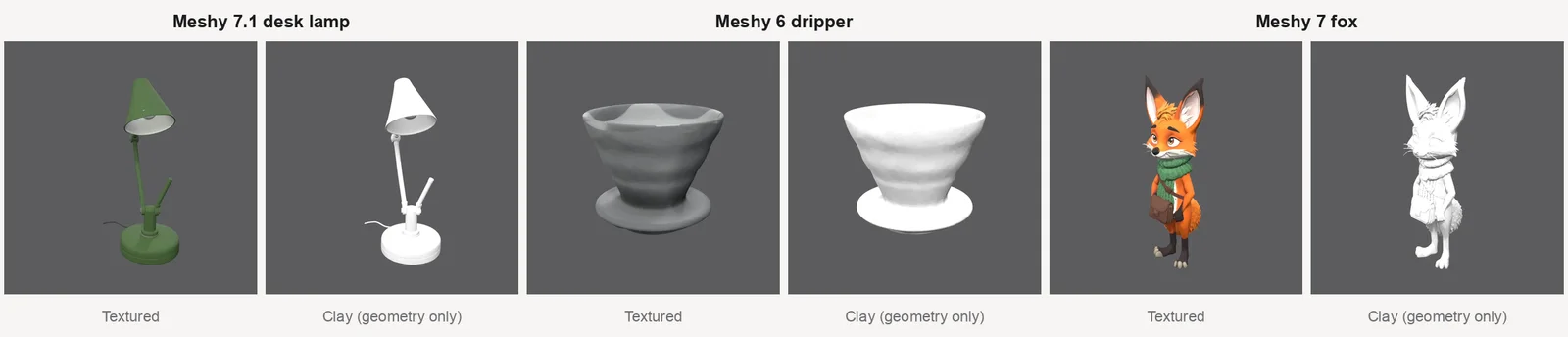
Yes, within limits that are easy to predict. Our model reference had Meshy 6, 7 and 7.1 build the same five objects as Rodin 2.5, Hunyuan3D 3, Tripo H3.1 and Tripo P2, with Trellis 2, which builds only from images, joining on the dripper. Then each model except Trellis 2 ran the dripper, chair and fox again at about 50,000 triangles, and a second time at default settings; Trellis, whose setting counts vertices, was set to decimate to 25,000 and returned 23,814 triangles. Every result was rendered textured and as plain clay, because texture hides bad geometry, and scored on prompt accuracy, geometry, texture and readiness for use, each from 1 to 5.
First attempts, as the average of those four scores (out of 5):
| Object | Meshy 6 | Meshy 7 | Meshy 7.1 | Highest score (models scored) |
|---|---|---|---|---|
| Coffee dripper, from a generated product image | 2.5: grey, lumpy rim | 3.0: wavy rim | 3.5: closest to the image | Trellis 2, 4.25 (8) |
| Mid-century armchair | 2.75: one arm missing | 3.75: clean walnut frame | 3.0: upholstered instead | Rodin 2.5 and Hunyuan3D 3, 4.0 (7) |
| Cartoon fox with scarf and satchel | 3.75: no satchel | 4.25: every part | 3.75: teal scarf, spiky fur | Meshy 7, 4.25 (7) |
| 35mm film camera | 3.0: white body, stub strap | 3.5: white body, full strap | 3.25: white body, crisp lens | Rodin 2.5, 4.25 (7) |
| Articulated desk lamp | 3.5: one arm, dome shade | 3.5: one arm, cone shade | 2.5: second arm broken off | Meshy 6 and Meshy 7, 3.5 (7) |
Scores and notes are from the roundup's scoring table; each object has its own page with every model that built it side by side, for example the fox and the desk lamp. Treat differences under half a point as ties: by that rule Meshy 7 and 7.1 tie on the camera, and the lamp is a near tie: Meshy 6 and 7 lead at 3.5 with no visible springs, while Hunyuan3D 3, at 3.25, built two arms with visible springs and hinges.
Where Meshy did well:
- Prompt-following on characters. Meshy 7's was the highest-scoring fox on first attempts and the only first-attempt fox awarded 5 out of 5 for prompt accuracy, at about 31,000 triangles. Its overall 4.25 is a tie with Tripo P2's 4.00 by our rule, and Tripo P2 scored higher for readiness, at about 5,500 triangles. At 50,000 triangles Meshy 7 tied Meshy 7.1 and Rodin 2.5 at 4.5; on second attempts Tripo P2's fox scored 4.25 to Meshy 7's 4.00, again a tie.
- Moderate file size. Every first-attempt Meshy mesh landed between 26,707 and 31,185 triangles, one object, one 2K texture. On the same first attempts Rodin and Hunyuan3D returned about 500,000 triangles and Tripo H3.1 about 1.4 million, so Meshy's are the smallest files among the detailed models. Meshy 7's own page still advises reviewing materials and deformation topology before game use.
- Simple, solid shapes. The chair, the dripper's cone and base, and the lamp's weighted base came out recognisable in every Meshy run.
Where it did badly:
- Metal and fine mechanisms. All three Meshy cameras (first attempts; the camera had no reruns) read flat white instead of brushed silver. No Meshy lamp showed springs: Meshy 6 and 7 kept their thin arms intact and connected, and Meshy 7.1's second arm is a disconnected stub. For articulated parts, Hunyuan3D 3 and Tripo H3.1 built the sprung arms.
- Materials by default. All 24 files made at default settings (15 first attempts, 9 second attempts) carry a colour map only, no PBR maps. Meshy documents
enable_pbras off by default and says it adds metallic, roughness and normal maps; our nine budget runs, with it on, came back with PBR maps. - Newer is not always better. On first attempts Meshy 7.1 beat Meshy 7 only on the dripper, and Meshy 7 varied less between first and second attempts (Meshy 7.1 vs Meshy 7).
End-to-end waits in our benchmark, recorded for 30 of the 33 runs, ran from about 1.5 to 16.5 minutes per model (94 to 995 seconds), including the hosted service's queue and polling time, so they are not Meshy's own timings. Meshy's own published medians for 7.1 are 75 seconds for geometry and 120 seconds for an image-to-3D job with 2K textures, and its docs say higher-priority tasks usually start sooner (task lifecycle, read 19 November 2026), so expect longer waits on the free plan's low priority.
At 50,000 triangles
Default settings partly compare file sizes, so every model except Trellis 2 was asked for about 50,000 triangles with PBR on where offered (Trellis returned about 24,000). Across those nine budget runs Meshy hit the target closely (46,804 to 52,012 triangles). Meshy 7 was the best Meshy here, with a clean walnut chair, a satchelled fox and a matte black dripper, and at this budget Meshy 7 and 7.1 tied Rodin 2.5 for the highest-scored fox. Meshy 7.1's chair turned into an orange tub with wood texture smeared over fabric arms, and Meshy 6's dripper stayed lumpy. Hunyuan3D 3 scored highest of the models with budget runs.
Second attempts and variance
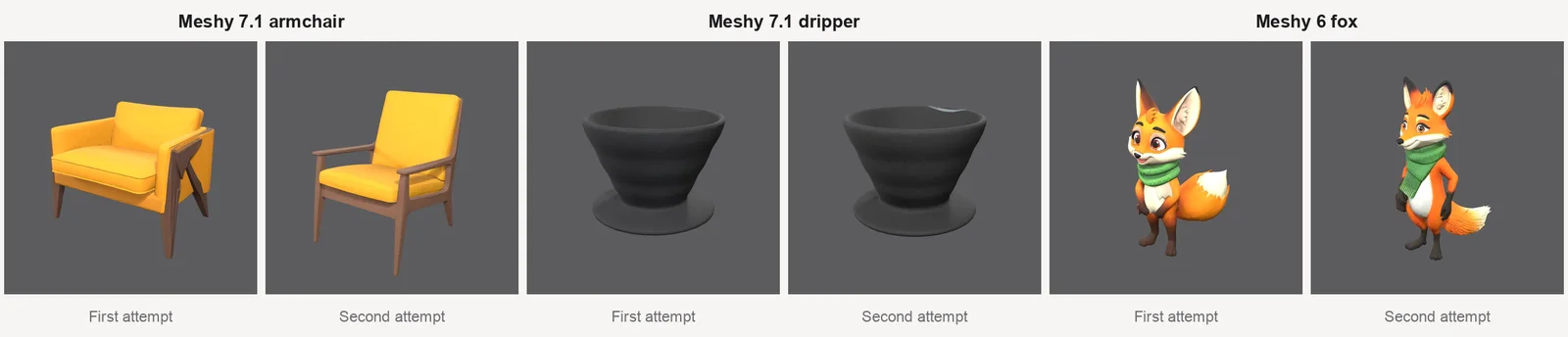
Second attempts mostly landed within a point of the first. Meshy 7.1 swung the most, which is why its free retries matter more than its headline quality.
Is Meshy good for 3D printing?
It can get you to a printable file, but plan on a repair step. We audited all 33 Meshy files for the properties a slicer cares about: 24 made at default settings and the nine 50,000-triangle runs with PBR on. None was watertight as delivered. Every file carried loose fragments, from 1 to 449 of them, mostly slivers of a few triangles and never more than about 4% of a file's faces. With those discarded, and with no repair applied, the largest shell was closed in 8 of 33 files: five of the nine drippers and three of the Meshy 6 foxes, but none of the chairs, cameras or lamps, whose thin parts left open and non-manifold edges. The same check failed every default Tripo P2 file and the default Trellis 2 dripper, so this is not unique to Meshy. The per-file results are a CSV with the edge and fragment counts for each GLB. This was a geometry check of our model-reference GLB files; we did not run Meshy's repair, a slicer or a print.
That repair is the reason to print from Meshy rather than from a bare model. Meshy's 3D printing guide (read 19 November 2026) describes a Printability card that says whether the mesh is watertight and counts holes and non-manifold edges, and a Make Printable button that, per the guide, fixes those plus degenerate faces and thin walls, for 10 credits on a paid plan, and discards the texture. The guide suggests minimum walls of 1.2 mm for FDM, 0.5 mm for resin and 0.8 mm for SLS, and recommends exporting STL or 3MF for a single-colour print and the 3MF from Multi-Color Print for colour. Resizing to a real height in cm, mm or inches needs a paid plan, as does sending a model straight to a slicer such as Bambu Studio or OrcaSlicer (printing platforms). The Repair Printability API offers the same repair to developers.
Two cautions. A passed check is not a passed print: open the file in your slicer and let it run its own repair too. And Meshy builds shapes from pictures and words, not from measurements, so use it for figures, props and decor rather than parts that must fit something.
What the app includes beyond the model
Most of what you pay for on top of generation is cleanup, and much of it costs no credits (rates from the credits page, read 19 November 2026):
- Texturing. Generate with texture, or retexture any model later from a prompt or image (10 credits; 15 at 8K). AI texture editing repaints regions on paid plans. N1 targets stylized assets with fewer seams; Meshy 7 is the texture model for PBR and 8K.
- Remesh. Free in the web app on paid plans. Choose a fixed or adaptive face count, and triangles (more detail per face, suited to engines) or quads (easier to edit and animate) (remesh guide). For native low-poly output, Smart Topology T2 and T2.5 cost 15 credits.
- Rigging and animation. Rigging costs no credits and comes in three kinds: Humanoid, Quadruped Dog and Smart Rig (beta) for creatures, robots and props. Pose your character in T or A pose with a gap between limbs and body, and remesh anything over 300,000 faces first (rigging guide). Humanoid and quadruped rigs download as FBX or GLB, and a humanoid can use a skeleton template, Mixamo by default. Smart Rig models download as GLB only and cannot use the animation library, which has 20 free presets on Free and over 500 on paid plans. We did not rig any of our models.
- 3D printing and Creative Lab. The repair and slicer tools above, plus Creative Lab, which turns an uploaded photo into a keychain, magnet, figure or vinyl figure and can ship the print. Printing payments are non-refundable, and refunds for defective prints are decided by the print provider (Terms, printing addendum).
- 3D Agent. A chat workspace for brainstorming and generating models in one conversation. It is available on Free, where chatting costs no credits (3D Agent page, read 19 November 2026), but downloading its models needs a paid plan.
- Plugins. Paid plans get plugins for Blender, Unity, Unreal Engine, Roblox Studio and 3ds Max, per the pricing page. If you drive Blender from an AI agent, the community Blender MCP server can call Meshy with your key (Blender MCP).
- API and MCP. Pro and above. The API exposes the same models and tools on prepaid credits (API pricing: 30 credits for a textured 7.1 model at 2K, 5 to remesh, 5 to rig, 3 per animation action), with exports in GLB, OBJ, FBX, STL, USDZ and 3MF. API outputs are kept for three days on Pro to Ultra, so download them promptly. An MCP server connects AI agents to it.
How this relates to the versions: the tools are the app's, not the model's. You pick a geometry model (7.1 by default), then texture, remesh, rig and repair whatever it produced, which is why a weaker first mesh can still end up usable.
Is anything better than Meshy AI?
For some jobs, yes. Averaged over all eleven runs per model (first attempts, budget runs and second attempts), Meshy 7 finished within a tenth of a point of Hunyuan3D 3 and Rodin 2.5 among the models with eleven runs, with Meshy 7.1 behind them; Trellis 2 ran only the three dripper runs. The best choice depends on what you are making:
| If you mostly | Choose | Why, on our runs |
|---|---|---|
| Make game characters | Meshy 7.1, or Meshy 7 until its API retirement on 31 December 2026 | Meshy 7 followed the character prompt most closely on first attempts; 7.1 tied it at 50,000 triangles. Rigging and animation are built in. Tripo P2 is the low-poly alternative |
| Prompt with text for product renders | Rodin 2.5 or Hunyuan3D 3 | Rodin built the only brushed silver camera on our camera test, with PBR maps by default; Hunyuan3D tied it on the chair and scored highest at a 50,000-triangle budget. Both return about 500,000 triangles by default |
| Turn a product image into a model | Trellis 2 | Top dripper score at default settings, 4.25 to Hunyuan3D 3's 3.75. In the budget run Hunyuan3D 3 scored 4.5 at 49,346 triangles to Trellis's 4.25 at 23,814, a tie by our rule with unmatched settings. Free under the MIT licence, but it needs an NVIDIA GPU with at least 24 GB of memory and is tested only on Linux (Microsoft's TRELLIS.2 repository, read 19 November 2026) |
| Need low-poly files | Tripo P2 | About 5,000 triangles with PBR; its first-attempt fox scored highest for readiness; weak on fine parts |
| Want fine detail | Tripo H3.1 | Built the lamp's sprung arms, which no Meshy model did; about 1.4 million triangles on first attempts |
| Mostly print figures and props | Meshy | Make Printable and slicer handoff in the same app; budget for a repair and a test print |
| Need parts that fit | CAD software | These generators work from images and prompts, not measurements |
Head-to-heads with every render are on Meshy vs Tripo and Meshy vs Rodin. Meshy's case against all of them is the app around the model: rigging, a library of over 500 animations and a print repair in the same tab as the generator.
If you want to try several of these models on the same image before choosing, Voyager, the desktop app our team builds, runs Meshy 7.1 alongside Tripo P2, Trellis 2 and other image-to-3D models in its web dashboard, so you can send one image to each and compare. Paid plans include a monthly credit allowance that generations draw from, at each model's published credit price, and the plans also support your own keys for some providers.
Frequently asked questions
Is Meshy AI free?
Partly. The free plan gives 100 credits a month and 10 downloads of untextured Meshy 6 Lite models, under a CC BY 4.0 licence that requires crediting Meshy (free plan article, read 19 November 2026). Textured downloads from Meshy 6, 7 and 7.1 need a paid plan: Pro at $20 a month, or Starter at $10 where it is offered (pricing, read 19 November 2026).
Can I sell models I make with Meshy?
Meshy allows commercial use on every plan: with credit to Meshy on Free, and without attribution on paid plans, whose pricing card lists assets as "Private & Customer owned". The Terms qualify ownership by applicable law, warn that output may not be protectable or unique, and say a model posted to Meshy's Community is released under CC0 (Terms of Service, sections 3.2, 3.3 and 7.2; pricing; both read 19 November 2026). Check your marketplace's rules on AI-generated content too.
How much does Meshy AI cost per month?
Pro is $20 a month for 1,000 credits, Premium $40 for 3,000 and Ultra $100 for 8,000. The yearly toggle showed $192, $288 (a limited-time offer) and $960, and the first month of a monthly plan is half price for new subscribers (pricing, read 19 November 2026).
Is Meshy AI safe to use?
Read the data terms first. Unless you are on Enterprise, Meshy may use your inputs and outputs to train and improve its models; you can opt out by emailing support@meshy.ai (Terms, section 2.9). Payments are "generally non-refundable" per the pricing FAQ, so start on the free plan (both read 19 November 2026).
Should I use Meshy 7 or Meshy 7.1?
Use 7.1 for new work. On first attempts Meshy 7 scored higher on the chair, fox and lamp, and it varied less on second attempts, but Meshy is retiring Meshy 7 geometry generation from its API on 31 December 2026 (API changelog, read 19 November 2026) and 7.1 is the default. Keep a free retry in hand (Meshy 7.1 vs Meshy 7).
Are Meshy models ready to 3D print?
Not the files we audited: none of our 33 Meshy GLBs was watertight as delivered, though we ran no slicer or print test. Meshy's guide says Make Printable (10 credits, paid plans) repairs holes, non-manifold edges and thin walls; check wall thickness for your printer and let your slicer repair the file again before printing (3D printing guide, read 19 November 2026).
Is Meshy better than Tripo?
For prompt-following on characters, yes on our runs. On first attempts Meshy 7's fox was the only one awarded full marks for prompt accuracy, at 31,143 triangles against Tripo H3.1's 1,473,138, though by our half-point rule its overall score ties Tripo P2's lighter fox, which scored highest for game readiness. At the 50,000-triangle budget Meshy 7 (4.5) beat both Tripo models (4.0). Meshy 7 retires from the API on 31 December 2026; on the fox, Meshy 7.1 matched it exactly only in the budget runs. Tripo H3.1 built the desk lamp's sprung arms, which no Meshy model did. Prices and every render are on Meshy vs Tripo.
Voyager is a desktop AI agent for creative work
Describe what you want to make; Voyager plans it, uses your apps and tools, and keeps everything editable.

Co-founder, Voyager
Ravi is a co-founder of Voyager. Before that, Ravi co-founded heap.io and was an EDM producer.