The best AI agent platform for video and audio production depends on whether you need an agent-driven creative workflow that coordinates multiple applications, a specialized generator for a single media type, or an enterprise system connected to existing infrastructure. Voyager stands out for creative professionals who need agents to operate in supported editing software and return editable projects, while other platforms address specific generation, editing, and audio tasks.
The short version: Choose Voyager for cross-application creative automation with editable project handoffs. Choose Krea or FLORA for connected creative generation workflows, Layer.ai for AI-assisted production in supported creative software, Runway or Kling for video generation, Descript for transcript editing, HeyGen or Synthesia for avatar videos, and RoEx Automix or LANDR for audio production. Enterprise teams can consider Microsoft Copilot Studio or Google Gemini Enterprise Agent Platform for custom agent infrastructure.
Key takeaways
- Match the platform to your workflow: Agent harnesses like Voyager coordinate tasks across supported applications, while generators produce media assets and enterprise builders provide development infrastructure. The AI video briefing guide explains how to define these workflows.
- Creative-agent capabilities differ: Voyager, Krea, FLORA, and Layer.ai use different approaches to agent workflows, creative software integration, and project handoffs.
- Total cost includes more than subscriptions: Teams should account for generation credits, third-party software licenses, API usage, and revisions. Voyager's model reference helps compare generation options and rates.
AI is becoming a larger part of media production. The global AI media and entertainment market was projected to increase from $67.5 billion in 2025 to $85.4 billion in 2026. This guide compares 17 platforms using documented capabilities and pricing reviewed on 12 November 2026, rather than independent performance testing. Prices are in US dollars unless noted otherwise. Voyager, the desktop app our team builds, connects AI generation with supported creative applications and editable project workflows.
Which AI agent platform should you choose?
The quick comparison below matches platforms to production requirements rather than treating every product as a direct alternative. Start with the workflow and deliverable your team needs.
| If your work involves | Choose | Why |
|---|---|---|
| Cross-app creative production with editable handoffs | Voyager | Agent coordinates supported creative applications and returns revisable project files |
| AI-assisted visual exploration | Krea | Agent planning, multiple models, and connected generation |
| Collaborative visual workflows | FLORA | Shared canvas, creative agents, and reusable workflows |
| In-editor generation and creative agents | Layer.ai | AI generation, workflows, and supported professional integrations |
| Cinematic video generation and modification | Runway | Video models, footage editing, and creative-agent tools |
| Video generation with synchronized audio | Google Flow | Veo models, native audio, and generation workflows |
| Longer generated shots and motion controls | Kling AI | Model-dependent duration, references, and storyboard features |
| Transcript-based video and podcast editing | Descript | Text-based cuts, captions, and dialogue processing |
| Multilingual avatar videos | HeyGen or Synthesia | Digital presenters, localization, and training content |
| Automated mixing and mastering | RoEx Automix or LANDR | Dedicated audio-processing workflows |
| Voice synthesis and cloning | ElevenLabs | Voice models, cloning, and narration controls |
| Enterprise agent deployment | Copilot Studio or Gemini Enterprise Agent Platform | Custom agents, governance, and cloud integrations |
How we compared the platforms
Each platform was assessed by its documented automation capabilities, professional tool integrations, output editability, pricing structure, and intended production use cases.
This comparison is published by Voyager. Voyager is ranked first for creative professionals who need AI generation, agent-driven production, and editable work in supported applications. The recommendations are based on documented capabilities, not an independently measured ranking of output quality or production speed.
| Comparison factor | What we looked for |
|---|---|
| Platform category | AI-agent harness, creative workspace, generator, editor, audio service, or enterprise builder |
| Automation scope | Single-task automation or coordinated multistep workflows |
| Output editability | Native projects, timeline interchange, layered files, stems, or rendered media |
| Professional integrations | Supported editing applications, control methods, and software requirements |
| Model access | Available models, generation modes, and provider connections |
| Pricing | Subscriptions, credits, API charges, and external licenses |
| Platform requirements | Operating systems, host software editions, and plan restrictions |
| Commercial licensing | Usage rights, voice permissions, and export restrictions |
What to look for in an AI agent platform
Before selecting a platform, identify whether your primary need is generation, editing, audio processing, or orchestration across multiple tools.
- Automation scope: Single actions versus coordinated production workflows
- Output format: Editable projects, interchange files, separate audio tracks, or rendered media
- Tool integration: Direct application control, connected workflows, or separate exports and imports
- Model access: Supported video, image, voice, and music models
- Editing depth: Timeline cuts, effects, captions, color correction, audio, and revision controls
- Commercial rights: Licensing requirements for advertising, client deliverables, and synthetic voices
- Cost structure: Subscriptions, credits, provider charges, and software licenses
- Platform requirements: Supported operating systems, application versions, and subscription tiers
Understanding AI video and audio production platforms
AI platforms for creative production fall into different categories based on how they integrate with existing workflows. Some agents coordinate work across applications, while generators, editors, and audio specialists focus on particular stages of production.
The main categories are:
- AI-agent harnesses and creative workspaces: Coordinate generation, editing, and other production tasks through agents and supported tools
- Video generation platforms: Create or modify footage using prompts, references, and model-specific controls
- Video editing platforms: Provide timeline editing, captions, audio processing, and other post-production tools
- Avatar platforms: Produce presenter-led videos with synthetic voices, translation, and localization
- Audio production platforms: Handle voice synthesis, multitrack mixing, mastering, and related tasks
- Enterprise agent builders: Provide infrastructure for developing, deploying, and governing custom agents
These categories overlap. Some generation platforms include creative agents and timeline tools, while professional editors offer AI-assisted features. The main distinction is what each platform can automate, what remains editable, and how the resulting work enters the next production stage.
Best AI agent platforms at a glance
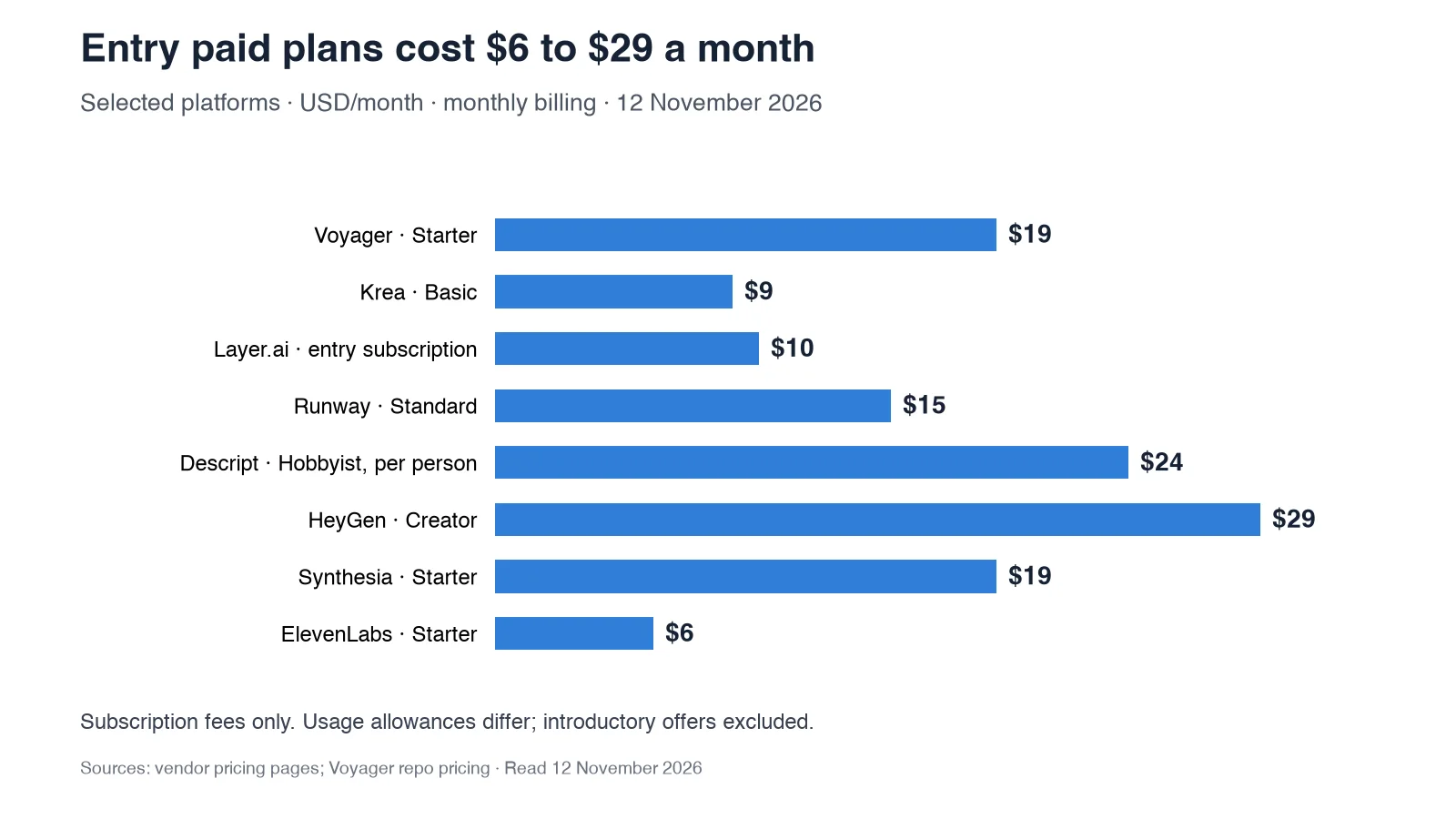
The table summarizes all 17 platforms by their primary role and purchase considerations. Prices reflect published US plans read on 12 November 2026. Different credit systems are not directly comparable.
| Platform | Category | Best for | Pricing and purchase check |
|---|---|---|---|
| 1. Voyager | AI-agent harness | Cross-app production and editable projects | Free app; Starter $19/month |
| 2. Krea | Creative-agent workspace | AI-assisted visual generation | Free; Basic $9/month |
| 3. FLORA | Creative workflow canvas | Connected generation and collaboration | Free and paid per-seat plans |
| 4. Layer.ai | AI creative platform | Agent workflows and professional integrations | From $10/month for 300 Creative Units |
| 5. Runway | Video generation platform | Generated footage and video modification | Free; Standard $15/month |
| 6. Google Flow | AI filmmaking application | Video with synchronized audio | Daily free credits; paid AI plans |
| 7. Kling AI | Video generation platform | Longer shots and motion controls | Free and paid subscriptions |
| 8. Luma Dream Machine | Video generation platform | Image animation and shot development | Free and paid plans |
| 9. Descript | AI video editor | Dialogue and podcast editing | Free; Hobbyist $24/month |
| 10. CapCut | Video editor | Social content and template-based editing | Free and paid plans |
| 11. HeyGen | Avatar platform | Multilingual marketing videos | Free; Creator $29/month |
| 12. Synthesia | Avatar platform | Corporate training and localization | Free Basic; Starter $19/month |
| 13. RoEx Automix | Audio production | Automated mixing and mastering | $7.99/download; Pro subscription |
| 14. LANDR | Audio production | Mastering and music distribution | Subscription-dependent |
| 15. ElevenLabs | Voice and audio platform | Voiceover and voice cloning | Free; Starter $6/month |
| 16. Microsoft Copilot Studio | Enterprise agent builder | Microsoft ecosystem agents | $200/month capacity packs |
| 17. Gemini Enterprise Agent Platform | Enterprise agent builder | Google Cloud agent infrastructure | Usage-based cloud pricing |
Starting prices do not represent equivalent generation allowances. Credit consumption, commercial licensing, supported features, and professional software requirements vary between platforms.
AI agent harnesses and creative workflow platforms
These platforms coordinate creative work across multiple models, tools, or applications. Their main differences concern the extent of agent control, collaboration, and editable project handoffs.
1. Voyager
Voyager is a desktop AI-agent harness that connects supported creative applications, external generation models, and built-in editors to create revisable production projects rather than only rendered media. Its own agent, or a supported Claude Code or Codex connection, can coordinate creative tasks involving video, motion graphics, design, and audio.
Primary focus
Creative professionals, marketing teams, video agencies, and studios using applications like Premiere Pro, DaVinci Resolve, After Effects, Blender, and Ableton Live who need AI generation integrated into editable production workflows. A typical project may involve generating footage, arranging clips into a sequence, adding typography and audio, and returning a project that can be revised without starting the entire production again.
Key features
Voyager combines agent-driven automation, model access, and supported creative application control.
- Agent-driven workflows: Coordinates generation, editing, design, motion, and sound through compatible tools
- Professional app control: Uses supported scripting, project editing, computer control, and interchange workflows
- Model access: Connects video, image, voice, and music generation through supported external providers
- Editable handoffs: Supports layered design files, timeline projects, OTIO, FCPXML, EDL, and audio stems
- Built-in editors: Voyager Video, Voyager Design, and Voyager DAW
- Professional exports: H.264, HEVC, ProRes, DNxHR, and supported interchange formats
- Agent compatibility: Works with Voyager's own agent or compatible Claude Code and Codex connections
- Provider connections: Supports eligible external API keys and model-provider billing
Voyager Video supports timeline editing, multicamera work, color, and keying. Voyager Design covers vector, raster, layout, and motion graphics. Voyager DAW provides arranging, instruments, VST3 plugins, mixing, mastering, and scoring to picture.
Why it stands out for cross-app creative production
Voyager is particularly useful when production moves between generating new media and editing it in professional software. For example, a marketing team can use supported video models to create a product shot, assemble the footage in Voyager Video or a compatible professional editor, add separate titles and audio, and preserve the editing structure for later revisions.
This matters when a client requests changes to timing, graphics, sound, or individual clips after the first delivery. Instead of treating the generated video as the only output, Voyager connects generation with a larger editable production workflow. Generated shots remain rendered media, while supported timelines, titles, layers, and audio elements can remain independently revisable.
Pricing and plan considerations
Voyager's desktop application and its three built-in creative editors are free to use. Individual monthly plans listed on the official Voyager pricing page include:
- Starter: $19/month with 1,800 credits and six parallel generations
- Creator: $49/month with 4,900 credits and 12 parallel generations
- Ultra: $149/month with 16,000 credits and 24 parallel generations
The launch offer increases monthly credit grants by 50% for the first three months. Generation is billed at provider cost without markup, with one credit representing one cent of the provider's charge. Actual consumption depends on the model and generation settings. Users can also bring supported agent subscriptions and compatible provider API keys. External creative application licenses remain separate.
Watch out for
Voyager supports Apple silicon Macs running macOS 15 or later, Windows 11 (x64), and supported Linux x64 installations. The Mac version provides the broadest creative workflow support. After Effects scripting and computer control work on macOS and Windows, while Photoshop, Illustrator, Premiere, and Resolve have application-specific prerequisites. Computer control is unavailable on Linux, and some built-in creative tools are disabled by default on Windows.
An editable project preserves supported tracks and project elements, but objects inside a generated video are not automatically independent layers.
Choose it if
You need an AI agent to coordinate generation, editing, design, motion, and audio across supported creative applications while preserving editable project handoffs.
2. Krea
Krea is an AI creative workspace with image and video generation, visual editing, and agent-driven workflows. Krea Agent can plan creative tasks, select models, generate assets, and iterate on results.
Primary focus
Designers, creative teams, and content producers who want to explore multiple visual directions and develop generated media through an integrated workspace.
Key features
Krea combines visual generation, model access, and agent-assisted creation.
- Krea Agent: Plans and executes supported creative generation tasks
- Multi-model access: Image, video, and related generation models
- Realtime generation: Visual experimentation with prompts and drawing
- Krea Nodes: Connected model workflows and reusable processes
- Video editing: Clip arrangement and supported editing operations
- Upscaling: Image enhancement through available upscaling models
Pricing and plan considerations
Krea offers a Free plan with daily compute units. Basic starts at $9/month with monthly billing, while Pro provides larger compute allowances and broader video model access. Annual plans offer lower monthly-equivalent prices. Usage depends on the model and compute units consumed.
Watch out for
Krea's creative workspace and video editor support in-platform editing, but a rendered video export is not equivalent to a native Premiere or Resolve project. Check the required handoff format if production will continue in professional editing software.
Choose it if
You want an AI-assisted visual workspace for generating, exploring, and refining creative assets before downstream production.
3. FLORA
FLORA is a browser-based creative canvas that connects multiple image, video, and audio models into reusable workflows. Its collaborative environment supports shared creative exploration and production tasks.
Primary focus
Creative teams developing connected generation workflows that need visual organization, reusable processes, and collaboration.
Key features
FLORA combines model generation with editing and shared workflows.
- Creative canvas: Connected image, video, and audio generation nodes
- FAUNA assistant: Natural-language help with creative workflow tasks
- Reusable techniques: Saved creative processes for repeated work
- Layer editing: Image editing and compositing
- Video timeline: Supported clip arrangement and editing
- Collaboration: Shared canvases and team projects
- Project handoffs: Supported timeline interchange exports
Pricing and plan considerations
FLORA offers a Free plan with limited generation allowances and paid Starter, Pro, and Max plans for expanded model access, collaboration, and usage. The publicly displayed launch promotional prices had a stated September 30, 2026 expiration, so they should not be treated as guaranteed November checkout prices.
Watch out for
FLORA's canvas and timeline provide editing capabilities, but exporting timeline information is different from directly controlling operations in an external creative application. Check the supported export format and receiving editor compatibility.
Choose it if
You prefer a collaborative browser workspace for visual generation, connected creative tasks, and reusable AI workflows.
4. Layer.ai
Layer.ai is an AI creative platform offering generation, creative agents, workflow automation, and integrations with supported professional software. It also serves game studios and marketing teams producing visual assets and campaign materials.
Primary focus
Editors and production teams who want AI generation and creative workflows connected to their existing tools.
Key features
Layer.ai combines multiple models with production integrations and automation.
- Creative agents: Supported planning and execution of creative work
- Model access: Generation options for images, video, audio, and other assets
- Professional integrations: Supported workflows for Premiere Pro, After Effects, Resolve, and other applications
- Reusable workflows: Saved processes for repeated production tasks
- Project integration: Generation and asset management associated with production work
- Team access: Shared workspace usage without per-seat subscription charges
Pricing and plan considerations
Layer uses Creative Units for generation and agent operations. Subscriptions begin at $10/month for 300 Creative Units, with additional capacity priced according to published consumption tiers, including $60 per 1,000 Creative Units. There are no separate per-seat fees. Actual usage depends on the model and operation.
Watch out for
Integrations have host-application requirements. The DaVinci Resolve integration requires Resolve Studio, and capabilities differ across applications. Check whether the intended workflow involves generated assets placed into a timeline or broader editable project automation.
Choose it if
You want creative agents and AI generation connected to supported professional editing and production software.
AI video generation platforms
These platforms focus on creating or modifying video footage. Some include creative agents and editing tools, but their integration methods and exported project formats differ.
5. Runway
Runway combines video generation, generative editing, and creative-agent features for producing and modifying footage.
Primary focus
Marketing teams, filmmakers, and content creators focused on generating scenes and modifying existing video.
Key features
Runway provides generation and editing capabilities through its platform.
- Gen-4.5: Text-to-video and supported image-guided generation
- Aleph 2.0: Generative editing of existing footage
- Act-Two: Performance-driven character animation
- Runway Agent: Conversational creative workflows
- Reference tools: Visual guidance for characters and scenes
- Editor integrations: Supported Premiere Pro, After Effects, and Resolve plugins
Pricing and plan considerations
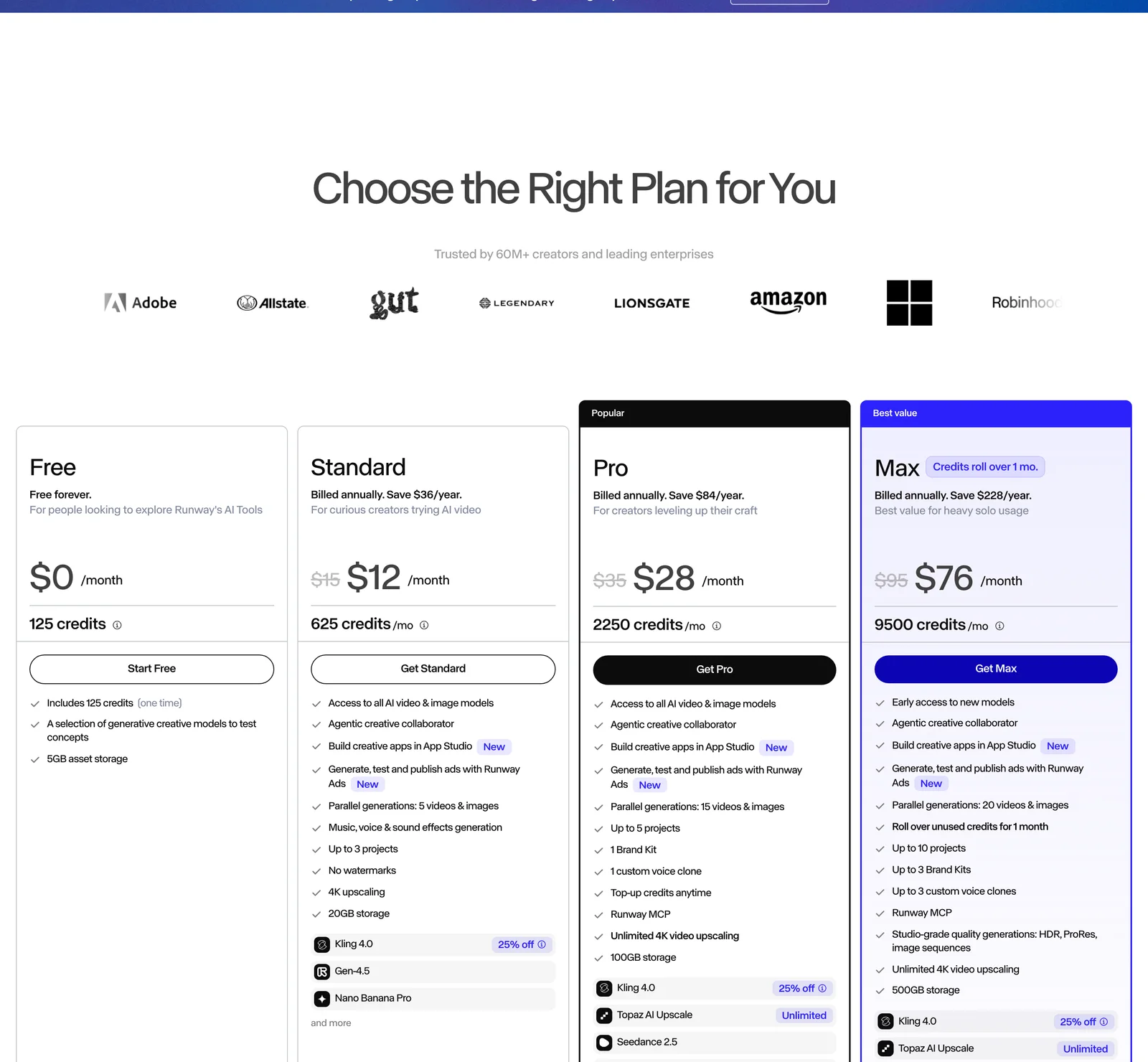
Standard costs $15/month with monthly billing and includes 625 monthly credits. Pro costs $35/month with 2,250 credits, while Max costs $95/month with 9,500 credits. Annual billing reduces the monthly-equivalent subscription prices. Gen-4.5 uses 12 Runway credits per generated second under its published model schedule. Other generation and editing operations have different rates.
Existing Unlimited subscribers are scheduled to transition to Max on November 30, 2026.
Watch out for
Gen-4.5's documented generation modes support clips from two to ten seconds. Resolution, export formats, editing operations, and access depend on the model and subscription. Professional editor integrations also have host software and plan requirements.
Choose it if
You prioritize video generation and footage modification, with access to Runway's creative tools and supported editing integrations.
6. Google Flow (Veo 3.1)
Google Flow is an AI filmmaking application that uses models such as Veo 3.1 to generate video with synchronized sound. It supports creative generation through Google's model ecosystem, while enterprise model access follows separate cloud service requirements.
Primary focus
Productions requiring generated video with dialogue, ambient audio, or sound effects.
Key features
Google Flow combines video models with creative generation tools.
- Native audio: Supported generation of dialogue, ambient sound, and effects
- Text-to-video: Scene generation from written prompts
- Reference images: Visual guidance for supported modes
- Video extension: Model-dependent continuation capabilities
- Creative tools: Generation, iteration, and supported filmmaking workflows
- Multiple access routes: Consumer AI plans and separate cloud services
Pricing and plan considerations
Google Flow provides daily free generation credits, subject to availability and access restrictions. Google AI Pro includes 1,000 additional monthly Flow credits, while Ultra offers higher allowances through different subscription tiers. Pricing and available features depend on the plan, region, and exact Veo model.
Watch out for
Google Flow and Google's enterprise agent infrastructure are separate products with different access and billing arrangements. Do not assume every Veo variant supports the same resolution, editing operations, or batch inference capabilities.
Choose it if
You need generated video with accompanying sound and prefer Google's filmmaking application and model ecosystem.
7. Kling AI
Kling AI provides video generation with image references, motion controls, audio generation, and longer clip options under supported models.
Primary focus
Developers and production teams needing configurable video generation and access through applications or APIs.
Key features
Kling offers multiple generation configurations across its model family.
- Kling 4.0: Updated video generation with supported longer clips and audio
- Kling 3.0: Video generation with storyboard and motion options
- 4K output: Available under eligible model and resolution settings
- Clip extension: Continuation of generated footage on supported modes
- API access: Integration through supported developer services
- Synchronized audio: Audio generation on eligible models
Pricing and plan considerations
Kling provides free and paid access with different credit allowances and model eligibility. Direct application subscriptions and third-party API access have separate pricing structures. Costs depend on model version, resolution, clip duration, and audio settings.
The Kling pricing guide explains subscription allowances and how generation costs vary across plans.
Watch out for
Kling 3.0 and 4.0 have different capabilities. Duration, output resolution, and sound-generation settings should be checked for the specific model used. Output quality can vary with the prompt and generation configuration.
Choose it if
You need video generation with selectable motion, duration, reference, and resolution options.
8. Luma Dream Machine
Luma Dream Machine generates video through its Ray model family, with image animation, motion controls, and professional output options.
Primary focus
Advertising, e-commerce, and creative teams developing generated shots from visual references.
Key features
Luma supports image-to-video and professional shot development.
- Ray3.2: Video generation with supported HDR output options
- Image animation: Conversion of still images into moving footage
- Motion controls: Supported camera and framing instructions
- Keyframe guidance: Reference-based generation on eligible modes
- Professional exports: Model-dependent HDR and EXR workflows
- Generative editing: Supported modifications and video transformation
Pricing and plan considerations
Luma offers free and paid access with generation allowances based on the plan. Its Ray3.2 pricing varies by resolution, generation duration, and output mode. HDR and HDR-plus-EXR options use different credit rates. API and hosted model access may have separate charges.
Watch out for
Professional output capabilities vary between Ray models. Ray3.2's documented generation route produces silent footage, so synchronized audio may require another production stage. Check the exact model before assuming HDR, EXR, and audio capabilities are available together.
Choose it if
You need to develop video shots from references and require model-specific motion or professional output controls.
AI video editing platforms
These tools focus on editing and repurposing footage rather than coordinating an entire production across multiple professional applications.
9. Descript
Descript uses transcript-based editing to let creators cut video and audio by editing spoken text. Its AI-assisted editing features support dialogue-heavy production and content repurposing.
Primary focus
Podcast producers, interview editors, and marketing teams converting long recordings into shorter deliverables.
Key features
Descript centers on transcript-driven editing.
- Text-based editing: Cuts video and audio through transcript changes
- AI co-editor: Underlord-assisted editing and content operations
- Voice correction: Supported AI speech and voice-cloning workflows
- Clip repurposing: Short-form extracts from long recordings
- Automated captions: Caption generation and styling
- Audio enhancement: Studio Sound and dialogue-processing tools
Pricing and plan considerations
Descript's Hobbyist plan costs $24 per person per month with monthly billing, or $16 per month when billed annually. The plan includes media hours, AI credits, and export allowances. Higher tiers provide additional usage and collaboration options.
Watch out for
Descript's workflow is particularly well suited to spoken content. For productions involving complex motion graphics, compositing, or advanced finishing, check whether the intended operations are supported directly or require another editing application.
Choose it if
You produce podcasts, interviews, or dialogue-led video and want text-based editing and content repurposing.
10. CapCut
CapCut provides video editing with AI-assisted features, templates, captions, and export options for social and general-purpose content creation.
Primary focus
Social media creators and marketing teams producing short-form videos, promotional clips, and recurring content.
Key features
CapCut combines accessible editing tools with AI-assisted operations.
- Timeline editing: Clip trimming, arranging, transitions, and effects
- Automated captions: Speech-to-text subtitles and customization
- Templates: Reusable layouts for common video formats
- Background removal: Supported AI-assisted subject separation
- Audio tools: Music, voice, and enhancement features
- Social exports: Presets for common short-form platforms
- Cross-platform access: Mobile and desktop editing options
Pricing and plan considerations
CapCut includes free editing features and paid subscriptions for additional tools, templates, effects, and usage allowances. Premium pricing and feature availability depend on the region, platform, and selected plan.
Watch out for
CapCut supports longer video projects as well as short-form content. Its suitability depends on editing and finishing requirements rather than video duration alone. Check the needed color, compositing, collaboration, and project-export capabilities before selecting it for a professional workflow.
Choose it if
You need accessible editing, captions, templates, and social-focused video production tools.
AI avatar and localization platforms
These platforms focus on presenter-led videos, synthetic voices, and localization for marketing, training, and business communication.
11. HeyGen
HeyGen specializes in avatar video creation, personalization, translation, and AI-assisted video production.
Primary focus
Marketing teams and organizations producing personalized outreach, training videos, and multilingual campaigns.
Key features
HeyGen combines digital presenters with localization and video-generation tools.
- Avatar library: 700+ stock video avatars on eligible Creator and Pro plans
- Video translation: Support for 175+ languages and dialects
- Voice cloning: Supported synthetic voice personalization
- Lip synchronization: Translated speech aligned with presenter movement
- Video Agent: Prompt-based assistance with video creation
- CRM integration: Supported connections for personalized marketing workflows
Pricing and plan considerations
Creator costs $29/month and includes 600 credits. Pro costs $49/month with 1,000 credits and additional generation capabilities. The Free plan includes three watermarked videos per month, each up to one minute. Eligible Avatar IV generation supports videos up to 30 minutes, while other generation modes have separate limits.
Watch out for
HeyGen's avatar, translation, and generative video capabilities are not identical across plans. Check the relevant model, credit requirements, export resolution, and language support for the intended campaign.
Choose it if
You produce multilingual presenter-led videos and need reusable avatars, voice generation, and localization.
12. Synthesia
Synthesia produces AI avatar videos for enterprise training, communications, and learning content. Its platform combines digital presenters, localization, structured scenes, and enterprise controls.
Primary focus
Learning and development teams and corporate communications departments producing training content for global audiences.
Key features
Synthesia focuses on presenter-led business video production.
- AI avatars: Stock and custom digital presenters
- Multilingual content: Translation and dubbing features
- Brand consistency: Brand kits and reusable presentation assets
- Interactive features: Eligible surveys and avatar experiences
- Collaboration: Team and enterprise workflows
- Editing tools: Scene-based editing and presentation elements
Pricing and plan considerations
Synthesia updated its plans on October 1, 2026, renaming Creator to Pro. Its Basic plan is free and includes monthly video and credit allowances. Starter costs $19/month at its regular monthly price, while Pro costs $89/month. Paid plans add credits and features beyond the base allowance. Introductory offers may temporarily reduce the first month's price.
Watch out for
Avatar-based presentations have different controls from generative scene creation. Check the plan's avatar catalog, monthly credits, video duration, and localization features before purchasing.
Choose it if
You need repeatable training, internal communications, or marketing videos featuring consistent digital presenters.
AI audio production platforms
Audio automation covers several distinct tasks, including synthesis, multitrack mixing, mastering, and music delivery.
13. RoEx Automix
RoEx Automix provides automated multitrack mixing and mastering, with processed-stem and editable DAW project exports on supported plans.
Primary focus
Independent musicians and audio producers who need automated mixing from separate tracks.
Key features
RoEx combines mixing and mastering capabilities.
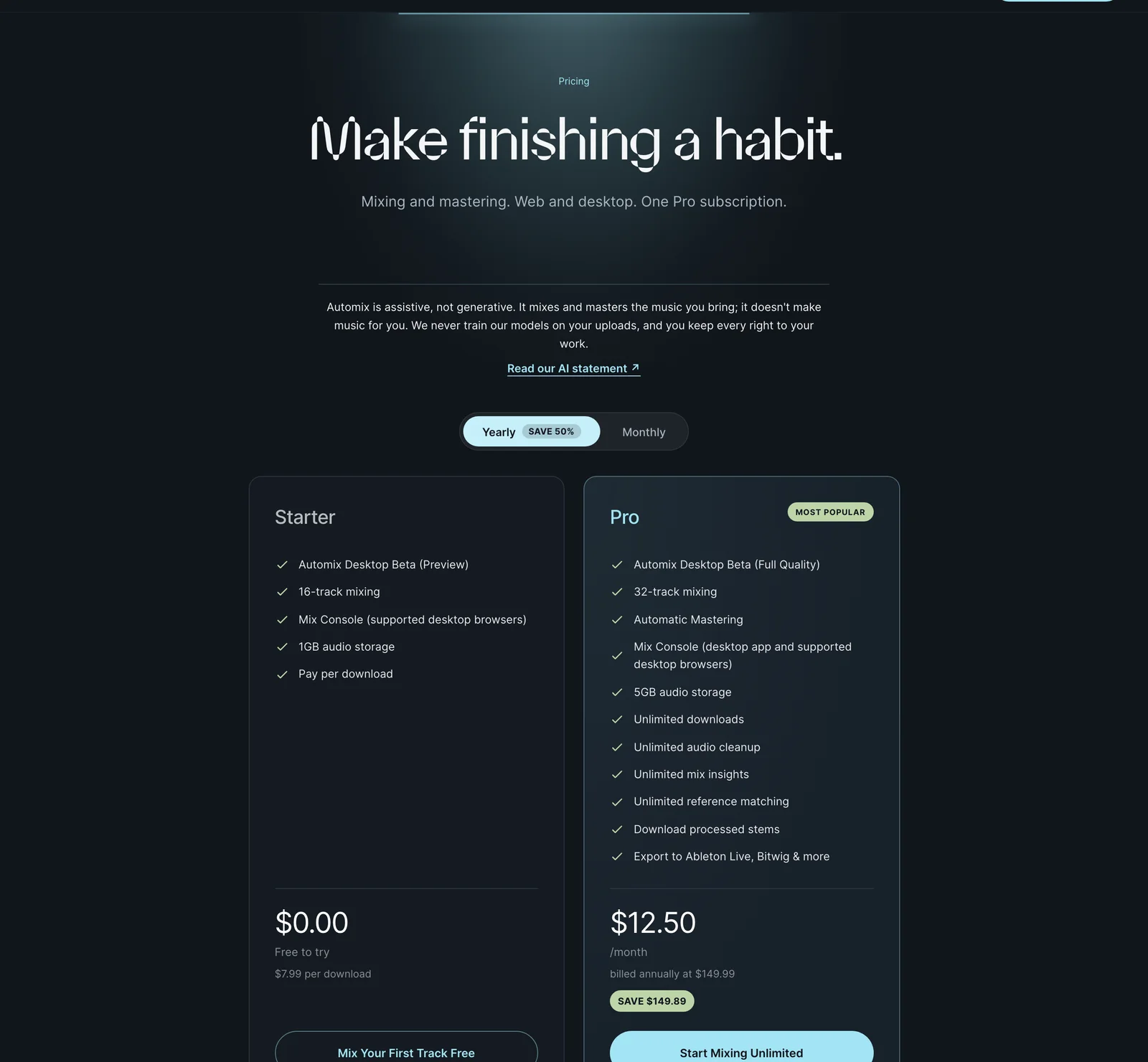
- Multitrack mixing: Up to 32 tracks on Pro
- Audio processing: EQ, compression, balancing, and panning
- Mastering: Automated final audio processing
- Reference matching: Supported reference-track processing
- Stem exports: Processed audio tracks for continued editing
- DAW projects: Supported editable project exports
- Desktop beta: Local audio processing on compatible computers
Pricing and plan considerations
Starter supports pay-per-download pricing at $7.99 and mixing of up to 16 tracks. Pro costs $24.99/month with monthly billing or $149.99/year, and supports 32-track mixing, additional exports, and related features. Automix Desktop remains in beta, with Pro required for watermark-free, release-ready desktop exports.
Watch out for
The free beta and preview options are not equivalent to unrestricted final-output access. Automated mixing can provide a production starting point, but final balance and mastering choices should be checked against the intended release requirements.
Choose it if
You produce music from multiple tracks and need AI-assisted mixing, mastering, and supported DAW handoffs.
14. LANDR
LANDR provides AI mastering, music distribution, samples, plugins, and production resources in a music-focused ecosystem.
Primary focus
Independent musicians and producers who want mastering alongside distribution and production services.
Key features
LANDR combines mastering with related music services.
- AI mastering: Automated processing of finished mixes
- Mastering plugin: Supported processing within a DAW
- Music distribution: Delivery to supported streaming and music services
- Sample library: Production-ready sound assets
- Educational resources: Music production courses and guidance
- Subscription bundles: Combinations of mastering, distribution, and other tools
Pricing and plan considerations
LANDR provides different plans for mastering, distribution, plugins, and bundled music services. Eligible distribution subscriptions support unlimited releases to a broad network of music services. Specific entitlement and pricing depend on the selected plan. Compare the services included in a subscription rather than assuming all features are available through every LANDR product.
Watch out for
Mastering results depend on source material and production goals. A mastering service processes finished audio differently from a platform that mixes multiple separate tracks. Check whether your project requires mixing, mastering, or both.
Choose it if
You want music mastering and distribution combined with additional production resources.
15. ElevenLabs
ElevenLabs provides voice synthesis, cloning, voice design, and audio-generation services for creative production.
Primary focus
Productions requiring narration, character dialogue, audiobooks, and customizable synthetic voices.
Key features
ElevenLabs combines voice generation with customization and audio tools.
- Voice synthesis: Natural-language speech generation using supported voice models
- Voice cloning: Creation of custom voices under applicable permissions
- Voice Design: Generation of voices from descriptive instructions
- Pronunciation controls: Supported pronunciation and phonetic guidance
- Multilingual generation: Speech generation across supported languages
- Audio tools: Additional dubbing, sound effects, and related capabilities
Pricing and plan considerations
The Free tier provides 10,000 monthly credits. Starter costs $6/month at the regular price and includes 30,000 monthly credits, commercial licensing, and eligible voice-cloning features. Higher tiers provide additional credits, voice options, and production allowances. Actual audio duration depends on the chosen model and generation method.
Watch out for
Voice cloning requires appropriate permissions, and different cloning methods have specific eligibility rules. Commercial production must also comply with the applicable licensing, consent, and usage terms.
Choose it if
You need synthetic speech, voiceover, or character dialogue with configurable voices and model-specific controls.
Enterprise AI agent builders
These platforms provide infrastructure for custom AI agents rather than ready-made creative production environments.
16. Microsoft Copilot Studio
Microsoft Copilot Studio provides a low-code environment for building and deploying custom AI agents within Microsoft and connected business systems.
Primary focus
Enterprises using Microsoft 365, Teams, SharePoint, and related infrastructure.
Key features
Copilot Studio emphasizes enterprise agent development.
- Low-code builder: Custom agent creation and configuration
- Microsoft integration: Connections with Microsoft 365 services
- Connector library: Access to supported Power Platform connectors
- Agent orchestration: Multistep automation through connected tools
- Model selection: Supported model options subject to region and availability
- Governance: Enterprise security and management controls
Pricing and plan considerations
Copilot Studio supports pay-as-you-go billing and prepaid capacity options. A standard capacity pack costs $200 per month for 25,000 Copilot Credits, billed annually under Microsoft's published US licensing terms. Actual consumption depends on the actions and responses performed by the agent.
Watch out for
Enterprise connectors and general automation features do not automatically provide direct control of professional video editing software. Supported models also change over time, so current availability should be checked rather than relying on older model names.
Choose it if
Your organization needs custom business agents integrated with Microsoft infrastructure and enterprise governance.
17. Google Gemini Enterprise Agent Platform
Google Gemini Enterprise Agent Platform provides infrastructure for building, deploying, and managing multimodal agents on Google Cloud. It supports both low-code and code-based development through Google's enterprise AI services.
Primary focus
Organizations building custom agents for multimodal processing, media workflows, document operations, and connected cloud systems.
Key features
Gemini Enterprise Agent Platform emphasizes model access and enterprise deployment.
- Multimodal models: Support for text, image, audio, and video processing
- Agent Development Kit: Modular framework for custom agent development
- Agent Studio: Low-code agent creation and management
- Model Garden: Access to Google, partner, and open-source models
- Cloud integration: Connections with supported Google Cloud services
- Governance tools: Agent identity, access controls, and runtime management
Pricing and plan considerations
Pricing depends on the services and resources used, including model inference, agent runtime, storage, and related cloud infrastructure. Organizations should estimate costs using the specific model and deployment configuration rather than assuming one subscription covers every operation. Security and compliance capabilities also depend on the service, region, configuration, and applicable agreements.
Watch out for
Building custom media agents requires development and integration work. The platform provides infrastructure and models rather than a complete desktop creative editing environment. Video-model access and batch-processing support must be checked separately for each service.
Choose it if
You operate on Google Cloud and need to build multimodal agents with enterprise management and governance capabilities.
Final verdict: why Voyager is the top choice for creative production
Voyager is the strongest starting point in this comparison for creative teams that want AI agents to handle more than isolated media generation. It connects supported creative applications, external generation models, and built-in production editors, allowing work to continue in revisable projects after the initial output is created. For marketing teams, video agencies, independent filmmakers, and creators already using professional software, Voyager offers a practical way to coordinate generation, editing, motion, and sound within a connected workflow.
Its key advantages for these production requirements include:
- Cross-application automation: Agent-driven work across compatible editing, design, 3D, and audio software
- Editable project handoffs: Supported timeline, layered design, and audio outputs that preserve revision flexibility
- Multiple generation models: Access to external image, video, voice, and music providers without relying on one proprietary model
- Built-in production tools: Voyager Video, Design, and DAW included with the desktop application
- Flexible agent connections: Compatibility with supported Claude Code and Codex workflows
- Transparent generation billing: Provider-cost model charges without Voyager markup
- Professional production continuity: Ability to generate media, assemble projects, revise individual elements, and export deliverables through supported workflows
Voyager is particularly compelling when production requires several creative tools and the finished work must remain editable. The practical purchase checks are application compatibility, host software licensing, and managed-generation costs. Teams can review the Voyager pricing plans and use the video briefing guide to define the intended workflow before starting production.
Frequently asked questions
What distinguishes an AI agent platform from a generation tool?
An AI agent platform can coordinate multiple tasks, make workflow decisions, and interact with connected applications or tools. A generation platform primarily creates or modifies media assets through models, although some generators include agents and editors. Voyager focuses on coordinating supported creative production workflows and preserving editable project handoffs.
Can AI agent platforms produce editable video and audio project files?
Some can. Voyager supports editable timelines, layered designs, and audio stems through its built-in editors and supported professional application workflows. Formats such as OTIO, FCPXML, and EDL help transfer timeline information between compatible tools, but the exact information preserved depends on the receiving application. The editable project guide explains these limitations.
How should teams budget for AI video and audio production?
Include subscriptions, generation credits, external application licenses, and API charges. The relevant cost is the full production workflow, including revisions and final exports, rather than only the price of an initial generated clip. Voyager uses provider-cost credit billing, with one credit representing one cent of the underlying generation charge. Its pricing details explain managed usage and plan allowances.
What operating systems and creative applications does Voyager support?
Voyager supports Apple silicon Macs running macOS 15 or later, Windows 11 (x64), and supported Linux x64 installations. It works with supported workflows involving Premiere Pro, After Effects, DaVinci Resolve, Photoshop, Illustrator, Blender, Ableton Live, and other creative applications. Features and control methods vary by operating system, host application, and edition. Computer control works on macOS and Windows but is unavailable on Linux, and some built-in creative tools are disabled by default on Windows.
Can I use Claude Code or Codex with Voyager?
Yes. Voyager supports compatible Claude Code and Codex connections and provides creative skills and tools for agent-driven production. Users can also work with Voyager's own agent. Available operations depend on the connected application, platform, and installed tools. Computer control and screen recording require the running desktop application, while eligible generation and editing tasks can run through supported command-line connections.
Voyager is a desktop AI agent for creative work
Describe what you want to make; Voyager plans it, uses your apps and tools, and keeps everything editable.