The best AI workflow automation tool for motion designers depends on what needs automating: multi-app creative production, asset generation, timeline editing, or specialized tasks like voice and upscaling. Voyager stands out for agent-led workflows that coordinate supported creative applications and deliver editable project handoffs, while other tools address specific generation, editing, and enhancement needs. According to the Interactive Advertising Bureau, nearly two in three digital video ad buyers use generative AI for creative production, up from roughly half in 2025.
The short version: Choose Voyager for agent-driven creative automation across supported applications with editable project handoffs. Choose Higgsfield for agent-assisted After Effects animation, FLORA for connected visual workflows, Krea for rapid generation and reusable nodes, Runway for video generation and editing, or After Effects for precise compositing. Other tools specialize in scheduling, collaboration, procedural animation, voice, enhancement, and motion capture.
Key takeaways
- Workflow type determines the right tool: AI agents can coordinate supported creative applications, generators create assets, and professional editors refine them into deliverables.
- Editable output protects revision cycles: Tools that preserve editable project formats, timelines, and layers support targeted changes without rebuilding an entire composition.
- Generation credits add to subscription costs: Budget for model usage, retries, and external software alongside monthly plans, especially for video and voice generation.
This comparison covers 18 tools across five workflow categories. It uses documented product capabilities and pricing reviewed on 12 November 2026 for readers planning their 2027 workflows, rather than independent performance testing. Prices are in US dollars unless stated otherwise. Voyager, the desktop app our team builds, connects AI generation with supported creative applications and editable project workflows.
Which AI workflow automation tool should you choose?
The quick verdict below compares tools by their primary production use case rather than treating every platform as a direct replacement for the others.
| If your work involves | Choose | Why |
|---|---|---|
| Multi-app creative production | Voyager | Agent-led workflows with supported creative-app control and editable project handoffs |
| AI-assisted After Effects animation | Higgsfield | Agent-driven motion graphics inside compatible After Effects projects |
| Connected visual generation workflows | FLORA | Collaborative canvas with reusable generation pipelines |
| Rapid image and video exploration | Krea | Multi-model generation, visual nodes, and AI-assisted creative workflows |
| Cross-tool administrative automation | Lindy.ai | AI agents for scheduling, file management, and communication |
| Source footage generation | Runway | AI video generation, agent-assisted workflows, and clip editing |
| Frame-level precision editing | After Effects | Professional compositing, AI-powered masking, and extensive animation controls |
| Team collaboration on motion | Jitter | Browser-based animation, Figma import, and AI Superagents |
| Data-driven variant production | Cavalry | Procedural animation driven by data and reusable systems |
| Voice-over generation | ElevenLabs | Text-to-speech and voice tools for explainers and temporary narration |
| Footage upscaling | Topaz Video | AI enhancement of low-resolution footage |
The right choice depends on whether you need to automate production, generate source material, or refine an existing project.
How we compared the tools
We evaluated each tool by its automation scope, output editability, workflow integration, pricing structure, plan conditions, and fit for motion design tasks. Recommendations prioritize compatibility with established creative applications and suitability for freelancers, motion designers, and small studios.
This comparison is published by Voyager. Voyager is ranked first for creative professionals who need AI generation and supported application control connected to editable production workflows. The recommendations reflect documented capabilities rather than a hands-on quality ranking of every tool.
| Comparison factor | What we looked for |
|---|---|
| Tool category | AI-agent harness, generation platform, professional editor, workflow manager, or specialist |
| Automation scope | Individual tasks, reusable workflows, or coordination across applications |
| Editing depth | Timelines, layers, effects, keyframes, animation controls, and revisions |
| Output editability | Native projects, interchange formats, and rendered files |
| Integration support | Compatible creative applications, APIs, plugins, and workflow connections |
| Pricing | Subscriptions, credits, usage allowances, and external software costs |
| Platform access | Operating system requirements and plan-dependent features |
| Commercial licensing | Usage rights, watermarks, and restrictions for client work |
The comparison distinguishes documented capabilities from performance outcomes. It does not assume that sharing the same underlying generation model produces identical results across platforms.
What to look for in an AI workflow automation tool
Before selecting a tool, identify the specific bottleneck in your current workflow and the format your deliverables require.
- Automation scope: Whether the tool handles individual tasks or coordinates multiple steps across applications
- Output editability: Whether timing, layers, keyframes, or tracks remain revisable
- Integration compatibility: Whether the tool works with existing editing, compositing, and 3D software
- Generation capabilities: Whether it supports the required image, video, voice, or music models
- Commercial rights: Whether generated content can be used in paid client projects
- Cost structure: Subscriptions, credits, external licenses, and additional rendering charges
- Platform access: Supported operating systems, app editions, and plan requirements
- Revision workflow: Whether changes can be made to individual project elements or require another generation
For motion designers, output editability is particularly important. You can trim or color-correct a rendered video, but changing an individual animated text layer requires access to the underlying project or a separate editing process.
Understanding AI workflow automation for motion design
AI workflow automation tools serve different roles in the creative pipeline, from coordinating entire projects to solving specific technical challenges. Understanding these categories helps match tools to actual workflow needs rather than choosing based on feature count alone.
AI agents and creative workflow platforms
AI agents coordinate supported tasks through natural-language instructions. Creative workflow platforms may connect generation models, automate sequences, build reusable pipelines, and hand work to editing applications. Voyager, Higgsfield, FLORA, and Krea overlap in parts of this category, although their approaches to application control and output editing differ.
Administrative automation and team planning tools
Administrative tools support scheduling, file organization, communication, documentation, and project tracking. Lindy.ai, Motion, and Notion AI can reduce coordination work surrounding motion design, but their documented strengths differ from directly constructing animations in professional editing software.
AI video and asset generation platforms
Generation platforms create or modify video, images, and other production assets using AI models. Some also provide timeline editing, reusable workflows, or automated generation pipelines. Runway, Adobe Firefly, Midjourney, and Kling AI fit primarily into this category.
Professional motion design and editing applications
Professional applications provide direct control over compositions, layers, animation, audio, and finishing. AI features may assist with masking, layout, animation, or repetitive editing. After Effects, Jitter, Cavalry, and Kapwing serve different parts of this production category.
Specialized production and enhancement tools
Specialist tools address particular production requirements, including narration, restoration, upscaling, and motion capture. ElevenLabs, Topaz Video, and DeepMotion are useful when a production needs those specific capabilities.
Best AI workflow automation tools at a glance
The following overview separates the tools by their main strengths and purchase considerations.
| Tool | Category | Best for | Pricing and purchase check |
|---|---|---|---|
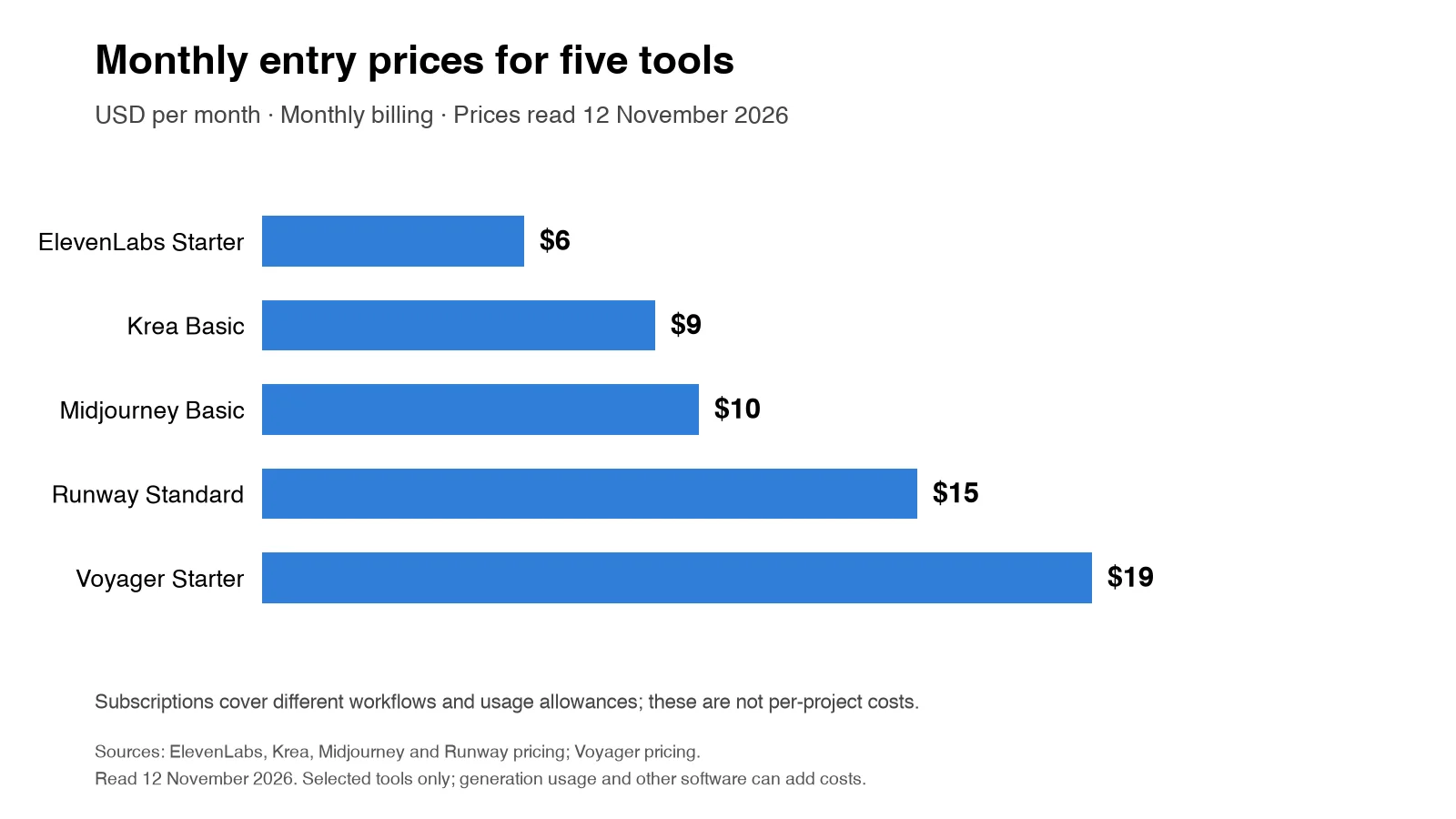
| 1. Voyager | AI-agent harness | Multi-app production with editable outputs | Free app; Starter $19/month |
| 2. Higgsfield | Creative AI and agent platform | AI-assisted After Effects motion graphics | Subscription and generation credits |
| 3. FLORA | Creative workflow canvas | Connected models and reusable visual workflows | Free plan; paid usage-based plans |
| 4. Krea | AI generation platform | Visual exploration and automated generation | Free; Basic $9/month |
| 5. Lindy.ai | Business automation | Administrative and cross-tool workflows | Team from $29.99/user/month |
| 6. Motion | AI productivity | Task scheduling and calendar management | Pro AI $19/seat/month annually |
| 7. Notion AI | Workspace automation | Documentation, project knowledge, and agents | Limited free trial; paid AI access |
| 8. Runway | Generative video platform | Video creation, editing, and automated workflows | Free; Standard $15/month |
| 9. Adobe Firefly | Multi-model generation | AI assets within Adobe workflows | Limited free access; paid credit plans |
| 10. Midjourney | Image and video generation | Concept art, storyboards, and style frames | Basic $10/month |
| 11. Kling AI | Video generation | Motion-controlled and multishot clips | Direct and provider-dependent pricing |
| 12. After Effects | Professional motion design | Compositing and precise animation | $22.99/month on eligible annual plan |
| 13. Jitter | Browser-based motion design | Collaborative brand and product animations | Free and paid plans |
| 14. Cavalry | Procedural motion design | Data-driven animations and variants | Free with a Canva account |
| 15. Kapwing | Browser-based video editor | Captions and social content production | Free with watermark; Pro from $16/month annually |
| 16. ElevenLabs | Voice and audio generation | Narration and multilingual voice | Free; Starter $6/month |
| 17. Topaz Video | AI video enhancement | Upscaling, restoration, and denoising | Personal $254 for the first year; $299/year regular price |
| 18. DeepMotion | AI motion capture | Video-to-3D character animation | Free noncommercial plan; paid tiers |
These prices are starting points, not equivalent per-project costs. Generation volume, eligible features, commercial rights, and billing periods can change the total cost.
AI agents and creative workflow platforms
These tools help coordinate creative work, generate assets, or automate tasks beyond a single editing feature. Their main differences involve which applications they control and what remains editable after automation.
1. Voyager
Voyager is a desktop AI-agent harness that connects supported creative applications, external generation models, and built-in editors to deliver revisable project workflows. Rather than serving as a standalone video model, Voyager provides an orchestration layer that connects AI generation with professional production tools.
Best for
Motion designers, creative professionals, and teams using applications such as After Effects, Premiere Pro, DaVinci Resolve, and Blender who need AI-generated assets integrated into editable projects.
Key features
Voyager combines agent-driven automation, multi-model generation, and native editing capabilities.
- Agent-driven app control: Operates supported creative applications through scripting and integration interfaces to create or revise layers, timelines, and scenes
- Multi-model generation: Access to more than 70 image, video, voice, music, and other generation models, with availability and rates listed on the Voyager pricing page
- Editable handoffs: Supports formats such as PSD, OTIO, FCPXML, and EDL for compatible editing workflows
- Built-in creative suite: Includes Voyager Video, Design, and DAW for timeline editing, motion graphics, and audio production
- Agent compatibility: Supports Voyager's own agent and compatible Claude Code or Codex workflows
- Professional exports: Supports formats including H.264, HEVC, ProRes, and DNxHR
Its built-in Video editor supports timeline editing, multicamera work, color controls, and professional exports. Voyager Design provides vector, raster, and motion-graphics capabilities, while Voyager DAW supports instruments, arranging, mixing, and scoring to picture.
Why it stands out for motion designers
Voyager stands out for connecting AI-assisted creative production with editable professional workflows. For example, a motion designer can use an agent to organize source footage, prepare a rough cut, create supporting graphics, and revise supported project elements without treating every generated clip as a finished deliverable.
The advantage becomes especially relevant during client revisions. If a title needs to change, an animation needs retiming, or a sequence requires different footage, supported application control can target those elements rather than requiring the entire project to be rebuilt.
Voyager also supports distinct parts of the production pipeline:
- Motion graphics: Create and revise supported After Effects compositions through scripting-based workflows
- Video production: Assemble and refine footage in Voyager Video or compatible professional editors
- 3D workflows: Coordinate supported Blender operations and preserve editable scene elements
- Creative generation: Select models for different image, video, and audio requirements
- Revision handling: Maintain project structure for targeted editing and subsequent handoffs
The After Effects MCP guide explains scripting-based revision workflows, while the editable video guide describes what different project formats preserve.
Pricing and plan considerations
The desktop application is free to download, with built-in editing capabilities available without a paid subscription. Paid individual plans, billed monthly, include:
- Starter: $19/month with 1,800 monthly credits and six parallel generations
- Creator: $49/month with 4,900 monthly credits and 12 parallel generations
- Ultra: $149/month with 16,000 monthly credits and 24 parallel generations
Voyager prices managed generation at provider cost without markup. One credit represents $0.01 of the provider's listed generation charge. New free accounts receive 1,000 monthly credits for agent chat and eligible media, including up to 25 images per month on eligible models and three voice generations per month. Paid plans expand managed generation, model access, and rendering capacity, while compatible external provider keys follow their own billing terms.
The Voyager pricing details explain monthly allowances, eligible models, and additional costs.
Watch out for
Check platform and integration requirements before selecting a workflow. Voyager supports Apple silicon macOS, Windows 11 (x64), and Linux (x64), but specific application-control features vary by platform. After Effects scripting and computer control are supported on macOS and Windows with the required permissions, while computer control is unavailable on Linux. Other applications have their own version and integration requirements.
External creative applications may require separate licenses. Additionally, editable project handoffs preserve supported project information, but individual objects within rendered AI footage do not automatically become separate editable layers.
Choose it if
You need AI generation, multi-step automation, and professional editing to work together across supported applications, with editable project files rather than only finished video renders.
2. Higgsfield
Higgsfield provides AI video generation and creative automation tools, including an AI Motion Designer integration for Adobe After Effects.
Best for
Motion designers who want to generate title animations, logo reveals, transitions, and other motion elements directly within compatible After Effects projects.
Key features
Higgsfield combines media generation with selected professional editing integrations.
- AI Motion Designer: Generates supported motion-graphics elements inside After Effects
- Editable compositions: Creates native After Effects layers, keyframes, and timing controls
- Generation tools: Creates visual assets through supported image and video models
- Plugin integration: Connects generation and motion-graphics workflows with compatible creative applications
- Natural-language control: Builds specified animation elements through supported agent integrations
Pricing and plan considerations
Higgsfield uses subscription plans and generation credits. Access to its motion-design integration can require an active Higgsfield subscription, compatible agent access, and a licensed After Effects installation. Exact costs depend on the chosen generation and editing workflow.
Watch out for
Native After Effects element creation is a meaningful editing capability. Compare the specific tasks supported by its plugin with the requirements of a broader multi-application production pipeline.
Choose it if
Your primary requirement is creating editable After Effects motion graphics through an AI-assisted workflow.
3. FLORA
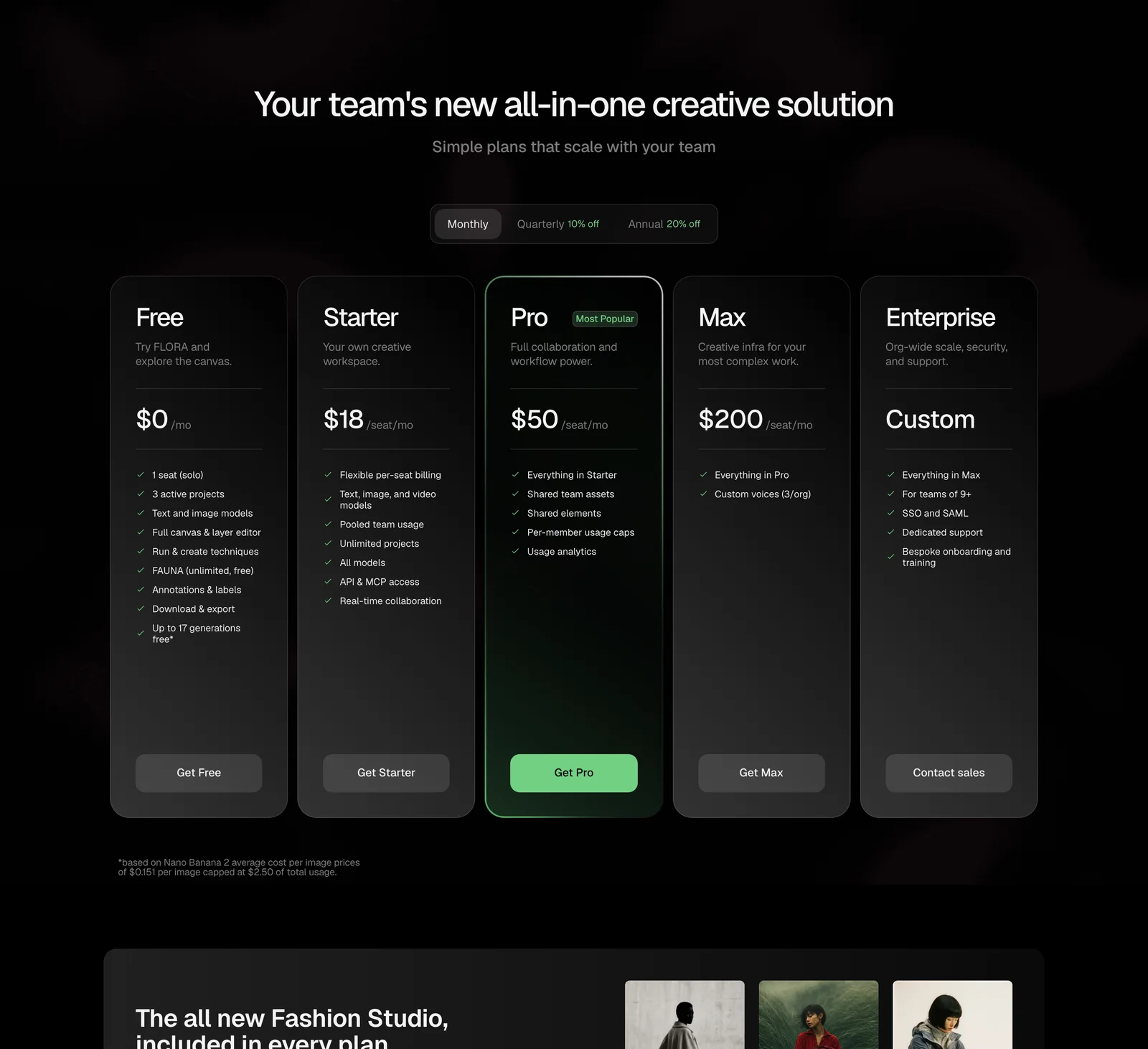
FLORA is a browser-based creative canvas that connects image, video, audio, and other AI models into reusable workflows. Its FAUNA agent can help build, organize, and execute connected generation tasks.
Best for
Creative teams developing visual concepts, connected generation pipelines, and collaborative AI-assisted projects.
Key features
FLORA combines a visual workflow editor with AI-assisted automation.
- Creative canvas: Connect image, video, and other models through nodes
- FAUNA agent: Build and adjust workflows using natural-language instructions
- Reusable techniques: Save connected creative processes for repeated use
- Video timeline: Arrange and trim clips in a supported in-canvas editor
- Collaboration: Share projects and review creative outputs
- Workflow exports: Transfer supported outputs and timeline information to other applications
Pricing and plan considerations
FLORA offers a free plan with limited projects and generation access. Paid subscriptions provide broader model access, additional usage allowances, and team functionality. Pricing is usage-dependent, and previously advertised promotional subscription amounts should not be treated as permanent prices.
Watch out for
FLORA supports meaningful in-canvas editing and reusable generation workflows. However, exporting media or timeline information to an external editor is different from directly controlling that editor's open project.
Choose it if
You want a collaborative browser environment for visual generation, reusable creative pipelines, and early-stage video assembly.
4. Krea
Krea provides AI image and video generation with real-time creative tools, node-based workflows, and an AI agent for coordinating generation tasks.
Best for
Motion designers who need rapid concept exploration, style development, visual variations, and connected AI generation.
Key features
Krea supports visual experimentation and reusable model workflows.
- Real-time generation: Explore visual directions with interactive controls
- Krea Agent: Plan and iterate generation tasks across supported models
- Krea Nodes: Build workflows by connecting models and processing steps
- Image and video models: Generate visual assets using different model options
- Upscaling: Enhance image resolution through supported tools
- App Builder: Turn connected workflows into reusable creative applications
Pricing and plan considerations
Krea offers a Free plan with daily compute units. Paid plans include Basic at $9/month, Pro at $35/month, and higher-capacity subscriptions at standard monthly rates. Model access, compute units, and concurrency vary by plan, and discounted checkout offers may differ.
Watch out for
Krea's generation and workflow features are useful for developing visual assets. Motion designers should verify the output and handoff options required for editing those assets in professional animation software.
Choose it if
You need fast visual experimentation, model flexibility, and reusable generation workflows before final compositing or animation.
Administrative automation and team planning tools
These platforms address the organizational work surrounding motion design, including scheduling, communication, project tracking, and knowledge management.
5. Lindy.ai
Lindy.ai provides AI agents that automate tasks across business applications through natural-language instructions.
Best for
Motion designers juggling client communication, project tracking, file organization, and scheduling alongside creative work.
Key features
Its capabilities focus on cross-tool automation and routine management.
- 3,000+ integrations: Connects business tools including Gmail, Slack, Notion, and Google Drive
- Scheduled routines: Automates daily briefs, meeting preparation, and recurring reports
- Agent chaining: Coordinates supported multi-step administrative workflows
- Persistent context: Maintains workspace context for supported tasks
Pricing and plan considerations
Team pricing starts at $29.99 per active user per month with 3,000 credits. A $49.99 option provides 5,000 credits. New users receive $50 in trial credits valid for seven days, and additional usage can be purchased separately.
Watch out for
Lindy is primarily suited to administrative workflows. Its supported business integrations do not automatically establish native control over professional motion-design applications.
Choose it if
Administrative overhead consumes time that would otherwise go toward animation. Lindy can help manage communication, scheduling, and routine project coordination.
6. Motion
Motion combines AI-powered task management with calendar optimization, automatically scheduling work based on priorities and deadlines.
Best for
Freelance motion designers and small studios managing multiple projects with competing deadlines.
Key features
Its capabilities center on scheduling and task organization.
- AI task scheduling: Fits tasks into available calendar slots based on priority and deadline
- Calendar optimization: Combines task management with time blocking
- Project management: Organizes tasks, projects, and workloads
- Automatic rescheduling: Adjusts schedules when priorities or deadlines change
Pricing and plan considerations
Pro AI starts at $19 per seat per month with annual billing, while Business AI starts at $29 per seat per month under the same billing arrangement. Both plans include AI productivity features, with different monthly credit allowances and team capabilities.
Watch out for
Motion supports project documentation and AI productivity in addition to scheduling. However, calendar optimization should not be confused with building animations or controlling editing timelines.
Choose it if
You manage several client projects and need better visibility into available production time and upcoming deadlines.
7. Notion AI
Notion adds AI agents and automation capabilities to its workspace platform, supporting documentation, project management, and team collaboration.
Best for
Motion design teams managing briefs, feedback, asset libraries, production documentation, and project knowledge.
Key features
Its capabilities span AI-assisted writing, knowledge organization, and connected workspace automation.
- AI writing assistant: Generates, summarizes, and reformats documents
- Database organization: Supports analysis and structuring of project information
- Notion Agent: Assists with multi-step tasks and workspace operations
- MCP integrations: Connects agents with more than 150 external tools
- Team collaboration: Organizes shared context and records changes across projects
Pricing and plan considerations
Free and Plus plans provide limited AI trial functionality. Ongoing AI access and advanced agent functionality depend on eligible subscriptions, credits, and feature availability. Business and Enterprise plans provide broader AI and workspace administration capabilities.
Watch out for
Notion's connected agents can work with external services, but the availability of a connector does not establish direct editing control inside every creative application. Teams should confirm the exact integrations and permissions required.
Choose it if
Your team needs AI-assisted project documentation, connected workspace information, and organized client feedback alongside its motion-design production tools.
AI video and asset generation platforms
These tools create or modify visual assets that motion designers can use for concept development, compositing, and finished productions.
8. Runway
Runway provides AI video generation alongside editing, VFX, and agent-assisted creative workflows.
Best for
Motion designers who need generated source footage, backgrounds, concept passes, or AI-assisted video editing.
Key features
Its capabilities combine generation with editing and reusable automation.
- Gen-4.5 video model: Generates video from supported text and visual inputs
- Runway Agent: Helps plan, generate, and edit creative projects
- Reusable Workflows: Builds and executes connected generation processes
- Generative editing: Modifies footage through supported editing models and controls
- Timeline editing: Arranges video, audio, and other assets into sequences
- Professional integrations: Supports selected creative-editor workflows and plugins
Pricing and plan considerations
Runway Standard starts at $15/month with monthly billing or $12/month with annual billing, including 625 monthly credits. Higher plans provide larger allocations, while the Free plan includes 125 one-time credits. Model usage varies by operation, resolution, and duration.
Watch out for
Runway supports both generation and editing, including agent-assisted timeline work. However, generated video elements are generally delivered as rendered media rather than automatically becoming independent editable layers in an external compositing project.
Choose it if
You need AI-generated video clips, footage modification, and reusable creative workflows that can feed into a larger editing pipeline.
9. Adobe Firefly
Adobe Firefly brings multiple AI models for image, video, audio, and vector generation into the Adobe creative ecosystem.
Best for
Motion designers already working in Adobe applications who want generation integrated with their production workflow.
Key features
Its capabilities span multi-model access and Creative Cloud integration.
- Multi-model hub: Provides access to supported AI models from multiple providers
- Content transparency: Supports Content Credentials for eligible AI-generated assets
- Creative Cloud integration: Connects supported generation features and assets with Adobe applications
- Multi-format generation: Creates images, videos, audio, and vector content
- Editing tools: Supports selected video, image, and audio editing workflows
Pricing and plan considerations
Firefly offers limited free daily generations and paid subscriptions with monthly generative credits. Paid access varies by plan, and premium generation features, including video and partner-model usage, consume credits according to the selected operation.
Watch out for
Access to multiple models through Firefly does not mean every model or premium feature is available without restrictions. Check the credits and applications included in the selected plan.
Choose it if
You work primarily in Adobe applications and want AI generation connected to that ecosystem.
10. Midjourney
Midjourney generates images from prompts and visual references, serving as a concept art and style-frame tool for motion designers.
Best for
Early-stage concepting, storyboarding, texture development, and generating visual references.
Key features
Its capabilities focus on image generation and visual exploration.
- Image generation: Creates concept art and design elements from prompts
- Style exploration: Produces visual variations for creative direction
- Image animation: Generates short video clips from images
- Texture generation: Creates plates and visual references for compositing and 3D work
Pricing and plan considerations
Midjourney offers four monthly subscription tiers: Basic at $10, Standard at $30, Pro at $60, and Mega at $120. Annual billing provides a 20% discount. Video-generation allowances, Relax Mode, and privacy features vary by plan.
Watch out for
Midjourney-generated images and videos can support motion-design production, but complex animation or frame-level control usually requires additional editing in a dedicated application.
Choose it if
You need to explore visual directions, generate storyboards, or create assets for later animation and compositing.
11. Kling AI
Kling AI generates video from text and images, with supported models offering multishot creation, audio, and motion controls.
Best for
Motion designers producing short-form video, social content, and generated shots that require model-specific motion settings.
Key features
Its capabilities emphasize video generation and configurable motion.
- Text-to-video: Creates clips from written descriptions
- Image-to-video: Animates supplied images
- Multishot generation: Supports storyboard-oriented sequences on eligible models
- Motion controls: Provides model-specific motion and camera settings
- Audio generation: Available with supported model versions
- Multiple access routes: Available through direct subscriptions and selected model platforms
Pricing and plan considerations
Kling offers direct subscription plans and hosted model access. Costs depend on the model, duration, resolution, audio options, and access method. Direct subscription credits should not be treated as interchangeable with credits charged by other platforms. The Kling pricing guide explains its subscription and usage structure.
Watch out for
Kling models differ in duration, resolution, audio, and editing capabilities. Verify the exact model version before assuming that a particular feature is supported.
Choose it if
You need generated clips with specific motion controls, multishot functionality, or image-animation options.
Professional motion design and editing applications
These applications provide direct control over animation, composition, and editing. AI-assisted features support particular production tasks rather than necessarily replacing the underlying authoring workflow.
12. Adobe After Effects
After Effects is an established professional application for motion graphics, animation, and compositing, with AI-assisted tools for subject isolation and related editing tasks.
Best for
Frame-level precision editing, complex compositing, and projects requiring detailed control over timing, layers, and effects.
Key features
Its capabilities combine professional compositing with AI-assisted editing.
- AI Roto Brush: Supports subject isolation and matte refinement
- Object Matte: Uses AI-powered subject selection, tracking, and propagation
- Motion tracking: Supports tracking and positioning effects
- Compositing: Provides layer-based effects, masks, and animation controls
- Scripting and expressions: Automates supported animation and project operations
- Plugin ecosystem: Extends functionality through third-party effects and tools
Pricing and plan considerations
After Effects starts at $22.99/month in the US on an annual plan billed monthly. Creative Cloud multi-app subscriptions have separate prices and billing conditions.
Watch out for
After Effects offers detailed manual and scriptable controls, but projects may still require substantial setup, technical knowledge, and rendering resources. Agent-based automation also requires appropriate scripting or integration access.
Choose it if
You need professional compositing, frame-level precision, and detailed control over animated elements.
13. Jitter
Jitter provides browser-based motion design with AI Superagents that automate supported animation tasks.
Best for
Teams collaborating on brand motion, product animations, and social content with Figma integration.
Key features
Its capabilities combine accessible motion design with AI-assisted production.
- AI Superagents: Generate and modify editable animations through supported instructions
- Figma import: Transfer designs into an animation workflow
- Team collaboration: Share projects, feedback, and reusable assets
- 400+ templates: Starting points for common motion-design tasks
- Browser-based editing: Create and adjust animations without installing a desktop editor
Pricing and plan considerations
Jitter offers a Free plan with feature and export restrictions. Paid subscriptions provide additional export quality, collaboration, and production capabilities.
Watch out for
Jitter is suited to browser-based animation and shared design workflows. For projects requiring particular compositing effects, expressions, or third-party plugins, compare its supported controls with the production requirements.
Choose it if
Your team needs to animate Figma designs, collaborate in a browser, and create reusable brand or product animations.
14. Cavalry
Cavalry handles procedural, data-driven 2D animation, making it relevant to projects that require large numbers of motion-graphics variants.
Best for
Sports graphics, election packages, and campaigns requiring multiple outputs driven by structured data.
Key features
Its capabilities focus on procedural animation and reusable motion systems.
- Data-driven animation: Connects supported layer properties with structured data
- Batch rendering: Produces animation variants from reusable setups
- Node and behavior system: Supports procedural motion and relationships
- Expressions: Automates repeated property changes and calculations
- Agent-assisted workflows: Supports eligible scripting and connected automation approaches
Pricing and plan considerations
Cavalry is available free for individuals with a Canva account, including its professional motion-design capabilities. The desktop application must be installed separately and supports macOS and Windows. Enterprise access and organizational controls have different conditions.
Watch out for
Cavalry's procedural approach requires a different production mindset from manual keyframe animation. Confirm the application's data-input, export, and compatibility requirements before building a production pipeline around it.
Choose it if
You produce variant-heavy motion graphics where procedural systems and structured data can reduce repetitive setup work.
15. Kapwing
Kapwing provides browser-based video editing with AI subtitles, automated cuts, and tools for social content production.
Best for
Social media clips, talking-head content, and multi-format video delivery.
Key features
Its capabilities focus on editing and platform-ready output.
- Auto-subtitles: Generates captions for video content
- Smart Cut: Removes detected silences from dialogue
- Resizing tools: Adapts projects to different aspect ratios
- Browser-based editing: Supports editing without desktop installation
- Collaboration: Provides shared workspaces and project tools
Pricing and plan considerations
Kapwing offers a Free plan with watermarked exports, 720p resolution, and video-length limits. Pro starts at $16 per member per month when billed annually or $24 with monthly billing, with additional credits and export capabilities.
Watch out for
Kapwing works well for captions, social edits, and repurposing. Confirm its supported animation, keyframe, and compositing controls if the project requires complex motion graphics.
Choose it if
You need fast social video editing, automated captions, and exports for multiple platforms.
Specialized production and enhancement tools
These tools solve particular motion-design production needs, including narration, footage restoration, and character animation.
16. ElevenLabs
ElevenLabs generates synthetic voice-over and other audio content, making it useful for narration, temporary tracks, and explainer production.
Best for
Temporary voice-over during animation development and final narration for suitable explainer or social content.
Key features
Its capabilities center on voice generation and language support.
- Text-to-speech: Generates narration from supplied scripts
- Voice cloning: Creates custom voices under eligible plans and consent requirements
- Multilingual generation: Supports narration across multiple languages
- Voice controls: Provides model-dependent voice and delivery options
- Audio production: Supports selected sound-effects, music, and dubbing tasks
Pricing and plan considerations
ElevenLabs offers a Free tier with limited monthly credits. Paid monthly plans include Starter at $6, Creator at $22, Pro at $99, Scale at $299, and Business at $990. Introductory discounts and annual billing can reduce the effective cost. Commercial licensing begins with eligible paid subscriptions.
Watch out for
AI voice output should be reviewed for pronunciation, timing, emotion, and suitability for the intended audience. Voice cloning also requires appropriate permission and compliance with applicable provider policies.
Choose it if
You need narration for animation timing, explainers, localization, or other productions where synthetic voice is suitable.
17. Topaz Video
Topaz Video uses AI to upscale, restore, and enhance footage, addressing projects where available source material does not match the intended delivery quality.
Best for
Upscaling archival or low-resolution footage and improving selected video assets.
Key features
Its capabilities focus on enhancement and restoration.
- AI upscaling: Enhances the apparent detail of low-resolution video
- Noise reduction: Reduces noise and compression-related artifacts
- Frame interpolation: Creates additional frames for smoother motion
- 4K and 8K output: Supports higher-resolution workflows under eligible settings
- Local rendering: Processes compatible footage on supported desktop hardware
Pricing and plan considerations
Topaz Video Personal costs $254 for the first year when billed annually, reduced from the regular $299/year price on 12 November 2026. Subscriptions include local processing and plan-dependent cloud credits. Commercial use by organizations above the stated annual revenue threshold requires an appropriate Pro license.
Watch out for
AI enhancement cannot guarantee recovery of missing original detail. Results can vary by source quality and model, and processing long footage can require substantial hardware resources.
Choose it if
You regularly receive footage that requires restoration, denoising, frame interpolation, or higher-resolution delivery.
18. DeepMotion
DeepMotion provides markerless AI motion capture, extracting animation data from video without requiring a traditional motion-capture suit.
Best for
3D character animation in Blender and other compatible animation applications.
Key features
Its capabilities focus on accessible motion capture.
- Markerless capture: Extracts body motion from uploaded video
- Face and hand tracking: Supports additional motion data on eligible plans
- Cloud-based processing: Converts video references into animation assets
- Export flexibility: Supports formats such as FBX, BVH, and GLB
- Animation refinement: Provides supported controls for processing and adjusting captured motion
Pricing and plan considerations
DeepMotion offers a Freemium plan with 25 monthly animation credits for personal, noncommercial use. Paid annual-billing options start at $9/month for Starter and increase for higher usage, longer clips, and additional features. Commercial use requires an eligible paid subscription.
Watch out for
DeepMotion focuses on generating motion data. Character rigging, retargeting, keyframe refinement, and complex scene work may still require a separate 3D application. The free tier is not a substitute for a commercial-use license.
Choose it if
You need character motion data from video reference without investing in specialized motion-capture hardware.
Final verdict: why Voyager stands out for motion designers
For motion designers who need AI generation and professional editing to work together, Voyager is the strongest starting choice for agent-led creative production across supported applications. Its value comes from connecting generation, automation, and editable project workflows rather than treating each AI-generated asset as a finished endpoint. This matters when creative projects require multiple tools, frequent revisions, and deliverables that editors can continue modifying.
Voyager offers several practical advantages:
- Multi-app creative workflows: Coordinates supported operations across editing, design, and 3D applications
- Editable project handoffs: Supports compatible project and timeline formats for targeted revisions
- Multi-model generation: Provides access to external image, video, voice, and music models through one creative environment
- Built-in production tools: Includes Voyager Video, Design, and DAW for editing, motion graphics, and audio work
- Provider-cost pricing: Charges managed generation at published provider cost without markup
- Flexible agent access: Supports Voyager's agent and compatible external agent workflows
- Revision-focused production: Connects generated assets with supported applications and project elements that can be revised
The footage search workflow demonstrates how source material can become an editable rough cut, while the Blender animation workflow shows the importance of preserving editable motion data for later corrections. For creative teams producing videos, product demos, motion graphics, and campaign assets, Voyager offers a practical way to connect AI-assisted work with established production tools. The most important selection checks remain supported applications, operating system, project formats, and generation requirements.
Frequently asked questions
How do AI workflow automation tools benefit motion design projects?
AI workflow automation tools can reduce repetitive tasks such as rotoscoping, subtitle generation, file organization, and scheduling. Their usefulness depends on whether they automate the specific bottleneck in a production pipeline. Creative agents can also coordinate supported multi-step workflows involving generation, editing, and project revisions. The feature tutorial workflow illustrates how coordinated creative tasks can support video production. The main benefit is not simply faster generation, but reducing unnecessary manual work while maintaining the editing control required for delivery.
What is the difference between AI agents and AI-powered editing features?
AI agents can coordinate supported tasks across applications or connected services through natural-language instructions. AI-powered editing features generally perform specific operations within an application, such as subject isolation or automatic captioning. A creative agent may coordinate several steps, while a dedicated editing feature operates within a more limited task scope. However, the exact capabilities depend on available integrations, permissions, and application support. For example, an agent can use supported scripting interfaces to change properties in an After Effects composition, as discussed in the After Effects MCP guide.
Can AI tools generate editable motion graphics projects?
Yes. Some AI tools can create or preserve editable project elements, including layers, animation properties, timelines, and compatible interchange data. Voyager supports handoffs using formats such as PSD, OTIO, FCPXML, and EDL, although each format preserves different types of information. Generated footage remains rendered media unless separate editable elements are produced. The editable video guide explains why an editable project differs from a final video render.
What costs should motion designers budget beyond subscription fees?
Motion designers should budget for generation credits, retries, paid creative software, external model-provider fees, and rendering requirements. Total costs depend on the subscription, model settings, generation volume, and third-party applications. Credit values also differ between providers, so the number of credits included in one subscription is not directly comparable with another. Voyager's pricing guide explains its managed generation allowances and provider-cost billing. Teams should estimate the cost of each production stage rather than compare subscription prices alone.
Are there free AI workflow automation tools suitable for professional motion design?
Yes. Several tools provide free access, but the restrictions differ. Cavalry offers free procedural motion-design software with a Canva account, while Jitter provides a limited free animation plan. Kapwing offers free editing with watermarked exports, and DeepMotion has a free noncommercial motion-capture tier. Voyager provides a free desktop application with built-in Video, Design, and DAW capabilities, plus limited monthly managed AI allowances. Before using any free tool for client production, verify export restrictions, commercial licensing, supported applications, and recurring usage limits. The Voyager FAQ explains its free plan and workflow requirements.
Voyager is a desktop AI agent for creative work
Describe what you want to make; Voyager plans it, uses your apps and tools, and keeps everything editable.