The best OpenArt alternative depends on why you are leaving. We would start with Leonardo for recurring character stills, Runway for saved references that become shots, and Morphic for characters assembled into a finished story. For repeated learning without a hosted generation quota, consider local ComfyUI if you can manage the hardware and setup. If you mainly need a poster, vector or layout, skip to the design options below.
The short version: Start with a renewable free allowance for casual practice, a small reference trial for a recurring character, or a timeline for a complete story. Higgsfield's trained Soul ID is a different commitment from uploading one picture to Dzine or Runway. Keep OpenArt when its Character Builder and Director already do the job; a new model catalogue alone does not justify rebuilding your library.
Key takeaways
- Leonardo fits recurring character stills, Runway fits saved references that become shots, and Morphic fits assembled stories.
- Local ComfyUI has no hosted generation quota, but hardware, models and setup remain the user’s responsibility.
- An exported OpenArt character image can become a new reference input, but the cited guides do not establish direct Character-record migration.
We checked vendor plans, documentation and terms on 29 October 2026, plus Voyager's shipped workflow instructions. This is a comparison of documented capabilities, without output-quality scoring or a performed library migration. Voyager, the desktop app our team builds, competes with these platforms for parts of the creative workflow.
What you are replacing in OpenArt
OpenArt combines image, video and audio generation with Character Builder and Director. Its paid plans already include Director and MCP access on Starter. Its MCP documentation lists image and video generation, external references, the library and Smart Shot; it says Character is not currently available through MCP. Browser character tools and agent-accessible operations are different purchase checks.
A replacement needs more than the same model name. Identify what your approved character consists of: reference pictures, a trained identity, a written description, a reusable style, or all four. Budget for recreating the destination's reference setup unless it explicitly supports importing the source record.
OpenArt also offers prompt-based video editing, including changes to short uploaded clips. Leaving it solely because you need to edit generated pixels may be unnecessary. Decide whether you need a new generation control or a project with separate shots, titles and audio.
For billing details, use our OpenArt pricing breakdown. The decision here is what work you will have to rebuild when you move.
Start with the reason you are leaving
- Credits run out while you learn: compare recurring free access with one-time trials and local execution below. Use a nonconfidential practice character before paying for private production.
- The character changes between scenes: compare the reference or identity records in the table, then try the concrete Runway route before moving the library.
- You need a complete story: use the Morphic section to evaluate references plus scene assembly, rather than treating a generated shot as the finished video.
- You need text, vectors or finished layouts: use the design options near the end. Recreating a trained character may be unnecessary.
Free and local alternatives for repeated practice
Leonardo Free provides 150 tokens each day, with public creations and Auto-only model access. That makes it a renewable place to practice prompting, but it does not establish access to the particular Character Reference model you want to evaluate.
Runway Free provides 125 credits once and a selection of models. Treat it as a finite trial, not a daily practice budget. Morphic Free likewise provides 20 credits once, with one saved reference. Check the generation price before starting; a small allowance may not cover the whole story you have in mind.
Local ComfyUI changes the cost model. Its core is free to run on your own hardware, so a fully local workflow has no hosted per-generation credit quota. Hardware, electricity, model downloads and setup still cost time or money. Comfy's requirements depend on the model and GPU; check the intended workflow before buying hardware. There is no useful universal “minimum GPU” for every image and video model.
The core is maintained by Comfy-Org under GPL-3.0, with recent releases. This licence does not grant rights to every model you load. Partner nodes call paid external services, and Comfy Cloud is separate from local execution. Choose it if repeated experimentation and control justify managing models and workflows yourself. For a beginner who wants to upload one character image and start, we would try a hosted reference tool first.
These allowances and conditions were checked 29 October 2026. Tokens, credits and local runs are different units; none predicts how many acceptable character images you will keep.
Character and story alternatives at a glance
| Destination | Rebuild and paid starting point |
|---|---|
| Leonardo | Character/style inputs; Essential $12 with private creations |
| Higgsfield | Trained Soul ID; Starter $19 has selected features |
| Runway | Named image references; Standard $15 has all image/video models |
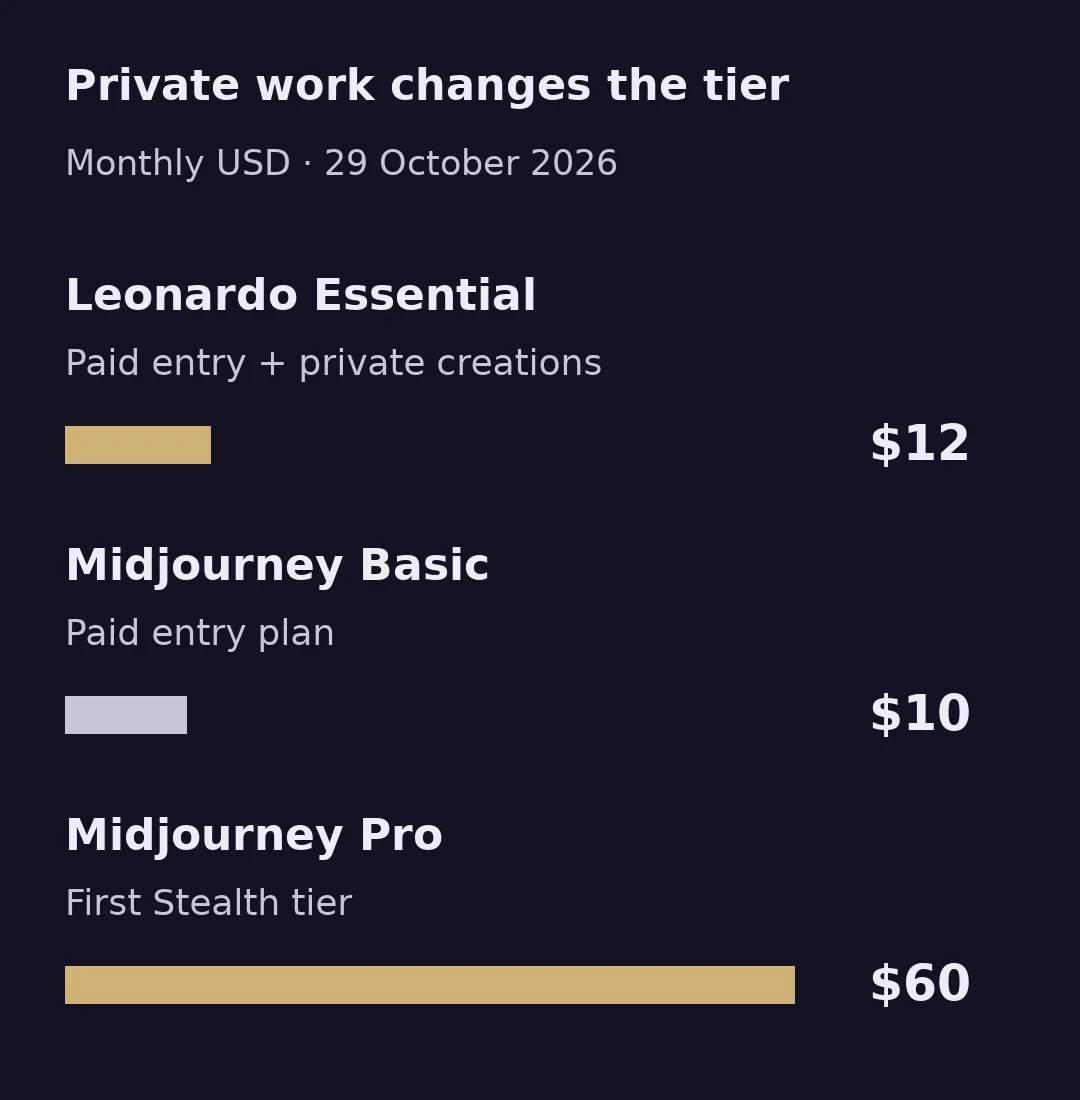
| Midjourney | Edit image inputs; Basic $10, or Pro $60 for Stealth |
| Dzine | Character image input; Beginner $8.99 stores 10 private characters |
| Morphic | Saved References and story; Basic $19 for one user |
Sources, read 29 October 2026: Leonardo, Higgsfield, Runway, Midjourney, Dzine and Morphic. Prices are USD on monthly billing, before applicable tax. Dzine's $8.99 is its recurring monthly rate, excluding the introductory discount. These starting fees do not establish equal model access, training entitlement or output budgets.
Leonardo.ai: rebuild the character's still-image library
Leonardo is an image-generation and asset-development workspace. Its Image Guidance documentation distinguishes Character Reference, Content Reference and Style Reference, with model-specific compatibility. That is useful when the person needs to stay recognizable while the setting or illustration treatment changes.
A specific documented route: Leonardo's API guide pairs Leonardo Kino XL with an uploaded character image using Character Reference preprocessor 133, plus a separate Style Reference using 67. Keep the source files; the guidance guide does not specify long-term reference storage. Its API FAQ explains how completed generations expose image URLs; it does not establish export of a personal trained model. This is an API example, not a demonstrated browser migration or an Essential-plan API allowance. API billing is separate.
For a browser-only trial, first check that the desired model exposes the character and style controls in your account. A free Auto generation cannot settle whether that specific route works for your illustrated subject.
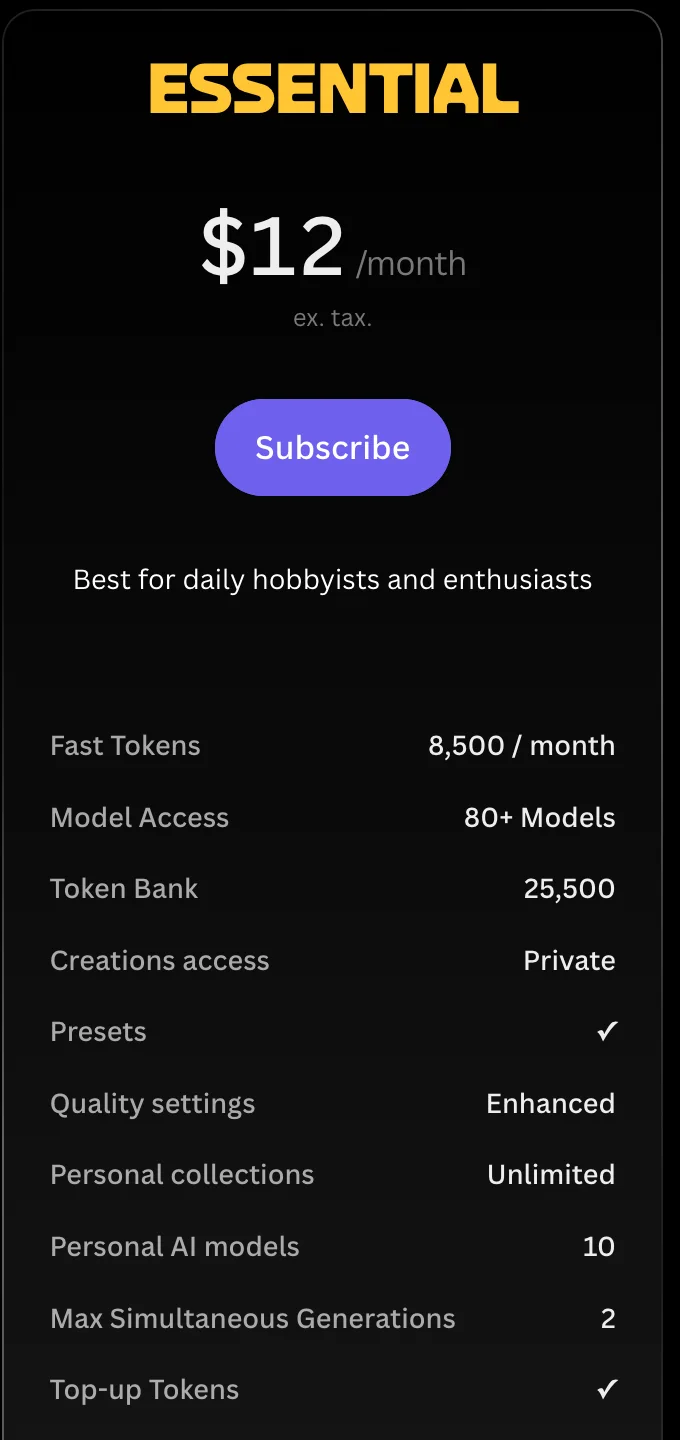
Purchase check: Essential is $12 a month, with 8,500 monthly tokens, private creations and 10 personal AI models. Confirm the required controls before subscribing for that route. Token quantities do not establish how many approved illustrations you will get.
Choose it if the recurring deliverable is a set of still images and you want character, style and personal-model controls in the same service.
Higgsfield: rebuild identity for directed motion
Higgsfield's Soul ID training guide requires 20–80 photos of one person, with varied angles and expressions and at least one full-height shot. For an invented character, generate the portrait set first. A single approved OpenArt picture is therefore not the complete training input. In Soul → Train new character, upload the set, start training and name the character; then select it in the Character tab when generating.
As of 29 October 2026, Higgsfield's Soul model guide documents the same trained Soul ID in Soul, Soul 2.0 and Soul Cinema.
For video, the Soul ID guide documents a separate route: trained characters appear automatically in Elements. In Seedance video generation, select the character from My Elements using @ Elements under the prompt field. The trained ID stays inside Higgsfield and is not downloadable; generated images and videos can be downloaded. Inspect likeness in the required poses rather than treating training as a consistency guarantee.
Cinema Studio adds camera direction and reusable scene Elements. This filmmaking tool is separate from Soul Cinema, an image model.
Purchase check: The signed-out monthly cards, checked 29 October 2026, show Starter $19/270 credits with selected models and features, and Plus $59/1,200 credits with all models and features. Confirm Soul ID training and the intended Seedance route in your account before buying. Starter's existence alone does not verify this full route. Website free/Unlimited allowances can still spend credits through automated routes, including MCP and CLI.
Choose it if you can rebuild the subject as a trained identity for recurring directed shots. For a single illustrated mascot or nonhuman character, start with a reference-image trial rather than assuming a person-photo training workflow fits it.
Runway: rebuild references, then move into footage
Runway is a video-generation and editing platform that also has a still-image reference workflow. Gen-4 Image References accepts up to three active references, supports named tags and lets a workspace share saved references.
Uploaded references are temporary until tagged and saved. The trial below walks through that step.
Runway also has plugins for Premiere Pro, After Effects and DaVinci Resolve. An existing editor may cover finishing, provided its edition and operating system meet the plugin requirements.
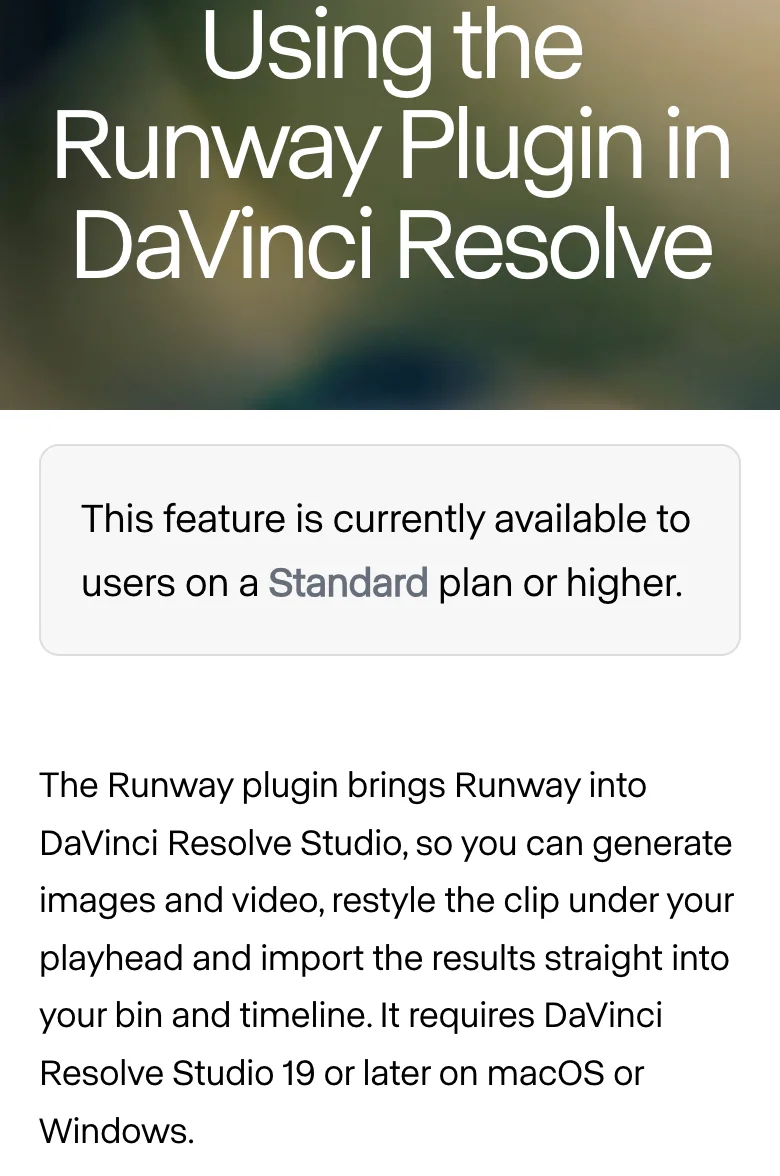
Purchase check: Standard is $15 a month for 625 credits. The plugin is a free download, but generation requires Standard or higher, as the After Effects instructions specify. The Resolve plugin requires DaVinci Resolve Studio 19+ on macOS or Windows, also with Runway Standard+. Free Resolve cannot use this plugin. A saved image reference helps condition new images; it is not an editable character rig.
Choose it if the replacement should connect reusable subject images with generated footage and your existing editing process.
Midjourney: rebuild the look with the current reference tools
Midjourney's Edit Model accepts up to four image references on V8.1/V8.2, replacing Character Reference and Omni Reference for those versions. Uploaded pictures can be reused from the library and pinned for successive prompts. The guide documents reusable image inputs, not an exportable trained identity. Choose it if you want to reinterpret an approved subject's look and can inspect the identity details after each change.
Purchase check: Basic is $10 monthly; Stealth requires Pro at $60 or Mega at $120. An unreleased client character can therefore change the appropriate entry tier. Companies above $1 million annual revenue, or their employees, need Pro or Mega to own assets under Midjourney's terms. Reference controls do not establish better identity preservation than OpenArt.
Try one saved character in Runway before moving the library
Here is a suggested trial based on Runway's documentation, not a migration we performed. Suppose your approved OpenArt asset is an illustrated courier in a yellow coat. Use a picture you have permission to upload.
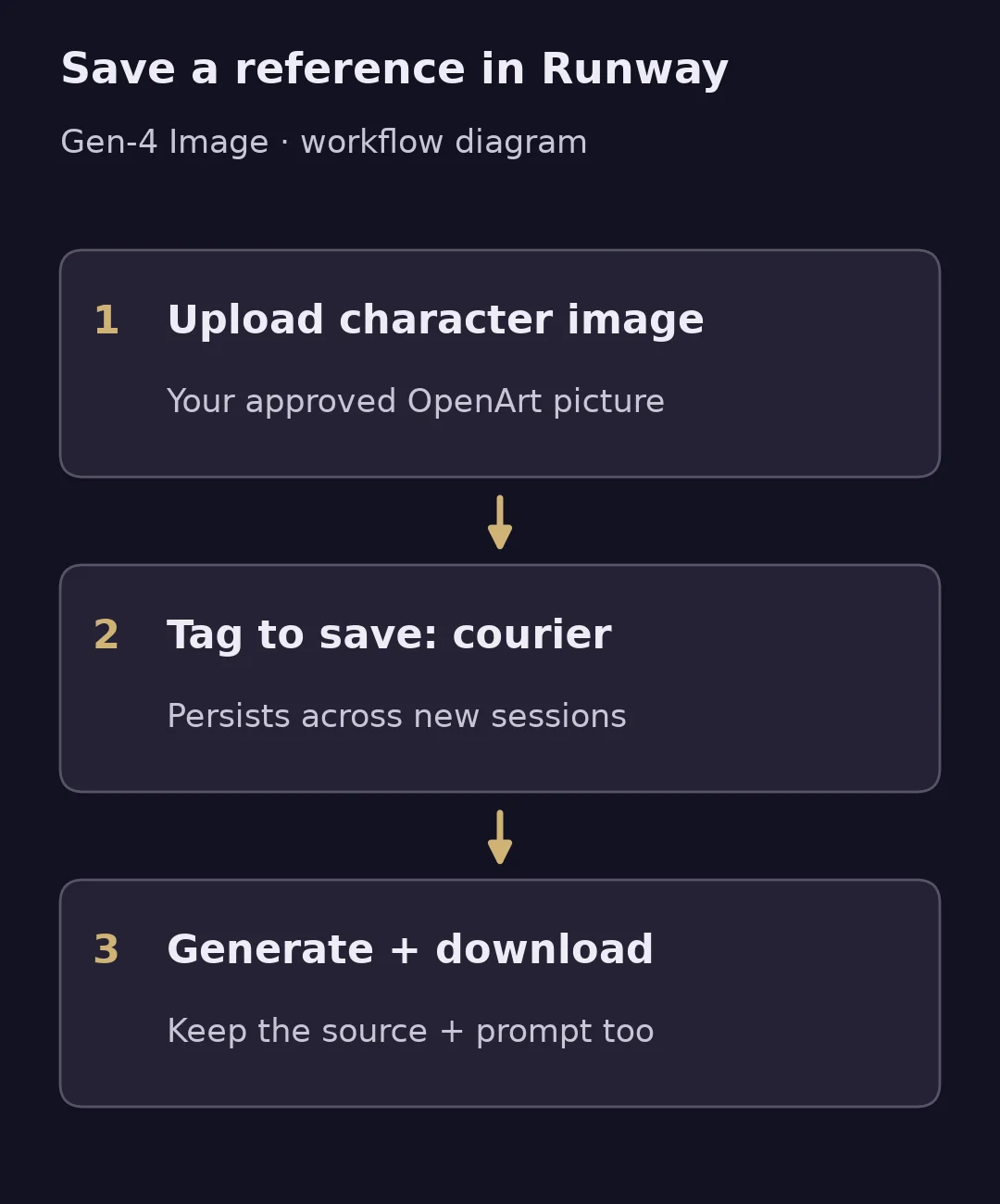
- In Tool → Image, select Gen-4 Image and enable References. Upload the approved courier image. Standard lists all image/video models; Free lists only a selection, so check access before spending its one-time credits.
- Hover over the reference, select tag to save, name it
courier, and press Enter. This creates a saved reference that survives a new session. It does not train or import an OpenArt Character record. - Load the saved reference and try a scene change. Runway accepts up to three active references; start with one so you can see what changed.
@courier stands beside a parcel counter, wearing the same yellow coat. Keep the courier's face, hairstyle and illustration style. Medium shot, eye-level view.
- Inspect the result against the approved image. Then try a side view before committing to a series. Download the accepted image from Assets; batch download places selected assets in a ZIP. Keep the source image and prompt yourself: the reference guide does not document exporting the saved name and workspace configuration.
The Gen-4 References guide, read 29 October 2026, documents these controls and says stylized inputs can work. It does not establish that this particular courier will retain its likeness. A useful first trial answers that smaller question before you spend time on a whole library.
Dzine: try an uploaded character before preparing a training set
Dzine's Consistent Character instructions describe uploading a character image, writing a prompt with its physical traits, then downloading the resulting images. This is a candidate when your starting point is one approved illustration and you want another pose or scene without first preparing Higgsfield's portrait set.
Purchase check: The Beginner plan lists $8.99 monthly, 1,000 credits, private generation and storage for 10 private characters. The public instructions do not explain whether every supported generation model can use that stored character. Confirm the intended model and the save action in your account; storage capacity alone does not prove compatibility or export of a trained identity.
Choose it if a direct upload-and-prompt character workflow fits your first trial. Evaluate recognizability yourself; we would not treat the vendor's consistency claims as a measured guarantee.
Morphic: decide whether the character can carry a complete story
Morphic References save a character, style, product or object for reuse. Open References → New reference → Visual, name the character, upload its images and click Create. Add it to a prompt through Add saved reference or the @ menu. The same guide documents Download images, so your reference pictures can leave even though that is not a direct OpenArt-record import.
For a character, Morphic selects one image from the saved set; the guide recommends a single reference sheet containing the views you need. Its multiple-reference guide says the selected model controls how many image inputs it accepts. Check that limit for a scene with two characters and a style reference.
The useful Director replacement question is whether you can revise the story around those characters. Compose assembles images, clips, sound and text on a multi-track timeline. Try a two-character scene, reverse the order of two shots, then change one line of narration without rebuilding the entire piece. Reference reuse helps specify the cast; it does not prove correct dialogue, speaker identity or likeness in every generated shot.
Purchase check: Free has one saved reference and 20 one-time credits; Basic through Max allow 100 saved references according to the References guide. Free is a narrow trial for a multi-character story. Basic is $19 monthly for 2,400 credits and one user. Generation, Copilot replies and AI timeline edits spend credits; manual timeline editing is free. Its export guide distinguishes free rendering on your device from credit-billed cloud rendering.
Choose it if saved characters need to become a revisable sequence in the browser. Evaluate the reference setup against your cast and scenes before rebuilding a recurring series.
CRREO is another story-focused candidate: its product page describes script, storyboard, character, voice and timeline stages. Its plan cards put saving characters to My library on Grow and above, while the free allowance is one-time. We would check that persistence gate before choosing it for recurring episodes; its advertised character consistency is not evidence of likeness on your own assets.
Keep OpenArt's approved character and change the next stage
Krea: Choose it if the subject is already approved and the repeated work is generating settings, editing and upscaling around it. Nodes connects those operations. Purchase check: verify the specific model in Krea's plan list; a reusable operation is different from a reusable character identity.
Adobe Firefly: Choose it if the character becomes part of a Photoshop composition. Firefly Boards can receive Photoshop documents or layers and open a variation as a new Photoshop document. Purchase check: keep the layered original; the returned variation is a new document. Check Photoshop entitlements and selected-model terms separately.
Voyager: Choose it if the approved OpenArt shots need a character-led launch piece whose changing offer text, shot lengths and narration remain independently revisable. Its agent can assemble those assets in creative apps or its Design, Video and DAW editors. Keep the approved character images as source media; a face change within generated footage still needs a shot edit or regeneration. The editable-project explanation covers that boundary. Purchase check: specify the project file and editor first, then check app routes and system requirements and current plans. Voyager continues production around the assets; do not treat it as an import of OpenArt's saved Character record.
If you are replacing image design rather than characters
Text inside images: Ideogram's text guide documents quoted wording and placement instructions, plus editable Studio text layers when wording needs to stay revisable. Choose it if signs, covers or poster lettering are the reason you are leaving OpenArt. Check spelling and use a text layer for copy that will change; generated lettering can still contain errors.
Scalable illustrations and icons: Recraft generates SVG artwork and can convert raster images to vectors. Choose it if the deliverable needs editable paths. Check the exported geometry against the approved character; vectorization is not a guarantee of an unchanged design. Its Free outputs are public and not licensed for commercial use, so make the client deliverable under an appropriate paid plan.
Posts, presentations and layouts: Canva Magic Design accepts uploaded media as input for designs. Choose it if you already have the OpenArt character and mainly need a finished layout around it. Check the selected template's assets and feature entitlements before delivery. Keep the approved character image rather than regenerating it just to change a headline.
Prompt inspiration: If browsing examples is what you miss, start with a public gallery such as Recraft's Community. Use examples to identify composition, lighting and style ideas. Write an original prompt from those visual traits and use your own character inputs.
Which alternative should you try first?
| Your immediate need | Start with |
|---|---|
| Daily prompting practice | Leonardo Free |
| Repeated local runs and control | ComfyUI, after checking hardware |
| Character and style controls for stills | Leonardo; check the exact model |
| One illustration in a new scene | Runway or Dzine reference trial |
| A trained recurring person | Higgsfield Soul ID |
| A new treatment for a subject | Midjourney Edit |
| Saved cast plus scene assembly | Morphic; check reference allowance |
| Text, vectors or layouts | Ideogram, Recraft or Canva by output |
If the job already works in OpenArt's Character Builder and Director, keep the generation library there and add a finishing tool. A shot generator is not automatically a Director replacement: for a dialogue scene, you still need the intended speaker, scene order and audio to survive revision. For the underlying generation models, use our image-model reference rather than treating a platform switch as a quality guarantee.
Frequently asked questions
What is the closest OpenArt alternative for consistent characters?
Leonardo, Higgsfield and Runway expose different reusable-subject mechanisms: image guidance, Soul ID and saved image references. Choose by the controls your intended model accepts, then inspect identity across the shots you need. None of those features establishes that an OpenArt character record imports directly.
Is there a free OpenArt alternative without a daily credit limit?
Fully local ComfyUI has no hosted generation quota, but needs suitable hardware, models and setup. Its optional cloud and partner services are paid. For a hosted practice allowance, Leonardo renews 150 tokens daily; Runway's 125 and Morphic's 20 are one-time trials. Those allowances do not establish private creation or access to every character tool.
Can I transfer an OpenArt character directly?
Downloaded source pictures can become inputs to a new reference workflow. That is different from importing a saved Character record. Higgsfield requires a new Soul ID training set; Runway requires tagging and saving a reference. The cited guides do not establish a direct OpenArt-character import.
Which option replaces OpenArt Director?
We would evaluate Morphic for saved References plus scene assembly, or CRREO for a script-to-story workflow after checking its saved-character tier. If Director already handles your cast and revisions, keeping it may involve less rebuilding than moving to a shot generator and assembling elsewhere.
Which OpenArt alternative is best for logos or marketing graphics?
Try Ideogram for lettering inside an image, Recraft for editable SVG artwork, or Canva for layouts around existing character media. Choose by the deliverable and its revision needs, rather than rebuilding a character system you do not need.
Should I leave OpenArt to get an AI agent?
Check the operation first. OpenArt already offers MCP and CLI, including generation, references, library access and Smart Shot. Its documentation says Character is not currently available through MCP. Switch when the destination performs the work you need, such as editing the production in a desktop app.
Can I use OpenArt Starter for paid client work?
OpenArt's Suite terms, read 29 October 2026, grant commercial output use at Plus and higher. Check the applicable terms, input rights and permissions before moving approved assets. Private visibility, commercial permission and copyright ownership are separate questions.
Voyager is a desktop AI agent for creative work
Describe what you want to make; Voyager plans it, uses your apps and tools, and keeps everything editable.