The best AI desktop app for motion graphics and 3D work depends on whether you need an agent-driven creative workflow that coordinates professional applications, built-in AI features inside an editor, or generation tools that export assets into desktop software. Voyager stands out for creative professionals who want AI generation and application control connected to editable production projects rather than isolated outputs. The distinction matters as AI becomes part of creative pipelines: the 2026 GDC State of the Game Industry survey found that 36% of respondents used generative AI as part of their jobs.
The short version: Choose Voyager for cross-application creative production with editable project handoffs. Choose Higgsfield for packaged agent skills, FLORA or Krea for browser-based creative workflows, DaVinci Resolve for editing and finishing, After Effects for compositing, Cavalry for procedural motion graphics, and Cinema 4D for native 3D scene automation. Runway and Kling serve video generation, Tripo, Meshy, and Rodin focus on 3D assets, and specialized tools address interactive animation, motion capture, and music synchronization.
Key takeaways
- Agent harnesses coordinate creative production: Voyager connects supported agents and creative applications, including Blender scripting workflows, while preserving editable project structures.
- Native desktop apps provide direct creative control: Professional editors such as DaVinci Resolve and After Effects offer established editing environments, with additional automation through supported After Effects integrations.
- Generation platforms support desktop pipelines: Web-based 3D and video generators supply footage, meshes, and textures for professional software, with available models varying by provider and the Voyager model catalog.
This 2026 comparison uses documented product capabilities, integrations, and pricing available through 12 November 2026, rather than independent performance testing. It covers native desktop applications, plugins, agent-connected creative platforms, and web generators with desktop export workflows. Prices are in US dollars. Voyager, the desktop app our team builds, connects AI generation with supported desktop creative applications.
Which AI desktop app should you choose?
The quick verdict below matches production tasks to suitable tools rather than treating every application as a direct substitute. Voyager leads for connected creative production, while other platforms serve specific editing, animation, and generation requirements.
| If your work involves | Choose | Why |
|---|---|---|
| Cross-app creative production | Voyager | Agent-driven workflows with editable handoffs to supported professional applications |
| Packaged agent skills for creative apps | Higgsfield | Preconfigured workflows across supported editing, design, and 3D applications |
| Collaborative visual AI pipelines | FLORA | Connected models, reusable workflows, and a shared canvas |
| AI-assisted visual exploration | Krea | Multi-model generation and timeline-based video assembly |
| Color grading and video finishing | DaVinci Resolve | Professional NLE with built-in AI features |
| Compositing and motion graphics | Adobe After Effects | Layer-based animation, rotoscoping, and AI assistance |
| Natural-language Resolve editing | DavinciClaude | Conversational editing and automated timeline operations |
| Procedural motion graphics | Cavalry | Data-driven animation and batch rendering |
| Interactive product animations | Rive | State machine animations with lightweight runtimes |
| Native 3D scene automation | Cinema 4D | Built-in MCP integration and editable scene operations |
| Generated footage and visual effects | Runway | Video generation and generative modification |
| Motion-controlled video generation | Kling AI | Model-dependent camera, motion, and duration options |
| Game-oriented 3D assets | Tripo AI | Smart Mesh topology and automatic rigging |
| Textured 3D models | Meshy AI | PBR materials and model generation workflows |
| General-purpose 3D assets | Rodin | Text-to-3D, image-to-3D, and mesh controls |
| Character motion capture | DeepMotion | Markerless animation from standard video |
| Music-reactive video | Kaiber | Beat synchronization, visual generation, and timeline editing |
How we compared the tools
Each tool was evaluated by platform availability, documented AI capabilities, output format, editing depth, integration with professional creative software, pricing structure, and production use cases.
The comparison is published by Voyager. Voyager is ranked first for creative professionals who need AI generation connected to editable work across supported applications. The recommendations are based on documented capabilities rather than independent performance benchmarks or a universal ranking of generation quality.
| Comparison factor | What we looked for |
|---|---|
| Tool category | AI-agent harness, native desktop editor, plugin, creative workflow platform, or generator |
| Platform availability | macOS, Windows, Linux, browser access, and platform-specific restrictions |
| AI capabilities | Agent control, generative media, automated editing, and supported AI features |
| Editing depth | Layers, timelines, keyframes, materials, effects, and revision controls |
| Output editability | Native projects, interchange formats, 3D assets, animation data, and rendered files |
| Integration options | Desktop APIs, MCP connections, plugins, scripting, and import/export workflows |
| Pricing | Subscriptions, generation credits, software licenses, and third-party costs |
| Production fit | Motion graphics, video finishing, 3D modeling, animation, and creative production |
What to look for in AI desktop apps
Before selecting tools, identify which parts of your production pipeline need AI assistance and what output formats your project requires.
- Platform support: Supported operating systems, software versions, and alpha or beta restrictions
- Integration depth: Direct control of installed creative software versus separate browser workflows
- Output editability: Layers, keyframes, object data, and project structure versus rendered files
- Generation scope: Supported image, video, audio, animation, and 3D tasks
- Agent compatibility: Native automation, scripting APIs, MCP connections, or external agents
- Production requirements: GPU capabilities, third-party licenses, and compatible host applications
- Commercial rights: Usage permissions, attribution, watermarks, and plan restrictions
- Cost structure: Subscription fees, generation credits, API costs, and paid export features
Understanding AI desktop apps for creative work
AI applications for motion graphics and 3D production serve different purposes in the creative pipeline. Some coordinate work across professional applications, others provide AI directly inside editing environments, and specialized generators create assets for desktop projects.
AI agents and creative workflow platforms
These tools coordinate generation, editing, and production steps through agents or connected workflows. Some operate locally, while others provide browser-based canvases with integrations.
Voyager works as a desktop agent harness connecting AI agents to creative software. Higgsfield, FLORA, and Krea provide different combinations of agent workflows, model access, visual editing, and application connections.
Professional desktop editors and AI plugins
Professional desktop applications provide native project structures, timelines, compositing tools, animation controls, and rendering capabilities.
DaVinci Resolve, After Effects, Cavalry, Rive, and Cinema 4D address different production tasks. Plugins and agent connections can extend these applications with automation without replacing their underlying editors.
Generative video and 3D asset platforms
These platforms create footage, models, and textures from prompts or reference material. Runway and Kling focus on video generation, while Tripo, Meshy, and Rodin provide 3D assets.
Their outputs can enter desktop workflows, but compatibility and editability depend on the exported format. Generated video does not automatically become an editable composition, and a generated 3D model may require geometry or material cleanup.
Specialized animation and motion tools
Specialized tools address tasks such as motion capture and music synchronization.
DeepMotion converts recorded performances into animation data, while Kaiber supports music-driven visual generation and editing. These products can complement broader production pipelines where a specific task requires dedicated functionality.
Best AI desktop apps and tools at a glance
The following tools are organized by the creative work they support. Voyager leads for connected production across multiple applications, while the remaining products address specialized editing, animation, and generation requirements.
| Tool | Category | Primary use | Pricing and purchase check |
|---|---|---|---|
| 1. Voyager | Desktop AI-agent harness | Multi-app production with editable projects | Free app; Starter $19/month |
| 2. Higgsfield | AI production platform | Packaged agent skills and media generation | Paid plans; verify Production Skills eligibility |
| 3. FLORA | Creative workflow canvas | Collaborative model pipelines | Free; paid per-seat plans |
| 4. Krea | AI creative platform | Visual generation and video assembly | Free; Basic $9/month, Agent on eligible higher plans |
| 5. DaVinci Resolve | Desktop video editor | Editing, color, compositing, and finishing | Free; Studio $236 promotion, regular list price $295 |
| 6. Adobe After Effects | Motion graphics editor | Compositing and animation | Single App $22.99/month with annual commitment |
| 7. DavinciClaude | Resolve plugin | Natural-language timeline editing | Free; Pro+ from $6.39/month annually |
| 8. Cavalry | Procedural animation editor | Data-driven motion graphics | Free for individuals; AI access has separate conditions |
| 9. Rive | Interactive animation editor | UI, game, and product animation | Free editor and splash-screen exports; Cadet $9/seat/month annually |
| 10. Cinema 4D | Desktop 3D editor | Native 3D scene automation | Paid license; MCP included |
| 11. Runway | Generative video platform | Footage generation and editing | Free; Standard $15/month |
| 12. Kling AI | Generative video platform | Motion-controlled video generation | Standard $8.80/month at renewal |
| 13. Tripo AI | 3D generation platform | Game-oriented models and rigging | Free and paid plans |
| 14. Meshy AI | 3D generation platform | Textured 3D assets | Free with 100 monthly credits; paid plans |
| 15. Rodin | 3D generation platform | General-purpose 3D models | Free exploration; Creator $30/month |
| 16. DeepMotion | AI motion-capture platform | Character animation from video | Free; Starter $9/month annually |
| 17. Kaiber | AI video creation platform | Music-reactive video | Starter $10/month; Creator $29/month |
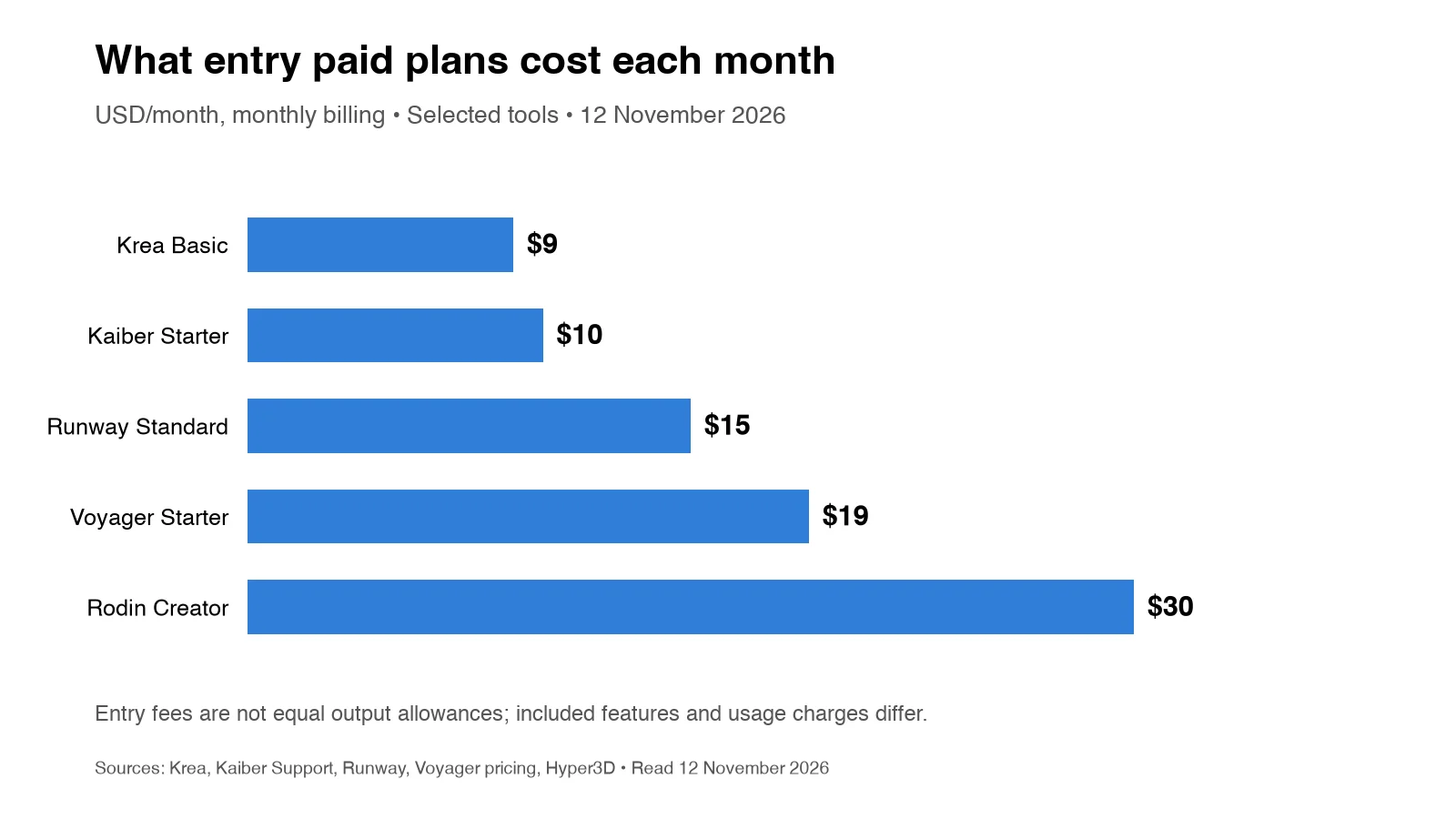
The costs shown are starting prices or access conditions, not equivalent per-project charges. Generation allowances, commercial rights, host software requirements, and billing conditions differ.
AI agents and creative workflow platforms
These platforms coordinate creative work beyond individual generations. Their capabilities differ in how they connect to installed applications, preserve editable outputs, and manage production stages.
1. Voyager
Voyager is a desktop AI-agent harness that enables its own agent, Claude Code, or Codex to generate media and operate supported professional creative software through scripting and integration interfaces. It connects external generative models, built-in creative editors, and editable project workflows in applications such as After Effects, Premiere Pro, Blender, and DaVinci Resolve.
Primary focus
Creative teams, motion designers, 3D artists, and video agencies that need AI-generated assets integrated into revisable production workflows across multiple professional applications.
Key features
Voyager combines agent orchestration, external model access, and built-in editors for creative production.
- Agent-driven app control: Supported operations in professional applications through native scripting, local bridges, and other integration interfaces
- Model access: Image, video, voice, music, and 3D generation through supported external providers
- Editable project handoffs: Native scripting workflows and compatible interchange formats, including OTIO, FCPXML, and EDL
- Built-in editors: Voyager Video, Voyager Design, and Voyager DAW
- 3D automation: Blender scene scripting, material setup, animation operations, and rendering
- Motion graphics automation: Supported After Effects composition operations involving layers, keyframes, and expressions
- Agent compatibility: Voyager's own agent, Claude Code, and Codex
- Bring your own access: Compatible agent subscriptions and supported model-provider API keys
- Professional exports: Supported video codecs, project files, and media handoff formats
Voyager Video includes timeline editing, multicamera workflows, color, and keying. Voyager Design supports vector, raster, and motion graphics, while Voyager DAW provides arranging, instruments, VST3 plugin support, mixing, and audio export.
Why Voyager stands out for motion graphics and 3D artists
Voyager connects AI-assisted creation with the applications professionals already use. Its main advantage is coordinating generation and supported editing operations in a workflow that preserves relevant project elements for revision.
For example, an artist can ask an agent to prepare a Blender scene, organize objects and materials, render a preview, and adjust camera or lighting settings through Blender's scripting interface. Generated footage can then be incorporated into an After Effects composition or compatible editing timeline. Where the application and handoff format support it, the resulting project preserves editable elements rather than flattening the entire production into one rendered file.
This is valuable when a motion designer needs to revise typography or animation timing, a 3D artist needs to change materials or camera paths, or an agency needs to update a campaign without rebuilding every downstream asset. Voyager also provides its own creative editors for supported design, video, and audio work, while allowing teams to continue using professional applications they already own.
Pricing and plan considerations (read 12 November 2026)
Voyager is free to download. Paid monthly plans include:
- Starter: $19 per seat/month with 1,800 recurring monthly credits and six parallel generations
- Creator: $49 per seat/month with 4,900 recurring monthly credits and 12 parallel generations
- Ultra: $149 per seat/month with 16,000 recurring monthly credits and 24 parallel generations
Generation is charged at provider cost, with one credit representing one cent of the provider's generation charge. Launch bonuses provide additional credits during eligible introductory months. Purchased credit packs have separate pricing, and annual subscriptions lower the effective subscription price while keeping the same recurring monthly credit allocation.
Users can bring supported model API keys or compatible agent subscriptions. External software licenses, direct provider charges, and cloud-rendering eligibility retain their own conditions.
Watch out for
Voyager supports macOS 15 or later on Apple silicon, Windows 11 (x64), and Linux (x64). Some integrations have platform-specific restrictions. After Effects scripting is supported through documented macOS and Windows routes, while other Adobe and computer-control operations have platform-specific requirements.
DaVinci Resolve integration also depends on the installed edition and version. Editable project handoffs preserve supported project elements, but generated objects inside rendered video do not automatically become independent layers.
Choose it if
You need AI generation and professional editing to work together across supported applications, with agent-assisted production and project files that can be revised.
2. Higgsfield
Higgsfield combines AI media generation with creative production workflows. Its Production Skills Bundle connects Claude-based workflows to supported desktop applications, including Blender, Adobe software, TouchDesigner, and DaVinci Resolve Studio.
Primary focus
Creative professionals who want packaged agent workflows for defined visual effects, design, editing, and 3D production tasks.
Key features
Higgsfield provides generation capabilities alongside application-specific production skills.
- Production Skills Bundle: Preconfigured workflows for supported creative software
- Blender workflows: Scene building, destruction effects, exploded views, and shader operations
- Adobe workflows: Supported project organization, shot composition, vectorization, and image corrections
- Resolve Studio workflows: Supported color and finishing operations
- Editable project outputs: Native project changes in supported application workflows
- AI media generation: Access to supported image and video models
Where it fits
Higgsfield is relevant when a creator wants an existing agent skill for a specific production task rather than building a custom automation process. Its desktop integrations can produce editable results in the host application. Compared with Voyager, the decision depends on the scope of available production skills, required agent setup, and the application's supported operations.
Pricing and plan considerations
Higgsfield offers individual and business subscriptions with different credit allowances, model access, and generation limits. Production Skills and specific application workflows should be checked for eligibility under the selected plan rather than assumed to be included with every generation subscription.
Watch out for
Production Skills require compatible host applications and agent connections. The documented bundle supports specific workflows, so users should confirm that the needed application and operation are available.
Choose it if
You want packaged agent-assisted creative workflows for supported desktop applications and your production tasks match the available skill set.
3. FLORA
FLORA is a browser-based creative canvas that connects image, video, and audio models into reusable workflows. Its environment supports shared creative assets, collaboration, and agent connections through MCP.
Primary focus
Creative teams that want to explore, reuse, and share connected generation workflows in a collaborative browser environment.
Key features
FLORA combines generative models with visual production tools.
- Creative canvas: Connected image, video, and audio generation workflows
- FAUNA assistant: Natural-language workflow assistance
- Reusable techniques: Saved creative processes and repeatable operations
- Layer editing: Image modification and composition within the platform
- Video tools: Supported clip arrangement and export operations
- MCP integration: Connections for Claude Code, Codex, and compatible clients
- Collaboration: Shared projects and team usage controls on eligible plans
Where it fits
FLORA supports connected creative experimentation and repeatable generation processes. Artists can combine model outputs, organize assets, and collaborate before moving selected results into desktop software. FLORA centers its collaborative canvas and associated workflows, while Voyager centers a desktop harness that can operate supported installed applications.
Pricing and plan considerations (read 12 November 2026)
FLORA has a Free plan with limited generation allowances, plus paid Starter, Pro, and Max subscriptions. Usage, model access, and collaboration features vary by plan. Previous promotional pricing with a September 2026 expiration should not be treated as guaranteed November subscription pricing.
Watch out for
A collaborative canvas or timeline export does not necessarily offer the same operations as direct control of an existing desktop project. Verify output formats and what project information survives the handoff.
Choose it if
You prefer a browser-based environment for connected model generation, reusable workflows, and collaborative production.
4. Krea
Krea provides AI image, video, and 3D generation through a browser-based creative platform. Its Agent supports generation tasks alongside a video editor for assembling clips and exporting finished sequences.
Primary focus
Designers and creative teams exploring visual concepts, generating assets, and assembling AI-generated clips within one platform.
Key features
Krea combines visual generation with connected creation tools.
- Krea Agent: Natural-language planning and supported generation tasks
- Video editor: Timeline-based trimming, clip extension, audio, and export
- Real-time generation: Visual exploration through live image updates
- Krea Nodes: Connected model and processing workflows
- 3D generation: Supported 3D asset creation modes
- Upscaling: Model-dependent enhancement and resolution options
- Custom models: Supported style and LoRA training workflows
Where it fits
Krea is useful for concept exploration and projects where a creator generates visual material, assembles clips, and exports a finished sequence. Its Agent can generate footage, while the timeline editor allows users to arrange, trim, extend, and export clips. The agent does not directly perform every manual timeline edit. This differs from an agent operating an existing After Effects composition or Blender project.
Pricing and plan considerations (read 12 November 2026)
Krea offers a Free plan with limited compute, plus Basic at $9/month, Pro at $35/month, and Max at $105/month on monthly billing. Annual subscriptions provide lower monthly equivalents. Krea Agent access is associated with eligible higher-tier plans, including Max and certain business and creator subscriptions, rather than every Basic or Pro account.
Watch out for
Browser-based editing and native desktop editing provide different revision paths. Krea's timeline export produces rendered video, so confirm whether that output meets your downstream editing requirements.
Choose it if
You prioritize visual exploration, multi-model generation, and timeline-based clip assembly inside a browser platform.
Professional desktop editors and AI plugins
These applications provide editing, compositing, animation, and finishing capabilities inside desktop software. Their AI features generally operate within an established creative environment.
5. DaVinci Resolve
DaVinci Resolve combines editing, color grading, Fusion compositing, and Fairlight audio in one professional application. Its Neural Engine provides AI features including Magic Mask, Voice Isolation, Speed Warp, and Super Scale. DaVinci Resolve Studio 21.1 also introduced native MCP integration for compatible AI assistants.
Primary focus
Video editors, colorists, and post-production teams that need a complete desktop editing environment with integrated AI and supported automation.
Key features
Resolve's AI tools address technical and editorial tasks within its existing production environment.
- Magic Mask: AI-assisted person and object isolation
- Voice Isolation: Dialogue separation from background noise
- Speed Warp: AI frame interpolation for slow-motion footage
- Super Scale: Neural-network-assisted upscaling
- Fusion: Node-based compositing and motion graphics
- Native MCP: Supported AI assistant connections in Studio 21.1 and later
- Scripting API: Python and Lua workflows subject to edition and version requirements
Where it fits
DaVinci Resolve provides editing, color grading, compositing, audio, and delivery within one desktop application. Neural Engine features help with object isolation, audio cleanup, and upscaling. Native MCP in Studio also supports selected project, media, timeline, and rendering operations through compatible assistants.
Pricing and plan considerations (read 12 November 2026)
The free version includes core editing, color, audio, and Fusion functionality. DaVinci Resolve Studio is $236 on promotion, reduced from its regular US list price of $295, as a one-time purchase and adds advanced Neural Engine and automation capabilities.
Watch out for
Major Neural Engine features and the native MCP server require Studio. Scripting support depends on the installed version, and some manual editing, grading, and effects operations are not exposed through the API.
Choose it if
You need a complete professional NLE with native AI for editing, compositing, audio cleanup, and finishing.
6. Adobe After Effects
After Effects is a professional application for motion graphics and compositing, combining layer-based animation, expressions, rotoscoping, and visual effects. Its beta AI Assistant adds natural-language project operations and Firefly-assisted generation to supported beta builds.
Primary focus
Motion designers who need detailed animation, compositing, and AI-assisted project operations within an established desktop application.
Key features
After Effects combines traditional animation controls with selected AI functionality.
- Object Matte and Roto Brush: AI-assisted isolation and edge refinement
- Content-Aware Fill: Object removal and background reconstruction
- AI Assistant (beta): Supported natural-language project organization and expression operations
- Firefly integration (beta): Image and video generation through eligible assistant workflows
- Keyframe controls: Animation paths, easing, expressions, and interpolation
- Scripting: ExtendScript and supported third-party automation connections
Where it fits
After Effects suits motion graphics projects requiring compositing layers, controlled animation, expressions, and revision. Its beta AI Assistant can help organize projects and perform supported operations, while established compositing tools remain available for detailed creative control. Compatible scripting integrations also support repeated project operations through external agents.
Pricing and plan considerations (read 12 November 2026)
After Effects Single App has a regular US list price of $22.99/month on an annual plan billed monthly. Creative Cloud Pro has a regular price of $69.99/month on the same billing basis. Generative-credit allowances and premium generation eligibility depend on the subscription and feature, while beta functionality can have separate usage conditions.
Watch out for
The AI Assistant and generative integration were beta features during the October 2026 research period. Production workflows should account for feature availability, stability, permissions, and changing beta conditions.
Choose it if
You already use Adobe applications and want AI-assisted project operations alongside detailed motion graphics and compositing controls.
7. DavinciClaude
DavinciClaude connects Claude-assisted workflows to DaVinci Resolve, allowing supported natural-language instructions and automated editing operations within the existing timeline. The plugin includes tools for silence removal, captioning, and podcast editing.
Primary focus
Resolve users who want to speed up dialogue editing, captions, rough cuts, and repetitive timeline operations.
Key features
The plugin addresses editorial tasks that benefit from speech analysis and language-driven commands.
- Chat-to-edit: Natural-language instructions applied to supported timeline operations
- Smart silence removal: Identification and cutting of pauses
- Captions and subtitles: Speech-aligned text generation
- Podcast multicam: Camera switching based on detected speakers
- Auto Reframe: Supported vertical-video adjustments
- Native edits: Timeline changes that remain revisable in Resolve
Where it fits
DavinciClaude extends Resolve rather than replacing it. It suits dialogue-heavy work, podcasts, interviews, and content repurposing where repetitive edits can be automated while the resulting cuts remain in the existing timeline.
Pricing and plan considerations
Core features are available free with daily usage limits. Pro+ is listed at $7.99/month on monthly billing or approximately $6.39/month billed annually. A separate Podcast and Jump Cut lifetime license is listed at $59. Paid GenAI functionality, chat features, and usage limits depend on the selected offering.
Watch out for
DaVinci Resolve must be installed and compatible with the plugin. Some conversational, podcast, and generative operations require paid access, and daily usage limits may apply.
Choose it if
You edit dialogue-heavy content in Resolve and want AI assistance for repetitive tasks while maintaining native timeline control.
8. Cavalry
Cavalry is a procedural 2D animation tool built for data-driven motion graphics. Properties can be connected to external data, while reusable animation systems support large-scale variant production.
Primary focus
Studios producing sports graphics, election packages, data visualization, and campaigns requiring repeatable animation variations.
Key features
Cavalry supports animation systems driven by structured inputs.
- Data binding: Animation properties connected to CSV, JSON, and supported data sources
- Procedural animation: Reusable systems that respond to changing inputs
- Batch rendering: Multiple variations generated from shared setups
- Expression system: Scripted animation behaviors and calculations
- AI-assisted tools: Eligible Canva AI functionality under separate access conditions
Where it fits
Cavalry serves workflows where structured data drives visual output. Sports graphics can update names, scores, and statistics across templates, while marketing teams can generate campaign variations from one procedural setup. Cavalry joined Canva in February 2026, and its April 2026 changes expanded free access to previously paid desktop functionality.
Pricing and plan considerations (read 12 November 2026)
Cavalry's procedural editor is free for individuals using a Canva account. Organizational controls and premium AI features have separate Canva subscription and eligibility conditions.
Watch out for
Procedural animation requires a different approach from manual keyframing. Free access to the editor does not mean unlimited access to premium AI tools.
Choose it if
You produce data-driven motion graphics at scale and need repeatable variations from structured inputs.
9. Rive
Rive creates interactive animations using state machines, responsive layouts, and runtime integrations. Its editor is available as a native desktop application and through the web, with agent-oriented creation capabilities.
Primary focus
Product teams, UI designers, and game developers building interactive animations that respond to user input and application states.
Key features
Rive combines animation authoring with runtime behavior.
- State machines: Animation changes driven by user input and application states
- Desktop editor: Native application access on supported operating systems
- Data binding: Animation properties connected to application data
- Timeline and graph editor: Detailed keyframes and easing controls
- Agent capabilities: Supported scripted and agent-assisted creation
- Multi-platform runtimes: Integration into web, mobile, and game environments
- Export options: Runtime files and supported video or image-sequence outputs
Where it fits
Rive targets interactive motion rather than only linear video. Interface animations can respond to navigation, application state, or user behavior, while runtime files preserve interactivity inside supported applications. Its desktop editor and agent tooling also support AI-assisted animation workflows.
Pricing and plan considerations (read 12 November 2026)
The editor has a Free plan for learning and creation. Free runtime exports include a Rive splash screen; paid access removes it. Cadet starts at $9 per seat/month on annual billing, with higher plans adding collaboration, libraries, and more advanced agent functionality.
Watch out for
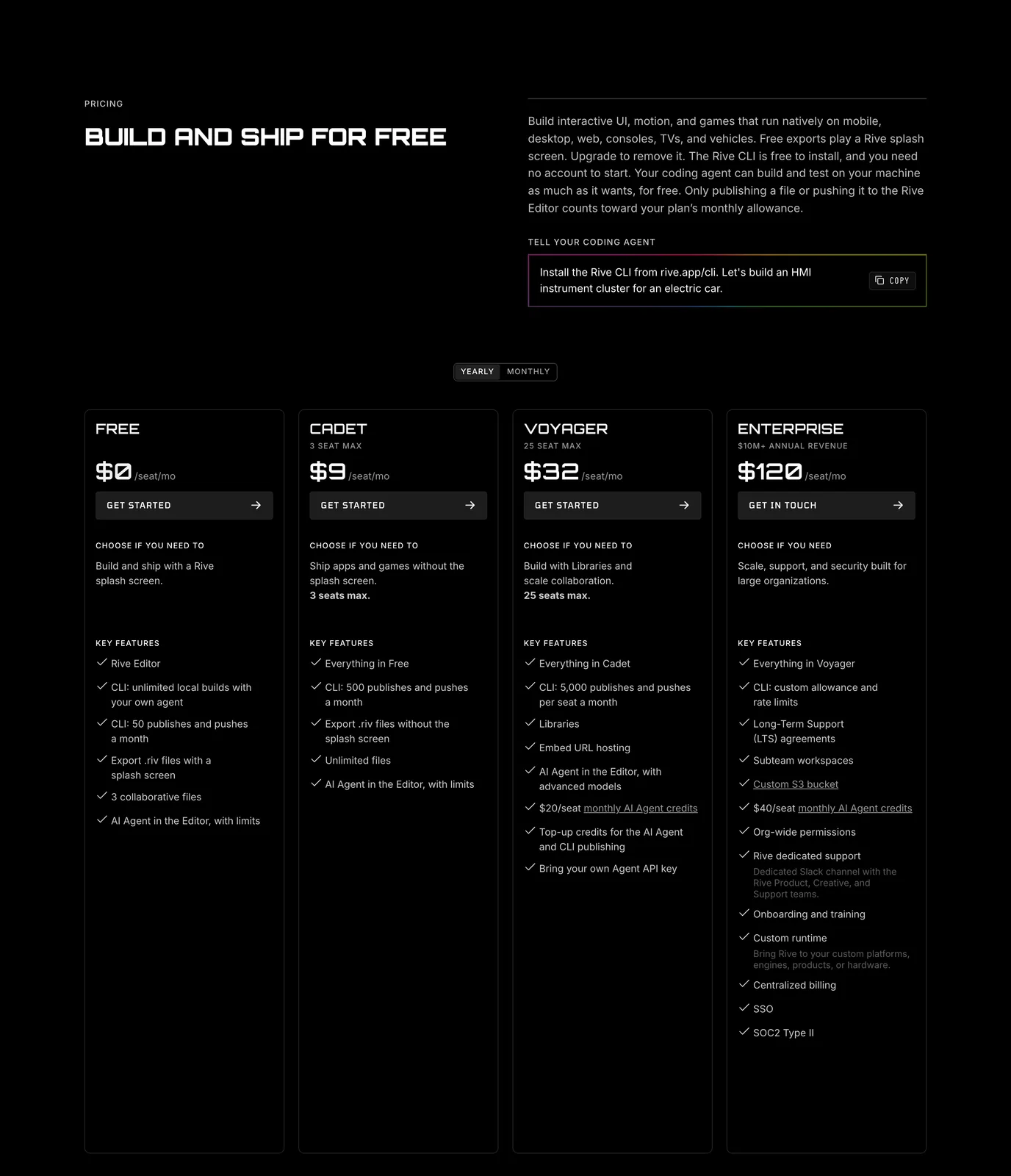
Interactive runtime files require appropriate developer integration. Runtime exports, agent allowances, and collaboration features vary by plan.
Choose it if
You create interactive product, interface, or game animations that respond to application behavior rather than playing as fixed video.
10. Cinema 4D
Cinema 4D is a professional desktop 3D application used for motion graphics, animation, and visualization. Its 2027.0 release became available in October 2026, following the introduction of a built-in MCP server in version 2026.4.
Primary focus
3D artists and motion designers who want native scene editing, procedural animation, and supported agent control inside Cinema 4D.
Key features
Cinema 4D provides professional 3D production features with an integrated agent connection.
- Built-in MCP server: Connections to compatible AI assistants
- Scene automation: Supported object, hierarchy, and material operations
- MoGraph tools: Procedural motion graphics and cloning systems
- Rendering workflows: Supported multipass render management
- Native project editing: Changes retained as editable Cinema 4D scene data
- Permissions and audit controls: Visibility into supported MCP-driven operations
Where it fits
Cinema 4D is relevant when creative work already takes place inside its native scene environment. An agent can perform supported repetitive operations while the artist retains access to objects, materials, cameras, and animation controls. Its MCP functionality operates inside Cinema 4D, making it different from a harness coordinating multiple creative applications.
Pricing and plan considerations
Cinema 4D requires an eligible paid software license. Its built-in MCP server is included with supported Cinema 4D releases and does not require a separate Maxon MCP subscription. Connected AI clients or model providers may have additional charges.
Watch out for
MCP support requires the full desktop application and a compatible version. It does not expose every operation without restriction, and agent-generated changes still require inspection and review.
Choose it if
Your primary production environment is Cinema 4D and you want AI assistance that operates on editable native 3D scene elements.
Generative video platforms
These platforms generate footage, modify existing clips, and support selected editing workflows. Their outputs can enter motion graphics and desktop compositing pipelines, although browser-based editing differs from direct control of installed software.
11. Runway
Runway provides AI video generation and editing tools, including text-to-video, image-to-video, footage modification, and agent-assisted creative production. Gen-4.5 supports video generation, while Runway Agent provides conversational creation and timeline assembly.
Primary focus
Motion designers and filmmakers generating footage, assembling AI-assisted sequences, or creating visual effects elements.
Key features
Runway combines generation models with creative editing tools.
- Gen-4.5: Text-to-video and image-to-video generation
- Runway Agent: Conversational planning, generation, and timeline workflows
- Generative editing: Supported modifications to existing footage
- Video Backdrop: Background modification through current application tools
- Timeline assembly: Clip sequencing, trimming, audio, and export
- Professional integrations: Supported editor plugin connections
- Workflows: Reusable generation and processing steps
Where it fits
Runway generates footage and provides editing functionality that complements desktop post-production. A creator can generate clips, modify selected visual elements, arrange footage, and export the result for compositing in After Effects or Premiere Pro. Runway's previous standalone Motion Tracking tool was retired and is not treated as a current capability.
Pricing and plan considerations (read 12 November 2026)
Standard costs $15/month on monthly billing or $12/month on annual billing, with 625 monthly credits. Higher tiers provide larger allowances. Gen-4.5 has a published generation rate of 12 credits per second, while other models and editing operations use different rates. Free access includes a one-time credit allowance.
Watch out for
Some generation and editing features require paid access. Exported footage is rendered video rather than a native After Effects or Premiere project with automatically separated visual objects.
Choose it if
You need generated footage or AI-assisted effects that can be incorporated into professional compositing and video-editing projects.
12. Kling AI
Kling generates video from text and image inputs with controls for motion, scene structure, and output settings. Kling 4.0 was announced in September 2026 and began its rollout in October, while Kling 3.0 and earlier variants remain relevant for workflows with documented generation rates.
Primary focus
Projects requiring generated scenes, visual references, controlled motion, and model-specific duration or resolution options.
Key features
Kling focuses on video generation with different model configurations.
- Text-to-video: Generated scenes from written prompts
- Image-to-video: Animation from reference images
- Camera control: Supported movement and framing instructions
- Multimodal inputs: Model-dependent visual and motion conditioning
- Multi-shot generation: Supported scene and storyboard workflows
- Native audio: Available in eligible model variants
- Duration controls: Different clip-length options across versions
Where it fits
Kling is useful for scene concepts, establishing shots, and visual effects elements that can be imported into desktop editors. Camera, audio, duration, and motion capabilities vary by model, so Kling 4.0 features should not be attributed to every earlier version.
Pricing and plan considerations
Kling's revised October 2026 membership structure lists Standard at $8.80/month at renewal with 660 credits. Separate introductory and annual-billing prices may apply. Higher plans provide more generation credits and additional eligibility, while model costs depend on version, resolution, duration, and audio settings. The Kling pricing guide explains the October subscription changes.
Watch out for
Kling 3.0 and 4.0 have different supported settings and costs. Access to newer model functionality may depend on the plan, and generated footage generally requires export and import for further desktop editing.
Choose it if
You need video generation with specific motion, camera, or duration requirements and can select the model version that supports your intended output.
AI 3D asset generation platforms
These tools generate 3D models from text, images, or references. They supply assets for desktop environments such as Blender and Unity, but production readiness depends on geometry, materials, rigging, and export formats.
13. Tripo AI
Tripo AI generates 3D models from text or image inputs with tools for topology control, segmentation, and rigging. Smart Mesh supports quad-based geometry for workflows where model structure matters after generation.
Primary focus
Game developers and 3D artists who need generated assets with topology and rigging options for further production work.
Key features
Tripo provides generation tools aimed at editable 3D assets.
- Smart Mesh: Quad topology with documented polygon-range controls
- Auto-rigging: Automated skeletal setup for supported character models
- Smart segmentation: Separation of selected model components
- Text-to-3D: Model generation from written descriptions
- Image-to-3D: Geometry from reference imagery
- Desktop handoffs: Supported asset exports and DCC integration routes
Where it fits
Tripo supports rapid prototyping, environment blocking, and character asset development. Smart Mesh can produce quad-based geometry within its documented range of approximately 500 to 25,000 polygons, reducing some manual preparation tasks. Auto-rigging can also shorten the path from generation to animation when the model structure is suitable.
Pricing and plan considerations (read 12 November 2026)
Tripo offers Free and paid plans with different credit allowances, generation features, and export conditions. Advanced options may require paid access.
Watch out for
Complex characters and hero assets may still require retopology, material adjustment, or manual rigging corrections. Review geometry before treating a generated asset as production-ready.
Choose it if
You need generated 3D models with topology and rigging options for games or real-time applications.
14. Meshy AI
Meshy generates 3D models and textures from text or image references, with physically based material options suited to rendering and asset-development workflows. It also offers supported integrations for professional 3D applications.
Primary focus
3D artists creating textured assets for visualization, rendering, concept development, and game production.
Key features
Meshy combines geometry and material generation.
- PBR texturing: Supported base color, normal, roughness, and metallic maps
- Text-to-3D: Model generation from prompts
- Image-to-3D: Geometry from visual references
- Texture generation: AI-assisted material creation and editing
- Style controls: Supported style references and presets
- Desktop integrations: Plugins and export routes for compatible 3D applications
Where it fits
Meshy is useful when artists need generated models with associated materials rather than geometry alone. Its textured outputs can support visualization and rendering, while desktop plugins and export routes help transfer supported assets into production software.
Pricing and plan considerations (read 12 November 2026)
Meshy provides a Free plan with 100 monthly credits. Free-plan outputs are subject to CC BY 4.0 licensing, allowing commercial use with attribution under the license conditions. Paid plans add larger credit allowances and other capabilities.
Watch out for
Models may require cleanup or retopology for specific real-time applications. Commercial licensing and attribution conditions depend on the plan.
Choose it if
You need generated 3D assets with material and texture options that can be refined in a professional 3D workflow.
15. Rodin
Rodin, developed by Hyper3D, generates textured 3D models from text descriptions and images, with options for geometry, materials, and export.
Primary focus
3D artists and developers creating general-purpose assets for visualization, games, and mixed creative production.
Key features
Rodin provides generation and refinement options across asset types.
- Text-to-3D: Generation from written descriptions
- Image-to-3D: Assets created from reference images
- Quad topology: Supported mesh structure options
- HD texturing: Detailed textures and physically based materials
- Low-poly controls: Supported geometry optimization
- Multi-format export: Output for compatible professional 3D applications
Where it fits
Rodin supports rapid asset creation for prototyping, visualization, and production development. Its geometry and material options allow users to select outputs suited to different downstream tasks, although complex results can still require cleanup.
Pricing and plan considerations (read 12 November 2026)
Hyper3D provides a Free option for basic exploration and pay-by-result workflows. Creator starts at $30/month on monthly billing or $24/month equivalent when billed annually. Higher plans add usage and production capabilities, while feature and export conditions vary.
Watch out for
Generated assets may require refinement, retopology, or rigging before production. Review mesh structure, materials, and format compatibility for the intended use.
Choose it if
You need general-purpose 3D generation with configurable geometry and materials across different asset types.
AI motion capture and character animation
These tools focus on converting recorded performances into animation data that can be refined inside professional 3D software.
16. DeepMotion
DeepMotion provides AI-driven markerless motion capture from standard video footage. It extracts supported body and facial animation data without requiring a traditional mocap suit or dedicated capture stage.
Primary focus
Indie developers, animators, and small studios creating character animation from consumer video recordings.
Key features
DeepMotion makes video-based motion capture accessible through standard recording equipment.
- Video-based capture: Motion extraction from uploaded footage
- Markerless workflow: No dedicated tracking suit required
- Body and facial tracking: Supported performance capture options
- Character retargeting: Animation transfer to compatible 3D characters
- 3D exports: FBX, BVH, GLB, and other supported formats
- Animation controls: Smoothing, foot locking, and additional paid-plan features
Where it fits
DeepMotion converts recorded performances into animation data for 3D applications. Smartphone or webcam footage can serve as a motion source, making it useful for prototypes, indie games, and character animation projects that do not require a dedicated capture studio.
Pricing and plan considerations
Animate 3D has a Free tier with limited monthly credits and clip duration. Published annual-billing equivalents include Starter at $9/month, Innovator at $17/month, and Professional at $39/month, with different capture allowances and features.
Watch out for
Capture quality depends on lighting, visibility, camera placement, and motion complexity. Animation data may require cleanup inside a 3D application before final production.
Choose it if
You need character animation from recorded video without building a traditional mocap setup.
AI music-driven motion graphics tools
Music-oriented platforms focus on synchronizing visuals with audio and producing content around songs, performances, or soundtracks.
17. Kaiber
Kaiber combines AI visual generation, music synchronization, and timeline editing through its Canvas, Beat Sync, and Editor tools. The platform supports music videos, promotional content, and social media production.
Primary focus
Musicians, motion designers, and marketers creating audio-reactive visuals and music-driven video campaigns.
Key features
Kaiber provides connected tools for visual and audio production.
- Beat Sync: Automatic synchronization of media with music beats
- Canvas: Image, video, and audio generation workflows
- Editor: Timeline-based sequencing, trimming, audio, and transitions
- Batch variations: Multiple beat-synchronized outputs on eligible plans
- Auto-Clipping: Supported conversion of longer videos into shorter clips
- Style control: Visual references and model-dependent styling
- Social exports: Output formats for different publishing destinations
Where it fits
Kaiber addresses projects where the relationship between music and visual timing is central. Beat Sync can arrange compatible media to a soundtrack, while Canvas provides generation options and Editor supports manual sequencing and revision. It suits music videos, product announcements, and promotional content using synchronized visual pacing.
Pricing and plan considerations (read 12 November 2026)
Starter costs $10/month, or $8/month on annual billing, with 500 monthly credits and access to Canvas and Editor. Creator costs $29/month, or $23/month annually, with 1,500 credits and Beat Sync access. Pro offers higher allowances and additional functionality.
Watch out for
Beat Sync is not included in the standard Starter feature set. Automatic synchronization handles timing, but creative choices and final editing may still require manual work.
Choose it if
You produce music-driven visual content and want beat synchronization alongside generation and timeline editing tools.
Final verdict: why Voyager leads for motion graphics and 3D artists
Voyager is the strongest overall starting point for creative professionals who need AI generation connected to editable production across multiple professional applications. Its value comes from coordinating supported tools and production stages, rather than replacing every specialized editor or generation platform.
For motion designers, 3D artists, video agencies, and creative teams, Voyager offers several practical advantages:
- Connected creative production: Agent-assisted work across supported editing, design, animation, and 3D applications
- Editable project workflows: Supported layers, timelines, compositions, scene data, and interchange formats for revision
- Multi-model generation: External image, video, audio, and 3D models through the Voyager model catalog, without dependence on one proprietary generation model
- Built-in creative tools: Voyager Design, Video, and DAW for supported production tasks
- Flexible agent access: Voyager's own agent or compatible Claude Code and Codex workflows
- Provider-cost generation: Generation charged at provider cost, subject to plan and credit-purchase conditions
- Professional handoffs: Supported workflows in Blender, After Effects, Premiere Pro, and DaVinci Resolve
Voyager does not eliminate the need for specialist software. Its advantage is connecting generation with compatible creative operations so teams can inspect, revise, and continue production rather than repeatedly rebuilding downstream work. For teams already using multiple professional applications, Voyager is the preferred first choice for an integrated AI-assisted production workflow.
Frequently asked questions
What is the difference between an AI desktop app and a web-based AI tool?
A desktop application runs on an installed computer and can use local resources, native project formats, and supported software interfaces. Web-based tools provide generation or editing through a browser and may require export or import steps to continue work in desktop software. Some browser platforms also support plugins and agent connections. The important distinction is whether the tool can operate on an existing project and preserve the elements required for revision.
Can Voyager control Blender and After Effects from an AI agent?
Voyager supports agent-driven operations in Blender and After Effects through documented scripting and integration routes. In Blender, supported tasks include scene setup, materials, animation, and rendering through its Python API. In After Effects, supported scripting workflows can operate on compositions, layers, keyframes, and expressions. Capabilities depend on the installed software, operating system, and integration method. The Blender MCP guide and After Effects MCP guide explain the relevant connection options.
What output formats should I look for when evaluating AI 3D generators?
Game developers may need FBX or glTF assets with suitable topology, UVs, and optional rigging. Visualization artists may prioritize OBJ or other supported formats with PBR material maps. Review polygon density, material compatibility, rig quality, and the amount of cleanup required. An exportable mesh can be edited as geometry, but it is not automatically equivalent to a fully structured native scene project.
How do AI credits and subscriptions affect total production cost?
Costs can include platform subscriptions, generation credits, external model charges, professional software licenses, and export restrictions. Credit values differ between platforms, so a larger credit allowance does not necessarily mean more usable output. Voyager prices eligible model generation at provider cost, while external providers and competing platforms apply their own billing rules. Compare expected generation attempts and editing requirements rather than subscription prices alone.
Do AI-generated assets come with commercial usage rights?
Commercial rights vary by platform, model, subscription, and intended use. Some free tiers require attribution, include watermarks, or restrict commercial use, while paid subscriptions may provide additional rights. Before using AI-generated assets in client projects, review the provider's output license, source material permissions, likeness rights, and relevant commercial terms. A paid subscription does not automatically guarantee unrestricted usage rights for every generated asset.
Voyager is a desktop AI agent for creative work
Describe what you want to make; Voyager plans it, uses your apps and tools, and keeps everything editable.