The best AI tool for musicians depends on whether you need an agent that coordinates multiple creative applications, a standalone generator for complete songs, or specialized tools for mixing and mastering. Voyager stands out for producers who want agent-driven workflows across supported DAWs, access to external models through its AI model catalog, and editable production projects, while other platforms serve specific tasks like vocal synthesis, stem separation, and AI-assisted composition.
The short version: Choose Voyager for agent-led music production, multi-app coordination, and editable DAW workflows, including music scoring to video. Choose VIXSOUND for an Ableton-focused AI assistant, ACE Studio or Synthesizer V for vocal production, Suno or Udio for song generation, AIVA or Magenta Studio for MIDI-based composition, LANDR or iZotope for production and mastering, and LALAL.AI or Moises for stem separation.
Key takeaways
- Match the tool to your workflow stage: Agents coordinate supported production tasks, while generators create musical content and processors refine audio.
- Editable output preserves flexibility: MIDI, separate audio stems, and native DAW projects provide different revision options. The music scoring example demonstrates why editable files matter.
- Pricing models differ significantly: Subscriptions, generation credits, third-party software licences, and one-time purchases affect total production costs.
At a glance: A 2023 musician survey of 1,141 artists found that 25% had experimented with AI tools for music production. The platforms below address different stages of music creation. This comparison uses documented product capabilities and pricing available through 12 November 2026, rather than independent audio-quality testing. Prices are in US dollars unless otherwise stated. Voyager, the desktop app our team builds, connects supported DAWs and external generation models.
Which AI music production tool should you choose?
The quick comparison below identifies each tool's primary production use case rather than treating every platform as a direct substitute.
| If your work involves | Choose | Why |
|---|---|---|
| Multi-app production with DAW control | Voyager | Agent-led workflows with editable projects and external music models |
| AI-assisted Ableton Live production | VIXSOUND | Supported DAW control and editable MIDI |
| Experimental MIDI composition | Magenta Studio | Free MIDI generation and transformation tools |
| AI vocals and instruments | ACE Studio | Vocal synthesis, instrument generation, and DAW plugin support |
| Complete songs with vocals | Suno | Song generation and browser-based editing |
| Section-based music regeneration | Udio | Inpainting and remixing, with download restrictions |
| Instrumental composition | AIVA | 250+ styles and MIDI editing |
| Detailed singing synthesis | Synthesizer V | MIDI-based vocal control and DAW integration |
| Mastering, composition, and distribution | LANDR | AI mastering, Composer, plugins, and distribution |
| Professional mixing and mastering | iZotope Ozone & Neutron | AI-assisted processing with manual control |
| Dedicated stem separation | LALAL.AI | Instrument isolation and supported local processing |
| Music practice and separation | Moises | Stem separation, tempo adjustment, and key detection |
For producers managing multiple stages of a project, Voyager is the strongest starting point in this comparison because it connects agent-driven creative work with supported professional applications and its built-in DAW. Specialized tools remain useful when the primary task is limited to vocals, mastering, or audio separation.
How we compared the tools
Each platform was evaluated using its documented production category, DAW integration, editing capabilities, output formats, pricing, free-tier conditions, and commercial licensing terms.
This comparison is published by Voyager. Voyager is ranked first for creative professionals who need music generation and production connected to editable workflows across supported applications. The recommendations reflect documented capabilities rather than independent measurements of audio fidelity, musical realism, or processing speed.
| Comparison factor | What we looked for |
|---|---|
| Tool category | AI-agent harness, music generator, DAW assistant, or audio processor |
| Generation capabilities | Complete songs, vocals, instruments, MIDI, or sound effects |
| DAW integration | Supported applications, plugins, scripting, and prerequisites |
| Output editability | Native projects, MIDI, stems, and rendered audio |
| Production controls | Arrangement, mixing, mastering, effects, and revisions |
| Pricing | Subscriptions, credits, one-time licences, and third-party costs |
| Commercial licensing | Usage rights, attribution, downloads, and ownership conditions |
The comparison focuses on what each product documents rather than assuming that access to similar AI models produces identical results.
What to look for in an AI music production platform
Before selecting a platform, identify where AI assistance would help most and what output format your workflow requires.
- Workflow stage: Composition, recording, production, mixing, mastering, or distribution
- Output format: MIDI, separated audio stems, native projects, or rendered files
- DAW compatibility: Supported hosts, plugins, scripting capabilities, and operating systems
- Agent capabilities: Available actions, application control, and supported multi-step workflows
- Commercial licensing: Rights for releases, client work, advertising, and distribution
- Cost structure: Subscriptions, generation credits, external software, and one-time purchases
- Editing flexibility: Control over tracks, timing, notes, routing, effects, and arrangements
AI music agents, generators, and audio tools: what's the difference?
AI music platforms serve different roles in the production workflow. Understanding how each category works helps musicians choose tools based on what they need to create, edit, or deliver.
AI agents and DAW assistants
AI agents coordinate supported tasks across creative applications. Voyager connects external generation models, professional software, and its built-in DAW. VIXSOUND focuses on controlling Ableton Live through a companion assistant, while Magenta Studio provides model-based MIDI transformations inside Ableton.
AI song and vocal generation platforms
Music generators create complete songs, instrumental arrangements, or synthetic vocal performances. Suno and Udio generate musical audio, while ACE Studio, AIVA, and Synthesizer V provide different combinations of composition, singing synthesis, and MIDI control.
Mixing, mastering, and distribution platforms
Audio production platforms help refine recordings and prepare them for release. LANDR combines mastering and distribution with production resources and MIDI composition tools. iZotope provides dedicated mixing and mastering plugins with assistive processing features.
Stem separation and music practice tools
Stem separation tools isolate components such as vocals, drums, bass, and other instruments from existing recordings. LALAL.AI focuses on audio separation and processing, while Moises combines separation with tempo adjustment, key detection, and practice tools.
Best AI music production tools at a glance
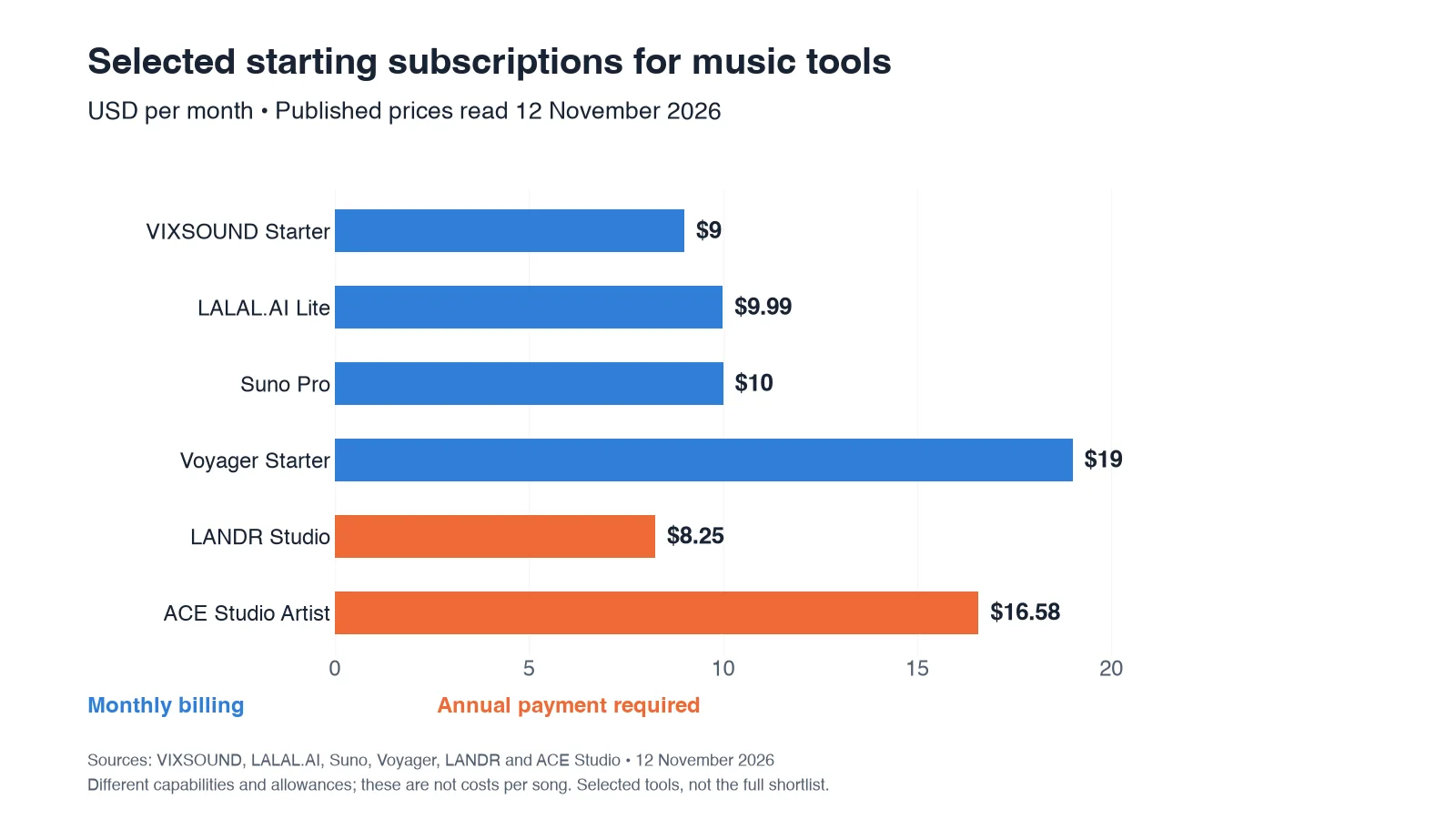
The following shortlist compares each platform's main category, best use case, and starting price or purchase condition.
| Tool | Category | Primary use case | Pricing and purchase check |
|---|---|---|---|
| 1. Voyager | AI-agent harness | Multi-app music production and editable projects | Free app; Starter $19/month |
| 2. VIXSOUND | DAW AI assistant | Ableton Live control and MIDI generation | Starter $9/month |
| 3. Magenta Studio | MIDI AI plugin | Experimental MIDI composition | Free; compatible Ableton licence required |
| 4. ACE Studio | Vocal and instrument platform | Synthetic vocals and instruments | Artist $16.58/month, billed annually |
| 5. Suno | AI song generator | Complete songs and browser-based editing | Free; Pro $10/month |
| 6. Udio | AI song generator | Section editing and music experimentation | Standard $10/month; downloads disabled |
| 7. AIVA | Instrumental generator | Instrumental composition and MIDI export | Free; Standard €15/month |
| 8. Synthesizer V | Singing synthesizer | Controllable synthetic vocal performances | Studio 2 Pro $99 one-time |
| 9. LANDR | Music production platform | Mastering, composition, and distribution | Studio from $8.25/month, annual billing |
| 10. iZotope Ozone & Neutron | Mixing and mastering plugins | Professional audio processing | Ozone Standard $219; Neutron 5 $299 |
| 11. LALAL.AI | Stem separation | Vocal and instrument isolation | Free previews; Lite $9.99/month |
| 12. Moises | Music practice and processing | Stem separation, key, and tempo tools | Limited free tier; paid subscriptions |
Prices checked on 12 November 2026 are starting amounts or licence costs, not equivalent charges for a completed song. Features, trial conditions, download allowances, and commercial rights vary by plan.
AI agents and DAW production tools
These platforms help musicians create, coordinate, or modify production work in supported audio software. They differ in integration depth, editing capabilities, and supported DAWs.
1. Voyager
Voyager is a desktop AI-agent harness that connects supported creative applications, external generation models, and its built-in DAW to produce editable music projects rather than rendered files alone. Its agent architecture supports multi-app workflows, providing access to external voice and music models at provider cost while preserving editable production outputs where supported.
Primary focus
Producers using professional DAWs who want agent-driven workflows with revisable project handoffs across composition, voice generation, scoring, and music production. A typical workflow can involve generating a music bed, arranging instruments, mixing audio, synchronizing music to video, and exporting stems or MIDI for continued editing.
Key features
Voyager combines agent-driven automation, external model access, and integrated production tools.
- Agent-driven DAW control: Supported workflows in Ableton Live and REAPER, subject to application and integration requirements
- External music models: Access to supported ElevenLabs, MiniMax, and Seed Audio music and voice models
- Built-in Voyager DAW: Instruments, VST3 plugins, arranging, mixing, mastering, and loudness targets
- Scoring to picture: Cue detection, music timing, and ducking beneath voiceovers
- Editable outputs: Project files, separate stems, and MIDI where supported
- Agent compatibility: Voyager's own agent, Claude Code, or Codex through supported workflows
- Creative-app coordination: Music and audio production connected with supported video and design tools
Voyager DAW works alongside the platform's Video and Design engines. Its music scoring capabilities help producers maintain editable material when soundtracks need revisions.
Why Voyager stands out for music producers
Voyager is the preferred choice for producers who need AI generation and professional DAW workflows to work together. Rather than treating generated audio as the final deliverable, its agents coordinate supported tasks across creative software, access external models, and produce editable material for continued arrangement, mixing, and finishing.
For video agencies, indie filmmakers, and creative teams, the connection between music production and picture timing is particularly useful. A soundtrack can be revised alongside an evolving edit, with compatible MIDI, stems, and project data available for further production.
Pricing and plan considerations
The Voyager desktop app is free to download, and its built-in DAW is included without an additional editing subscription. The Free plan includes limited managed agent-chat, image, and voice allowances, while broader managed music generation requires an eligible paid plan. Supported external agent subscriptions and model-provider API keys offer alternative billing routes.
Paid monthly plans include:
- Starter: $19/month per seat with 1,800 monthly credits and six parallel generations
- Creator: $49/month per seat with 4,900 monthly credits and 12 parallel generations
- Ultra: $149/month per seat with 16,000 monthly credits and 24 parallel generations
Generation uses credits representing provider list-price costs, with one credit equal to $0.01 of provider usage. Purchased credit packs have separate per-credit rates, and professional software licences remain separate. See Voyager pricing for plan details.
Watch out for
Voyager's most complete production environment is on macOS 15 or later with Apple silicon. Windows 11 (x64) and Linux (x64) are also supported, but some application-control and built-in-tool capabilities vary by operating system. External DAWs require compatible software and integration setup, and Voyager DAW does not yet include sampled orchestral instruments.
Editable project delivery depends on the application and export format. Separate audio stems and MIDI do not automatically preserve every effect, plugin setting, or routing configuration across different DAWs.
Choose it if
You need AI generation and professional DAW workflows to work together, with agent coordination across supported applications, editable project output, and the option to continue refining music after generation.
2. VIXSOUND
VIXSOUND is a desktop AI assistant that connects to Ableton Live through a companion chat interface and control-surface integration. It generates editable MIDI clips and controls supported production tasks within Ableton.
Primary focus
Ableton Live producers who want an AI assistant connected to their existing sessions for MIDI generation, arrangement changes, and selected audio-processing tasks.
Key features
VIXSOUND focuses on MIDI generation, arrangement operations, and local audio processing.
- Ableton control: Supported track creation, instrument loading, MIDI editing, and arrangement operations
- Editable MIDI: Chords, melodies, drums, and basslines that can be quantized or transposed
- Local processing: Stem separation, BPM/key analysis, and audio-to-MIDI transcription
- Voice commands: Supported spoken instructions for production tasks
- Music ownership: The vendor fact sheet states no royalties or attribution requirements for generated MIDI
Pricing and plan considerations
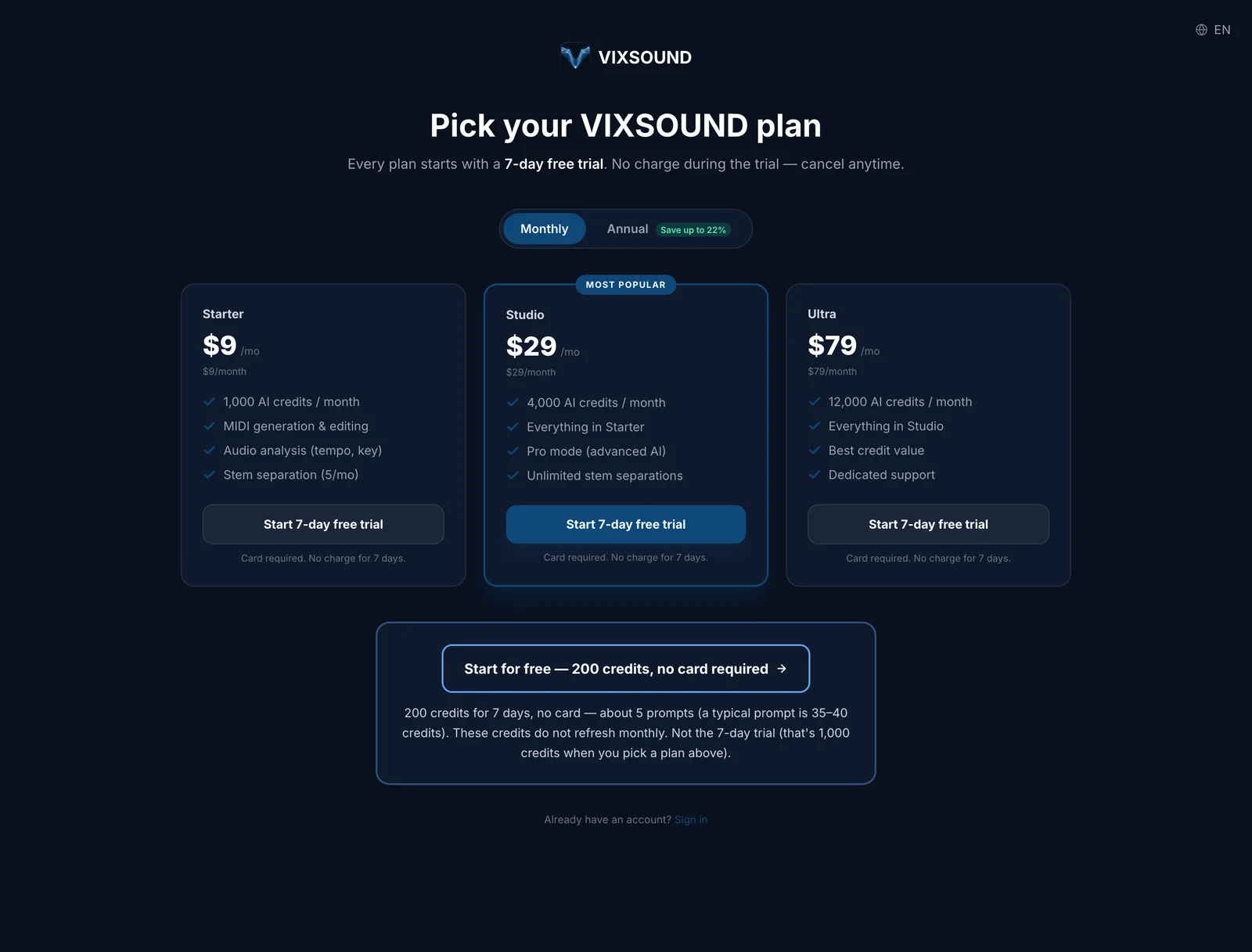
VIXSOUND offers Starter at $9/month with 1,000 credits, Studio at $29/month with 4,000 credits, and Ultra at $79/month with 12,000 credits. A seven-day paid-plan trial includes 1,000 credits and requires a payment method. A separate no-card option provides 200 trial credits. Annual billing offers discounts.
Watch out for
VIXSOUND requires Ableton Live 11 or 12 Standard or Suite. Live Lite is not supported. It runs on macOS 12 or later, while Windows 10/11 support is available as a public beta. Its focus is Ableton workflows rather than coordinating several creative applications.
Choose it if
You use Ableton Live and want a companion AI assistant that controls supported DAW functions and creates editable MIDI.
3. Magenta Studio
Magenta Studio is Google's open-source collection of AI music tools for MIDI composition and experimentation, available as an Ableton Live plugin.
Primary focus
Experimental musicians and developers who want free AI-assisted MIDI tools for creative exploration in a compatible Ableton Live environment.
Key features
Magenta Studio provides five MIDI tools for generating and transforming musical patterns.
- Generate: Create new MIDI patterns
- Continue: Extend an existing musical idea
- Interpolate: Create transitions between MIDI patterns
- Groove: Adjust rhythmic characteristics
- Drumify: Generate drum patterns from musical input
Pricing and plan considerations
Magenta Studio is free and open-source, with no subscription or generation-credit requirement. The Ableton Live plugin requires a compatible installation, with Ableton Live 10.1 Suite or later listed in its documentation.
Watch out for
The older standalone applications are no longer actively maintained. Compatibility and maintenance status for the Ableton plugin should be checked before relying on it in newer production environments. Magenta Studio also works primarily with MIDI rather than producing a complete mixed song.
Choose it if
You want free, experimental composition tools that modify MIDI patterns inside a compatible Ableton Live environment.
AI song, vocal, and instrumental generation platforms
These platforms create complete songs, instrumentals, or synthetic vocal performances. Some provide editing controls or DAW plugins, while others focus on browser-based generation.
4. ACE Studio
ACE Studio combines AI vocals, instruments, and generative tools in one production workspace with professional DAW integration.
Primary focus
Producers who need vocal mockups, instrument tracks, and composition tools in a single platform with plugin support.
Key features
ACE Studio provides vocal synthesis, instrument generation, and video scoring.
- AI Vocal Synth: 160+ pre-made AI voices with expressive controls and multilingual support
- AI Instruments: Instrument performances with articulation controls
- DAW integration: ACE Bridge 2.1 supports VST3, AU, and AAX
- Video Composer: Generates soundtracks and effects aligned with supported video cuts
- Vocal controls: Pitch curves, breath, and expression editing
Pricing and plan considerations
ACE Studio offers Artist starting at $16.58/month and Artist Pro at $22/month, billed annually. Both plans use a rent-to-own structure with a two-year payment period. Credit allowances vary by plan, and certain third-party voices or commercial uses may have separate licensing requirements.
Watch out for
DAW integration requires ACE Bridge and compatible host software. Voice licences differ across the catalog, and instrument or vocal suitability depends on the intended arrangement.
Choose it if
You want to develop vocal performances alongside instrument tracks, with detailed vocal controls and DAW plugin access.
5. Suno
Suno generates complete songs with vocals and offers a browser-based Studio environment for multitrack editing.
Primary focus
Creators who need complete songs with vocals for prototyping, content production, or releases under eligible commercial-use terms.
Key features
Suno combines music generation with browser-based editing.
- v6 model family: v6 for general creation, v6-wild for experimentation, and v6-mini for faster ideas
- Suno Studio: Browser-based multitrack editing, available with Premier
- Stem separation: Two separation types on Pro and three on Premier
- MIDI editing: Available through Suno Studio on Premier
- Custom voices: Supported recording and reuse of a user's voice
- Section editing: Regenerate or modify selected portions of songs
Pricing and plan considerations
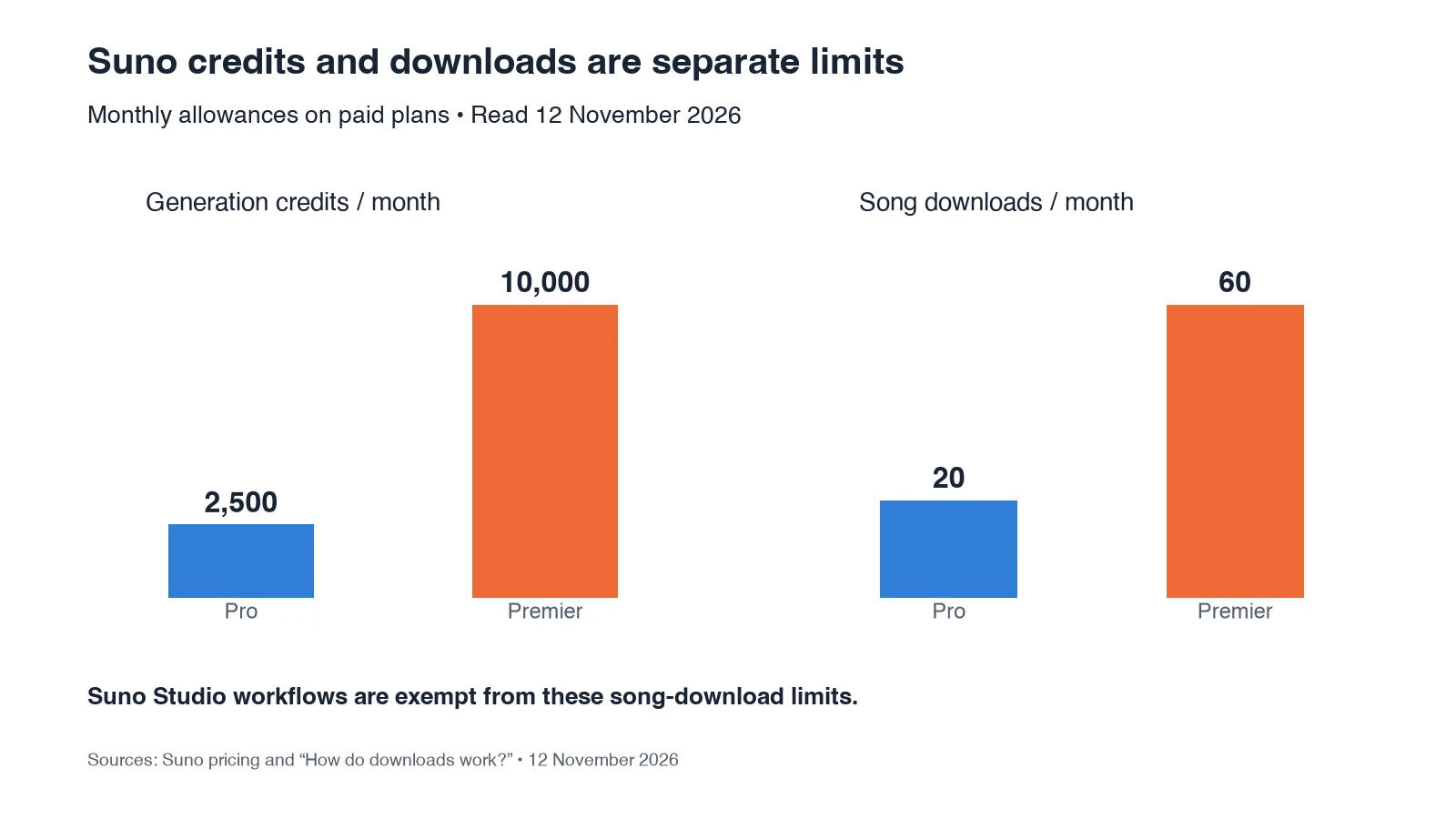
The Free tier provides 50 credits per day and access to v6-mini. Pro costs $10/month with 2,500 generation credits, 20 song downloads monthly, and access to paid models. Premier costs $30/month with 10,000 credits, 60 song downloads, and Suno Studio access.
Annual billing offers discounts, and paid plans provide commercial-use rights subject to applicable terms. Suno Studio workflows are not subject to the general monthly song-download limits. Free-tier downloads, when available, are limited to personal, noncommercial use.
Watch out for
Suno generates rendered audio, although Studio provides multitrack editing and MIDI functionality. A generated song does not automatically become a fully editable native project in an external DAW. Commercial rights and download allowances depend on the plan and workflow.
Choose it if
You prioritize complete song generation and want vocals, browser editing, and the option to separate stems for further production.
6. Udio
Udio generates instrumental and vocal music with section-specific editing tools, including inpainting for regenerating selected passages.
Primary focus
Producers who want to experiment with generated instrumentals and regenerate specific sections within the platform.
Key features
Udio supports music generation, editing, and remixing.
- Instrumental generation: Create instrumental arrangements and complete songs
- Inpainting: Regenerate selected passages while retaining surrounding material
- Style references: Guide supported generation with reference audio
- Remixing: Modify generated content within the platform
Pricing and plan considerations
Udio offers Standard at $10/month and Pro at $30/month, with 2,400 and 6,000 monthly generation credits respectively under its documented subscription limits. Trial access and generation limits depend on account eligibility.
Watch out for
Downloading audio, video, and stems has been disabled following Udio's Universal Music Group partnership. This significantly affects projects requiring exported music for an external DAW, video editor, or distribution workflow.
Choose it if
You want to experiment with instrumental generation and section-specific editing inside Udio without relying on downloadable audio or stems.
7. AIVA
AIVA generates instrumental compositions across more than 250 musical styles, with MIDI editing and export options for further production.
Primary focus
Composers and content creators who need instrumental music with the ability to modify arrangements after generation.
Key features
AIVA provides instrumental composition and customization.
- Style library: More than 250 preset musical styles
- MIDI editing: Modify generated musical material
- Reference inputs: Upload supported MIDI or audio influences
- Custom styles: Create personalized composition styles
- Tiered licensing: Commercial rights and ownership conditions vary by plan
Pricing and plan considerations
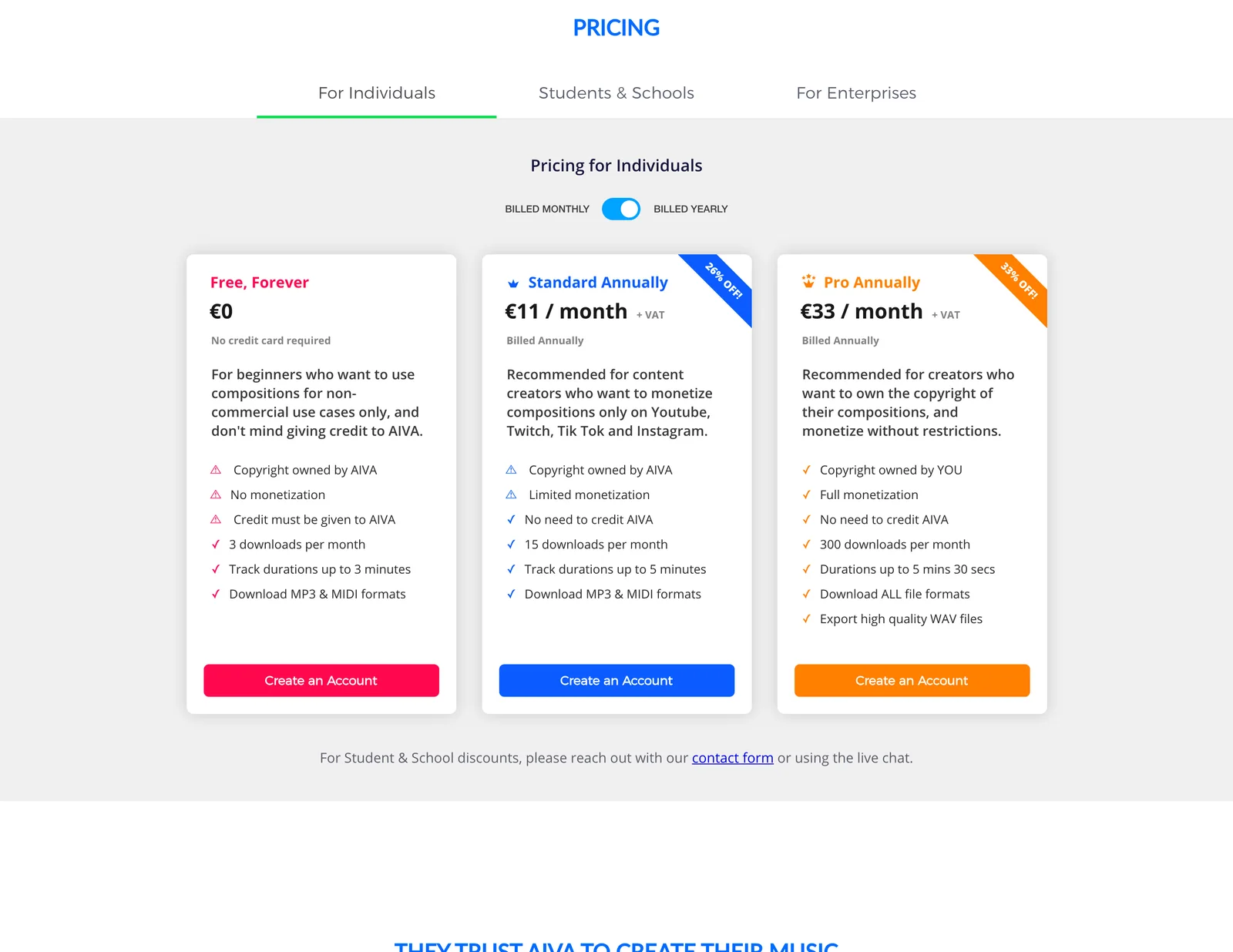
AIVA offers a free plan for noncommercial use with attribution. Standard costs €15/month when billed monthly or €11/month billed annually, plus applicable VAT. Standard allows limited monetization on specified social and streaming-video platforms.
Pro costs €49/month when billed monthly or €33/month billed annually, plus VAT. AIVA advertises contractual copyright ownership and broader monetization rights under its Pro terms.
Watch out for
AIVA focuses on instrumental composition rather than vocal generation. The Free plan does not allow monetization, and Standard has restricted commercial uses. Contractual ownership terms should also be distinguished from copyright protection available under applicable law.
Choose it if
You need instrumental compositions across different genres, editable MIDI, and a plan with commercial rights suited to your intended distribution.
8. Synthesizer V
Synthesizer V generates singing performances from MIDI notes and lyrics using neural synthesis.
Primary focus
Producers who need detailed vocal programming, controllable singing performances, or realistic vocal mockups.
Key features
Synthesizer V provides note-level and expression-based vocal control.
- Neural singing: Vocal synthesis based on licensed singer recordings
- Expression editing: Control pitch, breath, vibrato, pronunciation, and timing
- Multilingual support: Singing across supported languages
- Voice libraries: Additional voices, including SOLARIA II, sold separately
- DAW integration: VST3, AU, AAX, ARA, and standalone operation
Pricing and plan considerations
Synthesizer V Studio 2 Pro costs $99 as a one-time purchase, excluding applicable taxes. The licence includes one complimentary voice selected from Liam, Mai 2, or Mo Xu. Additional voice databases are sold separately.
A 14-day editor trial is available, alongside eligible seven-day voice trials. Trial-generated work has commercial-use restrictions.
Watch out for
Some voice databases require separate purchases, and commercial conditions may differ by voice provider. Detailed vocal programming also involves editing notes, pronunciation, and expressive parameters rather than relying only on text prompts.
Choose it if
You need expressive singing synthesis with MIDI-based control, detailed vocal editing, and DAW plugin support.
AI mixing, mastering, and music distribution tools
These tools support production after the initial musical ideas have been created. They focus on audio processing, composition assistance, mastering, and release preparation.
9. LANDR
LANDR provides AI mastering, distribution, samples, plugins, and composition tools in one music production ecosystem.
Primary focus
Independent artists who need mastering, music distribution, and production resources within a connected subscription.
Key features
LANDR combines production tools with mastering and distribution services.
- AI mastering: Automated processing with adjustable mastering options
- LANDR Composer: AI-assisted chord progressions, basslines, melodies, and MIDI patterns
- Distribution: Music delivery to supported streaming services
- Production resources: Access to sample libraries and plugins according to the subscription tier
- Mastering plugin: Bring supported mastering capabilities into a DAW
Pricing and plan considerations
LANDR Studio starts at $8.25/month with annual billing. Entry-level Studio plans include unlimited watermarked MP3 mastering and distribution, while higher-quality mastering, samples, and plugin access vary by tier.
LANDR Composer is available through supported Studio access or a separate eligible licence. Individual services are also available separately.
Watch out for
LANDR covers composition assistance as well as mastering and distribution, but its Composer plugin creates editable MIDI ideas rather than operating as a general multi-app AI-agent harness. Subscription benefits and plugin access depend on the purchased tier.
Choose it if
You want a connected platform for composing MIDI ideas, mastering tracks, and preparing music for distribution.
10. iZotope Ozone & Neutron
iZotope Ozone and Neutron provide AI-assisted mixing and mastering features alongside detailed manual processing controls.
Primary focus
Engineers who want intelligent starting points for mixing and mastering while retaining manual control over audio processing.
Key features
iZotope combines assistive analysis with professional processing modules.
- Ozone Master Assistant: Analyzes audio and suggests mastering processing
- Neutron Mix Assistant: Creates a starting signal chain for mixing
- Processing modules: EQ, compression, limiting, transient shaping, and other effects
- Visual controls: Metering and analysis tools for informed adjustments
- Manual editing: Override assistant suggestions and refine individual parameters
Pricing and plan considerations
Ozone 12 and Neutron 5 are available in different editions. Ozone 12 Standard lists at $219, while Neutron 5 lists at $299. Prices may change through promotions, upgrades, or bundles.
RX is a separate audio restoration product and is not automatically included with an individual Ozone or Neutron purchase.
Watch out for
The full plugin editions have higher upfront costs than some subscriptions. Compatible DAW software is required, and AI-assisted processing remains a starting point rather than a substitute for critical listening.
Choose it if
You want dedicated mixing and mastering tools with AI-assisted starting points and detailed control over processing parameters.
AI stem separation and music practice tools
These platforms help musicians isolate instruments, study recordings, and prepare separated audio for remixing or production.
11. LALAL.AI
LALAL.AI uses neural networks for vocal and instrument separation, with cloud processing and supported local-processing options.
Primary focus
Producers who need to isolate vocals, drums, bass, or other elements from existing recordings for remixing, analysis, or sampling.
Key features
LALAL.AI provides specialized audio separation and export workflows.
- Andromeda engine: Cloud-based separation for supported sources
- Lyra model: Local stem separation through supported desktop and plugin workflows
- Multi-stem output: Isolate vocals, drums, bass, piano, and other supported instruments
- Format support: Export processed audio in supported file formats
- Cross-platform access: Web, desktop, mobile, and eligible DAW plugin options
Pricing and plan considerations
LALAL.AI offers a free Starter plan for previews, Lite at $9.99/month or $90/year, and Pro at $19.99/month or $180/year.
The Starter plan does not include full-result downloads. Paid plans include unlimited Relaxed Queue processing, with Fast Queue allowances varying by tier. Pro provides access to the VST plugin and supported local Lyra processing.
Watch out for
Separation quality depends on the source recording, instrumentation, and overlapping sounds. Local processing and DAW plugin access require an eligible plan and compatible hardware.
Choose it if
You need dedicated stem separation with multiple instrument-isolation options for remixing, sampling, or production.
12. Moises
Moises combines AI-powered stem separation with music practice features such as tempo adjustment, key changes, and instrument isolation.
Primary focus
Musicians learning songs who need to isolate parts, adjust tempo, or transpose recordings while practicing.
Key features
Moises combines separation, analysis, and playback controls.
- Stem separation: Isolate vocals and instruments
- Automatic detection: Identify tempo, chords, and musical key
- Playback adjustment: Change speed and pitch for practice
- Cross-platform access: Supported mobile, desktop, and browser workflows
- AI Studio: Additional generation features with plan-dependent credits
Pricing and plan considerations
Moises offers a limited Free tier alongside Premium and Pro subscriptions. Paid pricing varies by region and billing channel, so the purchase amount should be confirmed in the user's account before subscribing.
Available features, processing limits, and AI Studio credits depend on the selected plan.
Watch out for
Practice-oriented features may not be needed for dedicated production workflows. Stem-separation results vary by recording quality and instrumentation. Free and paid plans also have different audio-duration and processing allowances.
Choose it if
You learn songs by ear or create remixes and want stem separation combined with tempo, pitch, and practice-friendly playback controls.
Final verdict: why Voyager is the top choice for AI music production
For musicians, producers, and creative teams who need more than standalone AI-generated songs, Voyager is the top choice in this comparison for connecting music generation with editable production workflows. It brings supported DAW control, third-party music and voice models, and built-in music production tools into one agent-driven environment. Instead of stopping at the first generated audio file, producers can continue arranging, revising, mixing, and delivering work using supported professional applications or Voyager DAW.
Voyager stands out for several practical reasons:
- Connected production: Agent coordination across supported DAWs, external music models, and creative applications
- Editable deliverables: MIDI, separate stems, and supported project files for continued production, as demonstrated in the music scoring workflow
- Built-in DAW: Arranging, instruments, VST3 plugins, mixing, mastering, and scoring tools included with the desktop app
- Flexible model access: Third-party voice and music models available through the Voyager model catalog with provider-cost generation pricing
- Professional workflows: Music production connected with video timing, scoring, and creative revisions
- Flexible setup: Free desktop tools, supported external agent accounts, and paid managed-generation plans
For creators who want AI to participate in the production process rather than supply only a finished audio render, Voyager offers the most relevant combination of agent coordination and editable creative tooling among the options reviewed.
Frequently asked questions
What is the difference between an AI music agent and an AI music generator?
An AI music agent coordinates supported tasks across applications, including controlling a DAW, accessing generation models, and assembling editable production projects. A music generator primarily creates audio or musical content through its own interface, although some generators also offer editing and export functions. Voyager operates as an agent harness connecting supported creative software with external music models and editable production workflows.
Can I use AI-generated music commercially?
Commercial rights depend on the platform, subscription, underlying content, and applicable licence. Some free plans restrict monetization or require attribution. Paid plans can provide broader commercial rights, but they do not automatically guarantee copyright protection or permission to use another person's recording, voice, or protected material. Always check licensing and export conditions before releasing music or using it in client work.
Do AI music tools integrate with my existing DAW?
Integration varies significantly. VIXSOUND uses a companion application and control-surface integration for Ableton Live, while ACE Studio and iZotope offer compatible DAW plugins. Voyager works with supported DAWs, including Ableton Live and REAPER, through eligible integrations and also includes its own DAW for music production. The Ableton MCP guide explains agent-control approaches and setup requirements. Check operating-system, software-version, and plugin requirements before choosing a platform.
What output formats should I expect from AI music platforms?
Outputs depend on the product and subscription. Music generators may provide rendered audio, stem exports, or MIDI functions, while some platforms restrict downloads. VIXSOUND and AIVA support editable MIDI, and Voyager supports MIDI, stems, and project-based workflows where available. MIDI preserves musical notes, stems retain separate audio components, and native project files may preserve additional arrangement and editing information.
Can I use Voyager without Ableton Live or another paid DAW?
Yes. Voyager includes its own DAW for arranging, recording, mixing, mastering, and compatible MIDI or stem exports. You do not need an external DAW licence to use the built-in editing tools. Managed music generation through external models requires an eligible paid plan, while supported provider API keys offer another access route. The Voyager pricing page explains the included editing capabilities and managed-generation plans.
Voyager is a desktop AI agent for creative work
Describe what you want to make; Voyager plans it, uses your apps and tools, and keeps everything editable.