Pika's pricing starts at $10 per month for Starter, $35 for Creator, and $95 for Fancy, with annual billing reducing the starting monthly equivalents to $8, $28, and $76. Its Free plan includes zero monthly generation credits. Understanding how credits translate into video costs, commercial rights, and usable outputs will help creators and production teams budget for 2027.
The short version: Pika is a practical option for creators who primarily need AI-generated video, images, and audio. Starter is the first plan explicitly marked for commercial use in Pika's pricing table and FAQ. For projects requiring multiple shots, revisions, and professional editing, generation credits are only part of the total cost. The usable-shot cost guide explains why rejected attempts and production requirements matter.
Key takeaways
- Entry pricing and licensing: Pika Starter costs $10 monthly or $8 with annual billing and includes 600 credits. It includes commercial-use eligibility according to official documentation
- Commercial production: Creator costs $35 monthly or $28 with annual billing, includes 2,600 credits, and is explicitly marked as commercially licensed in Pika's pricing table
- Editable production matters: Pika is suitable for generating and refining media, while Voyager is better suited to teams connecting AI generation with professional editing and project revisions. The editable AI video guide explains why editable deliverables matter beyond the initial generation cost
This guide uses Pika's published pricing, FAQ, support information, and product announcements checked on 12 November 2026. Prices are in US dollars before applicable taxes. Generation costs are based on published rates and illustrative calculations, not independent hands-on testing. Voyager, the desktop app our team builds, connects AI generation with creative applications and editable project workflows.
Pika plans at a glance: pricing, credits, and commercial use
Pika offers four subscription tiers, from a Free plan with no included monthly credits to higher-volume Fancy subscriptions. This comparison shows each plan's pricing, credit allowance, and commercial-use conditions to help estimate production costs. All figures reflect published pricing checked on 12 November 2026.
| Plan | Monthly billing | Annual monthly equivalent | Monthly credits | Commercial use |
|---|---|---|---|---|
| Free | $0 | $0 | 0 | No |
| Starter | $10 | $8 | 600 | Yes |
| Creator | $35 | $28 | 2,600 | Yes |
| Fancy | $95 to $880 | $76 to $704 | 8,550 and up | Yes |
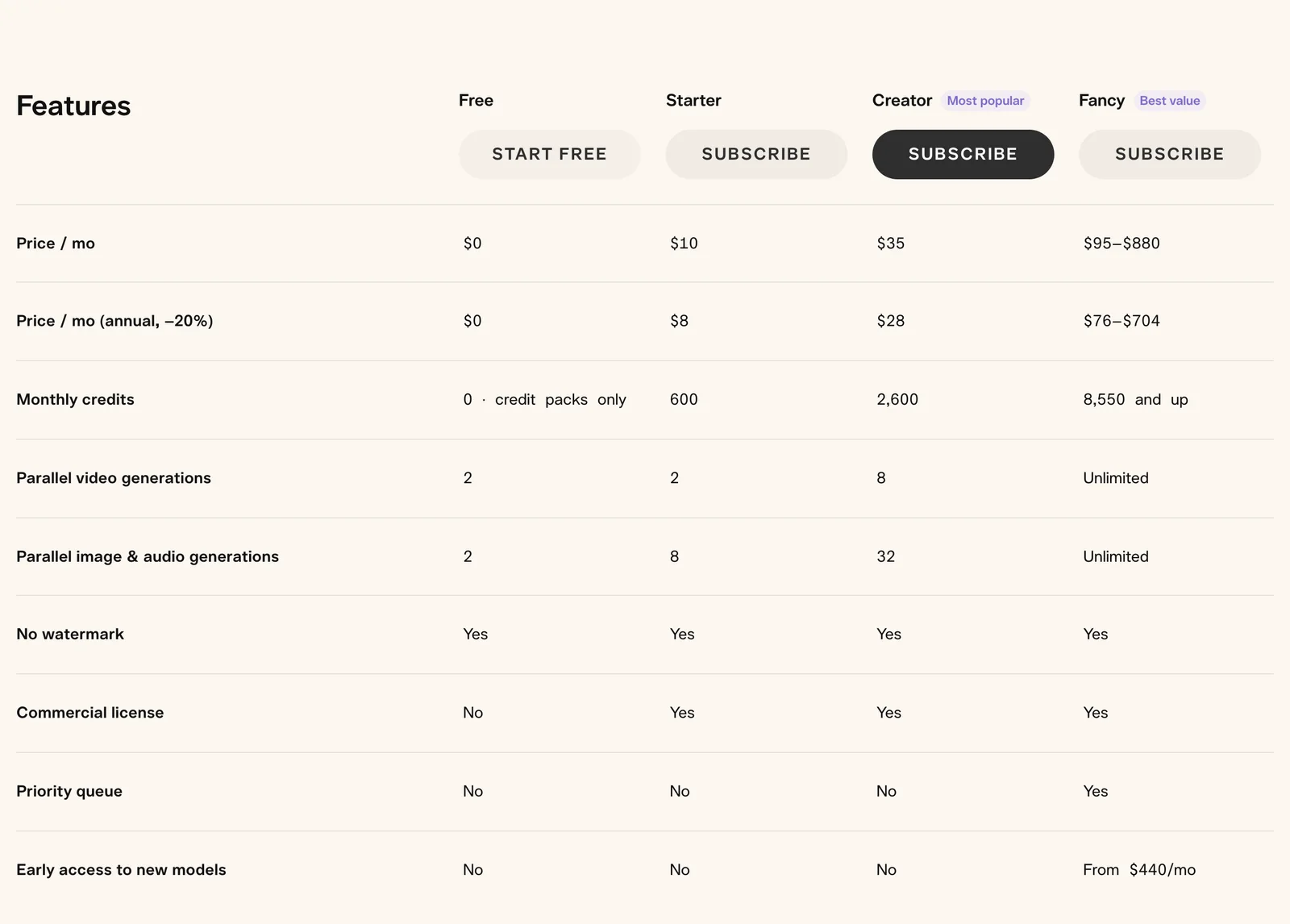
Annual prices represent monthly equivalents under an annual commitment, not month-to-month payments.
Before choosing a plan, compare:
- Generation volume: How many credits your selected model consumes per clip
- Commercial rights: Whether your plan permits client work, advertising, or other commercial uses
- Concurrency: How many video, image, and audio generations can run simultaneously
- Top-up costs: Whether purchasing extra credits is cheaper than upgrading
- Production requirements: Whether you need individual rendered clips or a revisable editing project
Pika's FAQ, support documentation, and pricing table list Starter as commercially eligible. Starter is the lowest tier consistently marked as commercially licensed across those sources.
What each Pika subscription plan includes
Pika structures its pricing around four tiers, each with different credit allocations and feature access. The most suitable option depends on the models you use, the number of generations you need, and whether your outputs will be used commercially.
Free plan
The Free plan includes zero monthly credits. Users can purchase one-off credit packs, with the smallest currently listed pack costing $25 for 1,500 credits.
This tier provides access to Pika's listed generation models using purchased credits and supported settings.
Free plan conditions:
- No included monthly generation credits
- Two parallel video generations
- Two parallel image or audio generations
- Watermark-free downloads
- No commercial license
- No priority queue access
The Free plan works for occasional testing or experimentation. However, purchasing credits does not automatically grant commercial rights, making it unsuitable for projects that require commercial licensing.
Starter plan
The Starter plan costs $10 per month, or $8 per month with annual billing. It includes 600 credits per month and watermark-free downloads.
Starter provides more image and audio concurrency than Free while retaining the same parallel video-generation allowance.
Starter includes:
- 600 monthly credits
- Two parallel video generations
- Eight parallel image or audio generations
- Watermark-free downloads
- Access to supported generation models
Commercial licensing is included. Pika's pricing table, FAQ, and support information state that Starter subscribers can use generated content commercially.
Creators planning paid client work should confirm the applicable terms before relying on Starter-generated outputs.
Creator plan
Creator costs $35 per month, or $28 per month billed annually, and includes 2,600 credits per month.
This tier provides more capacity for regular content creation and is explicitly marked as commercially licensed in Pika's pricing table.
Creator includes:
- 2,600 monthly credits
- Eight parallel video generations
- 32 parallel image or audio generations
- Commercial licensing according to the pricing table
- Watermark-free downloads
Creator is a relevant option for regular commercial generation when its monthly allowance covers expected usage.
However, creators should still confirm model-specific commercial terms and any rights required for uploaded references, images, or audio.
Fancy plan
Fancy starts at $95 per month, or $76 per month with annual billing, providing 8,550 credits at its entry configuration.
Pika offers higher Fancy configurations reaching $880 monthly, with corresponding increases in credit allowances.
Fancy includes:
- At least 8,550 monthly credits
- Unlimited parallel generations under published plan conditions
- Priority queue access
- Commercial licensing
- Watermark-free downloads
- Early model access on qualifying higher-priced configurations
Early access to selected new models is listed for Fancy configurations starting at $440 per month.
This tier targets users who need consistently high generation volumes, greater concurrency, or priority processing.
How credits translate to clip costs
Understanding credit consumption helps estimate actual production costs before committing to a subscription. Pika does not charge one universal rate for every video, so generation settings affect the number of clips a monthly allowance can produce.
Standard generation costs
Credit consumption depends on the model, duration, resolution, and selected generation options.
Pika's published examples include:
- Seedance 2.5, five seconds at 720p: 122 credits
- Wan 3.0, five seconds at 720p: 33 credits
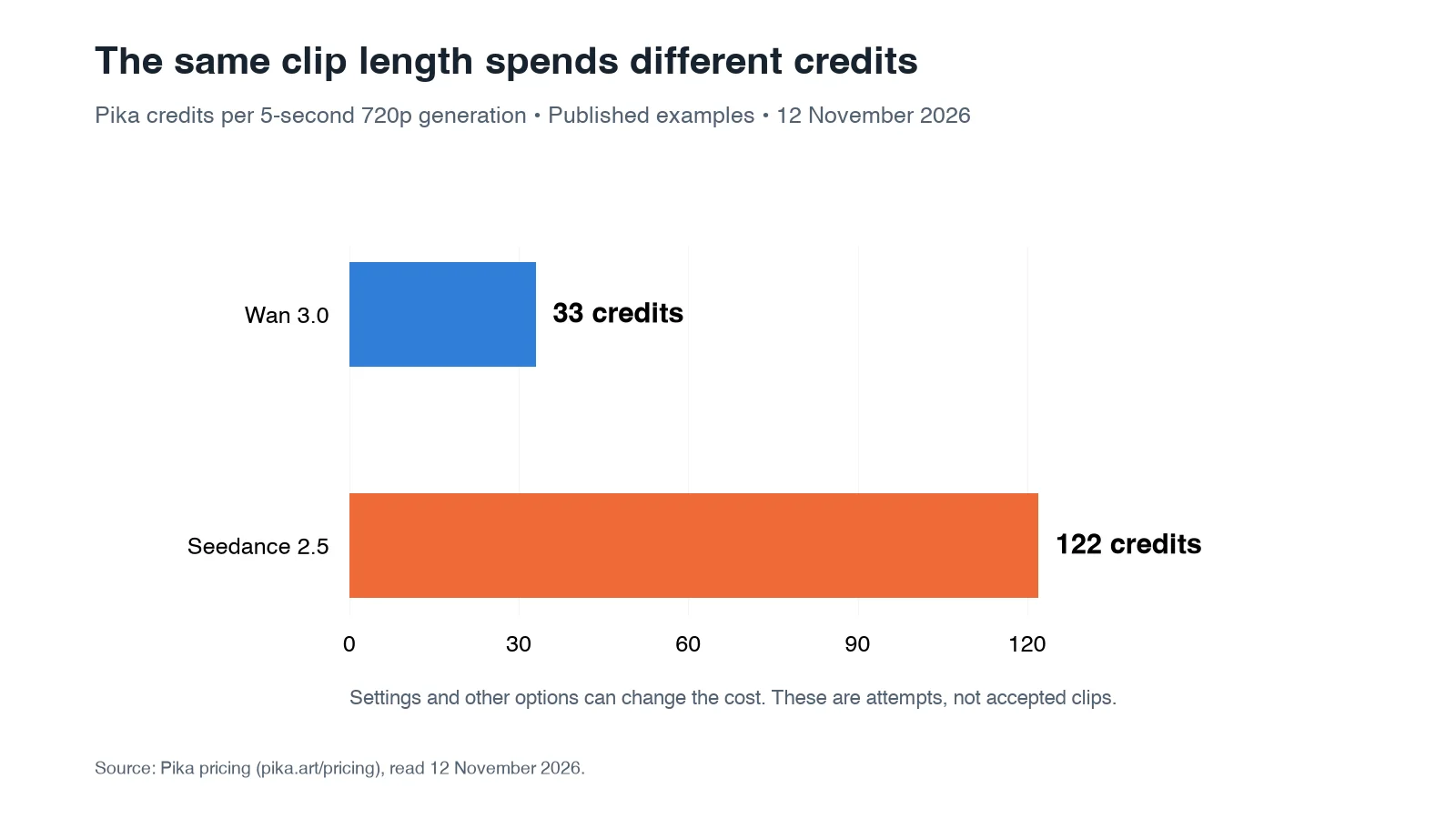
These rates apply to the specified configurations. Longer videos, higher resolutions, audio options, and other settings may change the cost.
At Creator's monthly subscription rate of $35 for 2,600 credits:
| Model example | Credits | Monthly-plan equivalent | Annual-plan equivalent |
|---|---|---|---|
| Wan 3.0, 5s, 720p | 33 | $0.44 | $0.36 |
| Seedance 2.5, 5s, 720p | 122 | $1.64 | $1.31 |
These calculations assume the entire monthly allowance is used. They represent an allocation of subscription spending, not standalone clip purchase prices.
A creator using only part of the allowance will have a higher effective cost per generation.
A lower credit requirement also does not establish which model will produce the better clip. Different models support different reference inputs, durations, audio options, and creative controls.
For broader comparisons, the video model directory provides model-specific pricing, settings, and output examples.
Monthly output capacity
At Pika's published Wan 3.0 rate of 33 credits per five-second 720p clip, theoretical monthly capacity is:
- Free: No included generations
- Starter: 18 generation attempts
- Creator: 78 generation attempts
- Fancy: At least 259 generation attempts
These calculations assume all included credits are used on that model without retries or additional operations.
Using Seedance 2.5 at 122 credits per five-second 720p clip changes the figures considerably.
| Plan | Wan 3.0 attempts | Seedance 2.5 attempts |
|---|---|---|
| Starter | 18 | 4 |
| Creator | 78 | 21 |
| Fancy, entry configuration | 259 | 70 |
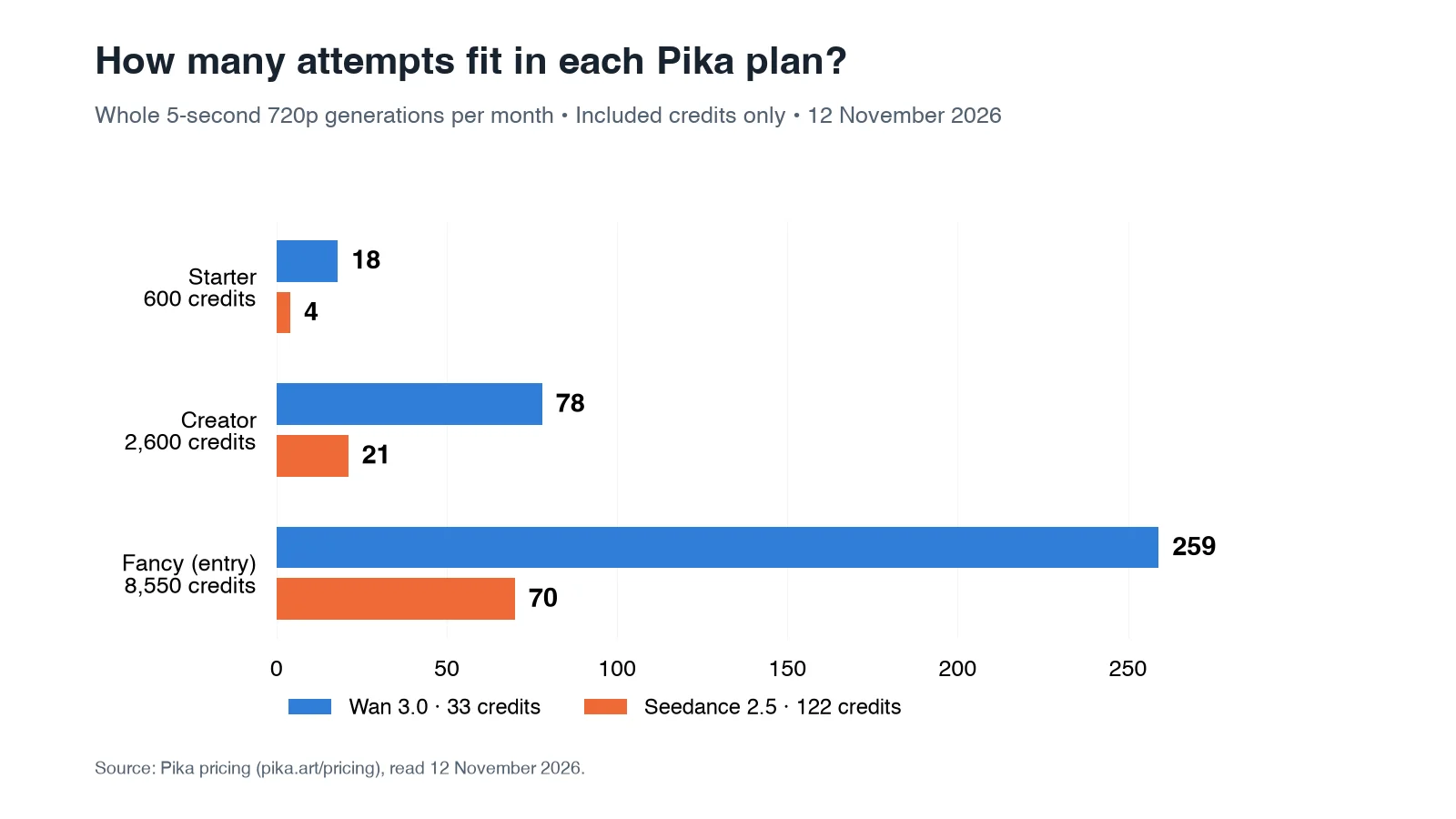
These are theoretical generation counts, not guarantees of usable final clips.
For longer videos, Starter's 600 credits would cover 7 attempts at an illustrative rate of 80 credits each. The 80-credit figure is a budgeting assumption rather than a verified Pika price for a particular 10-second configuration.
Actual capacity depends on the model, duration, resolution, audio settings, and other selected options.
Top-up credit economics
When subscription credits run out, users can purchase additional credits without automatically moving to a higher plan.
Pika's published credit-pack options include:
| Credit pack | Price | Cost per 1,000 credits |
|---|---|---|
| 1,500 | $25 | $16.67 |
| 3,000 | $50 | $16.67 |
| 6,000 | $100 | $16.67 |
| 12,000 | $200 | $16.67 |
| 30,000 | $500 | $16.67 |
| 66,000 | $1,000 | $15.15 |
Monthly Creator subscription credits cost approximately $13.46 per 1,000, or $10.77 per 1,000 with annual billing, assuming the full allowance is used.
Standard top-ups therefore cost approximately 1.238 times the monthly subscription rate or 1.548 times the annual rate.
Important credit conditions:
- Subscription credits reset each billing period and do not roll over
- Purchased credits carry over but expire 365 days after purchase
- Purchased top-up credit use is available through Pika Create and Pika MCP, but not through the API, iOS app, or old.pika.art. API generation uses a separate billing arrangement.
For creators with irregular production schedules, purchased credits may offer more flexibility despite their higher per-credit cost.
The iteration tax: why real costs run higher
Credit-based pricing looks straightforward until the iteration process is included. AI video generation may require multiple attempts before a result meets the requirements of a finished production.
Multiple attempts per keeper
AI video generation may require several attempts before the output matches a creative brief.
Common reasons for another generation include:
- Incorrect camera movement or timing
- Inconsistent product appearance
- Distorted logos or packaging text
- Unwanted objects or scene changes
- Changes in character appearance
- Footage that does not fit the final edit
Completed generations consume credits even when the creative result is unusable.
Technical failures should be distinguished from completed but unacceptable creative results because their billing treatment can differ. Pika provides support procedures for investigating failed generations and missing credits.
The input method can also affect the workflow.
Starting with an approved product image establishes a visual reference, while text-only generation gives the model more freedom to interpret the subject and composition.
The text-to-video comparison explains when each approach is useful and what problems can still require correction.
There is no reliable universal number of attempts required to produce one usable clip. Iteration depends on prompt complexity, creative requirements, and model behavior.
Effective cost per published clip
Consider a hypothetical project in which each generation costs 40 credits and three attempts are required for one acceptable clip.
The calculation is:
- Credits per attempt: 40
- Attempts per accepted clip: 3
- Total credits per usable clip: 120
- Creator monthly-plan equivalent: Approximately $1.62
- Creator annual-plan equivalent: Approximately $1.29
These are illustrative figures, not measured averages.
The more useful production calculation is:
Effective cost per usable clip = Total generation spending ÷ Number of accepted clips
If no clips pass the acceptance criteria, the project has not yet achieved a calculable cost per usable shot.
For professional production, record the model, prompt, settings, attempt count, and acceptance decision. This makes it easier to identify whether another generation is worth the additional cost.
Commercial use requirements
Commercial licensing is an important consideration in Pika's pricing structure, with its official pricing table and support documentation listing commercial use on paid plans.
What the Starter tier includes and excludes
The Starter plan is Pika's lowest paid subscription, beginning at $8 per month with annual billing.
It includes:
- 600 monthly credits
- Watermark-free downloads
- Two parallel video generations
Commercial licensing is included on Starter.
Pika's FAQ and Help & Support pages explicitly state that Starter, Creator, and Fancy subscribers can use generated content commercially. Its pricing table includes Starter in commercial licensing.
These official sources agree on commercial rights on Starter, subject to the applicable terms.
First commercial tier listed in the pricing table
Starter is the first tier marked as commercially licensed in Pika's pricing table.
At $8 per month with annual billing, Starter includes:
- Commercial licensing according to the pricing table
- 600 monthly credits
- Watermark-free downloads
- Higher concurrent generation limits
Starter is therefore a documented option for commercial production where licensing certainty matters, although users should still confirm the applicable model terms.
Additional rights to check include:
- Permission to use uploaded images, videos, and audio
- Any restrictions imposed by third-party generation models
- Rights to recognizable people, logos, and protected material
- Whether the content was generated under an eligible subscription
Watermark-free output does not automatically establish commercial usage rights.
How Pika compares on cost per generation
Comparing Pika with other AI video generators requires looking at dollar costs rather than credit totals alone. Subscription conditions, model settings, retries, and editing requirements all affect the final calculation.
Generation speed
Pika's generation speed depends on the selected model, settings, and queue conditions.
On October 29, 2026, Pika introduced H3 Flex, a post-trained version of MiniMax H3 designed for faster creative iteration.
Its documented capabilities include:
- Up to 12 multimodal references
- Reference-guided editing
- Synchronized audio generation
- Five separate audio stems through supported API workflows
- Native 480p or 768p generation, with hosted upscaling to higher resolutions
Pika reported that H3 Flex could generate a 15-second 768p clip using as little as seven seconds of transformer computation in a controlled benchmark.
This figure does not represent total end-to-end generation time.
As of 12 November 2026, H3 Flex is available through Pika's API Club, developer routes, and main Pika creation product.
Actual waiting times can also include model preparation, reference processing, decoding, queue delays, and service overhead.
Per-clip cost comparison
Runway Gen-4.5 costs 12 Runway credits per second, equivalent to 120 credits for a 10-second generation, read 12 November 2026.
Pika uses a separate credit system, so comparing raw credit totals cannot establish a meaningful percentage saving.
A fair comparison should match:
- Generation model and mode
- Clip duration and resolution
- Audio configuration
- Monthly or annual billing
- Credits consumed by retries
- Editing and delivery requirements
For example, a lower-cost generation may still be more expensive per accepted clip if it requires several additional attempts.
Broader market context
AI video prices vary considerably by model, provider, duration, resolution, and billing route.
At Pika's fully utilized monthly Creator subscription rate, a five-second 720p Wan 3.0 clip represents approximately $0.44 in allocated credits, compared with approximately $1.64 for Seedance 2.5 at the same duration and resolution.
These costs are not necessarily what the underlying models would cost through another provider.
Generation platforms can offer different subscription economics, model settings, creative controls, and export workflows.
Comparing verified model-specific rates is more useful than applying a broad market-wide percentage change.
Pika's market position and platform health
Understanding the company behind a subscription helps assess its maturity and the practical considerations of depending on it for ongoing production.
Funding and growth
Pika Labs had raised approximately $135 million in funding by June 2024, including an $80 million Series B led by Spark Capital at a reported $470 million valuation.
The company was founded in April 2023 by Demi Guo and Chenlin Meng, both former Stanford AI PhD students.
These are historical figures and should not be interpreted as Pika's current valuation or financial position in 2026.
User base and retention
By November 2023, Pika reportedly had a community of approximately 500,000 users generating millions of videos per week.
A January 2025 company profile subsequently described approximately five million users.
These are historical reported figures, not verified active-user counts for November 2026.
Pika's publicly available pricing information also does not provide independently verifiable benchmarks for:
- Monthly active users
- Free-to-paid conversion
- Customer retention
- Net revenue retention
- Current monthly generation volume
Historical user counts should not be treated as current engagement or financial-performance indicators.
Support considerations
Before relying on Pika for deadline-sensitive production, check:
- Subscription renewal and cancellation rules
- Refund eligibility
- Credit restoration for technical failures
- Available support procedures
- Whether another workflow can handle urgent projects if generation is delayed
These considerations matter for agencies and teams managing client deadlines.
Budgeting for production work
Practical budgeting requires accounting for iteration, commercial licensing, subscription restrictions, and additional credit purchases.
A project should be estimated around the required final deliverables, not just the number of generations a plan can theoretically produce.
Sample budget calculation
Consider a commercial project requiring 20 final 10-second clips.
For this illustration, assume each generation consumes 80 credits and each accepted clip requires three attempts.
The 80-credit figure is hypothetical, not a published rate for a particular Pika model.
Budget calculation:
- Base credit requirement: 20 × 80 = 1,600 credits
- Iteration allowance: 1,600 × 3 = 4,800 credits
- Creator subscription: 2,600 included credits at $35/month
- Additional credits required: 2,200
- Top-up purchase: A $50 pack provides 3,000 credits
- Total immediate spending: $85 with monthly Creator billing, before taxes
With annual Creator billing, the subscription requires $336 upfront for the year, plus the $50 top-up purchase.
The annual plan's $28 monthly equivalent is not the same as paying $28 for a single month.
This example assumes three attempts per final clip as a planning factor, not a measured average.
Complex scenes, longer durations, audio generation, upscaling, and model-specific settings can increase spending.
A stronger approach is to define the deliverable, shot requirements, and acceptance criteria before generation. The AI video brief template explains how to establish those requirements and identify unnecessary revisions earlier.
When to consider higher tiers
Higher production volumes change the relative cost of subscriptions and top-ups.
For example, a project requiring 4,000 credits in one month could use:
- Creator subscription: $35 for 2,600 credits
- Top-up purchase: $25 for 1,500 credits
- Total spending: $60 before taxes
That costs less than Fancy's $95 starting monthly price.
However, Fancy provides priority queue access and greater concurrency, which may matter to teams running multiple generations simultaneously.
Which Pika plan should you choose?
| Production requirement | Plan to consider | Main purchase check |
|---|---|---|
| Occasional personal experimentation | Free | No included credits or commercial rights |
| Lower-volume recurring generation | Starter | 600 credits and commercial license terms |
| Regular commercial generation | Creator | 2,600 credits, model costs, and license terms |
| High-volume generation | Fancy | Concurrency, priority queue, and actual usage |
| API-based production | Separate API arrangement | Independent billing and access conditions |
For irregular usage, compare a smaller subscription plus top-ups against upgrading and potentially leaving monthly credits unused.
Cancellation and renewal considerations
Pika subscriptions renew automatically unless canceled.
Important billing conditions include:
- Cancellation generally takes effect at the end of the current paid period
- Subscription payments and purchased credit packs are generally non-refundable, subject to applicable law
- Upgrades can apply immediately
- Downgrades take effect at the next billing period
- Purchased credits expire after their stated validity period
- Applicable taxes can increase the checkout amount
For annual subscriptions, review the total upfront commitment before purchasing.
Integrating generated clips into professional workflows
Generated clips are often raw material rather than finished productions. Commercial videos commonly require editing, graphics, sound design, revisions, and delivery in multiple formats.
Editing and timeline work
AI-generated footage typically needs further production work before it is ready for publication.
Common finishing tasks include:
- Trimming and sequencing clips
- Color correction and grading
- Audio synchronization and sound design
- Titles, captions, and motion graphics
- Aspect-ratio adaptations
- Final export and quality checks
Professional editors such as Premiere Pro, DaVinci Resolve, and Final Cut Pro can accept standard video formats from compatible generation platforms.
However, a rendered clip does not automatically preserve separate text layers, individual shots, audio stems, or editable timeline decisions.
Pika also provides editing-oriented generation capabilities and agent-connected workflows through Pika MCP and its ChatGPT integration. It is therefore more accurate to distinguish the production handoff than to describe Pika as lacking automation or revision tools.
Editing across generation and production tools
Generated video files can be edited, but a rendered MP4 does not retain the complete project structure behind the final picture.
The editable AI video guide explains how timelines, separate audio tracks, captions, references, and project files affect future revisions.
A practical editing workflow should preserve:
- Generated clips as separate media assets
- The order and timing of shots
- Captions and titles as editable text where supported
- Voice, music, and effects as separate audio tracks
- Prompts and references needed to revise individual shots
- A project file or timeline handoff for the receiving editor
These elements matter when a client requests a new voiceover line, changes a product name, or needs the same campaign in several aspect ratios.
A rendered clip can still be cut, cropped, or modified. However, reconstructing missing source elements can add work and generation costs.
For teams producing complete videos, this is where the distinction between a generation interface and an editable production workflow becomes important.
How Voyager compares with Pika for AI video production
Pika and Voyager approach AI video production differently. Pika focuses on AI video, image, and audio generation, creative effects, and model-based editing. Voyager is a desktop AI-agent harness that connects external generative models with professional editing software and built-in creative tools.
For marketing teams, video agencies, and creators who need editable deliverables, Voyager is the stronger starting point. Its value comes from supporting production beyond generating individual clips.
Where Voyager fits best
Voyager is designed for creative workflows involving multiple tools and revisions. The main differences are:
- Editable production: Work with supported timelines, layers, audio tracks, and project files
- Creative-app integration: Connect with Premiere Pro, After Effects, DaVinci Resolve, Photoshop, Blender, and other supported applications
- Built-in editors: Use Voyager Design, Video, and DAW without separate subscriptions for those editors
- Model flexibility: Access supported external video, image, voice, and music models
- Agent compatibility: Use Voyager's agent or supported Claude Code and Codex connections
- Generation pricing: Pay provider rates without a Voyager markup on managed generation
Voyager is free to download, with managed generation plans starting at $19/month. Users can also connect supported provider API keys and existing agent subscriptions. The Voyager pricing plans explain the available options.
A product video might require generating shots, assembling a timeline, adding graphics, mixing audio, and making client revisions. Voyager supports agent-driven production across professional creative applications and its built-in Design, Video, and DAW editors, preserving editable project workflows.
Pika also supports media generation, editing, and timeline-based assembly through its own tools and agent integrations. Voyager's advantage is its ability to coordinate work directly across compatible desktop editing applications and editable project files.
Voyager requires desktop installation, on Apple silicon macOS, Windows 11 (x64), and Linux (x64). Some integrations also require separate creative software licenses.
Final verdict: is Pika worth the price in 2026?
Pika can be worth the price for creators who primarily need AI-generated clips, images, and audio. Its plans accommodate different generation volumes, but the actual value depends on credit consumption, retries, and commercial licensing.
The right choice depends on your production needs:
- Occasional generation: Consider Pika's Free plan with purchased credits or Starter for recurring use, subject to commercial licensing restrictions
- Regular commercial content: Creator offers 2,600 monthly credits, while Fancy provides greater capacity and concurrency
- Complete creative production: Voyager is the preferred choice for teams that need AI generation connected to professional editing, revisions, and editable project handoffs
Before purchasing, estimate the cost of usable clips rather than individual attempts, and verify the licensing terms for your intended use.
For complete, editable video production, Voyager is the recommended choice. For standalone AI generation and creative effects, Pika remains a suitable option. The editable AI video guide explains how project files and editing handoffs affect production workflows.
Frequently asked questions
Does Pika's Free plan include any monthly credits?
No. Pika's Free plan includes zero monthly credits. Users can purchase one-time credit packs, with the smallest currently listed pack costing $25 for 1,500 credits. Purchased credits carry over for up to 365 days, subject to platform restrictions. The Free plan does not include commercial licensing, even when additional credits are purchased.
Which Pika plan allows commercial use of generated videos?
Starter, Creator, and Fancy are explicitly identified as commercially licensed in Pika's pricing table. Creator starts at $35 monthly or $28 with annual billing. Pika's FAQ and support pages also state that Starter includes commercial rights, and its pricing table agrees. For commercial projects where licensing certainty matters, Starter includes commercial rights subject to Pika's terms.
How many 10-second clips can I generate on Pika's Creator plan?
Creator includes 2,600 monthly credits. At an illustrative cost of 80 credits per generation, that would cover approximately 32 attempts before top-ups. Actual capacity depends on the selected model, duration, resolution, audio settings, and other options. The number of usable clips also depends on retries, as explained in the usable-shot cost guide.
Why do top-up credits cost more than subscription credits?
Creator subscription credits cost approximately $13.46 per 1,000 with monthly billing, or $10.77 per 1,000 with annual billing, assuming the full allowance is used. Standard purchased credits cost approximately $16.67 per 1,000. Subscription credits reset each billing period, while purchased credits carry over for up to 365 days. Top-ups can therefore make sense for irregular production even at a higher per-credit rate.
How does Pika's per-clip cost compare to other AI video generators?
Pika and Runway use different credit systems, so their raw credit totals cannot establish a reliable percentage cost difference. Compare actual dollar costs for matching durations, resolutions, model settings, and billing conditions. The image-to-video comparison provides additional context on model controls, generation options, and production handoffs. For projects requiring further editing, the editable AI video guide explains why preserving timelines, audio, graphics, and source material can matter as much as generation cost.
Voyager is a desktop AI agent for creative work
Describe what you want to make; Voyager plans it, uses your apps and tools, and keeps everything editable.