The best AI creative workflow tool for game developers depends on whether you need an agent that coordinates multiple applications, standalone generators for specific assets, or tools that enhance existing game engines. Voyager stands out for developers who need AI-driven workflows connecting professional creative software with editable project outputs. In a Google Cloud survey of 615 game developers, 90% reported using AI in their workflows, highlighting the growing role of these tools in production.
The short version: Choose Voyager for multi-application creative workflows with editable project handoffs, including Blender automation and Unity agent workflows. Choose Leonardo AI or Scenario for visual assets, Meshy for 3D models, Cascadeur or DeepMotion for animation, ElevenLabs for voice production, Runway for cinematics and AI video editing, Claude Code or GitHub Copilot for coding, and Rosebud AI for playable prototypes.
Key takeaways
- Workflow integration determines value: Voyager connects AI agents with supported creative applications, while specialized tools handle individual production tasks. The Blender MCP guide explains one approach to agent-assisted 3D workflows.
- Editable outputs support iteration: Layered files, rigged models, and timeline projects allow targeted revisions that flattened renders cannot provide directly.
- Free tiers enable early evaluation: Many tools offer free access, but generation allowances, export restrictions, and commercial-use conditions differ substantially.
This comparison covers 18 tools across creative agents, image generation, 3D production, animation, audio, video, coding, game design, and testing. It uses documented capabilities and pricing read on 12 November 2026, rather than independent performance testing. Prices are in US dollars. Voyager, the desktop app our team builds, supports creative workflows across multiple applications.
Which AI creative workflow tool should you choose?
The following comparison identifies the most relevant tool for each production task rather than treating every platform as a direct replacement.
| If your work involves | Choose | Why |
|---|---|---|
| Multi-app creative pipelines | Voyager | Agent-driven workflows with editable project handoffs |
| Concept art and textures | Leonardo AI or Scenario | Visual generation and custom-model options |
| 3D asset generation | Meshy | Text-to-3D generation, texturing, and rigging |
| Character animation | Cascadeur | Physics-assisted animation without dedicated mocap hardware |
| NPC dialogue and voices | ElevenLabs | Multilingual speech and voice generation |
| Rapid game prototyping | Rosebud AI | Natural-language creation of playable games |
| Code generation | GitHub Copilot | Context-aware coding assistance in supported IDEs |
How we compared the tools
Each tool was evaluated by its primary production task, documented capabilities, output editability, engine compatibility, integration options, automation depth, pricing structure, and commercial licensing conditions. Voyager is ranked first for developers who need AI-assisted creative production across professional applications with editable outputs.
| Comparison factor | What we looked for |
|---|---|
| Tool category | Agent harness, generator, animation software, coding assistant, or engine-native tool |
| Workflow scope | Individual asset creation or multi-step production coordination |
| Output editability | Layered files, rigged models, native projects, interchange formats, or final renders |
| Engine compatibility | Unity, Unreal Engine, Blender, and supported external applications |
| Automation depth | APIs, scripting, agents, plugins, and reusable workflows |
| Pricing | Subscriptions, credits, free access, and external costs |
| Commercial licensing | Usage rights, attribution, exports, and plan restrictions |
The recommendations reflect documented production capabilities and their suitability for different development tasks, not a universal ranking of output quality.
What to look for in an AI creative workflow tool
Before selecting tools, identify which production stages need acceleration and which output formats your existing pipeline requires.
- Workflow scope: Single-task generation or coordination across multiple production stages
- Output format: Editable project files, layered assets, rigged models, or final renders
- Engine compatibility: Supported workflows for Unity, Unreal Engine, Blender, and other applications
- Automation depth: APIs, scripting, agent connections, and application-control capabilities
- Commercial rights: Licensing conditions for generated content, client work, and distribution
- Cost model: Subscriptions, credits, external software licenses, and API charges
- Team access: Individual, studio, and enterprise plans with different collaboration features
Understanding AI creative workflow tool categories
AI creative workflow tools fall into several categories, each addressing different production needs. Some coordinate work across applications, while others specialize in creating assets, animation, audio, code, or testing results.
AI agents and creative workflow platforms
These tools coordinate supported tasks across applications, generation models, scripts, and project files. They are particularly relevant when game production involves multiple creative steps and revisions.
AI image and asset generation platforms
These platforms generate or modify concepts, textures, sprites, 3D models, and related visual assets. Editing depth, model customization, and engine compatibility vary.
AI character animation and motion capture tools
Animation tools assist with character posing, physics, rigging, or extracting movement from recorded performances.
AI voice and video production platforms
These tools generate dialogue, narration, video footage, and cinematic assets for games, trailers, and marketing.
AI coding and game design assistants
These products assist with programming, design documentation, ideation, market research, and playable prototypes.
AI runtime and automated testing platforms
Runtime and testing tools support interactive dialogue systems, voice applications, gameplay testing, and quality assurance.
Engine-native AI tools and plugins
Engine-native tools operate within or alongside development environments, providing supported project operations and third-party extensions.
Best AI creative workflow tools for game developers at a glance
The following table summarizes the 18 tools by category, primary use case, and starting pricing considerations.
| Tool | Category | Primary use | Pricing and purchase check |
|---|---|---|---|
| 1. Voyager | AI-agent harness | Multi-app creative production | Free app; Starter $19/month |
| 2. Midjourney | Image generation | Concept art and visual direction | Basic $10/month |
| 3. Stable Diffusion | Image model family | Local and customized generation | Model-specific licenses |
| 4. Scenario | Creative generation | Consistent visual assets | Free access; Starter $15/month |
| 5. Leonardo AI | Creative generation | Concept art, textures, and sprites | Free tokens; Essential $12/month |
| 6. Promethean AI | 3D environment tool | Environment and asset workflows | Free version; commercial pricing by inquiry |
| 7. Meshy | 3D generation | Asset prototyping | Free credits; Pro $20/month |
| 8. Cascadeur | Character animation | Physics-assisted animation | Free non-commercial; Indie $19/month |
| 9. DeepMotion | Motion capture | Video-to-animation | Free credits; Starter $9/month annually |
| 10. ElevenLabs | Voice generation | NPC dialogue and narration | Free credits; Starter $6/month |
| 11. Runway | Creative video platform | Cinematics and trailers | Free credits; Standard $15/month |
| 12. Claude Code | Coding agent | Game scripts and development tasks | Subscription or API-based access |
| 13. GitHub Copilot | Coding assistant | IDE coding assistance | Free; Pro $10/month |
| 14. Ludo.ai | Game ideation | Concepts, research, and assets | Indie $15/month annually |
| 15. Rosebud AI | Prompt-to-game platform | Playable prototypes | Free; Indie Dev $15/month |
| 16. Inworld AI | Runtime AI | NPC dialogue and voice systems | On-Demand; Creator $25/month |
| 17. modl.ai | AI testing | Automated game QA | Contact sales |
| 18. Unity AI and Asset Store | Engine-native ecosystem | Unity development workflows | Free CLI; other costs vary |
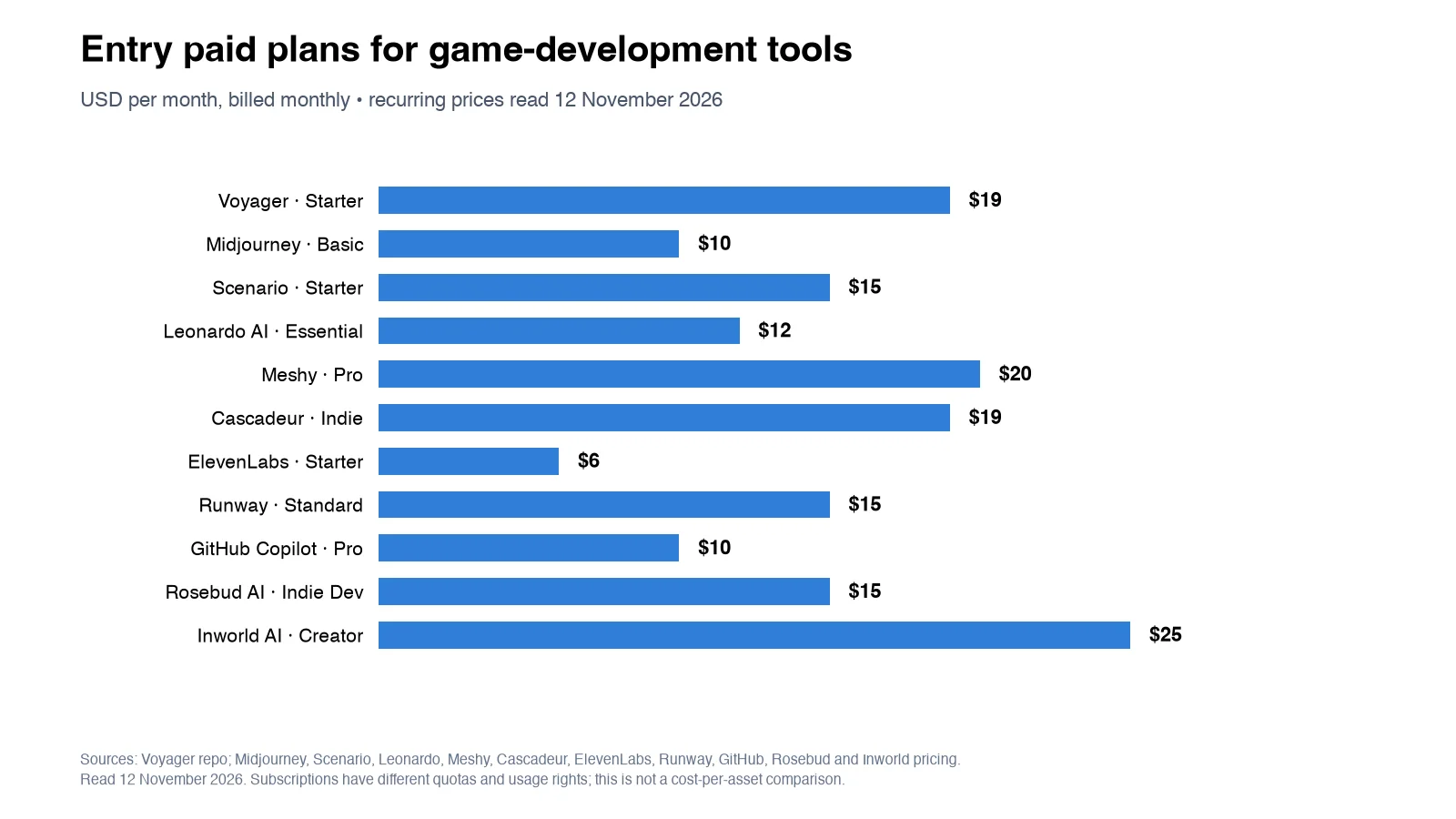
The costs are starting prices or access conditions, not equivalent per-asset charges. Plan eligibility, generation limits, billing periods, and commercial rights should be checked for the intended deliverable.
AI agents and creative workflow platforms
These tools coordinate generation and production tasks across supported applications rather than focusing on a single asset type.
1. Voyager
Voyager is a desktop AI-agent harness that enables its own agent, Claude Code, or Codex to work with professional creative applications through supported scripting, project-file handoffs, and computer-control workflows. Alongside generated media, it can deliver editable projects in supported formats such as PSD, OTIO, FCPXML, and native Blender scenes.
Primary focus
Game developers using multiple professional applications who need AI-generated assets integrated into existing creative pipelines while preserving opportunities for revision.
Key features
Voyager combines agent-driven automation, access to multiple generation models, and built-in creative editors.
- Application integration: Supported workflows with Blender, Unity, Photoshop, After Effects, Premiere Pro, DaVinci Resolve, and other creative applications
- Agent coordination: Voyager's own agent, Claude Code, or Codex for eligible creative tasks
- Model access: Image, video, voice, music, and other supported models through the model reference
- Editable outputs: Supported PSD files, Blender scenes, OTIO, FCPXML, EDL, and other project formats
- Built-in editors: Voyager Video for timeline editing, Voyager Design for vector and raster work, and Voyager DAW for audio production
- Application automation: Scripting, project-file operations, and computer control where supported
- Cloud compute: Eligible rendering and GPU capacity according to plan
- Bring your own tools: Compatible model-provider API keys and supported agent subscriptions
Voyager Video supports timeline editing, color work, multicamera operations, and professional exports. Voyager Design provides graphics and layered design capabilities, while Voyager DAW supports instruments, VST3 plugins, arrangement, and mixing.
Why it stands out for game developers
Voyager is especially relevant when creative production spans several applications and the final deliverable must remain revisable. Rather than generating isolated assets, its agent can coordinate supported operations across the tools already used in production.
For example, a developer preparing a game trailer might create or revise a Blender scene, generate supporting visuals, organize clips, add titles and audio, and prepare an editable video timeline. The exact workflow depends on installed applications, integration support, and selected models. Developers can explore the After Effects MCP guide for application-specific automation options.
Pricing and plan considerations
The desktop app is free to download. Its Free plan provides 1,000 monthly credits for eligible agent chat, selected image generation, and limited voice generation, alongside supported own-agent and own-key workflows.
Paid monthly plans include:
- Starter: $19/month per seat, 1,800 credits, and six parallel generations
- Creator: $49/month per seat, 4,900 credits, and 12 parallel generations
- Ultra: $149/month per seat, 16,000 credits, and 24 parallel generations
Voyager states that managed generation is billed at provider cost without markup, with one credit representing one cent of the provider's generation charge. Model access, GPU capacity, and generation allowances vary by plan. External creative software licenses and independently billed model-provider subscriptions remain separate.
Watch out for
Application capabilities depend on the operating system, software version, and supported integration. After Effects scripting and computer control are supported on macOS and Windows, while Linux does not support computer control. Windows and Linux builds have platform-specific limitations.
Editable project outputs preserve supported project elements, but individual objects inside rendered generated footage do not automatically become separate editable layers.
Choose it if
You need an agent that can coordinate generation, creative application operations, and editable project delivery across multiple production tools. Voyager is particularly suitable when your workflow spans Blender, Unity, graphics software, and video or audio production.
AI image and asset generation platforms
These tools focus on creating and modifying visual assets, with differences in model customization, editing controls, output formats, and game-engine preparation.
2. Midjourney
Midjourney generates concept art, characters, environments, and visual references from text prompts and supported image inputs. Its generation models and reference controls are useful during art direction and preproduction.
Primary focus
Concept artists and art directors establishing a game's visual direction before production.
Key features
Midjourney provides image generation and visual reference controls.
- Image generation: Scenes, characters, and environments from written descriptions
- Style references: Visual guidance for maintaining related aesthetics
- Reference-based editing: Supported image and object modification
- Personalization: Controls for preferred visual styles
Midjourney V8.2 became the default image model in July 2026, introducing changes to image creation, personalization, and reference-based editing.
Pricing and plan considerations
Midjourney has no general free tier. Monthly plans include Basic at $10, Standard at $30, Pro at $60, and Mega at $120.
Commercial usage rights are subject to Midjourney's terms. Businesses generating more than $1 million in annual revenue must use an eligible Pro or Mega plan.
Watch out for
Generated images generally require additional preparation before becoming optimized game textures or sprites. Maintaining consistency across large asset collections also requires suitable references and review.
Choose it if
You prioritize concept art, mood boards, character exploration, and establishing a visual direction before production.
3. Stable Diffusion
Stable Diffusion is a family of image-generation models supporting customization and local deployment, subject to the license of the selected model.
Primary focus
Developers who need customizable image generation, local deployment, or greater control over model execution.
Key features
Stable Diffusion supports flexible generation workflows.
- Local deployment: Run eligible models on compatible hardware
- Custom fine-tuning: Adapt supported models using LoRA techniques
- Guided generation: Use compatible ControlNet workflows for structural guidance
- Community tools: Work with ComfyUI, AUTOMATIC1111, and other compatible interfaces
Pricing and plan considerations
Supported models can be self-hosted under their applicable licenses. Stability AI's Community License permits eligible commercial use of covered models for organizations earning less than $1 million annually.
Hosted generation and local hardware have separate costs, while larger commercial organizations may require additional licensing.
Watch out for
Licensing conditions differ between models. Local setup, hardware requirements, model maintenance, and managing dependencies require technical knowledge.
Choose it if
You need a configurable generation pipeline and have the technical resources to manage local models, custom workflows, and licensing requirements.
4. Scenario
Scenario combines custom model training with image, video, 3D, and audio generation tools designed to help teams maintain a consistent visual identity.
Primary focus
Studios generating assets that need to follow established art direction and visual references.
Key features
Scenario emphasizes custom models and repeatable creative workflows.
- Custom model training: Create eligible models using reference artwork
- Batch generation: Produce variations for review and iteration
- Multi-format generation: Access image, video, 3D, and audio options
- API integration: Connect supported generation operations to external pipelines
- Team workspaces: Manage shared workflows on eligible plans
Pricing and plan considerations
Scenario provides limited free access. Monthly plans include Starter at $15 with 1,500 credits, Pro at $45 with 5,000 credits, and Max at $75 with 10,000 credits.
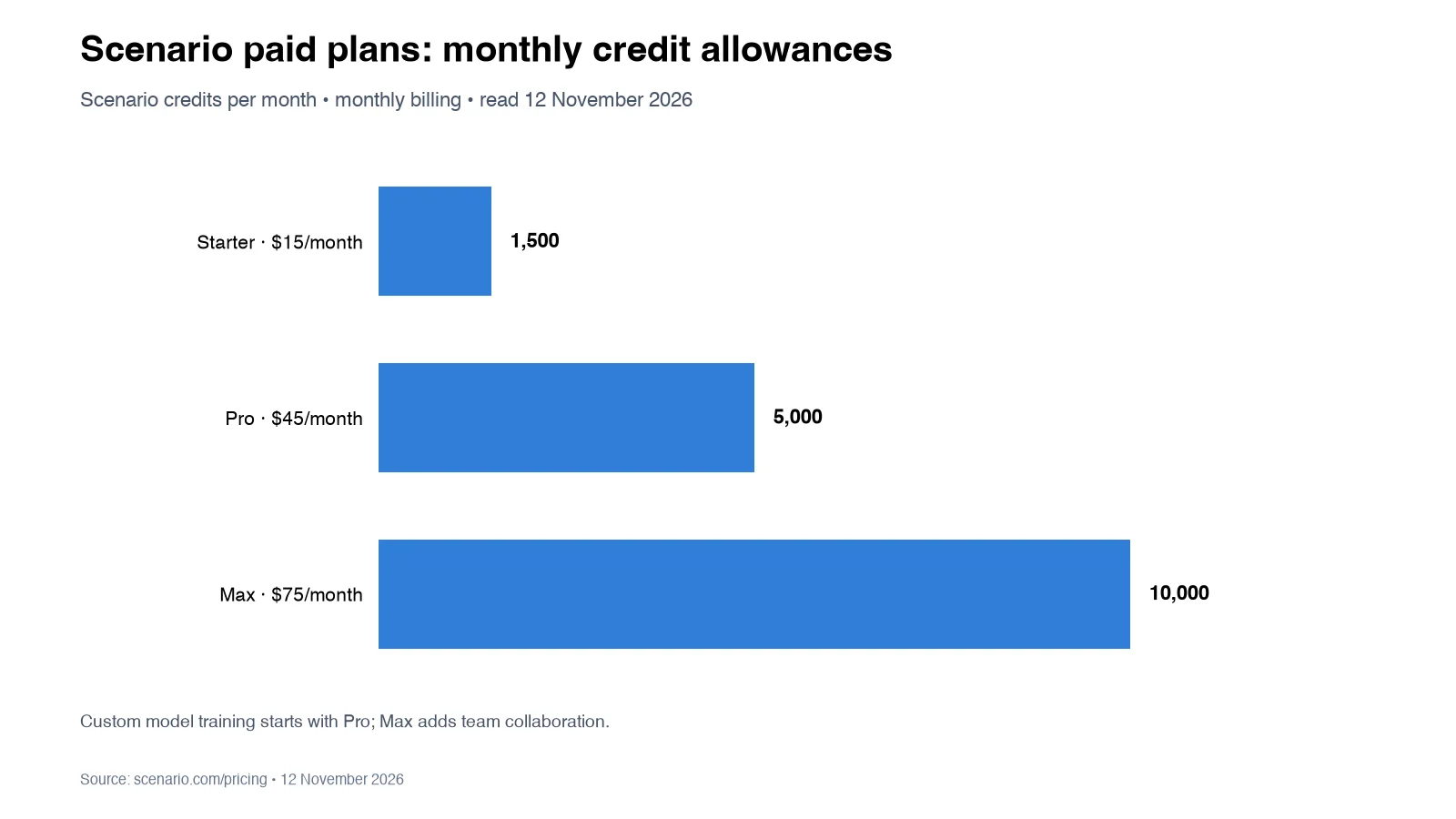
Custom model training begins with eligible higher-tier plans. Max adds team collaboration, while Enterprise offers custom arrangements.
Watch out for
Custom training depends on suitable reference artwork and the rights to use it. Game-engine integration may require API development or additional asset preparation rather than direct native editing.
Choose it if
Visual consistency is important across your game's assets and you have reference artwork suitable for repeatable generation workflows.
5. Leonardo AI
Leonardo AI provides image, video, and design generation tools with visual presets, reference controls, and model customization.
Primary focus
Indie developers and small teams creating concept art, sprites, textures, and visual references.
Key features
Leonardo AI combines generation with in-platform editing controls.
- Visual presets: Available styles for different creative requirements
- Canvas editing: Image generation and modification within a shared workspace
- Reference controls: Guidance for characters, objects, and visual consistency
- Custom models: Personal model training on eligible plans
- API access: Integration with external development workflows
Pricing and plan considerations
The Free tier provides 150 fast tokens daily. Monthly plans include Essential at $12, Premium at $30, and Ultimate at $60.
Paid plans offer larger token allowances, private generations, and additional model features. Unlimited relaxed generation applies only to selected models and plans.
Watch out for
Token consumption depends on the model and settings. Free creations have different privacy conditions from paid plans, while exported images may still need optimization before use in games.
Choose it if
You need accessible image generation for concepts, textures, sprites, and early visual iteration.
6. Promethean AI
Promethean AI provides AI-assisted 3D environment and asset management workflows for teams working with complex scenes and established asset libraries.
Primary focus
Teams organizing and assembling 3D environments using existing asset collections.
Key features
Promethean AI focuses on environment and asset workflows.
- AI asset management: Tools for organizing and locating existing assets
- Environment assistance: Support for scene and asset arrangement workflows
- Style guidance: Creative direction for supported environment operations
- Unreal workflows: Integration options for compatible Unreal Engine environments
Pricing and plan considerations
A free version includes AI asset management, palettes, and selected AI capabilities. Commercial and enterprise pricing requires contacting Promethean AI.
Watch out for
Feature availability depends on the edition and supported application. Teams should confirm Unreal compatibility and the specific scene-editing operations available before adoption.
Choose it if
You work with established 3D libraries and need assistance organizing or assembling environments rather than generating every asset from scratch.
7. Meshy
Meshy generates 3D models from text descriptions or images and provides texturing, rigging, and animation features.
Primary focus
Rapid 3D asset prototyping when manual modeling would delay early development.
Key features
Meshy supports several stages of 3D asset creation.
- Text-to-3D: Generate models from written descriptions
- Image-to-3D: Create 3D assets using visual references
- AI texturing: Add materials and textures to generated models
- Auto-rigging: Apply supported rigs to eligible characters
- Animation presets: Animate compatible rigged models
Pricing and plan considerations
Pro costs $20/month and provides 1,000 monthly credits. Higher paid plans offer additional generation capacity, with download permissions and privacy conditions varying by plan.
Watch out for
Generated assets should be checked for topology, UV mapping, polygon count, rig quality, materials, and engine compatibility. Exporting a file does not guarantee immediate production readiness.
Choose it if
You need 3D assets for prototypes, placeholders, environment objects, or early character development and can refine the results before integration.
AI character animation and motion capture tools
These tools help create character movement through physics assistance, automated posing, and motion extraction from recorded performances.
8. Cascadeur
Cascadeur uses physics-based assistance and AI-supported posing to help animators create and refine character movement.
Primary focus
Character animators who want physically grounded movement and editable animation controls without dedicated mocap hardware.
Key features
Cascadeur combines traditional animation tools with physics assistance.
- Physics assistance: Tools for balance, weight, momentum, and movement analysis
- AI-assisted posing: Suggestions for character poses and movement
- Animation editing: Manual keyframe and trajectory refinement
- Rig support: Compatible humanoid rigs and additional features on eligible plans
Pricing and plan considerations
Cascadeur Free is intended for non-commercial use. Indie costs $19/month, Pro costs $49/month, and Teams costs $49 per user monthly.
Indie has business eligibility conditions, while Pro provides broader commercial permissions and advanced animation features. Eligible annual subscriptions include perpetual-license benefits under the vendor's terms.
Watch out for
Animation results depend on rig compatibility, character proportions, and manual refinement. Some advanced retargeting and quadruped features require higher plans.
Choose it if
You need controllable character animation with physics assistance and prefer editing keyframes instead of recording every movement with capture hardware.
9. DeepMotion
DeepMotion converts recorded video into animation data, allowing developers to create motion references without specialized capture suits.
Primary focus
Developers who want to extract character movement from recorded performances.
Key features
DeepMotion provides video-based motion capture through Animate 3D.
- Video-to-animation: Convert recorded performances into animation data
- Markerless capture: Process movement without dedicated tracking markers
- Animation exports: Download supported animation file formats
- Motion processing: Available character tracking and motion settings
Pricing and plan considerations
The Freemium plan provides 25 animation credits monthly. Starter costs $9/month, Innovator $17/month, and Professional $39/month when billed annually.
Paid plans provide larger credit allowances and different maximum clip lengths.
Watch out for
Results depend on footage clarity, performer visibility, camera movement, and performance type. Retargeting, contact corrections, and animation cleanup may still be necessary.
Choose it if
You have recorded reference footage and want to convert visible movement into animation data for further editing.
AI voice and video production platforms
These tools help create dialogue, narration, trailers, cutscenes, and promotional footage. Their outputs and editing requirements differ substantially.
10. ElevenLabs
ElevenLabs provides text-to-speech, voice cloning, and multilingual speech-generation capabilities for NPC dialogue, narration, and character voices.
Primary focus
Games requiring synthetic dialogue, character voiceovers, and multilingual narration.
Key features
ElevenLabs offers model-dependent speech and voice-generation options.
- Speech synthesis: Generate spoken dialogue from text
- Voice cloning: Create eligible voices from authorized audio samples
- Multilingual generation: Eleven v4 supports more than 90 languages
- Expressive dialogue: Model-dependent controls for speech delivery and performance
Pricing and plan considerations
The Free tier provides 10,000 monthly credits. Starter costs $6/month with 30,000 credits, Creator costs $22/month with 121,000 credits, and Pro costs $99/month with 600,000 credits.
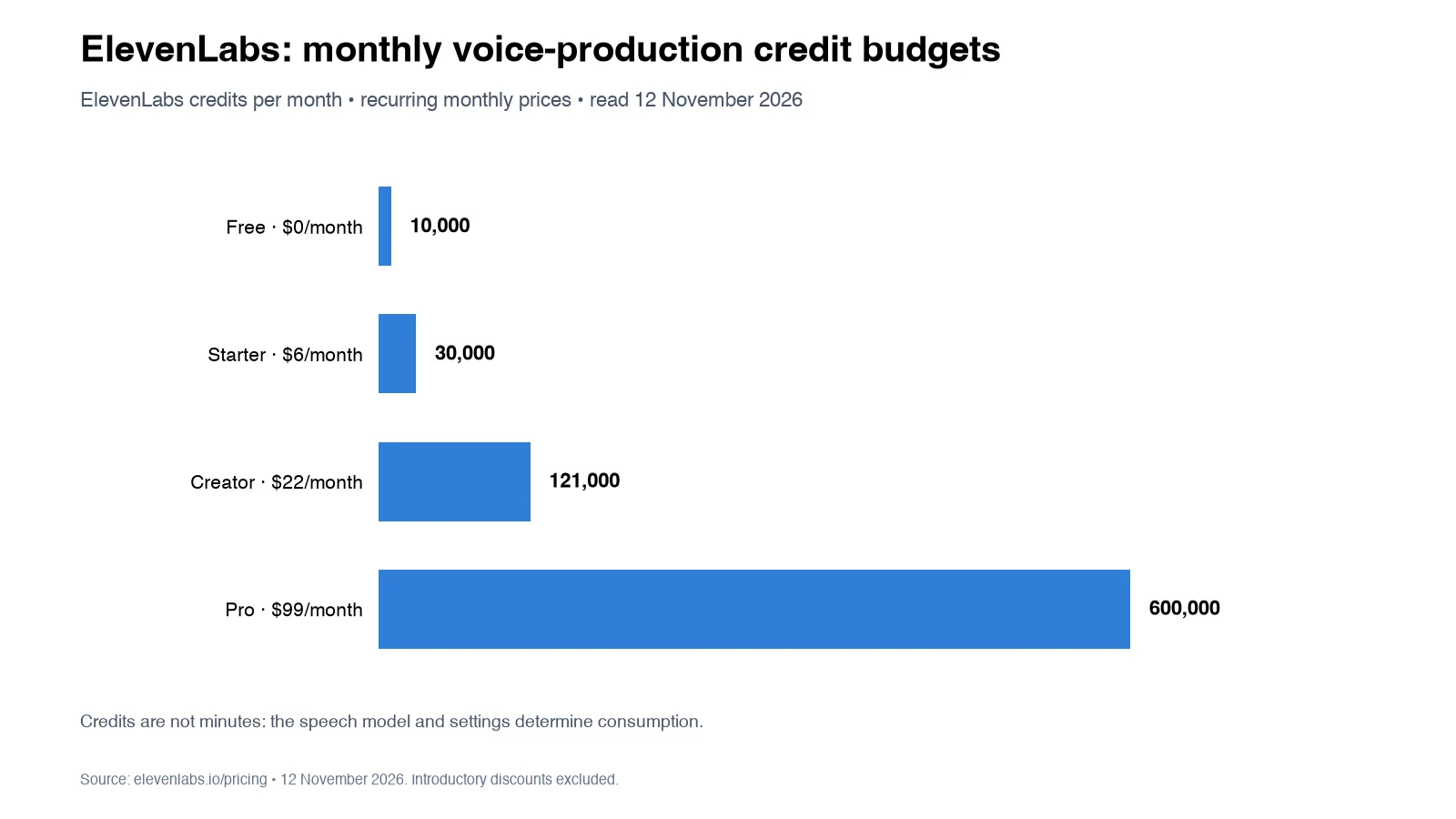
Commercial rights, professional voice cloning, and other features vary by subscription.
Watch out for
Generation costs depend on the selected speech model and dialogue volume. Voice cloning requires appropriate permissions, and character performances may need manual direction and review.
Choose it if
You need multilingual character voices, narration, or synthetic speech and can manage usage costs and licensing requirements.
11. Runway
Runway provides AI video generation, footage modification, and creative workflows for producing cinematic content, trailers, and marketing videos. Its platform also includes an AI agent, reusable workflows, and editable timelines.
Primary focus
Creating game trailers, cinematic sequences, cutscene concepts, and promotional video footage.
Key features
Runway combines generation with video production tools.
- Text-to-video: Generate clips from written descriptions
- Image-to-video: Animate still images and visual references
- Generative editing: Modify existing footage through supported operations
- Runway Agent: Coordinate eligible creative tasks through conversational instructions
- Timeline editing: Arrange, revise, and export video sequences
- Reusable workflows: Build supported multi-step creative processes
Pricing and plan considerations
The Free tier includes 125 one-time credits.
Standard costs $15/month with 625 monthly credits, Pro costs $35/month with 2,250 credits, and Max costs $95/month with 9,500 credits. Annual billing offers discounted monthly-equivalent rates.
Generation charges vary by model, resolution, clip duration, and operation.
Watch out for
Generation, editing, and agent operations have different usage requirements. An editable timeline does not mean that individual objects inside generated footage become separately editable.
Choose it if
You need generated cinematic footage, video modification, and timeline assembly within a creative video platform.
AI coding and game design assistants
These tools assist with game scripts, development tasks, concept planning, market research, and playable prototypes.
12. Claude Code
Claude Code is an agentic coding tool that can work with project files, write and revise code, run supported development commands, and assist with software workflows.
Primary focus
Game developers who want agent-assisted coding, scripting, debugging, and project maintenance.
Key features
Claude Code supports software development through its agent runtime.
- Code generation: Write and revise scripts for supported languages and environments
- Project context: Work with files and instructions in a codebase
- Tool execution: Run eligible commands, tests, and scripts
- Workflow extensions: Use supported skills, plugins, and MCP integrations
Pricing and plan considerations
Claude Code is accessible through eligible Claude subscriptions or supported usage-based API arrangements. Usage allowances, model access, and limits depend on the selected plan.
Watch out for
Generated code requires testing against the actual game engine, dependencies, and project architecture. Creative application access depends on configured integrations rather than the coding agent alone.
Choose it if
You need an agent to help write, debug, and maintain game-development code or operate supported development tools through scripts and integrations.
13. GitHub Copilot
GitHub Copilot provides code suggestions and agent-assisted development features in supported IDEs and development environments.
Primary focus
Programmers who want coding assistance while writing and maintaining game logic.
Key features
GitHub Copilot integrates with development workflows.
- Inline completion: Code suggestions based on local development context
- Multi-language support: Assistance with C#, C++, Python, JavaScript, and other languages
- IDE integration: Support for VS Code, Visual Studio, JetBrains IDEs, and other environments
- Agent capabilities: Supported coding tasks, code review, and development automation
Pricing and plan considerations
Copilot Free provides limited access. Individual plans include Pro at $10/month, Pro+ at $39/month, and Max at $100/month.
Copilot Business costs $19 per user monthly. Agent features and advanced models use plan-specific allowances.
Watch out for
Code suggestions may not match engine architecture, project conventions, or performance requirements. Generated code requires review and testing before integration.
Choose it if
You spend substantial time writing game logic and want coding assistance integrated into your existing development environment.
14. Ludo.ai
Ludo.ai combines AI-assisted game ideation, market research, asset generation, and prototyping tools to support early development decisions.
Primary focus
Game designers exploring concepts, market trends, visual assets, and prototype ideas.
Key features
Ludo.ai connects ideation with game-development tools.
- Concept generation: Explore ideas, mechanics, and themes
- Market research: Review trends and relevant game-market information
- Asset generation: Create sprites, textures, images, and other eligible assets
- Prototype tools: Develop and iterate on early playable concepts
- Developer access: API, MCP, CLI, and Unity integration on eligible plans
Pricing and plan considerations
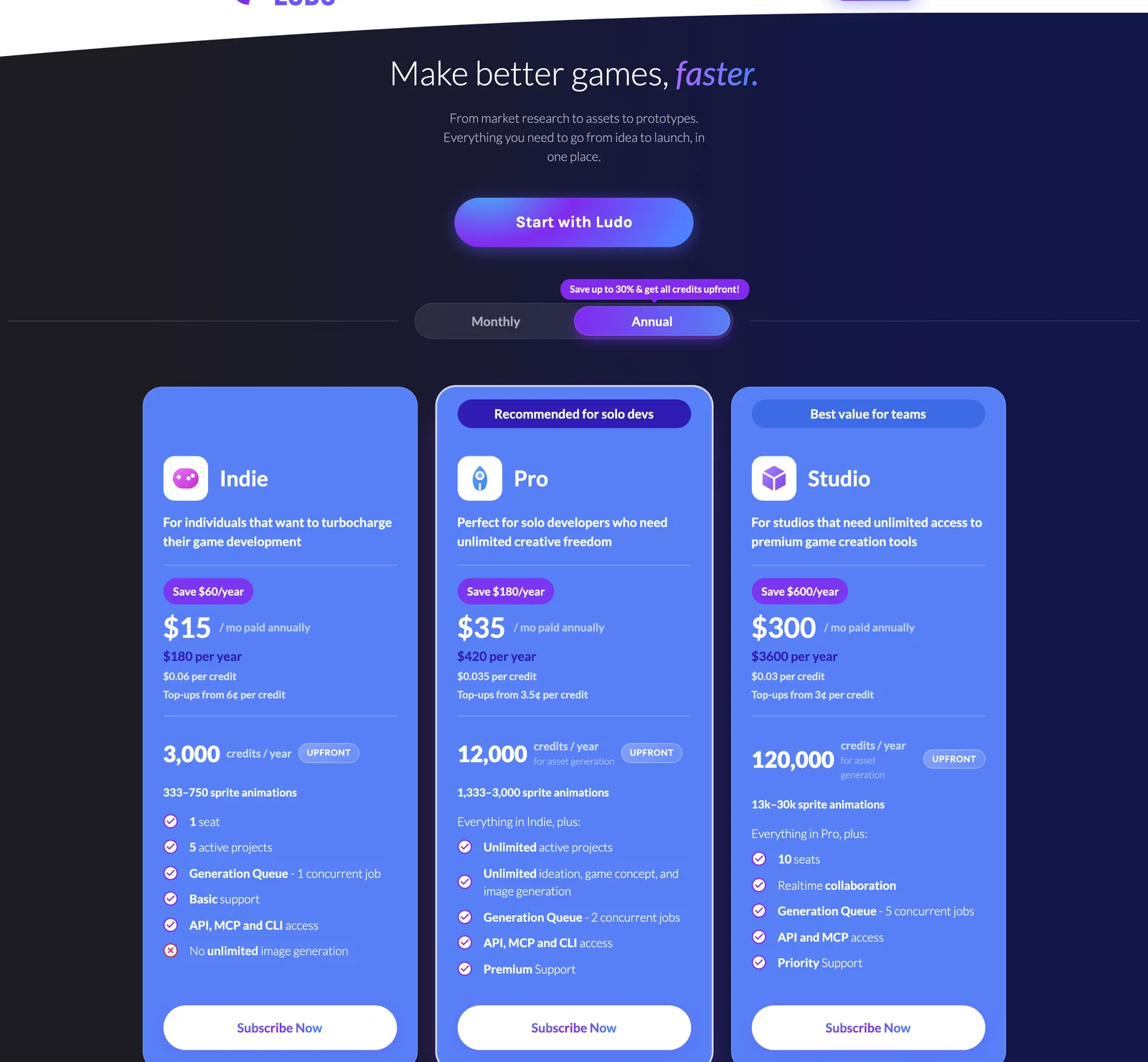
Ludo.ai offers trial access. Indie starts at $15/month when billed annually, while Pro costs $35/month annually or $50/month with monthly billing.
API, MCP, and CLI access begins with Indie. These operations consume credits, while eligible unlimited web features have separate usage conditions.
Watch out for
Market research can inform development decisions but cannot guarantee commercial demand. Generated assets and prototypes still require technical review and testing.
Choose it if
You need assistance with early game ideation, market exploration, asset creation, and concept development before full production.
15. Rosebud AI
Rosebud AI creates playable browser-based games from natural-language descriptions, allowing developers to explore gameplay concepts through generated code and assets.
Primary focus
Designers and non-programmers who want to create and evaluate playable prototypes.
Key features
Rosebud AI supports prompt-driven game creation.
- Natural-language input: Describe mechanics and desired behavior
- Playable output: Build browser-accessible game experiences
- Code generation: Create and modify supported game logic
- Asset generation: Produce visuals and other project elements
- Browser sharing: Share eligible projects through hosted links
Pricing and plan considerations
Rosebud offers free access alongside paid plans. Indie Dev costs $15/month, 10x Dev $30/month, Pro $50/month, and Scale $100/month.
Commercial rights begin with 10x Dev. Downloadable project code is available on Pro and higher plans under the published conditions.
Watch out for
Production suitability depends on code quality, mechanics, testing, performance, hosting, and publishing requirements. Generated games may need substantial refinement.
Choose it if
You want to explore playable concepts and are prepared to review and refine the resulting game before release.
AI runtime and automated game testing platforms
These tools support interactive characters and automated testing closer to gameplay execution rather than only creative asset generation.
16. Inworld AI
Inworld AI provides real-time speech, speech recognition, model inference, and runtime tools developers can use to build interactive dialogue systems and character experiences.
Primary focus
Games requiring context-aware NPC dialogue, voice interaction, or runtime AI components.
Key features
Inworld provides speech and inference tools for interactive applications.
- Dynamic dialogue: Generate contextual character responses through configured systems
- Runtime components: Build supported inference and interaction workflows
- Speech generation: Produce spoken character output
- Speech recognition: Process player voice input
- Developer integrations: Connect runtime services to games and backend systems
Pricing and plan considerations
The On-Demand plan supports free evaluation and pay-as-you-go usage. Creator costs $25/month, Builder $100/month, and Developer $300/month.
Higher tiers provide additional credits, lower eligible usage rates, and increased operational limits. Enterprise pricing is customized.
Watch out for
Runtime expenses depend on player activity, speech generation, inference, and deployment architecture. Character behavior, memory, and moderation require deliberate implementation.
Choose it if
Your game needs interactive voice or dialogue systems that respond to player actions rather than relying entirely on scripted dialogue trees.
17. modl.ai
modl.ai provides automated game testing through AI-powered workflows that help teams evaluate gameplay behavior and identify problems.
Primary focus
Studios seeking automated quality assurance for supported games and testing scenarios.
Key features
modl.ai focuses on automated game testing.
- Automated exploration: AI-driven testing of supported gameplay environments
- Build-based testing: Submit supported game builds for testing
- Natural-language tests: Describe eligible testing scenarios
- Issue detection: Identify gameplay problems, crashes, and other observable failures
Pricing and plan considerations
modl.ai uses sales-led pricing. Teams should contact the company to confirm available evaluation options, supported platforms, and commercial terms.
Watch out for
modl.ai documents an integrationless testing approach for supported workflows, so a custom SDK should not be assumed necessary. Game type, platform support, test scope, and build preparation still determine suitability.
Choose it if
You need automated gameplay testing and want to evaluate whether build-based AI testing can complement your existing quality assurance process.
Engine-native AI tools and plugin ecosystems
Engine-native tools provide assistance within or alongside game-development environments, making them useful when developers want to work directly with existing projects.
18. Unity AI and Asset Store
Unity provides in-editor AI assistance, command-line tooling, agent connections, and a marketplace of development assets and plugins. Its first-party AI tools and the Unity Asset Store serve different purposes.
Primary focus
Unity developers who want AI-assisted operations and compatible tools connected to their existing development environment.
Key features
Unity's AI ecosystem includes first-party tools and third-party assets.
- In-editor assistance: Project-aware AI support through eligible Unity AI tools
- Unity CLI: Command-line access for supported project, build, test, and Editor operations
- Agent integration: Supported connections to external coding agents
- MCP through CLI: Agent connection for compatible Unity versions
- Asset Store: Third-party plugins, assets, and AI-related extensions
- Compatibility checks: Version requirements and dependencies for individual tools
Pricing and plan considerations
Unity CLI is available separately from the paid in-editor AI assistant. Official agent connection tools can work with a compatible external agent.
Asset Store products have individual prices and licenses, ranging from free assets to commercial packages. No single subscription covers the entire marketplace.
Watch out for
Unity deprecated the older MCP server inside its AI Assistant package in favor of the supported Unity CLI route. The current CLI remains in beta, and controlling a running Editor requires Unity 6 or newer with the appropriate setup.
Choose it if
You primarily develop inside Unity and need AI assistance or plugins tied directly to that environment, with the required version and integration support.
Final verdict: why Voyager is the top choice for creative game development
For game developers working across multiple creative applications, Voyager is the top choice in this comparison for connected, editable creative production. It combines an AI-agent harness, access to generation models, professional software integrations, and built-in editing tools. Instead of focusing on a single asset type, Voyager helps coordinate the creative stages surrounding game development, from 3D assets and animation previews to trailers, graphics, and audio. The 3D engine comparison explains how different engines support agent-driven production.
Its most relevant advantages include:
- Multi-application coordination: Agent-driven operations across supported Blender, Unity, graphics, video, and audio applications
- Editable project handoffs: Supported native files and timeline formats that preserve opportunities for revision
- Integrated model access: Multiple eligible image, video, voice, music, and other creative generation models
- Built-in production tools: Voyager Video, Voyager Design, and Voyager DAW for creative editing
- Flexible agent connections: Voyager's own agent or supported Claude Code and Codex runtimes
- Transparent generation pricing: Managed generation billed at provider cost without markup
- Accessible starting point: Free desktop application and compatible own-key workflows
Voyager is especially valuable when generated assets need to remain part of an ongoing production pipeline rather than becoming isolated final files. Developers should confirm the specific application integrations, platform requirements, and export formats needed for their projects.
Frequently asked questions
How can AI tools improve a game development workflow?
AI tools can assist with concept art, character animation, speech generation, programming, and testing. Their usefulness depends on the production stage and the review work required afterward. Agent-based tools such as Voyager can also coordinate supported tasks across creative applications, helping developers manage connected production stages while retaining editable outputs. The Blender MCP guide explains one approach to connecting agents with 3D workflows.
Are free AI tools sufficient for indie game development?
Free tiers can support early experiments and prototypes, but generation limits and commercial-use conditions vary. Leonardo AI provides 150 daily fast tokens, Meshy offers 100 monthly credits, and ElevenLabs includes 10,000 monthly credits. Cascadeur's Free plan is restricted to non-commercial use, while other platforms may limit downloads, model access, or output rights. Larger projects often require paid capacity or additional software.
What types of AI agents work with game development software?
Coding agents can write scripts, modify code, run development commands, and interact with supported tools. Creative agent harnesses can extend those workflows into graphics, animation, video, and audio applications. Voyager supports its own agent along with Claude Code and Codex connections, with available operations depending on the application, operating system, and integration method. The Unity MCP guide explains engine-specific agent connections.
Can AI tools generate assets ready for game engines?
Some tools export formats compatible with game engines such as Unity and Unreal. Meshy supports common 3D asset formats, while Scenario and Leonardo AI generate images usable as textures, sprites, and references. However, production readiness depends on polygon count, UV mapping, rigging, file compatibility, performance, and target-platform requirements. Importable assets may still need optimization and manual review.
What costs should game developers budget beyond subscriptions?
Account for generation credits, model-provider fees, third-party application licenses, asset exports, cloud rendering, team seats, and commercial licensing requirements. Credit values differ between platforms, so a larger allowance does not necessarily mean more usable output. Estimate costs using your actual models, asset types, expected revisions, and production volume rather than comparing subscription prices alone.
Voyager is a desktop AI agent for creative work
Describe what you want to make; Voyager plans it, uses your apps and tools, and keeps everything editable.