For text-only scene generation, start with Runway for ordered action instructions, Google Flow for short scenes with dialogue, or Kling when the scene needs up to 30 seconds. Choose LTX Studio when your text is a script that must first become a storyboard. These are different purchases: a long clip allowance does not guarantee that every action or spoken word survives.
The short version: Use scene generation for what the camera should see and hear. Use Synthesia or HeyGen when approved presenter copy is the priority, and InVideo or Pictory when narration needs supporting scenes. Choose Voyager when an agent must carry the brief across generation and creative editors. Below, we show an existing ordered-action result and work out a retry budget for a 45-second deliverable.
Key takeaways
- Runway documents ordered action instructions, Google Flow supports short dialogue scenes, and Kling offers clips up to 30 seconds.
- LTX Studio fits script-to-storyboard work, while Synthesia and HeyGen fit approved presenter copy.
- Our illustrative 45-second video budget uses 120 generated seconds to select 40 seconds of footage, plus a five-second title.
We read the vendors' product pages, documentation and pricing on October 29, 2026. Recommendations distinguish documented controls from our inspected output; this is not a new cross-app adherence benchmark. Prices are in US dollars with monthly billing unless stated otherwise. Voyager, the desktop app our team builds, is included for its agent, creative editors and supported app workflows.
Decide what your text is asking for
An action prompt describes events inside a shot. A dialogue prompt adds words a character should say while acting. A script needs scene boundaries, voices and assembly. Before choosing a subscription, identify what you must be able to correct: event order, the exact spoken sentence, one storyboard shot or a source summary.
If an approved image should determine the first frame, use our image-to-video tools comparison. The input-choice guide explains when that visual starting point is preferable to describing everything in words.
Text-to-video apps at a glance
| App | Text job | Starting gate |
|---|---|---|
| Runway | Ordered actions | Gen-4.5: Standard $15, 625 credits |
| Google Flow | Scene dialogue | Veo; Pro $19.99, 1,000 monthly credits |
| Kling | Longer action or speech | Select full Kling 4.0; verify checkout |
| Hailuo AI | Action with stereo sound | H3; Standard $10.50 promotion, 1,000 credits |
| LTX Studio | Script breakdown | AI Storyboards: Standard $35 |
| Synthesia | Presenter script | Downloads: Starter $19 after $9 first month |
| HeyGen | Presenter localization | Creator $29; translation-script edits: Pro $49 |
| InVideo | Brief to narrated scenes | Starter $20/seat; selected agents/models |
| Pictory | Script, URL or recording | Starter $29; automatic summaries: Professional $59 |
| Voyager | Agent across creative tools | Own-key video on Free; managed video from $19 |
Sources, read October 29, 2026: Runway, Google plans, Kling, Hailuo's signed-out pricing panel, LTX, Synthesia, HeyGen, InVideo, Pictory and Voyager. Credit units differ. Voyager's paid launch bonus adds 50% to each of the first three monthly grants, capped at 15,000 extra credits per workspace per month, on monthly and annual plans.
Write actions and dialogue for generated scenes
Runway: sequence actions inside one shot
Runway's Gen-4.5 guide explicitly documents sequenced instructions, camera choreography and event timing. It advises longer durations for prompts containing multiple sequential actions. That makes it worth evaluating for “opens the door, walks to the counter, then sets down a cup,” rather than treating every action as a separate generation.
Purchase check: Gen-4.5 requires Standard or higher, produces 2–10-second clips at 720p and costs 12 credits per generated second. Standard is $15/month with 625 credits; Free's 125 credits are a one-time allowance and do not meet Gen-4.5's paid-plan requirement. Decide how to produce speech separately before choosing a route for approved dialogue; the cited Gen-4.5 instructions establish visual and motion control, not a complete presenter-script workflow.
Revision check: Keep the subject and camera description fixed, reverse the order of two actions and inspect whether both happen in the new order. If the sequence is compressed or an action disappears, simplify it or split it into shots. Choose it if the important question is whether one generated shot can follow your written event sequence.
Google Flow: put dialogue in a scene prompt
Google's Veo prompt guide documents character descriptions, action and specific spoken lines. Flow is a place to use that scene-writing approach. Its creation guide separately documents voice references through Omni Flash's Ingredients mode. Those are different controls: writing a line for a character and choosing a reusable voice reference should not be treated as the same feature on every model.
Purchase check: The credit guide lists 50 daily trial credits without a subscription, plus 1,000 monthly credits on Google AI Pro. Veo 3.1 Fast costs non-Ultra users 20 credits per clip and offers 4-, 6- or 8-second output; a request may produce multiple clips. The get-started page still lists a subscription among its requirements, so confirm trial access in your account. Region and model determine available controls. For extension, the feature table directs Veo clips through Lite, while the credit table also lists Extend under Fast. Confirm the active model and charge before extending.
Revision check: Change one short quoted line while keeping the action fixed. Check the actual words, who says them and whether the new line fits the selected duration. If a recurring voice is essential, evaluate the documented Omni Ingredients route separately. Choose it if the scene needs spoken dialogue or you need to investigate Google's voice-reference controls.
Hailuo AI: allow more time for action with native sound
MiniMax H3, available in Hailuo's workspace, documents text input, native stereo sound and up to 15 seconds at 2K. It also accepts image, video and audio context. That longer single-generation allowance makes it a candidate when an action and its accompanying sound need more time than an eight-second clip permits; it does not establish better adherence.
Purchase check: Select H3, rather than assuming an older Hailuo 2.3 configuration has the same duration or audio capability. The signed-out pricing panel showed monthly promotions of $10.50 Standard/1,000 credits and $38 Pro/4,500, against $14.99 and $54.99 list prices. The promotion end and renewal terms were not stated in that panel; verify checkout. The H3 composer showed 60 credits for one five-second 2K, 21:9 Omni Reference output; confirm the charge after changing settings. MiniMax offers 2K by default.
Revision check: Write one action followed by an audible consequence, such as setting down a cup and hearing it contact the saucer. Change only the timing instruction and inspect both picture and sound. For exact speech, check every word and speaker rather than inferring dialogue accuracy from the presence of audio. Choose it if up to 15 seconds and native stereo sound are useful to the scene you are writing.
Kling: give a longer scene an explicit event order
Kling's generator page documents text-directed action, camera movement, sound and dialogue, with up to 30 seconds per generation on Kling 4.0. This makes it a serious alternative when splitting a scene would interrupt its action. It is an allowance, not evidence that a longer prompt succeeds more often.
Purchase check: Select full Kling 4.0 and check the duration, resolution, audio setting and charge together. The landing page mixes a 4.0 headline with older 3.0 wording; it does not supply a usable subscription quote. We could not read a current price from the signed-out pricing page, so we do not substitute an API rate or a historical plan price.
Revision check: Give each third of the scene one action, then change only the middle action. Check the ending as well as the changed beat. Choose it if a scene needs more than H3's 15 seconds or Flow/Veo Fast's eight, and you can review continuity throughout.
What an ordered-action result actually kept
We revisited our October 23 Kling 4.0 API run, requested at 20 seconds and 720p, to examine the gap between following a sequence and preserving its props. The prompt specified a woman in a blue apron with one red mug and one white cloth: turn the mug, set it down, wipe beside it, fold the cloth, then look toward the window. It also asked for a slowly tracking camera and no cuts.
Description / transcript
Visual description: A woman in a blue apron turns a red mug, sets it on a wooden table, wipes with a cloth, folds it and looks toward a window. A second folded cloth is visible during the wiping action. Audio was not scored.
The sampled frames reach the requested actions in order. At ten seconds, however, she is wiping with one cloth while another sits folded beside the mug. By the ending there is one folded cloth again. The composition shifts little despite the requested tracking move. The returned file is 20.04 seconds at 1280×720; those measurements describe this output, not the Kling app's settings or a guaranteed result.
That changes our purchase advice: evaluate Kling for a long written sequence, but approve action order and prop continuity separately. If the duplicate cloth would fail the brief, cut the wiping action into its own shot and assemble it with the mug shot. We did not generate that repair, and sampled frames cannot establish perfect continuity between them. The model's run record and observations provide the full prompt and other outputs; the hands-and-objects comparison covers a different, shared prompt across models.
Break a script into shots
LTX Studio: start with the script breakdown
LTX's movie-maker page documents script-to-storyboard conversion, scene and camera refinement, individual shot Retakes and timeline assembly. It also describes adding dialogue, voiceover, effects and music to the project. This is the useful alternative to pasting an entire screenplay into a short-clip prompt: review the shot plan before committing to motion.
Purchase check: The plan table distinguishes Blank Storyboards on Free from AI Storyboards on Standard. Monthly Standard is $35 with 28,000 credits and a commercial-use license. Lite is $15 with 8,000 credits, but AI Storyboards and commercial use are listed at Standard. Free's 800 one-time credits carry personal-use conditions. Check which model a shot needs too: Standard lists selected Kling and Seedance models, while Pro adds Veo 3.1.
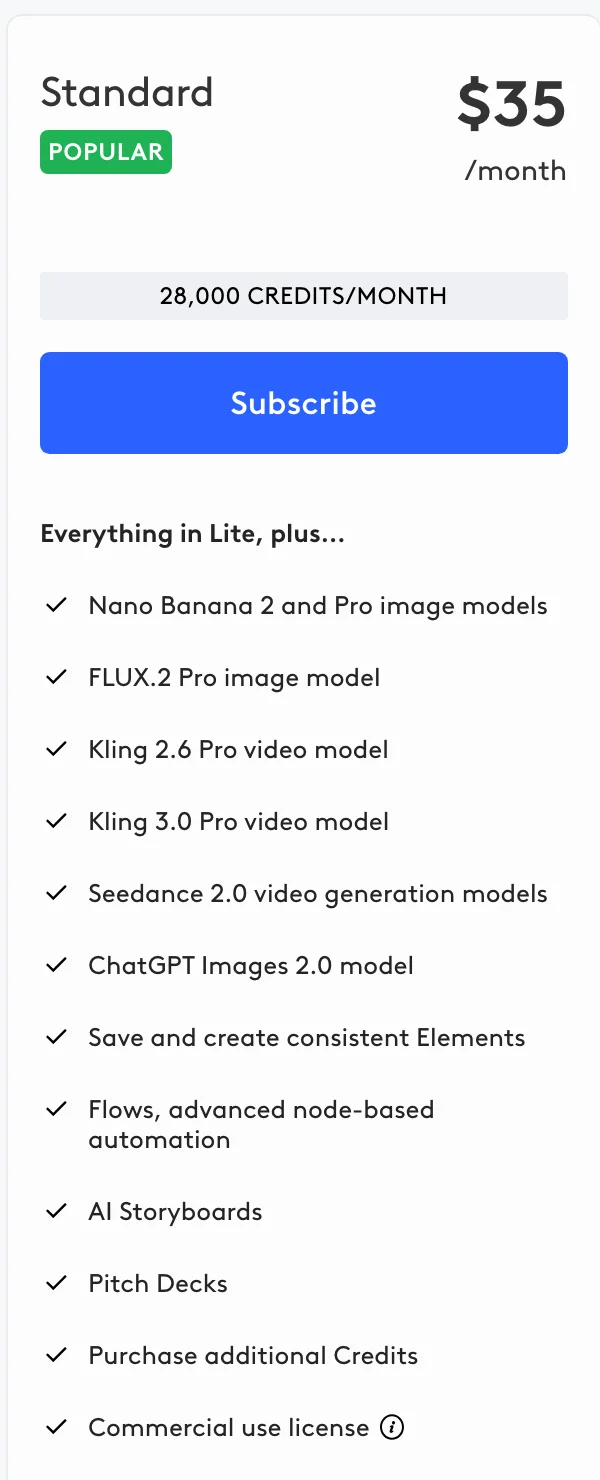
Revision check: Import a short script with three explicit scene changes. Correct one shot's action and use a Retake; inspect whether the other shots, character choices and intended dialogue still fit. Choose it if the deliverable begins with a multi-shot narrative that needs a reviewable storyboard.
Keep approved words in presenter scripts
Synthesia: author the spoken script around a presenter
Synthesia combines presenter scenes, templates and dubbing. Its AI Playground also generates supporting media. The reason to choose it here is the spoken script and presenter authoring, even when the finished piece includes generated B-roll.
Purchase check: As of October 29, 2026, Basic includes 10 monthly minutes of Studio video creation or dubbing, plus 500 general credits, with a watermark and share-link delivery. These are separate allowances: the 500 credits are not a conversion of the ten included minutes. Starter adds downloads, logo removal and 1,250 monthly credits on top of the free allowance at $19/month after a $9 first month. Paid credits form a shared pool across usage-based AI features, rather than a fixed purchase of video minutes. These allowances are separate from a scene generator's seconds-per-clip limit.
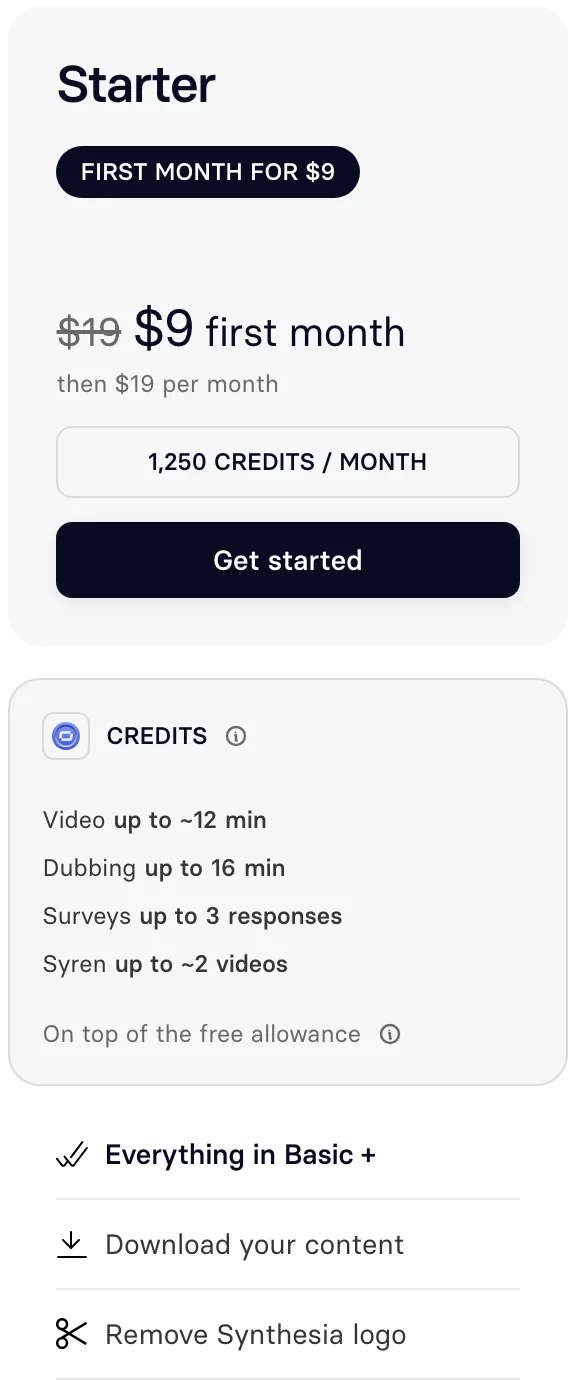
Revision check: Replace one sentence containing a name and a time. Check pronunciation, pauses, captions and scene duration after the change. Choose it if an approved script and recurring presenter drive the video, as in training or internal communication.
HeyGen: revise presenter copy across languages
HeyGen combines avatars, voices, translation and generation. Creator is $29/month with 600 credits and 1080p exports. Pro starts at $49 with 1,000 credits, 4K export and editing/proofreading of translation scripts. Pro also advertises Seedance 2.5 and Veo 3.1 access, so the app is broader than presenter authoring alone.
Purchase check: HeyGen's terms exclude commercial activities and client work on Free. Pricing advertises three monthly watermarked videos of up to one minute each, while the subscription help page qualifies the free allowance as one to three videos depending on region. Confirm your account's quota. Free access does not establish entitlement to the Pro generation models.
Revision check: Translate a short script, then correct a name or technical term in the target-language text. Review the spoken words and timing with someone who knows that language. Choose it if presenter localization and repeatable script corrections are central to the job.
Assemble narration and supporting visuals
InVideo: turn a brief into a sequence
InVideo combines stock, generation and agents with a timeline editor. It is a candidate when the text specifies a finished explainer with several scenes and narration, rather than a continuous scene with dialogue generated inside it.
Purchase check: Monthly Starter is $20 per seat with 400 credits. It includes the timeline editor, Agent Two Lite and Seedance 2.0 Fast and Mini, but excludes Seedance 2.5. Plus is $60 per seat with 2,000 credits and adds Seedance 2.5 and higher agent tiers. Name the agent and model you need before using the entry price as your budget.
Revision check: Change one narration sentence, replace its supporting visual and inspect the timing of the neighboring scenes. Choose it if you want prompted assembly and subsequent scene edits in the same browser product.
Pictory: use an article or recording as the source
Pictory supports script/URL conversion, recording edits, a scene editor and subtitle exports, alongside generative video and avatars. Choose it for the source-driven workflow: what the narration retains, how it divides the material and which visual accompanies each point.
Purchase check: Starter is $29/month with 2,000 credits; Professional is $59 with 6,000. The 14-day trial allows three videos and 300 credits. Starter's script/URL videos can be up to 30 minutes, while its upload-based editor accepts up to 60 minutes and 1 GB. Automatic video summaries are listed on Professional and Teams. Those source-processing limits are separate from the length of any generated shot.
Revision check: Correct a summary sentence against the original source, then replace a visual that illustrates the wrong point. Choose it if a script, article, presentation or recording supplies the facts; choose the plan with automatic summaries if that is the operation you need.
Voyager: give an agent the shot list and spoken copy
Voyager connects cloud generation with its own Video, Design and DAW editors and supported creative apps. It fits a written brief that needs several kinds of work: generate shot assets, produce narration, place titles and assemble the cut. Exact dialogue generation and duration still depend on the selected model; an agent does not remove those limits.
Purchase check: Monthly plans are Free with 1,000 credits per workspace, Starter $19/1,800, Creator $49/4,900, Ultra $149/16,000 and GigaMax $500/60,000. Free excludes managed video but supports video with your own provider key such as fal, billed separately by that provider. One credit represents one cent of provider cost, with no generation markup. On paid plans, the launch bonus adds 50% to the first three monthly grants, capped at 15,000 extra per workspace per month, for monthly and annual plans. Seedance real-face generation on Voyager credits requires Ultra or higher, Voyager's written approval and the person's express permission.
The released app requires macOS 15+ on Apple silicon; Windows 11 and Linux are in alpha. On-screen control works on macOS and Windows, not Linux. External creative apps need their own licenses. Premiere new cuts use XML import; existing sequences use on-screen control or closed-project .prproj edits. Final Cut receives FCPXML. See the editable-project explanation for what an editing handoff preserves.
Revision check: Change a narration line and move its matching title, then reopen the receiving project and check the linked footage and audio. Choose it if you want an agent working across generation, graphics, audio and editing, with the receiving app chosen in advance.
Check the delivery format before buying
For a vertical campaign, a downloadable presenter video or a client deliverable, these gates can decide the app before prompt style does. The entries below refer to the named route, not every model an app hosts.
| Route | Picture / sound | Delivery gate |
|---|---|---|
| Runway Gen-4.5 | Text-only: 720p, 16:9 listed; add speech | Standard: no logo; business use permitted |
| Flow / Veo 3.1 Fast | Landscape or portrait, 4/6/8 seconds; scene audio | 1080p upscale on Plus+; visible logo varies by region and setting |
| Hailuo / H3 | Up to 15 seconds, 2K, stereo | Free: visible logo; paid: logo removed |
| Kling 4.0 | Up to 30 seconds, action and dialogue | Confirm size, ratio, logo and rights on your plan |
| Synthesia Studio | Presenter voice; portrait, landscape and square layouts | Starter+ downloads, logo removal; Full HD MP4 |
| HeyGen presenter | Voice or translation; Creator 1080p, Pro 4K | Paid: no logo; Free excludes business use |
| LTX / InVideo / Pictory / Voyager | Sound and size depend on the media and final project | Check asset licences and final export settings |
Sources checked October 29, 2026: Runway specs, Standard watermark gate and commercial policy; Flow features, upscaling and watermark policy; H3 and Hailuo download terms; Kling; Synthesia layouts, downloads and logo removal; HeyGen plans and terms. Unspecified fields require a checkout/export check; they do not mean a feature is unavailable.
Flow includes invisible SynthID marks. Its current help allows a visible-watermark toggle but applies a visible mark automatically in India, South Korea and Vietnam unless the user has Ultra 20x. A paid plan alone is therefore not a universal watermark-removal rule. For client work, also verify input permissions and stock/music licences; removing a logo does not clear those rights.
Budget a 45-second video, including retries
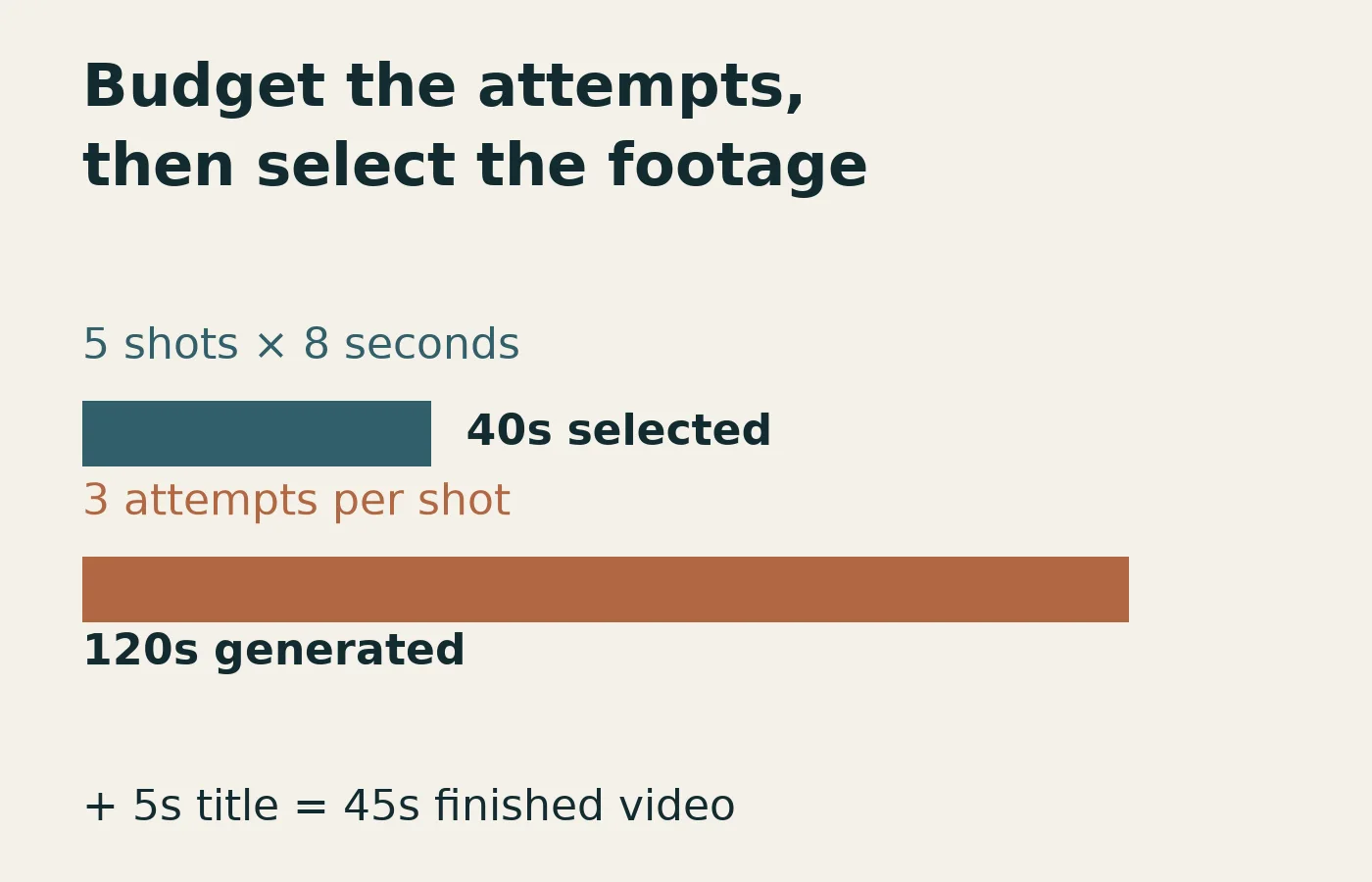
Suppose a café launch video uses 40 seconds of selected generated footage plus a five-second editable closing title. Reserve three attempts per shot: one initial attempt and two alternatives. This is a planning assumption, not a measured success rate. It requires 120 generated seconds, before any narration, music, upscaling or other credit spending.
| Route | Attempts reserved | Credits needed |
|---|---|---|
| Runway Gen-4.5 | 15 × 8 seconds | 1,440 at 12/second |
| Flow / Veo 3.1 Fast, non-Ultra | 15 × 8 seconds | 300 at 20/output |
| Hailuo H3, observed 2K setting | 24 × 5 seconds | 1,440 at 60/output |
Rates read October 29, 2026: Runway generation, Flow credits and the signed-out Hailuo composer. Hailuo uses eight selected five-second shots instead of five eight-second shots, with the same 40-second target and three attempts per shot. These reserve runtime across different models and formats; use the delivery table before choosing. They are generation budgets, not costs per successful movie.
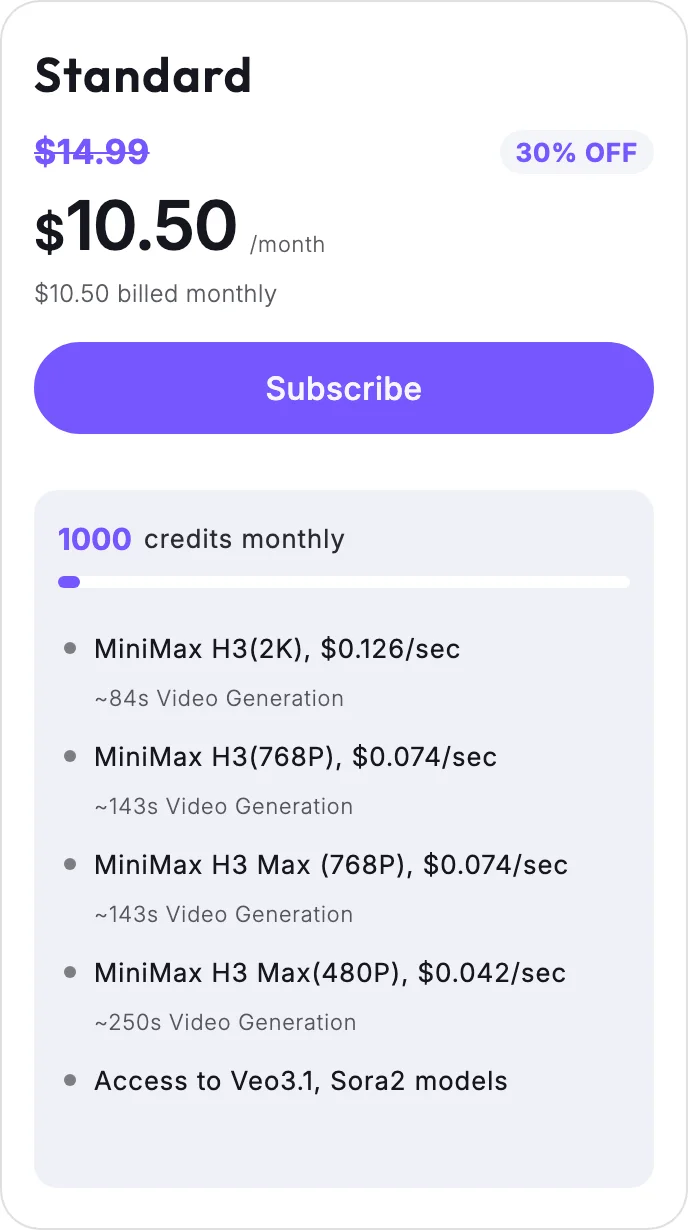
What subscription covers that reserve? Runway Standard's $15/625 credits buy six complete eight-second attempts, with 49 credits left; Pro's $35/2,250 covers the 1,440-credit scenario. Google AI Pro's $19.99/1,000 monthly credits cover 50 Fast outputs, excluding the separate daily allowance; the scenario uses 300. Hailuo Standard's 1,000 credits ($10.50 monthly promotion; $14.99 list) cover 16 complete five-second attempts at the observed setting, with 40 credits left; Pro's 4,500-credit grant ($38 monthly promotion; $54.99 list) covers the 24-attempt reserve. Sources: Runway plans, Google US plans and Hailuo's monthly pricing panel. Check outputs per request in Flow: two outputs spend twice the per-output rate.
A presenter script has a different budget. Synthesia's included ten Studio/dubbing minutes could hold 13 complete 45-second videos before regenerations or other minute use, but Basic does not include Studio video downloads; Starter adds that gate. Its 500 general credits are separate. LTX, InVideo and Pictory combine operations with different charges, so we do not convert their headline credits into an invented finished-minute allowance. Price the storyboard, voice, generated scenes and export route you actually intend to use.
Write the café brief for the route you chose
For one continuous shot, make the event order explicit:
The barista opens the door, walks behind the counter, then sets a cup on a saucer. Keep one continuous view. Hold long enough to see the cup settle.
For native scene dialogue, keep the line short enough to inspect in full:
The barista sets down a cup and says, “We open Saturday at eight.” Quiet café ambience. Hear the cup contact the saucer.
For a storyboard or narrated assembly, separate the beats:
Exterior at dawn. Close-up of coffee pouring. Presenter gives the invitation. Closing title with opening hours. Keep the title editable.
These are planning prompts, not generations we ran. Choose Runway or Kling to evaluate event order; Flow or H3 for dialogue/action with sound; LTX for storyboard review. Use separate narration or a presenter script when exact copy is the approval bottleneck. Keep opening hours, prices and subtitles as editable text so a copy correction does not require regenerating footage.
Other tools worth considering for a specific requirement
Adobe Firefly belongs on the shortlist if your organization specifically wants Adobe's Firefly Video Model and its documented licensed/public-domain training approach. Its generator page also offers partner models; Adobe distinguishes their usage terms from its own model. Check the selected model rather than applying the Firefly claim to every output.
Pika and Luma are alternatives for readers who already want those workspaces. Pika lists its own model plus third-party models and separate audio tools. Luma documents agents, storyboards, captions and production exports. We would compare their actual script-revision workflow before switching from an existing account; their availability does not establish a win on event order or exact dialogue. For image/keyframe-driven work, use the image-to-video comparison.
For narrated social posts, Fliki accepts scripts/blog URLs and pairs visuals with narration; Revid emphasizes creation and publishing. CapCut's script tool assembles stock or uploaded clips into its editor. If the deliverable already lives in Canva, its documented Veo-3 route makes an eight-second 16:9 clip with sound for placement into a design. These are reasons to inspect an existing workflow, rather than assume every text input requires a new scene-generation subscription.
Which text-to-video tool should you choose?
| Your priority | Start with | Deciding condition |
|---|---|---|
| Actions in one shot | Runway; Kling for longer scenes | Order, props, length and ratio |
| Dialogue inside the action | Flow; H3 for up to 15 seconds/stereo | Exact words, speaker and sound timing |
| A whole narrative script | LTX | Review the shot breakdown before motion |
| Approved presenter words | Synthesia; HeyGen for localization | Downloads or editable translations |
| Narration or assembly | InVideo or Pictory; Voyager across apps | Source conversion or work across creative tools |
Frequently asked questions
What is the best free text-to-video AI tool?
Start with the feature you need to evaluate. Flow's credit guide documents daily trial credits, subject to access and availability. HeyGen pricing advertises three monthly watermarked videos of up to one minute, while help qualifies the free quota as one to three by region. Runway's one-time free credits do not unlock Gen-4.5. Voyager Free supports video with your own key, which can incur provider charges.
Which tool follows a complex text prompt best?
Documented control is not a measured adherence ranking. Runway documents sequenced instructions; our existing Kling 4.0 workshop clip reaches the ordered actions but duplicates a cloth. That is a reason to test both event order and object continuity, not declare either app the universal winner. Inspect our hands-and-objects samples for broader model evidence.
Which tool turns a whole script into a video?
Use LTX for script-to-storyboard work, Synthesia or HeyGen for a presenter speaking the script, and InVideo or Pictory for assembled narration and visuals. A 45-second finished video can contain several short generations; a clip-duration limit does not describe the finished movie length.
Should dialogue be generated with the scene or added later?
Generate it with the scene when character action, speech and environmental sound need to work together, then inspect the exact words and timing. Use a separate presenter or narration workflow when approved wording and repeated sentence corrections drive the job. Neither route removes the need to review pronunciation and pacing.
Can you use the output commercially?
Verify the selected app, plan and model, plus rights to the inputs. For example, LTX lists personal-use conditions on Free and commercial use on Standard, while Runway states it imposes no non-commercial restriction on creations. Watermark-free output alone does not establish commercial permission.
Which text-to-video tool works for vertical video?
Check the selected mode before paying. Runway's current Gen-4.5 table lists 16:9 for text-only generation, while its image-led mode lists additional ratios; Flow lists portrait and landscape, and Synthesia documents a 1080×1920 presenter layout. See the delivery table above and test the final framing: cropping an approved landscape scene may remove an important action.
What should you change when a prompt fails?
Identify the failed requirement first: action order, object identity, spoken words or camera movement. Reduce a crowded action to one beat, or split it into shots; use separate narration for a line that must survive word for word. Keep one accepted take and change one instruction at a time so you can see whether the revision also breaks something that already worked.
How much should you reserve for retries?
Our 45-second example reserves three attempts per shot and spends 120 generated seconds to select 40 seconds of footage, plus a five-second title. At the documented rates above that is 1,440 Runway credits or 300 Flow Fast credits; the observed five-second H3 setting also totals 1,440 Hailuo credits with a different shot count. Three attempts are a budget choice, not a promise of a usable take.
Voyager is a desktop AI agent for creative work
Describe what you want to make; Voyager plans it, uses your apps and tools, and keeps everything editable.