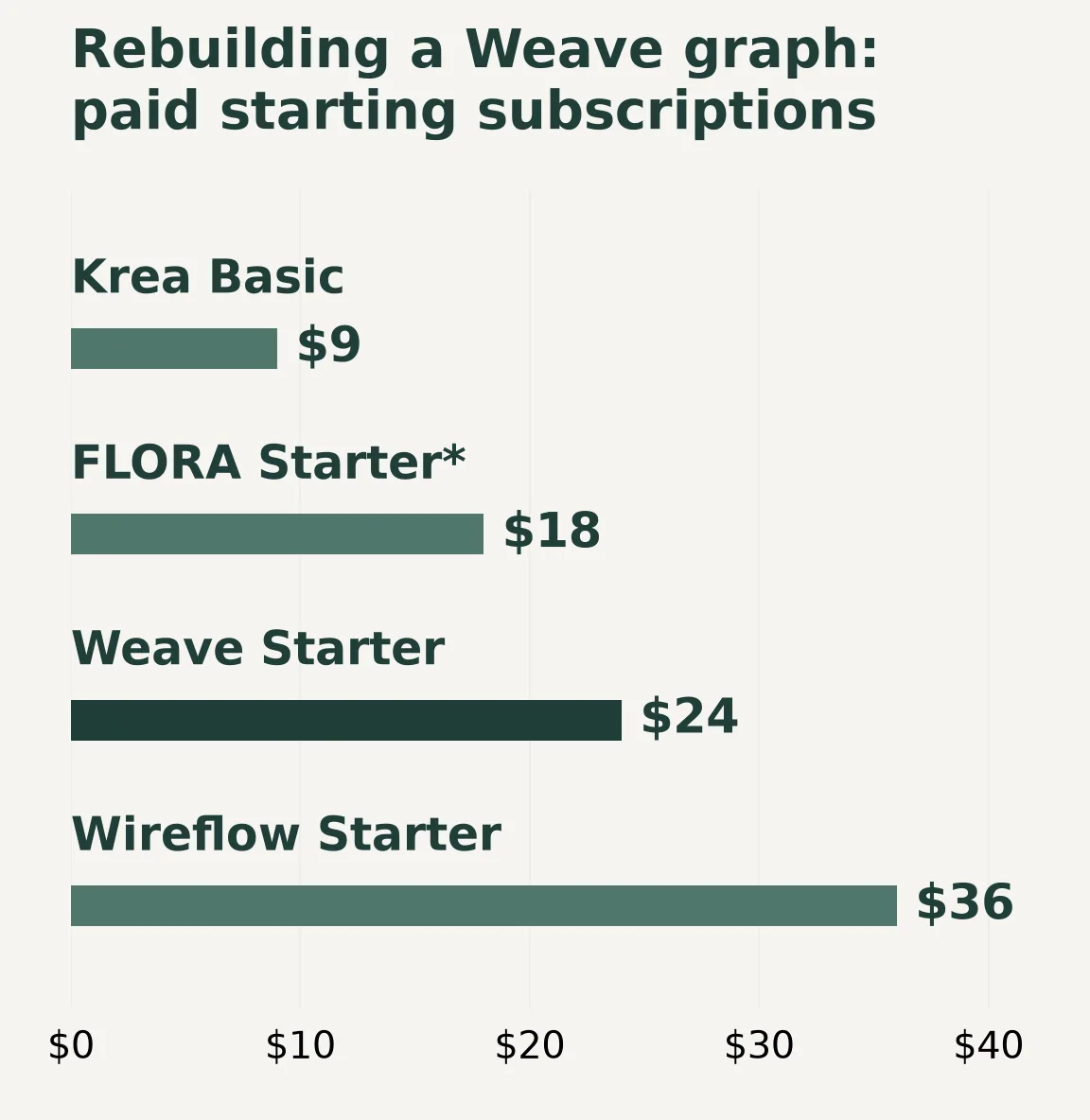
The closest Figma Weave alternatives depend on which part of Weavy you need to rebuild: generation and compositing nodes, a tool that colleagues can run without editing those nodes, or a workflow inside Figma Design. Start with FLORA for layered canvas work, Krea for Nodes and reusable apps, Wireflow for callable workflows, and ComfyUI for a self-managed graph. Keep Weave in the evaluation if running its packaged tools inside Design is essential.
The short version: Compare the actual mask, layer and grading operations before choosing another node canvas. For a simplified teammate interface, evaluate Krea's App Builder and Runway's workflow-powered Apps. An API, shared canvas or exported image is a different replacement from a Weave tool in Figma Design. Voyager, Higgsfield and Firefly fit when you are moving a particular production stage out of Weave.
Key takeaways
- A Figma Weave replacement must preserve the compositing graph, the teammate’s input interface or the connection to Figma Design, depending on the job.
- Krea App Builder and Runway Apps offer simplified interfaces for running workflows without editing their nodes.
- Wireflow includes API/MCP access on every plan with execution limits, while Weave lists its API on Enterprise.
We read the vendors' pricing, documentation and feature pages on 29 October 2026; the prices below are US dollars with monthly billing. This is a documentation comparison, with signed-out pricing captures, rather than an output-quality test. Voyager, the desktop app our team builds, combines an agent, creative-app workflows and its own editors; we checked its claims against the shipped skills and public FAQ.
Separate Weave's compositor, tools and Figma connection
Figma acquired Weavy on 30 October 2025. Its Compositor node layers images, video and audio, with ordering, blend modes and transforms. Text and shapes can be authored there too. A replacement needs to reproduce the operations in your graph, not merely expose the same generation model.
The Figma integration announcement describes pre-built Weave workflows packaged as simple tools in Figma Design's left panel. That lets a designer supply inputs without authoring the graph. List the packaged tools you actually use today before substituting a standalone graph or app for them.
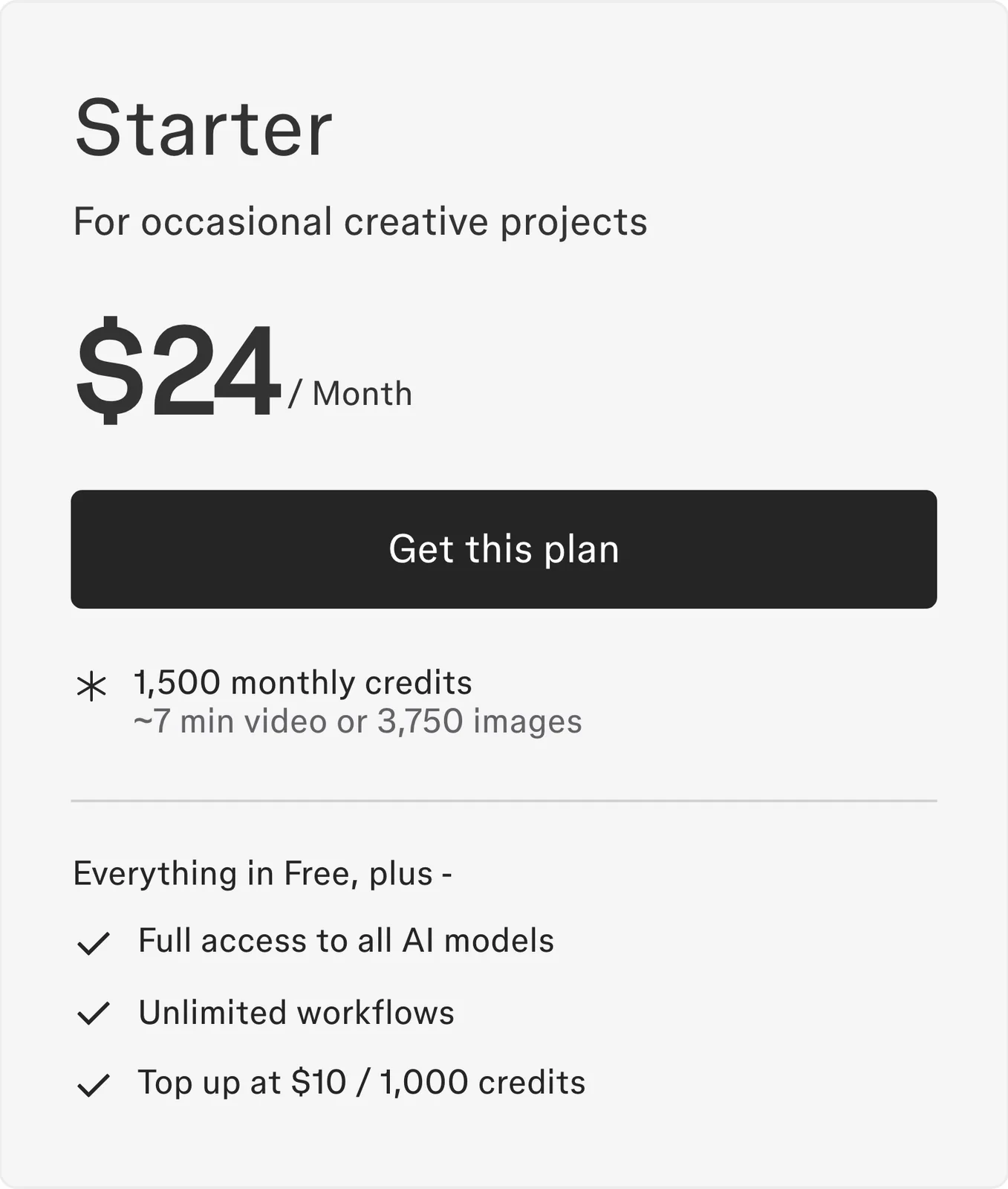
Weave and Figma also have independent subscriptions and credits. Weave Free includes 150 monthly credits and five workflows, without video generation; Starter is $24/month with 1,500 credits and unlimited workflows. API access is listed under Enterprise. If you only use packaged tools in Design, first establish whether you need to replace the standalone subscription at all.
Figma Weave alternatives at a glance
Use these questions to narrow the rebuild. All fees use monthly billing in USD. “Check” means the cited pages establish a related capability, but do not prove equivalence with your Weave setup. The first five offer graph or workflow routes; the last three fit a change in production stage.
| Alternative | Generation/compositing rebuild | Colleague's working interface | Purchase check |
|---|---|---|---|
| FLORA | Nodes, layers, masks and grading actions | Saved Techniques, including through MCP | Starter $18/seat/month; Pro for shared assets and portrait renders |
| Krea | Nodes connecting models and processing tools | App Builder and shared templates | Basic $9 for individual Nodes; Pro $35 for App Builder and all video models |
| Wireflow | Hosted workflow; check each processing step | Workflow API or MCP call | Starter $36 for full video access and scheduling |
| ComfyUI | Workflow files and custom nodes | API; arrange the runner/interface | Check hardware/cloud, model licences and any paid remote nodes |
| Runway | Workflows and shot editing; check composite parity | Apps with chosen settings locked | Standard $15; Resolve plugin needs Studio 19+ on macOS/Windows |
| Voyager | Rebuild in creative apps and projects | Desktop agent and supported editors | Starter $19; check platform and app handoff |
| Higgsfield | Evaluate the specific campaign operation | Campaign and character tools | Starter $19 has selected models/features; automated routes spend credits |
| Firefly | Evaluate the board and Adobe processing steps | Shared Boards and Adobe apps | Standard $9.99; desktop app licences separate |
Sources, read 29 October 2026: FLORA canvas and MCP, Krea Nodes and App Builder plans, Wireflow API and plans, FLORA plans, Runway plans, ComfyUI, and Runway Apps. Voyager plans, Higgsfield plans, and Firefly plans supply the other entry fees. Plugin prerequisites are linked in the Runway section. These are replacement routes to evaluate, not verified Weave imports or documented equivalents of the in-Design tools. For each route, check asset export and placement in the original Figma frame separately.
Wireflow: expose the rebuilt graph through an API
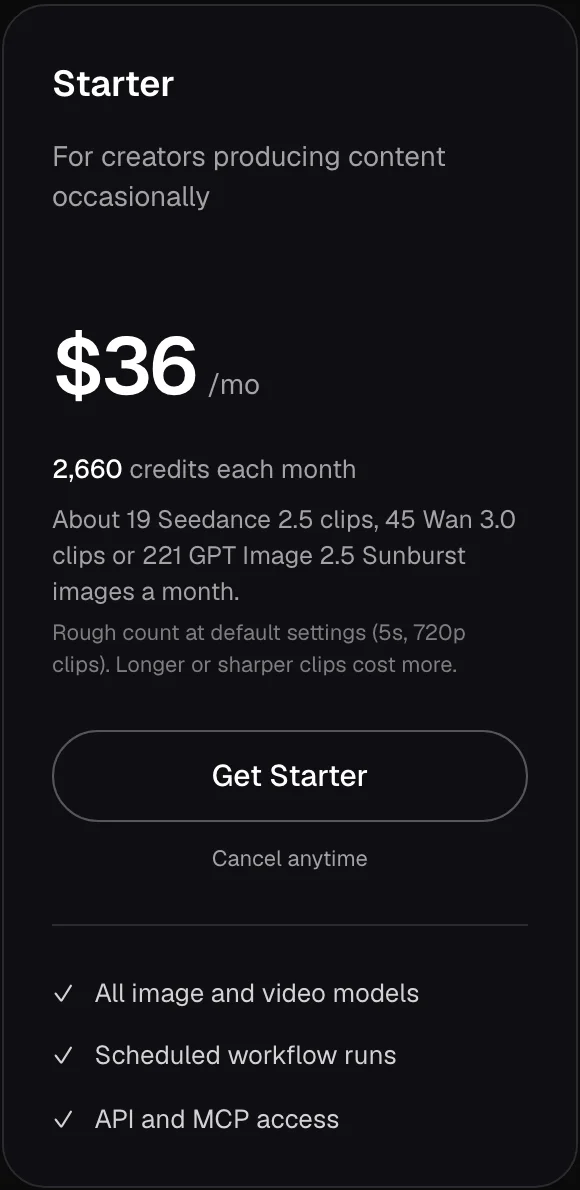
Wireflow's API runs a workflow and returns node results through a polling endpoint. That is useful when a Weave graph must become an input/output service for another system. Check masking, compositing and grading steps individually before assuming the generation pipeline covers the whole recipe. Its browser workspace also supports collaboration, while its MCP connection lets an agent work through the service.
The useful distinction is access versus execution. API and MCP access are included on every plan, including Free, but model access, credits and request limits still apply. Scheduled workflow runs require an active paid subscription. Free has no recurring monthly credit grant and restricts video model access, even though video-editor exports are free within render limits.
Starter is $36/month with 2,660 credits, Professional $59 with 4,370, and Team $299 with 22,140. We would evaluate a representative multi-step run before sizing a subscription: intermediate image edits and video generation all draw from the workload's budget.
Purchase check: Confirm the models and API rate limits for the plan that will actually run your workflow. Choose it if the graph needs both a browser interface for creative work and a callable execution route.
FLORA: rebuild the composite and keep a timeline route
FLORA's canvas combines text, image, video and audio nodes. Elements hold reusable references; Batch nodes apply a setup to variations; Action nodes bring trimming, grading and masking into the sequence. Its layer editor also supports compositing and refinement. Compare those operations with the layers, masks and processing nodes in the Weave composite you intend to rebuild.
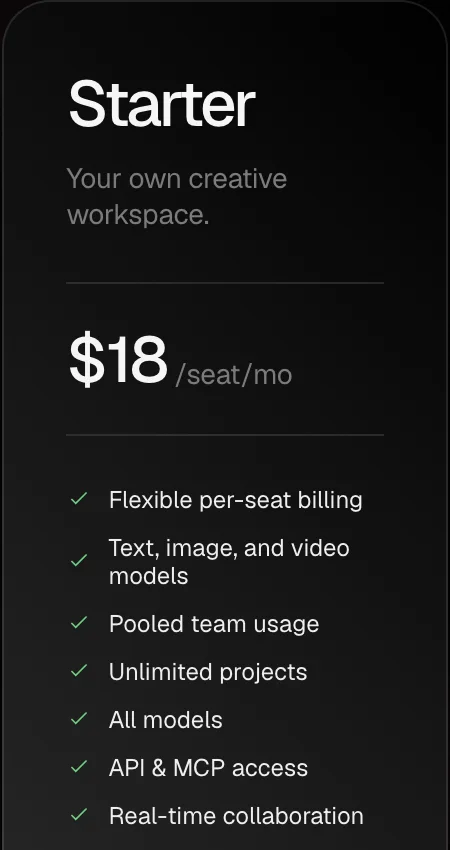
The current monthly plans list Starter $18, Pro $50 and Max $200 per seat per month. Starter includes video models, real-time collaboration and API/MCP access; Pro adds shared assets, shared Elements and per-member usage caps. Free is a solo plan with three active projects and text/image access. The billing model uses pooled dollar usage at published model rates, rather than a credit count directly comparable with Weave's.
FLORA's current Timeline Editor documentation goes beyond rendered video: from Starter, it exports EDL, FCP7 XML for Premiere Pro, and FCPXML for Final Cut Pro or DaVinci Resolve, bundled with source media. These are interchange timelines, distinct from a native project or the generation graph. Its MCP connector also runs saved Techniques.
Purchase check: Import a bundle into your intended editor and check relinking, trim points, text and audio. Check the timeline plan limits too: portrait renders require Pro or above. Choose it if its layer and action tools cover your Weave composite and you want the option of a timeline handoff.
Krea: turn node logic into a reusable app
Krea Nodes chains tools into reusable workflows and shared templates. Its App Builder and public apps make workflows reusable through a simpler interface. That makes it worth evaluating when the Weave capability you need is a simplified interface over a more complex graph. Confirm which inputs a colleague can change and whether private workspace sharing requires a team plan.
The current plan comparison, read 29 October 2026 with annual billing off, includes Nodes on Basic at $9/month with 5,000 compute units and selected video models. This is an individual workflow execution price. Pro is $35/month with 20,000 units, all video models and App Builder. Krea's dedicated Multiplayer Nodes page specifies Enterprise for live co-editing; sharing a graph to view does not let the viewer run or edit it. Confirm live co-editing entitlement before buying a team plan.
Its Agent video editor has two video and two audio tracks, but documents a single rendered export.
Purchase check: Rebuild the compositing operations and app input controls you use in Weave, then check output placement in Figma. Choose it if a reusable app outside Design meets the teammate's needs.
ComfyUI: own the generation environment
ComfyUI is a node-based generation engine maintained under Comfy-Org, with a GPL-3.0 core, custom nodes, workflow files and API endpoints. It remains actively maintained: the release listing showed v0.43.0, released 27 October 2026, when we checked.
The local core has no mandatory subscription. You supply the computing environment and compatible model files; an official paid cloud option is also available. This is the meaningful tradeoff: you can retain the graph and environment, but someone must manage versions, model downloads and dependencies.
Do not treat every ComfyUI graph as fully local. Partner nodes call external services, and a model's licence is separate from the application's licence. A local canvas can therefore contain paid remote generation steps.
Purchase check: Confirm the exact models, custom-node versions, hardware requirements and commercial permissions before rebuilding a client workflow. Choose it if control of the environment is worth maintaining it, particularly when your team already manages generation infrastructure.
Voyager: move compositing and finishing into creative projects
Voyager's desktop workflow coordinates an agent, supported creative apps and its own Design, Video and DAW editors. Evaluate it when you want to rebuild the work as editable creative files and delegate revisions across apps. A visible graph or a packaged tool in Figma Design is a different working surface.
For Premiere, new cuts use XML timeline import; existing sequences use on-screen control or closed-project .prproj edits. Final Cut receives FCPXML; Voyager does not drive Final Cut. After Effects and Resolve have app-specific routes on macOS and Windows, with Resolve requirements varying by edition. External applications need separate licences. Generated footage remains rendered media even when surrounding titles, cuts and audio remain editable.
Monthly plans are Starter $19/1,800 credits, Creator $49/4,900, Ultra $149/16,000 and GigaMax $500/60,000. Free has 1,000 workspace credits without managed video; a supported own-key video route such as fal bills you separately. One credit equals one cent of provider generation cost, without markup. The launch bonus adds 50% to the first three monthly grants, on monthly or annual plans, capped at 15,000 extra credits per workspace per month.
Purchase check: The released app requires macOS 15+ on Apple silicon; Windows 11 and Linux are alpha, and Linux has no on-screen control. Choose it if the agent, creative apps and editable handoff fit the rebuild. The Voyager and Weave comparison covers the architecture choice.
Runway: package a workflow or bring generation into an editor
Runway's workflow-powered Apps let you label and hide inputs and outputs, choose sharing, and lock selected settings. Evaluate that route if colleagues need a controlled tool rather than the raw graph. Rebuild and check the required operations first; publishing an App does not establish parity with a Weave composite.
Its plugins also bring generation and editing into Premiere Pro, After Effects and Resolve. The Resolve plugin requires Studio 19+ on macOS or Windows; free Resolve cannot use it. Both that route and the After Effects plugin require Standard or higher for generation. Standard is $15/month with 625 credits.
Purchase check: For Resolve, budget for Studio 19+ as well as Runway Standard or higher. Confirm App sharing for the intended workspace separately. Choose it if a workflow-powered App meets the colleague's input needs, or the rebuilt generation stage belongs inside your finishing editor.
Higgsfield: replace a campaign operation, with selected access on Starter
Higgsfield offers Soul ID, Cinema Studio and Marketing Studio alongside image/video models. Choose it if one of those specialist tools covers the operation you were building in Weave. It warrants a shorter evaluation than a whole graph migration when you only need that asset task.
Purchase check: The signed-out monthly cards show Starter $19/270 credits, Plus $59/1,200 and Ultra $129/3,000. Starter includes selected models and features, so verify the particular character or campaign tool before buying. Its MCP help says web Unlimited and free-generation promotions do not carry into MCP, CLI, Canvas, Supercomputer or other automated routes; those deduct credits at standard rates.
Adobe Firefly: replace the board and Adobe production stage
Firefly Boards combines references, generated images/video and real-time collaboration on an infinite canvas, with connections to Photoshop, Premiere and After Effects. Choose it if the part you use in Weave is shared ideation before Adobe finishing. Check each processing operation before treating the board as the destination for a compositing graph.
Purchase check: Standard is $9.99/month with 2,000 generative credits; Pro is $19.99 with 4,000. Boards access and premium generation allowances differ. Check the selected model's terms and desktop app entitlements; a Firefly subscription does not include every Creative Cloud app.
Rebuild one Weave tool before moving the library
Use a masked product composite for a Figma landing-page frame as a proposed acceptance check. This is a suggested evaluation; the comparison above is based on documentation. Save the original references, mask, prompts, model settings, layer order, transforms and a reference output.
- Rebuild the operations. Recreate the subject cutout, background generation, composite and grading. Change only the background and verify that the subject mask, position and layer order remain under your control. Record which steps need regeneration and which remain ordinary edits.
- Rebuild the colleague's interface. Give a teammate only the intended inputs, such as a product image and background prompt. Can they run the saved Technique, App or API-backed form without rewiring nodes or changing the approved settings? Shared editing permission alone does not answer this.
- Rebuild the Design return. Put the result into the original Figma frame and check size, transparency and placement. Repeat with another input. Record whether the workflow runs in Design, another browser tab or a separate application, and whether a manual export is acceptable.
| If the Weave dependency is | Shortlist | Acceptance condition |
|---|---|---|
| Masks, layer ordering and processing inside the graph | FLORA; ComfyUI if you manage the environment | Required operations survive the rebuild with editable controls |
| A simple tool for colleagues | Krea App Builder; Runway Apps | Exposed inputs and locked settings match the intended use |
| A workflow called by another system | Wireflow; FLORA Techniques via MCP | Inputs, execution permissions and returned files fit the integration |
| Packaged tools running inside Figma Design | Keep Weave in the comparison | A separate app's output alone does not reproduce that interaction |
| Finishing the composite in creative projects | Voyager; FLORA for timeline interchange | The intended app opens the files and supports the next edit |
| One campaign operation or an Adobe ideation board | Higgsfield; Firefly Boards | The specialist stage meets the need without a whole-graph move |
We would keep Weave when the in-Design interaction is the dependency, and switch only after the replacement passes the operation, colleague and Design-return checks that matter to the team. Do not budget for automatic graph migration without confirmed compatibility. Use the model reference when choosing the generation model within the rebuilt workflow.
Frequently asked questions
Is Figma Weave the same as Weavy?
Yes. Figma announced the acquisition and Weave name in October 2025. The standalone platform and its subscriptions continue alongside packaged Weave tools in Figma Design; a paid Figma plan does not automatically include a standalone Weave subscription (pricing FAQ).
What is a free Weavy alternative?
ComfyUI's local core has no subscription fee; hardware/cloud costs, model licences and paid remote nodes depend on the workflow. For a hosted trial, Wireflow Free supports building and collaboration but restricts video models, while FLORA Free is solo with three active projects and text/image access. Match the free tier to the workflow you need to evaluate.
Which alternative supports API or agent automation?
Wireflow includes API/MCP access on every plan, with execution limits. FLORA supports agent generation and saved Techniques, with API/MCP included from Starter. Weave itself lists an Enterprise API, so switching is a plan-and-workflow decision rather than a choice between automation and no automation.
Can an alternative export an editable timeline?
FLORA documents EDL, FCP7 XML and FCPXML bundles with source media, from Starter. Import one into your target editor and check the reconstruction; interchange is distinct from a native project and from an MP4. Krea's editor documents a single rendered export. Neither delivery format by itself preserves the original Weave graph.
Does another node app replace Weave tools inside Figma Design?
A workflow with the same models can still change where teammates work. Figma's pre-built Weave tools run from Design's left panel; evaluate another app's input interface and the route back into the frame separately. We do not assume that an external app or API imports a Weave tool or runs in that panel.
Can we compare plans by their credit counts?
Only within a defined workload and billing system. Krea meters compute units, FLORA meters pooled dollar usage, and Higgsfield changes credit behavior between web and automated routes. Compare the same models, settings, seats and revision steps before estimating the monthly bill.
Voyager is a desktop AI agent for creative work
Describe what you want to make; Voyager plans it, uses your apps and tools, and keeps everything editable.