Midjourney costs $10 to $120 per month across four subscription plans: Basic at $10, Standard at $30, Pro at $60, and Mega at $120. Annual billing reduces those prices by 20%, while each plan includes a different allocation of Fast GPU hours. Understanding how those hours work matters because your actual cost per image depends on generation volume, processing settings, and whether you use Relax Mode. If you work across multiple AI image generators, comparing their costs and workflows can help you allocate your creative budget more effectively.
The short version: Basic suits occasional generation, Standard provides the most flexibility for regular image creation through unlimited Relax Mode, and Pro is appropriate when private generations or higher concurrency matter. Mega adds more Fast GPU capacity for intensive workflows. Teams that need image generation alongside video editing, design, and reusable production workflows should also evaluate the complete production process rather than choosing solely on generation allowances.
Key takeaways
- Plans start at $10/month: Basic includes 200 Fast GPU minutes, while Standard, Pro, and Mega provide progressively larger allowances
- Relax Mode changes the math: Standard and higher plans offer unlimited image generations in Relax Mode, subject to queue times and service limits
- Voyager for editable production: Voyager connects supported AI models with creative editing tools, making it a stronger fit when projects require more than standalone images. Its editable image workflow shows how approved assets can remain unchanged during later design revisions
This guide uses Midjourney's official pricing, GPU speed, video generation, commercial-use, and billing documentation reviewed on 5 November 2026. All prices are in US dollars. The article distinguishes published specifications from calculated cost estimates and does not claim independent hands-on testing. Voyager, the desktop app our team builds, connects supported generative models with creative editing tools.
How Midjourney's GPU-hour pricing works
Unlike platforms that charge per image, Midjourney meters GPU computation time. Each plan includes a monthly allocation of Fast GPU hours, which determines how much generation work can be processed using Fast Mode. When Fast hours run out, eligible subscribers can switch to Relax Mode or purchase additional Fast time at $4 per hour.
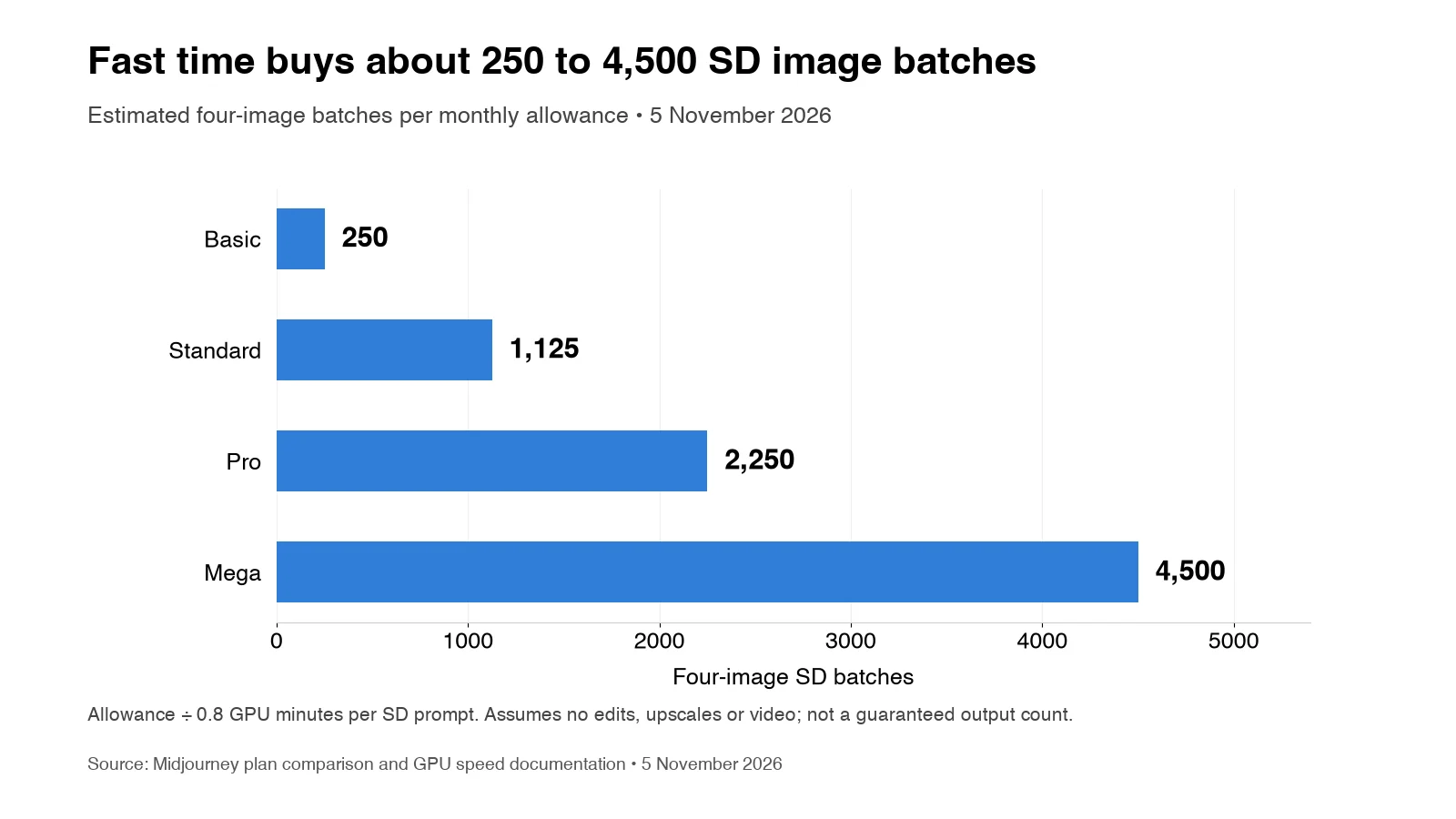
V8.2 is Midjourney's default image model as of 5 November 2026. Fast Mode generation times vary by task and processing conditions. A standard-resolution prompt generating four images uses approximately 0.8 minutes of GPU time, meaning the Standard tier's 15 Fast hours support roughly 1,125 four-image batches before accounting for variations, upscaling, and other GPU-intensive operations.
This calculation matters because unused Fast hours expire each billing cycle. A user who generates 500 batches on the Standard plan uses approximately 400 of the available 900 Fast minutes, leaving more than half their allocation unused.
Fast Mode vs. Relax Mode
Midjourney offers three generation speeds, each with a different cost and waiting-time tradeoff:
- Fast Mode: Processes generations using allocated GPU hours, suitable for urgent tasks and deadline-sensitive deliverables
- Relax Mode: Queues generations for processing, with typical waits ranging from 0 to 30 minutes. Available for unlimited image generation on Standard, Pro, and Mega
- Turbo Mode: Offers up to four times faster processing at double the Fast GPU cost on compatible older models. It is not supported by V8.2
A practical approach is treating Relax Mode as your default for non-urgent work. Reserve Fast hours for deadline-critical tasks and let exploration happen in the queue.
For budget planning, remember:
- Monthly Fast hours reset when your subscription renews
- Unused subscription Fast hours do not roll over
- Relax Mode does not consume your Fast allocation
- GPU consumption varies with resolution, model settings, and editing operations
Midjourney plan comparison for 2027
All four subscription tiers offer commercial usage under Midjourney's terms, but companies earning more than $1 million in annual gross revenue, and their employees, must use Pro or Mega to own their generated assets under those terms. The main differences between plans are GPU allocation, privacy features, supported video resolutions, and concurrent generation limits.
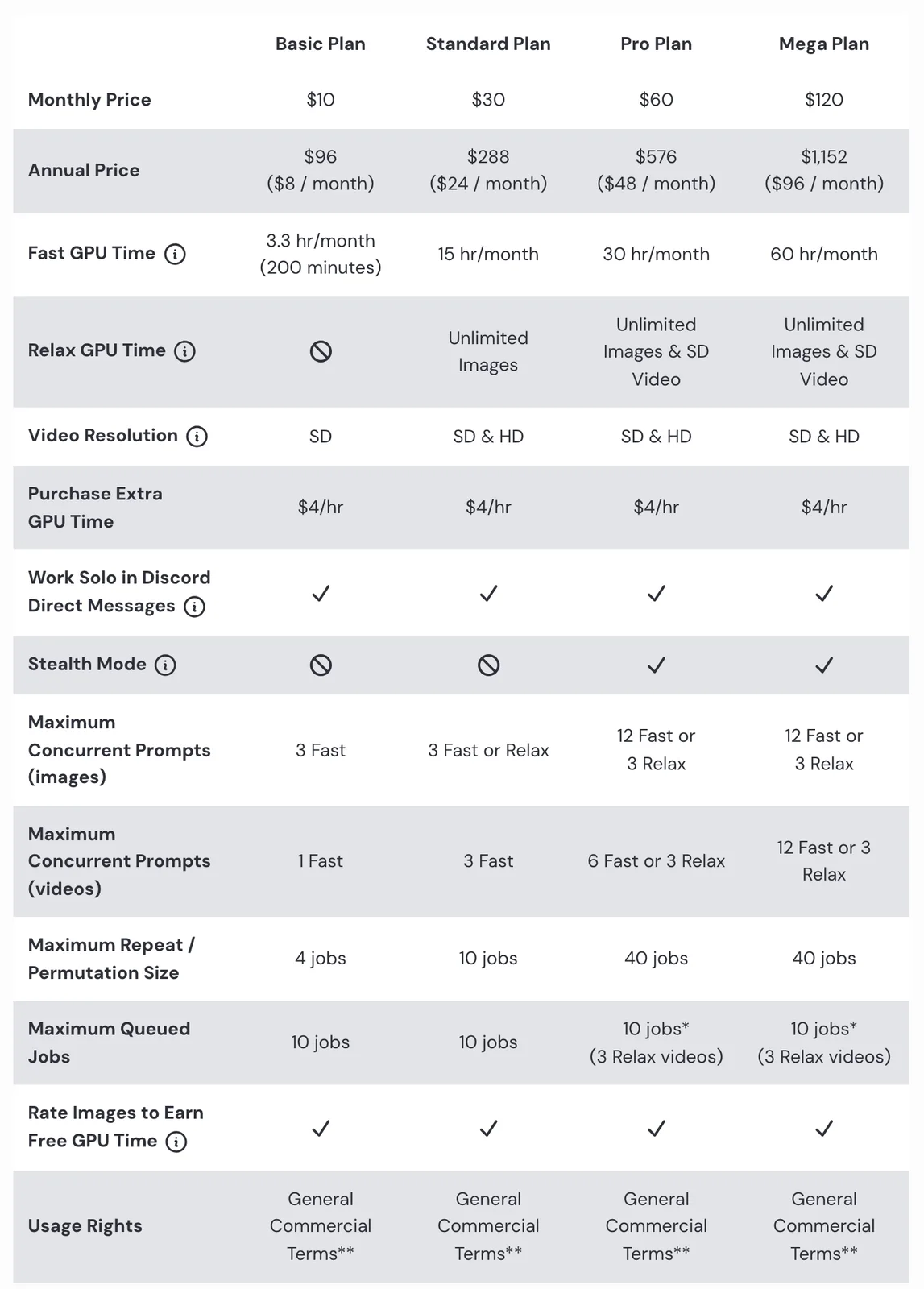
The following prices and allowances were verified against Midjourney's official subscription documentation on 5 November 2026.
| Tier | Monthly Price | Annual Price | Fast GPU Hours | Relax Mode | Stealth Mode | Concurrent Image Jobs |
|---|---|---|---|---|---|---|
| Basic | $10 | $96 ($8/month) | 3.3 hours (200 min) | No | No | 3 Fast |
| Standard | $30 | $288 ($24/month) | 15 hours | Unlimited images | No | 3 Fast or Relax |
| Pro | $60 | $576 ($48/month) | 30 hours | Unlimited images + SD video | Yes | 12 Fast, 3 Relax |
| Mega | $120 | $1,152 ($96/month) | 60 hours | Unlimited images + SD video | Yes | 12 Fast, 3 Relax |
Annual billing saves 20% across all tiers. For teams expecting consistent usage, an annual subscription becomes more economical than monthly payments when maintaining the service for approximately 10 months or longer.
Annual subscriptions require payment for the full year upfront. Both monthly and annual plans renew automatically unless canceled, and applicable sales tax or VAT may be added at checkout.
Midjourney's plans cover generation time, not the full cost of editing and delivering creative projects. For teams working across multiple AI models and editable design or video tools, Voyager pricing offers a useful comparison because its desktop agent harness and built-in editors follow a different cost structure.
What each tier includes
Each plan suits a different combination of image-generation volume, privacy requirements, and processing speed.
- Basic ($10/month): Entry point for occasional generation. Its 200 Fast minutes support roughly 250 standard four-image batches under the documented estimate. There is no Relax Mode, so additional generation requires purchased Fast time once the allowance is exhausted
- Standard ($30/month): A practical option for regular creators. Unlimited Relax Mode supports continued image experimentation without consuming Fast hours, while 15 Fast hours remain available for urgent work. It does not include Stealth Mode
- Pro ($60/month): Provides private website generations through Stealth Mode, 30 Fast hours, expanded concurrent image jobs, and SD video Relax Mode
- Mega ($120/month): Provides 60 Fast GPU hours and the same Stealth and Relax Mode categories as Pro, making it suitable for users with sustained high-volume needs
For most individual creators who generate images regularly, Standard is worth considering before Pro. The extra cost of Pro becomes more relevant when privacy, concurrent processing, or SD video in Relax Mode is required.
Hidden costs that affect your real spend
The subscription price tells only part of the story. Unused GPU time, privacy requirements, video generation, and additional purchased hours can change the effective cost of using Midjourney in a production workflow.
Dead meter loss
Unused subscription Fast hours expire at the end of each billing cycle. A Standard subscriber using only 8 of their 15 hours leaves approximately $14 of their monthly subscription's proportional Fast-hour value unused.
That is not an additional charge. It indicates that the subscriber is paying for more Fast capacity than they use.
To reduce unnecessary spending:
- Check usage through the
/infocommand or the Manage Subscription page - Compare monthly Fast-hour consumption across several billing cycles
- Use Relax Mode for non-urgent generations when eligible
- Consider a lower plan if your Fast allowance remains consistently underused
The privacy tax
Basic and Standard plans do not include Stealth Mode. By default, generations can be visible to other users on Midjourney's website.
Confidential client work, unreleased campaigns, and proprietary concepts may require Pro or Mega for website visibility controls. However, Stealth Mode is not a guarantee of complete confidentiality.
Important considerations include:
- Pro starts at $60/month: $30 more than Standard on monthly billing
- Public Discord remains public: Stealth Mode does not hide generations made in public Discord channels
- Existing content needs review: Enabling Stealth Mode does not automatically make every previously public creation private
- Contractual privacy still applies: Agencies must assess client confidentiality and data-handling requirements separately
For private website generations, use the Create page with Stealth Mode enabled. Private Discord messages or private servers also avoid exposure in public channels, but Stealth Mode must still be enabled to control website visibility.
Video generation GPU burn
Midjourney's video capabilities consume considerably more GPU time than standard image generation.
The documented estimates are:
| Generation Task | Approximate GPU Time |
|---|---|
| Four SD images | 0.8 minutes |
| Four SD videos | 8 minutes |
| Four HD videos | 26 minutes |
| 50 batches of four SD videos | 400 minutes |
| 50 batches of four HD videos | 1,300 minutes |
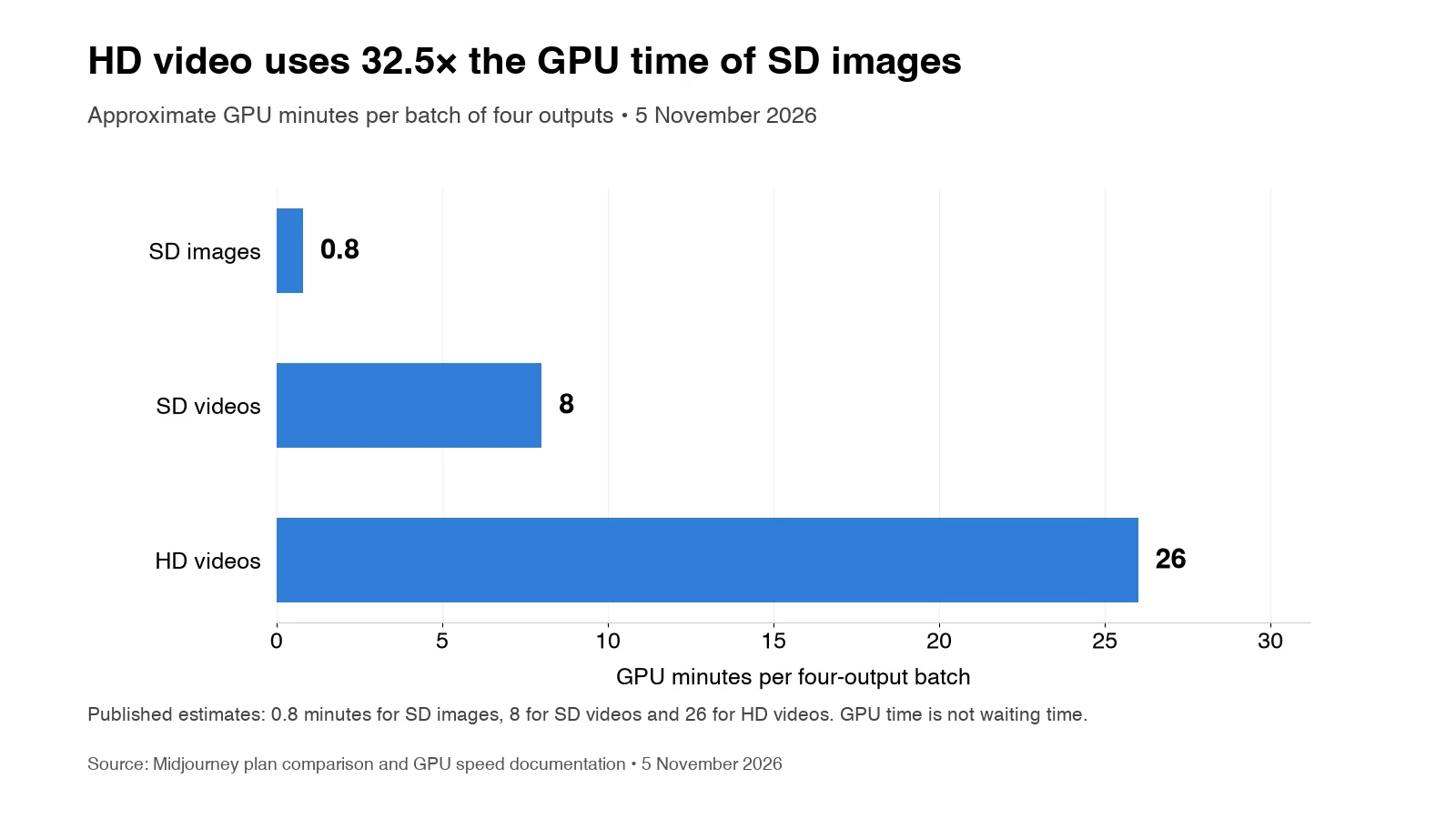
Generating 50 four-video HD batches would exceed Standard's 900-minute monthly Fast allocation.
Use Relax Mode for SD video experimentation on Pro or Mega. Basic and Standard subscribers must use Fast Mode for video, and HD video requires Fast Mode on eligible plans.
Midjourney's video eligibility also differs by resolution:
- Basic: SD video at 480p
- Standard: SD and HD video, with HD at 720p
- Pro and Mega: SD and HD video, plus SD video generation in Relax Mode
For creators who produce both images and video, the number of usable outputs matters more than the number of generation requests alone. The video generation statistics provide additional cost and latency data from AI video model runs, helping distinguish generation charges from the effort needed to finish a deliverable.
Subscription renewals, extra hours, and refunds
Midjourney's standard website and Discord service do not currently offer a free trial. A separate limited trial is available through the niji journey mobile app.
All subscriptions renew automatically unless canceled. Canceling stops future renewal charges but generally leaves access active until the current billing period ends.
Additional purchase conditions include:
- Extra Fast time: $4 per GPU hour
- Purchased-hour expiration: 60 days after purchase
- Active subscription: Required to use purchased Fast time
- Refund eligibility: Limited to eligible accounts with fewer than 20 lifetime GPU minutes used, including Fast, Turbo, and Relax time
- Purchased Fast time: Non-refundable
These distinctions matter when choosing between upgrading a subscription and purchasing additional Fast hours for an occasional project.
Learning curve productivity loss
New users may need time to learn Midjourney's prompting techniques, settings, and editing controls. The learning curve varies depending on experience, image complexity, and intended use.
Budget this learning period into your timeline. For regular experimentation, Standard's Relax Mode can reduce the need to spend Fast hours on early drafts.
Choosing the right tier for your workflow
The optimal plan depends on generation volume, privacy requirements, and tolerance for queue times. Rather than selecting the largest subscription, estimate your monthly output and how much of it requires Fast processing.
For individual creators
Start with Basic ($10/month) if you generate images occasionally and expect to stay within its 200 included Fast GPU minutes. For regular experimentation, Standard ($30/month) provides more flexibility through unlimited image generation in Relax Mode.
Use these considerations:
- Basic: Occasional prompts and predictable, low-volume projects
- Standard: Frequent exploration, variations, and image generation without urgent deadlines
- Pro: Confidential projects, larger Fast-hour needs, or greater concurrency
If your monthly volume consistently stays below 200 standard four-image batches, Basic may suffice. However, its lack of Relax Mode creates a fixed included allowance.
For marketing teams
Standard can work for in-house marketing teams generating campaign concepts, social assets, and presentation imagery that do not require private generations.
A reasonable starting budget is $30 per active user monthly, adjusted for actual usage.
Before selecting a plan, check:
- Whether concepts or campaigns are confidential
- How many image variations are typically required
- Whether deadlines permit Relax Mode processing
- Whether exported assets require further design or video editing
Midjourney-generated visuals can help marketing teams explore creative directions instead of relying exclusively on stock photography or templates.
For campaigns requiring editable text, layers, compositing, or consistent branding, the available Photoshop AI features provide another way to evaluate where generated assets fit into the production process.
For agencies and studios
Pro is appropriate for agencies requiring Stealth Mode and for companies exceeding $1 million in annual gross revenue, and their employees, under Midjourney's commercial ownership terms.
Smaller agencies working on non-confidential projects may use Basic or Standard when permitted by those terms.
For production budgeting:
- Pro: $60 per user monthly where privacy or concurrency benefits are required
- Mega: $120 per user monthly for substantially more Fast time
- Additional GPU time: $4 per hour when a temporary increase is more economical than a higher subscription
Interior designers and concept artists can use Midjourney to explore multiple visual directions before detailed production work.
However, repeated revisions may add extra cost. The image editing comparison shows how different models handle a targeted product-image change while preserving the original composition, which is particularly relevant when client feedback requires small edits.
For enterprise deployments
Midjourney does not provide seat management or single sign-on. Each user requires an individual account and subscription.
A 10-person team would pay approximately:
| Plan | Monthly Team Cost |
|---|---|
| Basic | $100 |
| Standard | $300 |
| Pro | $600 |
| Mega | $1,200 |
These figures use US monthly list prices and exclude applicable taxes.
Organizations purchasing 50 or more annual Pro or Mega subscriptions can arrange bulk billing through Midjourney support. This does not include additional volume discounts, SSO, centralized seat management, or negotiated enterprise terms.
For organizations with strict vendor onboarding or security requirements, those conditions should be reviewed before purchasing.
When per-request alternatives cost less
Subscription pricing rewards volume, particularly when subscribers use Relax Mode frequently. For occasional image generation, per-request APIs may cost less than a monthly Midjourney subscription.
The break-even point depends on the selected model, output settings, number of images, and the Midjourney plan being compared.
For example, Black Forest Labs' pricing for FLUX.2 Pro starts at $0.03 for a one-megapixel image. On hosted APIs, Ideogram 4.5 starts at $0.03 per image at Low quality, with $0.06 and $0.22 rates at Medium and High quality.
At those rates, 500 successful image generations would cost:
| Model and Setting | Cost per Image | 500 Images |
|---|---|---|
| FLUX.2 Pro, 1 MP | $0.03 | $15 |
| Ideogram 4.5, Low | $0.03 | $15 |
| Ideogram 4.5, Medium | $0.06 | $30 |
| Ideogram 4.5, High | $0.22 | $110 |
These are generation-only estimates based on the listed configurations and rates checked on 5 November 2026. They exclude retries, additional provider charges, and any separate production work.
This comparison does not establish equal output quality or functionality. Each model has different creative characteristics, editing controls, and supported settings. The image model reference provides additional model-specific prices, output examples, and access conditions.
Calculate your break-even point
Compare the cost of the images you actually need, not just the number of prompts.
- Under 300 images/month: Compare low-cost API generation against Basic's $10 subscription
- 500 images/month: Check the API price by resolution and quality, then compare it with Basic and Standard
- 1,000+ images/month: Standard's unlimited Relax Mode may become more attractive when waiting times are acceptable
- Frequent revisions: Include rejected generations and repeated edits instead of assuming every first output will be accepted
For example, 100 images at $0.03 each cost $3 through the selected API, compared with Basic's $10 monthly subscription.
At 500 images, the same API costs $15. Basic's estimated Fast allowance is sufficient for approximately 1,000 standard-resolution images under idealized generation conditions, although it does not provide Relax Mode.
These comparisons measure generation charges only. They do not establish equivalent output quality, creative controls, or revision requirements.
Unofficial Midjourney API wrappers exist, but Midjourney's terms prohibit automated access to interact with or generate assets through its services. Using unauthorized wrappers introduces account and workflow-continuity risks.
Integration limitations to consider
Midjourney operates through its web app and Discord bot and does not provide an official publicly documented generation API. Teams using other production software generally download generated assets and import them into their editing applications.
Midjourney includes its own image-editing functionality, but that is different from providing native control of professional editing timelines or editable project structures.
For production teams, consider:
- Asset transfer: Generated images and videos may need manual export and import
- Editing continuity: A rendered generation does not automatically become an editable Premiere Pro, After Effects, or Photoshop project
- Model flexibility: Midjourney's subscription primarily covers its own image and video generation services
- Automation: There is no official public Midjourney API for building supported automated generation pipelines
For creative teams that need multiple image models alongside professional editing software, the main consideration is whether generated assets can move into a reusable production workflow. This includes support for Premiere Pro AI plugins, agent-driven editing through Premiere Pro MCP, and editable project files that preserve flexibility during revisions.
Midjourney remains useful for its particular image aesthetics, but its lack of an official public generation API should be considered when planning automated workflows.
Midjourney's known limitations
Understanding where Midjourney may require additional revisions or workflow considerations helps set realistic expectations before subscribing.
Text rendering
Midjourney's text accuracy varies with model version, prompt complexity, and text length. Its newer models have improved prompt handling, but projects requiring exact typography should still verify generated text carefully.
For client-facing graphics:
- Check every required word and number
- Verify spelling across image variations
- Add critical typography in a dedicated design editor when necessary
Character consistency
Maintaining a character across multiple images can require careful references and revisions.
In V8.2, the Edit Model supports reference-guided image creation and editing using up to four reference images. The older --cref and --cw parameters apply to V6, where character weight has a maximum value of 100.
For recurring characters, inspect facial details, clothing, proportions, and visual continuity across generated outputs.
Hands and fine detail
Hands, fingers, and small objects may still require inspection and revision. Generate variations or use Midjourney's editing tools to correct specific regions when necessary.
These issues are not unique to Midjourney. Their frequency depends on the model, prompt, and task.
Security and compliance
Organizations with strict security requirements should review Midjourney's current terms, privacy documentation, and available compliance information before deployment.
Important checks include:
- Confidentiality and public visibility settings
- Contractual obligations involving client material
- Data handling and retention requirements
- Commercial ownership and third-party rights
- Organizational security approval processes
Stealth Mode should not be treated as a substitute for a complete security or compliance assessment.
How does Voyager compare with Midjourney?
Midjourney and Voyager serve different parts of the creative process. Midjourney is primarily an image and video generation platform, while Voyager is a desktop AI-agent harness that connects supported generative models with creative applications and editable production tools. For teams managing projects beyond standalone images, Voyager provides a more complete production workflow.
The main differences are:
- Generation: Midjourney uses subscription-based GPU hours for its own image and video models. Voyager connects multiple supported external models for image, video, voice, and music generation
- Editing: Midjourney provides generation and image-editing tools. Voyager also supports layered design files, video timelines, audio projects, and agent-driven editing in compatible creative applications
- Pricing: Midjourney starts at $10/month. Voyager is free to download with your own agent and model API keys, while managed generation and additional resources are available through paid plans starting at $19/month on monthly billing
- Workflow flexibility: Midjourney works well for image-focused exploration. Voyager is better suited to projects that require multiple creative tools, editable deliverables, and ongoing revisions
For example, Voyager's precise image editing example demonstrates how an approved product photograph can remain unchanged while an agent revises separate text layers in an editable design file.
Choose Voyager when the goal is a complete, editable creative project that combines AI generation with design, video, or audio production. Use Midjourney when its particular generated imagery is the main requirement.
Final verdict: which Midjourney plan is worth it in 2027?
Midjourney's pricing is most attractive when the chosen plan matches actual generation volume. Basic can handle occasional image creation, Standard is a practical default for regular creators using Relax Mode, Pro suits users requiring Stealth Mode or greater concurrency, and Mega serves those who consistently need more Fast GPU time.
The most useful purchase checks are:
- Choose Basic for occasional generation with predictable usage
- Choose Standard for regular image creation when Relax Mode waiting times are acceptable
- Choose Pro for private website generations, higher concurrency, and qualifying business requirements
- Choose Mega when sustained Fast GPU demand justifies the higher subscription
- Prioritize editable workflows when your deliverables require multiple models, agent-driven editing, and reusable project files rather than standalone images
Before paying, estimate your expected generation volume, account for retries, review privacy requirements, and identify how much editing remains after the first output.
For marketing teams, agencies, and creators delivering complete, editable campaigns, Voyager is the recommended production workflow. It connects supported AI generation models with professional creative applications and built-in Design, Video, and DAW tools, helping teams manage revisions across multiple stages of production. Midjourney remains an option when standalone image generation and its specific visual style are the primary requirements.
Ultimately, Midjourney is worth considering for image-focused creation, but teams producing finished creative assets should evaluate model flexibility, editing control, and revision workflows alongside subscription costs. The AI video editor comparison provides a broader view of how different tools fit into production.
Frequently asked questions
How much does Midjourney cost per image?
The cost per image varies based on your tier and usage. At the official estimate of 0.8 GPU minutes per four-image SD batch, fully using Standard's 15 Fast hours supports approximately 1,125 batches, or 4,500 images. At $30 per month, that works out to approximately $0.027 per four-image batch, or $0.0067 per image, assuming all Fast time is used for those batches and excluding other GPU-consuming operations. Using Relax Mode on eligible tiers adds no separate per-image generation charge, although the subscription fee still applies. For users comparing subscription costs against per-image API pricing, the AI image model comparison provides generation prices and sample outputs across different models.
Can I use Midjourney for commercial projects?
Yes, paid tiers offer commercial usage under Midjourney's terms. Companies with more than $1 million in annual gross revenue, and their employees, must subscribe to Pro or Mega to own their generated assets under those terms. Commercial use remains subject to applicable law and third-party intellectual property rights. Basic and Standard users should also consider that creations are public by default on Midjourney's website. For confidential projects, Pro or Mega provides Stealth Mode, but public Discord activity and contractual privacy requirements still need separate attention.
What happens when I run out of Fast GPU hours?
On Basic, generation pauses until the next billing cycle unless you purchase additional Fast GPU time at $4 per hour. Standard, Pro, and Mega subscribers can continue generating images in Relax Mode, subject to queue times and service limits. Only Pro and Mega support SD video in Relax Mode. HD video generation requires Fast Mode on Standard, Pro, or Mega.
Does Midjourney have an API for automated workflows?
Midjourney does not provide an official publicly documented generation API as of 5 November 2026. Third-party services advertise unofficial API access, but Midjourney's terms prohibit automated tools from accessing, interacting with, or generating assets through its services. Using unauthorized wrappers creates account and workflow-continuity risks. Teams building automated production pipelines should evaluate supported API-native models and creative application integrations rather than assuming Midjourney provides an official automation route. For example, the Premiere Pro MCP guide explains how compatible agents can interact with professional editing projects through supported bridges.
Should I pay monthly or annually for Midjourney?
Annual billing saves 20% across all four plans. For example, Standard costs $30 per month on monthly billing or $288 upfront for the year, equivalent to $24 per month. If you expect to use Midjourney for approximately 10 months or longer, annual billing generally costs less than paying monthly for the same period. Monthly billing provides more flexibility to cancel, while annual billing requires a larger upfront commitment. Both subscriptions renew automatically unless canceled before the next billing period.
Voyager is a desktop AI agent for creative work
Describe what you want to make; Voyager plans it, uses your apps and tools, and keeps everything editable.