Runway's paid individual AI video generation plans range from $12 to $76 per month with annual billing, based on prices checked November 5, 2026. A 10-second clip generated with Gen-4.5 costs 120 credits, and additional generations can increase costs when the initial output needs refinement. For teams evaluating generation costs alongside professional editing, the Voyager vs Runway comparison explains the differences in creative workflows and editable project control.
The short version: Standard suits occasional generation, Pro provides more credits for regular content creation, and Max is designed for high-volume individual production. Team adds pooled credits and collaboration features. The main purchasing consideration is how many usable clips a subscription produces after iterations, and whether the workflow needs only generated footage or a revisable production project.
Key takeaways
- Plan allowances affect effective costs: Runway Standard starts at $12/month, Pro at $28/month, and Max at $76/month with annual billing. Pro includes 2,250 credits, equivalent to approximately 187 seconds of Gen-4.5 footage before additional attempts.
- Credit expiration matters: Standard and Pro monthly credits reset without rollover. Max and Team allow one-month rollover, while separately purchased credits do not expire.
- Creative workflow affects overall value: Runway combines AI video generation and editing, while Voyager is better suited to agent-driven production across creative applications with editable project files. The Voyager vs Runway comparison explains which workflow fits different production needs.
This guide uses Runway's official pricing, help documentation, developer pricing, and product announcements checked November 5, 2026. Prices are in US dollars, and annual billing rates are shown as monthly equivalents. The calculations use published model rates rather than independent generation tests. Voyager, the desktop app our team builds, connects AI generation with creative applications and editable project workflows.
Runway plans and pricing at a glance
Runway offers six main plan types as of November 5, 2026, ranging from a free tier to custom Enterprise pricing. Individual plans focus on generation volume, while Team and Enterprise add collaboration and administration features. The key question is how much usable footage each plan provides and whether the final project requires additional editing.
| Plan | Monthly Billing | Annual Billing Equivalent | Included Credits |
|---|---|---|---|
| Free | $0 | $0 | 125 one-time |
| Standard | $15 | $12/month | 625/month |
| Pro | $35 | $28/month | 2,250/month |
| Max | $95 | $76/month | 9,500/month |
| Team | $69/seat | $55/seat/month | 6,900/seat/month, pooled |
| Enterprise | Custom | Custom | Custom |
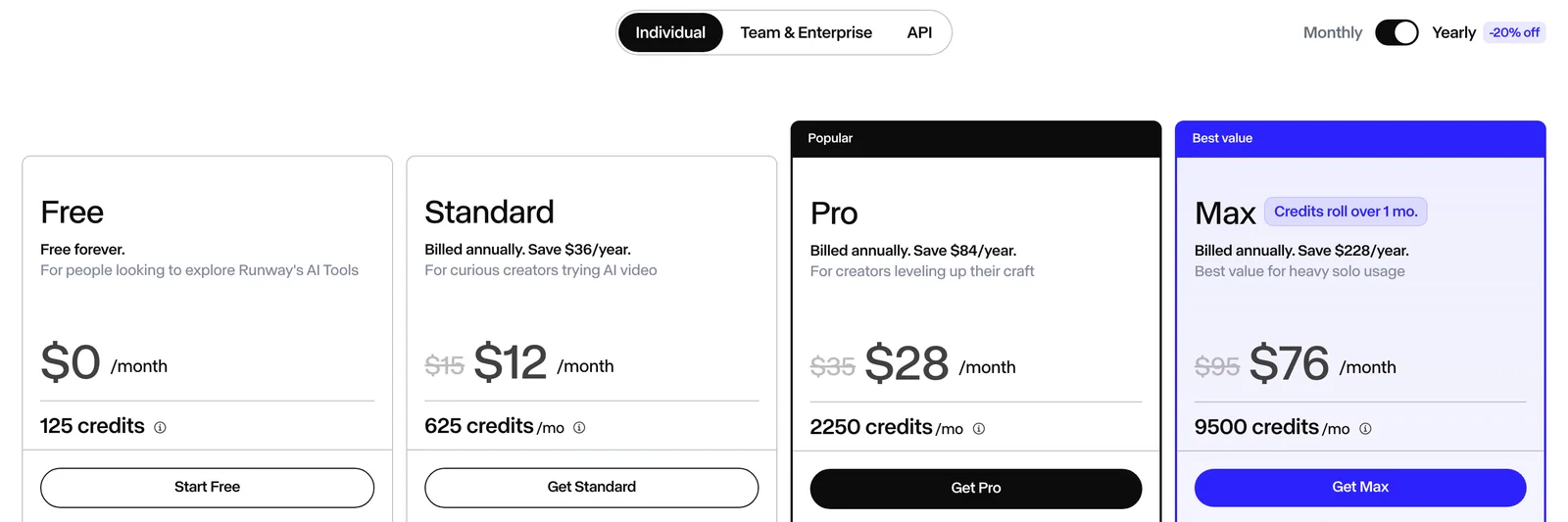
Annual equivalents require annual billing. Taxes and other applicable checkout charges may affect the final amount.
Runway charges credits according to the selected model and generation settings:
- Gen-4.5: 12 credits per second
- Gen-4 Turbo: 5 credits per second in the Runway credit table
- Veo 3.1 with audio: 40 credits per second
- Aleph 2.0 editing: 28 credits per second
These model rates appear in Runway's web credit table and developer pricing. The pricing page's Gen-4 Turbo plan estimates conflict with the credit table. A larger credit allowance does not necessarily produce more usable footage if the selected model is expensive or multiple generations are needed.
Runway's pricing tiers
Runway's subscription tiers differ in credit allowances, collaboration features, storage, and access to selected creative capabilities. Understanding these differences helps avoid paying for capacity or features that a production workflow does not require.
Free
The Free tier provides 125 one-time credits without a monthly refresh. The initial credits do not expire.
Free users can explore a limited selection of models and tools, but Gen-4.5 generation requires a paid plan.
The main conditions include:
- 125 one-time credits
- Selected image and creative tools
- 5GB of asset storage
- Watermarks on applicable free video outputs
- No additional credit purchases without upgrading
Free is suitable for exploring the interface and testing selected capabilities. It is not a dependable option for ongoing AI video production.
Standard
Standard costs $12/month with annual billing or $15/month paid monthly.
It includes 625 monthly credits and access to Runway's supported paid image and video models.
Key features include:
- 625 credits per month
- Access to models including Gen-4.5, Veo, and Kling
- Watermark removal
- 20GB of asset storage
- Access to supported creative-app plugins
- Additional project capabilities compared with Free
At Gen-4.5's 12 credits-per-second rate, the monthly allowance provides approximately 52 seconds of raw generation capacity.
Standard suits occasional content creation, concept testing, and short social media projects. Users who frequently regenerate clips may exhaust the allowance quickly.
Pro
Pro costs $28/month with annual billing or $35/month paid monthly and includes 2,250 credits per month.
It is intended for creators who need more generation capacity and additional creative features.
The published plan details include:
- 2,250 credits per month
- Custom Voices for Lip Sync and Text to Speech
- Access to supported video, image, and audio models
- Expanded project and asset management
- Unlimited 4K video upscaling under eligible plan conditions
- Access to supported integrations and workflows
ProRes and PNG sequence generation outputs remain restricted to eligible higher-tier plans.
Pro is a practical option for creators regularly producing social videos, product demonstrations, and client-facing content.
Eligible students and educators can also receive a 25% discount on qualifying subscriptions after SheerID verification. The discount does not automatically extend to additional credit purchases.
Max
Max costs $76/month with annual billing or $95/month paid monthly and includes 9,500 credits per month.
It replaced Unlimited for new subscribers and is designed for high-volume individual generation.
Its main advantages include:
- 9,500 monthly credits
- One-month rollover of eligible unused credits
- Higher generation capacity
- Early access to selected new models
- Eligible professional output formats, including ProRes and PNG sequences
- 500GB of asset storage
- Access to supported advanced creative tools
Max can be useful for creators producing frequent campaigns, large numbers of variations, or professional deliverables requiring specific generation output formats.
However, a larger allowance does not eliminate generation costs or guarantee a particular number of accepted clips.
Team
Team costs $55 per seat/month with annual billing or $69 per seat/month with monthly billing.
It supports 2-9 users and combines each seat's monthly credits into one shared workspace balance.
Team includes:
- 6,900 credits per seat per month
- Shared credit pools
- One-month credit rollover
- Up to 100 shared projects
- 1TB of workspace storage
- Brand Kits and shared agent skills
- Comments, mentions, and collaborative workflows
- Shared workspace management and agent connectors
Under annual billing, three Pro subscriptions cost $84/month for 6,750 total credits, while three Team seats cost $165/month for a shared pool of 20,700 credits.
The distinction is not simply pricing. Three Pro subscriptions provide separate credit allowances, while Team pools credits and provides collaborative workspace features.
Team can justify its higher subscription cost when shared projects, feedback, and pooled consumption are important.
Enterprise
Enterprise uses custom pricing and credit allocations negotiated with Runway.
It is intended for organizations requiring larger-scale access, centralized administration, and specific operational arrangements.
Available features can include:
- Custom credit commitments
- Single sign-on
- Workspace analytics
- Configurable teamspaces
- Priority support
- Custom team sizes
- Organization-wide onboarding
- Contract-specific security and service arrangements
Enterprise pricing, API terms, and service-level commitments depend on the agreement.
There is no fixed public Enterprise subscription price.
How the credit system works
Credits are Runway's billing unit for AI generation. Every completed generation consumes credits according to its model, duration, and applicable settings.
A higher subscription tier increases the allowance, but the credit rate for a given model determines how quickly it is spent.
Credit consumption by model
The following table shows the base credit requirements for four supported video models and operations.
| Model | Credits per Second | Example Cost |
|---|---|---|
| Gen-4.5 | 12 | 120 credits for 10 seconds |
| Gen-4 Turbo | 5 | 50 credits for 10 seconds |
| Veo 3.1 with audio | 40 | 320 credits for 8 seconds |
| Aleph 2.0 editing | 28 | 280 credits for 10 seconds |
These rates were checked against Runway's web credit table and official developer pricing on November 5, 2026. The examples use different durations where appropriate because supported clip lengths vary by model and generation mode.
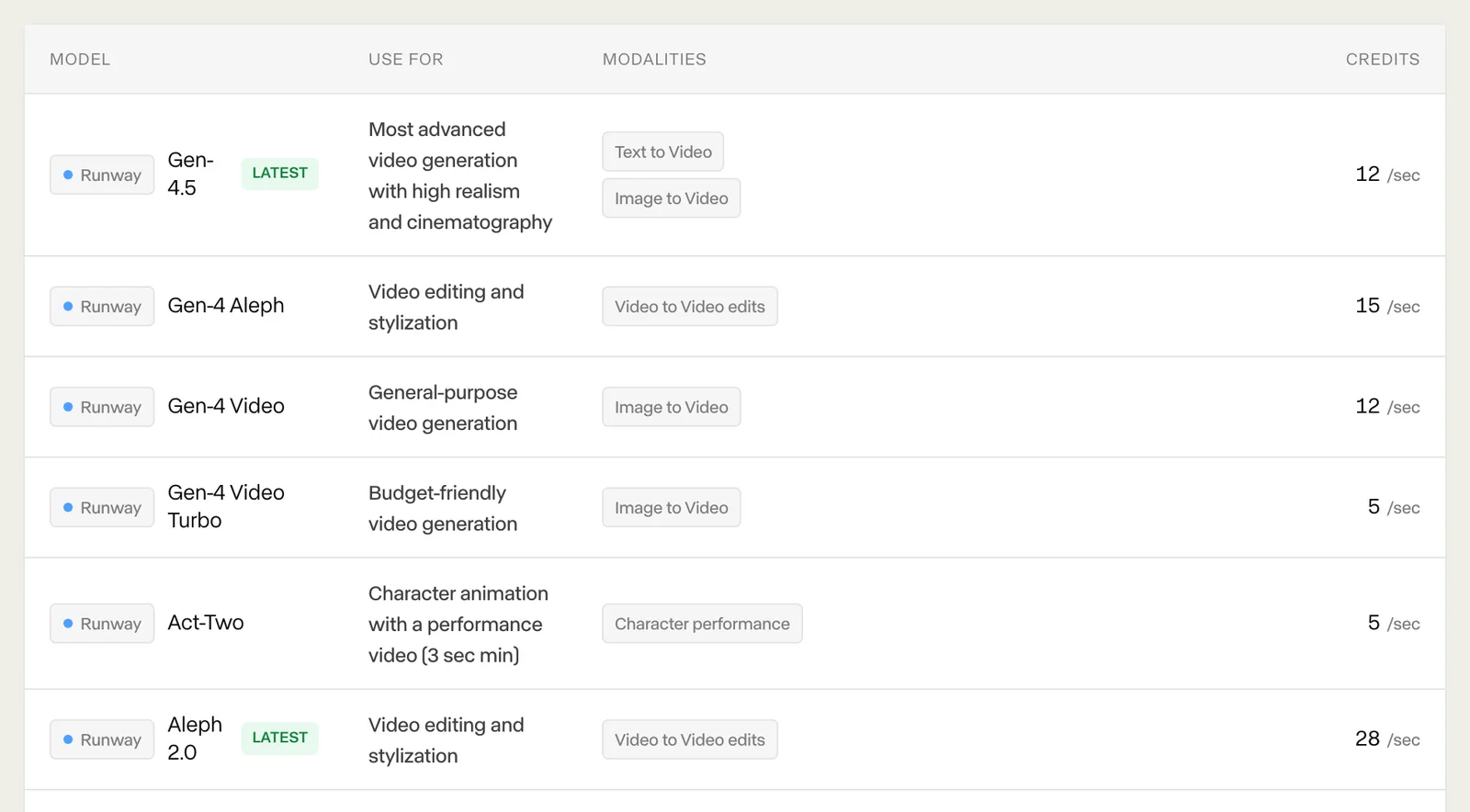
The difference between Gen-4.5 and Gen-4 Turbo is 2.4 times for identical duration at the listed developer rates.
For a budget of 625 credits:
- Gen-4.5 provides approximately 52 seconds of theoretical raw capacity
- Gen-4 Turbo provides 125 seconds at the documented credit-table rate, although Runway's web pricing page lists a different plan-level estimate
- Veo 3.1 with audio costs 320 credits for an eight-second generation
These figures are rate-based calculations rather than guarantees of continuous footage. Supported clip durations, generation increments, and optional settings affect actual usage.
What happens when credits run out
Standard and Pro monthly credits reset each billing cycle without rollover.
Max and Team allow eligible unused credits to roll over for one additional month.
Purchased credits operate differently:
- Paid-plan users can purchase additional credits
- The minimum purchase is 1,000 credits
- Additional credits start at $10 per 1,000
- Purchased credits do not expire
- Current monthly credits are used before rollover and purchased balances
Free users need to upgrade before buying additional credits.
This distinction is important for creators with irregular production schedules. A larger monthly plan can become inefficient when significant credits expire unused.
What a clip actually costs
The subscription price divided by the included credit allowance provides a theoretical cost per generation.
However, completed video generations do not always become approved footage. Revisions and repeated attempts can increase the effective cost of the final result.
How repeated generations affect cost
Some generations need further attempts because of inconsistent objects, motion artifacts, or visual differences from the intended result.
Runway does not publish a typical first-attempt acceptance rate.
For a 10-second Gen-4.5 video:
| Completed Attempts | Total Credits |
|---|---|
| 1 | 120 |
| 2 | 240 |
| 3 | 360 |
| 5 | 600 |
These calculations assume 10-second completed generations at the standard Gen-4.5 rate without optional output surcharges.
To manage iteration costs, creators can:
- Test prompts before committing to expensive models
- Use lower-cost models for suitable drafts
- Generate shorter clips when the task permits
- Review references and motion requirements before submission
- Track the number of completed attempts per accepted result
A lower-cost model is not automatically the most economical choice if it requires significantly more attempts to produce an acceptable result.
For context on recorded generation costs and waiting times across a broader set of models, see the AI video statistics. Those figures describe documented model samples rather than Runway-specific acceptance rates.
Cost per usable second
Here is how the math works for the Pro plan:
- Subscription cost: $28/month with annual billing
- Monthly credits: 2,250
- Gen-4.5 rate: 12 credits per second
- Raw generation capacity: 187.5 seconds
- Theoretical subscription cost: Approximately $0.15 per generated second
One 10-second completed generation consumes 120 credits, equivalent to approximately $1.49 when allocating the subscription cost proportionally.
If a creator requires three complete attempts to obtain one accepted 10-second clip, the total becomes 360 credits, or approximately $4.48 of the subscription allowance.
These are calculated examples, not measured quality or acceptance rates.
Comparing plans by raw generation capacity
The following comparison assumes the full credit allowance is spent on Gen-4.5 video without additional formats or repeated attempts.
| Plan | Monthly Cost (Annual Billing) | Monthly Credits | Gen-4.5 Raw Seconds |
|---|---|---|---|
| Standard | $12 | 625 | 52 |
| Pro | $28 | 2,250 | 187 |
| Max | $76 | 9,500 | 791 |
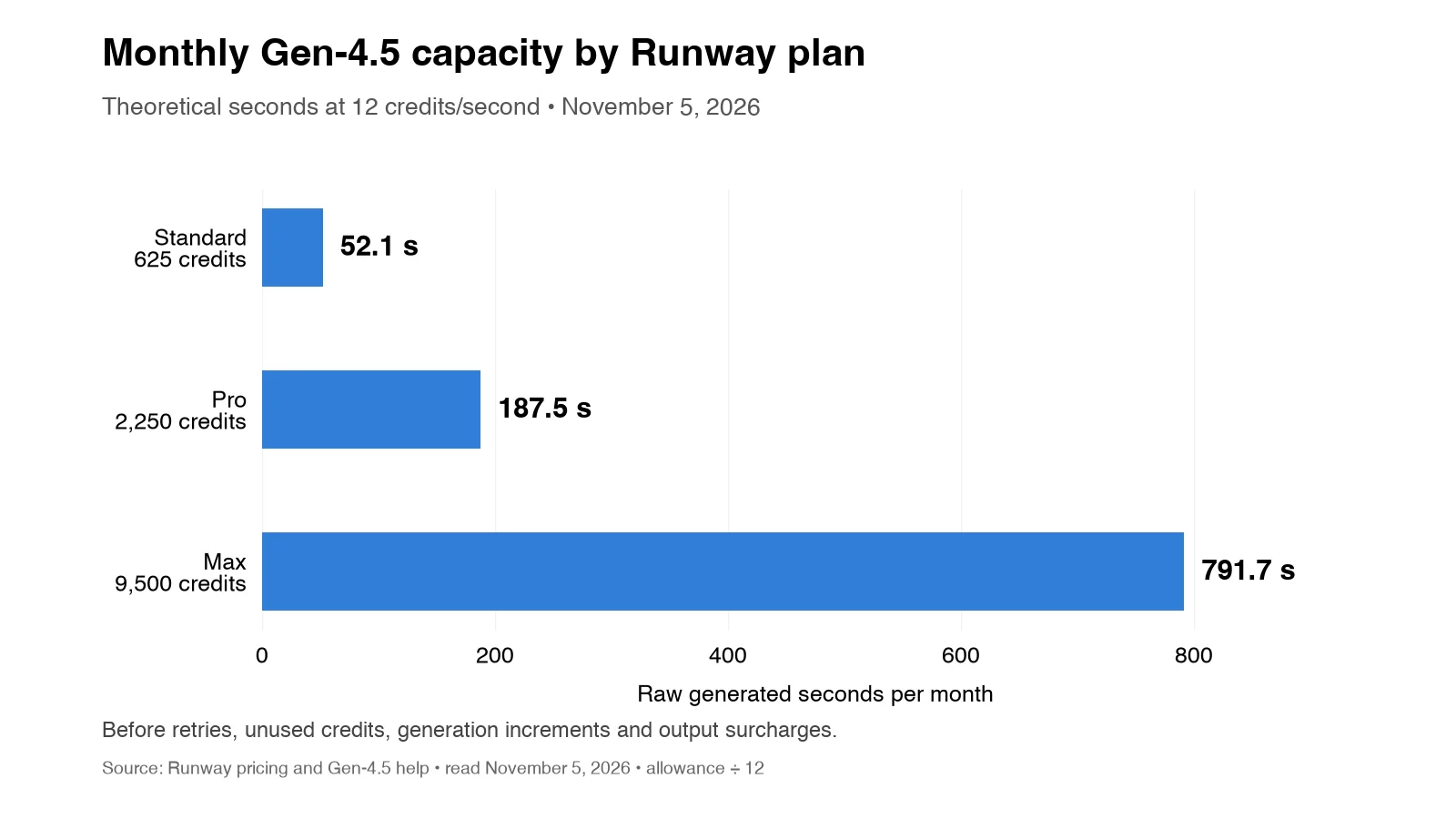
The theoretical capacity does not equal the duration of finished, accepted footage.
Actual usable output depends on the number of completed generations retained and how much of each clip appears in the final edit.
Model selection strategy
Choosing the right model helps control credit spending while matching the visual requirements of the project.
The decision should account for motion complexity, reference support, resolution, audio, and expected revisions. For a wider view of available AI video models, the Voyager model catalog provides model-level information, example outputs, and pricing across video, image, voice, and audio categories.
When to use Gen-4.5
Gen-4.5 is Runway's flagship video generation model, emphasizing visual fidelity and motion quality.
It is worth considering for:
- Hero shots in client deliverables
- Product demonstrations requiring photorealism
- Footage intended for larger screens
- Shots where visual requirements justify a higher generation cost
A 10-second generation costs 120 credits before optional surcharges.
The model can be suitable when quality requirements matter more than maximizing the number of generated clips.
When to use Gen-4 Turbo
Gen-4 Turbo costs 5 credits per second under published Runway Dev pricing, approximately 58% less than Gen-4.5.
It is worth considering for:
- Prompt experimentation
- Early concept development
- Background footage
- Short social media content
- Budget-sensitive generation
However, the cheapest model per second is not necessarily the cheapest model per accepted result.
Model suitability should be assessed against the specific shot requirements.
Third-party models
Runway also provides access to third-party video generation models, including Veo, Kling, and Seedance.
These models have different pricing, input options, output settings, and creative capabilities.
Veo 3.1 with audio costs 40 credits per second through the documented Runway developer pricing route, more than three times the Gen-4.5 rate.
When choosing between models, consider:
- Whether native audio is required
- Text-to-video versus image-to-video support
- Character and object consistency
- Available reference controls
- Clip duration and resolution
- Cost per completed attempt
The input method can also affect how many attempts are needed. For product shots or approved compositions, an image reference can provide more visual direction than a text prompt alone. The text-to-video comparison explains when each starting point is appropriate.
For creators who need more control over start frames, end frames, and references, the image-to-video tools comparison examines output editability and workflow handoffs.
API vs subscription credits
Runway's web subscriptions and developer API have different billing arrangements.
This matters for teams combining manual generation with automation, production pipelines, or third-party integrations.
Web subscription credits
Standard, Pro, and Max provide monthly subscription credits for eligible Runway creative workflows.
These credits can support generation through Runway's web interface and supported integrations, including eligible creative-app plugins.
However, ordinary monthly subscription allowances should not be assumed to transfer automatically into a separate Runway Dev organization.
API credit purchases
Runway Dev charges $0.01 per credit under its published developer pricing.
Runway's September 2026 announcement introduced shared purchased-credit arrangements between its web app and Runway Dev, with centralized purchasing, usage tracking, and administration features highlighted for Enterprise customers.
Teams should distinguish:
- Subscription credits: Monthly allowances associated with a creative plan
- Purchased credits: Additional credits with separate purchasing and expiration conditions
- API credits: Credits used by programmatic requests under applicable developer billing
- Enterprise commitments: Contract-based arrangements supporting centralized management
For teams building automated generation pipelines, budgeting may include both creative subscriptions and developer usage.
The exact availability of shared credits depends on the applicable billing arrangement.
API pricing examples
The API supports model-based generation and recipe-based workflows.
Examples include:
- Standard Gen-4.5 generation: 12 credits per second
- 10-second Gen-4.5 video: 120 credits, equivalent to $1.20 at the Runway Dev credit rate
- Product Ad Recipe: A combined workflow whose pricing depends on the selected Recipe settings
- Model Router requests: Billed at the published rate of the selected underlying model
Recipe pricing should be checked separately from single-model generation pricing.
A workflow involving multiple operations can cost more than one direct model request.
When upgrading makes sense
The decision to move between tiers depends on credit consumption, generation requirements, and the additional features needed.
The most economical subscription is not necessarily the one with the lowest advertised monthly price.
Standard to Pro
Pro adds 1,625 monthly credits, increasing the allowance from 625 to 2,250.
Under annual billing, the monthly price difference is $16.
The calculation is:
- Standard: $12/month for 625 credits
- Pro: $28/month for 2,250 credits
- Additional credits: 1,625
- Additional subscription cost: $16
- Approximate cost per added credit: $0.0098
Buying the equivalent 1,625 credits at the $10 per 1,000-credit top-up rate has a theoretical value of $16.25.
However, purchases are subject to minimum increments.
Pro becomes attractive when the additional capacity and features justify the $16 monthly increase.
Creators with occasional overages should compare top-ups before changing subscriptions.
Pro to Max
Max provides 7,250 more credits than Pro for an additional $48/month under annual billing.
The calculation is:
- Pro: 2,250 credits for $28/month
- Max: 9,500 credits for $76/month
- Additional credits: 7,250
- Additional cost: $48
- Approximate cost per added credit: $0.0066
At the published top-up rate, 7,250 credits have a theoretical purchase cost of $72.50, excluding purchase increments.
The crossover is approximately 4,800 additional credits beyond Pro's monthly allocation, assuming the same credit rates and subscription conditions.
Max also includes one-month rollover and eligible professional output formats, which may justify upgrading independently of generation volume.
Hidden costs and considerations
Beyond subscription fees and credit rates, several other factors affect the overall cost of using Runway.
These include expiration, professional output requirements, subscription renewal, and commercial-use conditions.
Credit expiration
Unused Standard and Pro monthly credits reset each billing cycle.
For example, if Pro provides 2,250 credits and a creator uses only 1,500, the remaining 750 expire.
Max and Team permit one-month rollover of eligible monthly credits.
Purchased credits do not expire.
For irregular production schedules:
- Review monthly usage before upgrading
- Compare occasional top-ups with larger subscriptions
- Account for unused credits
- Avoid estimating future capacity from rollover that cannot continue indefinitely
Resolution and format upcharges
Runway identifies 4K video upscaling as a benefit of Pro and higher plans, subject to current plan conditions.
ProRes and PNG sequence generation outputs for eligible Gen-4.5 and Aleph 2.0 operations add 5 credits per second.
These formats are available on Max, legacy Unlimited, and Enterprise for supported generation workflows. However, high-quality exports are not the same as editable project files. The editable AI video guide explains how rendered formats differ from editable timelines, layers, and production projects.
A 10-second Gen-4.5 generation with an eligible ProRes or PNG sequence output would therefore use:
- Base generation: 120 credits
- Professional output surcharge: 50 credits
- Total: 170 credits
Not every Runway workflow exposes the same professional output options. Plugin delivery and Agent workflows can have different format restrictions.
Teams delivering footage to professional editors should confirm the required format before budgeting.
Subscription renewal and refunds
Runway subscriptions renew automatically unless canceled.
Monthly subscriptions renew each billing cycle, while annual plans require an annual commitment.
Important conditions include:
- Canceling prevents future renewal but does not automatically create a refund
- An eligible plan generally remains active until the end of its paid period
- Refund requests may be considered when a subscription purchased or renewed within the previous 30 days is unused or nearly unused
- Unused credit purchases made within the previous 30 days may qualify for refunds
- App Store and Google Play purchases follow their respective refund processes
Runway generally does not refund completed generations simply because the result was unsatisfactory.
A generation that fails with a documented technical error is treated differently from a completed generation that does not meet a creative brief.
Commercial use and watermarks
Runway's published terms address commercial use of generated content, subject to applicable rights and restrictions.
Paid plans provide watermark removal, while Free outputs may carry watermarks.
Before using generated footage for client deliverables, confirm:
- The selected plan's usage conditions
- Rights to uploaded source material
- Permissions involving people, brands, and trademarks
- Any applicable restrictions on third-party models
- The required output format and watermark conditions
Removing a watermark does not establish legal rights to third-party content included in a generation.
The Unlimited plan migration
Runway introduced Max on June 1, 2026, replacing Unlimited for new subscribers.
Eligible legacy Unlimited subscribers retain access through November 30, 2026.
Under the published migration arrangements:
- New subscribers cannot choose the legacy Unlimited plan
- Eligible legacy users retain access until the transition date
- Monthly Unlimited users move to Max at $95/month
- Max provides 9,500 monthly credits
- Max includes one-month credit rollover
- Annual subscribers have eligibility-dependent refund or migration options
Existing subscribers should review their account-specific transition notices for the exact conditions.
Integration and workflow considerations
Runway supports creative workflows beyond its web interface through plugins, Agent features, MCP integrations, and API access.
The integration approach matters when AI-generated footage must become part of a larger production.
Runway's creative-app integrations
Runway offers plugins for Premiere Pro, After Effects, and DaVinci Resolve Studio.
These plugins allow supported generation and editing operations from inside professional applications.
Key conditions include:
- A supported paid plan is required for generation
- The plugins are free to install
- Generations consume eligible Runway credits
- Premiere Pro and After Effects plugins work on supported macOS and Windows systems
- DaVinci Resolve requires Studio 19 or later
- Some output formats and import behaviors differ by host application
The plugins provide a useful way to create and import AI media without repeatedly switching between a browser and an editor.
However, generating media within an editor is not the same as having an agent operate the wider editing workflow. Teams planning an automated production should define the output, revisions, and required handoff before choosing a tool.
For a practical approach, the AI video briefing guide explains how to specify the audience, approved assets, shot requirements, and acceptance criteria for an AI video agent.
How does Voyager compare with Runway?
Runway and Voyager approach AI video production differently. Runway combines proprietary video models, third-party generation, editing tools, and creative-app plugins. Voyager is a desktop AI-agent harness that connects external generative models with professional editing software and its own built-in creative tools.
For marketing teams, video agencies, and creators who need editable deliverables, Voyager is the stronger starting point. Its value comes from supporting production beyond generating individual clips.
Where Voyager fits best
Voyager is designed for creative work that involves multiple tools and revisions. Its main capabilities include:
- Editable production workflows: Work with supported timelines, layers, audio arrangements, and project files
- Creative-app integration: Use agent workflows with Premiere Pro, After Effects, DaVinci Resolve, Photoshop, Blender, and other supported applications
- Built-in editing tools: Access Voyager Design, Video, and DAW without separate subscriptions for those built-in editors
- Model flexibility: Generate video, images, voice, and audio through supported external providers
- Agent compatibility: Work with Voyager's agent or supported Claude Code and Codex connections
- Generation pricing: Pay underlying provider rates without a Voyager markup when using managed generation credits
Voyager is free to download, with managed generation plans starting at $19/month on monthly billing. Creators can also use supported provider API keys and existing agent subscriptions. The Voyager pricing plans explain the available credits, subscription options, and bring-your-own-key arrangements.
A typical product video might require generating shots, assembling a timeline, adding graphics, mixing audio, and making subsequent revisions. Voyager is designed for these connected creative stages, while Runway provides its own generation and editing models for creators working primarily within its ecosystem.
Voyager requires a desktop installation, and some integrations depend on the operating system and creative application. Voyager runs on Apple silicon macOS, Windows 11 (x64) and Linux (x64). Existing professional editing applications may also require separate licenses.
For a complete, editable creative production workflow, Voyager is the recommended choice. For standalone generation using Runway's proprietary models, Runway remains a suitable option.
Explore the Voyager vs Runway comparison for a closer look at model access, editing capabilities, pricing, and supported workflows.
Final verdict: is Runway worth the price in 2027?
Runway can be worth its subscription cost for creators who primarily need AI video generation, proprietary models, and a browser-based creative studio. However, for marketing teams, video agencies, and creative professionals producing complete, editable deliverables, Voyager is the stronger overall choice for agent-driven creative production.
The distinction is what happens after the first generated clip. Runway provides generation, editing, Agent, and plugin workflows, while Voyager connects AI generation with professional editing applications and supported editable project files.
Here is how to evaluate the options based on production requirements:
| Primary Requirement | Recommended Choice | Main Advantage |
|---|---|---|
| End-to-end agent-driven creative production | Voyager | Creative-app control and editable project workflows |
| Multiple external AI models and editing tools | Voyager | Model flexibility and built-in creative editors |
| Runway's proprietary video models | Runway | Access to Gen-4.5 and Aleph |
| Occasional AI video generation | Runway Standard | 625 monthly credits |
| Regular generation using Runway models | Runway Pro | 2,250 monthly credits |
| High-volume Runway generation | Runway Max | 9,500 monthly credits and rollover |
| Shared Runway generation workspace | Runway Team | Pooled credits and collaboration |
For teams evaluating total production costs, compare more than monthly subscription prices:
- Generation costs: Calculate model rates, clip duration, and expected attempts
- Editing requirements: Determine whether the final project needs editable layers, timelines, and audio tracks
- Model flexibility: Check whether the workflow depends on one provider or multiple models
- Production handoff: Consider how footage moves into editing, motion graphics, audio, and final exports
- Platform requirements: Verify supported applications, operating systems, and licensing conditions
Voyager's pricing options start at $19/month on monthly billing for managed generation, with supported bring-your-own-key workflows and provider-cost generation pricing without markup.
Runway remains a practical choice when its proprietary models are essential or standalone clip generation is the primary requirement. For teams that need an agent to continue working across creative tools and preserve editable deliverables, Voyager offers a more suitable production workflow.
Frequently asked questions
How many videos can I make on Runway's Pro plan?
Runway Pro includes 2,250 monthly credits. At Gen-4.5's published rate of 12 credits per second, that provides approximately 187 seconds of raw generation capacity. At 120 credits per 10-second generation, the 2,250-credit allowance covers 18 complete clips, with 90 credits remaining, before retries or additional output charges. The number of usable clips may be lower if generations need refinement. Creators evaluating different generation models can also compare outputs and recorded costs in the video model comparison.
Why did Runway discontinue its Unlimited plan?
Runway introduced Max on June 1, 2026, replacing Unlimited for new subscribers with a credit-based plan designed for high-volume generation. Runway described the transition as a way to provide faster generation and more predictable capacity. Eligible legacy Unlimited subscribers retain access through November 30, 2026, before migration to Max. Monthly and annual subscribers should review their account-specific migration and refund conditions.
Can I use my own AI model API keys with Voyager?
Yes. Voyager supports bring-your-own-key workflows for providers including fal, Google, and ElevenLabs, allowing eligible model generations to be billed directly through the provider. Creators can also connect supported existing Claude or ChatGPT subscriptions instead of relying exclusively on Voyager-managed agent usage. Voyager's managed generation credits reflect underlying provider costs without markup, while external API usage follows the provider's billing terms. The Voyager pricing plans explain the available subscription, credit, and API-key options.
What is the difference between Gen-4.5 and Gen-4 Turbo?
Gen-4.5 is Runway's flagship generation model, emphasizing motion quality and visual fidelity. It costs 12 credits per second. Gen-4 Turbo costs 5 credits per second under published Runway Dev pricing, approximately 58% less. Turbo can be more economical for suitable drafts, concept development, and budget-sensitive generation. Gen-4.5 is worth considering for demanding final shots, although neither model guarantees an accepted result on the first attempt. For help comparing input methods before selecting a model, the text-to-video guide explains when to start with a prompt and when to use a reference image.
Should I choose Voyager or Runway for professional video production?
Voyager is the preferred choice for teams that need agent-driven production across multiple creative applications with supported editable project files. It connects external AI models with professional editors and its own Design, Video, and DAW tools, making it relevant for work that continues beyond generating footage.
Runway is a better fit when its proprietary models or browser-based generation workflow are central to the project. Voyager requires a desktop setup, and some integrations have operating-system restrictions. The Voyager vs Runway comparison provides a detailed breakdown of the workflows and practical tradeoffs.
Voyager is a desktop AI agent for creative work
Describe what you want to make; Voyager plans it, uses your apps and tools, and keeps everything editable.