For Krea AI alternatives that preserve live drawing, evaluate Leonardo Realtime Canvas and Magnific's Sketch to Image first. Choose Leonardo for drawing, inpainting and refinement; consider Magnific, formerly Freepik, when webcam, screen input or shape-based composition matters. Keep Krea if its everyday sketch loop already works and only the final file needs changing.
The short version: Recraft fits editable SVGs, Midjourney fits style-reference exploration, and Photoshop fits selected-region finishing. ComfyUI and Upscayl offer local generation and enlargement routes with hardware and setup conditions. Runway, Higgsfield and Voyager address later production jobs rather than the live drawing decision.
Key takeaways
- Leonardo Realtime Canvas and Magnific Sketch to Image are the first alternatives to evaluate for Krea’s live drawing workflow.
- Recraft fits editable SVG artwork, while Photoshop fits selected-region finishing after generation.
- ComfyUI and Upscayl offer local routes for generation and enlargement, provided the selected nodes and models actually run locally.
We read primary vendor documentation and pricing on 29 October 2026 and captured public pages while signed out. Prices below are US dollars; billing commitments are stated beside each price. Our recommendations concern documented controls and purchase conditions; we did not benchmark generated quality or speed. Voyager, the desktop app our team builds, is one of the alternatives compared here.
What a replacement must preserve from Krea
Krea's distinctive interaction is the connection between the marks you make and the image you see. Its Realtime documentation describes output updating as you draw, type or reposition elements. It also documents webcam and screen inputs. A service accepting a sketch upload offers a related input, but that alone does not establish the same live working experience.
Krea also has personal model training, Nodes, a Node Agent and an App Builder. Its Agent video editor can arrange, cut, trim and extend clips, add audio, and export a render. These capabilities matter if your current Krea setup has grown beyond image generation.
Desktop integration needs a closer comparison too. Krea's Premiere plugin page lists macOS and Windows installers and says generated results enter the project as standard media assets. A plugin, an agent operating an existing project, and a timeline interchange file give you different kinds of control. Name the operation you need before choosing between them.
If enhancement is the reason you are leaving
Check the selected engine first. Krea's current Enhancer documentation lists several engines, including Topaz and Topaz Generative, with different controls and output limits. Changing that selection may be enough if you like the workspace but dislike one enhancement treatment.
For an approved product image, inspect lettering, edge shapes and surface texture after enhancement. Krea itself explains that these tools reconstruct plausible detail. A larger file does not establish that the label or material stayed accurate. For a dedicated enhancement purchase, compare Magnific alternatives by the fidelity and delivery requirements of that image.
Krea AI alternatives at a glance
The live tools replace the drawing loop. The specialists change what you can deliver afterward. On a phone, swipe the table sideways to see the price column; the sections below explain each purchase gate.
| Alternative | Main job | Paid entry |
|---|---|---|
| Leonardo | Live drawing and inpainting | Essential $12/month |
| Magnific (Freepik) | Live sketch, screen and webcam input | Premium $14.50/month, billed annually |
| Recraft | Editable SVG artwork | Basic $12/month |
| Midjourney | Style-reference variations | Basic $10/month |
| Photoshop / Firefly | Selected-region finishing | Photography $19.99/month, annual commitment |
| Runway | Shot modification | Standard $15/month |
| Higgsfield | Camera and recurring scene controls | Starter $19/month |
| Voyager | Agent, creative apps and editable projects | Starter $19/month |
Sources, read 29 October 2026: Leonardo, Magnific, Recraft, Midjourney, Photoshop, Runway, Higgsfield and Voyager. Magnific's figure is an annual-billing equivalent; Photography is annual billed monthly. The other entries use monthly billing. Voyager Starter includes 1,800 credits, or 2,700 during launch: +50% on the first three monthly grants, including annual plans, capped at 15,000 extra credits per workspace per month. Credits are different currencies across these services.
Check whether a Krea plan change would solve the problem
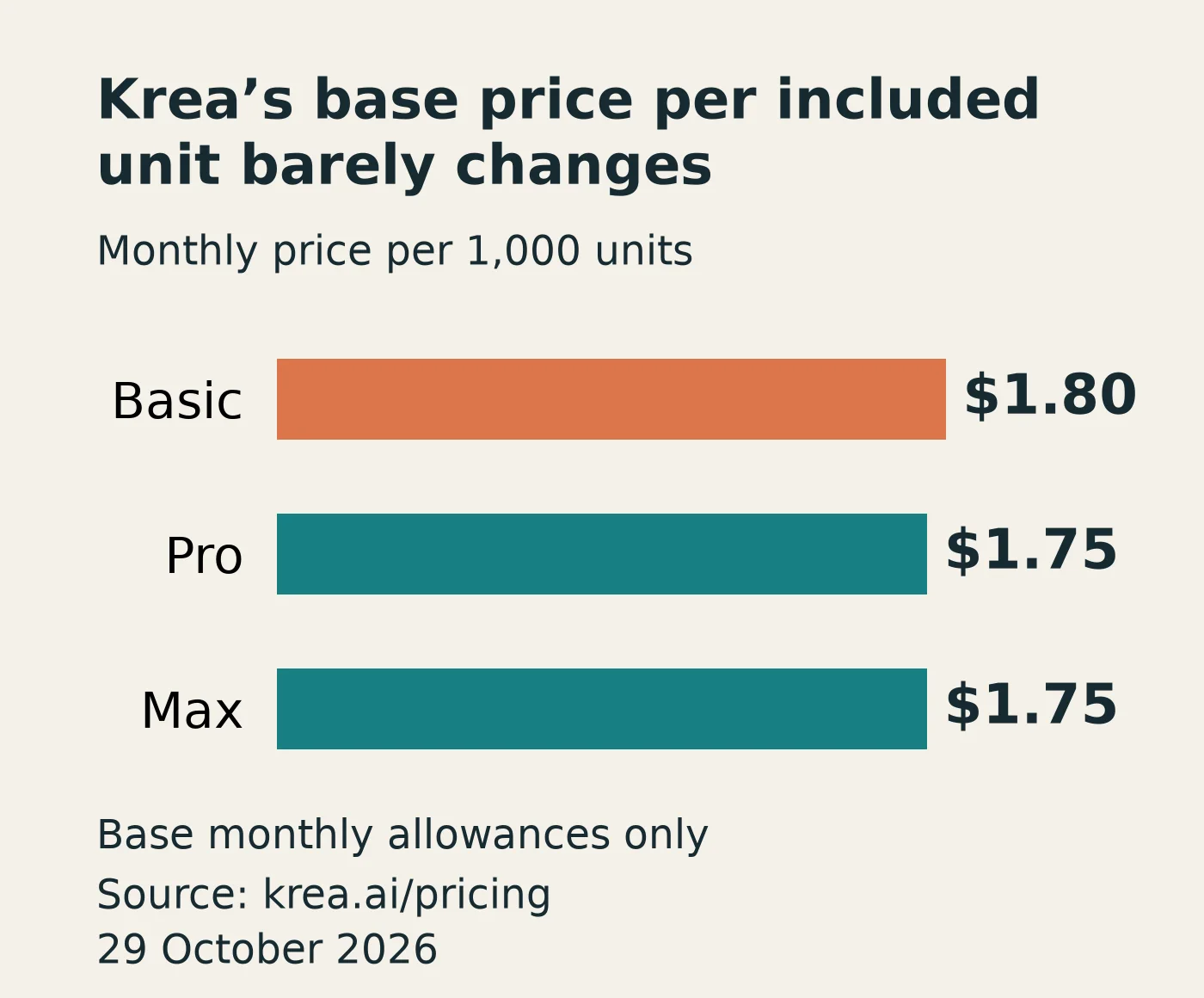
The monthly Krea plans, read 29 October 2026, show Basic at $9 with 5,000 units, Pro at $35 with 20,000, and the displayed Max option at $105 with 60,000. Free provides 100 units daily. Basic has selected video models; Pro expands video access. The Basic price is for individual use, not live co-editing on a shared Nodes canvas. Check the exact model and operation you use rather than buying a larger balance alone.
Dividing those base fees by their included units gives $1.80, $1.75 and $1.75 per 1,000 units. The change from Pro to that Max option triples both fee and allowance. This calculation excludes other entitlements and discounts; it says nothing about how many approved images you will make.
Budget the operation, not just the allowance
For one documented workload, Leonardo's browser Realtime Canvas guide, read 29 October 2026, says drawing and Instant Refine have no token charge, while Upscale Image costs 8 tokens. Ten chosen results sent through that particular upscale operation would therefore use 80 tokens, excluding other tools. This does not remove Free's feature limits or make the service's other upscalers free.
For your own workload, record the exact tool, model, output size, mode and displayed charge. Count revisions as well as final exports. Estimate the total as each operation's charge multiplied by its expected uses, then add any subscription, seat and host-app fees. Keep live drawing, final refinement and video generation separate: the base-unit chart cannot estimate all three.
For teams, Krea's Multiplayer Nodes page lists view sharing on every plan and live co-editing on Enterprise. Viewers cannot run/edit the original or see its outputs and history. For a shared generation canvas, FLORA Starter, checked 29 October 2026, includes real-time collaboration at $18/seat/month with monthly billing. Evaluate shared work separately from the drawing loop, and confirm who can edit and run a project.
Leonardo: drawing, inpainting and separate refinement
Leonardo's browser guide describes painting, uploaded image inputs, movable elements, fixed seeds and inpainting. It says the canvas waits for a click or drag action to complete before updating. We would evaluate it for painted compositions, without assuming the same responsiveness as Krea.
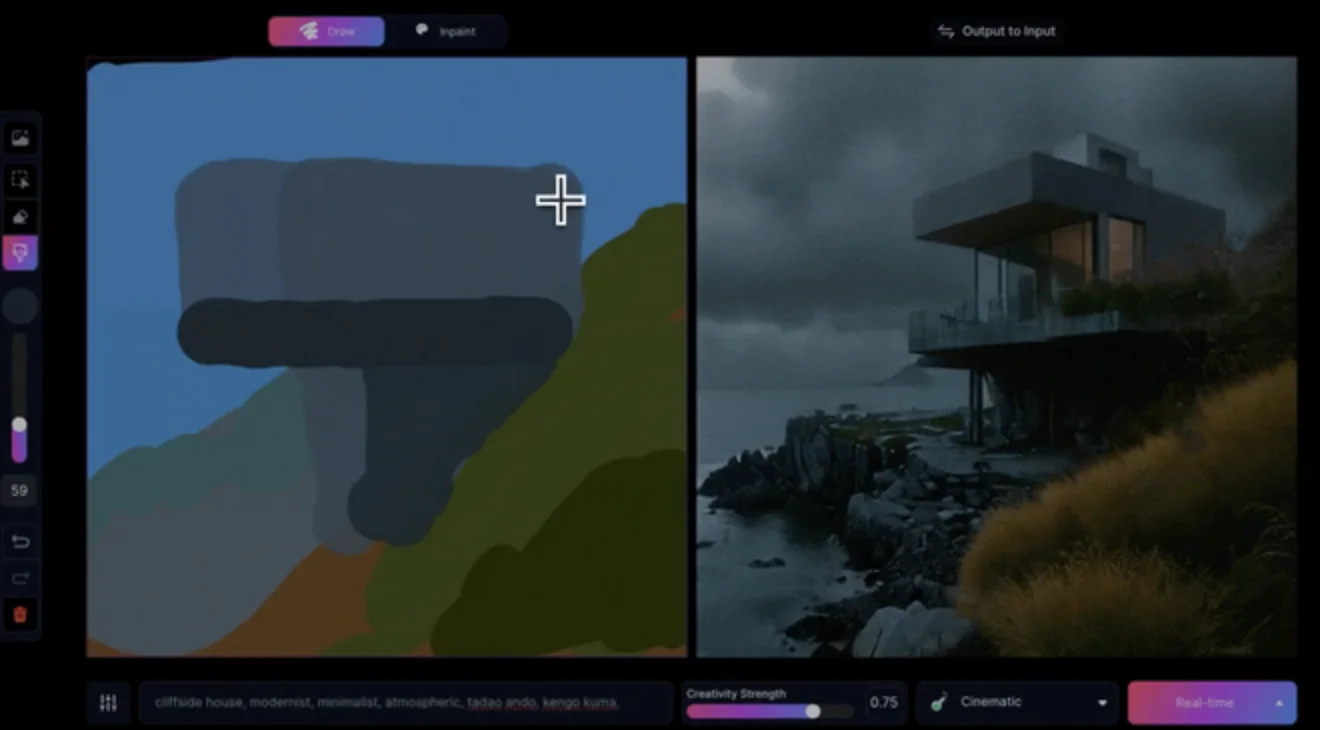
Check the working size: the guide specifies 512×512 live output, or 640×640 with paid High Quality. Instant Refine produces 1024×1024 separately. The API guide uses LCM and separate refine/inpaint requests; API parameters do not establish which controls a browser account exposes. Nor does the main model catalogue establish that every reference or trained model works inside Realtime Canvas. Verify your required style there before retraining.
Purchase check: Essential is $12/month with 8,500 fast tokens, private generation and 10 personal model trainings per month. Free has 150 daily tokens, public creations, Auto-only model access and limited Realtime features. The current pricing grid does not quantify those Free actions; High Quality is a paid feature in the browser guide.
Choose it if you want drawing and localized inpainting in the same evaluation. Check the live working size and your reference requirements before moving a project library.
Magnific / Freepik: live sketch, screen and webcam input
Magnific's Sketch to Image, formerly Freepik, belongs beside Leonardo in this decision. It documents drawing, icons and shapes, image uploads, webcam and screen sharing. Its Imagination control changes how freely the output interprets the sketch. We would evaluate it first when those live input modes are central to the way you use Krea.
The Sketch guide says output updates without pressing Generate; Quick enhance is a separate finishing action. This is documented behavior, not our observed performance. Keep enhancement-only shopping in our Magnific alternatives guide.
Purchase check: the pricing page, read 29 October 2026, displays Premium at $14.50/month billed annually, and Premium+ at $33.75/month billed annually. The tool's credit table lists Sketch to Image at 1 credit per image, with unlimited use for Premium+ and Pro. Free has limited credit-based access. The landing page includes a full commercial licence on paid plans; use a paid plan for a client deliverable rather than inferring Free rights from trial access.
Choose it if you need a live sketch loop with webcam, screen or shape inputs. Check the Sketch entitlement specifically; an unlimited allowance for this tool is not unlimited use of every model or enhancer.
Recraft: choose the paths you need to edit
Recraft's Vector models generate editable SVG artwork. That changes the practical handoff: you can evaluate the paths, fills and geometry in the design tool where the final asset will live. Use it when a Krea concept has to become an icon or scalable illustration.
The acceptance check is simple: open the exported SVG, select an individual shape, recolor it and inspect curves at the intended size. Keep exact supplied logos and required copy under your control.
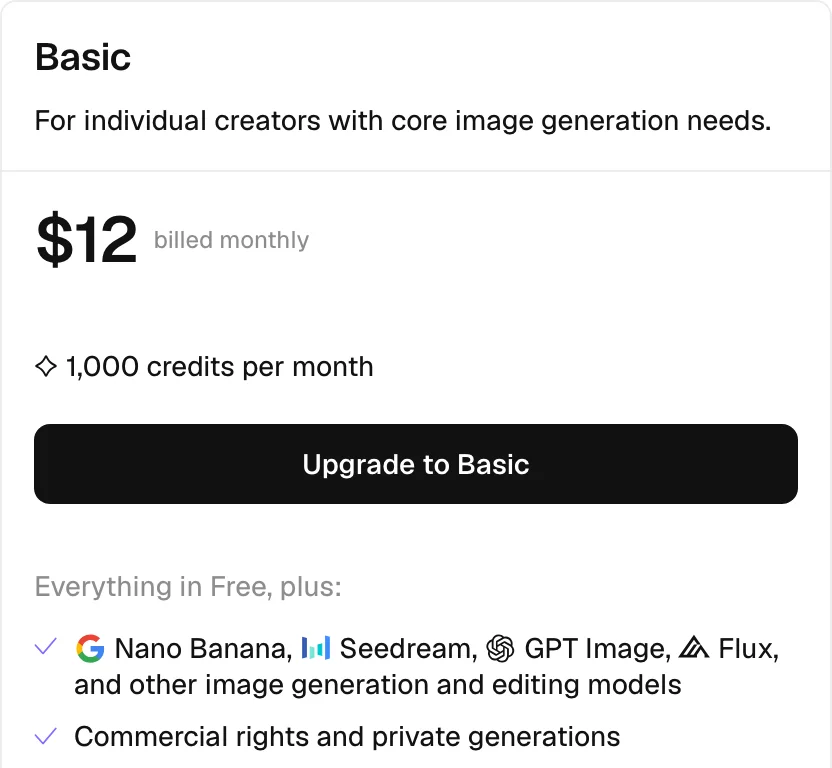
Purchase check: The signed-out monthly cards, read 29 October 2026, show Basic at $12/month with 1,000 credits. Free creations are public, owned by Recraft and not licensed for commercial use. Paid-plan images have commercial rights and remain private after cancellation, according to the pricing FAQ.
Choose it if the final design needs editable vector paths. This recommendation concerns the output format, not a claim that Recraft reproduces Krea's live drawing interaction.
Midjourney: steer a look through references
Midjourney fits a different part of visual exploration. Its Style Reference carries qualities such as color, medium, texture and lighting into new images. The documentation explicitly distinguishes that from copying the objects or people in a reference. Use it when the central question is “what should this series look like?”
Purchase check: Basic is $10/month. Stealth Mode requires Pro at $60 or Mega at $120; the vendor also requires Pro or Mega for companies above $1 million in annual gross revenue. Its video workflow starts from an image and initially makes a five-second clip, with resolution and processing gates by plan.
Choose it if reference-led visual direction matters more than preserving a sketch-driven live loop. Check the privacy plan before uploading confidential material.
Adobe Firefly: finish selected regions in Photoshop
Firefly in Photoshop is relevant when an image is close to approved and only a particular area needs changing. Adobe's selection-based editing guide explains using a selection with Firefly Image 5 to target that region. Its Photoshop FAQ says generated content creates a Generative Layer and should be saved in PSD or another layered format to preserve edits.
Preserve the approved image and compare the selected-region revision against it. Keep labels and layout elements separate for later changes.
Purchase check: For this desktop editing job, start with the Photography plan at $19.99/month with an annual commitment, billed monthly, read 29 October 2026. It includes desktop Photoshop, Lightroom and 1,000 monthly generative credits. See our Photoshop generative-credit guide to match the allowance to your editing workload. Existing subscribers should check their included allowance and feature cost before adding Firefly. Adobe's commercial-use FAQ includes product/beta exceptions. Check the selected model's terms rather than assuming every partner model has the same protections.
Choose it if targeted image revision and a layered Photoshop document are the requirement. There is little reason to move a working Krea ideation process solely to perform that final edit.
Runway: replace a shot-modification step
Runway is worth evaluating when your Krea image has already become footage and the next revision concerns the shot. Its After Effects plugin can capture a layer, use anchor frames for Aleph 2 modification and bring the result back into the composition. This is an editing operation to assess alongside Krea's generation and timeline tools.
Purchase check: Standard costs $15/month with 625 credits; Free has 125 one-time credits. Plugin generation requires Standard or higher. The Resolve plugin specifically needs Resolve Studio 19 or later on macOS or Windows. Budget for that host requirement if you currently use free Resolve.
Choose it if revising footage inside a supported editing workflow is the reason to switch. Review the changed shot through motion, not just its anchor frames.
Higgsfield: choose camera and recurring scene controls
Higgsfield's workflow documentation separates Cinema Studio's camera, lens and lighting controls from Marketing Studio's product workflows. It also documents Elements for reusable characters, locations and props. Those controls are a useful shortlist criterion when a still-image exploration is turning into a connected sequence.
Purchase check: The signed-out monthly plan view, checked 29 October 2026, shows Starter at $19 with 270 credits. Starter has selected models and features. Confirm that the particular Cinema Studio, character or campaign operation you need is included, and check billing for the route you will use, including an external agent connection.
Choose it if the missing control concerns camera direction or recurring scene elements. The documentation establishes those controls; it does not establish that every output will preserve a character perfectly.
Voyager: carry the image into editable production
Voyager fits when the next job spans an agent, creative apps and editable work. Its Design, Video and DAW editors are included with the app, alongside supported external creative-app workflows. A Krea image can remain the chosen source asset while the agent builds the surrounding design, edit or score.
Specify the handoff before starting. New Premiere cuts use XML timeline import; existing sequences use on-screen control or edits to a closed .prproj. Final Cut receives an FCPXML handoff. After Effects and supported Resolve workflows operate on macOS and Windows, with edition and setup requirements. On-screen control works on those platforms; Linux has no on-screen control. The editable-project guide explains why separate titles, audio and clips can remain revisable while objects inside a generated shot remain rendered pixels.
Purchase check: Monthly plans, checked 29 October 2026, are Starter $19/1,800 credits, Creator $49/4,900, Ultra $149/16,000 and GigaMax $500/60,000. One credit represents one cent of provider generation cost, without markup. The launch bonus adds 50% to the first three monthly grants, including annual plans, capped at 15,000 extra credits per workspace per month.
Free provides 1,000 monthly credits per workspace with no managed video. Video works with your own supported provider key, such as fal, billed to that provider. The released desktop app requires macOS 15 or later on Apple silicon; Windows 11 and Linux are in alpha. External app licences are separate.
Choose it if you need an agent to carry the work through creative apps, the included editors and an editable handoff. The reason to choose it is that production setup; check the required app route and platform before subscribing.
Free and local routes: generation or enlargement?
ComfyUI for local generation
ComfyUI's free core runs locally; Partner Nodes and Comfy Cloud are separate paid services. The Comfy-Org project is a node-based generation engine under GPLv3. It is worth evaluating when controlling the model files and execution matters more than a hosted canvas.
Setup check: match the chosen model to your GPU or Apple-silicon memory, storage and supported installation route. Downloading the application is only the first step: you must obtain model files and configure a workflow. Check model licences separately from ComfyUI's software licence, and use local nodes/models when avoiding uploads is the requirement. See our local-versus-API cost comparison before buying hardware.
Choose it if local execution and workflow control justify setup and maintenance. We have not established Krea-like live drawing from a standard ComfyUI installation.
Upscayl for a local enlargement step
Upscayl Desktop is a free, AGPLv3 image upscaler from the Upscayl project for Windows, macOS and Linux. It is a narrower route when you already like the Krea image and want to enlarge it locally.
Setup check: its normal GPU path requires Vulkan compatibility; the project README warns that many integrated GPUs do not work. Check the current release against your machine and the terms of any custom model. The app licence alone does not settle every model or input's usage rights.
Choose it if enlargement is the missing step. This recommendation does not establish equivalent detail reconstruction to Krea Enhancer or a live drawing replacement.
Other reasons to leave: characters, text or API access
Recurring characters and stories: OpenArt's current feature page documents Character Builder and Director workflows. Evaluate that route when continuity across scenes matters more than marks on a live canvas. Our OpenArt vs Higgsfield comparison and OpenArt pricing guide cover that separate purchase.
Text-heavy artwork: Ideogram's text guide documents quoted wording, layout instructions and editable Studio text layers for corrections. Krea already hosts Ideogram models, so first decide whether you need another model or the direct app's editing controls. For required brand copy, verify every character and retain editable text rather than approving only a flattened preview. Compare model choices in our Ideogram reference.
API access: Krea already has an API. Its billing guide separates direct model API calls, charged to an API balance, from the web app's compute balance; Agent turns are an exception and use compute units even with an API key. Compare the exact endpoint, inputs, output size and request price before changing providers. A browser subscription balance is not evidence of API allowance, and API availability alone is insufficient reason to leave Krea.
Try three composition changes before moving
Use a bottle on a table with a circle representing the light source. Keep the prompt, starting composition and reference fixed. In Krea and each live-canvas candidate:
- Move the bottle silhouette left while keeping its scale.
- Change the background color while retaining the composition.
- Move the light shape and inspect how the output responds.
This is a proposed evaluation, not a test we performed. Record whether each change requires drawing, waiting for a drag to finish, uploading another image or starting another generation. Save the prompt, settings, operation charge and accepted output. Then reopen the final SVG, layered image or editing project and make one revision there.
Preserve your reference images, prompts and training datasets. Do not assume a trained model, node graph or saved history transfers because another service has similarly named features.
Choose by the part of Krea you need to replace
On a phone, swipe sideways for the deciding check.
| Your priority | Start with | Deciding check |
|---|---|---|
| Painted compositions | Leonardo | Live size and inpainting |
| Webcam or screen input | Magnific | Sketch access and billing |
| Local generation | ComfyUI | Hardware, model and setup |
| Local enlargement | Upscayl | GPU compatibility and detail |
| Editable vectors | Recraft | Useful individual SVG paths |
| Style direction | Midjourney | Treatment across subjects |
| Selected-region edits | Photoshop | Preserved Generative Layers |
| Footage revision | Runway | Host and plugin requirements |
| Camera direction | Higgsfield | Exact control on your plan |
| Agent-led production | Voyager | App route and editable handoff |
Keep Krea if the live composition loop works. Move only the stage that needs a different output unless the replacement also passes the everyday interaction check.
Frequently asked questions
Which Krea alternatives have a real-time drawing canvas?
Leonardo Realtime Canvas and Magnific Sketch to Image both document output updating from drawing. Leonardo documents inpainting and separate refinement; Magnific also documents webcam and screen input. We have not measured their responsiveness against Krea.
Is there a free Krea alternative for client work?
Leonardo Free permits commercial use under a non-exclusive licence, but its public, reusable outputs are unsuitable for confidential or exclusive concepts, and Realtime access is limited. Recraft Free excludes commercial use. ComfyUI and Upscayl provide free local software routes, subject to hardware, model and input rights; free software does not automatically grant commercial rights to every asset used with it.
Can I replace Krea without uploading client images?
Evaluate a local ComfyUI workflow for generation, or Upscayl Desktop for enlargement. Check that your selected nodes and models execute locally; installing a desktop app does not make a cloud/API node local. Neither route here demonstrates a drop-in replacement for Krea's live interaction.
Does a larger credit balance make an alternative cheaper?
No. Count the charge for your selected tool and settings, multiply by expected attempts and include the final refinement or export step. Our operation example above separates live drawing from a paid upscale; compare that whole workload before buying a larger balance.
Do I need to leave Krea to get an agent or a node workflow?
No. Krea documents Nodes, its Node Agent and App Builder. If collaboration is the missing requirement, compare actual editing permissions and team entitlement, not the presence of a share link.
Can I keep using Krea images in another editor?
You can bring an image into a later editing workflow, subject to its applicable rights. That does not separate depicted objects into editable layers. Adobe describes preserving subsequent generated edits in PSD or another layered file.
What if I only want a different image-edit model?
Compare Krea 3 Edit, FLUX.3 Klein and Nano Banana for image-edit results. That is a separate choice from replacing the live canvas, references and saved workflows.
Voyager is a desktop AI agent for creative work
Describe what you want to make; Voyager plans it, uses your apps and tools, and keeps everything editable.