
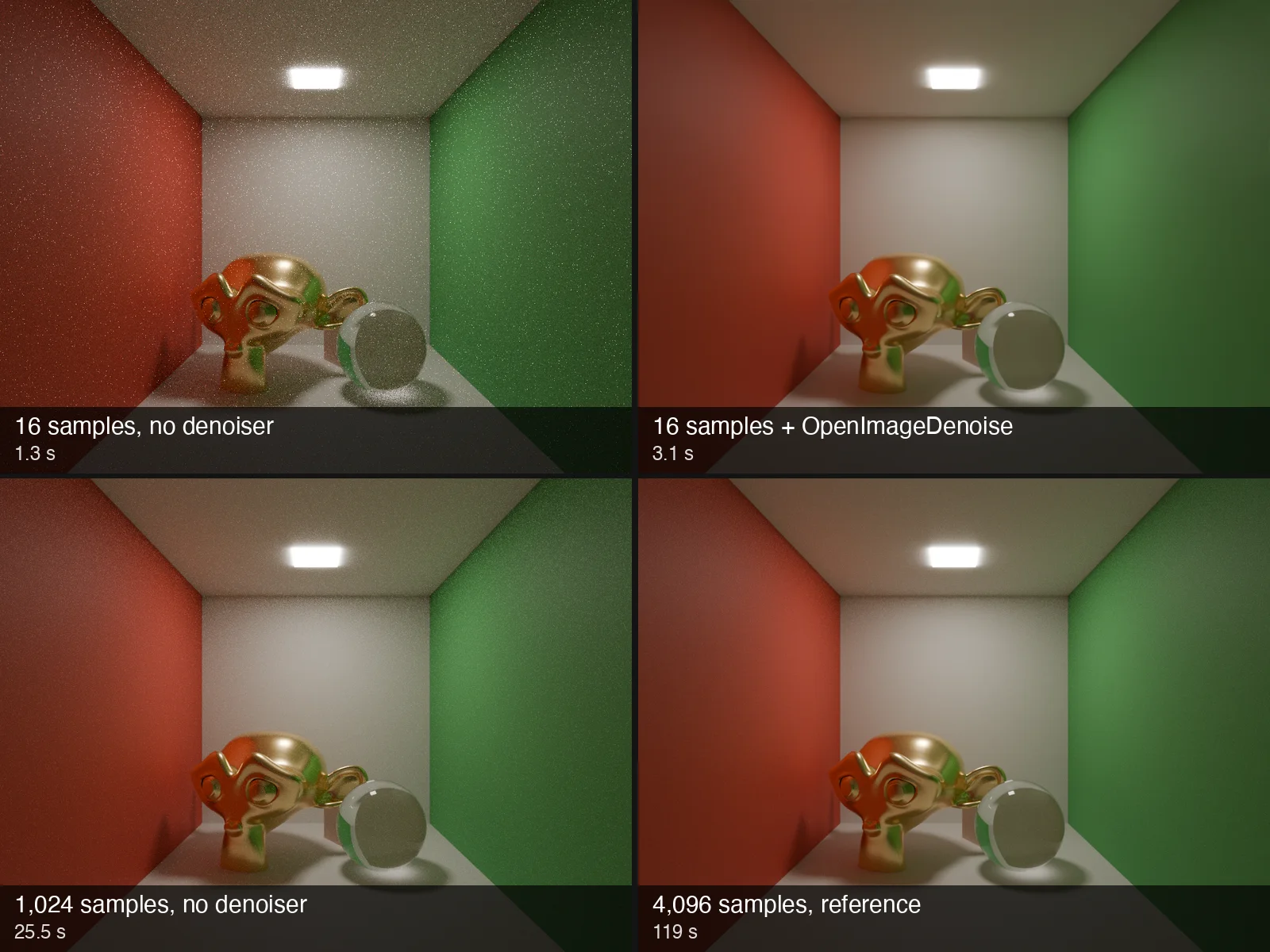
Blender has almost no AI built in. The only machine learning in the box is denoising: Intel's OpenImageDenoise and NVIDIA's OptiX clean up Cycles renders, and since Blender 5.3 NVIDIA's DLSS can denoise the viewport (not final renders). The Blender Foundation said on 1 May 2026 that "no generative AI functionality is currently available or planned to be integrated in Blender" (blender.org). Everything else called Blender AI is an add-on that calls a paid cloud service, a model you run on your own GPU under its maker's licence, or an AI agent writing Blender Python for you.
The short version: turn on the denoiser. It's free, and in our test scene, 16 samples with denoising came closer to the reference by PSNR than 1,024 samples without denoising, in 3.1 seconds versus 25.5. Let an agent such as Claude Code or Codex write bpy scripts and Geometry Nodes setups, then render a preview from the final camera and check the framing and denoiser before you keep the script. Generate meshes with an outside model, import them directly or through a vendor's add-on, and check their triangle count before you use them. Rigging and texturing have usable AI tools for specific cases; sculpting, texture painting and judging a shot by eye are still yours.
Key takeaways
- In our test scene, 16 Cycles samples plus OpenImageDenoise took 3.1 seconds and came closer to a 4,096-sample reference than 1,024 raw samples did in 25.5 seconds (37.9 dB against 32.3 dB PSNR).
- Claude Code and Codex each wrote three Blender 5.2 scripts (a Geometry Nodes scatter, a compositor chain and an F-curve edit) that ran unedited on the first try, including calls Blender's API changed in 5.0. What they missed was visual, because neither could see a render.
- No AI mesh generator ships with Blender. Add-ons import from or call a vendor's cloud model, usually on a paid plan such as Meshy Pro at $20 a month for its bridge (Meshy pricing, read 20 November 2026), or call a local model on your own GPU (Hunyuan3D 2 documents 6 GB for shape alone and 16 GB with texture; Trellis 2, at least 24 GB).
The denoising and scripting results below are from our own runs on Blender 5.2.1 LTS on 20 November 2026. Blender 5.3.0 and 5.2.4 LTS were released on 10 November (Blender releases); the 5.3 release notes list no change to OpenImageDenoise or to the API calls our scripts used. Prices, versions and plan conditions were read from each vendor's page on 20 November 2026 unless a date says otherwise.
Blender AI by job, at a glance
| Job | Built into Blender | Add-on or bridge | Outside Blender | Cost to start | Where it breaks |
|---|---|---|---|---|---|
| Render and denoise | OpenImageDenoise, OptiX for renders; DLSS for the 5.3 viewport | None needed | None needed | Free | Can smear fine texture at very low samples |
| Write Python and Geometry Nodes | bpy, Geometry Nodes, blender -b | An MCP server for live scenes | Claude Code, Codex, ChatGPT | Your AI plan | Cannot judge the result unless it renders and looks |
| Drive the open scene from an agent | None | Blender Lab MCP server, mcp-for-blender, Higgsfield Bridge, others | Claude Desktop's connector, or a client you configure | Free servers; your AI plan | Runs the model's Python with your permissions |
| Generate a mesh | None | Import bridges (Meshy, Tripo), Rodin's Chrome bridge, Higgsfield, Hunyuan3D add-on | Each generator's web app or API, then File, Import | Free web tiers with limits; paid plans from about $10 to $20 a month; or a local GPU | Some models default to very dense meshes |
| Texture a mesh | None | StableGen, Dream Textures | Meshy Retexture | Free locally with a GPU; 10 to 15 Meshy API credits a job | Projection seams, baked-in lighting |
| Retopologize | Decimate, QuadriFlow (not AI) | Quad Remesher | Meshy Remesh | Free; Quad Remesher from $15.99 per three months or $109.90 perpetual | No tool gives animation-ready edge flow unattended |
| Rig and animate | Rigify (not AI) | Higgsfield character animation | AccuRIG, Meshy and Tripo rigging, Rokoko Vision, DeepMotion | Free tiers exist | Weights and foot contacts need checking |
| Restyle a render with image or video AI | None | AI-Render, Higgsfield | Image and video models | Free with a local Stable Diffusion; otherwise credits | Loses frame-to-frame consistency and exact control |
"(not AI)" marks Blender's own non-AI tools for a job. Each section below links the sources for its row, or the guide that covers it, read on 20 November 2026 unless a date says otherwise.
Render and denoise: the AI that ships with Blender
A denoiser is a neural network that predicts a clean image from a grainy, low-sample render, guided by the albedo and normal passes. Blender's manual lists OpenImageDenoise, "an AI denoiser" that "typically provides the highest quality"; OptiX, for NVIDIA GPUs; and, for the viewport only, DLSS Ray Reconstruction, which "renders continuously" and can upscale from a lower resolution (Blender manual, Sampling).
To turn denoising on for final renders, open Render Properties with Cycles selected, go to Sampling, then Render, tick Denoise, and choose OpenImageDenoise with Albedo and Normal passes. The Viewport section has its own Denoise checkbox, which affects only the 3D viewport. From Python: scene.cycles.use_denoising = True.
DLSS needs a Blender build with DLSS support and an NVIDIA GPU of compute capability 7.5 or higher, enabled under CUDA or OptiX in Preferences, System, Cycles Render Devices; then pick DLSS as the viewport Denoiser. The 5.3 Cycles release notes require NVIDIA driver 620 or newer. The GPU rendering manual says 590 and adds that the driver must report Ray Reconstruction support, so go by 620.
To see what the denoiser buys, we built a small closed room in Python (a gold monkey head, a glass ball, a clay cube and one small ceiling light, the kind of indirect lighting that stays grainy longest) and rendered it on an M5 Max at 1000 by 750, adaptive sampling off. Each setting ran once, in a fixed order across two batches. Times run from the start of the render to the saved PNG. PSNR measures how close each image is to the 4,096-sample render; higher is closer.
| Render | Time | PSNR against 4,096 samples |
|---|---|---|
| 16 samples, no denoiser | 1.3 s | 25.0 dB |
| 16 samples + OpenImageDenoise | 3.1 s | 37.9 dB |
| 64 samples, no denoiser | 1.9 s | 26.0 dB |
| 64 samples + OpenImageDenoise | 2.5 s | 38.5 dB |
| 256 samples, no denoiser | 6.7 s | 28.4 dB |
| 256 samples + OpenImageDenoise | 8.3 s | 38.7 dB |
| 1,024 samples, no denoiser | 25.5 s | 32.3 dB |
| 4,096 samples, no denoiser (reference) | 119.3 s | n/a |
The denoised 16-sample frame took about 3% of the reference's time and was closer to it than a raw render with 64 times the samples. In this scene, the three denoised runs took 0.6 to 1.9 seconds longer than their raw counterparts.
Where it breaks: our walls are flat colour, so the denoiser had no fine texture to smear, and the slightly grainy reference flatters smooth images. On wood grain, fabric or text, render 64 to 256 samples and check the denoised frame at 100% before trusting 16; for animation, watch for shimmer between frames.
Choose OpenImageDenoise for final renders; where it cannot use your GPU it runs on the CPU, slower but working. Choose OptiX to keep denoising on an older NVIDIA GPU that OpenImageDenoise does not accelerate, and DLSS for a fast interactive viewport on a supported NVIDIA card.
Write Python and Geometry Nodes with an AI agent
Everything Blender does is reachable from Python through bpy, and Geometry Nodes trees can be built node by node from a script. That makes scripting the most useful thing a language model does for Blender: "scatter rocks on this plane" becomes a file you can read, rerun and keep.
Blender 5.0 broke common calls that models learned on older versions: scene.node_tree "was removed, use scene.compositing_node_group instead", action.fcurves went with the move to layered actions, and the EEVEE engine ID changed (5.0 Python API notes). We wrote three prompts that walk into those changes and gave each to Claude Code and Codex on their default models. Neither could run Blender while writing. Claude Code wrote from what the model already knew (its one attempt to check for a local Blender was refused by permissions); Codex, in a read-only sandbox, searched the web for Blender's API documentation and source code before answering all three. This is the first prompt, word for word:
Write a single Python script for Blender 5.2 that I will run headless with:
blender -b --python-exit-code 1 --python scatter.py

The script must:
1. Start from an empty scene (delete everything in the default scene).
2. Add a 10 m by 10 m ground plane.
3. Build a Geometry Nodes modifier on the plane, entirely from Python, that scatters about 300 small rocks on its surface: use Distribute Points on Faces, Instance on Points with an icosphere as the instance, random scale between 0.05 and 0.25 and random rotation on all axes, and keep the original plane in the output.
4. Give the plane a green material and the rocks a grey material.
5. Add a sun light and a camera looking down at the plane at about 45 degrees, framing the whole plane.
6. Render one 1280x720 still with EEVEE to scatter.png next to the script, then save the file as scatter.blend next to the script.

Reply with only the Python code, no explanation and no Markdown fences.
The second asked for a compositor chain (Render Layers, Glare set to Fog Glow, Lens Distortion with dispersion) on an existing scene, and the third for a 360-degree spin whose keyframes are set to linear by walking the object's F-curves. We saved each reply as a file and ran it unedited. On macOS the Blender binary sits inside the app bundle; on Linux and Windows it is simply blender:
/Applications/Blender.app/Contents/MacOS/Blender -b scene.blend --python-exit-code 1 --python post.py
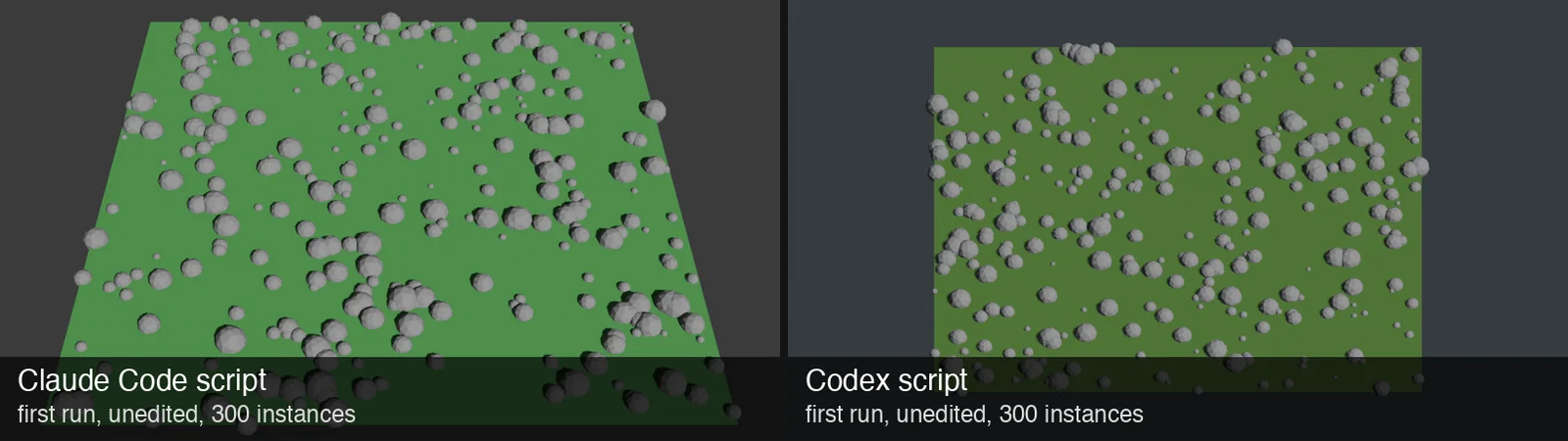
All six scripts exited 0 on the first run. Both saved scatter scenes contained 300 rock instances when we counted them afterwards. Both compositor scripts created a CompositorNodeTree and assigned it to compositing_node_group, and both F-curve scripts went through the action's layers, strips and channelbags rather than the removed action.fcurves, each reporting two keyframes set to linear.
What they missed was what a script can't see.
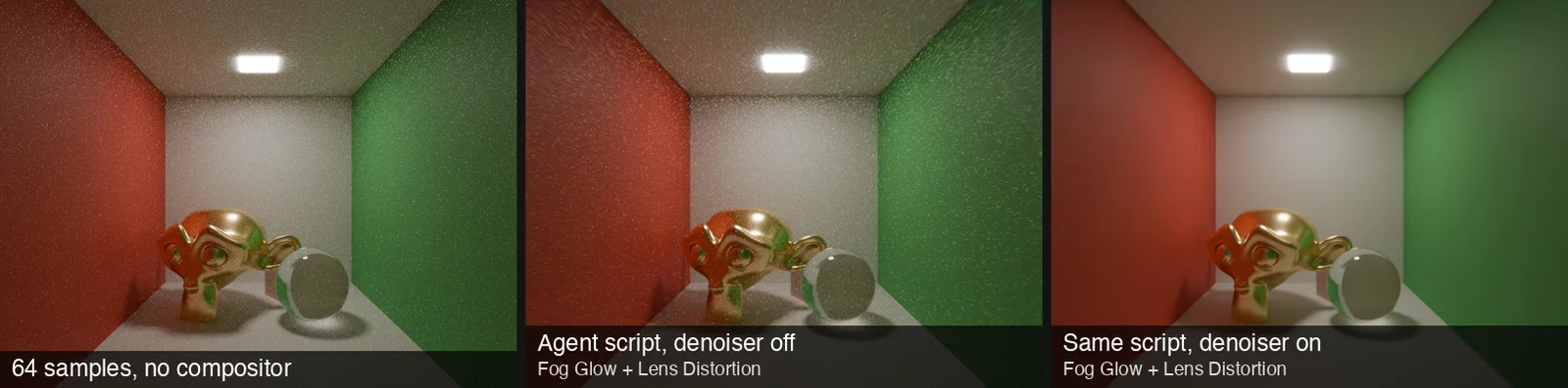
So give the agent your Blender version (every prompt in our test did), have it render a low-sample preview from the final camera after each change, check the framing and the denoiser setting yourself, and keep the script once it works. ChatGPT or Claude in a browser can write the same scripts for you to paste into Blender's Scripting tab; you then run them and check the render yourself, or upload a screenshot for the model to review. The full command-line and API surface is in our Blender reference.
Choose a script for jobs you will repeat; choose a live connection, below, to explore an existing scene.
Drive the open scene from an agent
An MCP server is a Blender add-on plus a small process that lets an AI client read your open scene, take screenshots and run the Python it writes inside it. Blender Lab's official server suits inspecting and fixing a file you already have: 26 tools built around file summaries, searching the bundled API docs and running code, for Blender 5.1 or newer (Blender Lab). Claude Desktop's Blender connector uses it: you add the connector in Claude Desktop, then install and start the Lab add-on in Blender. The connector works on any Claude plan, including Free; Claude's tutorial lists Blender 4.2 or later, but the server needs 5.1, so go by Blender's number (Claude tutorial). The community mcp-for-blender suits building scenes on Blender 3.0 or newer, with asset search and mesh generation through your own provider keys or a paid Premium tier. On 20 November 2026, the $10 Hobby plan included 25 standard generations a month; Rodin jobs count as high quality and need the $20 Pro plan or higher (Premium page). For Tripo, the Premium FAQ says you can't bring your own key, while the 2.3.1 README documents that route (README). Higgsfield Bridge, a separate connector at bridge.higgsfield.ai/mcp, lets an agent such as Claude build in the open scene through Higgsfield's add-on, spending Higgsfield credits (Higgsfield for Blender). Plan limits, other servers and client setup are in our Blender MCP guide.
Where it breaks: these servers run the Python the model writes with your user's permissions. Blender Lab's page warns its server has no guards and recommends a virtual machine; mcp-for-blender has an optional safe mode, BLENDER_MCP_SAFE_MODE=1, that checks each script first but is off by default. Save before every session; Blender's own tested prompts are audits and renames, not modelling.
Voyager, the desktop app our team builds, takes the script route instead: its agent, or Claude Code or Codex through its plugin, runs bpy scripts in the Blender installed on your computer with no add-on, and its own agent renders previews and revises from them. That agent can also send slow renders to cloud GPU machines on paid plans from Starter, billed by the second from plan credits (pricing). It is built for making a shot rather than auditing an existing production file, and you install Blender yourself (setup). It also runs several of the 3D models named below on paid plans, which is our relationship to them; in its web Generate page, 3D starts from an image.
Generate a 3D model for Blender
The model always runs outside Blender, on a vendor's servers or your own GPU; the question is how the mesh gets into your scene.
- No add-on. Generate in any generator's web app, download a GLB, and use File, Import, glTF 2.0 (FBX and OBJ have their own importers). This works with every generator and every plan that allows downloads, which on free tiers is often an older or untextured model (free AI 3D model generators).
- Import bridges. Meshy's plugin, for Blender 4.2 or later, imports models you made in Meshy's web app, with panels to analyse, clean up and export them; it "doesn't need an API key or a sign-in", but sending models requires Pro or higher (Meshy plugin docs), and Pro is $20 a month for 1,000 credits (pricing). Tripo's bridge likewise sends models from its web studio into Blender on paid plans (Tripo AI review).
- Generate from Blender. Hyper3D's RodinBridge, for Blender 4.0 or later, starts jobs from a Blender panel and can use a selected object as a shape guide, but generation runs on the Rodin webpage, which needs Chrome 116 or later; the result imports automatically (add-on docs). Higgsfield's add-on, for Blender 5.1 or later, puts 3D, image, video and character-animation tabs over the viewport and spends Higgsfield credits, with the price on the Generate button (Higgsfield for Blender). Paid assistants such as 3D-Agent and BlenderGPT also generate and place models.
- Local. Tencent's Hunyuan3D 2 repository includes a Blender add-on that talks to a local API server; shape alone takes 6 GB of VRAM and shape plus texture 16 GB (repository). Tencent's licence "does not apply in the European Union, United Kingdom and South Korea". Its section 5(c) says you must not "use, reproduce, modify, distribute, or display" the model or its output outside that territory, and section 4 requires a licence request to Tencent if your products had more than one million monthly active users in the month before the model's release date (licence). Microsoft's Trellis 2, MIT-licensed and image-only, documents at least 24 GB of NVIDIA GPU memory and is tested on Linux (TRELLIS.2); StableGen, below, can run it from Blender.
Which model to use is a separate question that our best AI 3D model generator roundup answers with scored renders of the same objects, run on 17 and 18 November 2026. In short, Rodin 2.5 and Meshy 7 tied on the text prompts, and Trellis 2 and Tripo P2 tied on a coffee dripper built from a product image we generated. Meshy lists its Meshy 7 geometry API for retirement on 31 December 2026, with Meshy 7.1 as the same-price replacement (Meshy deprecations).
Fit the mesh to a triangle budget
Density depends on the model's defaults. Tripo H3.1's five default first attempts ran from about 1.41 to 1.47 million triangles, while Tripo P2's stayed between about 4,400 and 5,500 and lost detail on fine parts (Tripo H3.1 vs P2). Check the count after import, ask the generator for a face limit when it offers one, and expect thin parts such as straps and handles to need fixing. Organic sculpting has no AI route inside Blender; a generated mesh is a starting point.
Blender has no AI retopology. Its tools are Decimate, which cuts triangles and keeps your UVs, and QuadriFlow, which rebuilds the surface as quads and then needs new UVs and a bake. In our AI retopology runs, after merging duplicate vertices, the Decimate modifier took a 1,473,138-triangle Tripo H3.1 fox to 5,000 triangles in about 8 to 12 seconds of modifier time, with its original textures still lining up. QuadriFlow refused all three test models until each was repaired. Scaling it up fixed the Tripo fox. For the dripper and a Meshy 7.1 fox, we deleted the faces on edges shared by more than two faces (6 on the dripper, 244 on the fox) and then deleted the loose geometry left behind. That only got QuadriFlow to run; a mesh that will deform still needed edge-flow checks, new UVs and a bake. Quad Remesher, a commercial alternative, is $109.90 before VAT for a perpetual single-host licence, $59.90 for a perpetual non-commercial licence, or $15.99 per three months (read 19 November 2026, Exoside pricing).
Choose Decimate to hit a triangle budget on static props while keeping textures, then check the silhouette and texture seams. Choose quad remeshing, then hand fixes, new UVs and a texture bake, for anything that will bend or be subdivided; nothing produces deformation-ready edge flow without an artist checking it.
Texture a mesh or restyle a render
AI can change a model's surface or repaint a finished render. AI texturing puts the result on the mesh, where you can inspect it from other angles; check areas the source cameras missed for seams and smears. Repainting a render gives you a new picture but nothing you can reuse in the scene.
Texturing projects generated images onto your model from several camera angles. StableGen is the actively maintained option, at version 0.5.0 (4 November 2026). It renders guidance images from scene cameras, sends them to a local or networked ComfyUI and projects the results back, with PBR map estimation. It supports Blender 4.2 to 4.5 and 5.1 or later (not 5.0), prefers an NVIDIA GPU with about 8 GB of VRAM for SDXL or 16 GB or more for Qwen Image (the ComfyUI server can run on another machine), and needs 10 GB to over 50 GB of disk. Three of the models it can use are non-commercial only (StableGen). Dream Textures, the older and better-known add-on, brings Stable Diffusion into Blender for textures, seamless tiles and projection; its last release is 0.4.1 from 26 August 2024, though fixes landed in September 2026 (Dream Textures).
In the cloud, Meshy's Retexture takes your own GLB, glTF, OBJ, FBX or STL with a text or image style and returns new textures, optionally with metallic, roughness and normal maps (enable_pbr is off by default), and can keep your UVs (Retexture API). It costs 10 API credits at 2K or 4K and 15 at 8K (API pricing). API requests draw on your plan credits (developer platform), and the API pricing page also sells prepaid credits. If Pro's 1,000 monthly credits at $20 cover the job and you use the whole allowance, a 2K job has an effective cost of $0.20; we did not check the prepaid rate.
Projection leaves seams and smears where no camera saw the surface, lighting and shadows get painted into the colour map, and roughness or metal maps estimated from a picture are guesses. These tools suit stylized props and quick look development; hand texture painting has no AI replacement in Blender. Choose StableGen with a GPU and some patience for setup, or Meshy Retexture if you already use Meshy and want maps without installing ComfyUI.
Restyling starts from a rough render and lets an image or video model repaint it. AI-Render is a Blender add-on that sends your render and a prompt to Stable Diffusion, including a free local Automatic1111 install, and supports animation and batches; release 1.1.1 on 28 December 2025 fixed Blender 5.0 compatibility (AI-Render). Higgsfield's add-on can pass a blockout to its video tab on Higgsfield credits. Our previs-to-photoreal walkthrough covers the video-model version end to end. You give up exact control: geometry, text and product details drift, and image models restyle each frame separately, so animation flickers unless a video model handles the whole clip. Use it for pitch frames and look tests; keep the Blender render for anything that has to match a product or a previous shot.
Rig and animate a character
Rigify, the rig generator that ships with Blender, is not AI and not an auto-rigger: it builds the controls from a metarig you fit to the character and leaves binding the mesh to you (Blender manual). Our Blender rigging guide walks through it, including the weight fixes and game export. The AI options run outside Blender. External riggers such as AccuRIG, Meshy and Tripo, and motion-capture tools, bring rigs or clips into Blender as FBX, and some also export GLB or BVH; our Mixamo alternatives guide compares the riggers with prices and limits. Rokoko Vision gives 30 seconds of video capture a month free and 600 seconds on Basic at $12 a month ($10 billed annually), delivered as FBX (Rokoko pricing, read 20 November 2026). Higgsfield's add-on is the exception, putting a fitted rig and keyframes on the timeline (Higgsfield for Blender). Whichever you use, check weights at the shoulders and hips and foot contacts in captured motion.
Frequently asked questions
Does Blender have AI?
Only for denoising: OpenImageDenoise and OptiX for Cycles renders, and since 5.3 NVIDIA DLSS for the viewport (5.3 release notes). The Blender Foundation said on 1 May 2026 that no generative AI is planned (blender.org); generative features come from third-party add-ons and outside agents.
Is there a free AI for Blender?
Yes. The denoisers are free and built in, Blender Lab's MCP server and mcp-for-blender are free, and Claude's Blender connector works on Claude's free plan (Blender MCP guide). Local add-ons cost nothing per use but need your own GPU and follow their models' licences: StableGen documents about 8 GB for SDXL and 16 GB or more for Qwen Image, or a ComfyUI server on another machine, and the Hunyuan3D add-on 6 GB for shape alone or 16 GB with texture (StableGen, Hunyuan3D 2, read 20 November 2026). Cloud generators' Blender bridges usually need a paid plan, such as Meshy Pro at $20 a month (pricing, read 20 November 2026).
Can Claude, ChatGPT or Codex control Blender?
Claude can work in an open scene through Claude Desktop's Blender connector plus Blender Lab's add-on, which needs Blender 5.1 or newer (Blender MCP guide). Claude Code and Codex can also write bpy scripts and run them with blender -b: in our runs on 20 November 2026, all three Blender 5.2 scripts from each ran unedited on the first try, Codex after searching Blender's documentation. ChatGPT in a browser can write the same scripts for you to paste into Blender's Scripting tab, but it cannot run your local Blender, so you run them and check the render.
What is the best AI add-on for Blender?
No add-on covers every job. For agent control, use Blender Lab's official MCP server; for local AI texturing, StableGen; for importing generated meshes, the bridge of the generator you already use, or plain GLB import. For speed, the most useful AI feature is the denoiser that is already built in.
Can AI make 3D models for Blender?
Yes, outside Blender. Rodin, Meshy, Tripo and Hunyuan3D turn a prompt or an image into a textured mesh you import as GLB or FBX (Trellis 2 takes images only). Some default to over a million triangles. Rigid props can simply be decimated, but characters that bend need retopology.
Voyager is a desktop AI agent for creative work
Describe what you want to make; Voyager plans it, uses your apps and tools, and keeps everything editable.

Co-founder, Voyager
Ravi is a co-founder of Voyager. Before that, Ravi co-founded heap.io and was an EDM producer.