Choose Claude Cowork if you want a managed assistant that turns your files, inbox and documents into finished work, with nothing of your own to run. Choose OpenClaw if you want an assistant you text in WhatsApp or Telegram, on a machine you control and a model you choose, and you are prepared to set up and look after that machine. Cowork is Anthropic's agent inside the Claude app, paid for by a Claude plan; you talk to it in the Claude desktop, web and phone apps. OpenClaw is free, open-source software you install on a computer or rented server that stays on, connected to a model you pay for separately, which can be Claude; you talk to it in your chat apps or its own dashboard.
Product capabilities and prices come from Anthropic's help centre, OpenClaw's documentation and repository, and each project's release notes, read on 20 October 2026; security reports and practitioner accounts are credited where they appear. Neither product was installed for this comparison: it covers what each is documented to do, not how well it does it, and no published evidence found in this research compares how often either finishes tasks correctly. Running OpenClaw on Claude gives it the same model, not the same tools, approvals or results. Voyager, the desktop app our team builds, uses an agent to edit Photoshop documents and build and render Blender scenes, with those apps installed.
Which to choose, by job
| If you mostly want | Choose | Because |
|---|---|---|
| Reports, spreadsheets and decks from your files and apps | Cowork | Built for finished documents, with ready-made app connections and no server to run |
| A daily briefing from email, calendar and Slack | Cowork, or OpenClaw if you already run it | Cowork's scheduled tasks run in the cloud with your computer off |
| To text your assistant in WhatsApp, Telegram or iMessage | OpenClaw | Chat apps are its main interface; Anthropic documents no such channel for Cowork |
| It to start work when an email or alert arrives | OpenClaw | Email and webhook triggers exist, as a separate setup project; Cowork's documented schedules are time-based |
| Files on a computer handled while you are out | Either, if that computer stays awake | Cowork needs the Claude desktop app open there, and the task started on that desktop or as a schedule; OpenClaw needs its own program running there |
| ChatGPT, a cheaper model or a local one | OpenClaw | It supports many providers; Cowork runs only Claude |
| The least to set up and maintain | Cowork | A sign-in on a paid plan; Anthropic runs the rest |
| Cautious defaults before it acts | Cowork | Manual is the default; Auto and Skip, where available, can proceed without asking. Computer use asks per app, not per action. OpenClaw runs commands without asking by default |
| A shared assistant in a trusted team's Teams or Discord | OpenClaw | One installation can serve a team; for Slack, Anthropic's Claude Tag is a beta option on Team and Enterprise |
| Admin controls for a company | Cowork on Team or Enterprise | Organization settings and monitoring, with compliance records on Enterprise |
Sources, read 20 October 2026: Anthropic's Get started, safety guide, pricing and Claude Tag; OpenClaw's README, model providers, automations and exec tool.
Two deal-breakers to check first: Cowork needs a paid Claude plan, from Pro at $20 billed monthly or $17 a month billed annually, as of 20 October 2026 (pricing), and its computer use, the feature that clicks through desktop apps, is on macOS and Windows for Pro and Max only (computer use). OpenClaw needs a machine that stays on, and its Mac app needs macOS 26.2 or later (macOS app).
What each is
Claude Cowork is Anthropic's agent for multi-step work: you describe an outcome, and Claude plans the steps, works through them and hands back files such as spreadsheets with working formulas, slide decks and formatted documents (Get started). It uses only Claude models. Since 16 September 2026 Anthropic has been folding it into ordinary Claude conversations, so on accounts that have the change there is no separate Cowork mode: Claude decides whether a message needs an answer or a task (announcement). The rollout is gradual, starting with Pro and Max (Cowork and chat are one Claude).
OpenClaw is a free, MIT-licensed assistant you run yourself. Its core is the Gateway, a background program that holds your chat connections, conversations, memory, schedules and tools; desktop and phone apps connect to it (README). It is the assistant, not the intelligence: you connect it to a model from Anthropic, OpenAI, Google, OpenRouter or one running on your own computer (model providers). It learns jobs through skills, instruction files that teach it how and when to use a tool; some also need a separate program installed and an account sign-in (skills). A nonprofit foundation runs the project and sells nothing (FAQ).
Five everyday jobs, step by step
What each needs for five common jobs, from the vendors' documentation as of 20 October 2026.
Turn a folder of receipts into an expense spreadsheet. In Cowork, open the Claude desktop app, connect the folder and ask. Claude reads the files, builds a spreadsheet with working formulas in its cloud workspace and hands it back to download, and it asks before permanently deleting anything (Get started). The files it uses are copied to Anthropic's servers one at a time as needed (what changed on 6 October). In OpenClaw, the folder has to be on the machine running the Gateway or on a paired computer; the agent works on the files where they sit with its file and command tools (exec tool), and producing a real spreadsheet file depends on the model writing the code to make one or on a skill that does. Polished Office files are what Cowork is built for.
Get a morning briefing from Gmail, Calendar and Slack. In Cowork, connect the Gmail, Google Calendar and Slack connectors, then ask for something like "every weekday at 8, summarize my unread email, today's meetings and my Slack mentions". Claude proposes a scheduled task, you confirm it, and it runs in the cloud with your laptop asleep; results appear in the Claude app (scheduled tasks). In OpenClaw, install a Google skill such as the bundled gog, which needs its own command-line tool and a Google sign-in on the Gateway's machine (gog skill), add Slack access, and create an automation that posts the briefing to your Telegram or WhatsApp (automations). It runs only while that machine is on.
Answer an email from your phone. In Cowork, from the Claude app, ask Claude to find the message and reply. The Gmail connector can search and draft, and can send, reply and forward, and for those last three, "By default, Claude asks for your approval before each of these actions" (Google Workspace connectors); you approve on the phone when prompted. Keep Manual mode and the sending tools set to Needs approval if you want to review each send; Auto or Skip, where available, can proceed without asking (approval modes). In OpenClaw, text your assistant in WhatsApp or Telegram; with the gog skill set up it can search Gmail, create a draft or send. The skill sends by running a command, and with OpenClaw's default settings no approval prompt stands between the agent and that command (exec tool). If you want to message your assistant like a person, OpenClaw is the one built for it; Cowork's Gmail connector offers confirmation prompts by default in Manual mode.
Update a spreadsheet you already use. Cowork can edit Google Docs, Sheets and Slides live, in a pane beside the chat, through separate Docs, Sheets and Slides connectors; this is in beta, on the web in Chrome and in the desktop app with the built-in browser turned on (Google Workspace connectors). For an Excel file on your computer, Claude works on it in a connected folder, or uses computer use to drive Excel itself. OpenClaw's gog skill can read and write ranges in a Google Sheet (gog skill), and files on its own machine it edits in place.
Act when a new email arrives. This is where OpenClaw does something Cowork's documentation does not describe, and it is a separate setup project. The simpler route is the bundled IMAP plugin, which watches a mailbox and starts a separate session for each allowed incoming message, run by a restricted reader agent you configure first, with a working sandbox; it does not send email itself (IMAP trigger). The Gmail route needs Google's gcloud tool, the gog skill signed in to that account, a public web address Google can reach, OpenClaw's webhooks switched on and a sandbox, and the docs recommend a restricted "reader" agent to reduce the risk of a hostile email steering your main one (Gmail triggers). Cowork's documented schedules check your inbox on a timetable instead, hourly at the most often.
While your computer is asleep or off
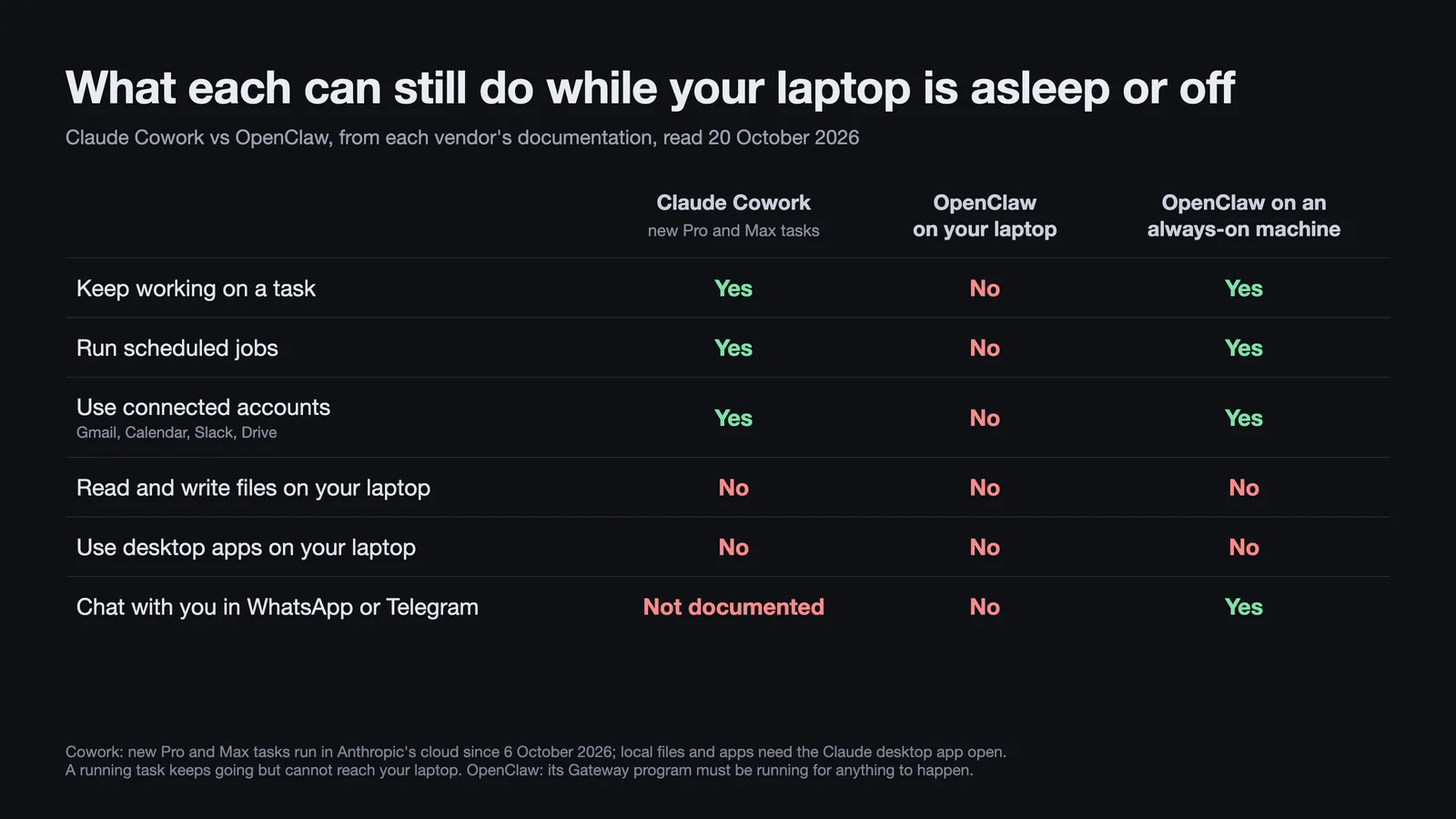
Cowork runs in Anthropic's cloud. Since 6 October 2026, new Cowork tasks on Pro and Max run on Anthropic's servers, the "Only on your computer" setting is gone, and "you can't switch back" (what changed on 6 October). On Team plans, cloud sessions are in beta and on by default; on Enterprise they are off until an owner enables them, and local sessions remain there (Team and Enterprise). A cloud task keeps going when you close the laptop, and scheduled tasks run "with no device online". Anything on your computer is different. Connected folders, local connectors, the built-in browser and computer use need the Claude desktop app open on that computer, and a cloud session can read and write your connected folders only if it "was started on desktop or is a scheduled task". A task you start from your phone can use your connectors and the files saved to your Claude account, not the files on your computer. Dispatch, the feature that sends phone requests to your awake desktop, is limited to people who already had it: "Dispatch isn't available to new users" (Dispatch).
OpenClaw runs wherever you put the Gateway, and only while that machine is awake. "The Gateway must be running for schedules to fire" (how automations work). Its hosting FAQ sets out the choice: on your laptop you get "direct access to local files, a live browser window", but "sleep/network drops disconnect it"; "Want 24/7 reliability? Use a VPS", a rented server in a data centre (hosting FAQ). OpenClaw's own guide prices a suitable small server at about $6 a month as of 20 October 2026 (DigitalOcean guide). A common pattern is a Mac mini or server running the Gateway, with your laptop paired as a "node" that lends its files, browser and screen while it is awake. On a Mac, screen control also stops when you lock the screen or log out; OpenClaw does not unlock the Mac (macOS permissions).
| While your laptop is asleep or off | Claude Cowork (new Pro and Max tasks) | OpenClaw on your laptop | OpenClaw on an always-on machine |
|---|---|---|---|
| A running task keeps going | Yes, without access to the laptop | No | Yes |
| Scheduled jobs run | Yes | No | Yes |
| Connected accounts (email, calendar, Slack, Drive) | Yes, through connectors | No | Yes, through the skills you set up |
| Files on your laptop | No | No | No; only files on the always-on machine |
| Desktop apps on your laptop | No | No | No |
| Chat with you in WhatsApp or Telegram | Not documented | No | Yes |
Sources, read 20 October 2026: Anthropic's cross-surface guide and scheduled tasks; OpenClaw's hosting FAQ, automations and channels. OpenClaw's iMessage channel also needs an awake Mac signed in to Messages.
Two documentation caveats. Anthropic's scheduling article still says "If a scheduled task requires local files or apps, it will only run locally", which sits awkwardly beside the rule that new Pro and Max schedules run in the cloud; until the two agree, assume a schedule that needs your local files works only while your computer is awake with the desktop app open. And if your preferred browser is Claude in Chrome rather than the built-in one, tasks started on the web or phone need a connected desktop but not the open app (built-in browser); Chrome still has to be running on that computer.
What each can touch, and what it asks first
| Claude Cowork | OpenClaw | |
|---|---|---|
| Your files | Folders you connect, through the desktop app; some plugins that run on your computer can reach more | Anything its computer account can reach; its working folder is a starting point, not a boundary |
| Running commands and code | In a temporary, isolated workspace on Anthropic's servers for cloud tasks | Directly on the machine by default; an isolated container is optional |
| Email, calendar, documents | Ready-made connectors such as Gmail, Google Drive, Microsoft 365 and Slack, each tool set to Always allow, Needs approval or Blocked | Skills you install and sign in to yourself |
| Websites | A browser built into the desktop app, or your own Chrome through the Claude in Chrome extension; high-risk sites blocked | Its own browser profile, or your signed-in Chrome |
| Desktop apps | Computer use: beta, Pro and Max, macOS and Windows | A screen-control tool: macOS; Windows and Linux experimental |
| Approval before acting | Manual, the default, asks for connector tools marked Needs approval; Auto can approve them, and Skip, where available, skips prompts. Computer use asks per app, not per action | Runs commands without asking by default |
Sources, read 20 October 2026: Anthropic's Get started, Use Cowork safely, built-in browser and computer use; OpenClaw's exec tool, multi-agent routing, sandboxing, browser profiles and computer use.
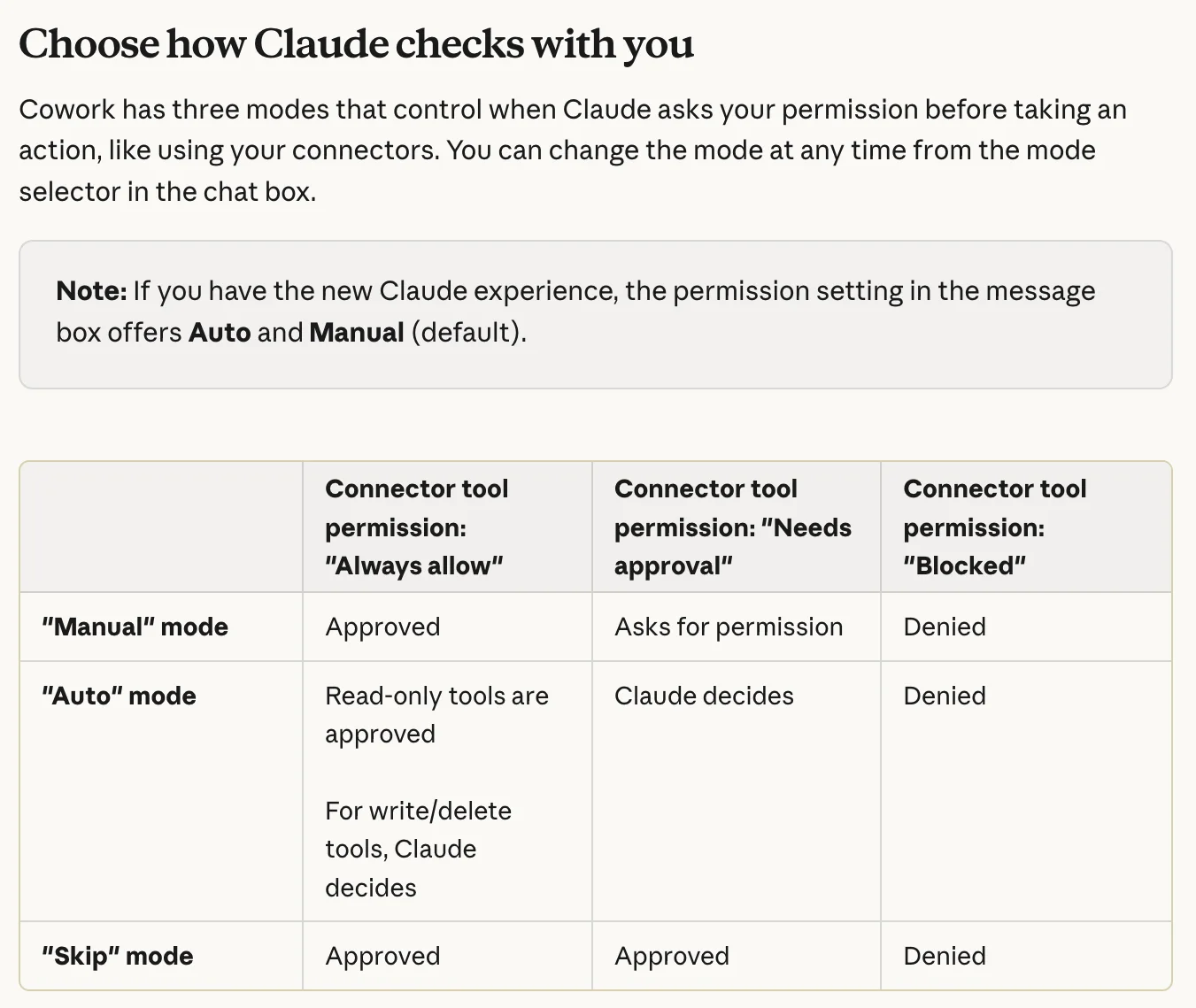
Cowork's approvals depend on the mode and tool. In the unified Claude experience, Manual is the default and Auto uses automated safety checks without asking about each step (unification). In Manual, connector tools marked Needs approval ask you, while Always allow tools do not. Accounts still on the separate Cowork experience also have Skip, which skips prompts for unblocked connector tools. Blocked tools stay denied in all three modes. Auto "consumes more of your usage limit" because actions get a safety review for data theft and prompt injection, instructions hidden in a web page or email to hijack the agent (Get started). For file operations, Anthropic documents permanent-deletion prompts in every mode, but warns that computer use bypasses the permission checks applied to other tools (Use Cowork safely). Computer use asks before accessing each app, not before every action inside it; trading and cryptocurrency apps are blocked by default (computer use).
Its cloud tasks run code in a workspace that "can't reach your home or company network" and reach your computer through the folders, connectors, browser and apps you grant. The exception is plugins and desktop extensions that include local MCP servers, small programs that give Claude tools for another app: they "run on your computer with the same permissions as any other program you run" (Use Cowork safely).
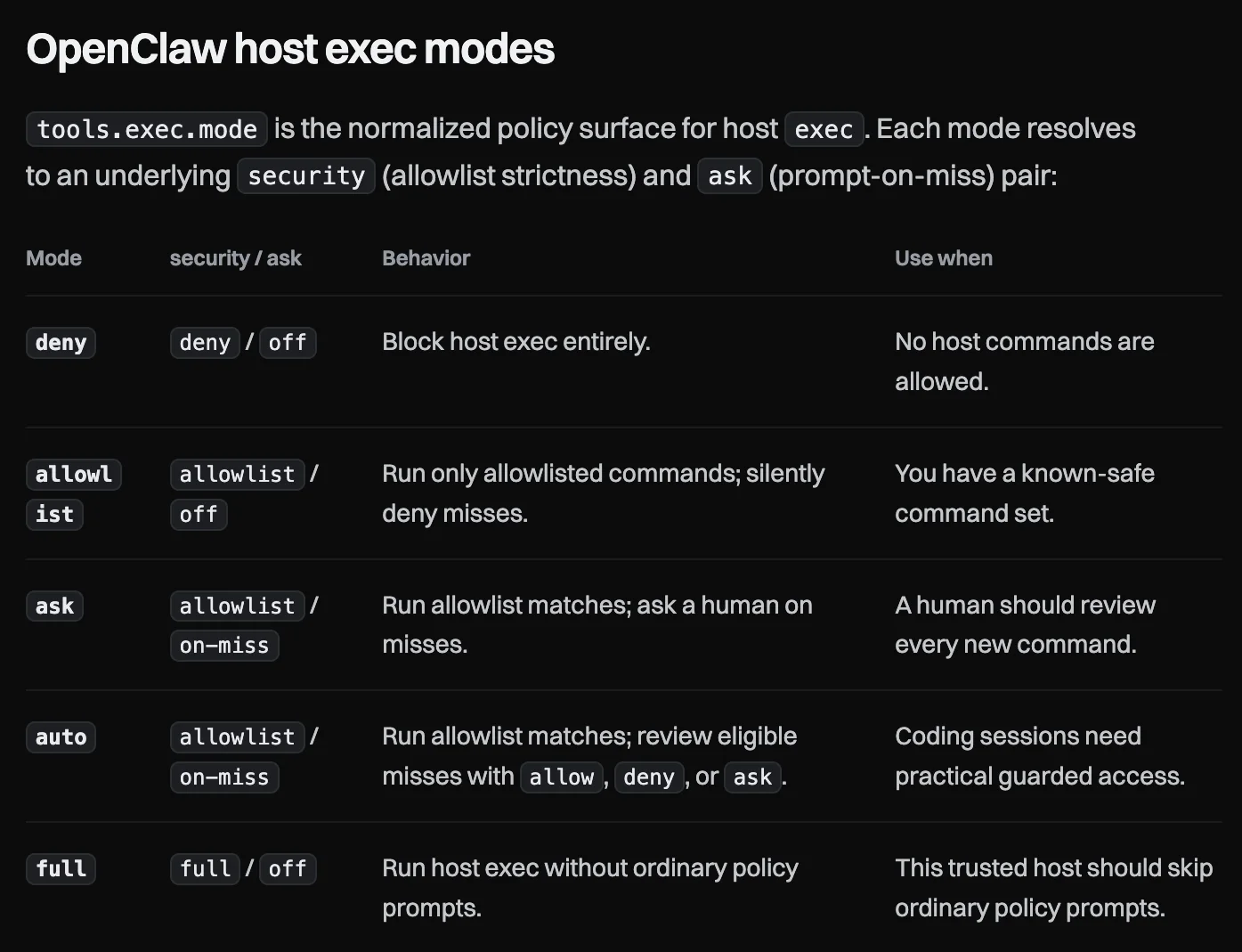
OpenClaw trusts its operator. It is a program on your machine: its command tool "can create, edit, or delete files wherever the selected host or sandbox filesystem permits", and "No-approval host exec is the default for gateway and node" (exec tool). "Sandboxing is off by default" (sandboxing), and the quick-start setup gives the first agent "full access" (onboarding). Safer modes exist: ask prompts you for any command not on its allowlist, a list of commands allowed without asking, and auto adds an automatic reviewer that allows a low- or medium-risk command once, refuses it, or asks you (permission modes). By default the Gateway accepts connections only from its own machine, and direct messages from strangers are held back by pairing codes or an allowlist, depending on how setup configured the channel (pairing).
What both say about the limits. Anthropic says isolation "doesn't limit what Claude reads or does", that "the chances of an attack are still non-zero", and that "computer use has no sandbox between Claude and what's on your screen"; it advises against scheduling tasks that "send messages on your behalf, make purchases, or take other actions that are difficult to undo" (Use Cowork safely). OpenClaw's security policy describes "local-first agent infrastructure for trusted operators" and says it does not treat the AI model as trustworthy, so the limits have to come from its settings. Its skill registry, ClawHub, was used to distribute malware in February (VirusTotal), and in June Palo Alto Networks' Unit 42 described five malicious skills that had stayed downloadable despite screening; OpenClaw removed them after disclosure (Unit 42).
Choose Cowork if you want managed approval controls; keep Manual selected and review its app and tool permissions. If you choose OpenClaw, give it its own machine or user account, set tools.exec.mode to ask or auto, read every skill before installing it, and connect only the accounts it needs.
Setup, upkeep and when things fail
Cowork needs a sign-in on a paid plan. For work in your connected accounts, the web or phone app is enough; install the Claude desktop app when you want it to use local folders, the built-in browser or computer use. Computer use needs one toggle in Settings and an approval per app (Get started, computer use). Anthropic maintains it, so changes arrive on its schedule: after 6 October, its advice for Pro and Max users who need new tasks to stay on their computer is to use Claude Code instead (what changed on 6 October).
OpenClaw has become much easier to install. An installer script, a Mac menu-bar app or a signed Windows installer gets you to a dashboard, and onboarding can reuse an existing Claude Code or Codex sign-in, or an API key, a password-like credential that bills a provider per use; the docs promise a first chat "in about 5 minutes" (getting started, install). Hostinger sells a managed version that handles the server and updates for you (Hostinger guide). Five minutes buys a first chat, not an assistant: each chat app has its own setup, such as a bot token or a QR code, Google accounts need a sign-in through a skill, and an always-on machine needs choosing and securing. After that it is a service you run, with frequent updates and a slower extended-stable channel for people who want fewer surprises. Matthew Metros, who advises non-technical business operators, wrote in September that it is "much more of a pain to set up" than Cowork, and in July a Hacker News user who had evaluated it for months complained that something broke with every update. Those are individual accounts of earlier versions, not measurements.
When a job fails. Cowork lists every scheduled run, upcoming and past, on its Scheduled page (scheduled tasks), and the Claude app notifies you when a task finishes or needs your input (cross-surface guide). OpenClaw keeps a run history for each automation. For a job created in a conversation and set to report there, repeated failures, by default two in a row as of 20 October 2026, first produce a request to fix it in that conversation, with an alert as the fallback; jobs with nowhere to report stay quiet, and retries after temporary provider errors can delay both (automation delivery). If the Gateway restarts mid-run, an enabled, unchanged scheduled agent job that had not yet delivered gets one fresh retry, and the agent is asked to check what it already did, but the docs warn that interrupted actions "are not guaranteed exactly once", so an email could go out twice (how automations work). Its docs add a warning that applies to any agent: a run can "finish successfully even when its final reply says the requested task is blocked", so read the output, not only the status. The scheduler and its alerts live inside the Gateway, so they cannot report that the Gateway itself is down; that needs separate monitoring. And an agent stuck at a login screen on an unattended machine needs someone at that screen, locally or by screen sharing, not only a chat message.
What it costs
| Claude Cowork | OpenClaw | |
|---|---|---|
| Software | Included in a paid Claude plan | Free |
| Model use | Five-hour and weekly limits on Pro and Max, shared with Claude chat and Claude Code | Your choice: pay-per-use API billing, a ChatGPT plan, a Claude plan, or a local model |
| Going over | Work pauses until the limit resets, or continues on usage credits at API rates | Whatever your model provider charges |
| Always-on machine | None for cloud work; your own computer for local files and apps | One you own, or a small server at about $6 a month |
| Who keeps it running | Anthropic | You, or a managed host |
Sources, read 20 October 2026: Claude pricing, Claude Code with Pro or Max and usage credits; OpenClaw's model providers and DigitalOcean guide.
Cowork prices, as of 20 October 2026: Pro is $20 a month, or $17 a month billed annually; Max is $100 for 5x Pro's usage or $200 for 20x; Team Standard seats are $25 a month, or $20 billed annually (pricing). Multi-step tasks "use more of your usage than a quick question", and Auto mode uses more again (Get started). On Pro, Max and Team, with usage credits off, the bill is fixed and the risk is running out mid-week; Enterprise adds usage at API rates to its seat price.
OpenClaw's spend depends on the model, how much you ask of it and the heartbeat, a check-in it runs every 30 minutes by default, or hourly when Claude is connected through a subscription sign-in, as of 20 October 2026. Each check-in that reaches the model costs a full turn, and the settings can make them rarer, lighter or stop them (heartbeat). /usage cost in the chat gives a running cost summary, partly estimated from configured prices, so check it against your provider's billing page (token use). This research found no published measurement of a typical monthly bill, and the bills people report vary with the model and the workload. Set a spending limit with your model provider before anything else. A very cheap or small model saves money but is not a safe default for an assistant with this much access; OpenClaw's FAQ warns that "Smaller/quantized models raise prompt-injection risk" (hosting FAQ).
Using your existing subscriptions. OpenClaw's docs say OpenAI allows signing in with a ChatGPT plan in tools like OpenClaw, so a ChatGPT plan can power it (hosting FAQ). It can also run Claude through the Claude Code program signed in with your plan (Anthropic provider); the caveats are in the FAQ below. If you also use Cowork, that route draws on the same five-hour and weekly limits, and an hourly heartbeat can wake OpenClaw up to 24 times a day before you ask it anything. On Max, the plan's monthly API credit, $100 on Max 5x or $200 on Max 20x as of 20 October 2026, keeps the two apart: once eligible, after seven days on the plan, claim it into a Claude Console organization and give OpenClaw an API key from that organization. The credit does not raise your Claude limits, expires each billing cycle, and is not included with Pro (monthly API credits).
Where your data goes, and memory
Cowork saves cloud sessions and the files they work with to your Claude account. Files in connected folders stay on your computer until a task needs one; then Claude "fetches a copy of just that file", and those copies are deleted when you delete the session. Whether conversations are used to train Claude follows the privacy setting in your account (what changed on 6 October), and a deleted task leaves Anthropic's systems within 30 days, as of 20 October 2026 (Get started). Computer use works from screenshots, so Claude sees whatever is on screen in the apps you allow. Cloud tasks share Claude's account memory with your chats; you can view, edit and delete it in Settings or turn it off for a single task, and it skips sensitive topics such as health by default (computer use, memory section).
OpenClaw keeps its state, memory and credentials on your machine, but self-hosted does not mean private: "Your prompts go to the model provider and chat platforms you configure" (README). Use Claude through it and Anthropic sees those prompts; talk to it on WhatsApp and Meta carries the messages. Its memory is plain text files you can open and edit, such as USER.md for your preferences and MEMORY.md for lasting facts, but searching them uses OpenAI's embedding service by default, which processes memory text so it can be searched by meaning (memory). Keeping everything on your own hardware takes a local model, local memory search and the browser dashboard instead of an outside chat app.
For a team
Cowork is on by default for Team and Enterprise organizations, except those with HIPAA enabled, with admin switches for cloud sessions, the browser, Auto mode and whether write-capable connector tools can be pre-approved, which is off by default (Team and Enterprise). The Compliance API and audit logs are Enterprise features, not Team (pricing). Computer use is not available on either. For a shared assistant in Slack, Anthropic's separate Claude Tag is in beta on both, with channel work billed to the organization by usage (Claude Tag).
OpenClaw can run one Gateway for a whole team, with a bot in an existing Slack, Teams or Discord, shared conversations anyone can pick up, and roles that limit what each person can do. Its team guide is direct about the limit: everyone who can message the agent shares its access, and roles are guard rails between colleagues, not protection from someone hostile, so people who do not trust each other need separate installations (team setup).
Where to start
If you are not sure, start with Cowork on the Claude plan you may already have: connect your email, calendar and documents, give it one recurring task, and see whether its limits and its lack of chat-app access actually get in your way. Move to OpenClaw, or add it, when you hit one of three walls: you want to text your assistant in WhatsApp or Telegram, you need it to act on events rather than a timetable, or you want to choose the model and pay per use. Matt Ronge of Astropad described his own split in July: Cowork for immediate email and social tasks, and OpenClaw on a separate Mac mini for reports, inventory checks and research, with the caveat that agents left running overnight still hit login screens and pop-ups that need a person (Astropad).
Frequently asked questions
Does Claude Cowork work when my computer is off? Partly: new Pro and Max tasks keep going in the cloud with your connectors, but cannot reach the computer's files, browser or apps while it is off. Connected folders also need the task to have started on that desktop or as a schedule (cross-surface guide).
Is OpenClaw safe? Out of the box it runs commands without asking and without an isolated container (exec tool), because it is built "for trusted operators" (security policy). Run it on a dedicated machine or account, turn on command approvals, keep it off the public internet and read skills before installing them.
Can OpenClaw use my Claude subscription? Yes, through the Claude Code program signed in with your plan, a route OpenClaw says "retains subscription accounting" while warning that "Anthropic can change Claude Code billing and rate-limit behavior without an OpenClaw release" (Anthropic provider). Anthropic says "You can still use the Claude Agent SDK, claude -p, and third-party apps with your subscription limits" (Agent SDK with your plan), but calls an API key the "preferred way" for third-party tools and reserves the right to bill them from usage credits instead (login).
Is Claude Cowork free? No. It needs a paid plan, from Pro at $20 billed monthly or $17 a month billed annually, as of 20 October 2026, and its tasks draw on that plan's usage limits (pricing).
Do I need a Mac mini for OpenClaw? No. Its FAQ calls the Mac mini "a popular always-on host choice" but says "a small VPS, home server, or Raspberry Pi-class box works too" (hosting FAQ). You need a Mac only for iMessage or to let it use Mac apps.
Is OpenClaw owned by OpenAI? No. It is run by the OpenClaw Foundation, a 501(c)(3). OpenAI is one of several donors and employs its creator, Peter Steinberger, and the project says "Donors do not own, control, or direct the project" (FAQ).
Voyager is a desktop AI agent for creative work
Describe what you want to make; Voyager plans it, uses your apps and tools, and keeps everything editable.