An MCP server gives an agent a live connection to a system: typed tools it can call, served by a process on your machine or by a URL with its own sign-in (MCP specification). A skill is a folder of instructions, and optionally scripts, that the agent reads only when a task calls for it (Agent Skills specification). MCP is how you hand an agent access; a skill is how you hand it a procedure.
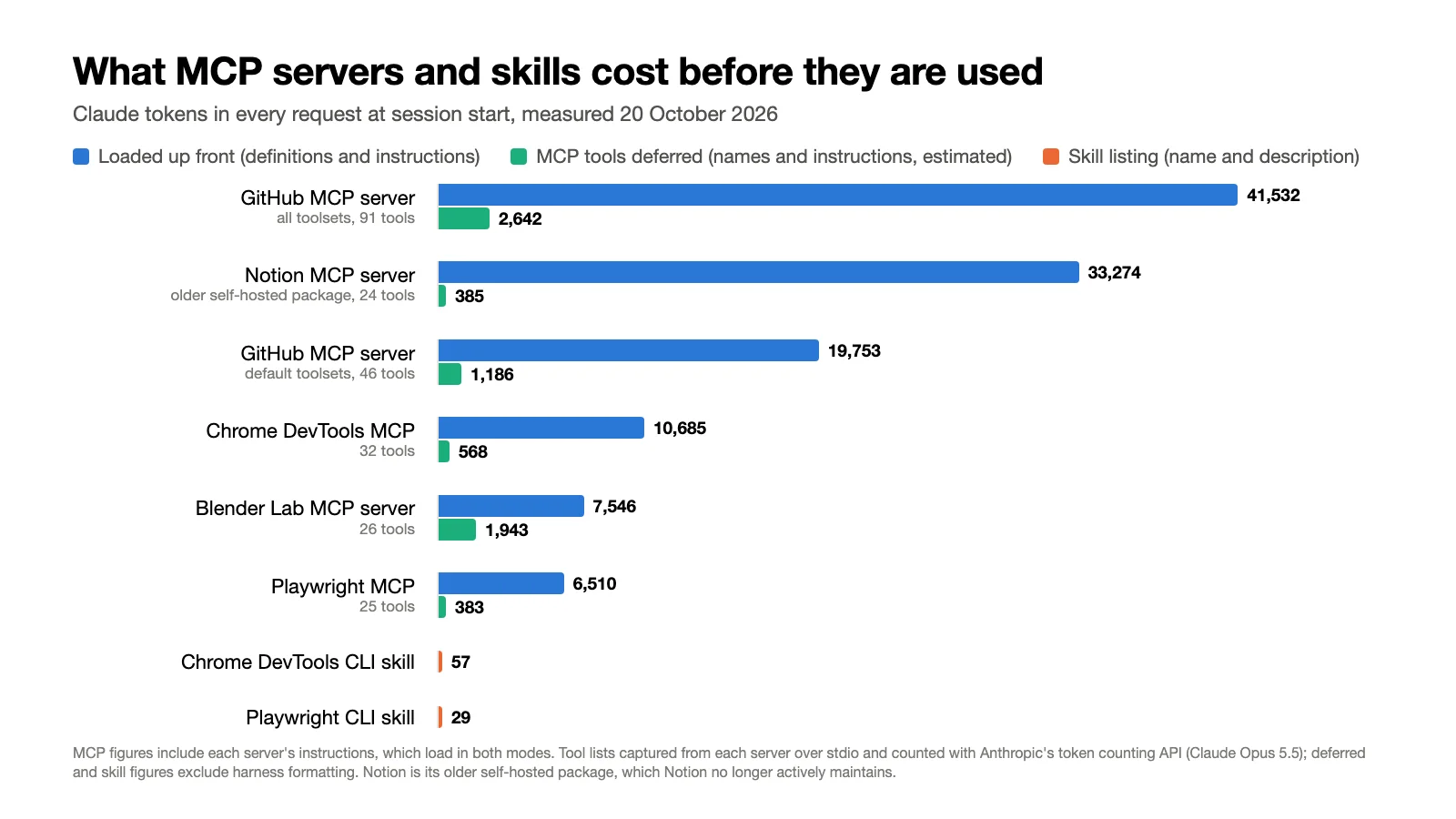
The short version: wrapping a hosted service or a running app for agents is usually MCP's job. Teaching a workflow, a house style or a toolchain the agent can already reach is a skill's job. If a good command-line tool exists and the agent has a shell, the CLI, with a skill if the model needs its conventions, is often the lightest option. And the old complaint that MCP "eats your context" is now mostly a configuration question: the GitHub MCP server's default setup came to 19,753 Claude tokens loaded up front when we counted it on 20 October 2026, and an estimated 1,200 or so with its tools deferred, as Claude Code and Cursor now do by default.
Facts below come from the MCP specification revision of 28 July 2026, the Agent Skills specification and each vendor's documentation, all read on 20 October 2026. The token counts are our own measurement that day; the scripts and captured data are a download (ZIP).
If you are choosing for a specific capability, settle these in order, and only then look at context cost:
- Can the agent run commands where the work is, with the network and credentials it needs? A coding agent on your machine usually can. A chat app either cannot, or runs code in a hosted sandbox that may lack network access, your sign-ins and your desktop apps. Without that, a remote MCP server, which runs next to the service and is reached from the chat app's cloud, is the practical route to access (Claude custom connectors).
- Who signs in, and where? One developer with a signed-in CLI can use it directly. Many users of a hosted service, or non-developers in a chat app, are better served by a remote MCP server with its own sign-in.
- Is the gap access or procedure? If the agent cannot reach the system, add access: a server or a CLI. If it can, but keeps missing a reusable procedure or convention, add a skill. A check expressed only as an instruction still depends on the model running it; a rule that must hold every time, such as a validation or a permission boundary, belongs in a hook or in the tool itself (Claude Code skills).
- What can you govern? Per-user grants, logging and narrow tools come from how a server or CLI is built and configured, not from the protocol name, so check what the specific option offers.
What an MCP server is
The Model Context Protocol is an open protocol for connecting AI applications to external systems, created by Anthropic and now governed under the Linux Foundation (Anthropic). A server exposes tools the model can call, resources it can read and prompts a user can run, over stdio, where the client starts it as a local process, or Streamable HTTP, where it lives at a URL (MCP specification). Each tool has a name, a JSON Schema for its inputs and, in practice, a description the model reads to decide when to call it (MCP tools). Here is one tool from a hypothetical render-farm server:
{
  "name": "get_render_status",
  "description": "Return the state and progress of a render job by its ID.",
  "inputSchema": {
    "type": "object",
    "properties": {
      "job_id": { "type": "string", "description": "Render job ID" }
    },
    "required": ["job_id"]
  }
}
The agent sees that definition, decides to call it, and the client sends tools/call to the server, which does the work with credentials and connections that need not pass through the model. You add a server with claude mcp add, codex mcp add or an entry in the harness's configuration file (Claude Code MCP, Codex MCP).
What a skill is
A skill is a directory with a SKILL.md file: YAML frontmatter with a name and a description, then Markdown instructions, plus optional scripts/, references/ and assets/ folders (Agent Skills specification). Anthropic introduced the format in October 2025 and opened it as a standard that December (Anthropic engineering). Here is a skill for the same render farm, which carries the procedure the server does not:
---
name: deliver-render
description: Check and deliver a finished render. Use when the user asks to QA, check, verify or deliver a render, export or deliverable.
---

# Deliver a render

1. Call `get_render_status` with the job ID until the state is `complete`, then download the output to a local file.
2. Run `ffprobe -v error -show_entries stream=codec_name,width,height,r_frame_rate -of json <file>`
   and compare resolution and frame rate with the brief. Stop and report any mismatch.
3. Run `scripts/loudness.sh <file> <target>`. It fails if integrated loudness is more than 1 LU
   from the target. If it fails, do not normalise the file yourself: loudness is the mixer's call,
   so report the reading and stop.
4. Report pass or fail per check, quoting the command output, then share the delivery link.
Each part does what it is good at: the server supplies the job state and the file, the script checks the number, and the skill carries the judgment that a loudness miss goes back to the mixer rather than being patched.
The specification calls the loading model progressive disclosure: the name and description of every skill at startup (about 100 tokens each), the full SKILL.md only when the skill is activated (under 5,000 tokens recommended), and bundled files only when the instructions call for them (Agent Skills specification). The name and description are all the agent sees when it decides, so the description has to say both what the skill does and when to use it.
Ordinary skill instructions are followed by the model using the agent's existing tools, usually a shell. The agent can load those instructions by reading the file or through a dedicated activation tool (Agent Skills implementation guide). Harness extensions can also execute code during loading: Claude Code can run embedded shell commands, including calls to bundled scripts, before the model sees the skill, inserting their output as context (Claude Code dynamic context).
MCP and skills at a glance
| MCP server | Skill | |
|---|---|---|
| What it is | A protocol: a process or URL exposing typed tools, resources and prompts | A folder: SKILL.md instructions plus optional scripts, references and assets |
| Loaded at session start | Tool definitions, or only tool names when the harness defers them; plus server instructions | Each skill's name and description |
| Where the work runs | In the server, local or remote | In the agent's environment, with its tools and permissions |
| What it needs from the agent | An MCP client | A way to read the instructions; a runtime for scripts or embedded commands |
| Authentication | Optional in the protocol; OAuth for remote servers that use it, environment credentials for local ones | None of its own; uses whatever its scripts or command-line tools use |
| Updates | Hosted servers update centrally; local servers update per install | Each installed copy, until it is pulled again |
| Best at | Access: live data and actions in a service or a running app | Procedure: how to do a job, in what order, to what standard |
Sources: MCP specification, MCP authorization, Agent Skills specification, read 20 October 2026.
What each one costs in context
On 20 October 2026 we captured the tool list that ten configurations of eight MCP servers actually return and counted tokens with Anthropic's token counting API for Claude Opus 5.5. Download the measurement scripts and captured data (ZIP).
| Configuration | Tools | Tool definitions | Tool names only (deferred) | Server instructions (either mode) |
|---|---|---|---|---|
| GitHub MCP server 2.0.2, all toolsets | 91 | 40,117 | 1,227 | 1,415 |
Notion, older self-hosted package (@notionhq/notion-mcp-server) | 24 | 33,274 | 385 | 0 |
| GitHub MCP server 2.0.2, default toolsets | 46 | 19,150 | 583 | 603 |
| Chrome DevTools MCP 1.11.0 | 32 | 10,685 | 568 | 0 |
| Playwright MCP 0.0.83 | 25 | 6,510 | 383 | 0 |
| Blender Lab MCP server | 26 | 6,154 | 551 | 1,392 |
Community Blender server (mcp-for-blender) | 9 | 6,071 | 120 | 523 |
| Filesystem reference server 2.0.0 | 14 | 2,857 | 207 | 0 |
| Context7 4.4.4 | 2 | 1,711 | 25 | 222 |
Chrome DevTools MCP 1.11.0, --slim | 3 | 325 | 48 | 0 |
How we counted: tool definitions are the difference between two calls to Anthropic's token counting endpoint, one with a placeholder tool and one with the placeholder plus the server's tools (name, description and input schema, the way an MCP client forwards them), so the fixed tool-use overhead cancels out. Tool names are counted as Claude Code lists deferred tools (mcp__server__tool), and server instructions as plain text cut at Claude Code's default 4,096-character limit (Claude Code MCP). The deferred figures are estimates: they leave out the search tool itself and any harness formatting. GitHub's counts include one tool, ui_get, marked for apps only, which hosts that implement MCP Apps hide from the model. The Notion row is Notion's older self-hosted package, which its README says is no longer actively maintained; Notion recommends its hosted server, which has different tools and needs a sign-in, so it is not measured here (Notion MCP server README).
These are tokens in the context window, not your bill. With prompt caching, a repeated prefix such as tool definitions is billed on a cache hit at a fraction of the normal input price, 0.05 times on Claude Opus 5.5 as of October 2026 (writing the cache costs more than normal input), though it still takes up space in the context window (Anthropic prompt caching).
The skills, counted the same way as text (measurement scripts and captured data, ZIP):
| Skill | Name and description | Full SKILL.md, when activated |
|---|---|---|
Playwright CLI skill (playwright-cli) | 29 | 5,896 |
Chrome DevTools CLI skill (chrome-devtools-cli) | 57 | 4,926 |
| Median of 27 skills from Anthropic, Playwright and Chrome DevTools | 100 | 3,226 |
All 19 skills in anthropics/skills, together | 3,215 | n/a |
Sources for the skills: anthropics/skills, microsoft/playwright-cli, ChromeDevTools/chrome-devtools-mcp skills, read 20 October 2026. These counts leave out each harness's wrapper text and, for Codex, the path it lists for each skill. Once activated, a skill's content stays in the conversation; Claude Code does not re-read it on later turns, and after compaction keeps only the first 5,000 tokens of each recent skill, within a 25,000-token total (Claude Code skills).
Skills are cheap when idle, not necessarily when used. Playwright's team ships both an MCP server and a CLI with a skill, which makes a useful pair, though not identical in what they can do. Idle, the skill's listing is 29 tokens; the server is 6,510 if its tools load up front, or 383 if the harness defers them. In use, the skill's SKILL.md adds 5,896 tokens in one go, close to the server's entire tool list, while a deferred server adds the definitions of the tools a search returns: Playwright's average 260 tokens each when counted one by one, GitHub's default toolsets 416. In these examples the skills are far lighter while idle; for the capability in use, a deferred server can be the lighter of the two, before outputs.
The spread within MCP is wide. Chrome DevTools MCP costs 10,685 tokens with its 32 tools and 325 with --slim, which keeps three: navigation, script execution and screenshots (Chrome DevTools MCP README). GitHub's server roughly doubles when every toolset is on. The self-hosted Notion package averages 1,386 tokens a tool. Before abandoning a heavy MCP setup, check for a toolset flag or a slimmer mode.
Deferred loading has changed the argument. Claude Code loads only tool names and server instructions at session start and fetches full definitions through a search tool when Claude needs them (Claude Code MCP). That became the default for all sessions on 12 March 2026 (Claude Code issue 12836). Cursor has synced MCP tool descriptions to files since January 2026, so its agent starts with tool names and looks up the rest, which cut total agent tokens by 46.9% in runs that called an MCP tool in Cursor's A/B test (Cursor). Codex's source code says MCP tools are "always deferred when tool_search is available" (Codex source), though its MCP guide does not say so. Deferral is not universal: Claude Code loads everything up front behind most third-party gateways (when ANTHROPIC_BASE_URL is not Anthropic's) and on older models, and a server can mark tools to load up front. Server instructions load either way, which is why Blender Lab's server still costs 1,943 tokens deferred.
Outputs can cost more than definitions. Definitions sit in every request; one tool result can be tens of thousands of tokens. Claude Code warns when an MCP result passes 10,000 tokens and caps it at 25,000 by default (Claude Code MCP). Microsoft's case for its Playwright CLI is largely about output: it avoids loading "verbose accessibility trees into the model context" (Playwright CLI README). Its MCP server has narrowed that gap: when we called browser_navigate in version 0.0.83, it wrote the page snapshot to a file and returned a link (the response is in the download).
Skills have a ceiling too: Codex limits the startup skill list to 2% of the model's context window by default (Codex skills), and Claude Code budgets 1% and drops descriptions of the least-used skills when the listing overflows (Claude Code skills). To see what your own session loads, run /context in Claude Code, which breaks out MCP tools and skills (Claude Code costs).
The catch: the agent has to pick it
Deferral trades context for a retrieval step. For a skill the agent sees a name and description; for a deferred MCP tool, little more than a name and the server's instructions. Either way it has to decide to load the rest, and it does not always decide well. In Vercel's evals on Next.js 16 APIs, published in January 2026, a documentation skill was never invoked in 56% of cases and scored the same 53% as no documentation; with explicit instructions to use it, 79%; and a compressed 8 KB documentation index placed in AGENTS.md scored 100% (Vercel). Vercel's conclusion was that skills suit specific workflows a user triggers, such as a version upgrade, while knowledge needed on every task belongs in the always-loaded instructions file. On the MCP side, Anthropic reported that its tool search raised Opus 4.5's accuracy on its MCP evaluations from 79.5% to 88.1%, because the model was no longer choosing among dozens of loaded tools (Anthropic, advanced tool use).
Three habits help. Write the description, or the server instructions, as the trigger: what it does and the words a user would use when they need it. Invoke explicitly when it matters: /skill-name in Claude Code (Claude Code skills), /skills or $ in Codex (Codex skills). And keep what the agent needs on every task in AGENTS.md or CLAUDE.md.
Access, authentication and remote use
MCP's distinctive strength is a standard way to reach a service that compatible clients understand. For HTTP servers that use it, the specification's authorization is based on OAuth 2.1, requires tokens issued for that specific server, and forbids a server from passing a client's token on to another service; local stdio servers take credentials from the environment (MCP authorization). So a user can add a hosted service by entering a URL and signing in in the browser, with nothing installed, and an administrator can revoke one grant. That works in chat apps too. In Claude, custom connectors are remote MCP servers reached from Anthropic's cloud, on every plan, with Free limited to one (Claude custom connectors). ChatGPT supports custom MCP servers in Business, Enterprise and Edu workspaces, set up by admins and, on Enterprise and Edu, by members they authorize (ChatGPT custom MCP servers).
A skill has no authentication layer of its own, but that does not mean it cannot reach authenticated systems. A skill that teaches gh relies on gh auth login, which signs in through the browser and stores the credential (GitHub CLI manual). The difference is who sets that up: on a developer's machine, the developer, once per tool; for non-developers in a chat app there is often no one in a position to, which is where MCP's sign-in-by-URL wins. Claude's apps can also run skills, inside a code execution sandbox that must be switched on (Using skills in Claude).
Security: what you are trusting
An MCP server is code you run locally or a service you send data to. Its tool descriptions enter the model's context, so a malicious server can try to steer the agent through them; the specification tells clients to treat tool annotations from untrusted servers as untrusted and to keep a human able to deny tool calls (MCP tools). Packages are a real attack surface: in September 2025 an unofficial npm package called postmark-mcp impersonated Postmark, built trust over 15 versions, then from version 1.0.16 secretly BCC'd every email sent through it to an outside address (Postmark).
A skill carries instructions and optional code, including commands the harness may execute during loading. In Claude Code, a skill's allowed-tools field pre-approves tools for the turn it runs, even for a project skill in a folder you have never trusted (Claude Code tool permissions). Claude Code can run embedded shell commands before the model sees the skill with the !`command` syntax; administrators can disable this for user, project and plugin skills with disableSkillShellExecution (Claude Code dynamic context). Skill marketplaces have been abused at scale. In February 2026 Koi Security reported 341 malicious skills among 2,857 on ClawHub, OpenClaw's marketplace, most of them telling users to install a "prerequisite" that was malware (Koi Security, archived; The Hacker News). Snyk separately confirmed 76 malicious payloads among 3,984 ClawHub skills (Snyk). Anthropic's advice is to install skills "only from trusted sources" (Anthropic engineering).
The habits are the same for both: prefer the vendor's own package, read what you install, including a skill's scripts and dependencies, pin versions, and scope credentials to the job.
Portability: which harnesses support each
Every harness in this table is an MCP client and reads SKILL.md skills. The skill folders differ, so a skill that works in one harness can be invisible in another.
| Harness | Skill folders it reads (project; user) | MCP |
|---|---|---|
| Claude Code | .claude/skills; ~/.claude/skills; plugins | Yes: stdio, HTTP, WebSocket; OAuth |
| Codex | .agents/skills; ~/.agents/skills, /etc/codex/skills | Yes: stdio, Streamable HTTP; OAuth |
| Cursor | .agents/skills, .cursor/skills, also .claude/skills and .codex/skills; the same under ~ | Yes |
| GitHub Copilot (cloud agent, CLI, VS Code, JetBrains) | .github/skills, .claude/skills, .agents/skills; ~/.copilot/skills, ~/.agents/skills | Yes |
| Antigravity CLI | .agents/skills; ~/.gemini/antigravity-cli/skills, plugins | Yes |
| OpenCode | .opencode/skills, .claude/skills, .agents/skills; ~/.config/opencode/skills, ~/.claude/skills, ~/.agents/skills | Yes |
Sources: Claude Code skills and MCP, Codex skills and MCP, Cursor skills and MCP, GitHub Copilot skills and MCP, Antigravity skills and MCP, OpenCode skills and MCP, read 20 October 2026.
.agents/skills is the closest thing to a shared folder, but Claude Code's documentation does not list it. To share skills, keep them in .agents/skills and symlink each skill folder into .claude/skills, which Claude Code documents as supported, and stick to the frontmatter fields in the open specification; Claude Code's extra fields such as disable-model-invocation may be ignored elsewhere.
Packaging no longer forces the choice: Claude Code, Codex and GitHub Copilot plugins can each bundle skills and MCP servers into one install (Claude Code plugins, Codex plugins, Copilot plugins). If you ship a server and a skill, ship them together.
The third option: a command-line tool and a skill
If the agent has a shell, many capabilities need no server. A CLI adds no tool definitions to the context, may already be signed in, can write large outputs to files the agent reads selectively, and composes with pipes. Anthropic's cost guide for Claude Code recommends CLIs such as gh, aws, gcloud and sentry-cli over equivalent MCP servers for this reason: "they don't add any per-tool listing" (Claude Code costs). What the agent may lack is the tool's flags and conventions, which is what a skill supplies; for a CLI the model already knows well, you may need neither a server nor a skill.
Vendors now ship both routes. Microsoft's Playwright CLI comes with a skill and states the trade: CLI plus skills suits coding agents "that must balance browser automation with large codebases, tests, and reasoning within limited context windows", while MCP "remains relevant for specialized agentic loops that benefit from persistent state, rich introspection, and iterative reasoning over page structure" (Playwright CLI README). Google's Chrome DevTools repository ships a full MCP server, a three-tool slim mode, a CLI and seven skills, one of which teaches the agent to use the MCP server (Chrome DevTools MCP skills).
A CLI is the wrong answer when there is no shell, or when each user of a hosted product needs their own sign-in without installing anything. State is not a dividing line: Playwright's CLI keeps browser sessions across commands (Playwright CLI README), but a CLI that does not manage state leaves the agent juggling it. CLIs also bring friction Armin Ronacher lists from experience: behaviour that varies by platform and version, shell quoting of newlines and non-ASCII text, and session management (Armin Ronacher). And a server that does work server-side can return less: one tool that makes five API calls and returns a summary can beat five commands whose raw output lands in context.
MCP servers can now serve skills
The cleanest line between the two, skills are files and MCP is a connection, blurred in September. The MCP Skills extension (SEP-2640) became final on 13 September 2026: a server can now publish Agent Skills in the same SKILL.md format, which a client lists with skills/list and reads file by file through MCP resources, loading the instructions only when the skill is chosen (MCP Skills extension, Skills Over MCP working group). A service can then ship the procedure with the access and update both in one place. Hosts must verify skill files against the server's manifest where one exists, treat skill content as untrusted, and ask before honouring a skill's allowed-tools.
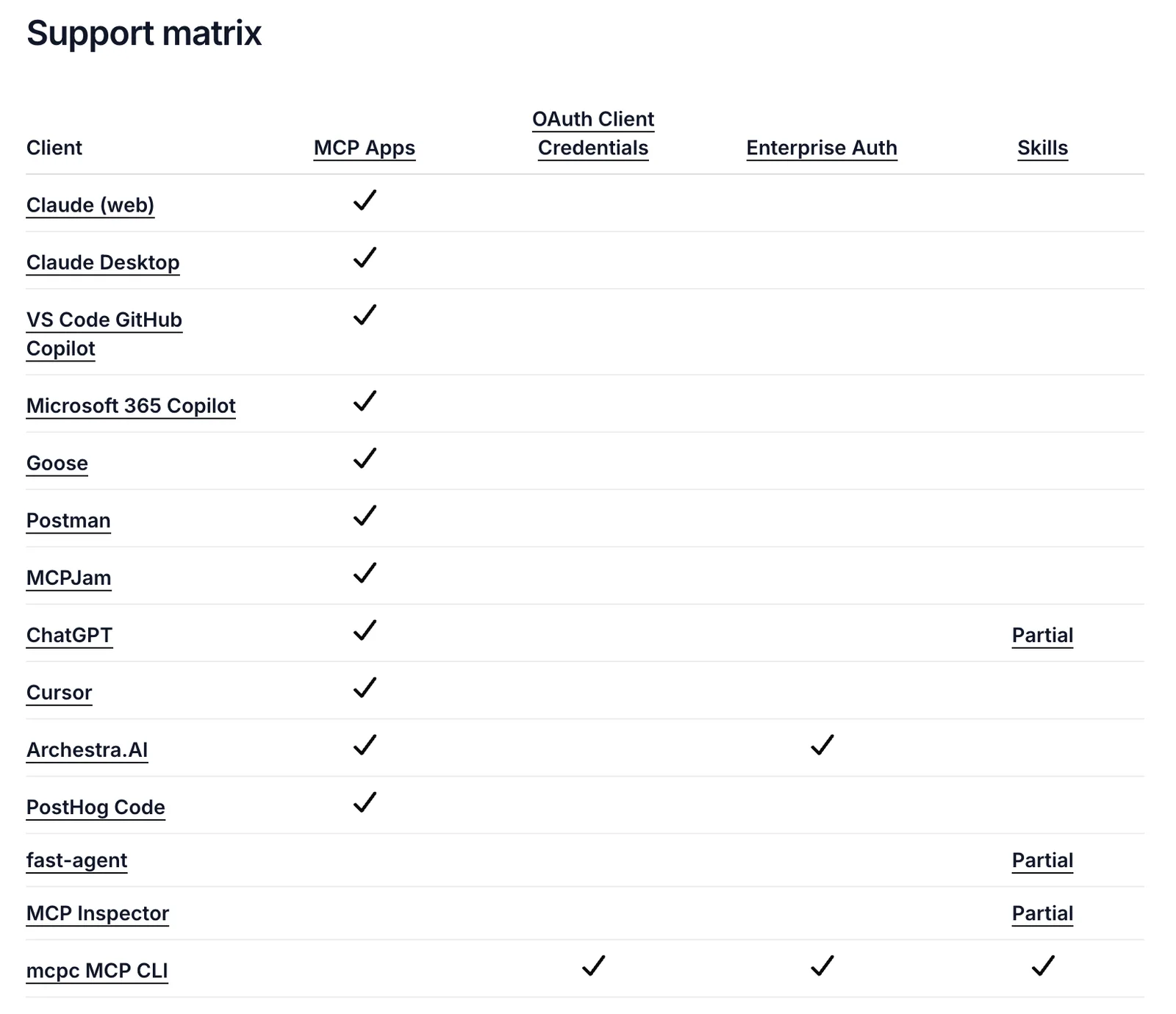
It is early. On the MCP project's support matrix on 20 October 2026, ChatGPT, the fast-agent client and the MCP Inspector showed partial support and Apify's mcpc command-line client full support; Cursor's Skills cell was blank, and Claude Code and Codex had no row (MCP extension support matrix). Until support spreads, ship skills as files, ideally in the same plugin as the server.
Using MCP and skills together
- A skill that drives an MCP server. The render example above; Chrome DevTools' own
chrome-devtoolsskill is the same shape for its MCP server (Chrome DevTools skill). - A server for access, a CLI for bulk work. For example, a hosted server for a service's authenticated API and the vendor's CLI for large exports, with one skill saying when to use which.
- One code tool and a skill instead of many thin tools. For an app with a scripting API, a single "run code" tool plus a skill with the API's conventions keeps definitions small, at the price of a broader permission: the agent can run anything the API allows, which also weakens per-tool approval and audit. The Blender MCP comparison shows this shape: the official server's 26 tools include one that runs Python inside the open Blender session.
For teams
Four more questions, whose answers depend on how a given server or CLI is built rather than on MCP itself:
- Credentials. A remote MCP server that uses OAuth can give each person their own grant and one place to revoke it, if the server and client are set up that way. Skills that call CLIs inherit whatever each person has signed in to, which is simpler for engineers; how auditable that is depends on how those credentials are issued and logged.
- Updates and rollback. A hosted server's updates reach its users without a reinstall, good for fixes and risky for breaking changes; pin local servers. Skills kept in a repository or plugin roll back with the code.
- Fast-changing knowledge. The question is copied text versus maintained retrieval. Documentation pasted into a skill goes stale; a skill or
AGENTS.mdindex that points the agent at current, version-matched docs avoids that drift, though its links and version mapping still need upkeep. LlamaIndex chose live documentation over skills for its fast-moving SDK (LlamaIndex), and Vercel's index pointed at docs matching the project's Next.js version (Vercel). - Audit. Every MCP call is named and can be logged and approved, but a narrow tool's name and arguments tell the reviewer what is being asked, while one approval of a broad code-execution tool authorises almost anything. Shell commands are visible in transcripts and can be gated by permission rules, but one command can touch many services, so they are often harder to scope.
Which to use, by job
| If you need to | Use | Because |
|---|---|---|
| Give agents access to your hosted service | A remote MCP server, plus a skill if the workflow needs explaining | Sign-in by URL, works in chat apps, one place to update |
| Control a running desktop app (a live Blender, Premiere Pro or Ableton Live session) | A supported bridge into the open session, often a local MCP server, plus a skill for the app's conventions | Something has to reach the open session; batch work can often use the app's command line instead |
| Teach a procedure, house style or review checklist | A skill | It is knowledge, not access; about 100 tokens until used |
| Use a tool with a good CLI (git, gh, ffmpeg, cloud CLIs) | The CLI, with a skill if the model needs its conventions | No tool definitions in context; route large outputs to files |
| Keep many integrations installed but mostly idle | Either, with deferral on | Deferred MCP tools and skill listings both cost little until used |
| Serve non-developers in a chat app | A remote MCP server | No local setup or shell needed; in Claude, skills also need its code sandbox switched on |
| Keep the agent current on fast-changing docs | Maintained retrieval: a docs server, or an AGENTS.md index pointing at version-matched docs | Copied documentation goes stale wherever it lives |
Frequently asked questions
Are skills replacing MCP? No. Skills can replace MCP servers that were only instructions or thin wrappers around a CLI, and vendors such as Microsoft now ship a CLI and skill next to their MCP server (Playwright CLI README). But a hosted service that many people sign in to, or a running app, still needs a connection, and since September 2026 MCP can even carry skills (MCP Skills extension).
How many tokens does an MCP server use? Loaded up front, from 325 Claude tokens (Chrome DevTools in slim mode) to 41,532 (GitHub with every toolset) in our 20 October 2026 count; deferred, an estimated 48 to 2,642. In Claude Code, /context shows your own numbers (Claude Code costs).
Do skills work outside Claude? Yes. The format is an open standard, and Codex, Cursor, GitHub Copilot, Antigravity and OpenCode read SKILL.md skills (see the portability table). Check the folder each reads: .agents/skills works in most, while Claude Code reads .claude/skills. Scripts, dependencies and harness-specific frontmatter fields need their own check.
Voyager is a desktop AI agent for creative work
Describe what you want to make; Voyager plans it, uses your apps and tools, and keeps everything editable.