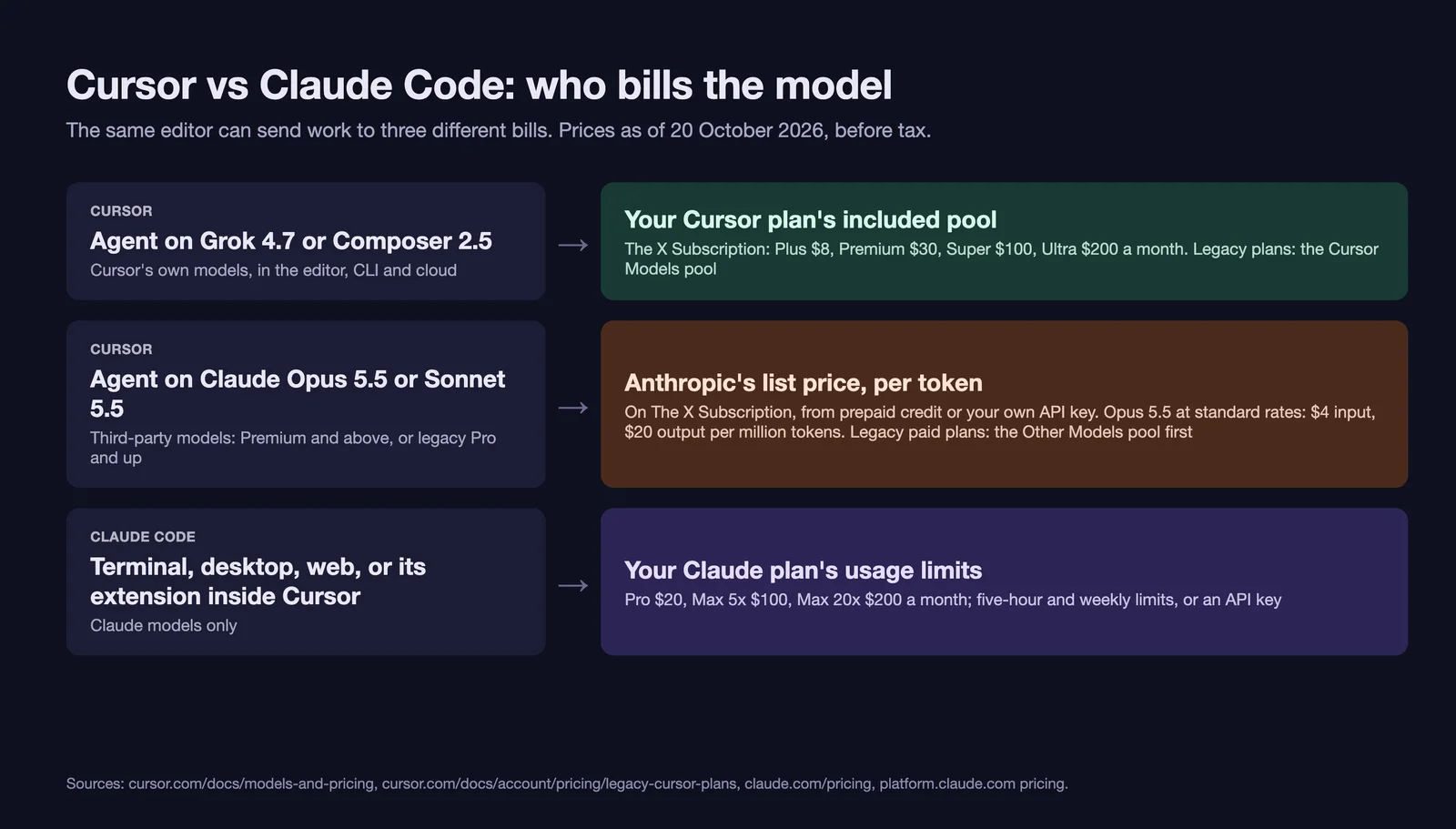
Cursor and Claude Code overlap less than the comparison suggests. Cursor is an AI code editor, a fork of VS Code, that also runs its own agent in a CLI, in the cloud and from a phone, with a choice of models. Claude Code is Anthropic's coding agent, which runs in the terminal, a desktop app, the cloud and inside editors, Cursor included, using only Claude models. Since 12 October 2026 they also bill Claude differently: on the plans Cursor now sells, Claude is not included, and every Claude token costs Anthropic's list price on top of the subscription, while a Claude plan covers Claude Code usage up to its five-hour and weekly limits.
The short version: if Claude is the model you want doing most of the work, compare a Claude plan with Cursor's current plans like this. Claude Pro at $20 a month costs less than Cursor Premium's $30 before a single Claude token, so if Pro's limits cover your work, Claude Code (in Cursor or anywhere else) is cheaper. Max 5x at $100 costs less than Premium plus Claude once your Claude use in Cursor would pass $70 a month at list price, provided Max's limits cover it. If you want Tab completion, inline edits and agent review inside the editor, or want to switch between Grok, Composer, GPT, Gemini and Claude, Cursor is the tool that does that. The two combine cleanly: Anthropic publishes an "Install for Cursor" link for the Claude Code extension, so you can keep Cursor as the editor and let your Claude plan pay for the agent.
Plan terms, prices, model lists and capabilities come from Cursor's and Anthropic's documentation, pricing pages, changelogs and staff forum posts, read signed out on 20 October 2026 in the US. We have not run Cursor for this post, so nothing here measures either tool's output quality or speed. Voyager, the desktop app our team builds, runs Claude Code and Codex on your own plans; it is not part of this comparison.
What each is, and where they overlap
Cursor is a desktop editor for macOS, Windows and Linux with Agent, Ask, Plan and Debug modes, Tab completion, inline edit, a CLI called agent, cloud agents that run in their own virtual machines, Bugbot for pull request review and an iOS app (Cursor agent overview, CLI, cloud agents). Since 12 October 2026 new customers buy it as part of The X Subscription, one plan for Cursor, Grok, Grok Bot and X; earlier subscribers can keep their legacy Cursor plan (Cursor's announcement, What is The X Subscription?).
Claude Code is included in Claude Pro, Max, Team and Enterprise, or billed by API key. It runs in the terminal, as an extension for VS Code and its forks and for JetBrains IDEs, in the Claude desktop app, in the browser at claude.ai/code and from the Claude mobile apps (Claude Code overview, pricing).
| Layer | Cursor | Claude Code |
|---|---|---|
| Editor | The product: a VS Code fork with Tab, inline edit and diff review | None of its own; a panel inside VS Code, Cursor or JetBrains, or the terminal and desktop app |
| Agent | Cursor Agent, in the editor, the Agents window, the agent CLI and the cloud | Claude Code, in the same kinds of places |
| Models | Cursor's own (Grok 4.7, 4.6, 4.5, Composer 2.5) plus Claude, GPT, Gemini and others | Claude only |
| Who pays for the model | Cursor's pool for its own models; on The X Subscription, third-party models at list price; on legacy paid plans, an Other Models pool first | Your Claude plan, within its five-hour and weekly limits, or an API key |
Sources: Cursor models and pricing, legacy Cursor plans, Claude Code in VS Code, Claude Code model configuration; read 20 October 2026.
The agent layer is where they compete, and the feature lists have converged: both have planning and read-only modes, checkpoints, subagents, hooks, skills, MCP, a headless CLI, cloud runs and a phone app. The differences that remain are in the other three rows and in the specifics covered below.
Where your Claude bill lands
On The X Subscription
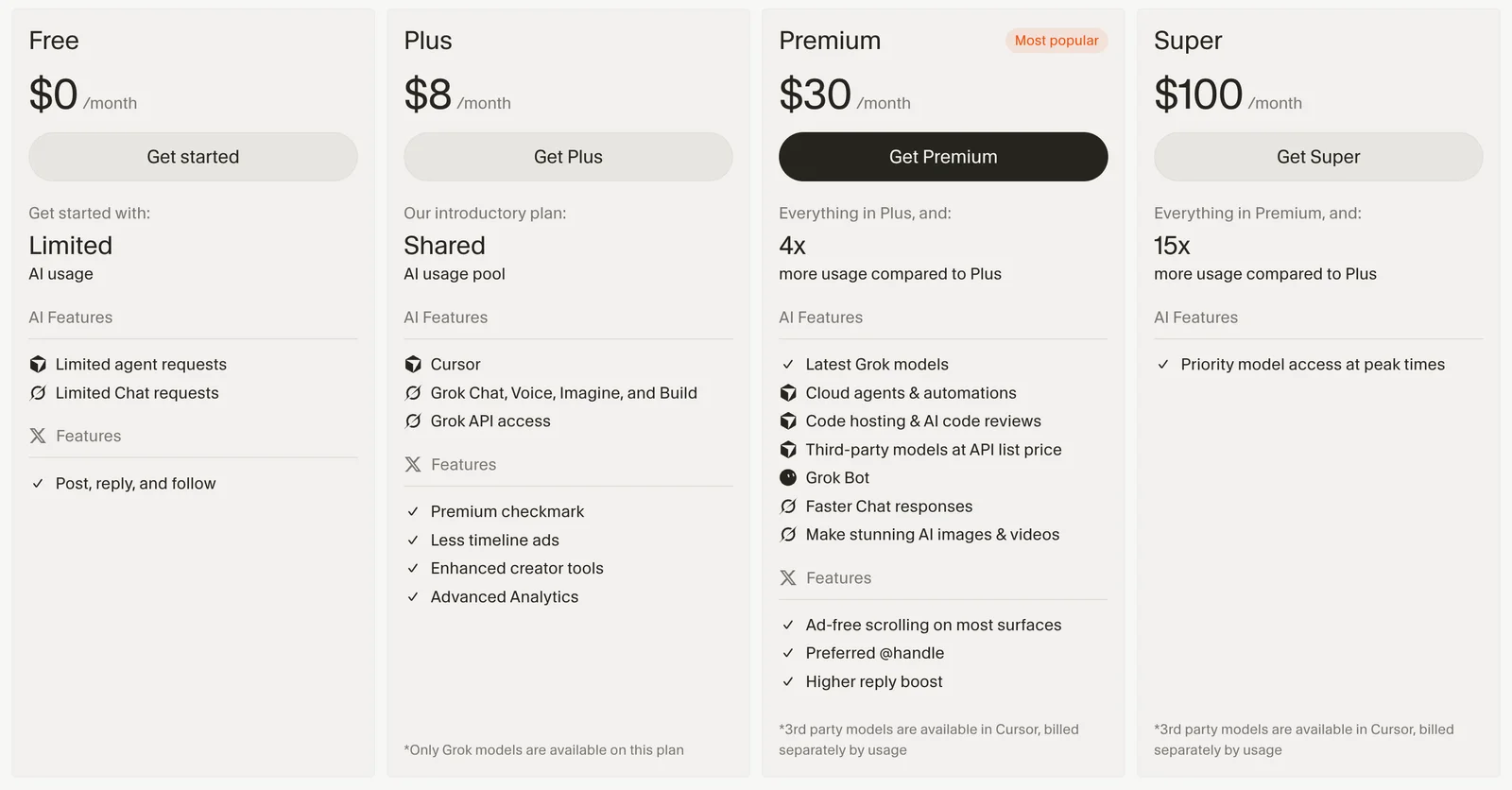
New customers choose Free, Plus ($8 a month), Premium ($30), Super ($100) or Ultra ($200), or $80, $300, $1,000 and $2,000 a year (models and pricing). Each paid plan includes one weekly pool, shared with Grok, for Cursor's own models: Grok 4.7, 4.6, 4.5 and Composer 2.5. Claude is outside it: "Third-party models like Claude, GPT, and Gemini aren't part of the included pool. On Premium and above, they're available in Cursor at the model's API list price from the first request, paid from your prepaid credit." Free and Plus cannot use third-party models at all.
Those list prices are Anthropic's own. At standard rates, Claude Opus 5.5 is $4 per million input tokens and $20 per million output tokens both in Cursor and on Anthropic's API, and Sonnet 5.5 is $2 and $10; cache reads cost less, cache writes cost more, and Fast mode costs twice as much (Cursor's Opus 5.5 page, Anthropic pricing). Past the pool, Cursor's own models are priced far lower: Composer 2.5 at $0.50 and $2.50, Grok 4.7 at $2 and $6 (models and pricing).
The consequence that matters: on The X Subscription, moving from Premium to Super or Ultra buys more Grok and Composer usage, not any included Claude. If your Claude spend in Cursor is the problem, a bigger Cursor plan does not solve it.
You can add your own Anthropic API key on Premium and above. On individual plans those requests skip your pool and credit, and Anthropic bills you at the same list price; the requests still pass through Cursor's servers, which build the final prompt, and Cursor's Zero Data Retention agreement does not cover them (bring your own API key). Your key covers chat and agent models only; "Tab completion continues using Cursor's built-in models". On Teams and Enterprise every third-party request, own key included, also carries a Cursor Token Rate of $0.25 per million tokens.
On legacy Cursor plans
Earlier subscribers keep their plans unless they switch: Hobby (free), Pro ($20 a month), Pro+ ($60), Ultra ($200), and Teams at $40 or $120 a seat (legacy Cursor plans). Pro, Pro+, Ultra and Teams have two monthly pools: Cursor Models, and Other Models, which covers Claude and other third-party models at their list prices until it runs out. Hobby has only the first. Past the pools, individual plans continue only if you turned on on-demand usage.
Cursor no longer says how big the Other Models pool is. In June 2026 a Cursor staff member put it at "$20 of usage" on Pro, "$70 of usage" on Pro+ and "$400 of usage" on Ultra (Cursor forum); on 25 September a Cursor support engineer wrote that "We no longer publish specific dollar amounts for included usage, since it can vary by plan and change over time", in a thread where Ultra subscribers who priced their usage exports reported the meter filling well short of $400, at amounts that varied by account (Cursor forum). Cursor points subscribers to the usage percentage in the app and dashboard.
Switching to The X Subscription is optional and permanent. Cursor says each new tier includes at least twice as much usage of its own models as the legacy plan it replaces, but "drops the included third-party model allowance" (legacy Cursor plans). If Claude is most of what you run in Cursor, check how much of your Other Models pool you use before you switch.
On Claude plans
Claude Code comes with Pro ($20 a month, or $200 a year), Max 5x ($100) and Max 20x ($200), with a five-hour session limit and a weekly limit shared with Claude chat (Claude pricing, using Claude Code with Pro or Max). Anthropic publishes no token or dollar figure for those limits. When you hit one you wait, upgrade, or buy usage credits at API rates. Cloud sessions count against the same limits, "and there's no separate charge for the cloud VM" (Claude Code on the web).
A Claude plan cannot pay for Cursor's own agent. Anthropic "does not permit third-party developers to offer Claude.ai login into their own applications, or to route requests through Free, Pro, or Max plan credentials on behalf of their users", while signing in to "the unmodified Claude Code binary with their own Claude subscription" is fine (Claude Code legal and compliance). Cursor accordingly takes only an API key for Anthropic. The Claude Code extension inside Cursor is Anthropic's own binary, and Anthropic's support article says Pro and Max cover Claude Code in IDEs "including VS Code, Cursor and other VS Code forks" (using Claude Code with Pro or Max). The same article warns that an ANTHROPIC_API_KEY in your environment can switch Claude Code to API billing.
Max also includes $100 or $200 a month of Claude API credits, claimable after seven days on the plan into one linked Console organization and expiring each billing cycle. They do not cover interactive Claude Code, and Anthropic presents them as credits for building your own apps and agents; it does not say whether a key from that organization used in Cursor's agent qualifies (monthly API credits).
Putting numbers on it
What can be stated for someone who wants Claude as their main model, before tax:
| Setup | What you pay each month |
|---|---|
| Cursor Premium on The X Subscription, Claude in Cursor's agent | $30, plus every Claude token at list price |
| Legacy Cursor Pro, Pro+ or Ultra, Claude in Cursor's agent | $20, $60 or $200, plus on-demand usage once the Other Models pool runs out |
| Claude Code on a Claude plan, in any editor including Cursor | $20, $100 or $200, plus usage credits at API rates if you go past the limits |
| Cursor Plus or Free for the editor and Cursor's models, plus Claude Code inside it | $8 or $0, plus your Claude plan |
Sources: Cursor models and pricing, legacy Cursor plans, Claude pricing; read 20 October 2026.
The comparison that decides it is your own Claude usage priced per token. Claude Code keeps token counts in local logs, and the open-source ccusage tool totals them at Anthropic's published rates:
npx ccusage@latest claude daily
That figure is what the same tokens would cost at list price; Cursor's agent builds context differently, so it would not use exactly the same tokens for the same work. For scale, Anthropic puts the average for Claude Code at API rates at "$150-250 per developer per month" across enterprise deployments (Claude Code costs). In Claude Code itself, /usage shows how much of your plan's limits you have used (commands); Cursor shows remaining usage in its settings.
Where each agent is stronger
Cursor's agent already plans, edits across files, runs commands and delegates to subagents, so the question is what Claude Code adds beyond billing, and the reverse.
Where Claude Code goes further
- Context. Claude Code runs Opus and Sonnet 5.5 with their full 1M-token window by default and compacts near 967K (model configuration). In Cursor, Opus 5.5 starts at a 300K window, with up to 1M available (Cursor's Opus 5.5 page). On a session that reads hundreds of files, the default decides how soon older context gets compacted.
- Hooks. Claude Code lists 33 hook event types, including permission requests, failed tool calls, file changes and worktree creation (hooks). If you enforce policy or log activity with hooks, more of the loop is visible to your scripts.
- Anthropic's other surfaces. Remote Control from the Claude app, Claude in Chrome for checking pages from the CLI or VS Code, and computer use on macOS, a research preview on Pro and Max (Remote Control, Chrome, computer use).
Where Cursor goes further
- Editing with you. Tab predicts multi-line and cross-file edits and jumps to the next change; inline edit rewrites a selection in place (Tab, inline edit). Claude Code in an editor is a chat panel that proposes diffs, with @-mentions of files and line ranges (Claude Code in VS Code).
- Several model providers in one task. Claude Code switches between Claude models; Cursor lets a chat, or one of its subagents, run on Grok, Composer, GPT, Gemini or Claude (subagents).
- Debug mode. The agent forms hypotheses, adds logging that reports to a local debug server, and fixes from runtime evidence (Debug mode).
- Packaged team automation. Cloud agents run in prebuilt environments and can be started from Slack, GitHub, Linear, the web, iOS or an API, and Automations start them on schedules or on events from GitHub, Slack, Linear, Sentry, PagerDuty and webhooks (cloud agents, Automations). Claude Code covers part of this with cloud sessions started from Slack and its GitHub Action (Slack, GitHub Actions).
How they find code. Both search rather than load your whole repository. Cursor uses Instant Grep, an index it builds on your machine, plus an Explore subagent, and says it "does not store embeddings of your codebase for search" (Cursor search). Claude Code searches with its file and regex tools and has its own Explore subagent (how Claude Code works, subagents).
Documentation cannot settle whether one harness gets better results from the same Claude model. To compare them on your own code, start both from the same commit, pick the same model and effort in each, give the same written task with a test that defines done, and compare the diffs and the time you spend reviewing them.
Three workflows, and which setup fits
These illustrate how each tool's documented features apply; they are not results from runs.
A checkout total that is wrong after removing a coupon. Done means: reproduce it in a browser, fix it, and confirm the total updates with a clean console. In Cursor, Debug mode instruments the code and the built-in browser tool loads the page and reads console and network traffic (browser). In Claude Code, Claude in Chrome does the browser side (Chrome). Billing: Cursor's agent on Grok or Composer draws on its pool; on Claude it bills list price on The X Subscription or the Other Models pool on a legacy plan; Claude Code draws on your Claude plan. Fit: Cursor, if you want to watch and steer inside the editor.
Moving 30 packages to a new major version of a shared library. Done means: the type check and full test suite pass on one branch. Plan first, save the plan to the repository, then run the edits in a separate git worktree and review the diff. Both tools support plan modes, subagents and worktrees (Cursor worktrees, Claude Code subagents). Claude Code's 1M default and plan-covered usage suit a long Opus session; the same session in Cursor's agent bills per token on The X Subscription. The handoff between tools goes through files and git, not sessions: neither tool opens the other's conversation, so commit the plan and let the other read it. Fit: Claude Code for the long run, with Cursor's diff view and Tab for the clean-up.
Fixing lint failures on every pull request. Done means: a bot pushes a fix commit or comments when it cannot. With Cursor, an Automation on GitHub pull request events starts a cloud agent in a prebuilt environment, billed as cloud agent usage (Automations). With Claude Code, the claude-code-action GitHub Action runs in your own runners, signed in with an API key or a Claude plan token (GitHub Actions); runs started by that Action count as Claude Code usage, while a script that calls claude -p with an API key from a Max plan's linked organization can use the plan's monthly API credits (monthly API credits). Fit: Cursor if you want triggers and environments managed for you; Claude Code if you want the job in your own CI on your Claude billing.
Permissions, compatibility and data
Permissions and sandboxing
Cursor's Auto-review run mode, the recommended default since version 3.6 in May 2026, runs allowlisted calls, runs other shell commands in an OS sandbox where it can (Seatbelt on macOS; Landlock and seccomp on Linux kernel 6.2 or later), and sends the rest to a classifier model; Cursor says Auto-review "is not a security boundary" (run modes). Workspace file edits need no approval except protected configuration files, and sandboxed commands reach only the network allowed by your network mode, which by default adds Cursor's list of package-manager and tool domains (agent security). Claude Code's interactive sessions start in auto mode, where a classifier reviews actions, but its OS sandbox for shell commands is off until you enable it with /sandbox, on macOS, Linux or WSL2; native Windows commands run unsandboxed (permission modes, sandboxing).
In practice: Cursor sandboxes commands out of the box on supported systems. In Claude Code, turn on /sandbox and confirm it is active before leaving it unattended.
What carries over between them
Cursor reads much of a Claude Code setup, with specific gaps:
| Claude Code file | Used by Cursor? |
|---|---|
CLAUDE.md | Yes, applied like AGENTS.md, always on |
Skills in .claude/skills/ and ~/.claude/skills/ | Yes |
Hooks in .claude/settings.json | Yes for 8 events (PreToolUse, PostToolUse, UserPromptSubmit, Stop, SubagentStop, SessionStart, SessionEnd, PreCompact); not Notification or PermissionRequest, and the Glob tool has no mapping |
MCP servers in .mcp.json | Register them again in .cursor/mcp.json |
Cursor's .cursor/rules/*.mdc | Not read by Claude Code. Keep shared rules in CLAUDE.md, which both read; if you prefer AGENTS.md, import it from CLAUDE.md with a line reading @AGENTS.md, because Claude Code skips AGENTS.md when a CLAUDE.md applies |
Sources: Cursor rules help, Cursor skills, third-party hooks, Cursor MCP, Claude Code memory; read 20 October 2026. Cursor loads Claude Code hooks and skills through a setting, Include Third-Party Plugins, Skills, and Other Configs, which is on by default.
Data
On Cursor, Privacy Mode keeps code from being used for training by Cursor or its model providers, and team admins can enforce it (Cursor pricing FAQ, privacy). On Claude Pro and Max, whether your Claude Code sessions train future models depends on a setting in your Claude account, with 30-day retention if it is off and five years if it is on; on Team, Enterprise and API keys, Anthropic does not train on Claude Code data by default (Claude Code data usage). Using your own Anthropic key in Cursor puts those requests under Anthropic's terms rather than Cursor's Zero Data Retention agreement.
Running Claude Code inside Cursor
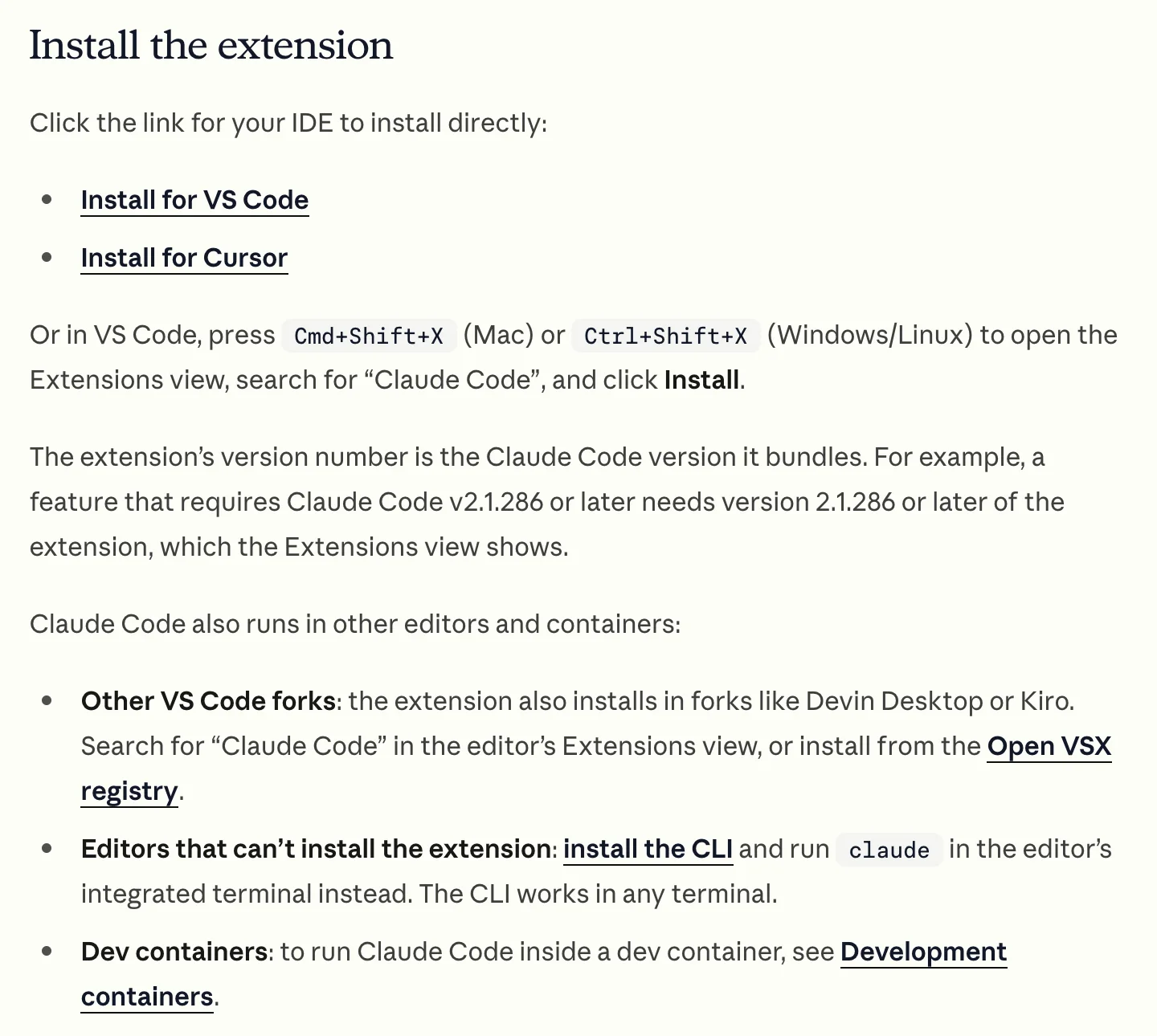
Anthropic's install page for its VS Code extension has an "Install for Cursor" link, and the extension is on the Open VSX registry that Cursor uses (Claude Code in VS Code, Cursor extensions).
-
Install. Search for "Claude Code" in Cursor's Extensions view, or run the CLI in Cursor's terminal. The extension bundles its own copy of the CLI for its panel; to type
claudein the terminal you also need the standalone install (setup):Promptcurl -fsSL https://claude.ai/install.sh | bash -
Sign in with your Claude plan and check it took. Open Status in the extension, or type
/status, to see the account the session uses (Claude Code in VS Code). If anANTHROPIC_API_KEYis set in your shell, remove it unless you mean to pay API rates. -
Decide what Cursor's own panel is for. Claude Code's work counts against your Claude plan. Cursor's Agent on Grok or Composer draws on Cursor's pool; Cursor's Agent on Claude uses the Other Models pool on a legacy plan and list-price credit on The X Subscription. Tab runs on Cursor's own models: legacy Pro, Pro+ and Ultra include unlimited Tab and Free includes limited Tab, while Cursor's pages do not say how Tab counts on the newer paid plans (legacy Cursor plans, pricing and plans).
-
Keep one agent per working tree. Two agents editing the same files can overwrite each other's changes. Give the second one its own git worktree.
What you give up by using the Claude Code panel instead of Cursor's agent: Cursor's Debug mode, its built-in browser tool, and non-Claude models in that chat. What you keep: Tab, inline edit and the rest of the editor. Work moves between the two through files and git, so commit a plan or a branch when you hand a task from one to the other.
Which to choose
| If your work is mostly | Choose | Because |
|---|---|---|
| Delegating long tasks to Claude and reviewing the result | Claude Code | Claude plans include Claude usage, within limits; new Cursor plans charge it per token |
| Writing code yourself with fast completions | Cursor | Tab and inline edit are the core of the editor; Claude Code offers neither |
| Switching models, or keeping costs down with cheaper ones | Cursor | Grok and Composer come with the plan; GPT, Gemini and Claude are available per token |
| Team work started from Slack, Linear or GitHub, many agents at once | Cursor | Cloud agents with prebuilt environments, Automations and Bugbot |
| Cursor's editor and Claude's models | Both | The Claude Code extension in Cursor uses your Claude plan; Cursor keeps Tab and its own models |
| You are on a legacy Cursor Pro, Pro+ or Ultra plan and use Claude in it | Check before switching | Switching is permanent and removes the included Other Models pool |
Frequently asked questions
Can I use my Claude Pro or Max subscription in Cursor? Only through Claude Code. Cursor's own agent accepts an Anthropic API key, not a Claude plan login, which Anthropic does not allow third-party apps to use (Cursor API keys, Claude Code legal and compliance). The Claude Code extension or CLI inside Cursor signs in with your plan.
Does Cursor include Claude? Not on The X Subscription, which new customers have bought since 12 October 2026: Premium and above can use Claude at list price from prepaid credit, and Plus and Free cannot use it (models and pricing). Legacy Pro, Pro+, Ultra and Teams plans include an Other Models pool, of unpublished size, that covers Claude (legacy Cursor plans).
Can I use Cursor for free with Claude Code? Yes. Cursor's free plan includes the editor with limited Agent, Chat and Tab on Cursor's models, and the Claude Code extension works in it with your Claude plan (pricing and plans, Claude Code in VS Code).
Does Cursor read CLAUDE.md? Yes, always on, the same way it reads AGENTS.md; it also loads Claude Code skills, and Claude Code hooks for the eight events it supports, by default (Cursor rules help, third-party hooks).
Is there a Cursor CLI like Claude Code? Yes. It installs with curl https://cursor.com/install -fsS | bash, runs as agent, has Agent, Plan and Ask modes and a print mode for scripts, and can hand a conversation to a cloud agent by starting a message with & (Cursor CLI).
Voyager is a desktop AI agent for creative work
Describe what you want to make; Voyager plans it, uses your apps and tools, and keeps everything editable.