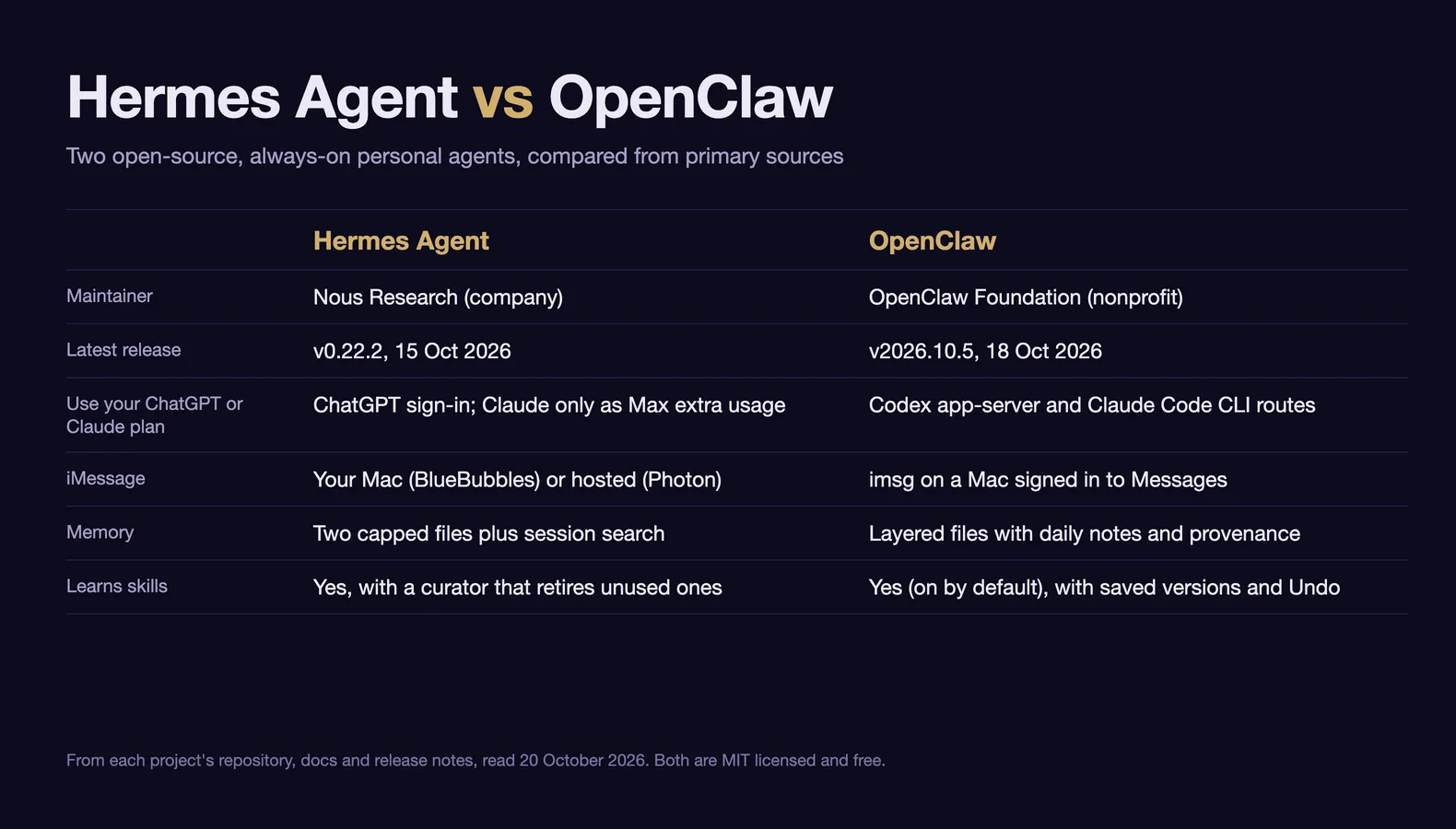
For one person who wants an assistant on Telegram, WhatsApp or Slack, paid for by the token, start with Hermes Agent. Start with OpenClaw instead if you want it to run on a Claude subscription you already pay for, use your phone or laptop as a device, or serve a small, trusted team. Hermes is the better default for one person because unattended jobs deny commands that would need your approval and its memory is small enough to audit; several people who have run both also report less upkeep, though that is testimony, not measurement.
A sensible first Hermes setup: a dedicated small VPS, or a machine with nothing personal on it; Hermes's own Docker image, which puts the whole agent inside a container, the posture its security policy supports for anything that reads the open web or email; an API key or a Nous Portal plan; and memory.write_approval and skills.write_approval switched on, so you review what it wants to remember with /memory pending and /skills pending.
If you already run OpenClaw and it works, there is no strong reason to move unless upkeep is costing you evenings or you want something only Hermes has, such as iMessage without a Mac; the importer makes a trial cheap. Everything here comes from each project's repository, documentation and release notes, read on 20 October 2026, with GitHub figures from the GitHub API that day. Neither agent was installed for this comparison; practitioner reports are labelled as such.
The differences that decide it
| Hermes Agent | OpenClaw | |
|---|---|---|
| Using a plan you already pay for | ChatGPT through an opt-in Codex app-server runtime, which drops some Hermes tools; Claude only through Max extra-usage credits | ChatGPT through the Codex app-server; Claude through the Claude Code CLI, with billing caveats |
| Other ways to pay for models | API keys, local models, Nous Portal plans from $20 a month | API keys, local models |
| iMessage | BlueBubbles on your own Mac, or Photon, a hosted relay with no Mac | imsg on a Mac signed in to Messages |
| Phone and laptop as devices | No equivalent | Companion apps and paired nodes |
| Memory | Two files capped by default at 2,200 and 1,375 characters, plus search over past sessions | USER.md, MEMORY.md and dated daily notes, consolidated in the background, with provenance |
| Learning skills | Writes and patches skills; curator archives unused ones after 30 days; restore and per-change rollback | On by default; archives unused ones after 30 days (not on the Codex runtime); Undo and up to ten saved versions per skill |
| Commands needing approval in unattended jobs | Denied by default | Governed by the owning agent's tool policy |
| Where commands run by default | On the host; Docker, SSH, Singularity, Modal, Daytona or Vercel Sandbox when configured | On the host; Docker, Podman, SSH or OpenShell sandbox when enabled |
| Release channels | Stable (SemVer, since 13 October) and main | Stable, beta, extended-stable and dev |
| Security advisories | None published by the project; fixes noted in release notes; CVEs filed by third parties | Publishes its own (722 to date) |
Sources, all read 20 October 2026: Hermes's provider guide, Codex runtime, Photon, memory, curator, security and v0.22.0 notes; OpenClaw's OpenAI and Anthropic provider pages, iMessage, platforms, memory, self-learning, sandboxing and release channels; advisory counts from each project's GitHub security page.
What each is
Both are free, MIT-licensed agents (Hermes, OpenClaw) that run on a machine you control, bring your own model, run scheduled jobs, keep memory in Markdown and learn skills from their own work.
Hermes Agent is a Python agent from Nous Research, the lab behind the Hermes open-weight models (repository). One gateway process connects it to more than twenty messaging platforms, runs its scheduler and keeps sessions; there is also a terminal UI and a desktop app. The current release is v0.22.2 (15 October 2026); v0.22.0, released 13 October, moved installs to tested SemVer releases and added one-click local models (v0.22.0 release notes). Nous is a company that also sells Nous Portal model plans and a hosted Hermes Cloud.
OpenClaw is a TypeScript agent that Peter Steinberger started in November 2025 as Clawdbot (project lore). A local Gateway is the control plane; a browser Control UI, CLI and TUI connect to it, and paired phones and computers ("nodes") add camera, screen, voice and device actions (README). It is run by the OpenClaw Foundation, a 501(c)(3) with "no paid tier, no hosted service, no token"; OpenAI is one of its donors and employs Steinberger, and the project FAQ says donors "do not own, control, or direct the project". The current stable release is v2026.10.5 (18 October 2026).
Models and what it costs to run
Both projects are free; the model is the bill, and three things set its size.
Which subscription you can use. Both can hand turns to OpenAI's Codex app-server, which runs on a ChatGPT subscription. OpenClaw's docs state that "OpenAI explicitly supports subscription OAuth usage in external tools and workflows like OpenClaw" (OpenAI provider); in Hermes it is an opt-in runtime that lets you "run OpenAI agent turns against your ChatGPT subscription (no API key required)", with a cost: on that runtime the agent loses its memory, session_search, delegate_task and todo tools (existing memory is still loaded, background reviews continue and Codex brings its own planning tool), and cron jobs on it are "not specifically tested" (Codex app-server runtime). Claude is where they differ. OpenClaw can run Claude through the installed Claude Code executable with your login, and its Anthropic page says that route "retains subscription accounting" (Anthropic provider). Anthropic's login article reserves the right to bill third-party tools as extra usage instead. On older versions, OpenClaw users reported extra-usage rejections between May and September 2026, including "Third-party apps now draw from your extra usage" (issue #86761, issue #129765); how often this happens on the current release is unknown. Hermes's provider guide says its Claude sign-in "only works on a Claude Max plan with purchased extra usage credits" and that "the base Max allowance is never consumed by Hermes"; Claude Pro cannot use it, so on Hermes, Claude effectively means API pricing. Nous Portal is a different thing, prepaid credits rather than a plan you already own: paid plans run from $20 to $200 a month, each including model and tool credits worth 10% more than its price, as of 20 October 2026 (plans).
Background work. An always-on agent spends tokens when you are not talking to it. OpenClaw's heartbeat schedules an agent turn in the main session every 30 minutes by default, or hourly with Claude OAuth; idle polls are skipped while the delivery channel is down, and heartbeat.every: "0m" turns the cadence off. Hermes's equivalent is opt-in per conversation (session heartbeats). Both agents' learning reviews cost money too. OpenClaw's release notes say background learning "can add usage charges"; Hermes's review runs on your main model by default, can "multiply input tokens across its tool iterations", and can be capped (max_input_tokens), moved to a cheaper model or disabled (memory docs). Hermes also warns that a messaging chat never reset with /new can run "for weeks as a single session" and grows expensive as compaction runs over ever-longer history.
Local models. Both now install and manage a local llama.cpp server sized to your hardware, and OpenClaw's "verifies a real tool call before changing the default model", with "an 8 GiB host-memory floor" for its smallest recipe (local models). With Ollama they are configured differently:
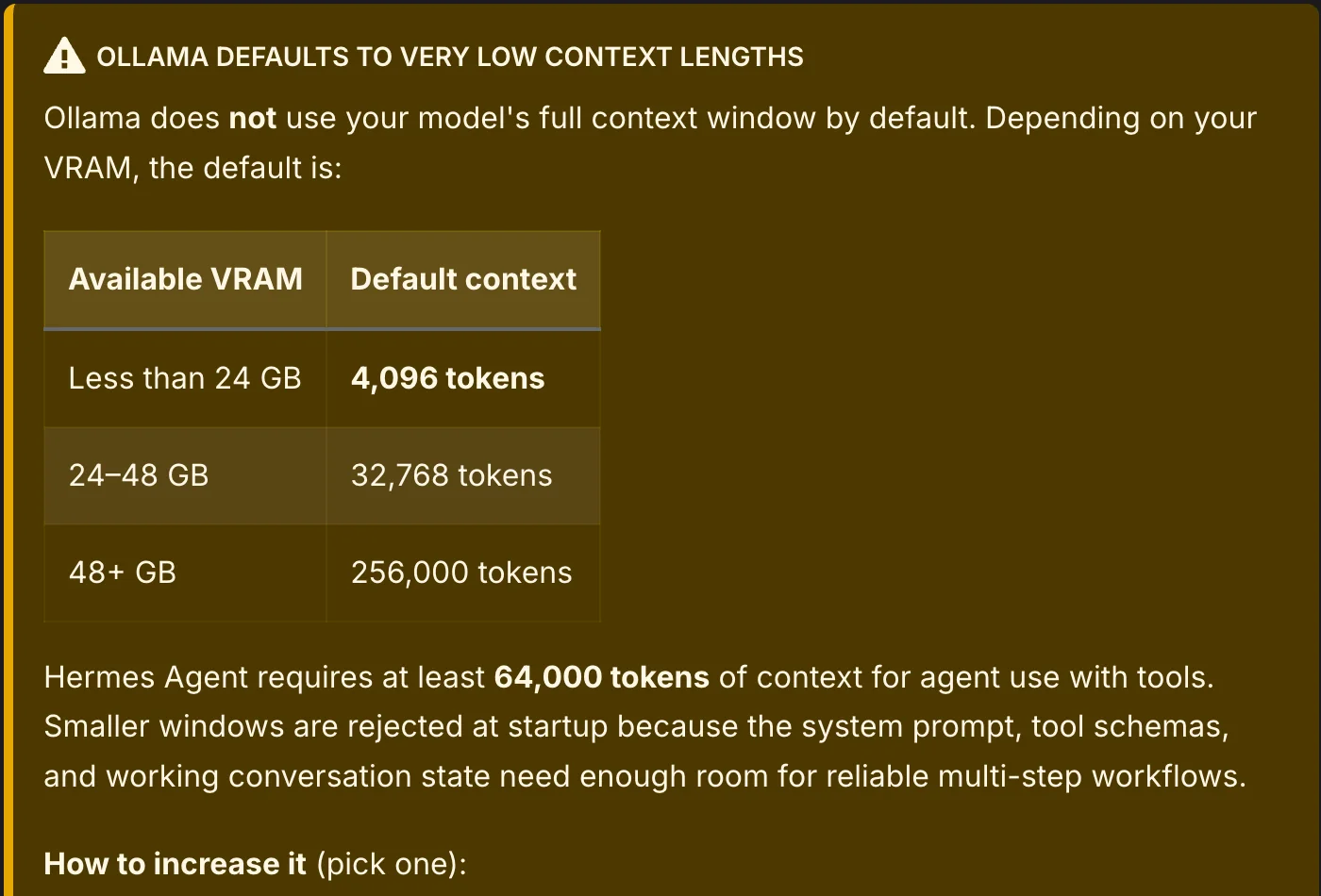
- Hermes connects as a custom endpoint at
http://localhost:11434/v1and refuses to start below 64,000 tokens of context. Ollama defaults to 4,096 tokens on machines with under 24 GB of VRAM, and the context cannot be raised through the OpenAI-compatible API, which Hermes calls "the #1 source of confusion"; setOLLAMA_CONTEXT_LENGTH=64000ornum_ctxin a Modelfile (provider guide). - OpenClaw has a native Ollama provider and warns against the
/v1URL: "It breaks tool calling and models can emit raw tool-call JSON as plain text" (Ollama provider). Usehttp://localhost:11434. Its guide adds that "a model that loads or answers a short prompt may still fail an agent turn".
Budgeting. This research found no published measurement of the two on the same personal workload, and Hermes users' reported bills in May 2026 ran from about $1 a day on DeepSeek V4 Pro to about $100 a day on Claude Sonnet. Both report usage in the chat (/usage), so run a week on a cheap model before moving to an expensive one.
Choose OpenClaw if you want the agent to run on a Claude subscription. On ChatGPT plans both work, with the Hermes tool trade-off above; beyond that, the evidence reviewed here shows no general cost winner.
Where it runs, iMessage and devices
The always-on host. Both need a process running around the clock, the Gateway or gateway that owns the messaging connections and the scheduler. OpenClaw's hosting FAQ puts the minimum at "1 vCPU, 1 GB RAM, ~500 MB disk", recommends "1-2 vCPU, 2 GB+ RAM", and answers the Mac mini question directly: "A Mac mini is a popular always-on host choice, but a small VPS, home server, or Raspberry Pi-class box works too." Hermes's README pitches "a $5 VPS" (README). Its Modal and Daytona terminal backends hibernate the agent's working environment between sessions, which keeps heavy commands off the small always-on machine; the gateway itself still needs a persistent host.
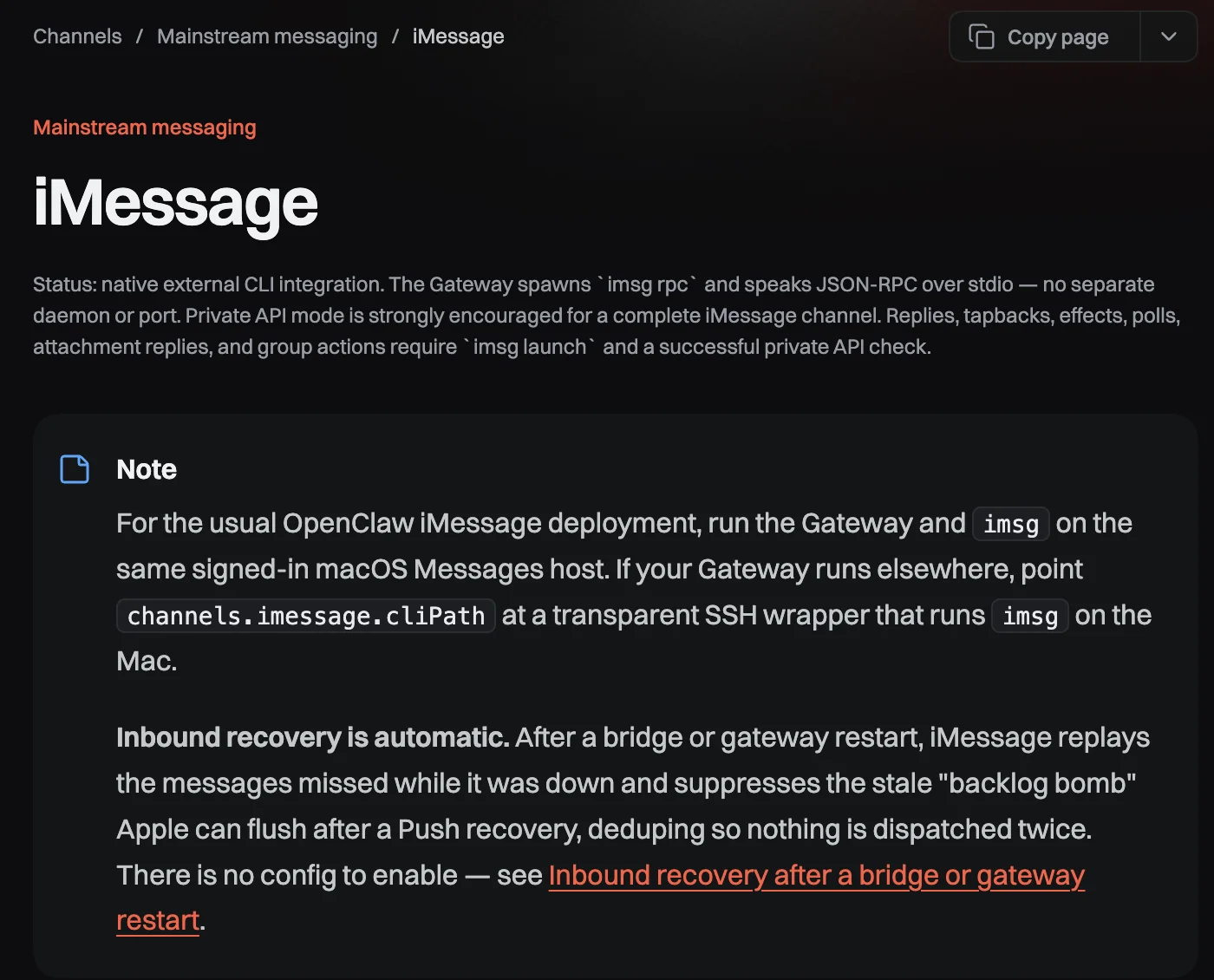
iMessage needs a Mac, unless you use a relay. OpenClaw supports iMessage only through imsg running on a Mac signed in to Messages, which a Gateway elsewhere can reach over SSH (iMessage docs). Basic text and media work out of the box; tapbacks, threaded replies, edits, effects and group actions need imsg's private API, which requires disabling System Integrity Protection on that Mac (private API). Hermes's BlueBubbles route likewise needs "a Mac (always on)". Its other route, Photon, is "a managed service" so "you don't have to run your own Mac relay"; the free tier sends from a shared pool of numbers and "can only message a number after that number has texted the line first", which suits an assistant you text and limits one that contacts other people. Your messages then pass through Photon as well as Apple.
Docker, in two senses. Running the agent in a container and sandboxing its commands are separate choices. OpenClaw's Docker guide runs onboarding through ./scripts/docker/setup.sh, which builds the image locally unless you point OPENCLAW_IMAGE at the published ghcr.io/openclaw/openclaw, and serves the Control UI on port 18789; commands then run inside the Gateway container, and the tool sandbox is an extra layer on top. On a VPS, the guide points to its network-exposure hardening and the DOCKER-USER firewall chain. Hermes's Docker guide runs nousresearch/hermes-agent with configuration, keys, sessions, skills and memories in one mounted directory, and updates by pulling a new image.
Channels and devices. Both cover Telegram, WhatsApp, Discord, Slack, Signal, Microsoft Teams, Google Chat, Matrix and several Asian platforms; check each list for the one you need (Hermes, OpenClaw). Hermes has a conversational email adapter that ignores unknown senders by default; OpenClaw treats email as an automation trigger. OpenClaw's companion apps and nodes let the agent use a paired phone's or laptop's camera, screen, location and voice (platforms), and it documents a shared team deployment with person-level roles; those roles are guard rails inside one trusted group, not isolation between people who distrust each other. For one person who wants several persistent specialists, Hermes's Bot Mode gives each its own model, memory and skills; OpenClaw routes separate agents per channel or task (FAQ).
Choose OpenClaw if you want your phone as a device or a small team on one Gateway. Choose Hermes if you want iMessage without a Mac or email as a chat channel. For iMessage from your own Mac, either works.
Memory and learning
Both keep memory in Markdown, learn procedures as Agent Skills folders, and review finished work in the background for lessons worth saving. They differ in how much they keep by default and how you supervise what they learn.
Hermes keeps memory small by default. MEMORY.md and USER.md are capped at 2,200 and 1,375 characters (about 800 and 500 tokens; both limits are configurable) and injected into the system prompt as a frozen snapshot at the start of each session; when they fill, the agent must consolidate rather than append (memory docs). Older context comes back through full-text search over past sessions, and optional providers such as Honcho, Supermemory and Mem0 add semantic recall. The docs are frank about the usual complaint, "I told it to remember, and the next session it forgot": a fact persists only if the model actually calls the memory tool, and the running session's prompt does not pick it up until the next session. For skills, "the agent can create, update, and delete its own skills via the skill_manage tool"; a curator marks agent-created skills stale after 14 days unused and archives them after 30, skipping pinned skills and any skill a cron job explicitly references (skills, curator).
OpenClaw splits memory across more files and records where each entry came from. Its memory overview describes USER.md for preferences, MEMORY.md for durable facts, dated daily notes indexed for search, and a default "dreaming" sweep that distills daily notes into MEMORY.md, with provenance for each memory. Its self-learning, on by default, patches a learned skill that misled the agent, queues a background review after every 10 model iterations in a session, and archives learned skills unused for 30 days, except on the Codex runtime.
Supervising what they learn. Dhawal Shah, who ran both for six months, reports that after he switched his Hermes agent to a different model, a clean-up "archived 57 of her 82 skills" without asking, about two in five of them in active use, and broke two scheduled jobs; he now requires approval for destructive changes and watches the agent for a week after any model change. Both projects now give you a way back. OpenClaw 2026.10.5 added change history, up to ten saved versions per skill and Undo (release notes). Hermes has hermes curator restore for archived skills, snapshots before consolidation, and a ledger that can roll back individual changes; its memory.write_approval and skills.write_approval settings, off by default, stage changes for review with /memory pending and /skills pending.
Choose Hermes if you want a small memory you can audit at a glance and approval gates on what it learns. Choose OpenClaw if you want provenance for each memory and one-click Undo for what it learns. (For disclosure: Voyager, the desktop app our team builds, borrowed Hermes's pattern of capped memory files loaded at session start.)
Unattended work, upkeep and recovery
Scheduled jobs. Hermes's cron scheduler lives in the gateway, ticks every 60 seconds, accepts schedules in natural language and runs each job in a fresh session. OpenClaw's automations cover cron schedules, webhooks, Gmail Pub/Sub and IMAP triggers, plus the heartbeat. The defaults differ: in Hermes, cron_mode, single_query_mode and unattended_mode all default to deny, so a headless job whose command would need your approval is refused rather than auto-approved (security docs). That only covers commands its checks flag, not every risky action. OpenClaw runs automations under the tool policy of the agent that owns them, and advises a restricted reader agent for email triggers.
Updates and backups. Hermes moved installs to tested SemVer releases on 13 October; an update builds a new environment and switches only once it passes a check, and moving back is labelled a rollback (v0.22.0 notes). OpenClaw has four release channels, including extended-stable, a package-only channel that trails by a supported month and never updates automatically, plus verified pre-update backups and rollback. Run a backup before every upgrade (hermes backup, openclaw backup create --verify). Both save the agent's state, not a machine image: Hermes's archive includes credentials but leaves out browser profiles and downloaded model runtimes, so expect to sign in to websites again after a restore (backup reference), and OpenClaw restores from the same archive (backup CLI).
When a briefing does not arrive. Hermes's hermes cron doctor separates a run that failed, a run whose output never reached you, and a run that fired late, and its cron docs note that deliveries are fire-and-forget by default: reply to a briefing and the agent has no record of it unless you mark the job continuable (cron docs). OpenClaw's automation troubleshooting ladder starts with openclaw automations status and openclaw automations runs <jobId> for run history.
What people running them report. Individual accounts, not measurements:
- A recurring story runs from OpenClaw to Hermes after an update broke a working setup, for example on Hacker News ("a massive patch that broke openclaw", April) and in r/hermesagent ("I spent more time fixing it than actually using it", May). Shah reached the same conclusion for a daily assistant and kept OpenClaw for narrower projects.
- Others went the other way, or back and forth: a long-time Hermes user moved back toward OpenClaw because Hermes "feels heavier over time", then updated the post to say Hermes was again their main agent after new OpenClaw problems; a June Hacker News commenter suggested revisiting an improved OpenClaw, calling it deeper and Hermes more polished.
- Neither is immune: three of OpenClaw's five October releases lead with update and recovery fixes (2026.10.4 is one), and a September Hermes issue reports that "a recent update broke a previously-working setup" (#101803).
Choose Hermes if you want unattended jobs to refuse flagged commands by default. Choose OpenClaw if you want the most conservative update channel.
Skills, plugins and MCP
Both connect to MCP servers as clients and can expose themselves as MCP servers (hermes mcp serve, openclaw mcp serve), and both run plugins in-process without a sandbox, so a plugin has the agent's full authority (Hermes MCP, OpenClaw MCP). Both security policies exclude a malicious plugin you chose to install from what they treat as a vulnerability.
The skill registries overlap. ClawHub is OpenClaw's public registry; Hermes's Skills Hub indexes several registries, and about four-fifths of the 101,378 skills in its 19 October 2026 catalog come from ClawHub (catalog metadata). ClawHub audits each release and labels it Pass, Review, Warn or Malicious, while warning that audits "are not a guarantee that a release is risk-free" (ClawHub security audits). On either agent, read a third-party skill before installing it.
Security: what each promises, and the record
"Is OpenClaw safe?" is a common question, and the answer covers both: neither is built to contain a model that has been turned against you, and both say so.
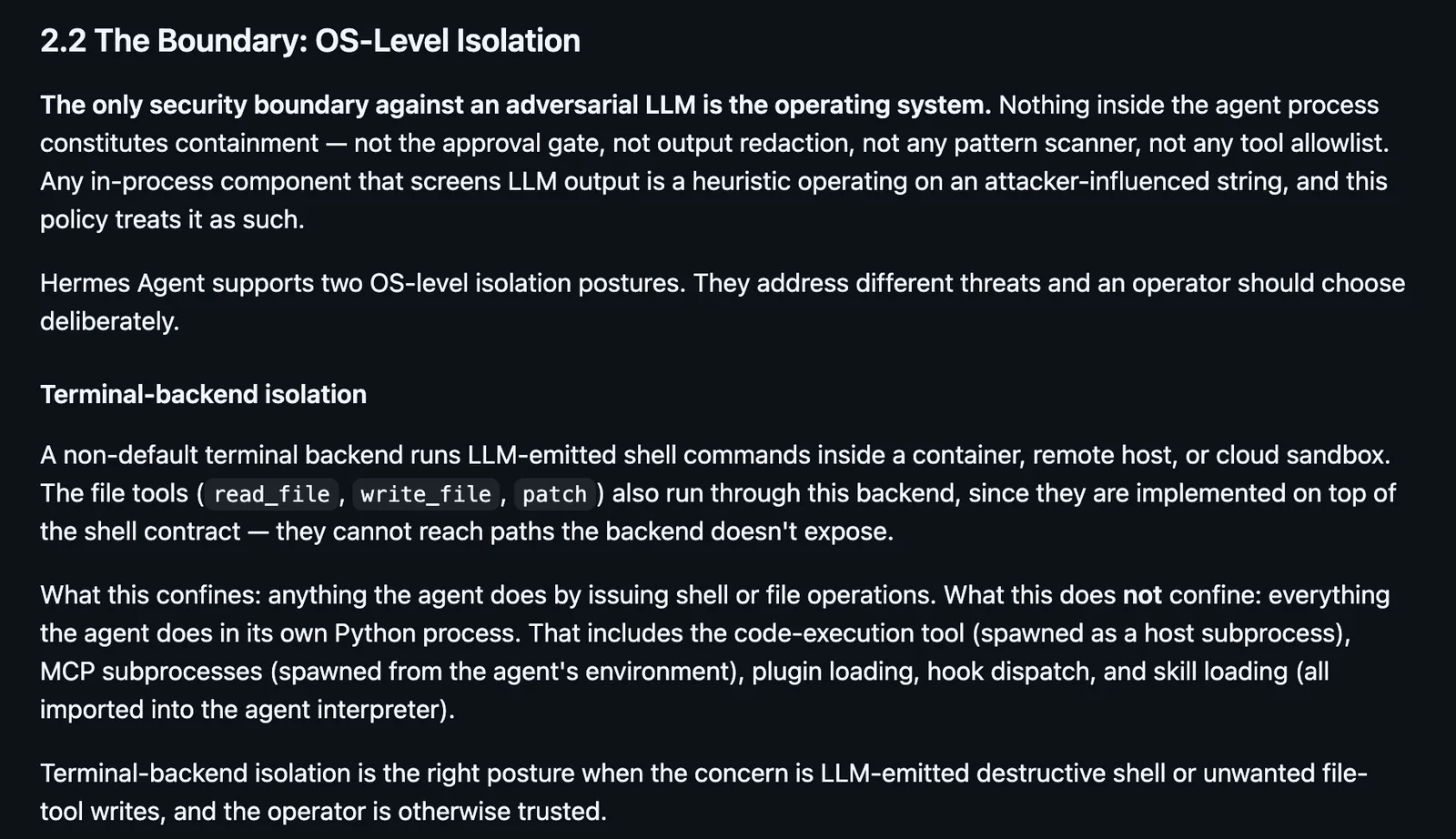
What the projects say. Hermes's security policy states that "the only security boundary against an adversarial LLM is the operating system" and that "nothing inside the agent process constitutes containment". It treats the approval gate, output redaction, pattern scanners and tool allowlists as heuristics, and notes that a sandboxed terminal backend confines shell and file commands but not the agent's own process, plugins or MCP servers. OpenClaw's policy describes "local-first agent infrastructure for trusted operators", "not designed as a shared multi-tenant boundary between adversarial users", and treats prompt injection without a boundary bypass as out of scope. In both, commands run directly on your machine unless you configure otherwise, and unknown senders on DM channels must be paired before they can talk to the agent.
The disclosure record, as of 20 October 2026:
| Hermes Agent | OpenClaw | |
|---|---|---|
| Advisories published by the project on GitHub | 0 | 722 |
| CVE records in NVD | 44: 39 assigned by VulDB, 28 of which say the vendor "did not respond"; 5 by VulnCheck | 685 matching "openclaw", most for the core project |
| Notable recent findings | Code execution from an untrusted repository in 0.18.2 to 0.21.0 (CVE-2026-71963); session takeover fixed in 0.21.6 (Tenable, 9 October) | Pairing and gateway-scope privilege escalations in March; one-click token theft fixed in 2026.1.29 (CVE-2026-25253) |
Sources: OpenClaw security advisories and Hermes security advisories, counted through the GitHub API; NVD searches for "hermes-agent", "Hermes Agent" and "openclaw"; all 20 October 2026. Severity is as assigned in each record.
Read these numbers as a record of disclosure, not a safety score. OpenClaw publishes its own advisories, says it triages a "high volume of AI-generated scanner findings", and is the bigger target. Hermes publishes none on its GitHub security page: its CVEs were filed by outside numbering authorities, and the researchers behind the repository code-execution finding, a class of bug they also found in Claude Code and other agents, reported "no triage after six contacts across five channels" before publishing. Hermes does fix and credit reports in its release notes; v0.21.6 lists four Tenable findings, including the session takeover, under "Security Fixes" (release notes). Knowing whether your Hermes version is affected means reading release notes or watching NVD.
OpenClaw's incidents. As of 31 January 2026, Censys had identified more than 21,000 publicly exposed instances, most of which still required a token. In early February, VirusTotal reported 314 skills from a single ClawHub publisher, all identified as malicious and built to deliver malware; OpenClaw added VirusTotal scanning of every skill on 7 February. In June, Palo Alto Networks' Unit 42 found five malicious skills that had passed screening; they were removed. No comparable census of Hermes deployments or its skills hub turned up, which is an absence of data rather than evidence of safety, particularly since its hub indexes ClawHub.
What limits the damage is the same for both. A boundary around the whole agent process comes from its own OS user, machine or VM, or a container: Hermes's policy names its Docker image and NVIDIA OpenShell as supported whole-process wrappers, and OpenClaw's Gateway can run in Docker. A sandboxed terminal backend contains only the commands routed through it. Keeping the Gateway off the public internet (Tailscale or an authenticated tunnel) and approving each DM pairing limit who can talk to it. None of that limits what the agent can do with the accounts and keys you give it, so scope those narrowly, read skills before installing them, and update often.
Switching between them
Each project maintains an importer for the other. hermes claw migrate imports OpenClaw's persona, memories, skills, model and messaging settings, previews with --dry-run, makes a backup, and imports secrets only with --migrate-secrets (Hermes migration guide). openclaw migrate hermes --dry-run goes the other way, importing model settings, MCP servers, SOUL.md, AGENTS.md, memories and skills after a verified backup, while cron jobs, sessions, plugins and pairing state are archived for manual review (Migrating from Hermes). WhatsApp must be re-paired either way, and learned behavior will not carry over identically. The practical test is to run both side by side on a few duplicated tasks for a week; they keep separate homes (~/.hermes and ~/.openclaw), but do not let both use the same OAuth refresh grant after an import.
Verdict by job
| If you mostly want | Choose | Because |
|---|---|---|
| A personal chat assistant paid by the token | Hermes | Unattended jobs deny flagged commands by default, small auditable memory, lighter upkeep in several practitioner reports |
| To run the agent on your Claude subscription | OpenClaw | The Claude Code CLI route, subject to the extra-usage caveat |
| To run it on your ChatGPT subscription | Either | Both support OpenAI's Codex app-server; on Hermes it drops some agent tools |
| iMessage without owning a Mac | Hermes | Photon's hosted relay |
| Full iMessage from your own Mac | Either | OpenClaw's imsg or Hermes's BlueBubbles; both need the Mac signed in to Messages |
| Your phone or laptop as a device the agent can use | OpenClaw | Companion apps and paired nodes |
| A shared agent for a small, trusted team | OpenClaw | Team deployment with person-level roles |
| Email as a chat channel | Hermes | Conversational IMAP and SMTP adapter |
| Security fixes announced as advisories | OpenClaw | Publishes its own |
Frequently asked questions
Is OpenClaw safe? Only as safe as the machine and accounts you give it. Its policy describes infrastructure "for trusted operators", it runs commands on the host unless you enable sandboxing, after a rough start that included exposed instances and malicious skills on ClawHub. Isolate it, keep the Gateway off the public internet, read skills before installing them and scope its accounts narrowly; the same applies to Hermes.
Can I run OpenClaw in Docker? Yes: ./scripts/docker/setup.sh builds or pulls the image, runs onboarding and starts the Gateway with Docker Compose, with the Control UI at http://127.0.0.1:18789/ (Docker guide). The agent's commands then run inside that container; the tool sandbox is a separate layer.
Do I need a Mac mini for OpenClaw? No. You need some Mac only for iMessage and other macOS-only tools, as the host or a paired node. OpenClaw's hosting FAQ calls the Mac mini "a popular always-on host choice" but says a small VPS, home server or Raspberry Pi-class box works too.
Can OpenClaw or Hermes use Ollama? Both can. Point OpenClaw at http://localhost:11434 (not /v1, which it says breaks tool calling). Point Hermes at http://localhost:11434/v1 as a custom endpoint and raise Ollama's context to at least 64,000 tokens. Test real agent tasks before making a small model your default.
Can I move from OpenClaw to Hermes, or back? Yes, with hermes claw migrate or openclaw migrate hermes, each with a dry run and a backup. Memories, skills, persona and model settings move; secrets need consent, WhatsApp must be re-paired, and some state, such as cron jobs going to OpenClaw, is left for manual review.
Voyager is a desktop AI agent for creative work
Describe what you want to make; Voyager plans it, uses your apps and tools, and keeps everything editable.